Disc BMW Z4 2016 E89 User Guide
[x] Cancel search | Manufacturer: BMW, Model Year: 2016, Model line: Z4, Model: BMW Z4 2016 E89Pages: 289, PDF Size: 7.13 MB
Page 191 of 289
Music cannot be played back.▷Start the program for playing back music
data on the device and select a track on the
device if necessary.▷Switch the radio on and off again.
Music files can only be played back softly.
▷Adjust the volume settings on the device.
Playback is disturbed when buttons are
pressed or by other messages on the device.
▷Switch off the button tones and other sig‐
nal tones on the device.
Playback is interrupted by a telephone call or
traffic bulletin and is not resumed automati‐
cally.
▷Switch the radio on and off again.
Playback is not possible if the mobile phone is
connected via Bluetooth Audio while it is also
connected via the USB interface or the snap-in
adapter.
▷Disconnect one of the two connections; for
example, disconnect the audio connection,
refer to page 186, and restart playback.
If all points in this list have been checked and
the required function is still not available,
please contact the hotline or service center.
Software Update
The vehicle supports various external devices
depending on the current software version.
With a software update, the vehicle can sup‐
port new mobile phones or new external de‐
vice, for example.
▷USB.
Software updates and related current infor‐
mation is available at www.bmw.com/
update.
Displaying the current version
The currently installed software is displayed.
1."Settings"2."Software update"3."Show current version"
Select desired version to display additional in‐
formation.
Updating software via USB The software may only be updated when the
vehicle is stationary.
1.Store the file for the software-update in the
main director of a USB flash drive.2.Insert the USB flash drive into the USB au‐
dio interface in the center armrest. An up‐
date via the USB interface in the glove
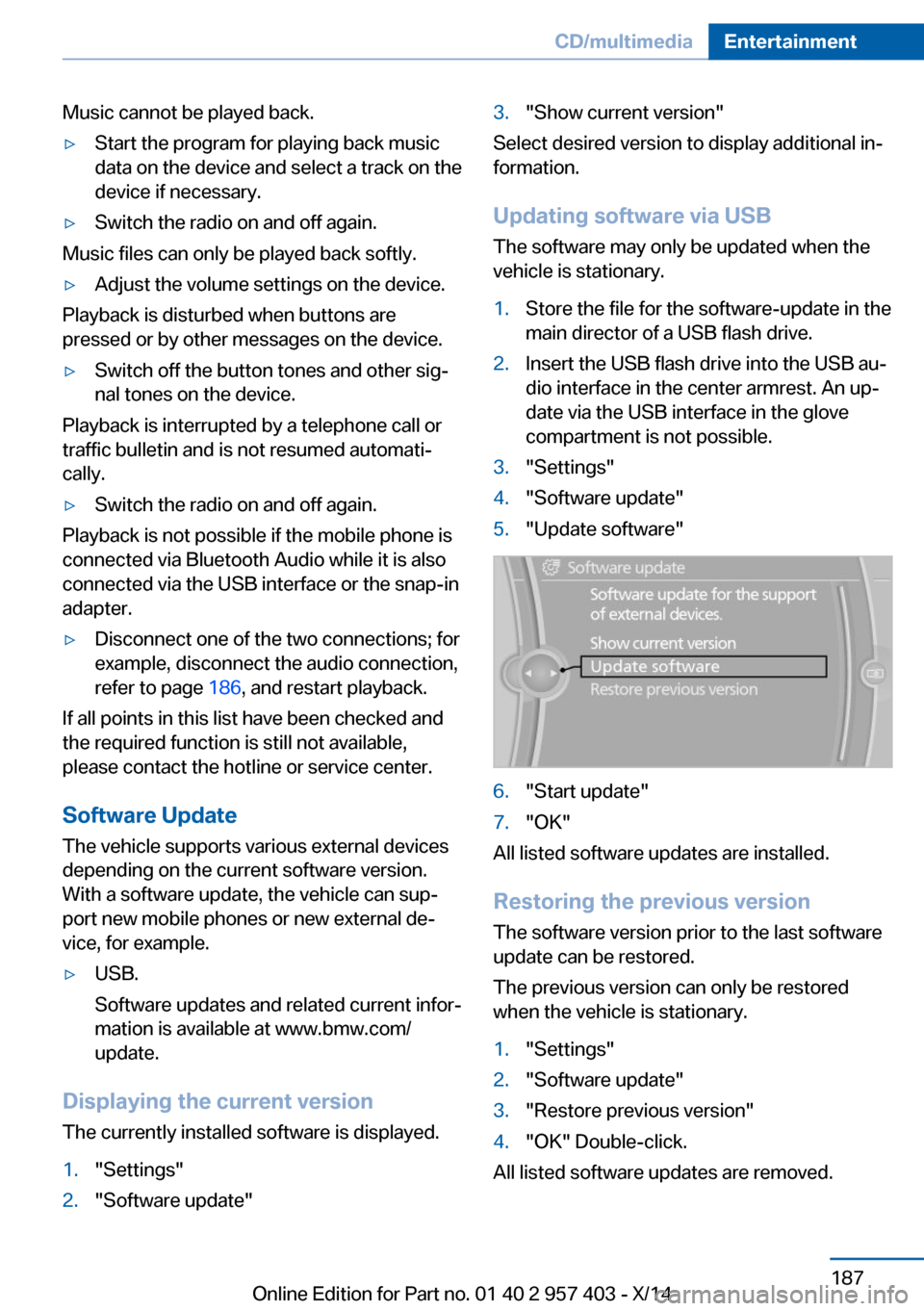
compartment is not possible.3."Settings"4."Software update"5."Update software"6."Start update"7."OK"
All listed software updates are installed.
Restoring the previous version
The software version prior to the last software
update can be restored.
The previous version can only be restored
when the vehicle is stationary.
1."Settings"2."Software update"3."Restore previous version"4."OK" Double-click.
All listed software updates are removed.
Seite 187CD/multimediaEntertainment187
Online Edition for Part no. 01 40 2 957 403 - X/14
Page 245 of 289
MaintenanceVehicle equipment
This chapter describes all series equipment as
well as country-specific and special equipment
offered for this model series. Therefore, it also
describes equipment that may not be found in
your vehicle, for instance due to the selected
special equipment or the country version. This
also applies to safety-related functions and
systems.
When using the features and systems descri‐
bed here, adhere to local regulations.
BMW Maintenance System
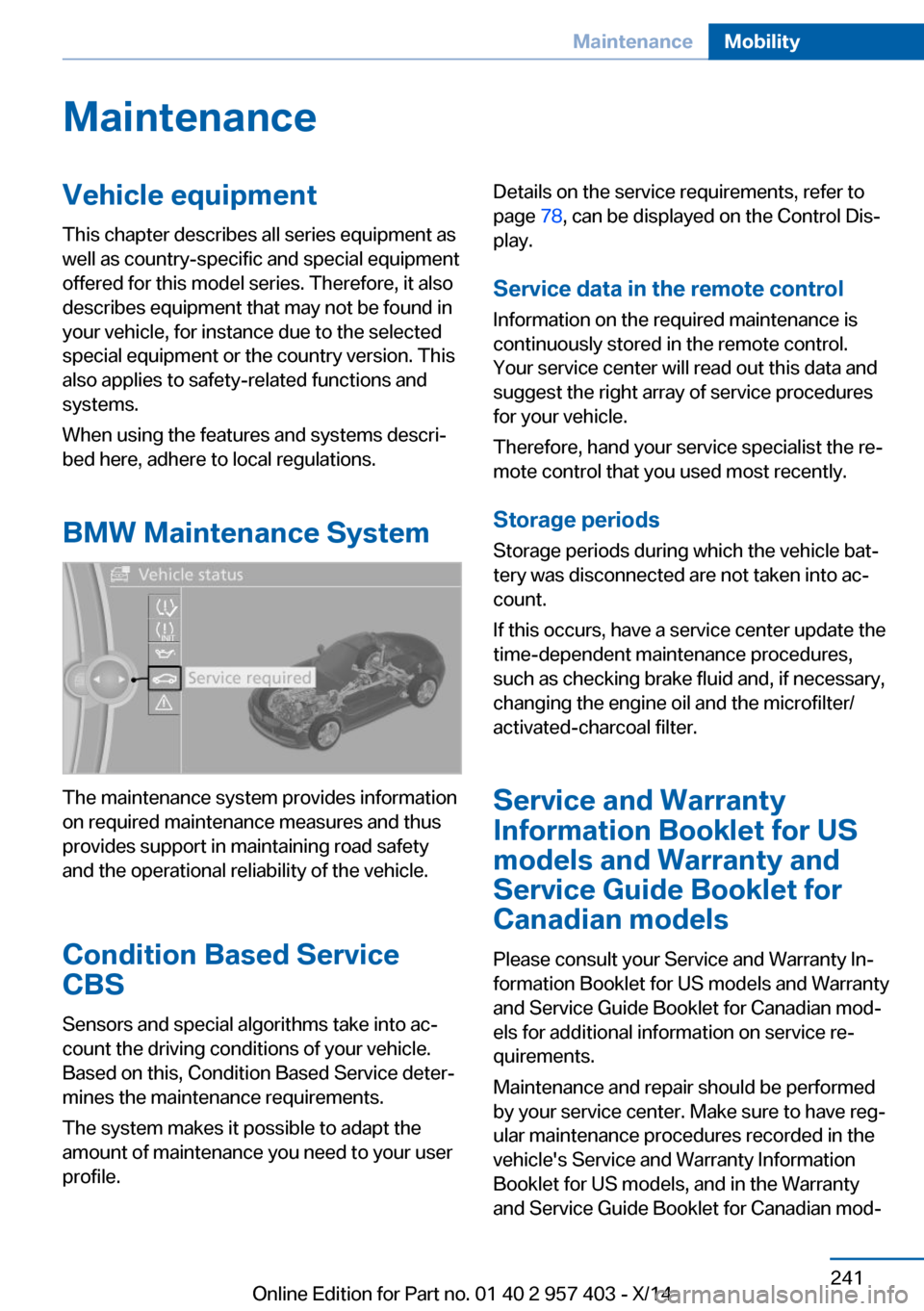
The maintenance system provides information
on required maintenance measures and thus
provides support in maintaining road safety
and the operational reliability of the vehicle.
Condition Based Service
CBS
Sensors and special algorithms take into ac‐
count the driving conditions of your vehicle.
Based on this, Condition Based Service deter‐
mines the maintenance requirements.
The system makes it possible to adapt the
amount of maintenance you need to your user
profile.
Details on the service requirements, refer to
page 78, can be displayed on the Control Dis‐
play.
Service data in the remote control
Information on the required maintenance is
continuously stored in the remote control.
Your service center will read out this data and
suggest the right array of service procedures
for your vehicle.
Therefore, hand your service specialist the re‐
mote control that you used most recently.
Storage periods
Storage periods during which the vehicle bat‐
tery was disconnected are not taken into ac‐
count.
If this occurs, have a service center update the
time-dependent maintenance procedures,
such as checking brake fluid and, if necessary,
changing the engine oil and the microfilter/
activated-charcoal filter.
Service and Warranty
Information Booklet for US
models and Warranty and
Service Guide Booklet for
Canadian models
Please consult your Service and Warranty In‐
formation Booklet for US models and Warranty
and Service Guide Booklet for Canadian mod‐
els for additional information on service re‐
quirements.
Maintenance and repair should be performed
by your service center. Make sure to have reg‐
ular maintenance procedures recorded in the
vehicle's Service and Warranty Information
Booklet for US models, and in the Warranty
and Service Guide Booklet for Canadian mod‐Seite 241MaintenanceMobility241
Online Edition for Part no. 01 40 2 957 403 - X/14
Page 254 of 289
▷If the LED is flashing but the BMW Re‐
sponse Center cannot be heard on the
hands-free system, the hands-free system
may be malfunctioning. However, the
BMW Response Center may still be able to
hear you.
Initiating an Emergency Request
automatically
Under certain conditions, an Emergency Re‐
quest is automatically initiated immediately af‐
ter a severe accident. Automatic Collision Noti‐
fication is not affected by pressing the SOS
button.
Warning triangle
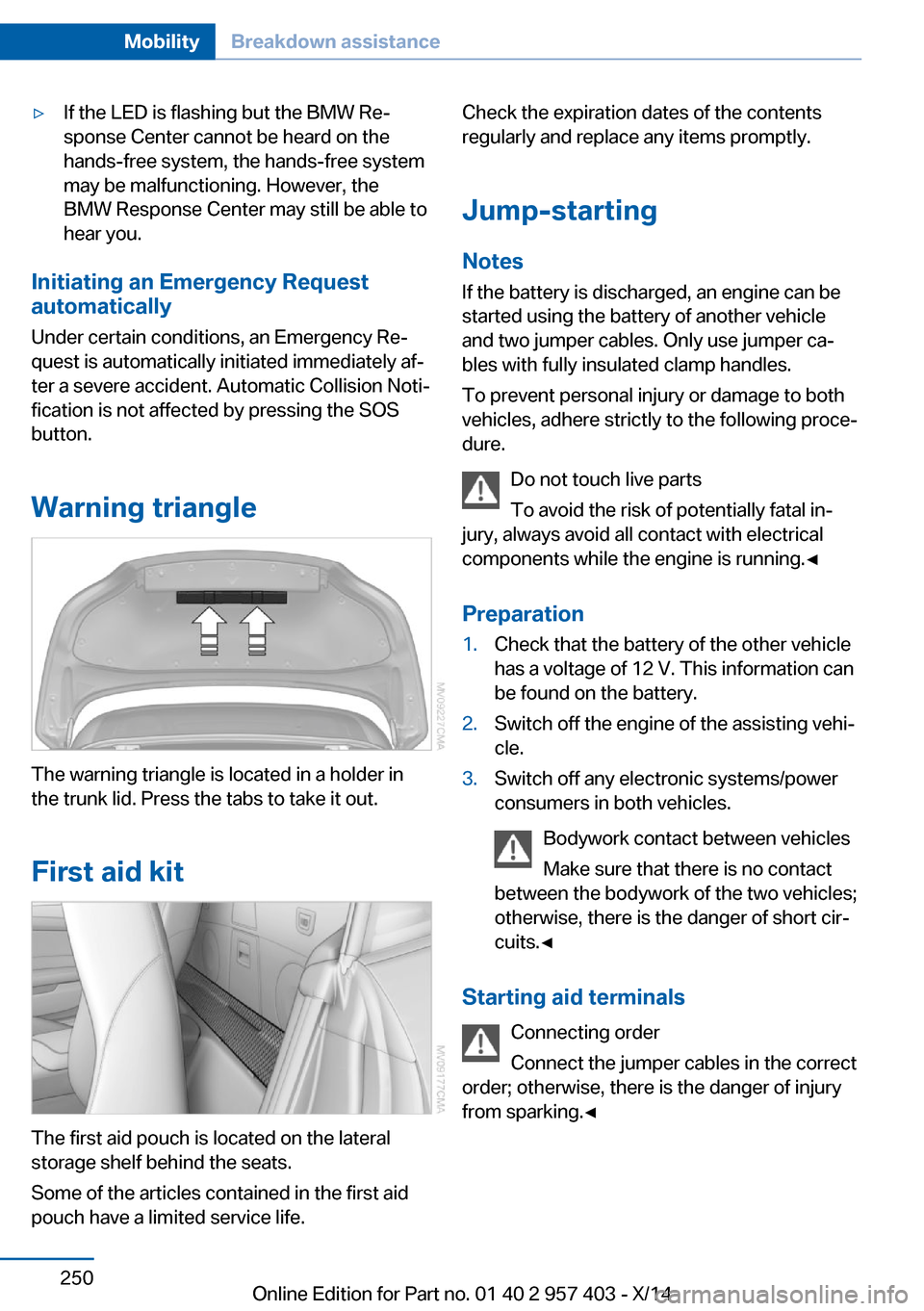
The warning triangle is located in a holder in
the trunk lid. Press the tabs to take it out.
First aid kit
The first aid pouch is located on the lateral
storage shelf behind the seats.
Some of the articles contained in the first aid
pouch have a limited service life.
Check the expiration dates of the contents
regularly and replace any items promptly.
Jump-starting
Notes If the battery is discharged, an engine can be
started using the battery of another vehicle
and two jumper cables. Only use jumper ca‐
bles with fully insulated clamp handles.
To prevent personal injury or damage to both
vehicles, adhere strictly to the following proce‐
dure.
Do not touch live parts
To avoid the risk of potentially fatal in‐
jury, always avoid all contact with electrical
components while the engine is running.◀
Preparation1.Check that the battery of the other vehicle
has a voltage of 12 V. This information can
be found on the battery.2.Switch off the engine of the assisting vehi‐
cle.3.Switch off any electronic systems/power
consumers in both vehicles.
Bodywork contact between vehicles
Make sure that there is no contact
between the bodywork of the two vehicles;
otherwise, there is the danger of short cir‐
cuits.◀
Starting aid terminals
Connecting order
Connect the jumper cables in the correct
order; otherwise, there is the danger of injury
from sparking.◀
Seite 250MobilityBreakdown assistance250
Online Edition for Part no. 01 40 2 957 403 - X/14
Page 255 of 289
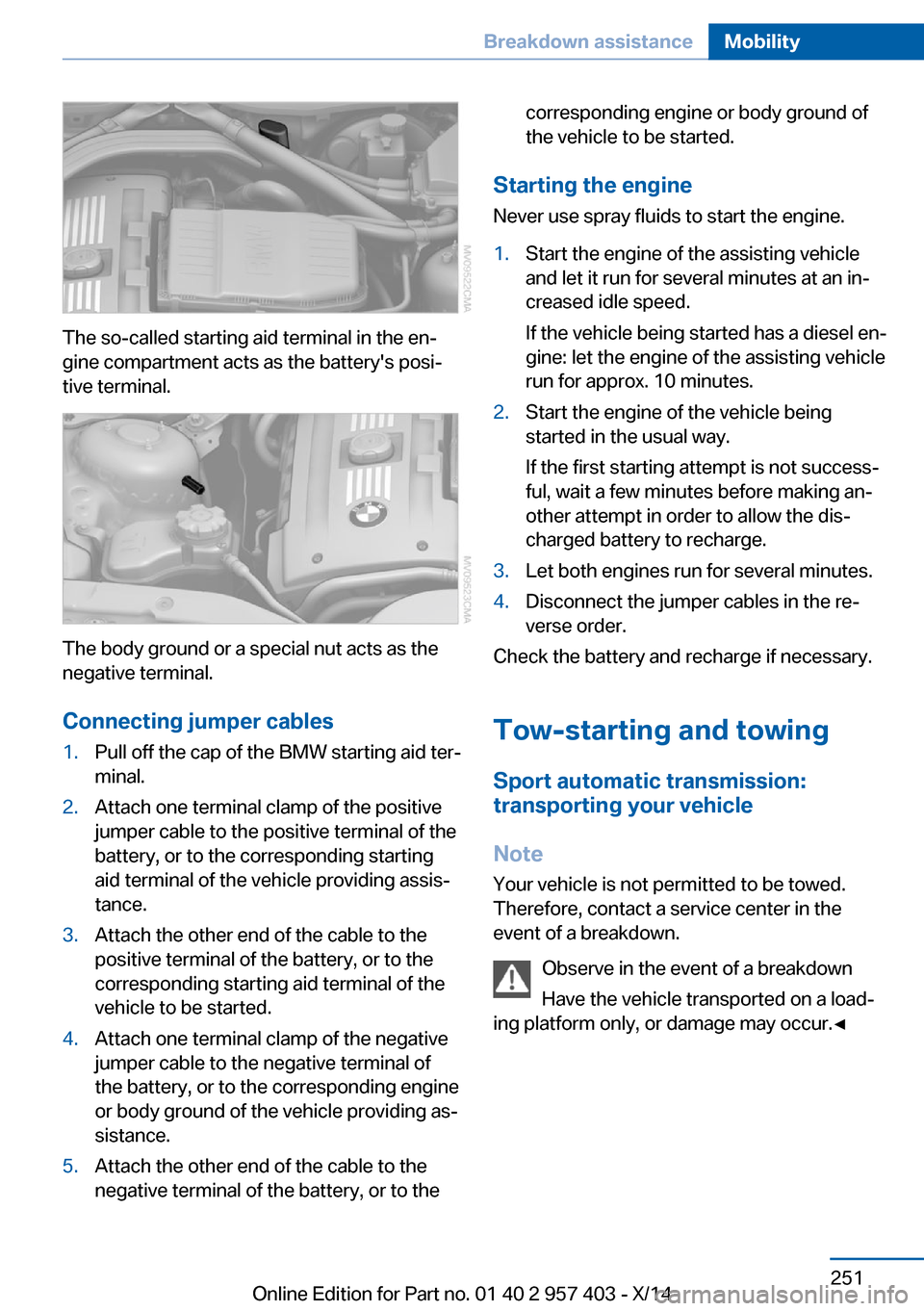
The so-called starting aid terminal in the en‐
gine compartment acts as the battery's posi‐
tive terminal.
The body ground or a special nut acts as the
negative terminal.
Connecting jumper cables
1.Pull off the cap of the BMW starting aid ter‐
minal.2.Attach one terminal clamp of the positive
jumper cable to the positive terminal of the
battery, or to the corresponding starting
aid terminal of the vehicle providing assis‐
tance.3.Attach the other end of the cable to the
positive terminal of the battery, or to the
corresponding starting aid terminal of the
vehicle to be started.4.Attach one terminal clamp of the negative
jumper cable to the negative terminal of
the battery, or to the corresponding engine
or body ground of the vehicle providing as‐
sistance.5.Attach the other end of the cable to the
negative terminal of the battery, or to thecorresponding engine or body ground of
the vehicle to be started.
Starting the engine
Never use spray fluids to start the engine.
1.Start the engine of the assisting vehicle
and let it run for several minutes at an in‐
creased idle speed.
If the vehicle being started has a diesel en‐
gine: let the engine of the assisting vehicle
run for approx. 10 minutes.2.Start the engine of the vehicle being
started in the usual way.
If the first starting attempt is not success‐
ful, wait a few minutes before making an‐
other attempt in order to allow the dis‐
charged battery to recharge.3.Let both engines run for several minutes.4.Disconnect the jumper cables in the re‐
verse order.
Check the battery and recharge if necessary.
Tow-starting and towing Sport automatic transmission:
transporting your vehicle
Note
Your vehicle is not permitted to be towed.
Therefore, contact a service center in the
event of a breakdown.
Observe in the event of a breakdown
Have the vehicle transported on a load‐
ing platform only, or damage may occur.◀
Seite 251Breakdown assistanceMobility251
Online Edition for Part no. 01 40 2 957 403 - X/14
Page 260 of 289
Sport automatic transmission1.Insert the remote control into the ignition
lock, even with Comfort Access.2.Release the parking brake, refer to
page 59.3.Drive into the car wash.4.Engage transmission position N.5.Switch the engine off.6.Leave the remote control in the ignition
lock so that the vehicle can roll.
When starting the engine:
1.Depress the brake pedal.2.Press the Start/Stop button.
Transmission position P is engaged automati‐
cally:
▷Automatically after approx. 30 minutes.▷When the remote control is removed from
the ignition lock.
Headlights
▷Do not rub dry and do not use abrasive or
caustic cleansers.▷Soak areas that have been soiled e.g. due
to insects, with shampoo and wash off with
water.▷Thaw ice with de-icing spray; do not use an
ice scraper.
Retractable hardtop
When you open a wet hardtop, water drops
may run into the cargo area. If necessary, re‐
move items from the cargo area beforehand to
avoid water stains or soiling.
After washing the vehicle
After washing the vehicle, apply the brakes
briefly to dry them; otherwise, braking action
can be reduced and corrosion of the brake
discs can occur.
Fully remove any residue from the windows to
prevent obstruction of view from streaking,
wiping noises, and wiper wear.
Vehicle careCar care productsBMW recommends using cleaning and care
products from BMW, since these have been
tested and approved.
Car care and cleaning products
Follow the instructions on the container.
When cleaning the interior, open the doors or
windows.
Only use products intended for cleaning vehi‐
cles.
Cleansers can contain substances that are
dangerous and harmful to your health.◀
Vehicle paint Regular care contributes to driving safety and
value retention. Environmental influences in
areas with high air pollution or natural contami‐
nants, such as tree resin or pollen, can have an
impact on the vehicle paint. Tailor the fre‐
quency and extent of your car care to these in‐
fluences.
Immediately remove aggressive substances,
such as spilled fuel, oil, grease, or bird drop‐
pings, to prevent damage to or discoloration of
the paintwork.
Leather care
Remove dust from the leather often, using a
cloth or vacuum cleaner.
Otherwise, particles of dust and road grime
chafe in pores and folds, and lead to increased
wear and premature degradation of the leather
surface.
To guard against discoloration, such as from
clothing, provide leather care roughly every
two months.Seite 256MobilityCare256
Online Edition for Part no. 01 40 2 957 403 - X/14
Page 261 of 289
Clean light-colored leather more frequently as
dust and dirt are more noticeable.
Use leather care products; otherwise, dirt and
grease will gradually break down the protective
layer of the leather surface.
Suitable care products are available from the
service center.
Upholstery material care Vacuum regularly with a vacuum cleaner.
If they are very dirty, e.g., beverage stains, use
a soft sponge or microfiber cloth with a suita‐
ble interior cleaner.
Clean the upholstery down to the seams using
large sweeping motions. Avoid rubbing the
material vigorously.
Damage from Velcro® fasteners
Open Velcro® fasteners on pants or
other articles of clothing can damage the seat
covers. Ensure that any Velcro® fasteners are
closed.◀
Caring for special components
Light-alloy wheels When cleaning the wheels on the vehicle, only
use a neutral wheel rim cleaner with a pH value
of 5 to 9. Do not use abrasive cleaners or a
steam jet hotter than 140 ℉/60 ℃; otherwise,
damage may result. Adhere to the manufac‐
turer instructions.
Aggressive, acidic, or alkaline cleaners may
destroy the protective coating of neighboring
components such as the brake disc.
Chrome surfaces
Carefully clean components such as the radia‐
tor grille or door handles with an ample supply
of water, possibly with shampoo added, partic‐
ularly when they have been exposed to road
salt.Rubber components
Aside from water, treat only with rubber
cleansers.
When cleaning rubber seals, do not use any
silicon-containing car care products in order to
avoid damage or reduced noise damping.
Fine wood partsClean fine wood facing and fine wood compo‐
nents only with a moist rag. Then dry with a
soft cloth.
Plastic components These include:▷Imitation leather surfaces.▷Headliner.▷Lamp lenses.▷Instrument cluster cover.▷Matte black spray-coated components.▷Painted parts in the interior.
Clean with a microfiber cloth.
Moisten the cloth lightly with water if neces‐
sary.
Do not soak the headliner.
Do not use cleansers that contain alcohol
or solvents
Do not use cleansers that contain alcohol or
solvents, such as lacquer thinners, heavy-duty
grease removers, fuel, or such; this could lead
to surface damage.◀
Safety belts
Dirty belt straps impede the reeling action and
thus have a negative impact on safety.
No chemical cleaning
Do not clean chemically; this can destroy
the webbing.◀
Use only a mild soapy solution, with the safety
belts clipped into their buckles.
Seite 257CareMobility257
Online Edition for Part no. 01 40 2 957 403 - X/14
Page 277 of 289
Average fuel consumption– Setting the units 76
Average speed 73
Axle loads, refer to Weights 262
B
Backrest curvature, refer to Lumbar support 47
Backrests, refer to Seat ad‐ justment 46
Backrest width adjust‐ ment 48
Backup lights
– Bulb replacement 245, 246
Balance 160
Band-aids, refer to First aid kit 250
Bass 160
Battery
– Disposal 39, 248– Power failure 247– Remote control 30– Replacement in the remote
control 39– Replacement, vehicle bat‐
tery 247– Vehicle 247
Before entering the car
wash 255
Belts, refer to Safety belts 48
Belt tensioners, refer to Safety belts 48
Beverage holder, refer to Cu‐ pholder 124
Black and white map dis‐ play 154
Blower, refer to Air flow rate 108, 111
Bluetooth audio 183
Bluetooth connection, acti‐ vating/deactivating 193
BMW Apps 218
BMW EfficientDynamics, re‐ fer to Saving fuel 132
BMW Homepage 6
BMW Internet page 6
BMW Maintenance Sys‐ tem 241
BMW Online 216
Bottle holder, refer to Cu‐ pholder 124
Brake assistant, refer to Dy‐ namic Brake Control 99
Brake discs, breaking in 128
Brake force display 98
Brake force distribution, elec‐ tronic 99
Brake lamps– Brake force display 98
Brake lights
– Bulb replacement 245, 246
Brake lights, adaptive 98
Brake pads, breaking in 128
Brakes
– ABS 99
Braking
– Notes 129– Parking brake 59
Braking safely 129
Breakdown assistance, refer to Roadside Assistance 215
Breaking in 128
Brightness of Control Dis‐ play 78
Bulbs, replacing, refer to Lamps and bulbs 243
Button for starting the engine, refer to Start/Stop but‐
ton 55
Buttons on the steering wheel 12
Bypassing, see Starting aid 250
C Calendar 208
California Proposition 65 Warning 7
Camera, care 258
Can holder, refer to Cu‐ pholder 124
Capacities 263
Capacities– Cargo area, refer to
Weights 262– Fuel tank, refer to Filling ca‐
pacities 263
Car battery 247
Car care products 256
Care 255
Care, displays 258
Care, vehicle 256
Cargo 130
Cargo area 119
Cargo area
– Capacity 262– Comfort Access 38– Lamp, refer to Interior
lamps 89– Opening from the inside 36– Opening from the out‐
side 36
Cargo area capacity, enlarg‐
ing 119
Cargo, securing 120
Cargo straps, securing cargo 132
Car key, refer to Integrated key/remote control 30
Carpet, care 258
Car phone
– Installation location, refer to
Center armrest 122
Car phone, refer to Tele‐
phone 192
Car vacuum cleaner, connect‐ ing, refer to Connecting
electrical devices 118
Car wash 255
Car wash
– With Comfort Access 38
Catalytic converter, refer to
Hot exhaust system 129
CBS Condition Based Serv‐ ice 241
CD/DVD 170
CD/DVD notes 174
CDs, storing 175
Cell phone 192
Seite 273Everything from A to ZReference273
Online Edition for Part no. 01 40 2 957 403 - X/14
Page 278 of 289
Center armrest 122
Center brake light– Bulb replacement 246
Center console, refer to
Around the center con‐
sole 16
Central locking
– Comfort Access 37– From the inside 35– Setting the unlocking char‐
acteristics 32
Central locking system
– From the outside 31– Principle 31
Central screen, refer to Con‐
trol Display 18
Changes, technical, refer to Safety 6
Changing wheels/tires 232
Chassis number, refer to En‐ gine compartment 235
Check Control 82
Children, transporting safely 53
Child restraint fixing sys‐ tem 53
Child seats, refer to Trans‐ porting children safely 53
Chrome parts, care 257
Cigarette lighter, refer to Lighter 118
Circulation of air, refer to Re‐ circulated air
mode 108, 112
Cleaning, displays 258
Cleaning your BMW, refer to Care 255
Clock 71
Clock
– 12h/24h format 77– Setting the time and date 76
Closing
– From the inside 35– From the outside 32
Cockpit 12
Cold start, refer to Starting the engine 56
Combination instrument, refer
to Instrument cluster 14
Combination switch– Refer to Washer/wiper sys‐
tem 61
Combination switch, refer to
Turn signal, high beams,
headlamp flasher 60
Comfort Access 37
Comfort Access
– Battery replacement 39– In a car wash 38
Comfort area, refer to Around
the center console 16
COMFORT program, Dy‐ namic Driving Control 101
Compartment for remote control, refer to Ignition
lock 55
Compartments, refer to Stor‐ age compartments 123
Compass 116
Computer 73
Computer
– Displays on the Control Dis‐
play 73
Concierge service 215
Condensation under the vehi‐ cle 130
Condition Based Service CBS 241
Confirmation signals for lock‐ ing/unlocking the vehicle 34
Connecting, mobile phone, refer to Pairing the mobile
phone 193
Consumption, refer to Aver‐ age fuel consumption 73
Contacts 204, 212
Control Display 18
Control Display, care 258
Control Display, settings 78
Controller 19
Controls and displays 12
Control systems, driving sta‐ bility 99
Convenient loading 33
Convenient opening and clos‐
ing– Retractable hardtop 33– Window 33
Convertible top, refer to Re‐
tractable hardtop 42
Coolant 239
Coolant
– Checking the level 239– Temperature 72
Cooling, maximum 111
Cooling system, refer to Cool‐ ant 239
Corrosion on brake discs 130
Courtesy lamps, refer to Inte‐ rior lamps 89
Cradle for telephone or mo‐
bile phone
– Refer to Snap-in adapter in
center armrest storage
compartment 122
Cradle for telephone or mo‐
bile phone, refer to Snap-in
adapter 201
Cruise control 103
Cruise control
– Malfunction 105
Cupholder 124
Curb weight, refer to Weights 262
Current location, storing 142
D
Damage, tires 231
Dashboard lighting, refer to Instrument lighting 88
Dashboard, refer to Cock‐ pit 12
Data, technical
– Dimensions 262– Filling capacities 263– Weights 262
Date
– Date format 77– Setting 77
Daytime running lights 86
Seite 274ReferenceEverything from A to Z274
Online Edition for Part no. 01 40 2 957 403 - X/14