Interior mirror BMW Z4 2016 E89 User Guide
[x] Cancel search | Manufacturer: BMW, Model Year: 2016, Model line: Z4, Model: BMW Z4 2016 E89Pages: 289, PDF Size: 7.13 MB
Page 252 of 289
▷Radio station: store again, refer to
page 162.▷Navigation system: wait for the operability
of the navigation.▷Interior rearview mirror with digital com‐
pass: recalibrate, refer to page 116.
Disposing of old batteries
Have old batteries disposed of by your
service center or bring them to a recy‐
cling center.
Maintain the battery in an upright position for
transport and storage. Secure the battery so
that it does not tip over during transport.
Fuses Notes Replacing fuses
Never attempt to repair a blown fuse and
do not replace a defective fuse with a substi‐
tute of another color or amperage rating; this could lead to a circuit overload, ultimately re‐
sulting in a fire in the vehicle.◀
A pair of plastic tweezers is found on the cur‐
rent distributor.
See the inside of the cover for information on
fuse assignment.
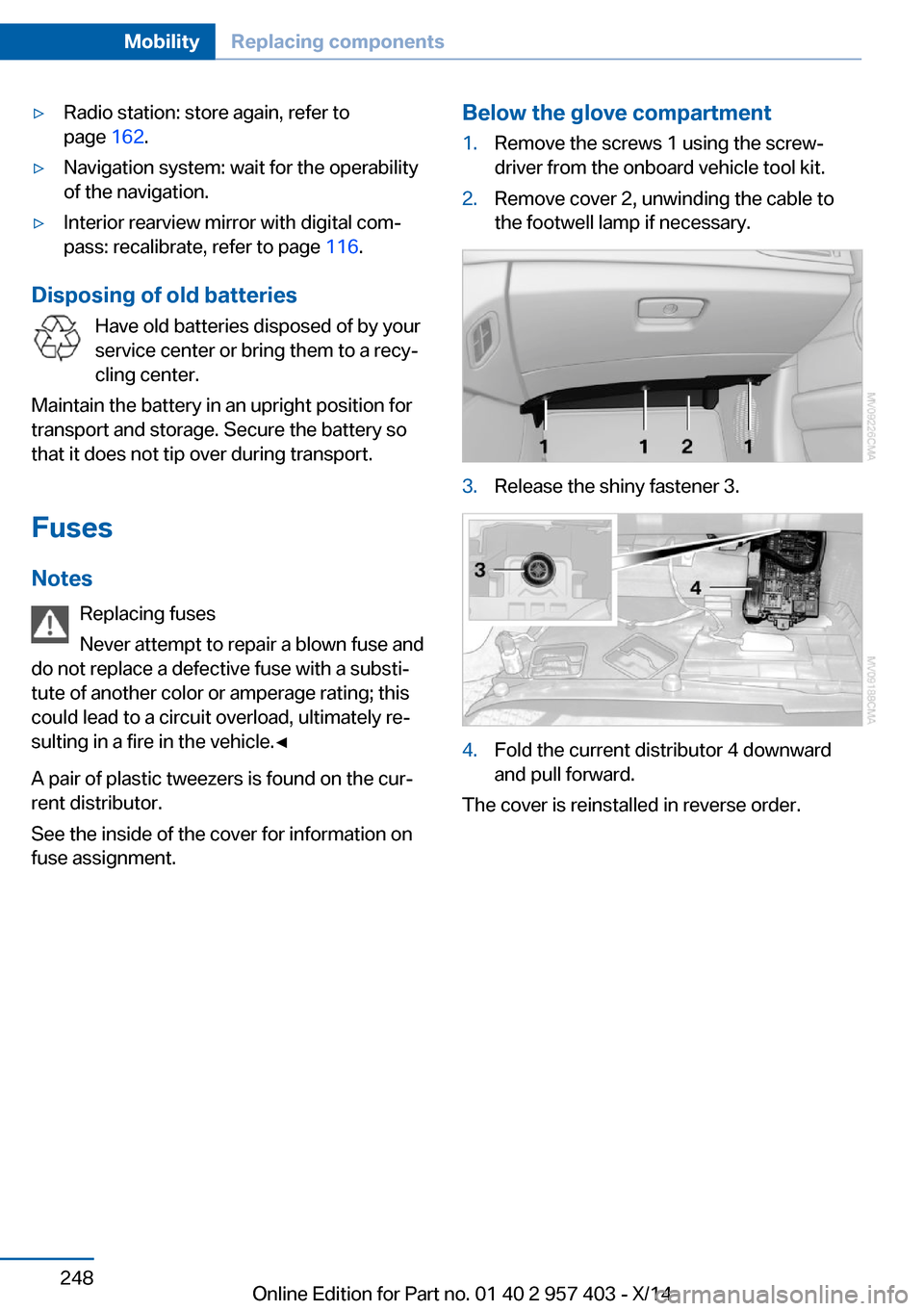
Below the glove compartment1.Remove the screws 1 using the screw‐
driver from the onboard vehicle tool kit.2.Remove cover 2, unwinding the cable to
the footwell lamp if necessary.3.Release the shiny fastener 3.4.Fold the current distributor 4 downward
and pull forward.
The cover is reinstalled in reverse order.
Seite 248MobilityReplacing components248
Online Edition for Part no. 01 40 2 957 403 - X/14
Page 279 of 289
DBC Dynamic Brake Con‐trol 99
DCC, refer to Cruise con‐ trol 103
Defogging windows 109
Defroster– Rear window 109, 112
Defrosting windows 109
Destination entry via the ad‐ dress book 142
Destination guidance 149
Destination guidance with in‐ termediate destinations 147
Destination input, naviga‐ tion 140
Digital clock 71
Digital compass 116
Digital radio 163
Dimensions 262
Dimming mirrors 51
Directional indicators, refer to Turn signals 60
Display lighting, refer to In‐ strument lighting 88
Display, refer to Control Dis‐ play 18
Displays and controls 12
Displays, care 258
Displays, cleaning 258
Displays, refer to Instrument cluster 14
Disposal
– Coolant 239– Remote control battery 39– Vehicle battery 248
Distance control, refer to
PDC 105
Divided screen view, split screen 22
Door key, refer to Remote control with integrated
key 30
Door lock 35
Doors, manual operation 35
Doors, unlocking and locking– Confirmation signals 34– From the inside 35– From the outside 32
DOT Quality Grades 230
Draft-free ventila‐ tion 109, 112
Drive-off assistant 102
Drive-off assistant, refer to DSC 99
Driving notes, breaking in 128
Driving notes, general 128
Driving stability control sys‐ tems 99
Driving tips 128
DSC Dynamic Stability Con‐ trol 99
DTC Dynamic Traction Con‐ trol 100
DTMF suffix dialing 198
DVD/CD 170
DVDs, storing 175
DVD, video 172
Dynamic Brake Control DBC 99
Dynamic destination guid‐ ance 156
Dynamic Driving Control 100
Dynamic Stability Control DSC 99
Dynamic Traction Control DTC 100
E
EBV electronic brake-force distribution 99
EfficientDynamics, refer to Saving fuel 132
Electrical fault
– 7-gear automatic transmis‐
sion 69
Electrical malfunction
– Door lock 35– Driver's door 35– Fuel filler flap 222Electric seat adjustment 47
Electronic brake-force distri‐ bution 99
Electronic engine oil level check 236
Electronic Stability Program ESP, refer to DSC 99
Emergency operation– Fuel filler flap, unlocking
manually 222
Emergency Request 249
Emergency unlocking
– Trunk lid, from the inside 37
Energy, saving
– Automatic Engine Start/
Stop Function 57
Engine compartment 235
Engine coolant, refer to Cool‐ ant 239
Engine oil, adding 238
Engine oil additives 238
Engine oil, checking the level 236
Engine oil temperature 72
Engine oil types, alterna‐ tive 238
Engine oil types, ap‐ proved 238
Engine, overheating, refer to Coolant temperature 72
Engine start, Help 250
Engine, starting 56
Engine, starting
– Comfort Access 37– Start/Stop button 55
Engine, stopping, Start/Stop
button 55
Engine, switching off 57
Engine temperature 72
Entry comparison 23
Entry lamps, refer to Interior lamps 89
Equalizer 160
Equipment, interior 114
Error messages, refer to Check Control 82
Seite 275Everything from A to ZReference275
Online Edition for Part no. 01 40 2 957 403 - X/14
Page 281 of 289
Height, refer to Dimen‐sions 262
High-beam Assistant 87
High beams 60, 87
High beams/low beams, refer to High-beam Assistant 87
High beams, headlamp flasher 87
High beams, indicator lamp 15
High-pressure washers 255
Hills 130
Hill start assistant, refer to Drive-off assistant 102
Holder for beverages 124
Holder for remote control, re‐ fer to Ignition lock 55
Homepage 6
Hood 236
Horn 12
Hot exhaust system 129
Hotline 217
House number, entering for navigation 141
Hydroplaning 129
I Ice warning, refer to External temperature warning 71
Icy roads, refer to External temperature warning 71
Identification marks– Tires 229
iDrive 18
iDrive
– Changing the date and
time 76– Changing the units of meas‐
ure and display format 76
Ignition 56
Ignition
– Switched off 56– Switched on 56
Ignition key position 1, refer
to Radio ready state 56
Ignition key position 2, refer
to Ignition on 56
Ignition key, refer to Remote control with integrated
key 30
Ignition lock 55
Indication of a flat tire 93
Indicator and warning lamps 15
Indicator and warning lights, Tire Pressure Monitor
TPM 96
Individual air distribution 108
Inflation pressure, refer to Tire inflation pressure 226
Inflation pressure warning, tires 92
Information on the navigation data 138
Initializing– Compass, refer to Calibrat‐
ing 117– Flat Tire Monitor FTM 93
Installation location
– Telephone 122
Instrument cluster 14
Instrument lighting 88
Instrument panel, refer to In‐ strument cluster 14
Instruments, refer to Cock‐ pit 12
Integrated key 30
Interactive map 145
Interior equipment 114
Interior lamps 89
Interior lamps
– Remote control 33
Interior motion sensor 40
Interior rearview mirror 51
Interior rearview mirror
– Automatic dimming 51– Compass 116
Interior temperature, setting,
refer to Air conditioner 108
Interior temperature, setting, refer to Automatic climate
control 110
Intermediate destina‐
tions 147
Intermittent wipe 61
Internet page 6
Intersection, entering for navi‐ gation 141
Interval display, service re‐ quirements 78
iPod/iPhone 181
J
Jacking points 247
Joystick, refer to iDrive 18
K Keyless Go, refer to Comfort Access 37
Keyless opening and closing, refer to Comfort Access 37
Key Memory, refer to Per‐ sonal Profile 30
Key, refer to Integrated key/ remote control 30
Kickdown– 7-gear automatic transmis‐
sion 67– 8-gear automatic transmis‐
sion 63
Knee airbag 90
L
Lamps and bulbs, bulb re‐ placement 243
Lamps, replacing, refer to Lamps and bulbs 243
Language on Control Dis‐ play 78
Lap-and-shoulder belt, refer to Safety belts 48
Lashing eyes, securing cargo 132
Launch Control, acceleration assistant 68
Leather, care 256
Seite 277Everything from A to ZReference277
Online Edition for Part no. 01 40 2 957 403 - X/14
Page 282 of 289
LED, light-emitting di‐odes 244
Length, refer to Dimen‐ sions 262
Letters and numbers, enter‐ ing 23
License plate light, bulb re‐ placement 246
Light 85
Light-alloy wheels, care 257
Light control 86
Light-emitting diodes LED 244
Lighter 118
Lighter– Connecting electrical devi‐
ces 118
Lighting
– Instruments 88– Lamps and bulbs 243
Light switch 85
Limit, refer to Speed limit 83
Load 131
Loading 130
Lockable lug bolts, refer to Lug bolt lock 247
Lock buttons, doors, refer to Locking 36
Locking
– From the inside 36– From the outside 33– Setting the confirmation
signals 34– Without remote control, re‐
fer to Comfort Access 37
Locking the vehicle
– From the inside 35– From the outside 32
Low beams 85
Low beams, automatic, refer to High-beam Assistant 87
Lower back support, refer to Lumbar support 47
Lug bolt lock 247
Lumbar support 47
M
M/S, automatic transmission– 7-gear 67– 8-gear 64
Maintenance 241
Maintenance require‐ ments 241
Maintenance, service require‐ ments 78
Maintenance system, BMW 241
Malfunction
– Door lock 35– Fuel filler flap 222– Parking brake 60
Malfunction warnings, refer to
Check Control 82
Manual air distribution 108
Manual mode
– 7-gear automatic transmis‐
sion 67– 8-gear automatic transmis‐
sion 64
Manual operation
– Door lock 35– Driver's door 35– Fuel filler flap 222– Transmission lock 69
Manual transmission 63
Map, destination entry 145
Map display in black and white 154
Map in split screen 153
Map view 151
Marking on approved tires 233
Marking, run-flat tires 232
Master key, refer to Remote control with integrated
key 30
Maximum cooling 111
Maximum speed, winter tires 233
Medical kit, refer to First aid kit 250
Memory, refer to Seat and mirror memory 49
Menus, of iDrive, operat‐
ing 18
Menus, refer to iDrive operat‐ ing concept 19
Message list, traffic bulle‐ tins 153
Messages 206
Microfilter– For air conditioner 109– With automatic climate con‐
trol 113
Minimum tread depth,
tires 231
Mirror
– Mirror memory, refer to Seat
and mirror memory 49
Mirrors 50
Mirrors
– Automatic Curb Monitor 50– Exterior mirrors 50– Folding in, before driving
into a car wash 51– Heating 51– Interior rearview mirror 51
Mobile communication devi‐
ces in the vehicle 129
Mobile phone, installation lo‐ cation, refer to Center arm‐
rest 122
Mobile phone, refer to Tele‐ phone 192
Modifications, technical, refer to Safety 6
Monitor, refer to Control Dis‐ play 18
MP3 player 180
Multimedia 170
Music collection 175
Music search 177
Music, storing 175
N
Navigation 138
Navigation data 138
Navigation data, updat‐ ing 138
Seite 278ReferenceEverything from A to Z278
Online Edition for Part no. 01 40 2 957 403 - X/14