warning lights BMW Z4 2016 E89 User Guide
[x] Cancel search | Manufacturer: BMW, Model Year: 2016, Model line: Z4, Model: BMW Z4 2016 E89Pages: 289, PDF Size: 7.13 MB
Page 253 of 289
Breakdown assistanceVehicle equipment
This chapter describes all series equipment as
well as country-specific and special equipment
offered for this model series. Therefore, it also
describes equipment that may not be found in
your vehicle, for instance due to the selected
special equipment or the country version. This
also applies to safety-related functions and
systems.
When using the features and systems descri‐
bed here, adhere to local regulations.
Hazard warning system
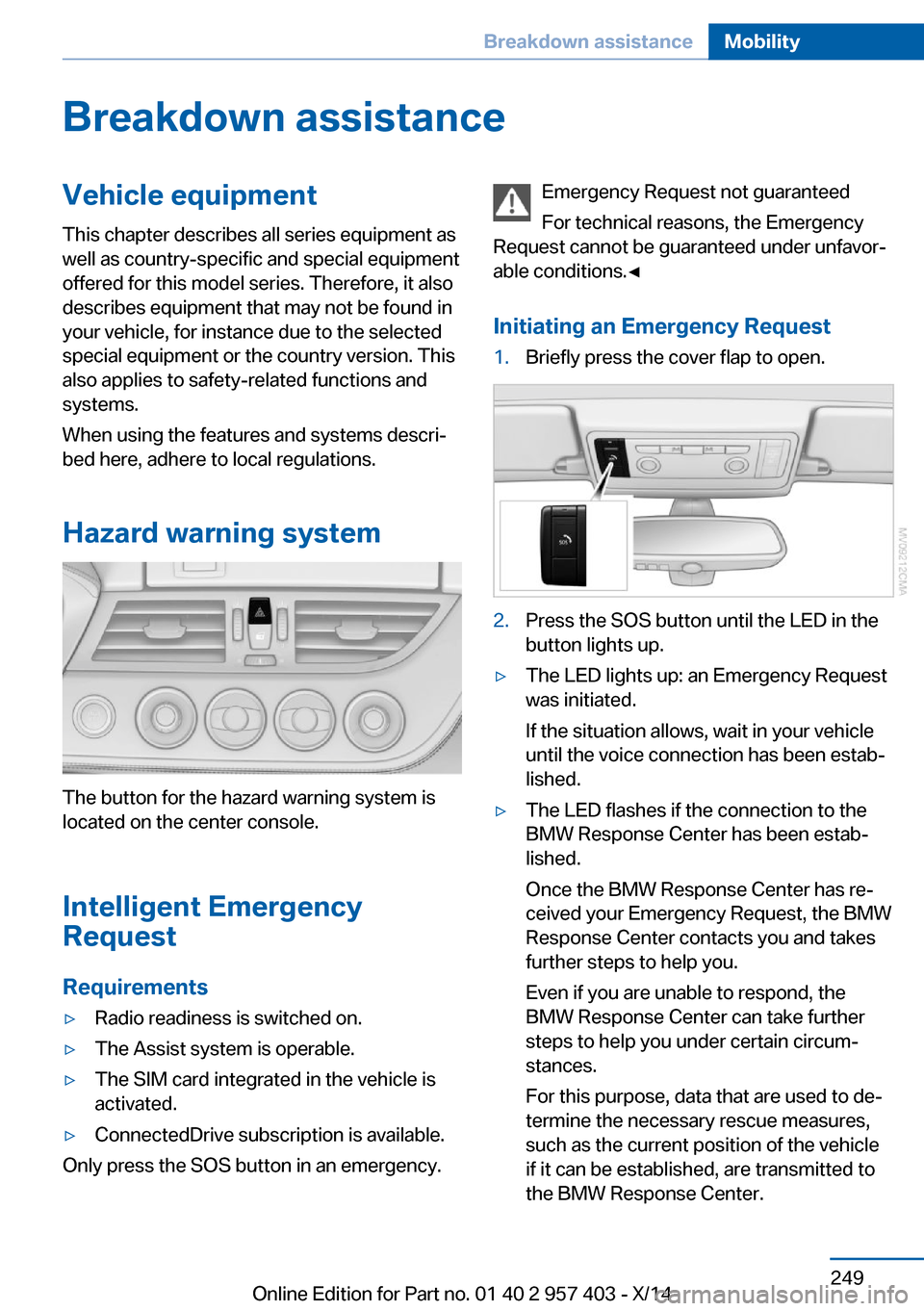
The button for the hazard warning system is
located on the center console.
Intelligent Emergency
Request
Requirements
▷Radio readiness is switched on.▷The Assist system is operable.▷The SIM card integrated in the vehicle is
activated.▷ConnectedDrive subscription is available.
Only press the SOS button in an emergency.
Emergency Request not guaranteed
For technical reasons, the Emergency
Request cannot be guaranteed under unfavor‐
able conditions.◀
Initiating an Emergency Request1.Briefly press the cover flap to open.2.Press the SOS button until the LED in the
button lights up.▷The LED lights up: an Emergency Request
was initiated.
If the situation allows, wait in your vehicle
until the voice connection has been estab‐
lished.▷The LED flashes if the connection to the
BMW Response Center has been estab‐
lished.
Once the BMW Response Center has re‐
ceived your Emergency Request, the BMW
Response Center contacts you and takes
further steps to help you.
Even if you are unable to respond, the
BMW Response Center can take further
steps to help you under certain circum‐
stances.
For this purpose, data that are used to de‐
termine the necessary rescue measures,
such as the current position of the vehicle
if it can be established, are transmitted to
the BMW Response Center.Seite 249Breakdown assistanceMobility249
Online Edition for Part no. 01 40 2 957 403 - X/14
Page 257 of 289
Follow the towing instructions
Follow all towing instructions, or vehicle
damage or accidents may occur.◀▷Make sure that the ignition is switched on;
otherwise, the low beams, tail lights, turn
signals, and windshield wipers may be un‐
available.▷Do not tow the vehicle with the rear axle
tilted, as the front wheels could turn.▷When the engine is stopped, there is no
power assist. Consequently, more force
needs to be applied when braking and
steering.▷Larger steering wheel movements are re‐
quired.▷The towing vehicle must not be lighter
than the vehicle being towed; otherwise,
it will not be possible to control the vehicle
response.
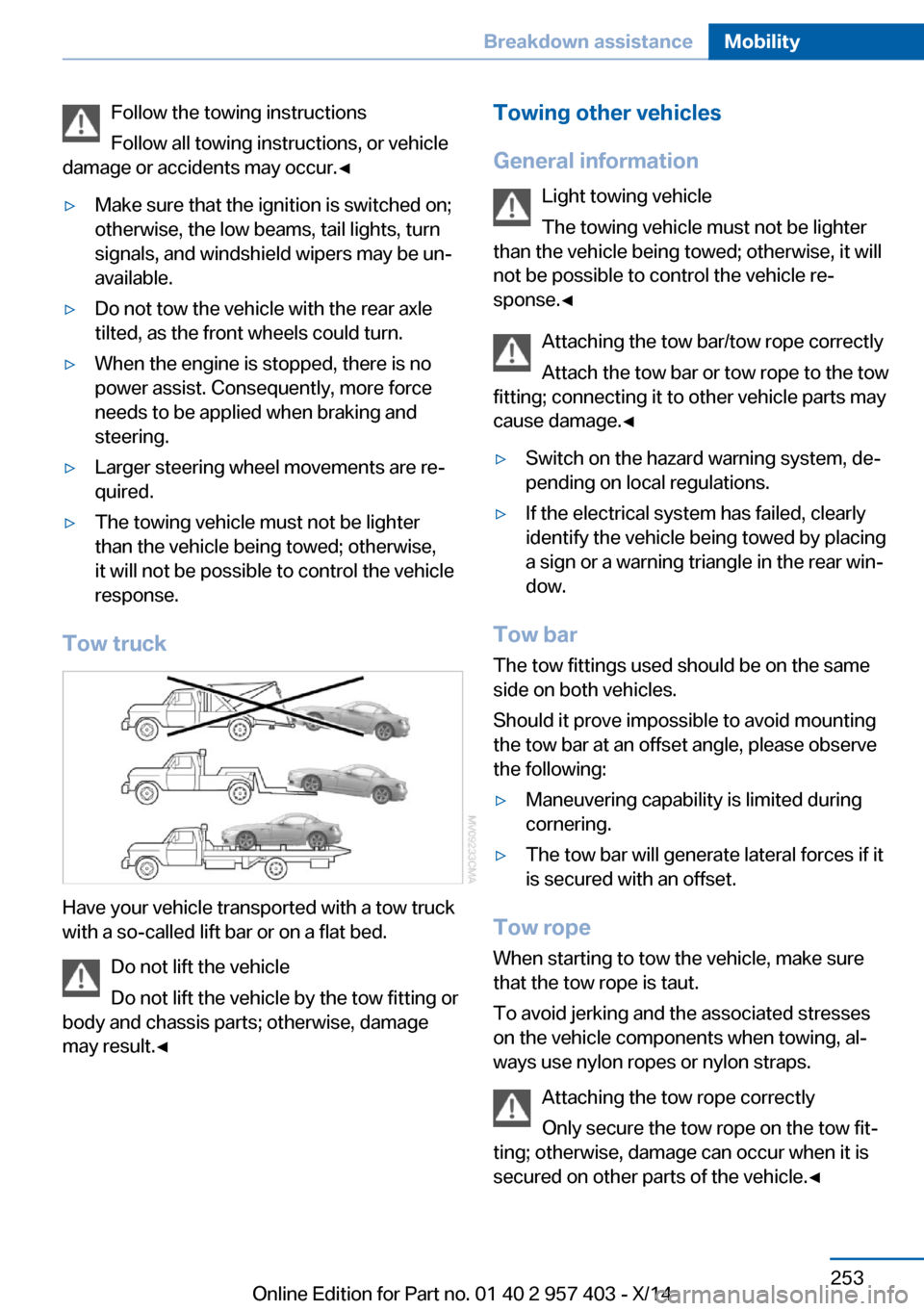
Tow truck
Have your vehicle transported with a tow truck
with a so-called lift bar or on a flat bed.
Do not lift the vehicle
Do not lift the vehicle by the tow fitting or
body and chassis parts; otherwise, damage
may result.◀
Towing other vehicles
General information Light towing vehicle
The towing vehicle must not be lighter
than the vehicle being towed; otherwise, it will
not be possible to control the vehicle re‐
sponse.◀
Attaching the tow bar/tow rope correctly
Attach the tow bar or tow rope to the tow
fitting; connecting it to other vehicle parts may
cause damage.◀▷Switch on the hazard warning system, de‐
pending on local regulations.▷If the electrical system has failed, clearly
identify the vehicle being towed by placing
a sign or a warning triangle in the rear win‐
dow.
Tow bar
The tow fittings used should be on the same
side on both vehicles.
Should it prove impossible to avoid mounting
the tow bar at an offset angle, please observe
the following:
▷Maneuvering capability is limited during
cornering.▷The tow bar will generate lateral forces if it
is secured with an offset.
Tow rope
When starting to tow the vehicle, make sure
that the tow rope is taut.
To avoid jerking and the associated stresses
on the vehicle components when towing, al‐
ways use nylon ropes or nylon straps.
Attaching the tow rope correctly
Only secure the tow rope on the tow fit‐
ting; otherwise, damage can occur when it is
secured on other parts of the vehicle.◀
Seite 253Breakdown assistanceMobility253
Online Edition for Part no. 01 40 2 957 403 - X/14
Page 277 of 289
Average fuel consumption– Setting the units 76
Average speed 73
Axle loads, refer to Weights 262
B
Backrest curvature, refer to Lumbar support 47
Backrests, refer to Seat ad‐ justment 46
Backrest width adjust‐ ment 48
Backup lights
– Bulb replacement 245, 246
Balance 160
Band-aids, refer to First aid kit 250
Bass 160
Battery
– Disposal 39, 248– Power failure 247– Remote control 30– Replacement in the remote
control 39– Replacement, vehicle bat‐
tery 247– Vehicle 247
Before entering the car
wash 255
Belts, refer to Safety belts 48
Belt tensioners, refer to Safety belts 48
Beverage holder, refer to Cu‐ pholder 124
Black and white map dis‐ play 154
Blower, refer to Air flow rate 108, 111
Bluetooth audio 183
Bluetooth connection, acti‐ vating/deactivating 193
BMW Apps 218
BMW EfficientDynamics, re‐ fer to Saving fuel 132
BMW Homepage 6
BMW Internet page 6
BMW Maintenance Sys‐ tem 241
BMW Online 216
Bottle holder, refer to Cu‐ pholder 124
Brake assistant, refer to Dy‐ namic Brake Control 99
Brake discs, breaking in 128
Brake force display 98
Brake force distribution, elec‐ tronic 99
Brake lamps– Brake force display 98
Brake lights
– Bulb replacement 245, 246
Brake lights, adaptive 98
Brake pads, breaking in 128
Brakes
– ABS 99
Braking
– Notes 129– Parking brake 59
Braking safely 129
Breakdown assistance, refer to Roadside Assistance 215
Breaking in 128
Brightness of Control Dis‐ play 78
Bulbs, replacing, refer to Lamps and bulbs 243
Button for starting the engine, refer to Start/Stop but‐
ton 55
Buttons on the steering wheel 12
Bypassing, see Starting aid 250
C Calendar 208
California Proposition 65 Warning 7
Camera, care 258
Can holder, refer to Cu‐ pholder 124
Capacities 263
Capacities– Cargo area, refer to
Weights 262– Fuel tank, refer to Filling ca‐
pacities 263
Car battery 247
Car care products 256
Care 255
Care, displays 258
Care, vehicle 256
Cargo 130
Cargo area 119
Cargo area
– Capacity 262– Comfort Access 38– Lamp, refer to Interior
lamps 89– Opening from the inside 36– Opening from the out‐
side 36
Cargo area capacity, enlarg‐
ing 119
Cargo, securing 120
Cargo straps, securing cargo 132
Car key, refer to Integrated key/remote control 30
Carpet, care 258
Car phone
– Installation location, refer to
Center armrest 122
Car phone, refer to Tele‐
phone 192
Car vacuum cleaner, connect‐ ing, refer to Connecting
electrical devices 118
Car wash 255
Car wash
– With Comfort Access 38
Catalytic converter, refer to
Hot exhaust system 129
CBS Condition Based Serv‐ ice 241
CD/DVD 170
CD/DVD notes 174
CDs, storing 175
Cell phone 192
Seite 273Everything from A to ZReference273
Online Edition for Part no. 01 40 2 957 403 - X/14
Page 281 of 289
Height, refer to Dimen‐sions 262
High-beam Assistant 87
High beams 60, 87
High beams/low beams, refer to High-beam Assistant 87
High beams, headlamp flasher 87
High beams, indicator lamp 15
High-pressure washers 255
Hills 130
Hill start assistant, refer to Drive-off assistant 102
Holder for beverages 124
Holder for remote control, re‐ fer to Ignition lock 55
Homepage 6
Hood 236
Horn 12
Hot exhaust system 129
Hotline 217
House number, entering for navigation 141
Hydroplaning 129
I Ice warning, refer to External temperature warning 71
Icy roads, refer to External temperature warning 71
Identification marks– Tires 229
iDrive 18
iDrive
– Changing the date and
time 76– Changing the units of meas‐
ure and display format 76
Ignition 56
Ignition
– Switched off 56– Switched on 56
Ignition key position 1, refer
to Radio ready state 56
Ignition key position 2, refer
to Ignition on 56
Ignition key, refer to Remote control with integrated
key 30
Ignition lock 55
Indication of a flat tire 93
Indicator and warning lamps 15
Indicator and warning lights, Tire Pressure Monitor
TPM 96
Individual air distribution 108
Inflation pressure, refer to Tire inflation pressure 226
Inflation pressure warning, tires 92
Information on the navigation data 138
Initializing– Compass, refer to Calibrat‐
ing 117– Flat Tire Monitor FTM 93
Installation location
– Telephone 122
Instrument cluster 14
Instrument lighting 88
Instrument panel, refer to In‐ strument cluster 14
Instruments, refer to Cock‐ pit 12
Integrated key 30
Interactive map 145
Interior equipment 114
Interior lamps 89
Interior lamps
– Remote control 33
Interior motion sensor 40
Interior rearview mirror 51
Interior rearview mirror
– Automatic dimming 51– Compass 116
Interior temperature, setting,
refer to Air conditioner 108
Interior temperature, setting, refer to Automatic climate
control 110
Intermediate destina‐
tions 147
Intermittent wipe 61
Internet page 6
Intersection, entering for navi‐ gation 141
Interval display, service re‐ quirements 78
iPod/iPhone 181
J
Jacking points 247
Joystick, refer to iDrive 18
K Keyless Go, refer to Comfort Access 37
Keyless opening and closing, refer to Comfort Access 37
Key Memory, refer to Per‐ sonal Profile 30
Key, refer to Integrated key/ remote control 30
Kickdown– 7-gear automatic transmis‐
sion 67– 8-gear automatic transmis‐
sion 63
Knee airbag 90
L
Lamps and bulbs, bulb re‐ placement 243
Lamps, replacing, refer to Lamps and bulbs 243
Language on Control Dis‐ play 78
Lap-and-shoulder belt, refer to Safety belts 48
Lashing eyes, securing cargo 132
Launch Control, acceleration assistant 68
Leather, care 256
Seite 277Everything from A to ZReference277
Online Edition for Part no. 01 40 2 957 403 - X/14
Page 283 of 289
Navigation system– Destination entry by
voice 146
Nets, refer to Storage com‐
partments 123
Neutral cleaner, care 257
New wheels and tires 232
Notes 6, 209
Nozzles, refer to Air vents 107
Nozzles, refer to Ventila‐ tion 109, 112
O OBD Onboard Diagnos‐ tics 242
Odometer 71
Office 203
Oil additives 238
Oil change interval, service requirements 78
Oil consumption 236
Oil level 236
Oil, refer to Engine oil 236
Oil types, alternative 238
Oil types, approved 238
Old batteries, disposal 248
Onboard computer, refer to Computer 73
Onboard Diagnostics OBD 242
Onboard monitor, refer to Control Display 18
Onboard vehicle tool kit 243
Opening and closing
– Comfort Access 37– From the inside 35– From the outside 32– Using the door lock 35– Using the remote control 32
Operating principle, iDrive 18
Outside-air mode
– Automatic climate con‐
trol 112
Outside air, refer to Recircu‐
lated air mode 108, 112
Overheating of engine, refer
to Coolant temperature 72
P Paint, vehicle 256
Pairing, mobile phone 193
Park Distance Control PDC 105
Parked vehicle, condensa‐ tion 130
Parking aid, refer to PDC 105
Parking brake 59
Parking brake, refer to Park‐ ing brake 59
Parking lamps 85
Passenger airbags, deactivat‐ ing 91
Passenger side mirror, tilt‐ ing 50
PDC Park Distance Con‐ trol 105
Personal information 203
Personal Profile 30
Pinch protection– Windows 41
Plastic, care 257
Pollen
– Refer to Microfilter/acti‐
vated-charcoal filter with
automatic climate con‐
trol 113– Refer to Microfilter for air
conditioner 109
Position, storing 142
Postal code, entering in navi‐ gation 141
Power failure 247
Power windows, opening and closing 41
Power windows, refer to Win‐ dows 40
Pressure, tires 226
Pressure warning, tires 92
Pressure warning, tires
– Flat Tire Monitor 92Programmable memory but‐
tons, iDrive 22
Protective function, refer to
Pinch protection– Windows 41
Push-and-turn switch, refer to
Controller 19
R Radiator fluid, refer to Cool‐ ant 239
Radio-operated key, refer to Remote control with
integrated key 30
Radio ready state 56
Radio ready state
– Switched off 56– Switched on 56
Radio setting, refer to Radio
ready state 56
Rain sensor 61
Random 171
Random playback 171
Range 73
RDS 163
Reading lamps 89
Reading out loud 210
Rear lights
– Bulb replacement 245
Rear lights, refer to Tail
lights 245
Rear lights, refer to Tail lights
– Bulb replacement 245, 246
Rearview mirror, refer to Mir‐
rors 50
Rear window de‐ froster 109, 112
Recirculated air mode 108, 112
Reclining seat, refer to Back‐ rest 46
Recommended tire brands 233
Redialing 199
Refueling 222
Seite 279Everything from A to ZReference279
Online Edition for Part no. 01 40 2 957 403 - X/14
Page 284 of 289
Remaining range, refer toRange 73
Reminders 210
Remote app 219
Remote control 30
Remote control– Battery replacement 39– Comfort Access 37– Malfunction 34, 38– Removing from the ignition
lock 55– Trunk lid 33
Remote control, univer‐
sal 114
Remote inquiry 198
Remote Services 219
Replacement fuses, refer to Spare fuses 248
Replacement remote con‐ trol 30
Replacing wheels/tires 232
Reporting safety defects 9
Reservoir for washer fluid 62
Restraining systems
– Refer to Safety belts 48
Restraint system
– For children 53
Retaining straps, securing
cargo 132
Retractable hardtop
– Convenient opening and
closing 33– Opening and closing 42– Remote control 33
Retreaded tires 233
Reverse gear
– 7-gear automatic transmis‐
sion 67– 8-gear automatic transmis‐
sion 63– Manual transmission 63
Rim cleaner, care 257
Road, avoiding 149
Road detour 149
Roadside Assistance 215
Roadside parking lamps 87
Roadworthiness test 78
Roof, refer to Retractable
hardtop 42
Route 150
Route criteria, route 149
Route, displaying 150
Route section, bypass‐ ing 150
RSC Runflat System Compo‐ nent, refer to Run-flat
tires 232
Rubber components, care 257
Run-flat tires 232
Run-flat tires– Tire inflation pressure 226
Running lights, refer to Park‐
ing lamps/low beams 85
S Safety 6
Safety-belt height adjust‐ ment 49
Safety belts 48
Safety belts
– Damage 49– Indicator/warning light 49– Reminder 49
Safety belts, care 257
Safety systems
– Airbags 90– Safety belts 48
Safety tires 232
Satellite radio 164
Saving fuel 132
Scale, changing during navi‐ gation 152
Screen, refer to Control Dis‐ play 18
Search, refer to BMW On‐ line 216
Seat adjustment, electric 47
Seat adjustment, mechani‐ cal 46
Seat and mirror memory 49
Seat and mirror memory, re‐ trieving automatically 34
Seat Belt Reminder, refer to
Safety belt reminder 49
Seat belts– Refer to Safety belts 48
Seat heating 48
Seats 46
Seats
– Adjusting 46– Adjusting electrically 47– Heating 48– Memory, refer to Seat and
mirror memory 49– Storing the setting, refer to
Seat and mirror memory 49
Sensors, care 258
Service and warranty 7
Service requirements, CBS Condition Based Serv‐
ice 241
Service requirements, dis‐ play 78
Services, remote 219
Servotronic 102
Settings and information 75
Settings, configuring, refer to Personal Profile 30
Settings, DVD 173
Settings on Control Dis‐ play 78
Setting the clock, 12h/24h format 77
Shift paddles on steering
wheel
– 7-gear automatic transmis‐
sion 68– 8-gear automatic transmis‐
sion 65
Short commands, voice acti‐
vation 264
Side airbags 90
Side windows, refer to Win‐ dows 40
Signal horn, refer to Horn 12
Sitting safely 46
Ski bag, refer to Through- loading opening with
integrated transport
bag 119
Seite 280ReferenceEverything from A to Z280
Online Edition for Part no. 01 40 2 957 403 - X/14
Page 287 of 289
Version of the navigationdata 138
Video playback 172
Voice activation– Navigation 146
Voice activation, short com‐
mands 264
Voice activation system 25
Volume, setting 160
W Warning and indicator lamps 15
Warning messages, refer to Check Control 82
Warning signal volumes 161
Warning triangle 250
Washer/wiper system 61
Washer fluid 62
Washing, vehicle 255
Waste tray, refer to Ash‐ tray 118
Water on roads 129
Wear indicator in tire 231
Weights 262
Welcome lamps 85
Wheelbase, refer to Dimen‐ sions 262
Wheel change 246
Wheels and tires 226
Wheels, changing 232
Wheels, Flat Tire Monitor FTM 92
Wheels, Tire Pressure Moni‐ tor TPM 94
Width, refer to Dimen‐ sions 262
Wind deflector 44
Window, convenient opening and closing 33
Windows 40
Windows, defrosting and de‐
fogging
– Automatic climate con‐
trol 112Windows, defrosting and re‐
moving condensation– Air conditioner 109
Windows, pinch protec‐
tion 41
Windshield
– Cleaning 62– Defrosting and defogging,
air conditioner 109– Defrosting and defogging,
automatic climate con‐
trol 112
Windshield, defrosting, refer
to Defrosting windows 109
Windshield wash 61
Windshield wash
– Nozzles 62– Washer fluid 62
Windshield washer fluid 62
Windshield wiper blades, changing 243
Windshield wiper, refer to Washer/wiper system 61
Winter storage, care 258
Winter tires, suitable tires 233
Winter tires, tread 231
Wiper blades, changing 243
Wiper fluid 62
Wood, care 257
Wordmatch principle, naviga‐ tion 23
Working in the engine com‐ partment 236
Wrench/screwdriver, refer to Onboard vehicle tool kit 243
X Xenon headlights
– Bulb replacement 244
Y
Your individual vehicle
– Settings, refer to Personal
Profile 30Seite 283Everything from A to ZReference283
Online Edition for Part no. 01 40 2 957 403 - X/14