light switch BMW Z4 COUPE 2006 E86 User Guide
[x] Cancel search | Manufacturer: BMW, Model Year: 2006, Model line: Z4 COUPE, Model: BMW Z4 COUPE 2006 E86Pages: 128, PDF Size: 4.41 MB
Page 48 of 128
Everything under control
46
Everything under control
Odometer
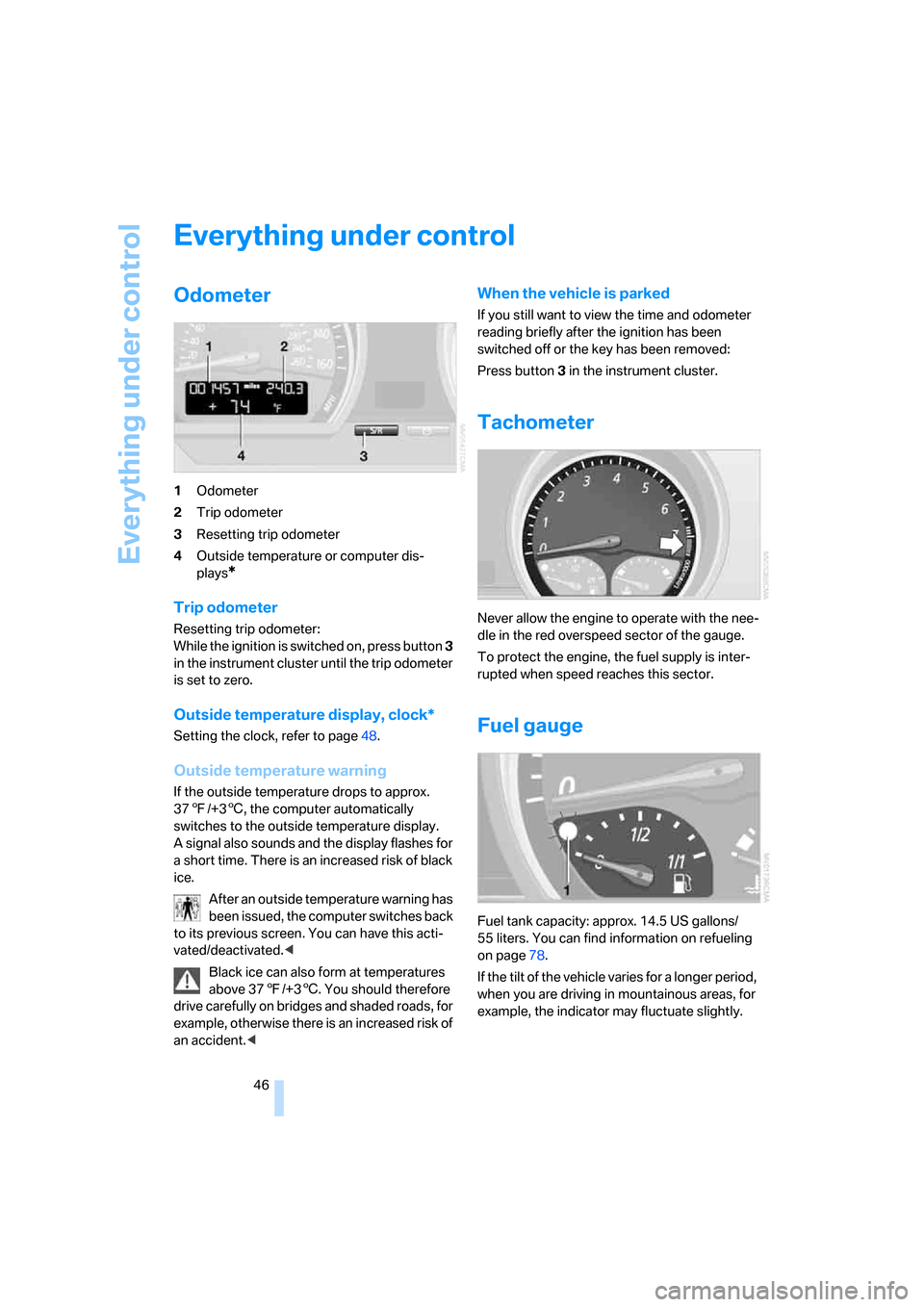
1Odometer
2Trip odometer
3Resetting trip odometer
4Outside temperature or computer dis-
plays
*
Trip odometer
Resetting trip odometer:
While the ignition is switched on, press button 3
in the instrument cluster until the trip odometer
is set to zero.
Outside temperature display, clock*
Setting the clock, refer to page48.
Outside temperature warning
If the outside temperature drops to approx.
377/+36, the computer automatically
switches to the outside temperature display.
A signal also sounds and the display flashes for
a short time. There is an increased risk of black
ice.
After an outside temperature warning has
been issued, the computer switches back
to its previous screen. You can have this acti-
vated/deactivated.<
Black ice can also form at temperatures
above 377/+36. You should therefore
drive carefully on bridges and shaded roads, for
example, otherwise there is an increased risk of
an accident.<
When the vehicle is parked
If you still want to view the time and odometer
reading briefly after the ignition has been
switched off or the key has been removed:
Press button 3 in the instrument cluster.
Tachometer
Never allow the engine to operate with the nee-
dle in the red overspeed sector of the gauge.
To protect the engine, the fuel supply is inter-
rupted when speed reaches this sector.
Fuel gauge
Fuel tank capacity: approx. 14.5 US gallons/
55 liters. You can find information on refueling
on page78.
If the tilt of the vehicle varies for a longer period,
when you are driving in mountainous areas, for
example, the indicator may fluctuate slightly.
Page 49 of 128
Reference
At a glance
Controls
Driving tips
Mobility
47
Reserve
Once the fuel level has fallen to the reserve
zone of approx. 2.1 US gallons/8 liters, indicator
lamp 1 lights up continuously.
Do not drive until the fuel tank is empty
and refill it well in advance. Otherwise the
engine may not operate properly and damage
could result.<
When you switch on the ignition, the indicator
lamp comes on briefly to indicate an operational
check.
Engine coolant temperature
gauge
Blue
The engine is still cold. Drive at moderate
engine and vehicle speeds.
Between the blue and red zones
Normal operating range. The needle may rise as
far as the edge of the red sector during normal
operation.
Red
When you switch on the ignition, warning
lamp1 comes on briefly to indicate an opera-
tional check.
Comes on while driving:
The engine has overheated. Stop and switch
the engine off immediately and allow it to cool
down.
For checking the coolant level, refer to page89.
Service interval display
The remaining driving distance in miles/km until
the next scheduled service is displayed briefly
immediately after you start the engine or switch
on the ignition.
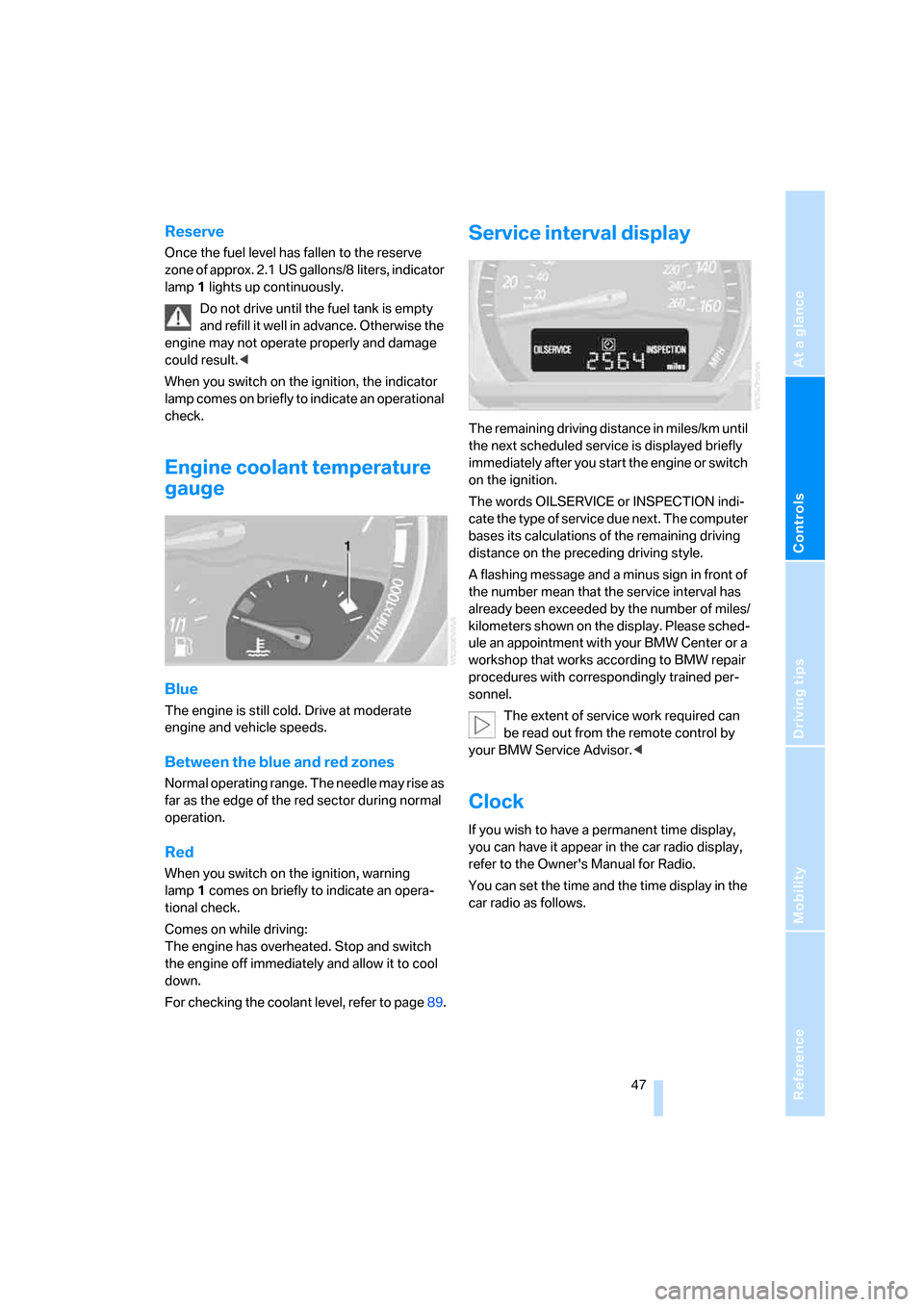
The words OILSERVICE or INSPECTION indi-
cate the type of service due next. The computer
bases its calculations of the remaining driving
distance on the preceding driving style.
A flashing message and a minus sign in front of
the number mean that the service interval has
already been exceeded by the number of miles/
kilometers shown on the display. Please sched-
ule an appointment with your BMW Center or a
workshop that works according to BMW repair
procedures with correspondingly trained per-
sonnel.
The extent of service work required can
be read out from the remote control by
your BMW Service Advisor.<
Clock
If you wish to have a permanent time display,
you can have it appear in the car radio display,
refer to the Owner's Manual for Radio.
You can set the time and the time display in the
car radio as follows.
Page 57 of 128
Reference
At a glance
Controls
Driving tips
Mobility
55
Lamps
Parking lamps/Low beams
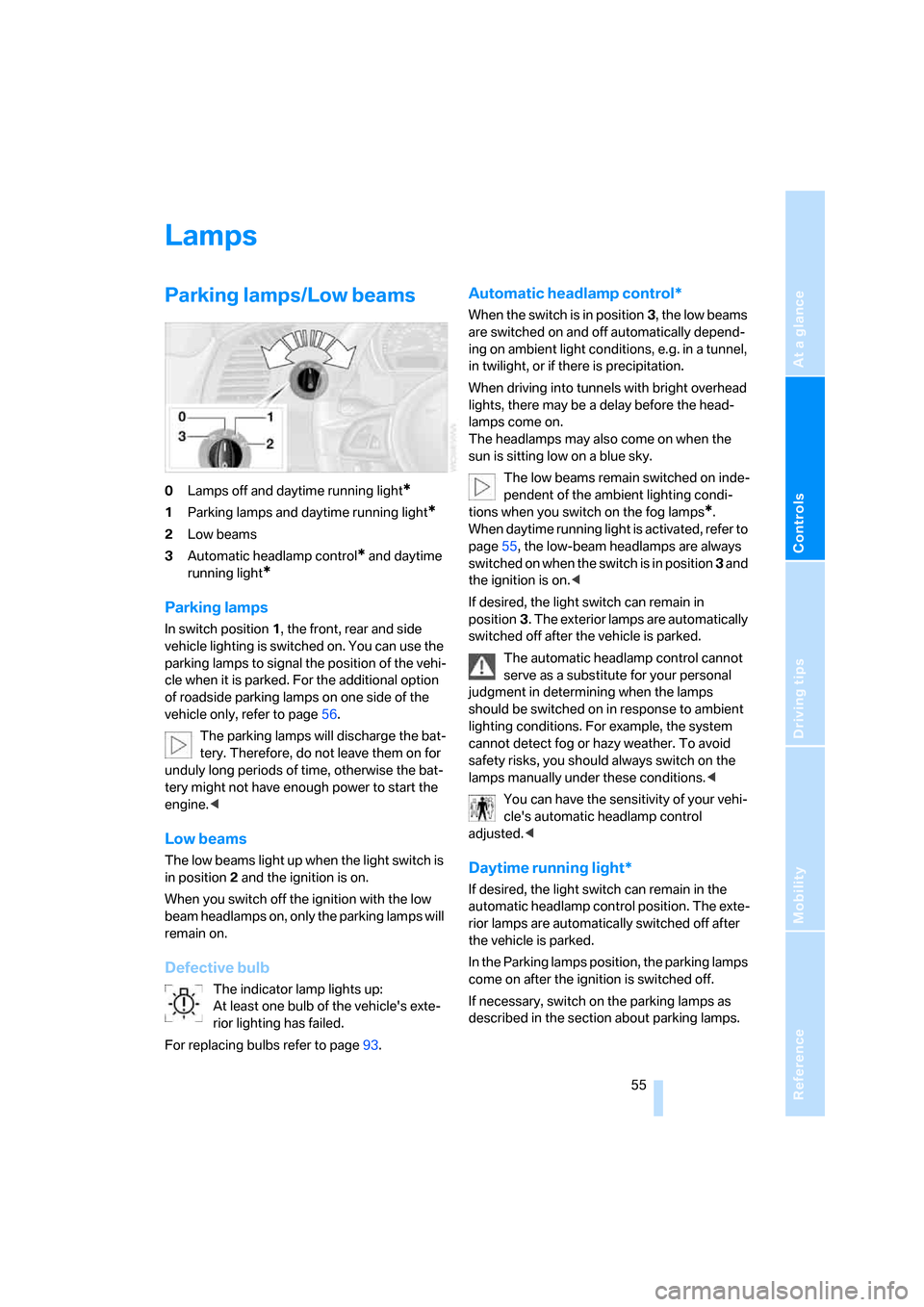
0Lamps off and daytime running light*
1Parking lamps and daytime running light*
2Low beams
3Automatic headlamp control
* and daytime
running light
*
Parking lamps
In switch position1, the front, rear and side
vehicle lighting is switched on. You can use the
parking lamps to signal the position of the vehi-
cle when it is parked. For the additional option
of roadside parking lamps on one side of the
vehicle only, refer to page56.
The parking lamps will discharge the bat-
tery. Therefore, do not leave them on for
unduly long periods of time, otherwise the bat-
tery might not have enough power to start the
engine.<
Low beams
The low beams light up when the light switch is
in position 2 and the ignition is on.
When you switch off the ignition with the low
beam headlamps on, only the parking lamps will
remain on.
Defective bulb
The indicator lamp lights up:
At least one bulb of the vehicle's exte-
rior lighting has failed.
For replacing bulbs refer to page93.
Automatic headlamp control*
When the switch is in position3, the low beams
are switched on and off automatically depend-
ing on ambient light conditions, e.g. in a tunnel,
in twilight, or if there is precipitation.
When driving into tunnels with bright overhead
lights, there may be a delay before the head-
lamps come on.
The headlamps may also come on when the
sun is sitting low on a blue sky.
The low beams remain switched on inde-
pendent of the ambient lighting condi-
tions when you switch on the fog lamps
*.
When daytime running light is activated, refer to
page55, the low-beam headlamps are always
switched on when the switch is in position 3 and
the ignition is on.<
If desired, the light switch can remain in
position3. The exterior lamps are automatically
switched off after the vehicle is parked.
The automatic headlamp control cannot
serve as a substitute for your personal
judgment in determining when the lamps
should be switched on in response to ambient
lighting conditions. For example, the system
cannot detect fog or hazy weather. To avoid
safety risks, you should always switch on the
lamps manually under these conditions.<
You can have the sensitivity of your vehi-
cle's automatic headlamp control
adjusted.<
Daytime running light*
If desired, the light switch can remain in the
automatic headlamp control position. The exte-
rior lamps are automatically switched off after
the vehicle is parked.
In the Parking lamps position, the parking lamps
come on after the ignition is switched off.
If necessary, switch on the parking lamps as
described in the section about parking lamps.
Page 58 of 128
Lamps
56 You can have daytime running light acti-
vated/deactivated on your vehicle.<
Pathway lighting
If you activate the headlamp flasher after park-
ing the car, with the lights switched off, the low
beams come on and remain on for a certain
time.
You can have this function activated/
deactivated as well as the duration of the
pathway lighting set.<
LIGHTS ON warning
Whenever you open the driver's door after hav-
ing turned the key to position 0, you will hear an
acoustic signal for a few seconds to remind you
that the lamps have not been switched off.
High beams/Roadside
parking lamps
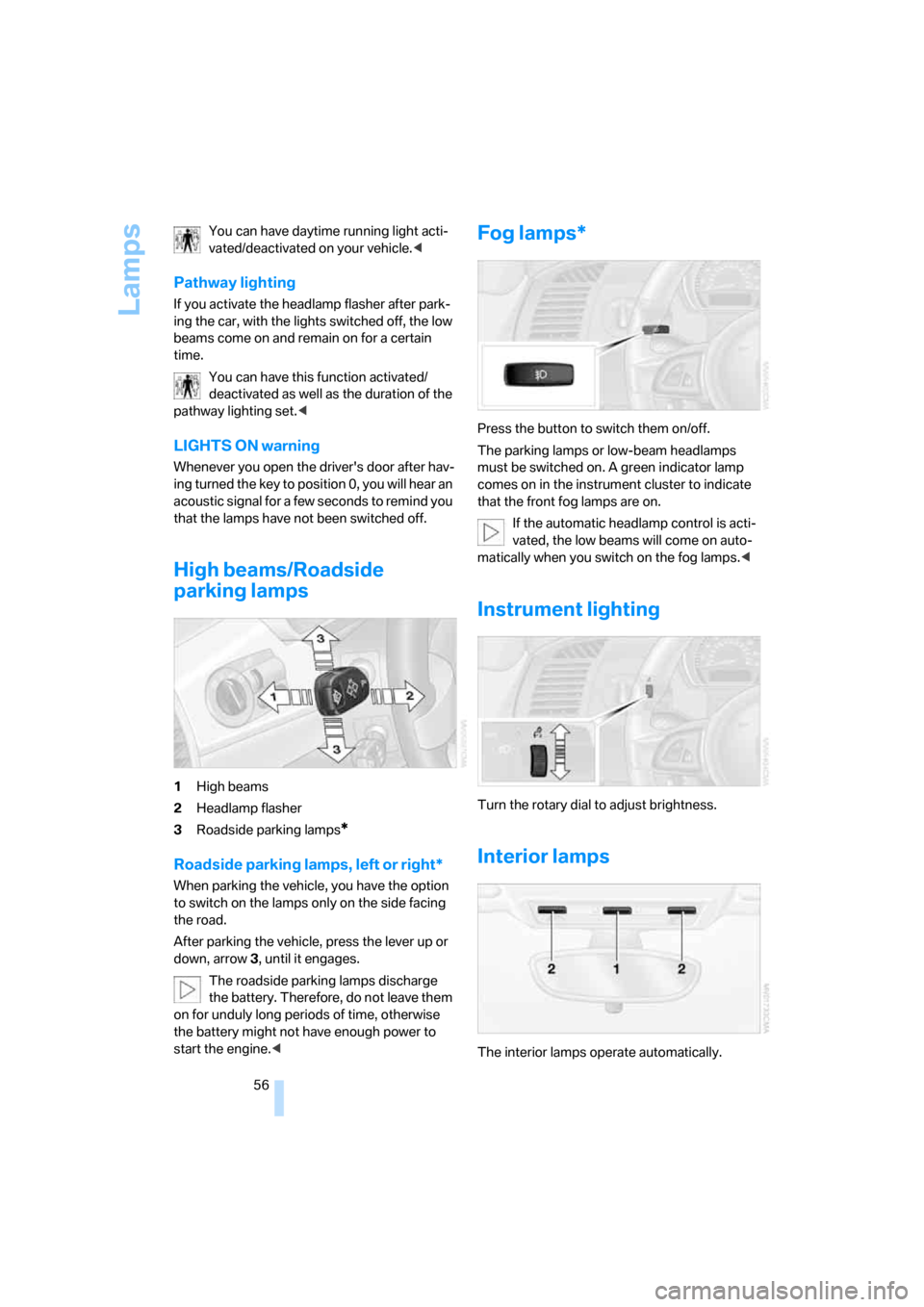
1High beams
2Headlamp flasher
3Roadside parking lamps
*
Roadside parking lamps, left or right*
When parking the vehicle, you have the option
to switch on the lamps only on the side facing
the road.
After parking the vehicle, press the lever up or
down, arrow 3, until it engages.
The roadside parking lamps discharge
the battery. Therefore, do not leave them
on for unduly long periods of time, otherwise
the battery might not have enough power to
start the engine.<
Fog lamps*
Press the button to switch them on/off.
The parking lamps or low-beam headlamps
must be switched on. A green indicator lamp
comes on in the instrument cluster to indicate
that the front fog lamps are on.
If the automatic headlamp control is acti-
vated, the low beams will come on auto-
matically when you switch on the fog lamps.<
Instrument lighting
Turn the rotary dial to adjust brightness.
Interior lamps
The interior lamps operate automatically.
Page 64 of 128
Climate
62
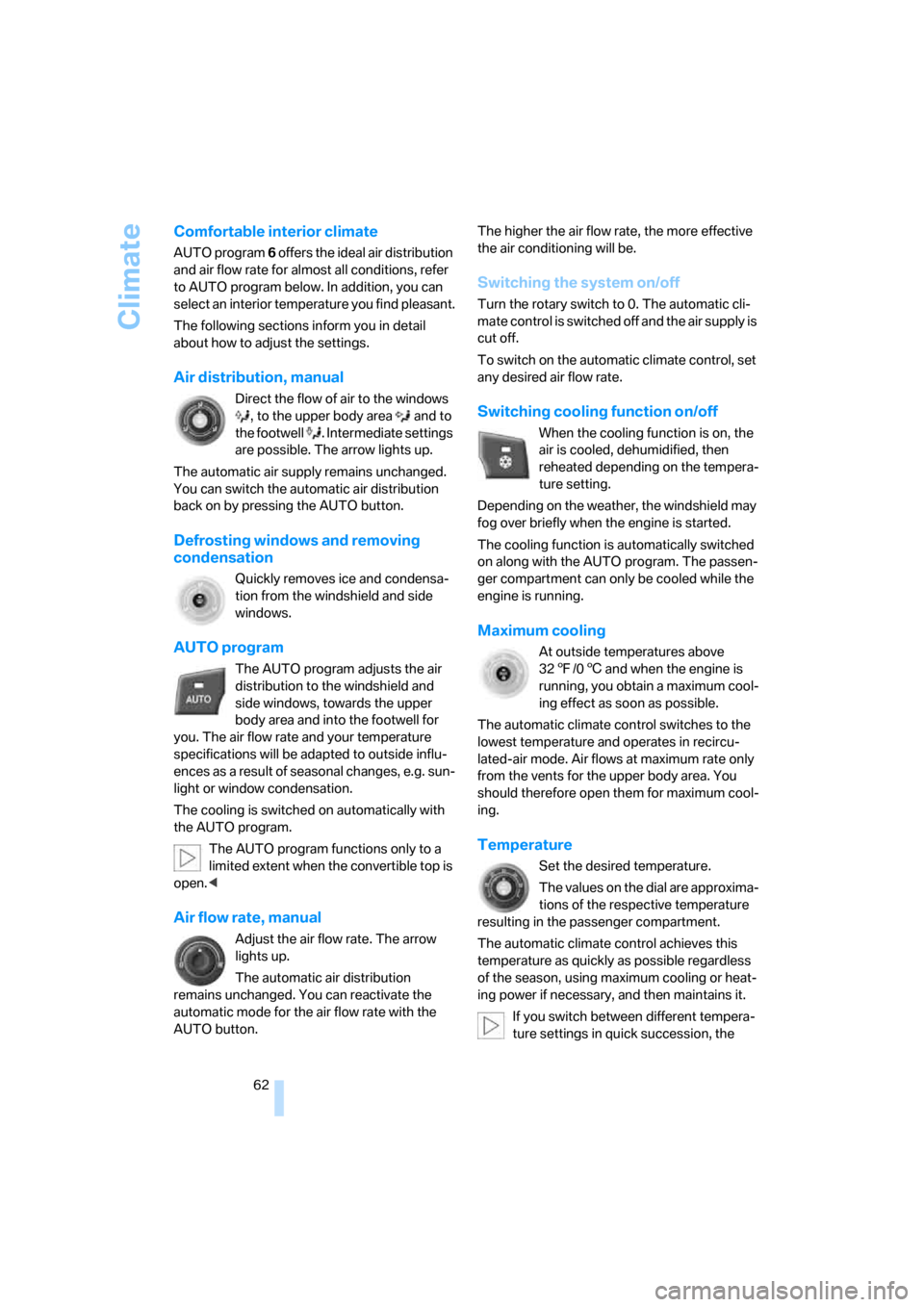
Comfortable interior climate
AUTO program 6 offers the ideal air distribution
and air flow rate for almost all conditions, refer
to AUTO program below. In addition, you can
select an interior temperature you find pleasant.
The following sections inform you in detail
about how to adjust the settings.
Air distribution, manual
Direct the flow of air to the windows
, to the upper body area and to
the footwell . Intermediate settings
are possible. The arrow lights up.
The automatic air supply remains unchanged.
You can switch the automatic air distribution
back on by pressing the AUTO button.
Defrosting windows and removing
condensation
Quickly removes ice and condensa-
tion from the windshield and side
windows.
AUTO program
The AUTO program adjusts the air
distribution to the windshield and
side windows, towards the upper
body area and into the footwell for
you. The air flow rate and your temperature
specifications will be adapted to outside influ-
ences as a result of seasonal changes, e.g. sun-
light or window condensation.
The cooling is switched on automatically with
the AUTO program.
The AUTO program functions only to a
limited extent when the convertible top is
open.<
Air flow rate, manual
Adjust the air flow rate. The arrow
lights up.
The automatic air distribution
remains unchanged. You can reactivate the
automatic mode for the air flow rate with the
AUTO button.The higher the air flow rate, the more effective
the air conditioning will be.
Switching the system on/off
Turn the rotary switch to 0. The automatic cli-
mate control is switched off and the air supply is
cut off.
To switch on the automatic climate control, set
any desired air flow rate.
Switching cooling function on/off
When the cooling function is on, the
air is cooled, dehumidified, then
reheated depending on the tempera-
ture setting.
Depending on the weather, the windshield may
fog over briefly when the engine is started.
The cooling function is automatically switched
on along with the AUTO program. The passen-
ger compartment can only be cooled while the
engine is running.
Maximum cooling
At outside temperatures above
327/06 and when the engine is
running, you obtain a maximum cool-
ing effect as soon as possible.
The automatic climate control switches to the
lowest temperature and operates in recircu-
lated-air mode. Air flows at maximum rate only
from the vents for the upper body area. You
should therefore open them for maximum cool-
ing.
Temperature
Set the desired temperature.
The values on the dial are approxima-
tions of the respective temperature
resulting in the passenger compartment.
The automatic climate control achieves this
temperature as quickly as possible regardless
of the season, using maximum cooling or heat-
ing power if necessary, and then maintains it.
If you switch between different tempera-
ture settings in quick succession, the
Page 80 of 128
Refueling
78
Refueling
Always switch off the engine before refu-
eling. Otherwise the tank cannot be
refilled. The Service Engine Soon warning lamp
will come on.<
Take all precautionary measures and
observe all applicable regulations when
handling fuel. Do not carry any spare fuel con-
tainers in your vehicle. They can develop a leak
and cause an explosion or cause a fire in the
event of an accident.<
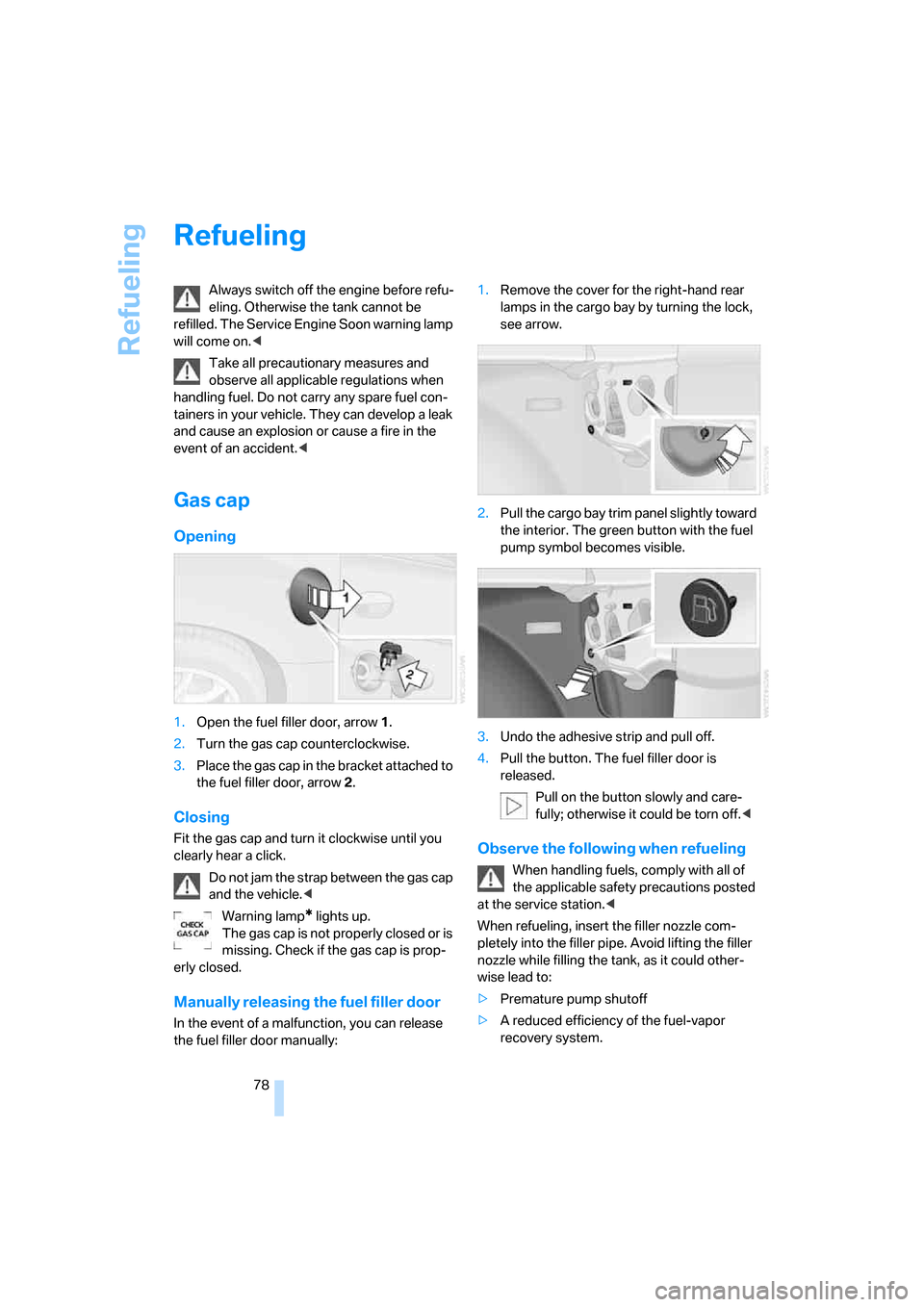
Gas cap
Opening
1.Open the fuel filler door, arrow 1.
2.Turn the gas cap counterclockwise.
3.Place the gas cap in the bracket attached to
the fuel filler door, arrow 2.
Closing
Fit the gas cap and turn it clockwise until you
clearly hear a click.
Do not jam the strap between the gas cap
and the vehicle.<
Warning lamp
* lights up.
The gas cap is not properly closed or is
missing. Check if the gas cap is prop-
erly closed.
Manually releasing the fuel filler door
In the event of a malfunction, you can release
the fuel filler door manually:1.Remove the cover for the right-hand rear
lamps in the cargo bay by turning the lock,
see arrow.
2.Pull the cargo bay trim panel slightly toward
the interior. The green button with the fuel
pump symbol becomes visible.
3.Undo the adhesive strip and pull off.
4.Pull the button. The fuel filler door is
released.
Pull on the button slowly and care-
fully; otherwise it could be torn off.<
Observe the following when refueling
When handling fuels, comply with all of
the applicable safety precautions posted
at the service station.<
When refueling, insert the filler nozzle com-
pletely into the filler pipe. Avoid lifting the filler
nozzle while filling the tank, as it could other-
wise lead to:
>Premature pump shutoff
>A reduced efficiency of the fuel-vapor
recovery system.
Page 89 of 128
Reference
At a glance
Controls
Driving tips
Mobility
87
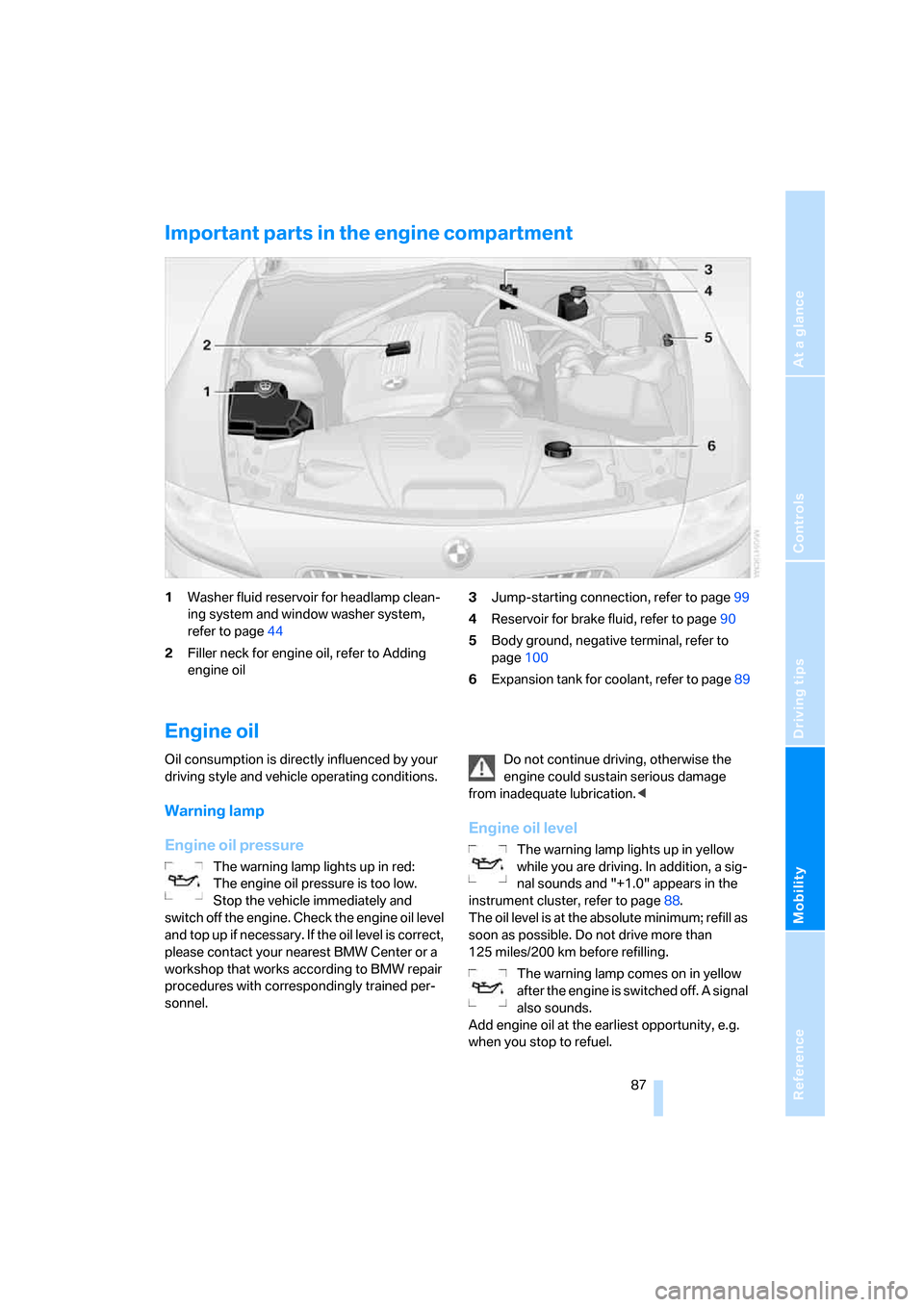
Important parts in the engine compartment
1Washer fluid reservoir for headlamp clean-
ing system and window washer system,
refer to page44
2Filler neck for engine oil, refer to Adding
engine oil3Jump-starting connection, refer to page99
4Reservoir for brake fluid, refer to page90
5Body ground, negative terminal, refer to
page100
6Expansion tank for coolant, refer to page89
Engine oil
Oil consumption is directly influenced by your
driving style and vehicle operating conditions.
Warning lamp
Engine oil pressure
The warning lamp lights up in red:
The engine oil pressure is too low.
Stop the vehicle immediately and
switch off the engine. Check the engine oil level
and top up if necessary. If the oil level is correct,
please contact your nearest BMW Center or a
workshop that works according to BMW repair
procedures with correspondingly trained per-
sonnel.Do not continue driving, otherwise the
engine could sustain serious damage
from inadequate lubrication.<
Engine oil level
The warning lamp lights up in yellow
while you are driving. In addition, a sig-
nal sounds and "+1.0" appears in the
instrument cluster, refer to page88.
The oil level is at the absolute minimum; refill as
soon as possible. Do not drive more than
125 miles/200 km before refilling.
The warning lamp comes on in yellow
after the engine is switched off. A signal
also sounds.
Add engine oil at the earliest opportunity, e.g.
when you stop to refuel.
Page 95 of 128
Reference
At a glance
Controls
Driving tips
Mobility
93
Replacing components
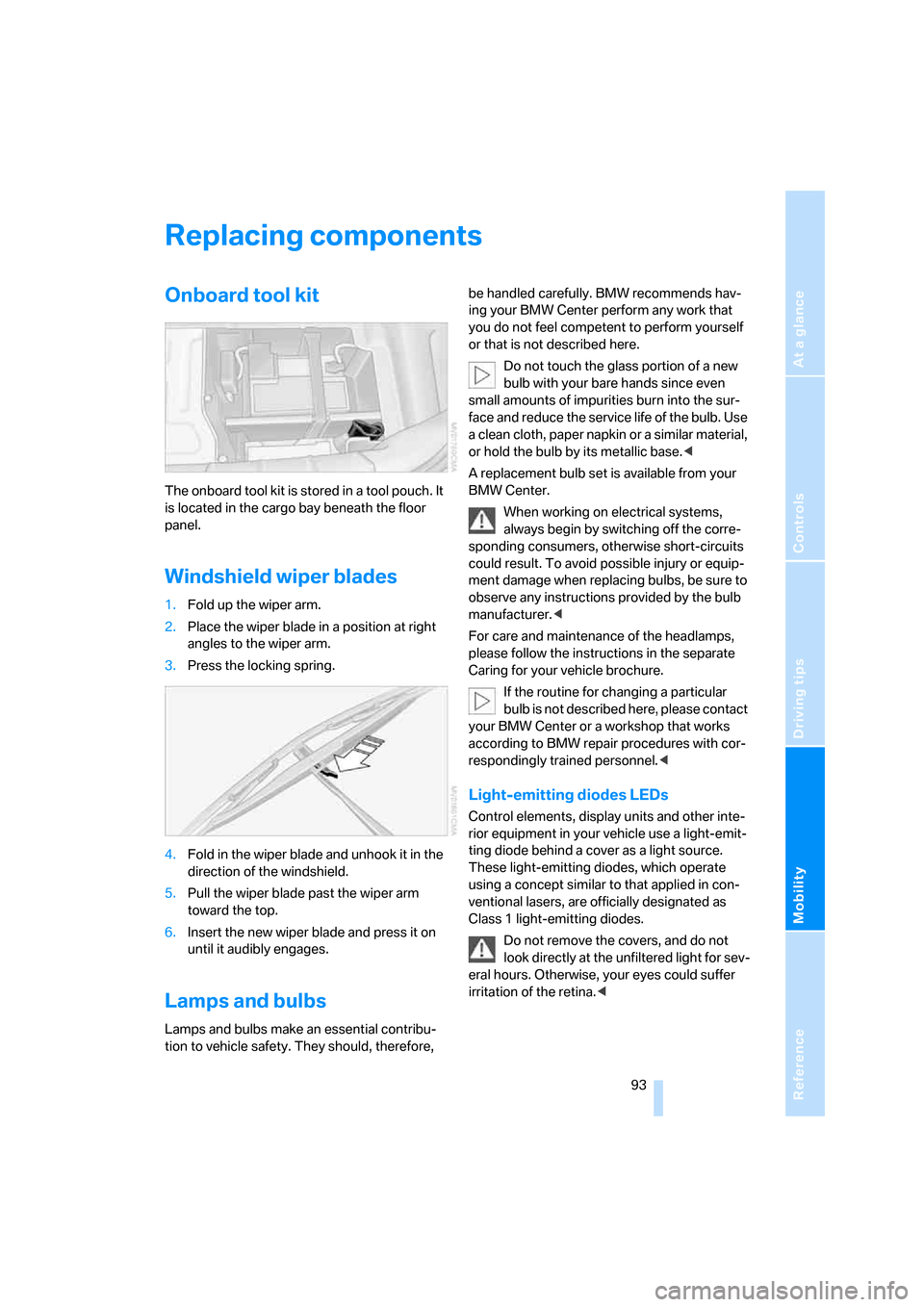
Onboard tool kit
The onboard tool kit is stored in a tool pouch. It
is located in the cargo bay beneath the floor
panel.
Windshield wiper blades
1.Fold up the wiper arm.
2.Place the wiper blade in a position at right
angles to the wiper arm.
3.Press the locking spring.
4.Fold in the wiper blade and unhook it in the
direction of the windshield.
5.Pull the wiper blade past the wiper arm
toward the top.
6.Insert the new wiper blade and press it on
until it audibly engages.
Lamps and bulbs
Lamps and bulbs make an essential contribu-
tion to vehicle safety. They should, therefore, be handled carefully. BMW recommends hav-
ing your BMW Center perform any work that
you do not feel competent to perform yourself
or that is not described here.
Do not touch the glass portion of a new
bulb with your bare hands since even
small amounts of impurities burn into the sur-
face and reduce the service life of the bulb. Use
a clean cloth, paper napkin or a similar material,
or hold the bulb by its metallic base.<
A replacement bulb set is available from your
BMW Center.
When working on electrical systems,
always begin by switching off the corre-
sponding consumers, otherwise short-circuits
could result. To avoid possible injury or equip-
ment damage when replacing bulbs, be sure to
observe any instructions provided by the bulb
manufacturer.<
For care and maintenance of the headlamps,
please follow the instructions in the separate
Caring for your vehicle brochure.
If the routine for changing a particular
bulb is not described here, please contact
your BMW Center or a workshop that works
according to BMW repair procedures with cor-
respondingly trained personnel.<
Light-emitting diodes LEDs
Control elements, display units and other inte-
rior equipment in your vehicle use a light-emit-
ting diode behind a cover as a light source.
These light-emitting diodes, which operate
using a concept similar to that applied in con-
ventional lasers, are officially designated as
Class 1 light-emitting diodes.
Do not remove the covers, and do not
look directly at the unfiltered light for sev-
eral hours. Otherwise, your eyes could suffer
irritation of the retina.<
Page 99 of 128
Reference
At a glance
Controls
Driving tips
Mobility
97
Jacking points
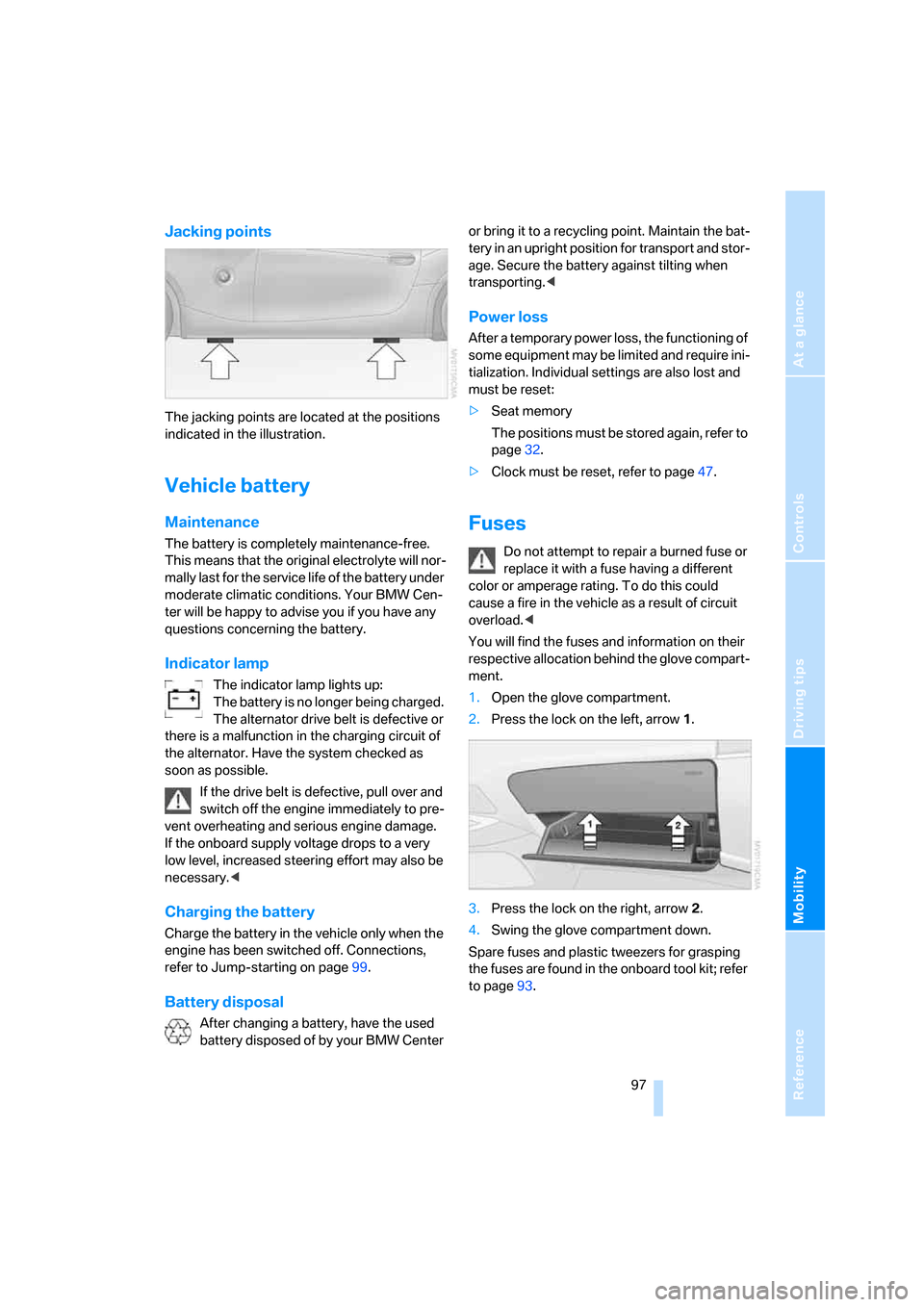
The jacking points are located at the positions
indicated in the illustration.
Vehicle battery
Maintenance
The battery is completely maintenance-free.
This means that the original electrolyte will nor-
mally last for the service life of the battery under
moderate climatic conditions. Your BMW Cen-
ter will be happy to advise you if you have any
questions concerning the battery.
Indicator lamp
The indicator lamp lights up:
The battery is no longer being charged.
The alternator drive belt is defective or
there is a malfunction in the charging circuit of
the alternator. Have the system checked as
soon as possible.
If the drive belt is defective, pull over and
switch off the engine immediately to pre-
vent overheating and serious engine damage.
If the onboard supply voltage drops to a very
low level, increased steering effort may also be
necessary.<
Charging the battery
Charge the battery in the vehicle only when the
engine has been switched off. Connections,
refer to Jump-starting on page99.
Battery disposal
After changing a battery, have the used
battery disposed of by your BMW Center or bring it to a recycling point. Maintain the bat-
tery in an upright position for transport and stor-
age. Secure the battery against tilting when
transporting.<
Power loss
After a temporary power loss, the functioning of
some equipment may be limited and require ini-
tialization. Individual settings are also lost and
must be reset:
>Seat memory
The positions must be stored again, refer to
page32.
>Clock must be reset, refer to page47.
Fuses
Do not attempt to repair a burned fuse or
replace it with a fuse having a different
color or amperage rating. To do this could
cause a fire in the vehicle as a result of circuit
overload.<
You will find the fuses and information on their
respective allocation behind the glove compart-
ment.
1.Open the glove compartment.
2.Press the lock on the left, arrow1.
3.Press the lock on the right, arrow2.
4.Swing the glove compartment down.
Spare fuses and plastic tweezers for grasping
the fuses are found in the onboard tool kit; refer
to page93.
Page 116 of 128
Everything from A to Z
114 Changes, technical, refer to
For your own safety5
Changing a wheel96
– Run-Flat Tires96
Charge indicator lamp12,97
Check gas cap, indicator
lamp13
Child-restraint mounting
system, LATCH37
Child-restraint systems36
Child seat, refer to Installing
child-restraint systems36
Chrome parts, refer to the
Caring for your vehicle
brochure
Cigarette lighter65
Cleaning the rear window,
refer to the Caring for your
vehicle brochure
Cleaning the vehicle, refer to
the Caring for your vehicle
brochure
Cleaning the windows
– automatically, refer to Rain
sensor43
– reservoir capacity110
– spray nozzles44
– washer/wiper system43
– washer fluid44
– washer fluid reservoir44
Clock47
– 12h/24h mode48
– onboard computer48
– setting48
– setting, refer also to Owner's
Manual for Radio/Onboard
Computer
Clothes hooks66
Cockpit10
Cold start, refer to Starting the
engine38
Comfort area, refer to Around
the center console14
Compact disc operation, refer
to Owner's Manual for
Radio/Onboard ComputerComputer48
– button BC48
– clock, 12h/24h mode48
– refer to Owner's Manual for
Onboard Computer
Computer, refer to the
separate Owner's Manual
Condensation, refer to When
the vehicle is parked72
Condensation, removing from
windows
– air conditioning59
– automatic climate control62
Configuring settings, refer to
Vehicle Memory, Key
Memory18
Connecting vacuum cleaner,
refer to Connecting
electrical appliances67
Consumption, refer to
Average fuel
consumption48
Consumption display, refer to
Fuel gauge46
Controls, refer to Cockpit10
Convenience operation
– convertible top20
– from outside20
– windows20
Convertible top26,27
– care, refer to the Caring for
your vehicle brochure
– convenience operation20
– electrical fault28
– emergency closing28
– fully automatic27
– malfunction28
– manual26
– mechanical26
Convertible top compartment
panel23
Coolant89
– checking level89
– indicator lamp13
– thermometer47
Coolant water, refer to
Coolant89Cooling
– maximum62
– refer to Switching cooling
function on/off59,62
Cooling fluid, refer to
Coolant89
Cooling function
– air conditioning59
– automatic climate control62
Cooling system, refer to
Capacities110
Copyright2
Correct tires84
Cruise control44
Cruising range48
Cup holders, refer to
Beverage holders65
Curb weight, refer to
Weights109
Cylinders, refer to Engine
data106D
Dashboard, refer to
Cockpit10
Dashboard lighting, refer to
Instrument lighting56
Data, technical
– capacities110
– dimensions107,108
– engine106
– measurements107,108
– weights109
Daytime running light55
DBC Dynamic Brake
Control49
– indicator/warning lamp13
Deadlocking, refer to
Locking19
Defective bulb55
Defrosting, windows59,62
Defrosting the windshield,
refer to Defrosting
windows59,62
Defrosting windows and
removing condensation
– air conditioning59
– automatic climate control62