button BMW Z4 COUPE 2006 E86 Owner's Guide
[x] Cancel search | Manufacturer: BMW, Model Year: 2006, Model line: Z4 COUPE, Model: BMW Z4 COUPE 2006 E86Pages: 128, PDF Size: 4.41 MB
Page 48 of 128
Everything under control
46
Everything under control
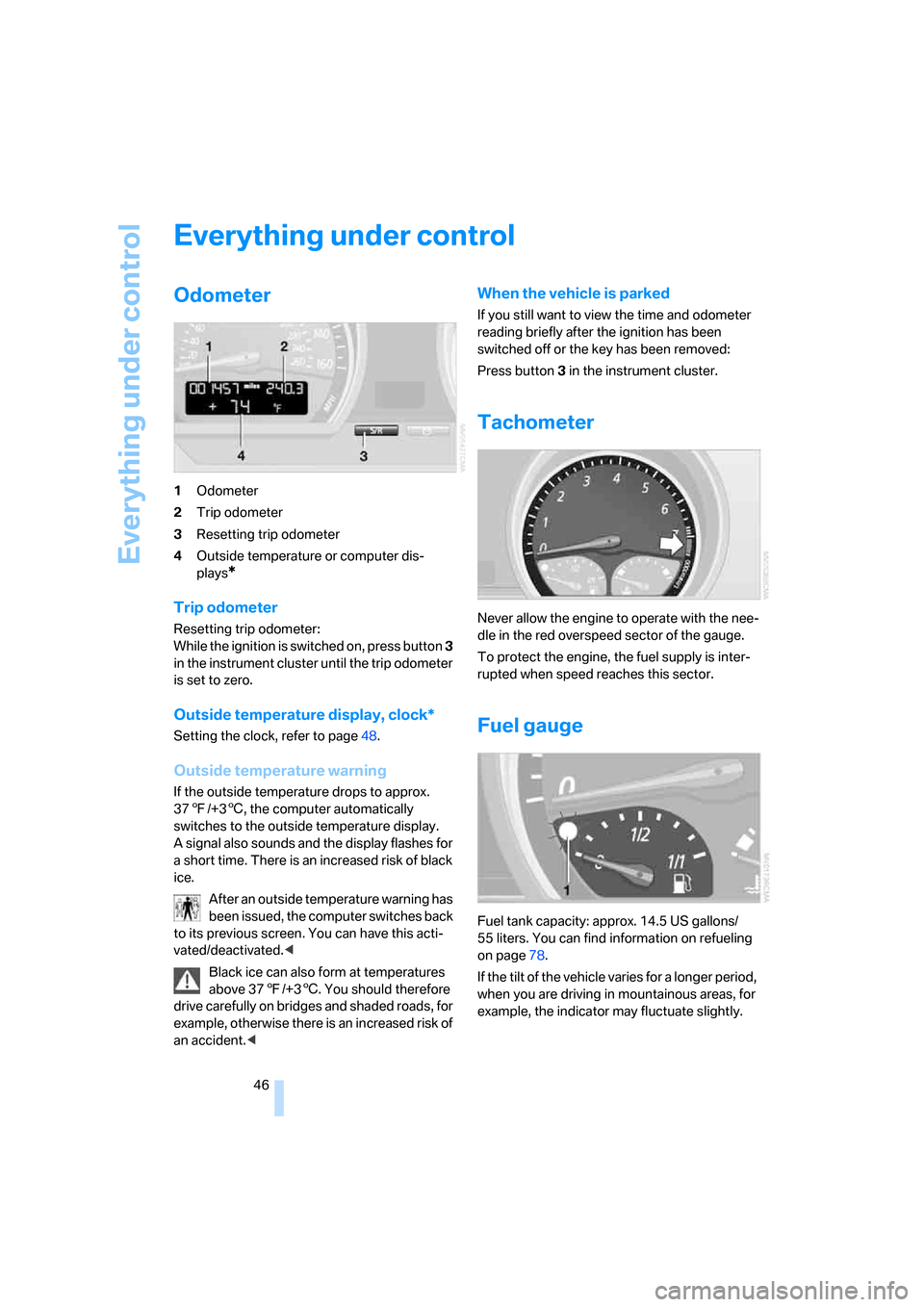
Odometer
1Odometer
2Trip odometer
3Resetting trip odometer
4Outside temperature or computer dis-
plays
*
Trip odometer
Resetting trip odometer:
While the ignition is switched on, press button 3
in the instrument cluster until the trip odometer
is set to zero.
Outside temperature display, clock*
Setting the clock, refer to page48.
Outside temperature warning
If the outside temperature drops to approx.
377/+36, the computer automatically
switches to the outside temperature display.
A signal also sounds and the display flashes for
a short time. There is an increased risk of black
ice.
After an outside temperature warning has
been issued, the computer switches back
to its previous screen. You can have this acti-
vated/deactivated.<
Black ice can also form at temperatures
above 377/+36. You should therefore
drive carefully on bridges and shaded roads, for
example, otherwise there is an increased risk of
an accident.<
When the vehicle is parked
If you still want to view the time and odometer
reading briefly after the ignition has been
switched off or the key has been removed:
Press button 3 in the instrument cluster.
Tachometer
Never allow the engine to operate with the nee-
dle in the red overspeed sector of the gauge.
To protect the engine, the fuel supply is inter-
rupted when speed reaches this sector.
Fuel gauge
Fuel tank capacity: approx. 14.5 US gallons/
55 liters. You can find information on refueling
on page78.
If the tilt of the vehicle varies for a longer period,
when you are driving in mountainous areas, for
example, the indicator may fluctuate slightly.
Page 50 of 128
Everything under control
48
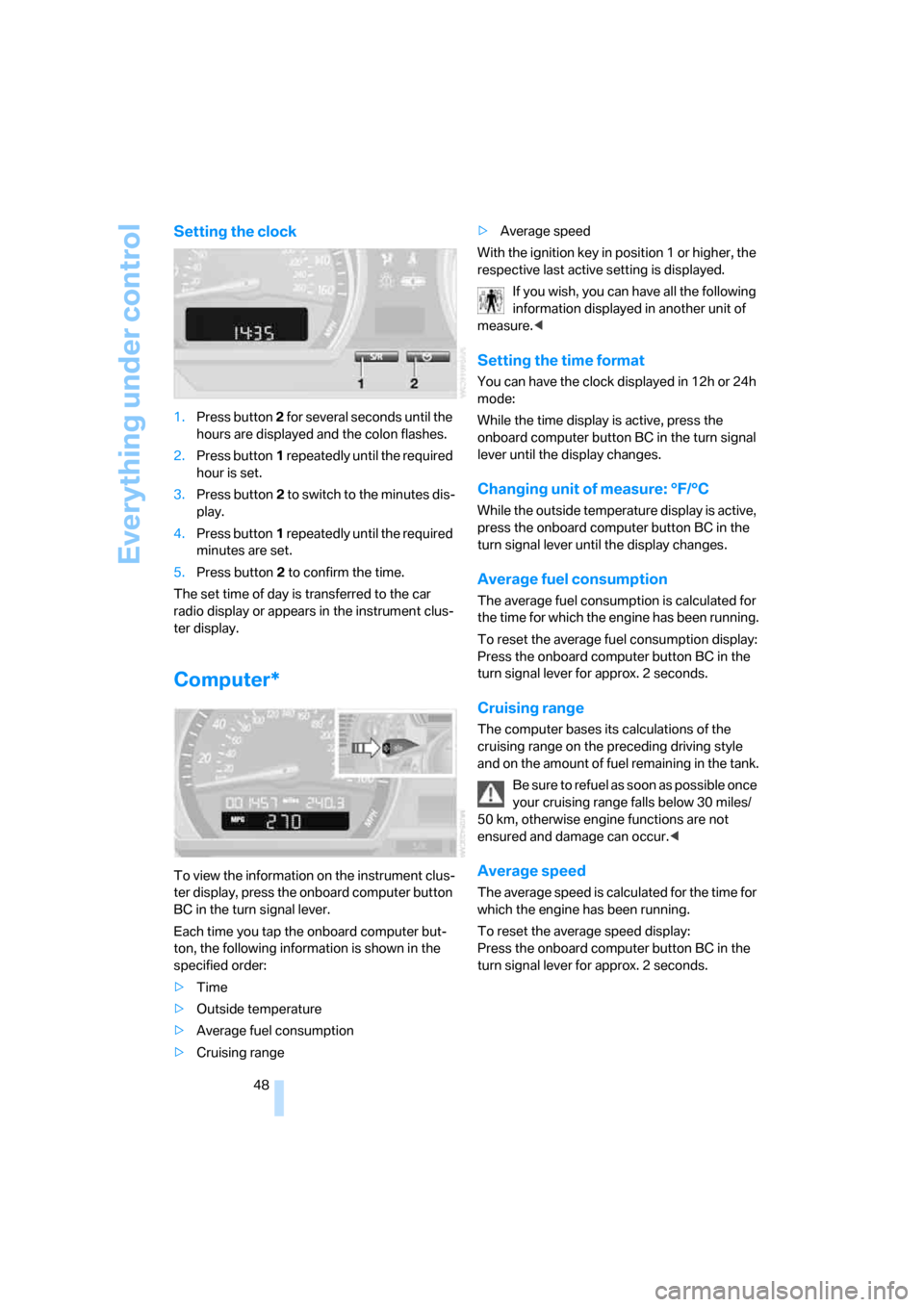
Setting the clock
1.Press button 2 for several seconds until the
hours are displayed and the colon flashes.
2.Press button1 repeatedly until the required
hour is set.
3.Press button2 to switch to the minutes dis-
play.
4.Press button1 repeatedly until the required
minutes are set.
5.Press button2 to confirm the time.
The set time of day is transferred to the car
radio display or appears in the instrument clus-
ter display.
Computer*
To view the information on the instrument clus-
ter display, press the onboard computer button
BC in the turn signal lever.
Each time you tap the onboard computer but-
ton, the following information is shown in the
specified order:
>Time
>Outside temperature
>Average fuel consumption
>Cruising range>Average speed
With the ignition key in position 1 or higher, the
respective last active setting is displayed.
If you wish, you can have all the following
information displayed in another unit of
measure.<
Setting the time format
You can have the clock displayed in 12h or 24h
mode:
While the time display is active, press the
onboard computer button BC in the turn signal
lever until the display changes.
Changing unit of measure: °F/°C
While the outside temperature display is active,
press the onboard computer button BC in the
turn signal lever until the display changes.
Average fuel consumption
The average fuel consumption is calculated for
the time for which the engine has been running.
To reset the average fuel consumption display:
Press the onboard computer button BC in the
turn signal lever for approx. 2 seconds.
Cruising range
The computer bases its calculations of the
cruising range on the preceding driving style
and on the amount of fuel remaining in the tank.
Be sure to refuel as soon as possible once
your cruising range falls below 30 miles/
50 km, otherwise engine functions are not
ensured and damage can occur.<
Average speed
The average speed is calculated for the time for
which the engine has been running.
To reset the average speed display:
Press the onboard computer button BC in the
turn signal lever for approx. 2 seconds.
Page 51 of 128
Reference
At a glance
Controls
Driving tips
Mobility
49
Technology for driving comfort and safety
Driving stability control
systems
Your BMW is equipped with a series of systems
that help maintain driving stability even in
adverse driving situations.
Antilock Brake System ABS
ABS keeps the wheels from locking during
braking. Steering stability is maintained even
during full brake applications. In this way, active
safety is enhanced.
ABS is operational each time the engine is
started. Braking safely, refer to page71.
Electronic brake-force distribution
The system controls brake-force application at
the rear wheels in order to obtain increased sta-
bility in the vehicle's braking response.
Dynamic Brake Control DBC
When you apply the brakes rapidly, this system
automatically produces the maximum braking
force boost and thus helps to achieve the short-
est possible braking distance during full brak-
ing. At the same time, the benefits of the ABS
are also exploited.
As long as you want full braking to continue, do
not reduce pressure on the brake.
Dynamic Stability Control DSC
DSC prevents slip at the drive wheels while
starting off and accelerating the vehicle. DSC
also recognizes unstable vehicle conditions,
such as fishtailing or nose-diving. In these
cases, and subject to physical limits, DSC helps
to keep the vehicle on a steady course by
reducing engine speed and by applying brakes
at individual wheels.
The laws of physics cannot be repealed
even with DSC. It will always be the
driver's responsibility to drive in a manner that
matches road conditions. Therefore, do not limit the additional safety margin by practicing
risky driving.<
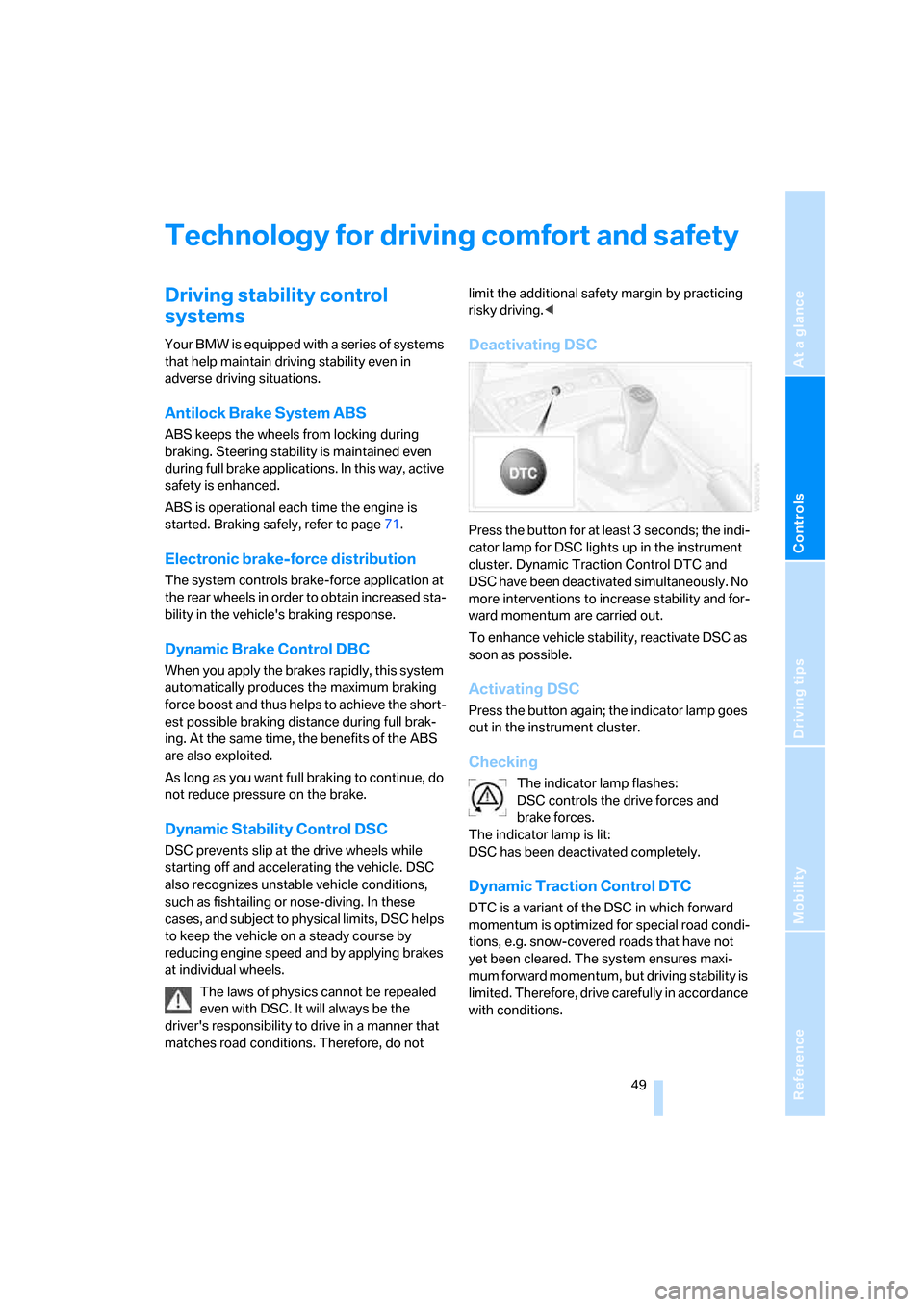
Deactivating DSC
Press the button for at least 3 seconds; the indi-
cator lamp for DSC lights up in the instrument
cluster. Dynamic Traction Control DTC and
DSC have been deactivated simultaneously. No
more interventions to increase stability and for-
ward momentum are carried out.
To enhance vehicle stability, reactivate DSC as
soon as possible.
Activating DSC
Press the button again; the indicator lamp goes
out in the instrument cluster.
Checking
The indicator lamp flashes:
DSC controls the drive forces and
brake forces.
The indicator lamp is lit:
DSC has been deactivated completely.
Dynamic Traction Control DTC
DTC is a variant of the DSC in which forward
momentum is optimized for special road condi-
tions, e.g. snow-covered roads that have not
yet been cleared. The system ensures maxi-
mum forward momentum, but driving stability is
limited. Therefore, drive carefully in accordance
with conditions.
Page 52 of 128
Technology for driving comfort and safety
50 In the following exceptional circumstances, it
may be effective to activate the DTC for a short
period:
>When driving on snow-covered grades, in
slush or on uncleared, snow-covered roads
>When rocking the vehicle or starting off in
deep snow or on loose surfaces
>When driving with snow chains
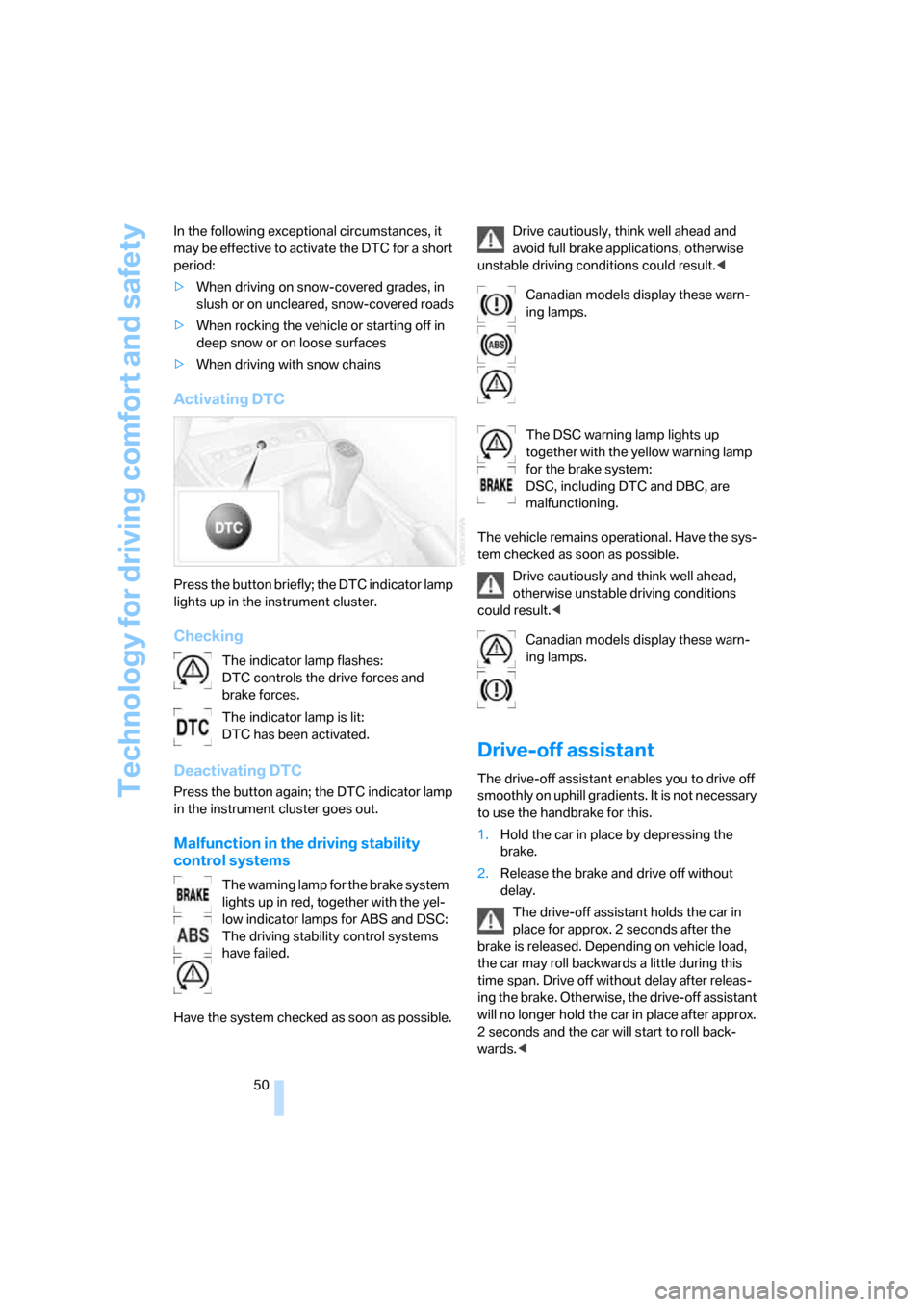
Activating DTC
Press the button briefly; the DTC indicator lamp
lights up in the instrument cluster.
Checking
Deactivating DTC
Press the button again; the DTC indicator lamp
in the instrument cluster goes out.
Malfunction in the driving stability
control systems
Have the system checked as soon as possible.Drive cautiously, think well ahead and
avoid full brake applications, otherwise
unstable driving conditions could result.<
The vehicle remains operational. Have the sys-
tem checked as soon as possible.
Drive cautiously and think well ahead,
otherwise unstable driving conditions
could result.<
Drive-off assistant
The drive-off assistant enables you to drive off
smoothly on uphill gradients. It is not necessary
to use the handbrake for this.
1.Hold the car in place by depressing the
brake.
2.Release the brake and drive off without
delay.
The drive-off assistant holds the car in
place for approx. 2 seconds after the
brake is released. Depending on vehicle load,
the car may roll backwards a little during this
time span. Drive off without delay after releas-
ing the brake. Otherwise, the drive-off assistant
will no longer hold the car in place after approx.
2 seconds and the car will start to roll back-
wards.< The indicator lamp flashes:
DTC controls the drive forces and
brake forces.
The indicator lamp is lit:
DTC has been activated.
The warning lamp for the brake system
lights up in red, together with the yel-
low indicator lamps for ABS and DSC:
The driving stability control systems
have failed.
Canadian models display these warn-
ing lamps.
The DSC warning lamp lights up
together with the yellow warning lamp
for the brake system:
DSC, including DTC and DBC, are
malfunctioning.
Canadian models display these warn-
ing lamps.
Page 53 of 128
Reference
At a glance
Controls
Driving tips
Mobility
51
Malfunction
The warning lamp for the brake system
lights up in yellow. The drive-off assis-
tant has failed. The car will not be held
in place after the brake is released. Have the
system checked as soon as possible.
Flat Tire Monitor FTM
The concept
The Flat Tire Monitor monitors tire pressures
while the car is being driven. The system
reports any significant loss of pressure in one
tire in relation to another.
In the event of tire pressure loss, the rolling
radius of the tire changes, thereby affecting the
rotational speed of the wheels. This change is
detected, and a flat tire warning is issued to the
driver.
System requirements
To ensure a reliable flat tire warning, the system
must be initialized with the correct tire inflation
pressures.
The system must be reinitialized each
time a tire inflation pressure has been cor-
rected or a wheel or tire has been changed.<
System limitations
The Flat Tire Monitor is unable to warn
the driver of sudden, severe tire damage
caused by external factors, nor can it identify
the gradual loss of pressure that will inevitably
occur in all four tires over a lengthy period of
time.<
The system could issue a false warning or func-
tion in a delayed manner in the following situa-
tions:
>System was not initialized
>Driving on a snow-covered or slippery road
surface
>Performance-oriented driving: slip at the
drive wheels, high levels of lateral accelera-
tion
>Driving with snow chains attached
Initializing the system
The initialization is completed while you
are driving, and can be interrupted at any
time. Initialization is continued automatically
when you continue driving.
When driving with snow chains, do not initialize
the system.<
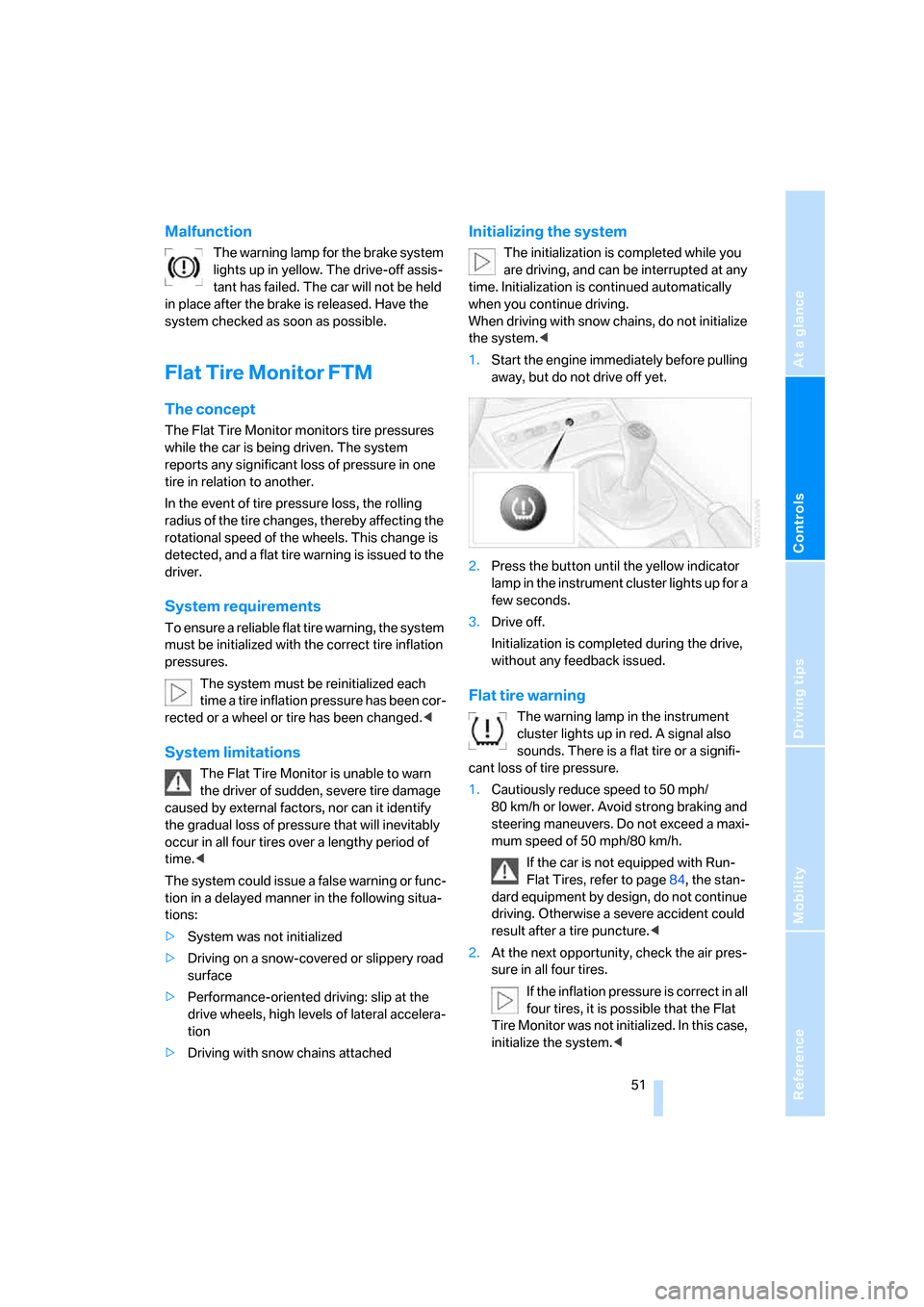
1.Start the engine immediately before pulling
away, but do not drive off yet.
2.Press the button until the yellow indicator
lamp in the instrument cluster lights up for a
few seconds.
3.Drive off.
Initialization is completed during the drive,
without any feedback issued.
Flat tire warning
The warning lamp in the instrument
cluster lights up in red. A signal also
sounds. There is a flat tire or a signifi-
cant loss of tire pressure.
1.Cautiously reduce speed to 50 mph/
80 km/h or lower. Avoid strong braking and
steering maneuvers. Do not exceed a maxi-
mum speed of 50 mph/80 km/h.
If the car is not equipped with Run-
Flat Tires, refer to page84, the stan-
dard equipment by design, do not continue
driving. Otherwise a severe accident could
result after a tire puncture.<
2.At the next opportunity, check the air pres-
sure in all four tires.
If the inflation pressure is correct in all
four tires, it is possible that the Flat
Tire Monitor was not initialized. In this case,
initialize the system.<
Page 58 of 128
Lamps
56 You can have daytime running light acti-
vated/deactivated on your vehicle.<
Pathway lighting
If you activate the headlamp flasher after park-
ing the car, with the lights switched off, the low
beams come on and remain on for a certain
time.
You can have this function activated/
deactivated as well as the duration of the
pathway lighting set.<
LIGHTS ON warning
Whenever you open the driver's door after hav-
ing turned the key to position 0, you will hear an
acoustic signal for a few seconds to remind you
that the lamps have not been switched off.
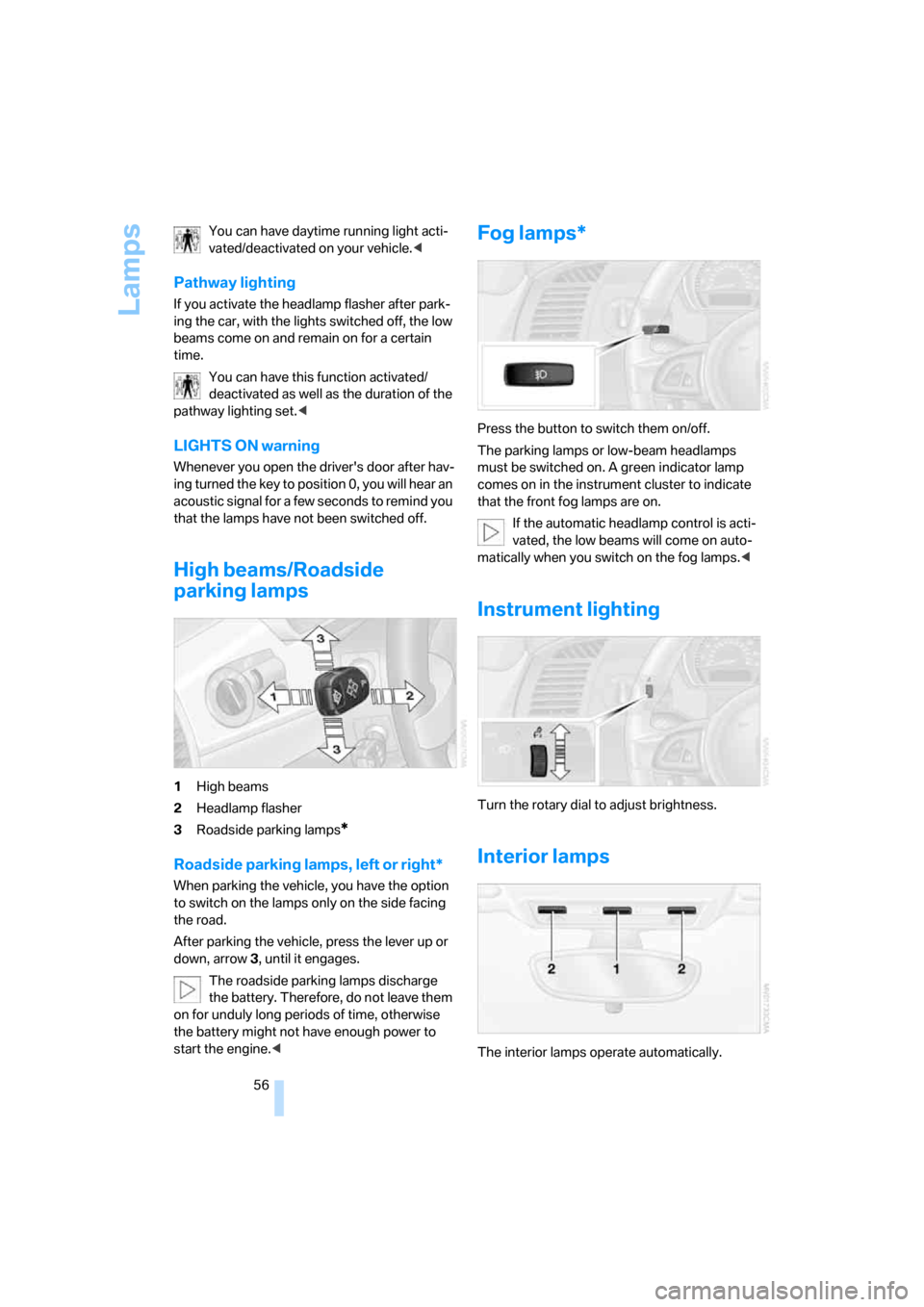
High beams/Roadside
parking lamps
1High beams
2Headlamp flasher
3Roadside parking lamps
*
Roadside parking lamps, left or right*
When parking the vehicle, you have the option
to switch on the lamps only on the side facing
the road.
After parking the vehicle, press the lever up or
down, arrow 3, until it engages.
The roadside parking lamps discharge
the battery. Therefore, do not leave them
on for unduly long periods of time, otherwise
the battery might not have enough power to
start the engine.<
Fog lamps*
Press the button to switch them on/off.
The parking lamps or low-beam headlamps
must be switched on. A green indicator lamp
comes on in the instrument cluster to indicate
that the front fog lamps are on.
If the automatic headlamp control is acti-
vated, the low beams will come on auto-
matically when you switch on the fog lamps.<
Instrument lighting
Turn the rotary dial to adjust brightness.
Interior lamps
The interior lamps operate automatically.
Page 59 of 128
Reference
At a glance
Controls
Driving tips
Mobility
57
Switching interior lamps on/off
manually
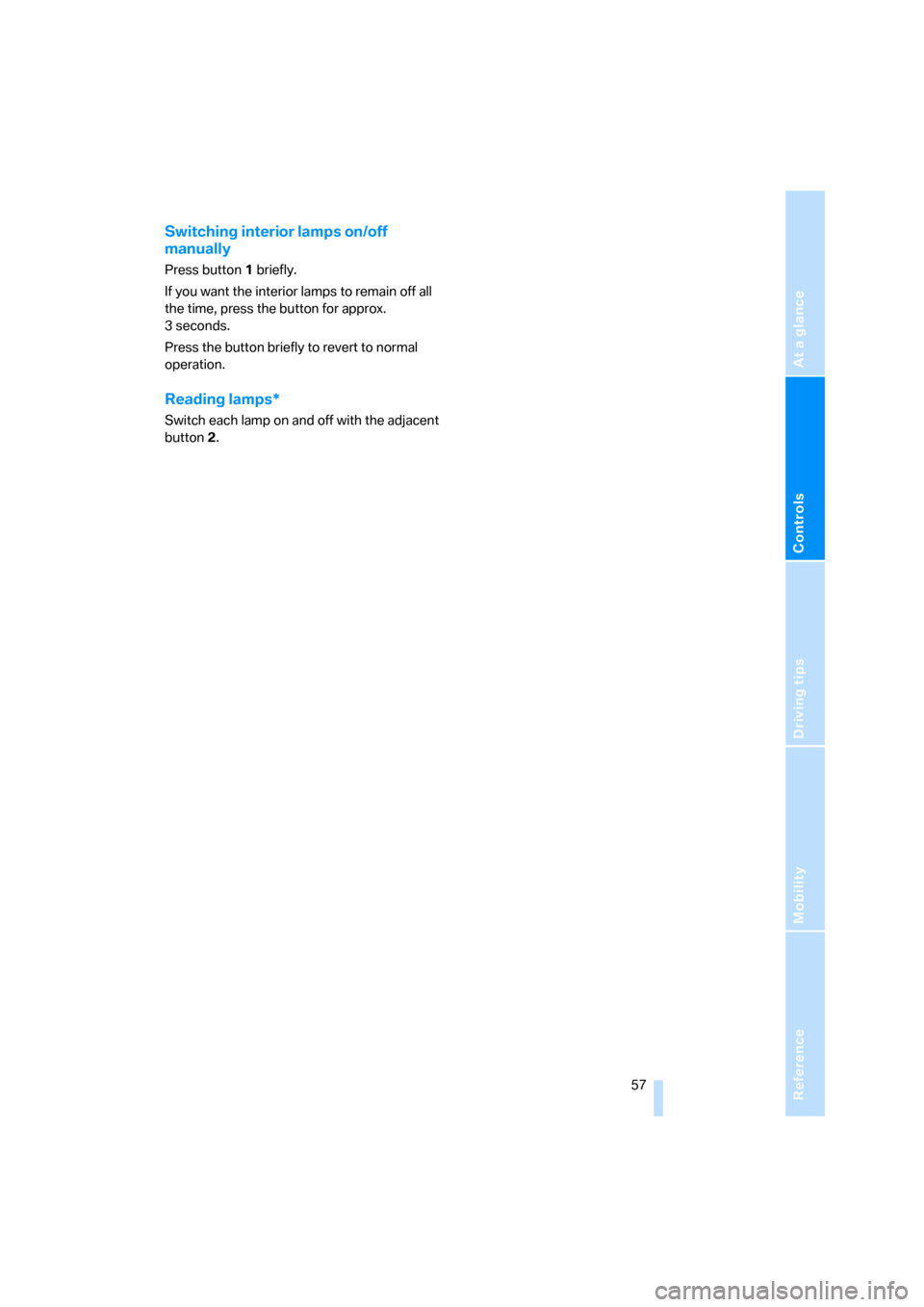
Press button1 briefly.
If you want the interior lamps to remain off all
the time, press the button for approx.
3seconds.
Press the button briefly to revert to normal
operation.
Reading lamps*
Switch each lamp on and off with the adjacent
button2.
Page 64 of 128
Climate
62
Comfortable interior climate
AUTO program 6 offers the ideal air distribution
and air flow rate for almost all conditions, refer
to AUTO program below. In addition, you can
select an interior temperature you find pleasant.
The following sections inform you in detail
about how to adjust the settings.
Air distribution, manual
Direct the flow of air to the windows
, to the upper body area and to
the footwell . Intermediate settings
are possible. The arrow lights up.
The automatic air supply remains unchanged.
You can switch the automatic air distribution
back on by pressing the AUTO button.
Defrosting windows and removing
condensation
Quickly removes ice and condensa-
tion from the windshield and side
windows.
AUTO program
The AUTO program adjusts the air
distribution to the windshield and
side windows, towards the upper
body area and into the footwell for
you. The air flow rate and your temperature
specifications will be adapted to outside influ-
ences as a result of seasonal changes, e.g. sun-
light or window condensation.
The cooling is switched on automatically with
the AUTO program.
The AUTO program functions only to a
limited extent when the convertible top is
open.<
Air flow rate, manual
Adjust the air flow rate. The arrow
lights up.
The automatic air distribution
remains unchanged. You can reactivate the
automatic mode for the air flow rate with the
AUTO button.The higher the air flow rate, the more effective
the air conditioning will be.
Switching the system on/off
Turn the rotary switch to 0. The automatic cli-
mate control is switched off and the air supply is
cut off.
To switch on the automatic climate control, set
any desired air flow rate.
Switching cooling function on/off
When the cooling function is on, the
air is cooled, dehumidified, then
reheated depending on the tempera-
ture setting.
Depending on the weather, the windshield may
fog over briefly when the engine is started.
The cooling function is automatically switched
on along with the AUTO program. The passen-
ger compartment can only be cooled while the
engine is running.
Maximum cooling
At outside temperatures above
327/06 and when the engine is
running, you obtain a maximum cool-
ing effect as soon as possible.
The automatic climate control switches to the
lowest temperature and operates in recircu-
lated-air mode. Air flows at maximum rate only
from the vents for the upper body area. You
should therefore open them for maximum cool-
ing.
Temperature
Set the desired temperature.
The values on the dial are approxima-
tions of the respective temperature
resulting in the passenger compartment.
The automatic climate control achieves this
temperature as quickly as possible regardless
of the season, using maximum cooling or heat-
ing power if necessary, and then maintains it.
If you switch between different tempera-
ture settings in quick succession, the
Page 65 of 128
Reference
At a glance
Controls
Driving tips
Mobility
63
automatic climate control does not have
enough time to achieve the set temperature.<
AUC Automatic recirculated-air
control/Recirculated-air mode
Switch on the desired operating
mode by pressing this button repeat-
edly:
>LEDs off: outside air flows in continuously.
>Left-hand LED on, AUC mode: a sensor
detects pollutants in the outside air. If nec-
essary, the system blocks the supply of out-
side air and recirculates the inside air. As
soon as the concentration of pollutants in
the outside air has decreased sufficiently,
the system automatically switches back to
outside air supply.
>Right-hand LED on, recirculated-air mode:
the inflow of outside air is shut off perma-
nently. The system recirculates the air
within the vehicle.
If the windows fog over in the recircu-
lated-air mode, you should switch it off
and, if necessary, increase the air flow rate.
The recirculated-air mode should not be used
over an extended period of time, otherwise the
air quality inside the car will deteriorate contin-
uously.<
Rear window defroster
The defroster switches off automati-
cally after a certain time.
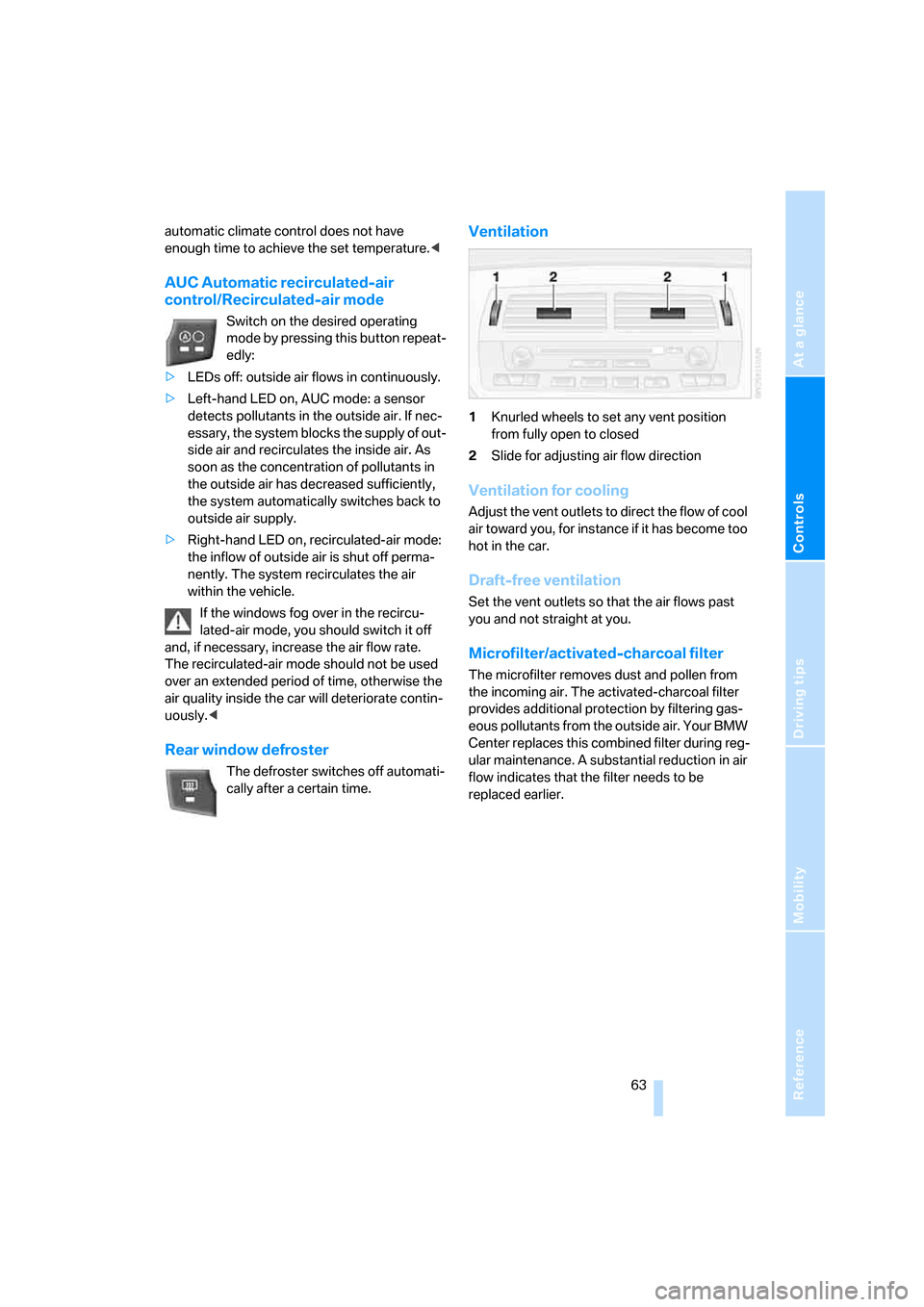
Ventilation
1Knurled wheels to set any vent position
from fully open to closed
2Slide for adjusting air flow direction
Ventilation for cooling
Adjust the vent outlets to direct the flow of cool
air toward you, for instance if it has become too
hot in the car.
Draft-free ventilation
Set the vent outlets so that the air flows past
you and not straight at you.
Microfilter/activated-charcoal filter
The microfilter removes dust and pollen from
the incoming air. The activated-charcoal filter
provides additional protection by filtering gas-
eous pollutants from the outside air. Your BMW
Center replaces this combined filter during reg-
ular maintenance. A substantial reduction in air
flow indicates that the filter needs to be
replaced earlier.
Page 66 of 128
Practical interior accessories
64
Practical interior accessories
Glove compartment
To open
Press the two push buttons together.
To close
Swing the door up.
To prevent injury in the event of an acci-
dent while the vehicle is being driven,
close the glove compartment immediately after
use.<
Storage compartments
Storage compartment between
backrests
To open
1.Press button1.
2.Swing the cover down.
To close
Swing the cover up.
Locking/unlocking
The storage compartment between the back-
rests is automatically locked and unlocked with
the central locking system.
Roadster: releasing manually
In the event of a malfunction or if the central
locking system fails, you can manually unlock
the storage compartment between the seats.
1.Pull on the cord in the rear trim panel of the
cargo bay:
The storage compartment between the
seats unlocks.
2.Press button1.
Other compartments and nets*
Other compartments can be found on the
doors, in the center console and behind the
seats, depending on your vehicle's equipment.
Nets
* are located on the passenger side of the
center console and on the rear of the backrests.