steering wheel BMW Z4 COUPE 2006 E86 Owner's Manual
[x] Cancel search | Manufacturer: BMW, Model Year: 2006, Model line: Z4 COUPE, Model: BMW Z4 COUPE 2006 E86Pages: 128, PDF Size: 4.41 MB
Page 12 of 128
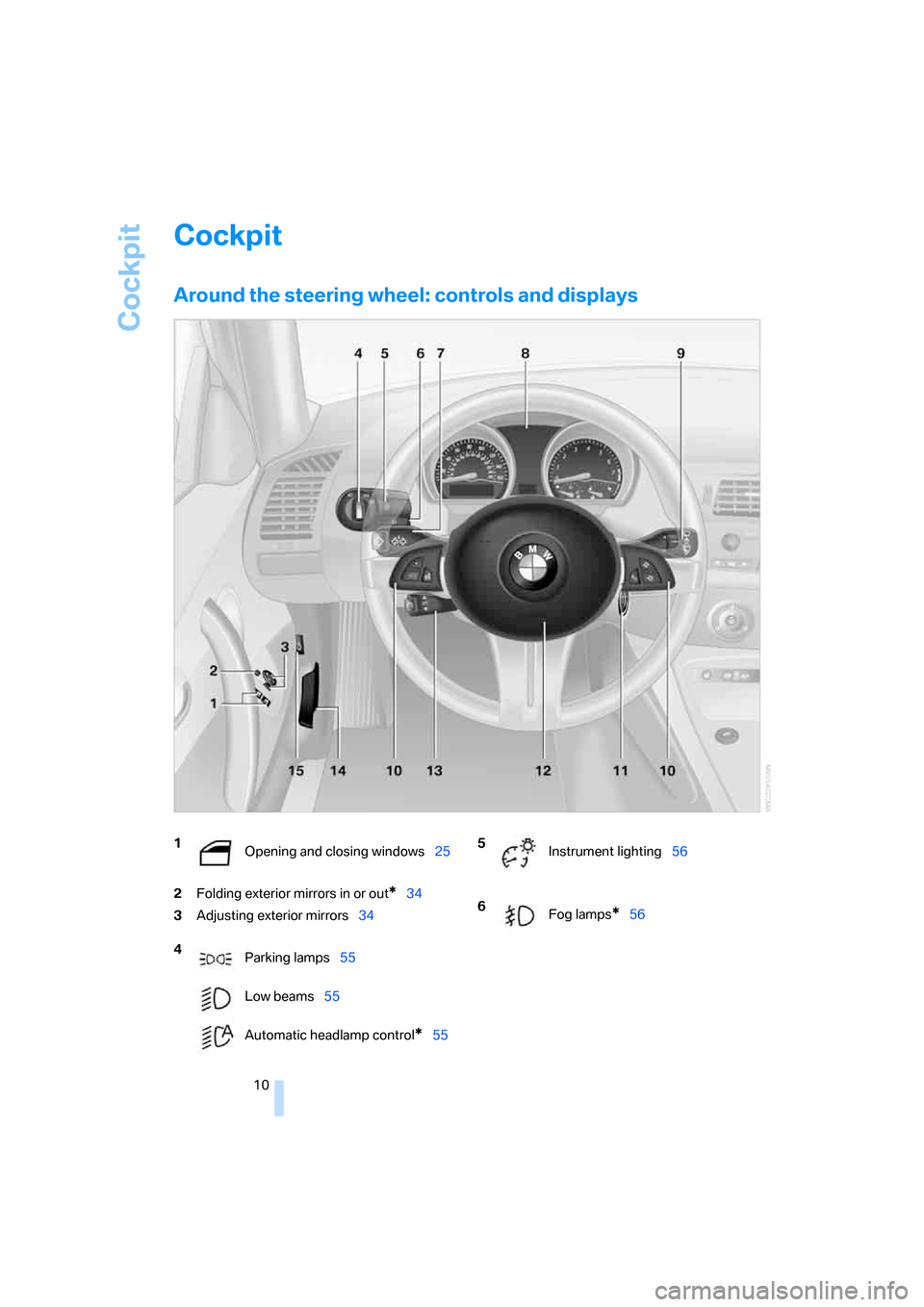
Cockpit
10
Cockpit
Around the steering wheel: controls and displays
2Folding exterior mirrors in or out*34
3Adjusting exterior mirrors34
1
Opening and closing windows25
4
Parking lamps55
Low beams55
Automatic headlamp control
*55
5
Instrument lighting56
6
Fog lamps
*56
Page 13 of 128
At a glance
Controls
Driving tips
Mobility Reference
11
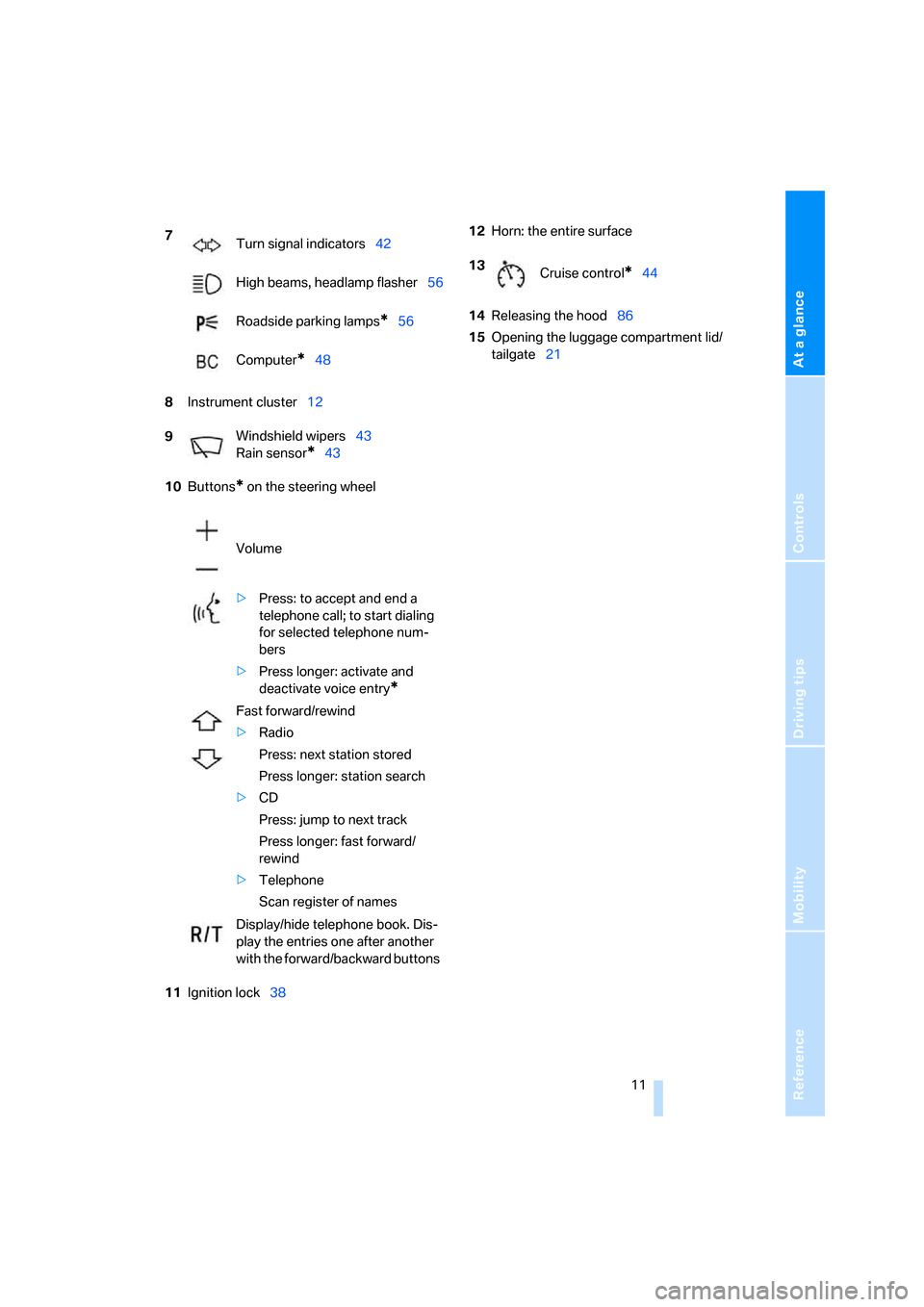
8Instrument cluster12
10Buttons
* on the steering wheel
11Ignition lock3812Horn: the entire surface
14Releasing the hood86
15Opening the luggage compartment lid/
tailgate21 7
Turn signal indicators42
High beams, headlamp flasher56
Roadside parking lamps
*56
Computer
*48
9Windshield wipers43
Rain sensor
*43
Volume
>Press: to accept and end a
telephone call; to start dialing
for selected telephone num-
bers
>Press longer: activate and
deactivate voice entry
*
Fast forward/rewind
>Radio
Press: next station stored
Press longer: station search
>CD
Press: jump to next track
Press longer: fast forward/
rewind
>Telephone
Scan register of names
Display/hide telephone book. Dis-
play the entries one after another
with the forward/backward buttons
13
Cruise control*44
Page 32 of 128
Adjustments
30
Adjustments
Safe seating position
For relaxed driving with as little fatigue as pos-
sible, you should select a seating position that
reflects your personal requirements. In combi-
nation with the safety belts, the head restraints
and the airbags, the seating position has a
major influence on your safety in the event of an
accident. To ensure that the vehicle's safety
systems provide you with optimal protection,
we request that you direct your careful attention
to the following section.
For supplementary information on transporting
children refer to page35.
Airbags
Always maintain an adequate distance
between yourself and the airbags. Always
grip the steering wheel on the rim, with your
hands in the 3 o'clock and 9 o'clock positions,
to minimize the risk of injury to the hands or
arms in the event of the airbag being triggered
off.
Never allow any objects, individuals or animals
to obstruct the areas between passengers and
airbags.
Never use the front airbag's cover as a storage
tray or support for objects of any kind. Ensure
that the passenger is correctly seated, e.g. does
not prop feet or legs against the dashboard.
Otherwise, leg injury could result if the knee air-
bag and front airbag suddenly deployed.
Make sure that the passenger does not lean his
or her head against the side airbag, otherwise
serious injuries could result if the airbags sud-
denly deployed.<
Even when all these guidelines are observed,
the risk of injury as a result of contact with the
airbags cannot entirely be ruled out in some sit-
uations. In sensitive individuals, the ignition and
inflation noise may induce a mild hearing loss
that is temporary in most cases.
For airbag locations and additional information
on airbags, refer to page52.
Head restraint
A correctly adjusted head restraint reduces the
risk of neck injury in the event of an accident.
Adjust the head restraint in such a way
that its center is at approx. ear level. Oth-
erwise, there is an increased risk of injury in the
event of an accident.<
Head restraints, refer to page32.
Safety belt
Make sure every occupant fastens his or her
safety belt. As supplemental restraint devices,
the airbags are designed to enhance the effec-
tiveness of the safety belts, and not to replace
them.
Your vehicle offers two sitting positions, each of
which is equipped with a safety belt.
Never allow more than one person to
wear a single safety belt. Never allow
infants or small children to ride in a passenger's
lap. Make sure that the belt in the lap area sits
low against the hips and does not press against
the abdomen. The safety belt must never rest
against the throat, rub against sharp edges,
pass over hard or fragile objects or be pinched.
F a s t e n t he s a f e t y b e l t a ro u n d y o u r b o d y s n u g l y,
ma king sure tha t it is pulled taut across your lap
and shoulder and that it is not twisted; other-
wise, the belt can slide over the hips in the event
of a frontal collision and injure your abdomen.
Avoid wearing bulky clothing and regularly pull
the belt in the upper-body area taut, otherwise
its restraining effect could be impaired.<
Safety belts, refer to page33.
Seats
Before adjusting your seat, always
observe the following precautions
Never try to adjust your seat while driving.
Otherwise, the seat could respond with
unexpected movement, and the ensuing loss of
Page 36 of 128
Adjustments
34
Damaged safety belts
If the safety belts are damaged or
stressed in an accident: have the belt sys-
tem, including any belt tensioners, replaced and
the belt anchors checked. Have this work done
o nly by your BMW Center o r at a workshop that
works according to BMW repair procedures
with correspondingly trained personnel. Other-
wise, it is not guaranteed that the safety devices
will function properly.<
Mirrors
Exterior mirrors
The passenger's mirror is more convex
than the driver's mirror. The objects seen
in the mirror are closer than they appear. Do not
gauge your distance from traffic behind you on
the basis of what you see in the mirror; other-
wise there is an increased risk of an accident.<
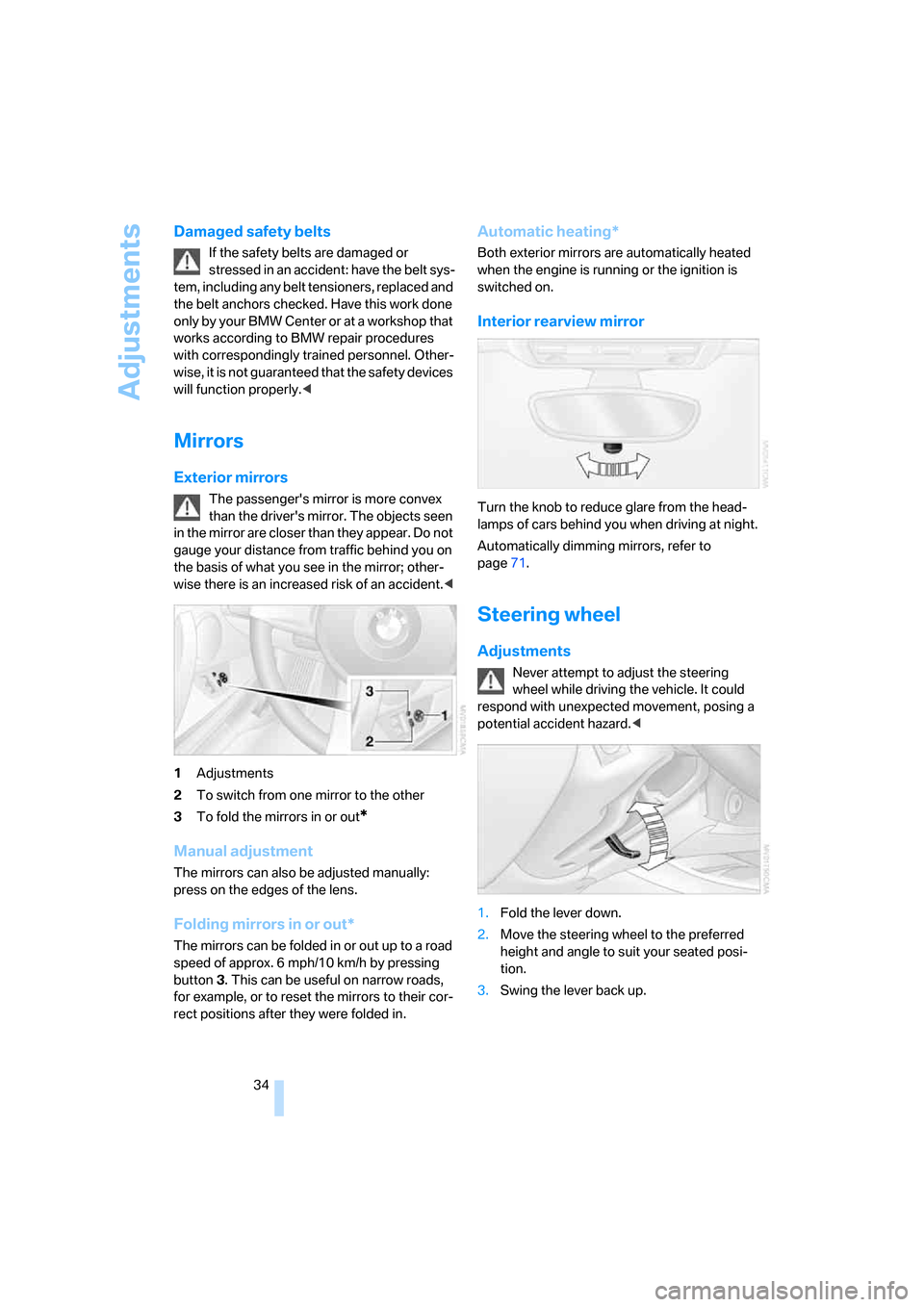
1Adjustments
2To switch from one mirror to the other
3To fold the mirrors in or out
*
Manual adjustment
The mirrors can also be adjusted manually:
press on the edges of the lens.
Folding mirrors in or out*
The mirrors can be folded in or out up to a road
speed of approx. 6 mph/10 km/h by pressing
button3. This can be useful on narrow roads,
for example, or to reset the mirrors to their cor-
rect positions after they were folded in.
Automatic heating*
Both exterior mirrors are automatically heated
when the engine is running or the ignition is
switched on.
Interior rearview mirror
Turn the knob to reduce glare from the head-
lamps of cars behind you when driving at night.
Automatically dimming mirrors, refer to
page71.
Steering wheel
Adjustments
Never attempt to adjust the steering
wheel while driving the vehicle. It could
respond with unexpected movement, posing a
potential accident hazard.<
1.Fold the lever down.
2.Move the steering wheel to the preferred
height and angle to suit your seated posi-
tion.
3.Swing the lever back up.
Page 40 of 128
Driving
38
Driving
Ignition lock
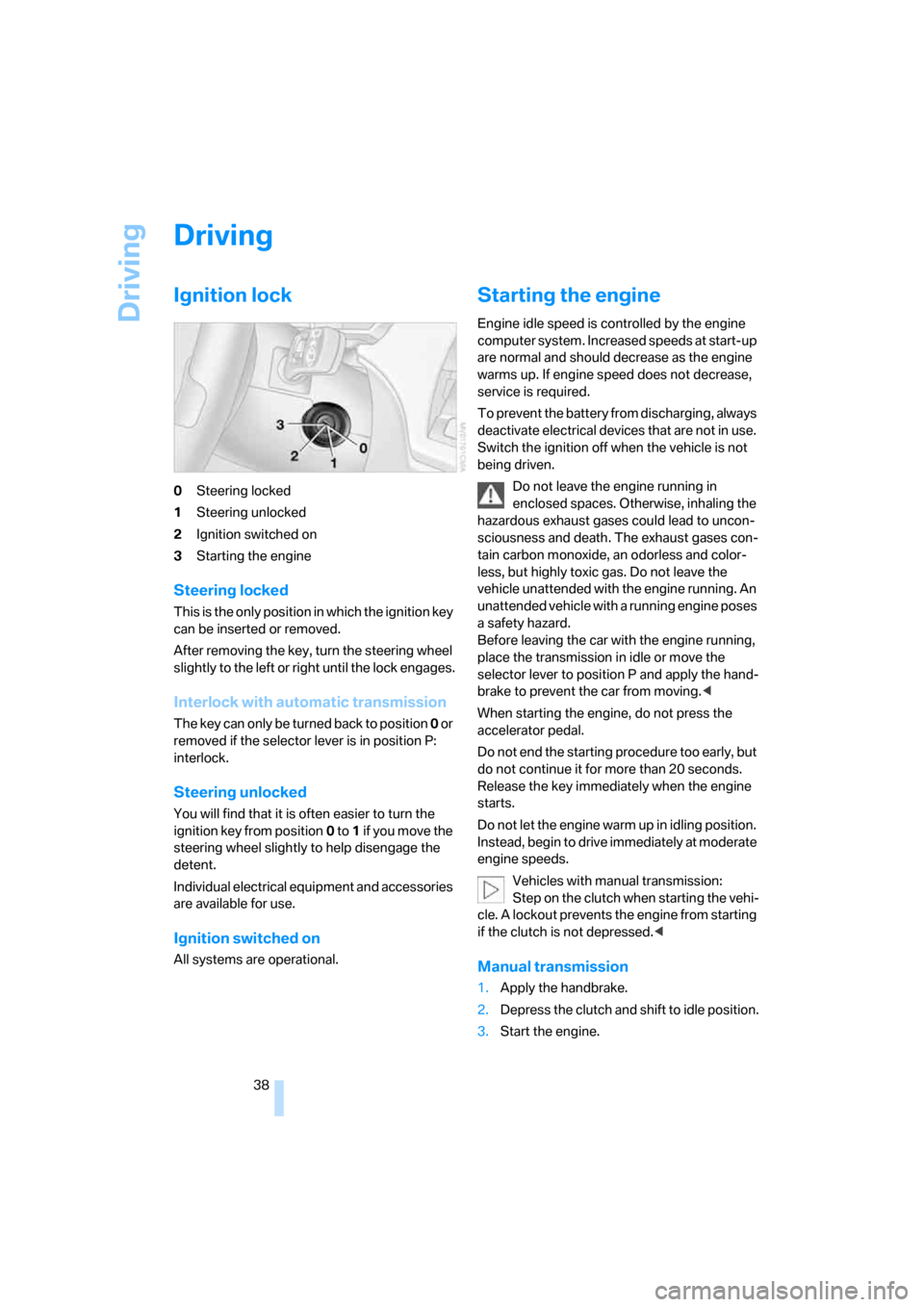
0Steering locked
1Steering unlocked
2Ignition switched on
3Starting the engine
Steering locked
This is the only position in which the ignition key
can be inserted or removed.
After removing the key, turn the steering wheel
slightly to the left or right until the lock engages.
Interlock with automatic transmission
The key can only be turned back to position 0 or
removed if the selector lever is in position P:
interlock.
Steering unlocked
You will find that it is often easier to turn the
ignition key from position0 to 1 if yo u m ove the
steering wheel slightly to help disengage the
detent.
Individual electrical equipment and accessories
are available for use.
Ignition switched on
All systems are operational.
Starting the engine
Engine idle speed is controlled by the engine
computer system. Increased speeds at start-up
are normal and should decrease as the engine
warms up. If engine speed does not decrease,
service is required.
To prevent the battery from discharging, always
deactivate electrical devices that are not in use.
Switch the ignition off when the vehicle is not
being driven.
Do not leave the engine running in
enclosed spaces. Otherwise, inhaling the
hazardous exhaust gases could lead to uncon-
sciousness and death. The exhaust gases con-
tain carbon monoxide, an odorless and color-
less, but highly toxic gas. Do not leave the
vehicle unattended with the engine running. An
unattended vehicle with a running engine poses
a safety hazard.
Before leaving the car with the engine running,
place the transmission in idle or move the
selector lever to position P and apply the hand-
brake to prevent the car from moving.<
When starting the engine, do not press the
accelerator pedal.
Do not end the starting procedure too early, but
do not continue it for more than 20 seconds.
Release the key immediately when the engine
starts.
Do not let the engine warm up in idling position.
Instead, begin to drive immediately at moderate
engine speeds.
Vehicles with manual transmission:
Step on the clutch when starting the vehi-
cle. A lockout prevents the engine from starting
if the clutch is not depressed.<
Manual transmission
1.Apply the handbrake.
2.Depress the clutch and shift to idle position.
3.Start the engine.
Page 41 of 128
Reference
At a glance
Controls
Driving tips
Mobility
39
Automatic transmission
1.Depress the brake.
2.Start the engine.
Special starting conditions
In the following situations, press the accelerator
pedal halfway down when starting the engine:
>If the engine does not start on the first
attempt, for instance when it is extremely
hot or cold.
>If the engine is started at very low tempera-
tures, below approx. +57/–156, at high
altitudes above approx. 3,300 ft/1,000 m.
Avoid frequent starting attempts in quick
succession or repeated starting attempts
during which the engine does not start. Other-
wise, the fuel is not burned or inadequately
burned; there is a danger of overheating and
damaging the catalytic converter.<
Switching off the engine
Do not remove the key while the vehicle is
still moving. Otherwise, the steering lock
would engage when the steering wheel is
turned.
When you leave the vehicle, always remove the
key and engage the steering lock.
Apply the parking brake when parking on steep
gradients, otherwise the vehicle could start to
roll.<
You can have an acoustic signal set as a
reminder that the key is still in the ignition
switch after the driver's door has been
opened.<
Manual transmission
1.Turn the key to position 1 or 0.
2.Engage first gear or reverse gear.
3.Apply the handbrake.
Automatic transmission
1.With the car at a standstill, move the selec-
tor lever to position P.
2.Turn the key to position 1 or 0.
Parking brake
The parking brake is designed primarily to pre-
vent the vehicle from rolling when parked. It
operates against the rear wheels.
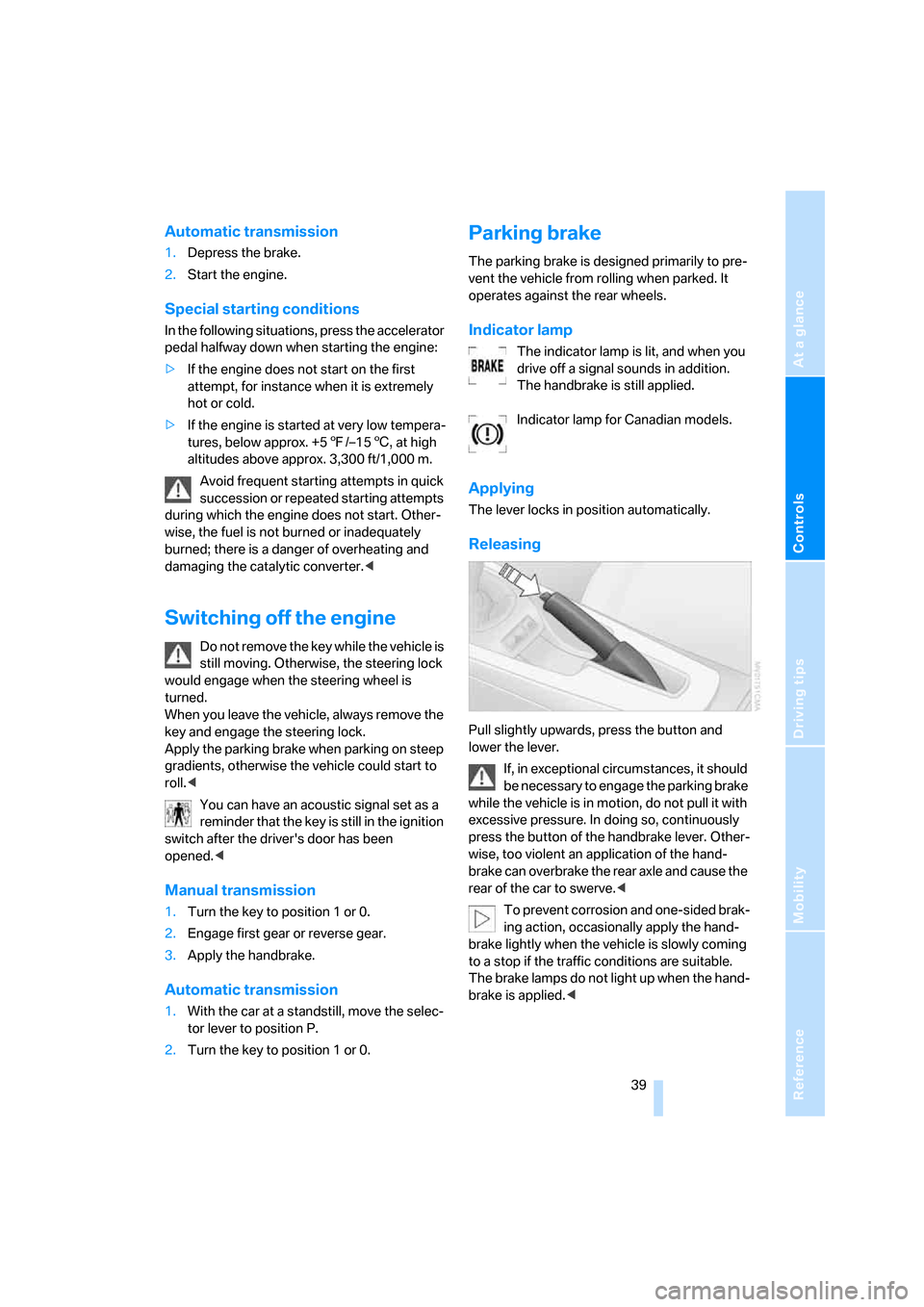
Indicator lamp
The indicator lamp is lit, and when you
drive off a signal sounds in addition.
The handbrake is still applied.
Indicator lamp for Canadian models.
Applying
The lever locks in position automatically.
Releasing
Pull slightly upwards, press the button and
lower the lever.
If, in exceptional circumstances, it should
be necessary to engage the parking brake
while the vehicle is in motion, do not pull it with
excessive pressure. In doing so, continuously
press the button of the handbrake lever. Other-
wise, too violent an application of the hand-
brake can overbrake the rear axle and cause the
rear of the car to swerve.<
To prevent corrosion and one-sided brak-
ing action, occasionally apply the hand-
brake lightly when the vehicle is slowly coming
to a stop if the traffic conditions are suitable.
The brake lamps do not light up when the hand-
brake is applied.<
Page 43 of 128
Reference
At a glance
Controls
Driving tips
Mobility
41
R Reverse
Select only when the vehicle is stationary.
N Neutral, idle
You can select this in a car wash, for example.
The vehicle can roll.
D Drive, automatic position
This position is designed for driving under all
normal operating conditions. All forward gears
are selected automatically.
Under normal operating conditions, fuel con-
sumption is lowest when you are driving in posi-
tion D.
Kickdown
Kick-down enables you to achieve maximum
performance.
Press the accelerator pedal beyond the full-
throttle resistance point.
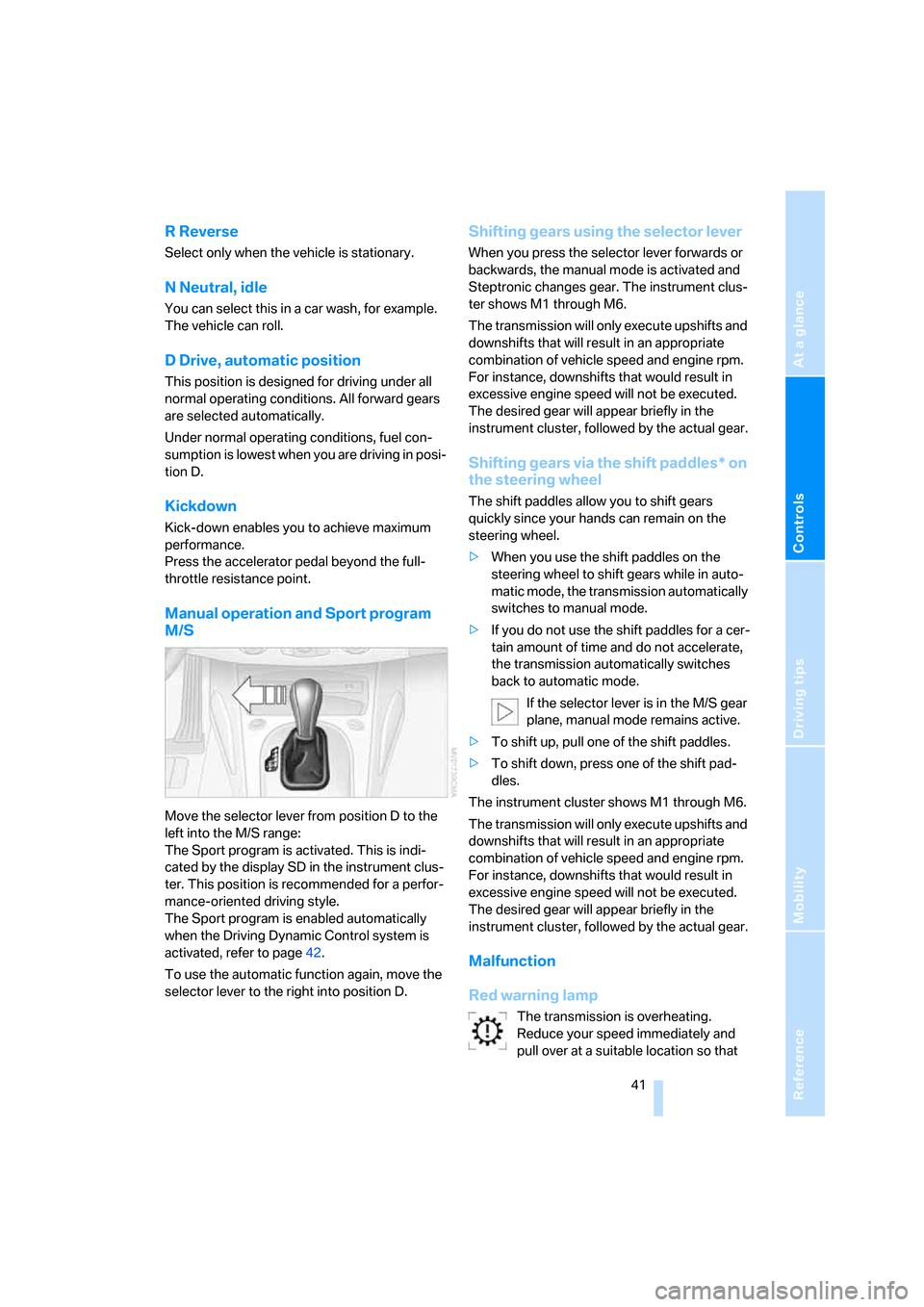
Manual operation and Sport program
M/S
Move the selector lever from position D to the
left into the M/S range:
The Sport program is activated. This is indi-
cated by the display SD in the instrument clus-
ter. This position is recommended for a perfor-
mance-oriented driving style.
The Sport program is enabled automatically
when the Driving Dynamic Control system is
activated, refer to page42.
To use the automatic function again, move the
selector lever to the right into position D.
Shifting gears using the selector lever
When you press the selector lever forwards or
backwards, the manual mode is activated and
Steptronic changes gear. The instrument clus-
ter shows M1 through M6.
The transmission will only execute upshifts and
downshifts that will result in an appropriate
combination of vehicle speed and engine rpm.
For instance, downshifts that would result in
excessive engine speed will not be executed.
The desired gear will appear briefly in the
instrument cluster, followed by the actual gear.
Shifting gears via the shift paddles* on
the steering wheel
The shift paddles allow you to shift gears
quickly since your hands can remain on the
steering wheel.
>When you use the shift paddles on the
steering wheel to shift gears while in auto-
matic mode, the transmission automatically
switches to manual mode.
>If you do not use the shift paddles for a cer-
tain amount of time and do not accelerate,
the transmission automatically switches
back to automatic mode.
If the selector lever is in the M/S gear
plane, manual mode remains active.
>To shift up, pull one of the shift paddles.
>To shift down, press one of the shift pad-
dles.
The instrument cluster shows M1 through M6.
The transmission will only execute upshifts and
downshifts that will result in an appropriate
combination of vehicle speed and engine rpm.
For instance, downshifts that would result in
excessive engine speed will not be executed.
The desired gear will appear briefly in the
instrument cluster, followed by the actual gear.
Malfunction
Red warning lamp
The transmission is overheating.
Reduce your speed immediately and
pull over at a suitable location so that
Page 51 of 128
Reference
At a glance
Controls
Driving tips
Mobility
49
Technology for driving comfort and safety
Driving stability control
systems
Your BMW is equipped with a series of systems
that help maintain driving stability even in
adverse driving situations.
Antilock Brake System ABS
ABS keeps the wheels from locking during
braking. Steering stability is maintained even
during full brake applications. In this way, active
safety is enhanced.
ABS is operational each time the engine is
started. Braking safely, refer to page71.
Electronic brake-force distribution
The system controls brake-force application at
the rear wheels in order to obtain increased sta-
bility in the vehicle's braking response.
Dynamic Brake Control DBC
When you apply the brakes rapidly, this system
automatically produces the maximum braking
force boost and thus helps to achieve the short-
est possible braking distance during full brak-
ing. At the same time, the benefits of the ABS
are also exploited.
As long as you want full braking to continue, do
not reduce pressure on the brake.
Dynamic Stability Control DSC
DSC prevents slip at the drive wheels while
starting off and accelerating the vehicle. DSC
also recognizes unstable vehicle conditions,
such as fishtailing or nose-diving. In these
cases, and subject to physical limits, DSC helps
to keep the vehicle on a steady course by
reducing engine speed and by applying brakes
at individual wheels.
The laws of physics cannot be repealed
even with DSC. It will always be the
driver's responsibility to drive in a manner that
matches road conditions. Therefore, do not limit the additional safety margin by practicing
risky driving.<
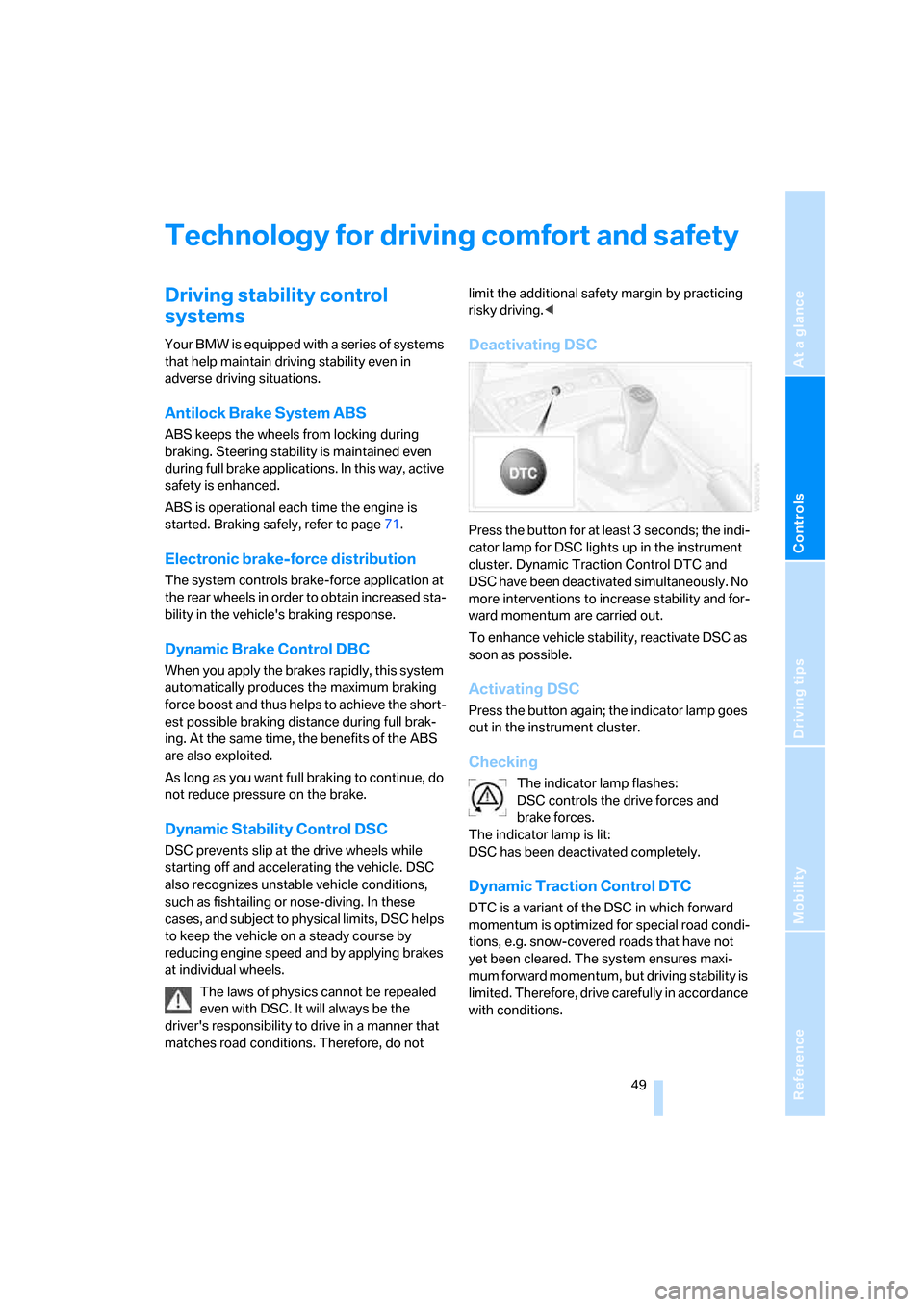
Deactivating DSC
Press the button for at least 3 seconds; the indi-
cator lamp for DSC lights up in the instrument
cluster. Dynamic Traction Control DTC and
DSC have been deactivated simultaneously. No
more interventions to increase stability and for-
ward momentum are carried out.
To enhance vehicle stability, reactivate DSC as
soon as possible.
Activating DSC
Press the button again; the indicator lamp goes
out in the instrument cluster.
Checking
The indicator lamp flashes:
DSC controls the drive forces and
brake forces.
The indicator lamp is lit:
DSC has been deactivated completely.
Dynamic Traction Control DTC
DTC is a variant of the DSC in which forward
momentum is optimized for special road condi-
tions, e.g. snow-covered roads that have not
yet been cleared. The system ensures maxi-
mum forward momentum, but driving stability is
limited. Therefore, drive carefully in accordance
with conditions.
Page 53 of 128
Reference
At a glance
Controls
Driving tips
Mobility
51
Malfunction
The warning lamp for the brake system
lights up in yellow. The drive-off assis-
tant has failed. The car will not be held
in place after the brake is released. Have the
system checked as soon as possible.
Flat Tire Monitor FTM
The concept
The Flat Tire Monitor monitors tire pressures
while the car is being driven. The system
reports any significant loss of pressure in one
tire in relation to another.
In the event of tire pressure loss, the rolling
radius of the tire changes, thereby affecting the
rotational speed of the wheels. This change is
detected, and a flat tire warning is issued to the
driver.
System requirements
To ensure a reliable flat tire warning, the system
must be initialized with the correct tire inflation
pressures.
The system must be reinitialized each
time a tire inflation pressure has been cor-
rected or a wheel or tire has been changed.<
System limitations
The Flat Tire Monitor is unable to warn
the driver of sudden, severe tire damage
caused by external factors, nor can it identify
the gradual loss of pressure that will inevitably
occur in all four tires over a lengthy period of
time.<
The system could issue a false warning or func-
tion in a delayed manner in the following situa-
tions:
>System was not initialized
>Driving on a snow-covered or slippery road
surface
>Performance-oriented driving: slip at the
drive wheels, high levels of lateral accelera-
tion
>Driving with snow chains attached
Initializing the system
The initialization is completed while you
are driving, and can be interrupted at any
time. Initialization is continued automatically
when you continue driving.
When driving with snow chains, do not initialize
the system.<
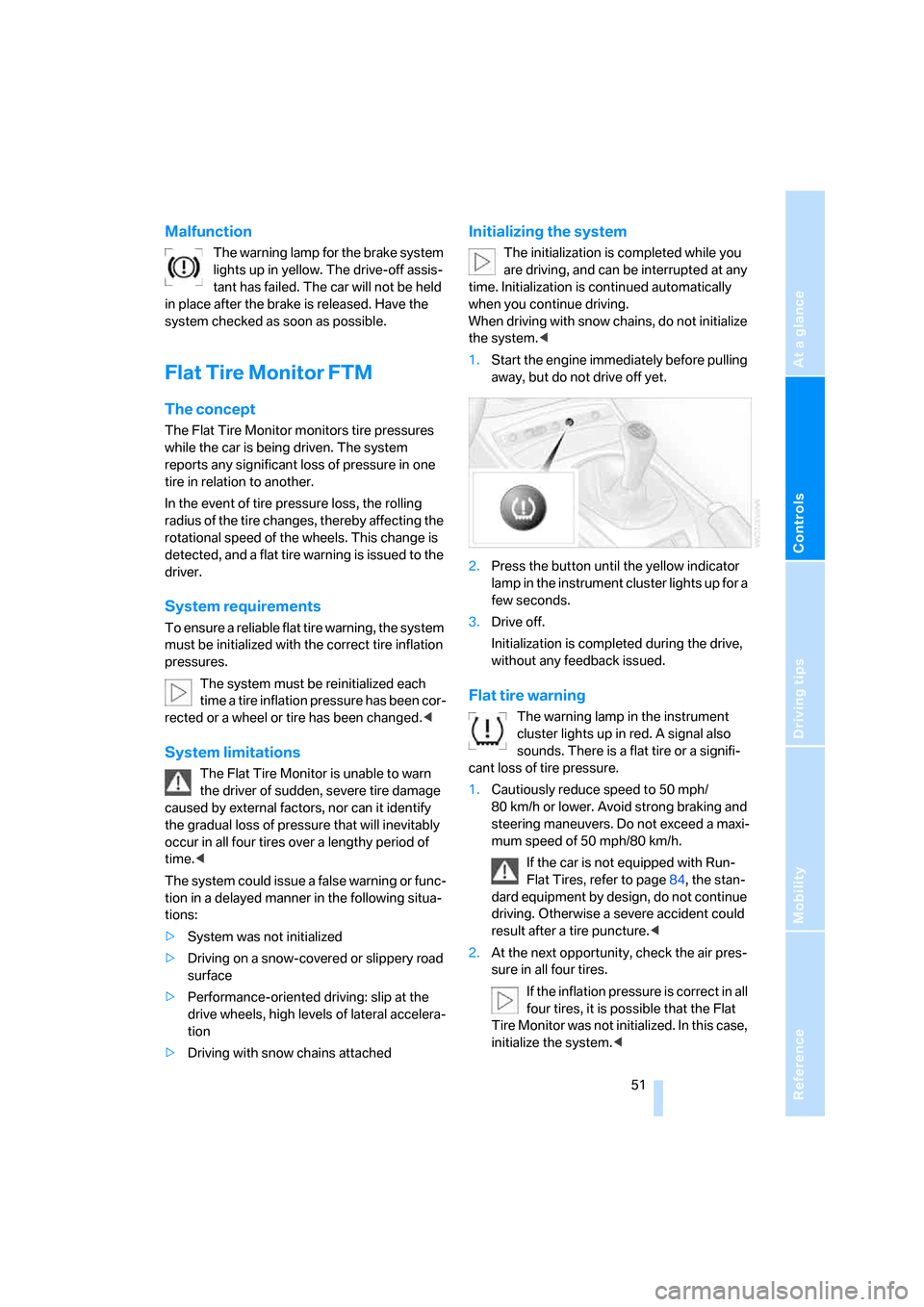
1.Start the engine immediately before pulling
away, but do not drive off yet.
2.Press the button until the yellow indicator
lamp in the instrument cluster lights up for a
few seconds.
3.Drive off.
Initialization is completed during the drive,
without any feedback issued.
Flat tire warning
The warning lamp in the instrument
cluster lights up in red. A signal also
sounds. There is a flat tire or a signifi-
cant loss of tire pressure.
1.Cautiously reduce speed to 50 mph/
80 km/h or lower. Avoid strong braking and
steering maneuvers. Do not exceed a maxi-
mum speed of 50 mph/80 km/h.
If the car is not equipped with Run-
Flat Tires, refer to page84, the stan-
dard equipment by design, do not continue
driving. Otherwise a severe accident could
result after a tire puncture.<
2.At the next opportunity, check the air pres-
sure in all four tires.
If the inflation pressure is correct in all
four tires, it is possible that the Flat
Tire Monitor was not initialized. In this case,
initialize the system.<
Page 55 of 128
Reference
At a glance
Controls
Driving tips
Mobility
53
help provide protection in the event of side
impact. The relevant side airbag supports the
side upper body area. The respective knee air-
bag protects the legs from hitting the cockpit.
The airbags will purposely not be activated by
every collision, e.g. not by more minor acci-
dents, or rear-end collisions.
Do not apply adhesive materials to the
cover panels of the airbags, cover them or
modify them in any other way. Do not attempt to
dismantle the airbag retention system. Do not
modify the individual components of the sys-
tem or its wiring in any way. This includes the
padding in the steering wheel, the dashboard
and the doors.
Do not attempt to remove or dismantle the
steering wheel. Do not touch the individual
components immediately after the system has
been triggered, because there is a danger of
burns.
In the event of malfunctions, deactivation, or
triggering of the airbag restraint system, have
the testing, repair, removal, and disposal of air-
bag generators executed only by a BMW Cen-
ter or a workshop that works according to BMW
repair procedures with correspondingly trained
personnel and has the required explosives
licenses. Unprofessional attempts to service
the system could lead to failure in an emer-
gency or undesired airbag activation, either of
which could result in personal injury.<
Warning notices and information about the air-
bags can also be found on the sun visors.
Automatic deactivation of the
passenger airbags
An analysis of the impression in the passenger
seat cushion determines whether and how the
seat is occupied. The front and side airbags for
the passenger are activated or deactivated by
the system accordingly.
The indicator lamp in the center console
shows the current status of the passen-
ger airbags, deactivated or activated, refer to
Status of passenger airbags below.<
Before transporting a child on the pas-
senger seat, observe the safety and han-dling instructions under Transporting children
safely, refer to page35.
Adolescents and adults sitting in certain posi-
tions could inadvertently deactivate the front
and side airbags on the passenger side; the
indicator lamp for the passenger airbags comes
on. In such cases, the passenger should change
his or her sitting position so that the passenger
airbags are activated and the indicator lamp
goes out. If the passenger airbags cannot be
restored to the desired status despite the pas-
senger changing his or her seat position, use
the key switch to activate or deactivate the pas-
senger airbags, refer to page35. Do not attach
seat covers, seat cushion padding, ball mats or
other items to the passenger seat unless they
are specifically recommended by BMW. Do not
place any items under the seat which could
press against the seat from below. Otherwise a
correct analysis of the seat cushion is not
ensured.<
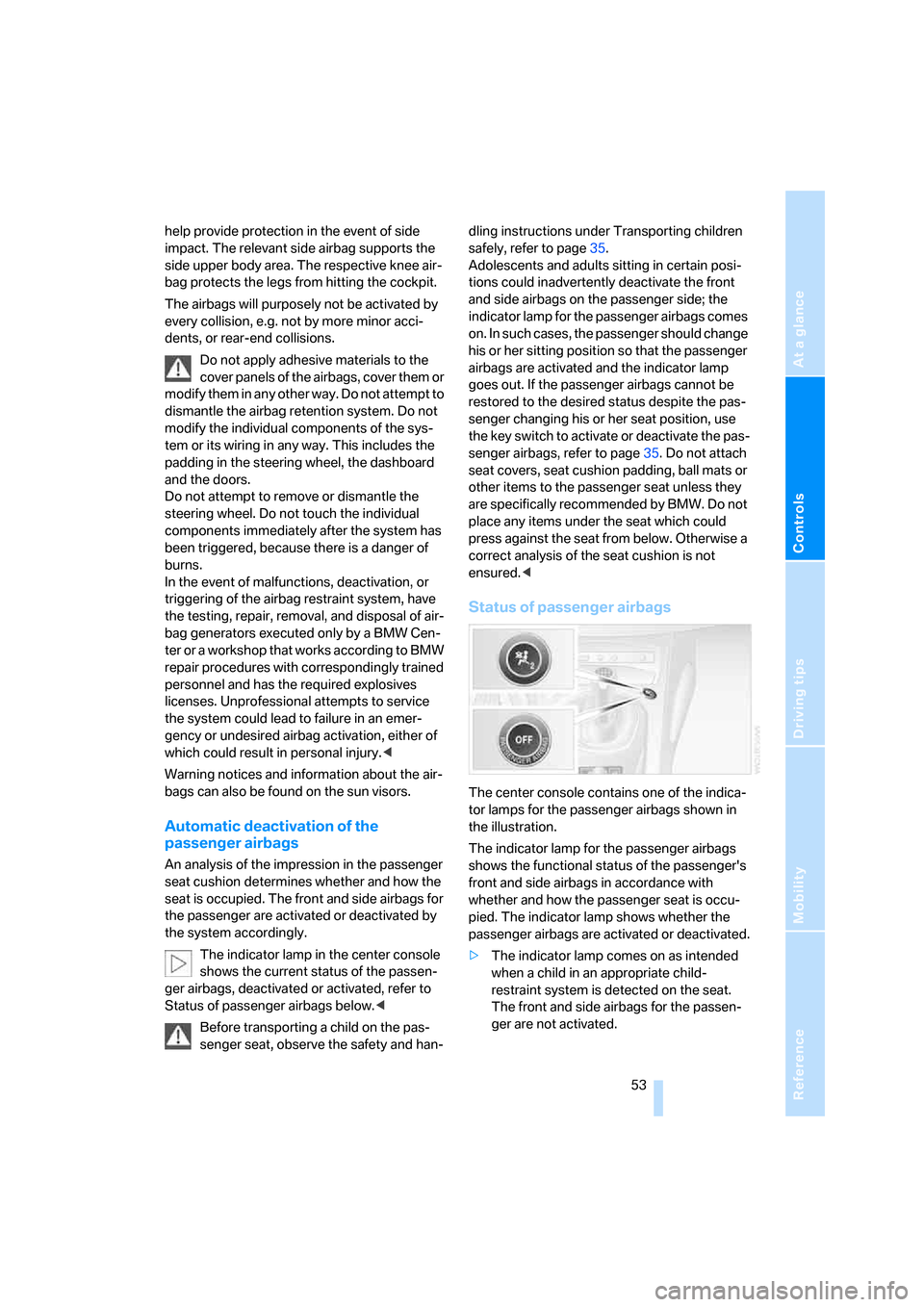
Status of passenger airbags
The center console contains one of the indica-
tor lamps for the passenger airbags shown in
the illustration.
The indicator lamp for the passenger airbags
shows the functional status of the passenger's
front and side airbags in accordance with
whether and how the passenger seat is occu-
pied. The indicator lamp shows whether the
passenger airbags are activated or deactivated.
>The indicator lamp comes on as intended
when a child in an appropriate child-
restraint system is detected on the seat.
The front and side airbags for the passen-
ger are not activated.