high BMW Z4 COUPE 3.0SI 2007 Owners Manual
[x] Cancel search | Manufacturer: BMW, Model Year: 2007, Model line: Z4 COUPE 3.0SI, Model: BMW Z4 COUPE 3.0SI 2007Pages: 132, PDF Size: 3.14 MB
Page 7 of 132
Reference
At a glance
Controls
Driving tips
Mobility
5
Your individual vehicle
When you ordered your BMW, you chose vari-
ous items of equipment. This Owner's Manual
describes all models and equipment that BMW
offers within the same group.
We hope you will understand that equipment
and features are included which you might not
have chosen for your vehicle. Any differences
can easily be identified since all optional acces-
sories and special equipment are marked with
an asterisk
*.
If your BMW features equipment not described
in this Owner's Manual, please observe the
enclosed supplementary Owner's Manuals.
Status at time of printing
BMW pursues a policy of continuous, ongoing
development that is conceived to ensure that
our vehicles continue to embody the highest
quality and safety standards combined with
advanced, state-of-the-art technology. In
exceptional cases, the features described in
this Owner's Manual could therefore differ from
those on your vehicle.
For your own safety
Maintenance and repair
Advanced technology, e.g. the use of
modern materials and powerful electron-
ics, requires specially adapted maintenance
and repair methods. You should therefore have
the corresponding work on your vehicle per-
formed only by your BMW center or at a work-
shop that works according to BMW repair pro-
cedures with correspondingly trained
personnel. If this work is not carried out prop-
erly, there is a danger of subsequent damage
and related safety hazards.<
California Proposition 65 warning
California laws require us to state the following
warning:
Engine exhaust and a wide variety of
automobile components and parts,
including components found in the interior fur-
nishings in a vehicle, contain or emit chemicals
known to the State of California to cause cancer
and birth defects and reproductive harm. In
addition, certain fluids contained in vehicles and
certain products of component wear contain or
emit chemicals known to the State of CA to
cause cancer and birth defects or other repro-
ductive harm.
Battery posts, terminals and related accesso-
ries contain lead and lead compounds. Wash
your hands after handling.
Used engine oil contains chemicals that have
caused cancer in laboratory animals. Always
protect your skin by washing thoroughly with
soap and water.<
Page 9 of 132
Reference
At a glance
Controls
Driving tips
Mobility
7
Reporting safety defects
For U.S. customers
The following only applies to vehicles owned
and operated in the US.
If you believe that your vehicle has a defect
which could cause a crash or could cause injury
or death, you should immediately inform the
National Highway Traffic Safety Administration
NHTSA in addition to notifying BMW of North
America, LLC, P.O. Box 1227, Westwood, New
Jersey 07675-1227, Telephone
1-800-831-1117.
If NHTSA receives similar complaints, it may
open an investigation, and if it finds that a safety
defect exists in a group of vehicles, it may order
a recall and remedy campaign. However,
NHTSA cannot become involved in individual
problems between you, your dealer, or BMW of
North America, LLC.
To contact NHTSA, you may call the Vehicle
Safety Hotline toll-free at 1-888-327-4236
(TTY: 1-800-424-9153); go to
http://www.safercar.gov; or write to: Adminis-
trator, NHTSA, 400 Seventh Street, SW.,
Washington, DC 20590. You can also obtain
other information about motor vehicle safety
from http://www.safercar.gov
For Canadian customers
Canadian customers who wish to report a
safety-related defect to Transport Canada,
Defect Investigations and Recalls, may call
1-800-333-0510 toll free from anywhere in
Canada or 1-613-993-9851 from the Ottawa
region and from other countries, or contact
Transport Canada by mail at: Transport Can-
ada, ASFAD, Place de Ville, Tower C,
330 Sparks Street, Ottawa, ON, K1A 0N5.
You can also obtain other information about
motor vehicle safety from http://www.tc.gc.ca
Page 13 of 132
At a glance
Controls
Driving tips
Mobility Reference
11
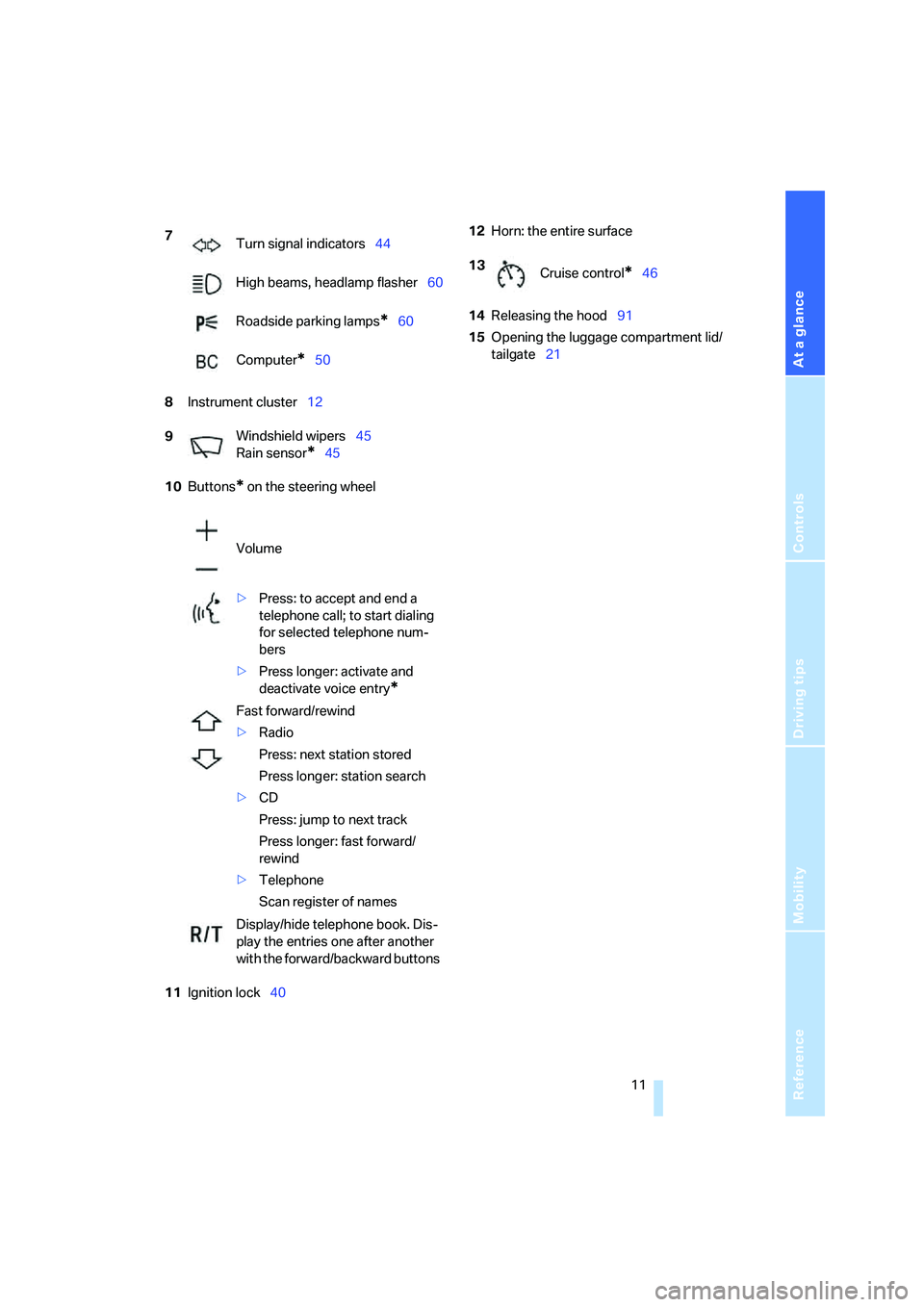
8Instrument cluster12
10Buttons
* on the steering wheel
11Ignition lock4012Horn: the entire surface
14Releasing the hood91
15Opening the luggage compartment lid/
tailgate21 7
Turn signal indicators44
High beams, headlamp flasher60
Roadside parking lamps
*60
Computer
*50
9Windshield wipers45
Rain sensor
*45
Volume
>Press: to accept and end a
telephone call; to start dialing
for selected telephone num-
bers
>Press longer: activate and
deactivate voice entry
*
Fast forward/rewind
>Radio
Press: next station stored
Press longer: station search
>CD
Press: jump to next track
Press longer: fast forward/
rewind
>Telephone
Scan register of names
Display/hide telephone book. Dis-
play the entries one after another
with the forward/backward buttons
13
Cruise control*46
Page 14 of 132
Cockpit
12
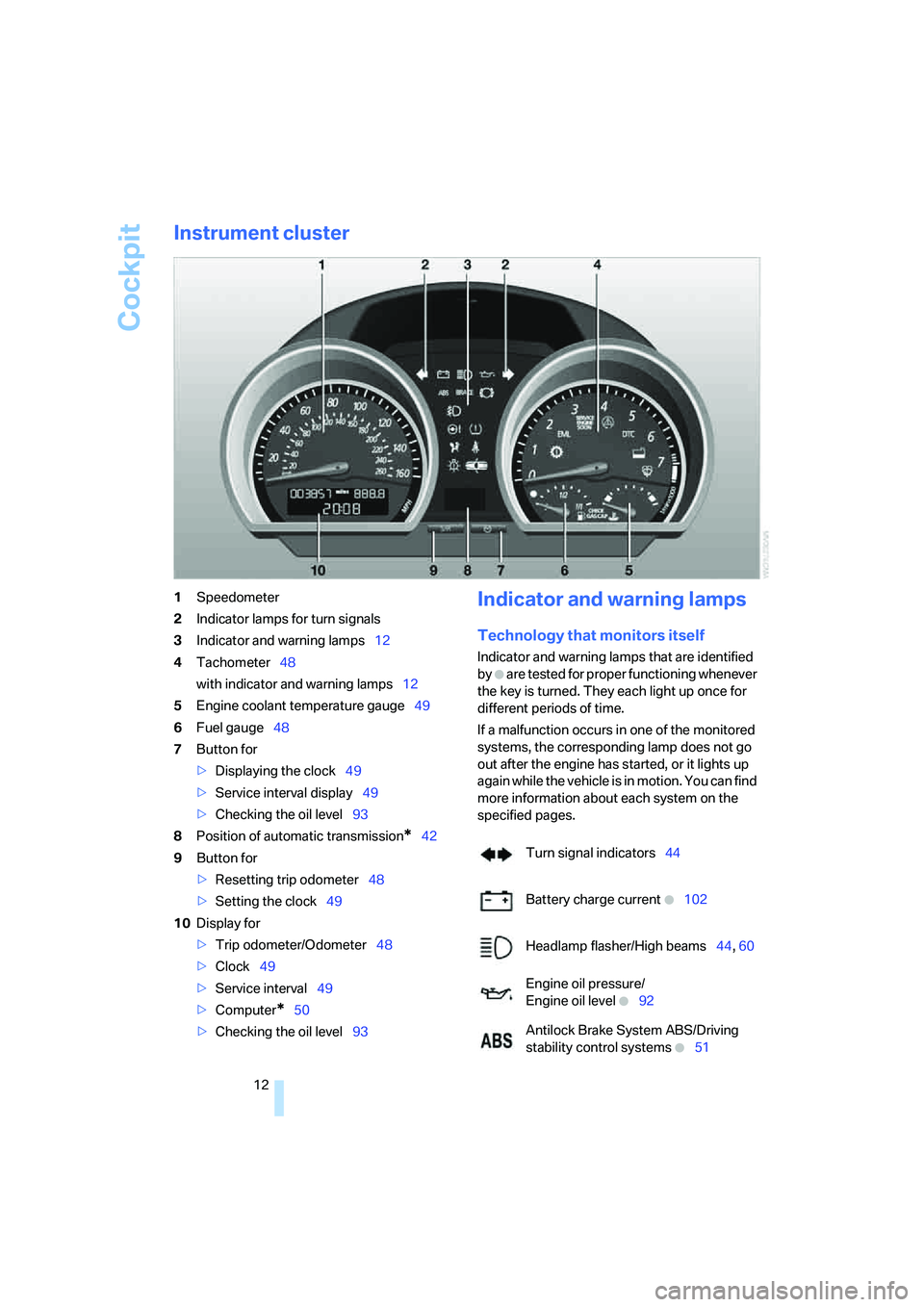
Instrument cluster
1Speedometer
2Indicator lamps for turn signals
3Indicator and warning lamps12
4Tachometer48
with indicator and warning lamps12
5Engine coolant temperature gauge49
6Fuel gauge48
7Button for
>Displaying the clock49
>Service interval display49
>Checking the oil level93
8Position of automatic transmission
*42
9Button for
>Resetting trip odometer48
>Setting the clock49
10Display for
>Trip odometer/Odometer48
>Clock49
>Service interval49
>Computer
*50
>Checking the oil level93
Indicator and warning lamps
Technology that monitors itself
Indicator and warning lamps that are identified
by
+ are tested for proper functioning whenever
the key is turned. They each light up once for
different periods of time.
If a malfunction occurs in one of the monitored
systems, the corresponding lamp does not go
out after the engine has started, or it lights up
again while the vehicle is in motion. You can find
more information about each system on the
specified pages.
Turn signal indicators44
Battery charge current
+102
Headlamp flasher/High beams44, 60
Engine oil pressure/
Engine oil level
+92
Antilock Brake System ABS/Driving
stability control systems
+51
Page 25 of 132
Reference
At a glance
Controls
Driving tips
Mobility
23
The handle recess in the interior trim of the lug-
gage compartment lid makes it easier to pull
down.
Make sure that the closing path of the
luggage compartment lid is clear, other-
wise injuries may result.<
Cargo bay
Emergency release
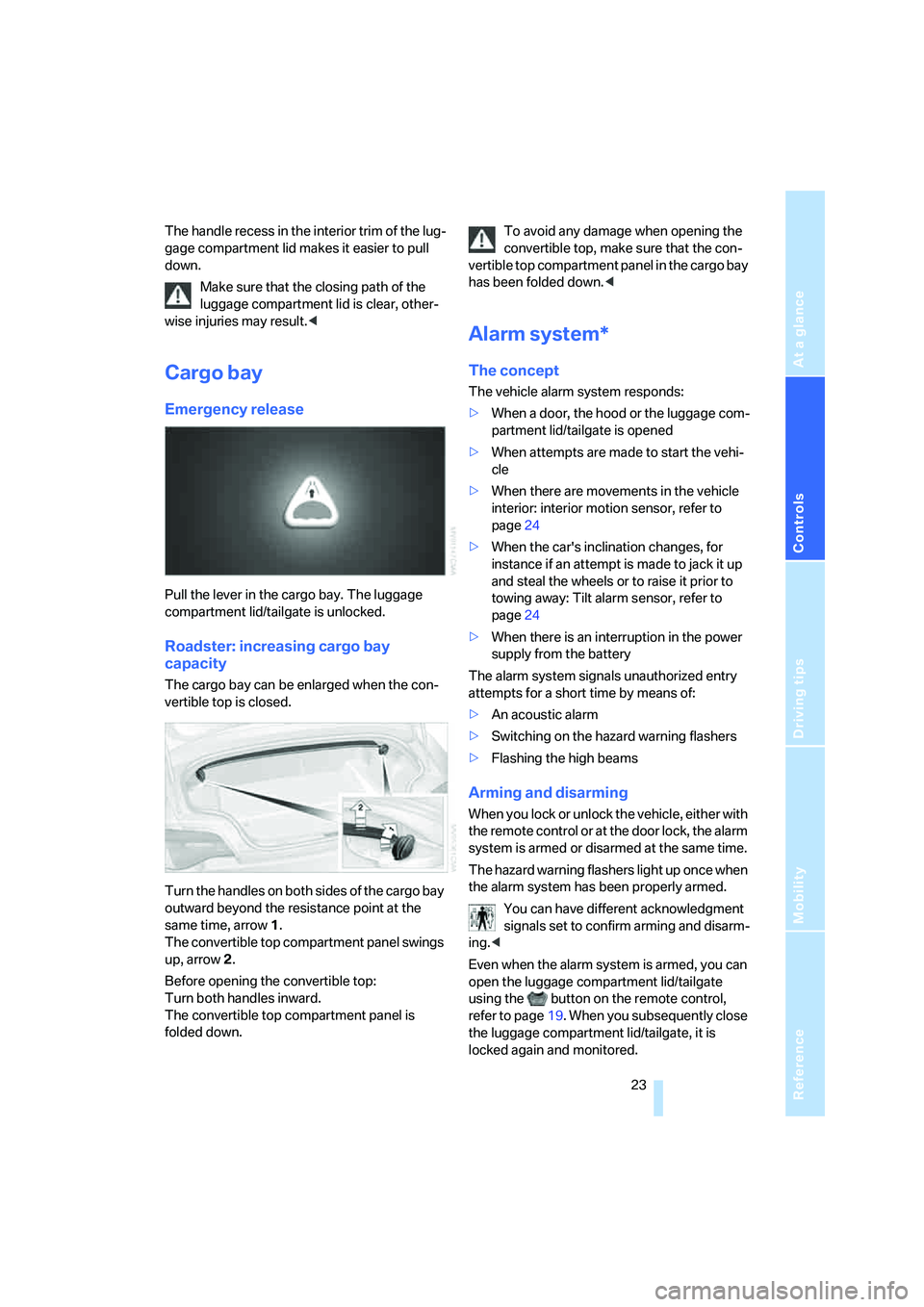
Pull the lever in the cargo bay. The luggage
compartment lid/tailgate is unlocked.
Roadster: increasing cargo bay
capacity
The cargo bay can be enlarged when the con-
vertible top is closed.
Turn the handles on both sides of the cargo bay
outward beyond the resistance point at the
same time, arrow 1.
The convertible top compartment panel swings
up, arrow 2.
Before opening the convertible top:
Turn both handles inward.
The convertible top compartment panel is
folded down.To avoid any damage when opening the
convertible top, make sure that the con-
vertible top compartment panel in the cargo bay
has been folded down.<
Alarm system*
The concept
The vehicle alarm system responds:
>When a door, the hood or the luggage com-
partment lid/tailgate is opened
>When attempts are made to start the vehi-
cle
>When there are movements in the vehicle
interior: interior motion sensor, refer to
page24
>When the car's inclination changes, for
instance if an attempt is made to jack it up
and steal the wheels or to raise it prior to
towing away: Tilt alarm sensor, refer to
page24
>When there is an interruption in the power
supply from the battery
The alarm system signals unauthorized entry
attempts for a short time by means of:
>An acoustic alarm
>Switching on the hazard warning flashers
>Flashing the high beams
Arming and disarming
When you lock or unlock the vehicle, either with
the remote control or at the door lock, the alarm
system is armed or disarmed at the same time.
The hazard warning flashers light up once when
the alarm system has been properly armed.
You can have different acknowledgment
signals set to confirm arming and disarm-
ing.<
Even when the alarm system is armed, you can
open the luggage compartment lid/tailgate
using the button on the remote control,
refer to page19. When you subsequently close
the luggage compartment lid/tailgate, it is
locked again and monitored.
Page 27 of 132
Reference
At a glance
Controls
Driving tips
Mobility
25
Opening, closing
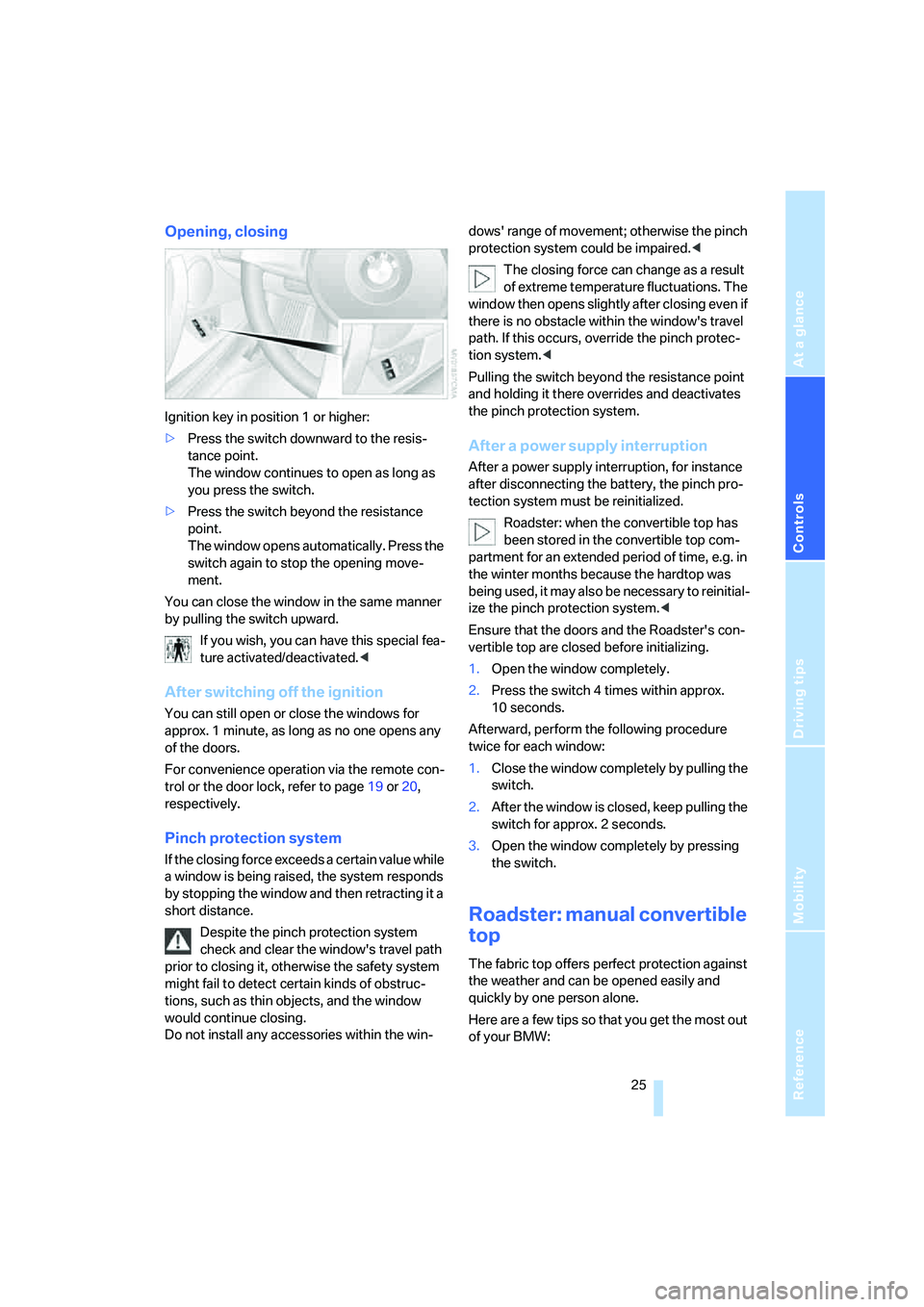
Ignition key in position 1 or higher:
>Press the switch downward to the resis-
tance point.
The window continues to open as long as
you press the switch.
>Press the switch beyond the resistance
point.
The window opens automatically. Press the
switch again to stop the opening move-
ment.
You can close the window in the same manner
by pulling the switch upward.
If you wish, you can have this special fea-
ture activated/deactivated.<
After switching off the ignition
You can still open or close the windows for
approx. 1 minute, as long as no one opens any
of the doors.
For convenience operation via the remote con-
trol or the door lock, refer to page19 or20,
respectively.
Pinch protection system
If the closing force exceeds a certain value while
a window is being raised, the system responds
by stopping the window and then retracting it a
short distance.
Despite the pinch protection system
check and clear the window's travel path
prior to closing it, otherwise the safety system
might fail to detect certain kinds of obstruc-
tions, such as thin objects, and the window
would continue closing.
Do not install any accessories within the win-dows' range of movement; otherwise the pinch
protection system could be impaired.<
The closing force can change as a result
of extreme temperature fluctuations. The
window then opens slightly after closing even if
there is no obstacle within the window's travel
path. If this occurs, override the pinch protec-
tion system.<
Pulling the switch beyond the resistance point
and holding it there overrides and deactivates
the pinch protection system.
After a power supply interruption
After a power supply interruption, for instance
after disconnecting the battery, the pinch pro-
tection system must be reinitialized.
Roadster: when the convertible top has
been stored in the convertible top com-
partment for an extended period of time, e.g. in
the winter months because the hardtop was
being used, it may also be necessary to reinitial-
ize the pinch protection system.<
Ensure that the doors and the Roadster's con-
vertible top are closed before initializing.
1.Open the window completely.
2.Press the switch 4 times within approx.
10 seconds.
Afterward, perform the following procedure
twice for each window:
1.Close the window completely by pulling the
switch.
2.After the window is closed, keep pulling the
switch for approx. 2 seconds.
3.Open the window completely by pressing
the switch.
Roadster: manual convertible
top
The fabric top offers perfect protection against
the weather and can be opened easily and
quickly by one person alone.
Here are a few tips so that you get the most out
of your BMW:
Page 28 of 132
Opening and closing
26 >It is advisable to close the convertible top
when the vehicle is parked. When closed,
the top not only guards the passenger com-
partment from unforeseeable damage from
the weather, but also affords a degree of
protection against theft. Valuables, how-
ever, should only be kept in the locked
cargo bay, even when the convertible top is
closed.
>When the convertible top is open, the cen-
tral locking system also locks button 1 for
the convertible top, refer to page26. The
convertible top cannot be operated. This
provides better theft protection for valu-
ables stored in the cargo bay.
>Never mount a roof-mounted luggage rack
system on the convertible top.
Never keep a wet convertible top in the
convertible top compartment for longer
than one day, otherwise the moisture could
cause damage.<
Opening
Operate the convertible top only when
the vehicle is stationary.
To avoid any damage when opening the con-
vertible top, make sure that the convertible top
compartment panel in the cargo bay has been
folded down, refer to page23.<
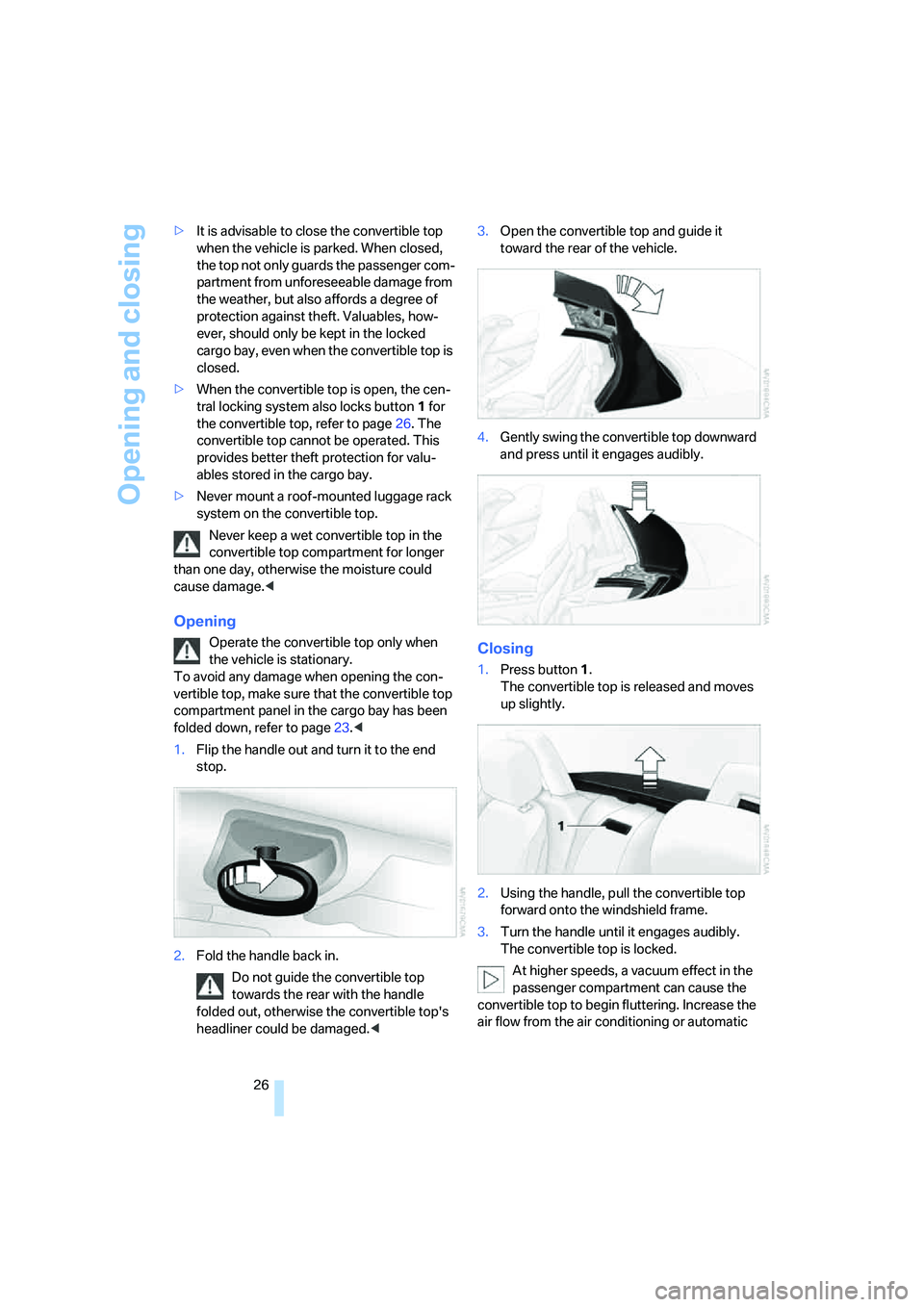
1.Flip the handle out and turn it to the end
stop.
2.Fold the handle back in.
Do not guide the convertible top
towards the rear with the handle
folded out, otherwise the convertible top's
headliner could be damaged.<3.Open the convertible top and guide it
toward the rear of the vehicle.
4.Gently swing the convertible top downward
and press until it engages audibly.Closing
1.Press button1.
The convertible top is released and moves
up slightly.
2.Using the handle, pull the convertible top
forward onto the windshield frame.
3.Turn the handle until it engages audibly.
The convertible top is locked.
At higher speeds, a vacuum effect in the
passenger compartment can cause the
convertible top to begin fluttering. Increase the
air flow from the air conditioning or automatic
Page 29 of 132
Reference
At a glance
Controls
Driving tips
Mobility
27
climate control to prevent a partial vacuum in
the vehicle.<
Roadster: fully automatic
convertible top*
The fully automatic convertible top combines
assured protection against the elements with
simple and easy handling.
Here are a few tips so that you get the most out
of your BMW:
>It is advisable to close the convertible top
when the vehicle is parked. When closed,
the top not only guards the passenger com-
partment from unforeseeable damage from
the weather, but also affords a degree of
protection against theft. Valuables, how-
ever, should only be kept in the locked
cargo bay, even when the convertible top is
closed.
>Never mount a roof-mounted luggage rack
system on the convertible top.
Do not operate the convertible top at tem-
peratures below 147/–106, otherwise
damage could result.
Never keep a wet convertible top in the convert-
ible top compartment for longer than one day,
otherwise the moisture could cause damage.
Do not lay objects on the convertible top, other-
wise they could fall off when the convertible top
is operated and cause damage or injuries.
Driving while the convertible top is not com-
pletely open or closed can cause vehicle dam-
age or personal injury.
Do not reach into the convertible top mecha-
nism during opening and closing. Keep children
away from the convertible top's range of move-
ment.
For safety reasons, whenever possible operate
the convertible top when the vehicle is station-
ary.<
If a convertible top operation has not yet
been completed as you start to drive off,
at a traffic light for example, you can continue
the procedure at moderate speed:
To do so, press and hold the corresponding button again.
At higher speeds, a vacuum effect in the pas-
senger compartment can cause the convertible
top to begin fluttering. Use the air conditioning
or automatic climate control to increase the air
flow rate and thus prevent a partial vacuum in
the vehicle.<
Before opening and closing
>Read and comply with the preceding safety
precautions.
>Make sure that the convertible top com-
partment panel in the cargo bay has been
folded down; refer to page23. Otherwise
the convertible top cannot be opened.
>Ensure that the luggage compartment lid/
tailgate is closed.
Opening and closing
With the key in ignition position 1 or higher,
refer to page40, and while the vehicle is sta-
tionary:
If at all possible, operate the convertible
top only with the engine running. This
saves unnecessary battery wear.
Before closing the convertible top, remove any
objects from the windshield frame that other-
wise could prevent the convertible top from
closing properly.<
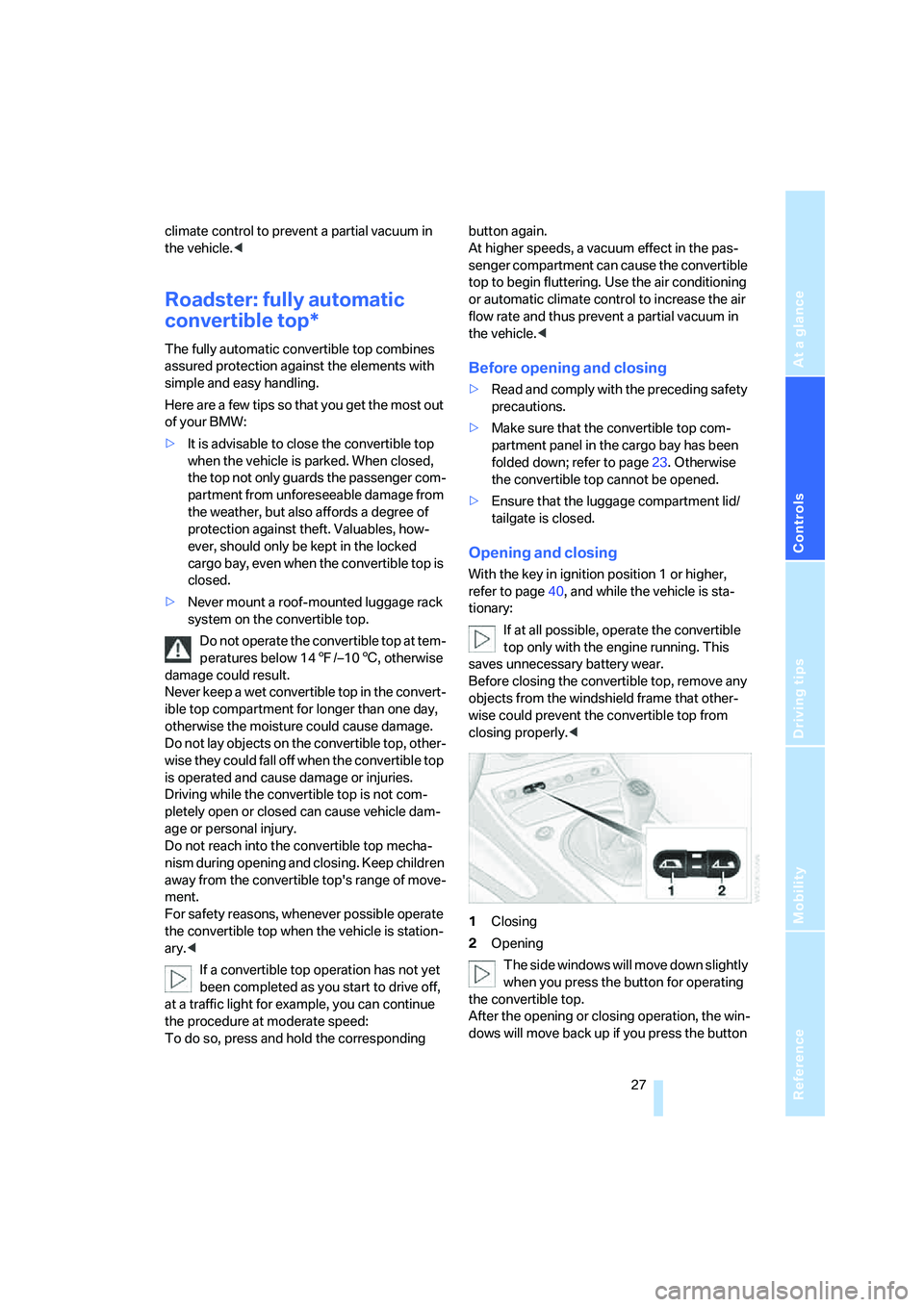
1Closing
2Opening
The side windows will move down slightly
when you press the button for operating
the convertible top.
After the opening or closing operation, the win-
dows will move back up if you press the button
Page 33 of 132
Reference
At a glance
Controls
Driving tips
Mobility
31
vehicle control could lead to an accident.
On the passenger seat as well, do not incline
the backrest too far to the rear while the vehicle
is being driven, otherwise there is a danger in
the event of an accident of sliding under the
safety belt, eliminating the protection normally
provided by the belt.<
Comply with the instructions on head restraint
height on page32 and on damaged safety belts
on page34.
Seat adjustment
Comply with the preceding instructions in
this chapter to ensure the best possible
personal protection.<
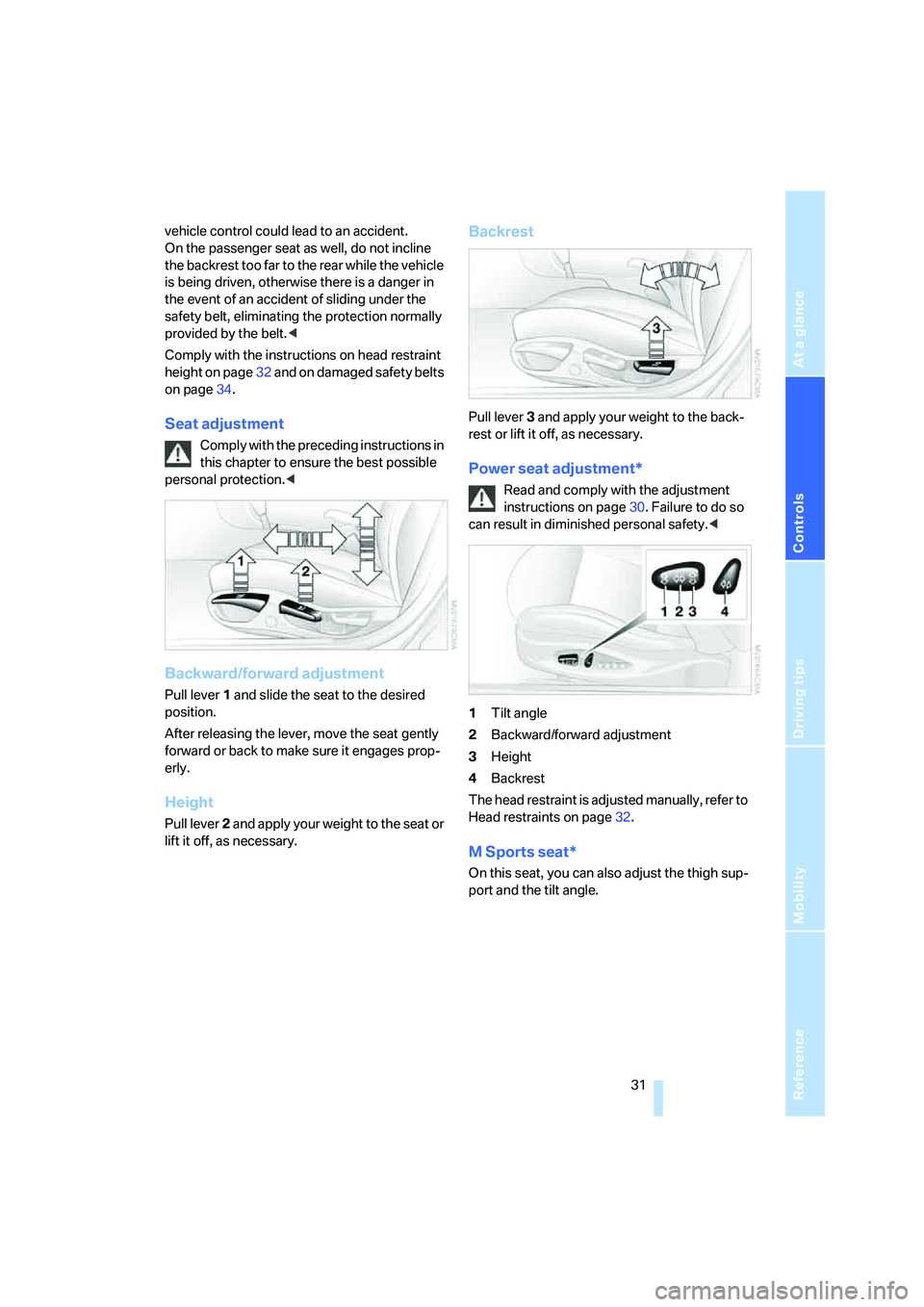
Backward/forward adjustment
Pull lever 1 and slide the seat to the desired
position.
After releasing the lever, move the seat gently
forward or back to make sure it engages prop-
erly.
Height
Pull lever 2 and apply your weight to the seat or
lift it off, as necessary.
Backrest
Pull lever 3 and apply your weight to the back-
rest or lift it off, as necessary.
Power seat adjustment*
Read and comply with the adjustment
instructions on page30. Failure to do so
can result in diminished personal safety.<
1Tilt angle
2Backward/forward adjustment
3Height
4Backrest
The head restraint is adjusted manually, refer to
Head restraints on page32.
M Sports seat*
On this seat, you can also adjust the thigh sup-
port and the tilt angle.
Page 34 of 132
Adjustments
32
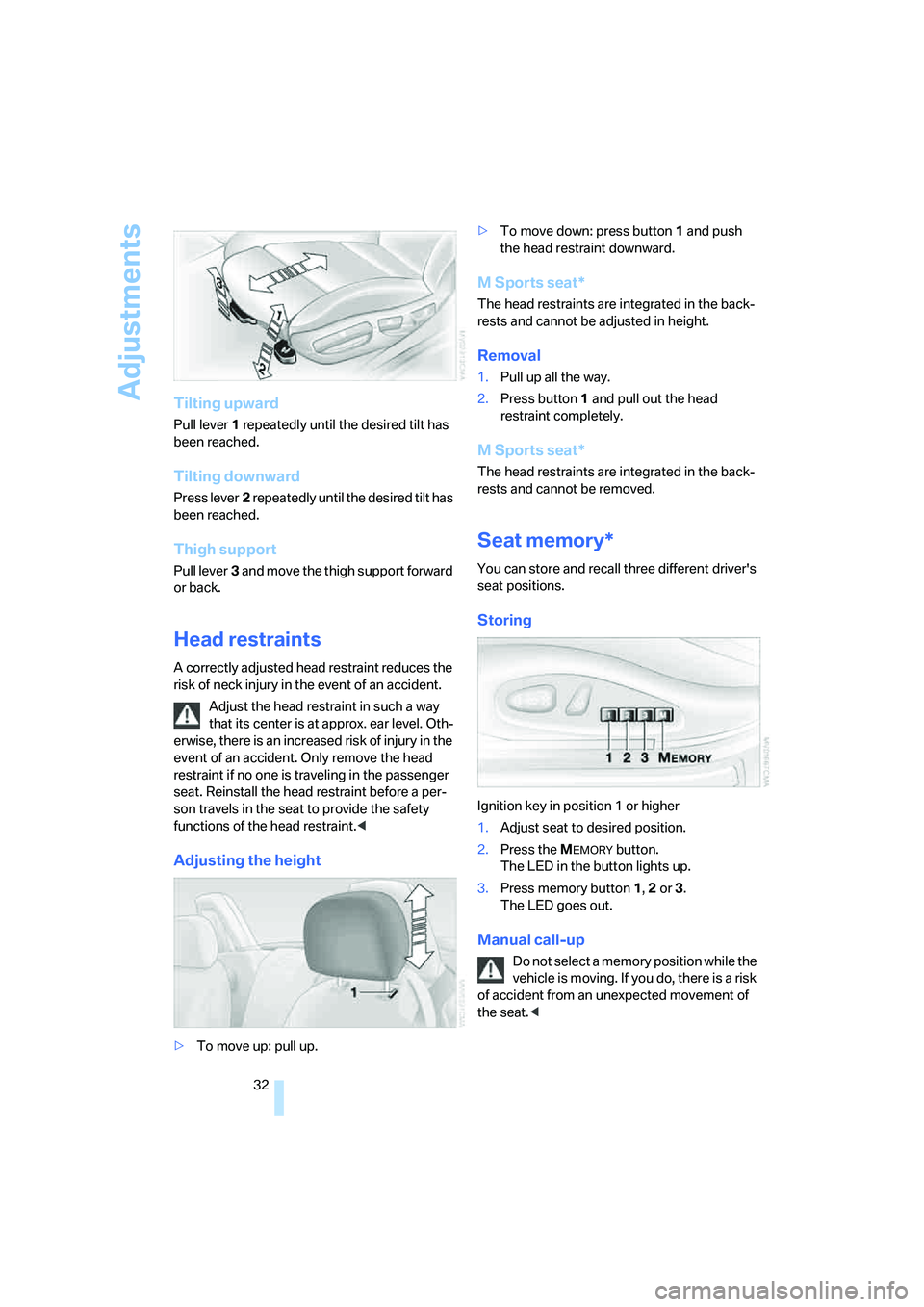
Tilting upward
Pull lever1 repeatedly until the desired tilt has
been reached.
Tilting downward
Press lever2 repeatedly until the desired tilt has
been reached.
Thigh support
Pull lever3 and move the thigh support forward
or back.
Head restraints
A correctly adjusted head restraint reduces the
risk of neck injury in the event of an accident.
Adjust the head restraint in such a way
that its center is at approx. ear level. Oth-
erwise, there is an increased risk of injury in the
event of an accident. Only remove the head
restraint if no one is traveling in the passenger
seat. Reinstall the head restraint before a per-
son travels in the seat to provide the safety
functions of the head restraint.<
Adjusting the height
>To move up: pull up.>To move down: press button1 and push
the head restraint downward.
M Sports seat*
The head restraints are integrated in the back-
rests and cannot be adjusted in height.
Removal
1.Pull up all the way.
2.Press button1 and pull out the head
restraint completely.
M Sports seat*
The head restraints are integrated in the back-
rests and cannot be removed.
Seat memory*
You can store and recall three different driver's
seat positions.
Storing
Ignition key in position 1 or higher
1.Adjust seat to desired position.
2.Press the M
EMORY button.
The LED in the button lights up.
3.Press memory button 1, 2 or 3.
The LED goes out.
Manual call-up
Do not select a memory position while the
vehicle is moving. If you do, there is a risk
of accident from an unexpected movement of
the seat.<