check engine light BMW Z4 SDRIVE28I 2012 User Guide
[x] Cancel search | Manufacturer: BMW, Model Year: 2012, Model line: Z4 SDRIVE28I, Model: BMW Z4 SDRIVE28I 2012Pages: 220, PDF Size: 9.9 MB
Page 113 of 220
Close both windows
An open window causes higher air resistance
and thus increases fuel consumption.
Check the tire inflation pressure
regularly
Check and, if necessary, correct the tire inflation
pressure, refer to page 155, at least twice a
month and before starting on a long trip.
Low tire inflation pressure increases rolling re‐
sistance and thus raises fuel consumption and
tire wear.
Drive away without delay
Do not wait for the engine to warm up while the
vehicle remains stationary. Start driving right
away, but at moderate engine speeds.
This is the fastest way for the cold engine to
reach its operating temperature.
Look well ahead when driving
Avoid unnecessary acceleration and braking.
By maintaining a suitable distance to the vehicle
driving ahead of you.
Driving smoothly and looking ahead reduces
fuel consumption.
Avoid high engine speeds
Use 1st gear to get the vehicle in motion. Be‐
ginning with 2nd gear, accelerate rapidly. When
accelerating, shift up before reaching high en‐
gine speeds.
When you reach the desired speed, shift into the
highest applicable gear and drive with the en‐
gine speed as low as possible and at a constant
speed.
As a rule: driving at low engine speeds lowers
fuel consumption and reduces wear.
Use coasting conditions
When approaching a red light, take your foot off
the accelerator and coast to a halt in the highest
applicable gear.On a downhill slope, take your foot off the ac‐
celerator and coast in a suitable gear.
The flow of fuel is interrupted while coasting.
Switch off the engine during longer
stops
Switch off the engine during longer stops, e.g.,
at traffic lights, railroad crossings or in traffic
congestion.
Fuel savings are achieved after the vehicle is
switched off for only approx. 4 seconds.
The Automatic Engine Start/Stop Function au‐
tomatically switches the engine off during a
stop. Additional information on the Automatic
Engine Start/Stop Function, refer to page 47.
Switch off any functions that are not
currently needed
Functions such as the automatic climate control
require a large amount of energy and consume
additional fuel, especially in city and stop-and-
go traffic.
Therefore, switch off these functions if they are
not actually needed.
Have maintenance carried out
Have vehicles maintained regularly to achieve
optimal vehicle economy and operating life.
Have the maintenance carried out by your serv‐
ice center.
Please also note the BMW Maintenance Sys‐
tem, refer to page 168.Seite 113Things to remember when drivingDriving tips113
Online Edition for Part no. 01 40 2 609 184 - 09 11 500
Page 167 of 220
Suitable additives
Only use suitable additives; otherwise, en‐
gine damage may occur. The additives are
harmful to your health.◀
Coolant consists of water and additives.
Not all commercially available additives are suit‐
able for your vehicle. Ask your service center for
suitable additives.
Checking the coolant level1.Let the engine cool.2.Turn the expansion tank cap counterclock‐
wise slightly to allow any accumulated pres‐
sure to escape, then continue turning to
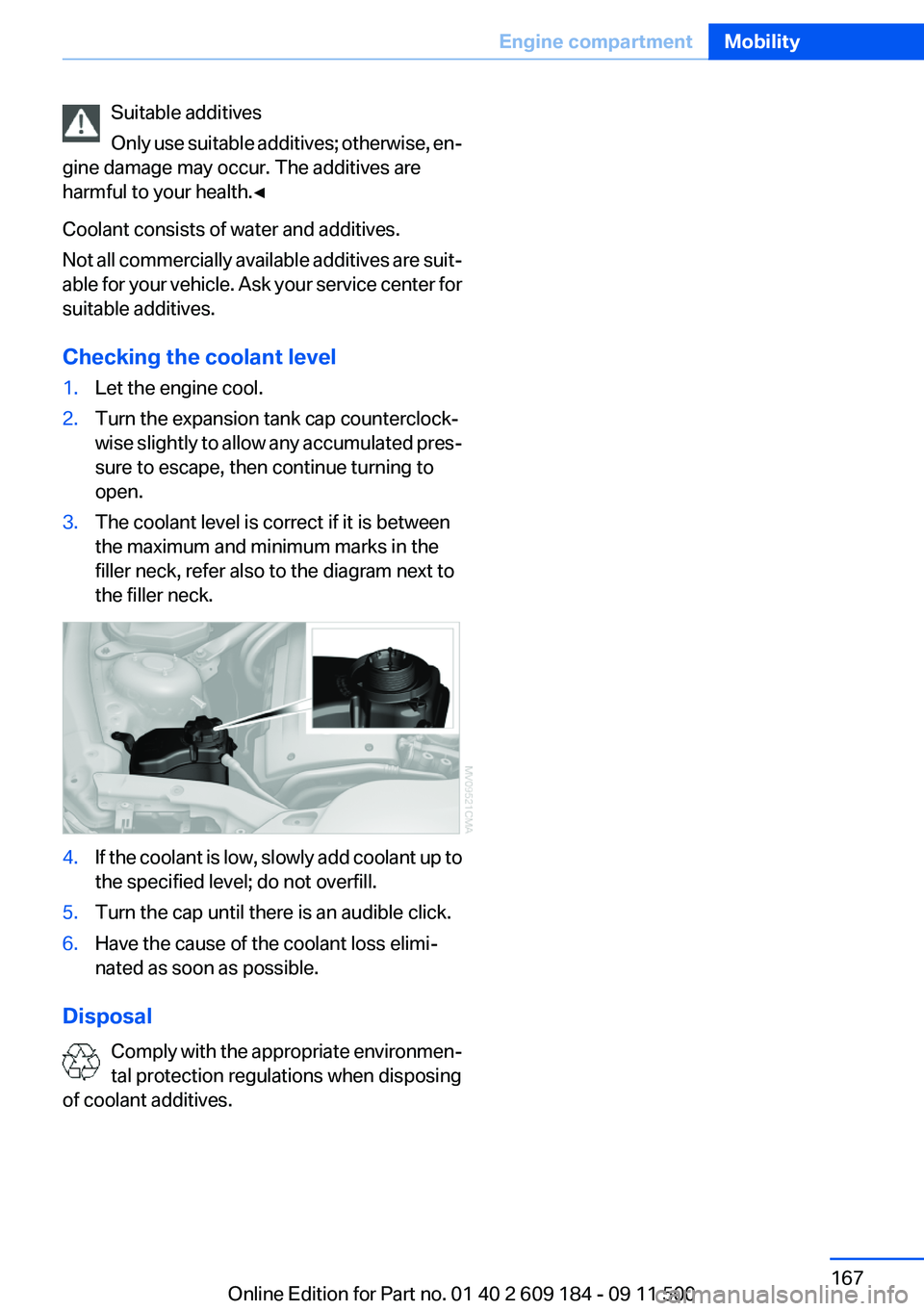
open.3.The coolant level is correct if it is between
the maximum and minimum marks in the
filler neck, refer also to the diagram next to
the filler neck.4.If the coolant is low, slowly add coolant up to
the specified level; do not overfill.5.Turn the cap until there is an audible click.6.Have the cause of the coolant loss elimi‐
nated as soon as possible.
Disposal
Comply with the appropriate environmen‐
tal protection regulations when disposing
of coolant additives.
Seite 167Engine compartmentMobility167
Online Edition for Part no. 01 40 2 609 184 - 09 11 500
Page 169 of 220
Socket for OBD Onboard
Diagnosis
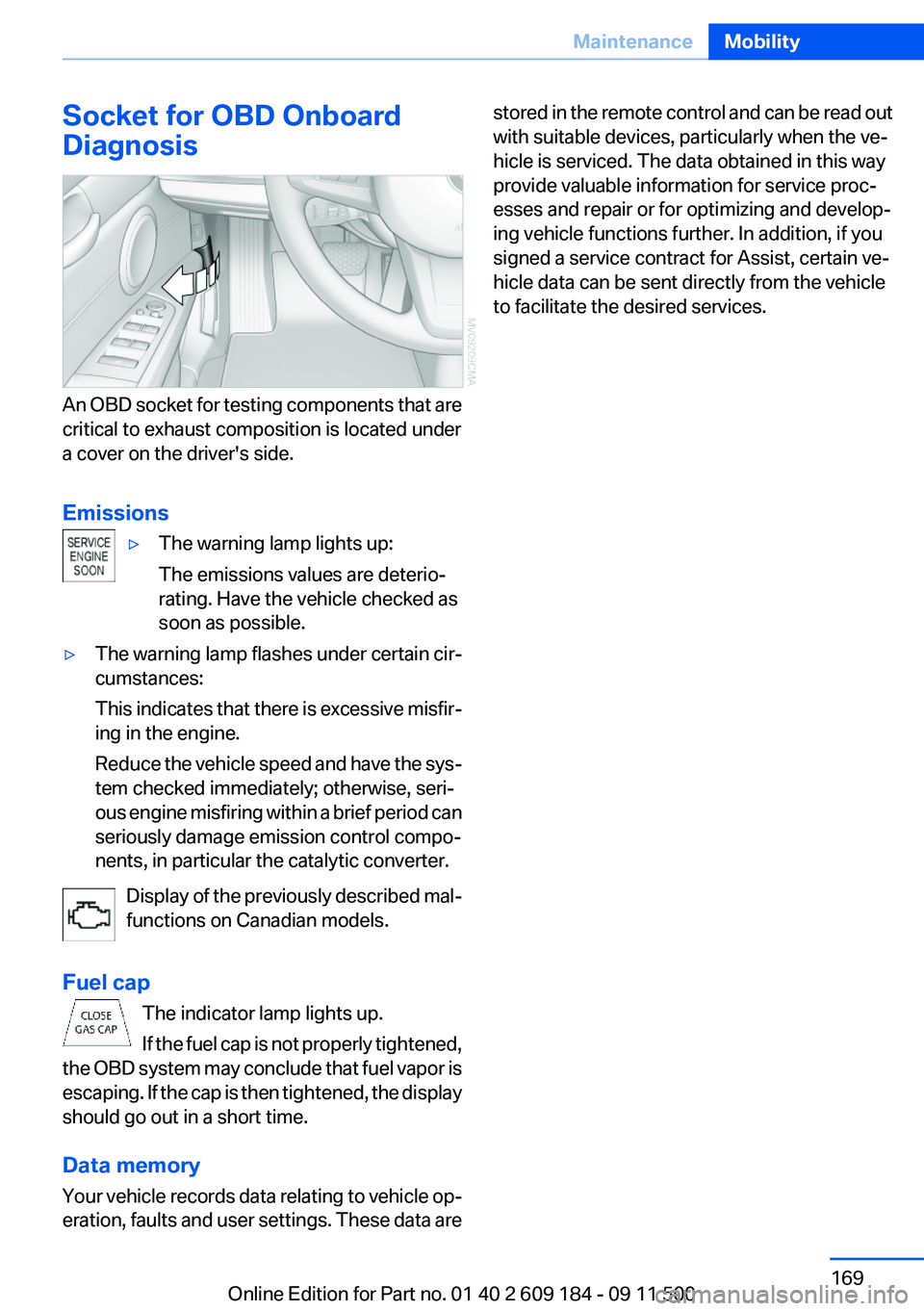
An OBD socket for testing components that are
critical to exhaust composition is located under
a cover on the driver's side.
Emissions
▷The warning lamp lights up:
The emissions values are deterio‐
rating. Have the vehicle checked as
soon as possible.▷The warning lamp flashes under certain cir‐
cumstances:
This indicates that there is excessive misfir‐
ing in the engine.
Reduce the vehicle speed and have the sys‐
tem checked immediately; otherwise, seri‐
ous engine misfiring within a brief period can
seriously damage emission control compo‐
nents, in particular the catalytic converter.
Display of the previously described mal‐
functions on Canadian models.
Fuel cap The indicator lamp lights up.
If the fuel cap is not properly tightened,
the OBD system may conclude that fuel vapor is
escaping. If the cap is then tightened, the display
should go out in a short time.
Data memory
Your vehicle records data relating to vehicle op‐
eration, faults and user settings. These data are
stored in the remote control and can be read out
with suitable devices, particularly when the ve‐
hicle is serviced. The data obtained in this way
provide valuable information for service proc‐
esses and repair or for optimizing and develop‐
ing vehicle functions further. In addition, if you
signed a service contract for Assist, certain ve‐
hicle data can be sent directly from the vehicle
to facilitate the desired services.Seite 169MaintenanceMobility169
Online Edition for Part no. 01 40 2 609 184 - 09 11 500
Page 187 of 220
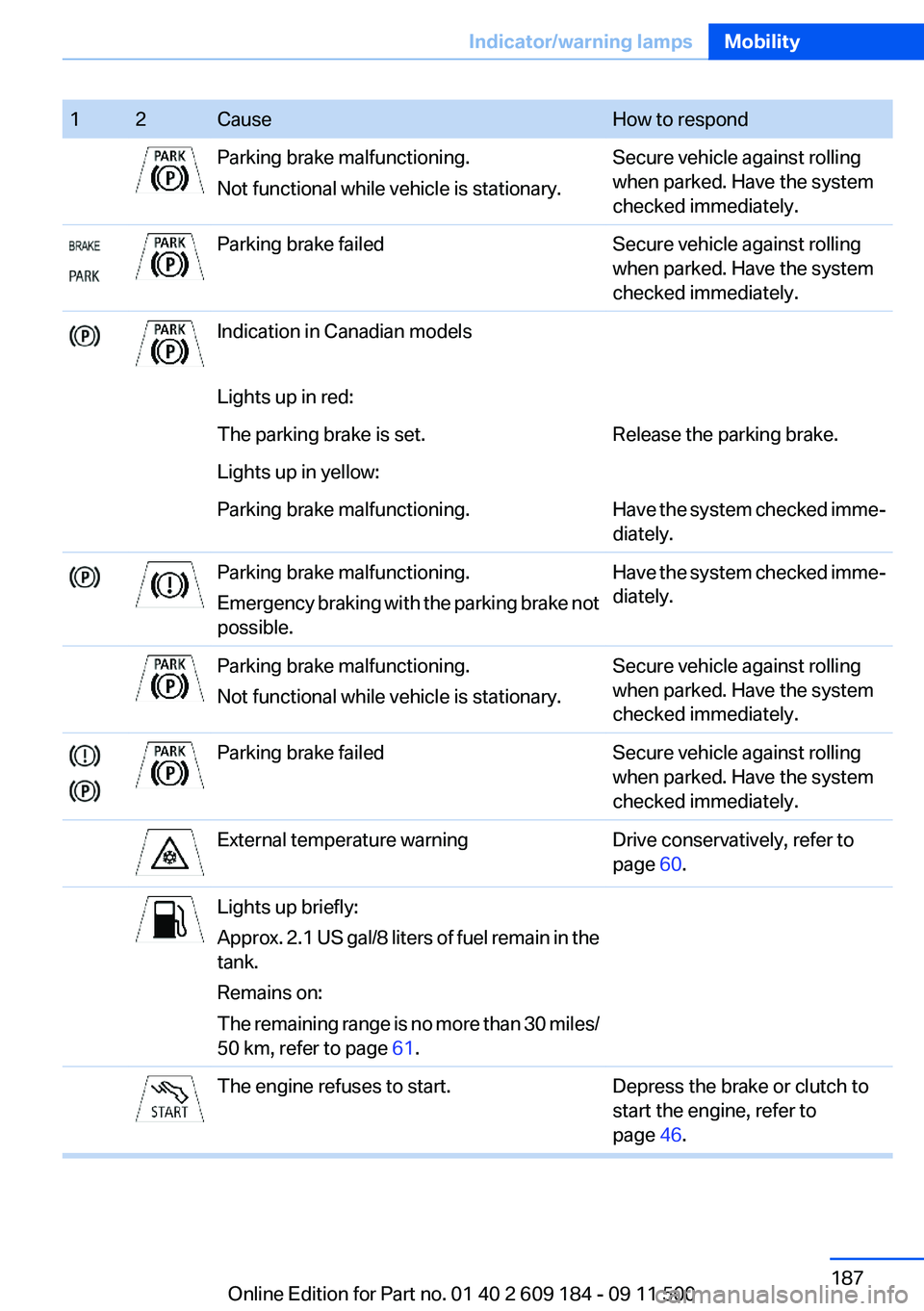
12CauseHow to respondParking brake malfunctioning.
Not functional while vehicle is stationary.Secure vehicle against rolling
when parked. Have the system
checked immediately.Parking brake failedSecure vehicle against rolling
when parked. Have the system
checked immediately.Indication in Canadian modelsLights up in red:The parking brake is set.Release the parking brake.Lights up in yellow:Parking brake malfunctioning.Have the system checked imme‐
diately.Parking brake malfunctioning.
Emergency braking with the parking brake not
possible.Have the system checked imme‐
diately.Parking brake malfunctioning.
Not functional while vehicle is stationary.Secure vehicle against rolling
when parked. Have the system
checked immediately.Parking brake failedSecure vehicle against rolling
when parked. Have the system
checked immediately.External temperature warningDrive conservatively, refer to
page 60.Lights up briefly:
Approx. 2.1 US gal/8 liters of fuel remain in the
tank.
Remains on:
The remaining range is no more than 30 miles/
50 km, refer to page 61.The engine refuses to start.Depress the brake or clutch to
start the engine, refer to
page 46.Seite 187Indicator/warning lampsMobility187
Online Edition for Part no. 01 40 2 609 184 - 09 11 500
Page 189 of 220
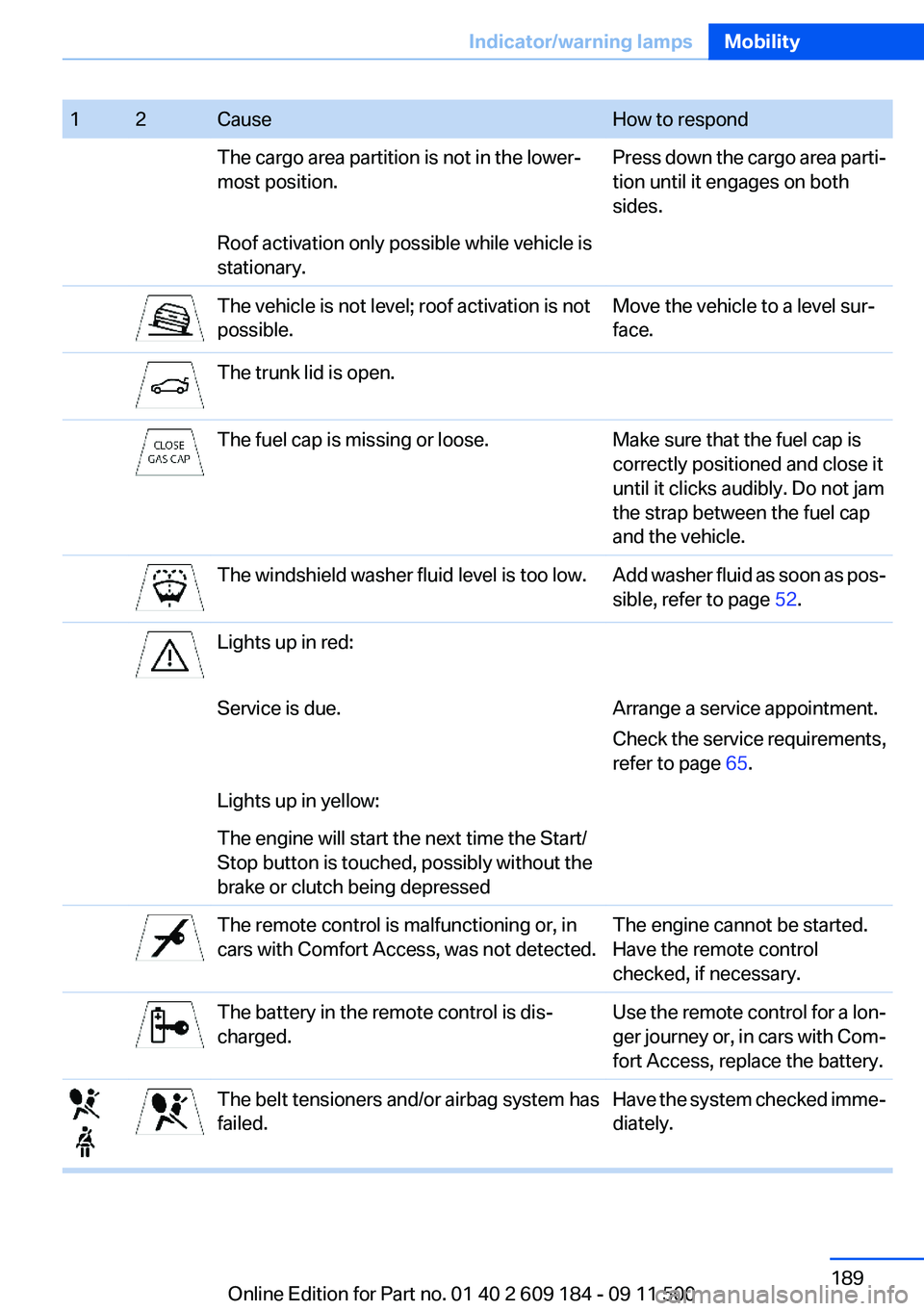
12CauseHow to respondThe cargo area partition is not in the lower‐
most position.Press down the cargo area parti‐
tion until it engages on both
sides.Roof activation only possible while vehicle is
stationary.The vehicle is not level; roof activation is not
possible.Move the vehicle to a level sur‐
face.The trunk lid is open.The fuel cap is missing or loose.Make sure that the fuel cap is
correctly positioned and close it
until it clicks audibly. Do not jam
the strap between the fuel cap
and the vehicle.The windshield washer fluid level is too low.Add washer fluid as soon as pos‐
sible, refer to page 52.Lights up in red:Service is due.Arrange a service appointment.
Check the service requirements,
refer to page 65.Lights up in yellow:The engine will start the next time the Start/
Stop button is touched, possibly without the
brake or clutch being depressedThe remote control is malfunctioning or, in
cars with Comfort Access, was not detected.The engine cannot be started.
Have the remote control
checked, if necessary.The battery in the remote control is dis‐
charged.Use the remote control for a lon‐
ger journey or, in cars with Com‐
fort Access, replace the battery.The belt tensioners and/or airbag system has
failed.Have the system checked imme‐
diately.Seite 189Indicator/warning lampsMobility189
Online Edition for Part no. 01 40 2 609 184 - 09 11 500
Page 190 of 220
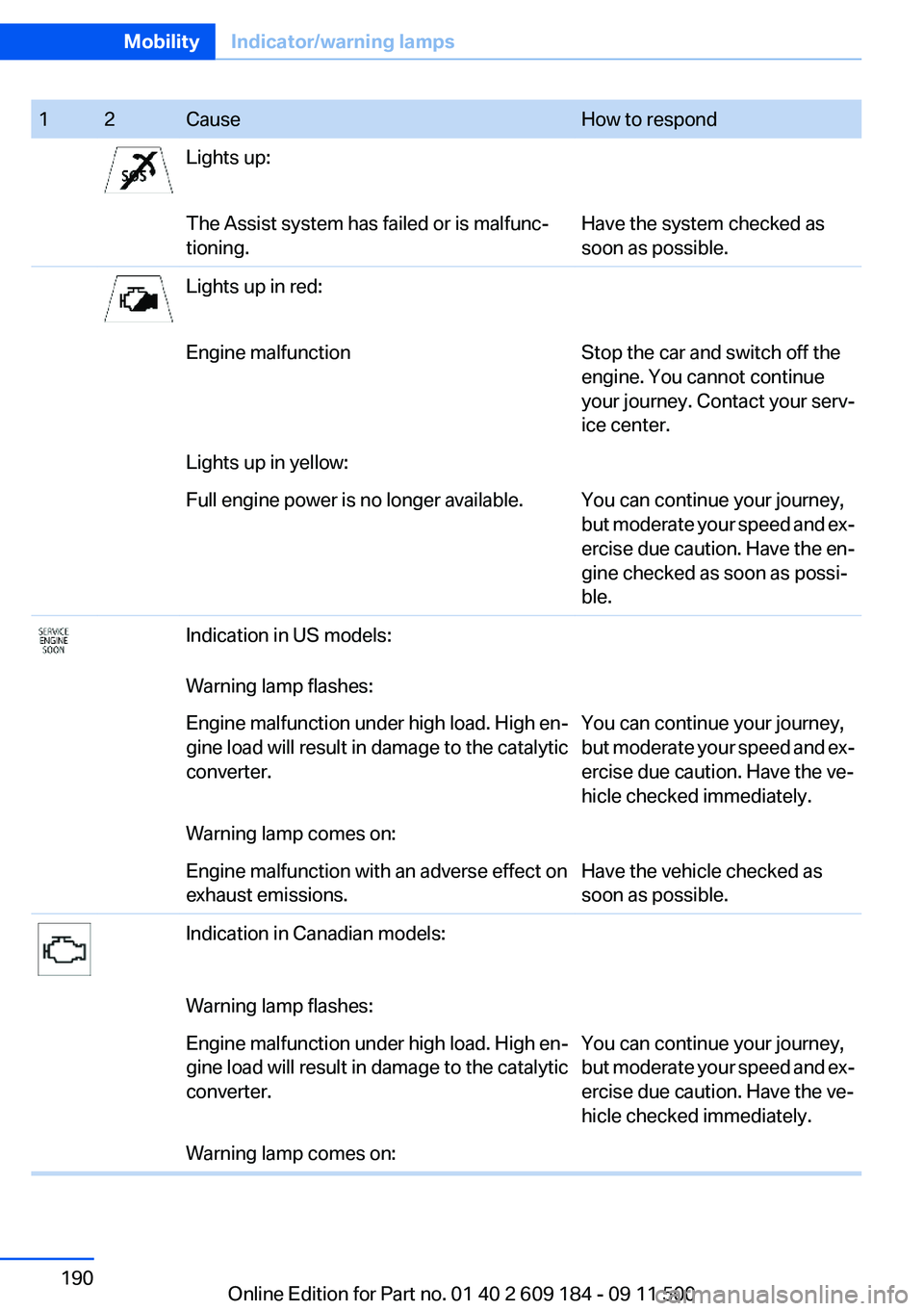
12CauseHow to respondLights up:The Assist system has failed or is malfunc‐
tioning.Have the system checked as
soon as possible.Lights up in red:Engine malfunctionStop the car and switch off the
engine. You cannot continue
your journey. Contact your serv‐
ice center.Lights up in yellow:Full engine power is no longer available.You can continue your journey,
but moderate your speed and ex‐
ercise due caution. Have the en‐
gine checked as soon as possi‐
ble.Indication in US models:Warning lamp flashes:Engine malfunction under high load. High en‐
gine load will result in damage to the catalytic
converter.You can continue your journey,
but moderate your speed and ex‐
ercise due caution. Have the ve‐
hicle checked immediately.Warning lamp comes on:Engine malfunction with an adverse effect on
exhaust emissions.Have the vehicle checked as
soon as possible.Indication in Canadian models:Warning lamp flashes:Engine malfunction under high load. High en‐
gine load will result in damage to the catalytic
converter.You can continue your journey,
but moderate your speed and ex‐
ercise due caution. Have the ve‐
hicle checked immediately.Warning lamp comes on:Seite 190MobilityIndicator/warning lamps190
Online Edition for Part no. 01 40 2 609 184 - 09 11 500
Page 191 of 220
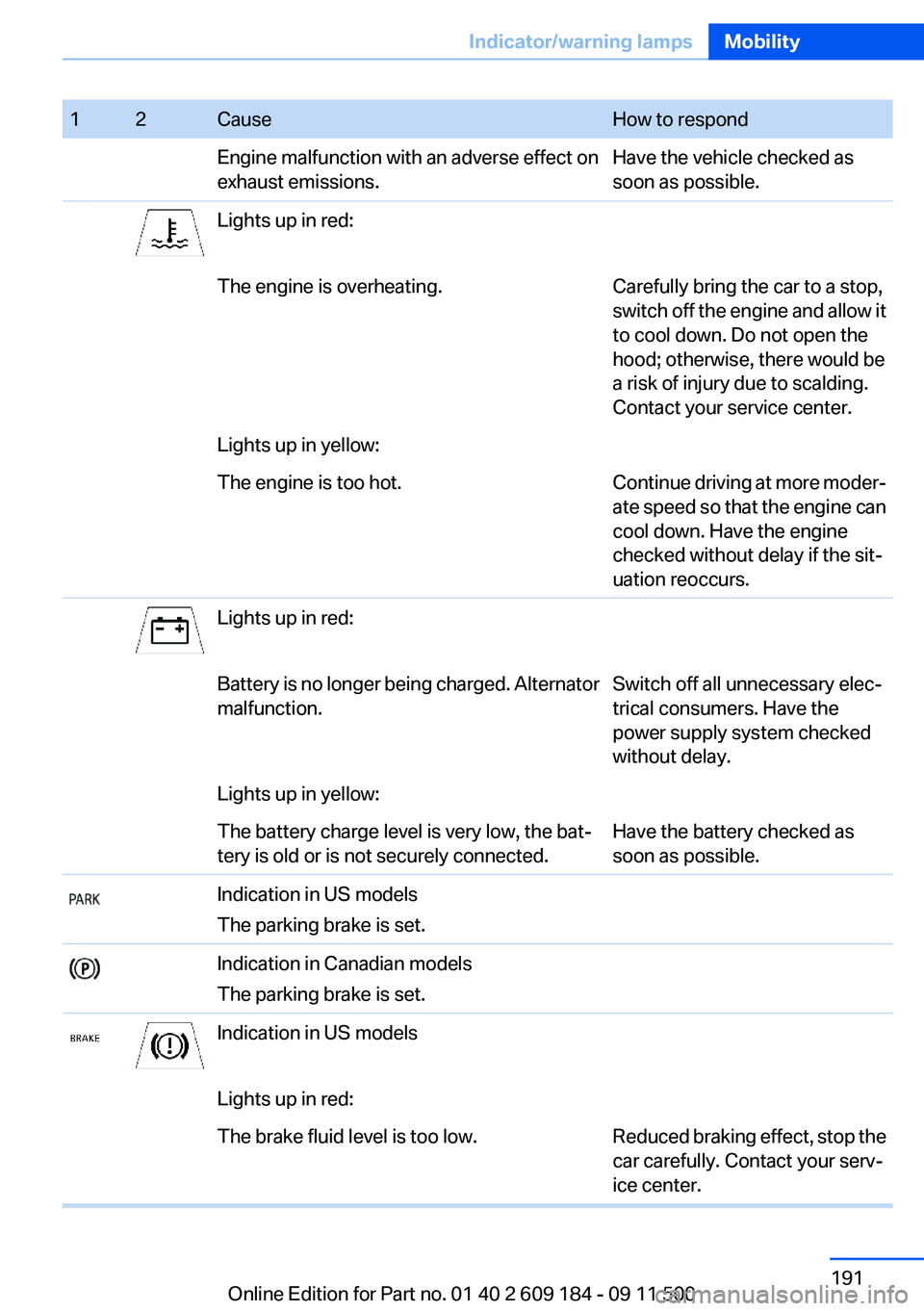
12CauseHow to respondEngine malfunction with an adverse effect on
exhaust emissions.Have the vehicle checked as
soon as possible.Lights up in red:The engine is overheating.Carefully bring the car to a stop,
switch off the engine and allow it
to cool down. Do not open the
hood; otherwise, there would be
a risk of injury due to scalding.
Contact your service center.Lights up in yellow:The engine is too hot.Continue driving at more moder‐
ate speed so that the engine can
cool down. Have the engine
checked without delay if the sit‐
uation reoccurs.Lights up in red:Battery is no longer being charged. Alternator
malfunction.Switch off all unnecessary elec‐
trical consumers. Have the
power supply system checked
without delay.Lights up in yellow:The battery charge level is very low, the bat‐
tery is old or is not securely connected.Have the battery checked as
soon as possible.Indication in US models
The parking brake is set.Indication in Canadian models
The parking brake is set.Indication in US modelsLights up in red:The brake fluid level is too low.Reduced braking effect, stop the
car carefully. Contact your serv‐
ice center.Seite 191Indicator/warning lampsMobility191
Online Edition for Part no. 01 40 2 609 184 - 09 11 500
Page 193 of 220
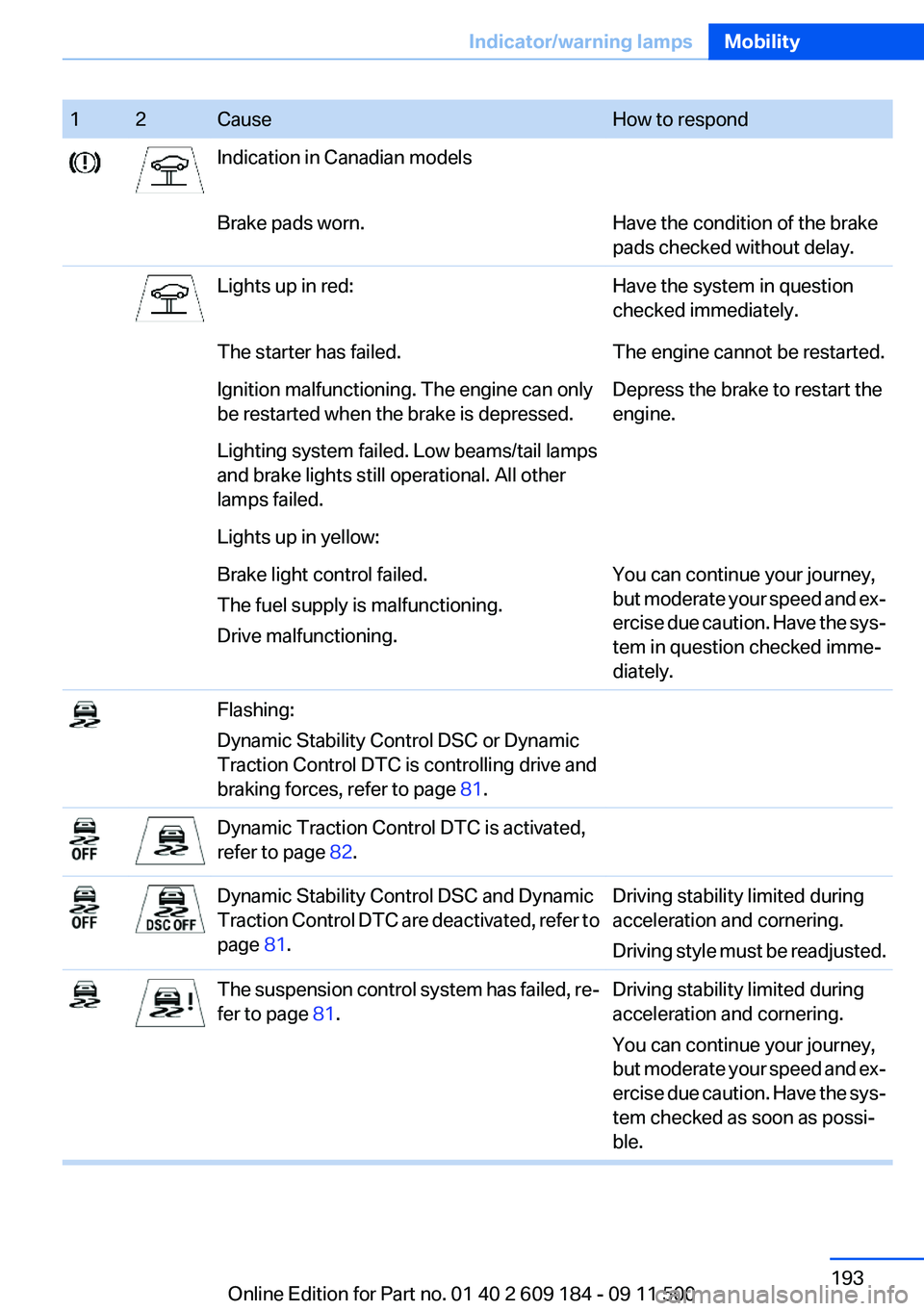
12CauseHow to respondIndication in Canadian modelsBrake pads worn.Have the condition of the brake
pads checked without delay.Lights up in red:Have the system in question
checked immediately.The starter has failed.The engine cannot be restarted.Ignition malfunctioning. The engine can only
be restarted when the brake is depressed.Depress the brake to restart the
engine.Lighting system failed. Low beams/tail lamps
and brake lights still operational. All other
lamps failed.Lights up in yellow:Brake light control failed.
The fuel supply is malfunctioning.
Drive malfunctioning.You can continue your journey,
but moderate your speed and ex‐
ercise due caution. Have the sys‐
tem in question checked imme‐
diately.Flashing:
Dynamic Stability Control DSC or Dynamic
Traction Control DTC is controlling drive and
braking forces, refer to page 81.Dynamic Traction Control DTC is activated,
refer to page 82.Dynamic Stability Control DSC and Dynamic
Traction Control DTC are deactivated, refer to
page 81.Driving stability limited during
acceleration and cornering.
Driving style must be readjusted.The suspension control system has failed, re‐
fer to page 81.Driving stability limited during
acceleration and cornering.
You can continue your journey,
but moderate your speed and ex‐
ercise due caution. Have the sys‐
tem checked as soon as possi‐
ble.Seite 193Indicator/warning lampsMobility193
Online Edition for Part no. 01 40 2 609 184 - 09 11 500
Page 196 of 220
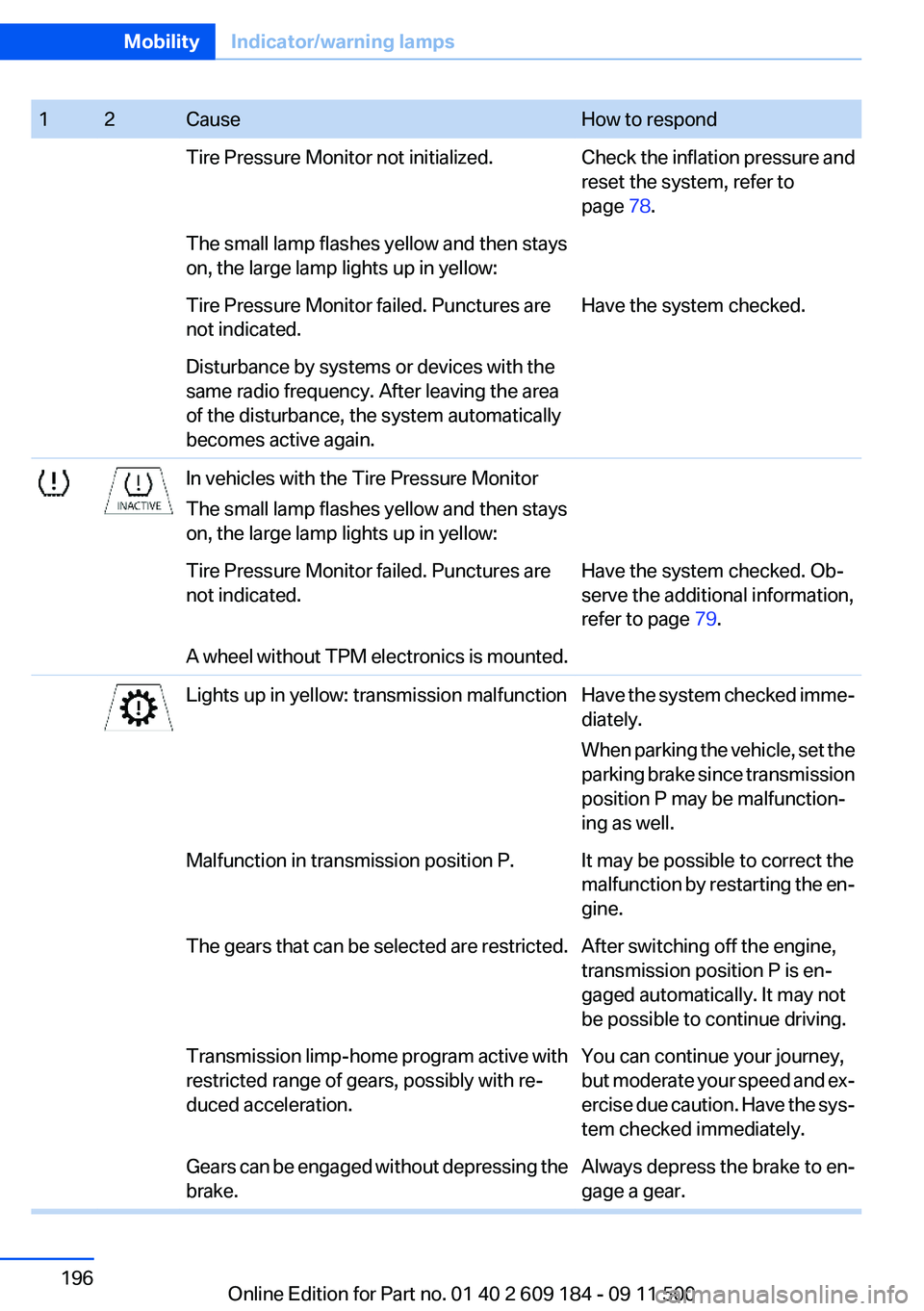
12CauseHow to respondTire Pressure Monitor not initialized.Check the inflation pressure and
reset the system, refer to
page 78.The small lamp flashes yellow and then stays
on, the large lamp lights up in yellow:Tire Pressure Monitor failed. Punctures are
not indicated.Have the system checked.Disturbance by systems or devices with the
same radio frequency. After leaving the area
of the disturbance, the system automatically
becomes active again.In vehicles with the Tire Pressure Monitor
The small lamp flashes yellow and then stays
on, the large lamp lights up in yellow:Tire Pressure Monitor failed. Punctures are
not indicated.Have the system checked. Ob‐
serve the additional information,
refer to page 79.A wheel without TPM electronics is mounted.Lights up in yellow: transmission malfunctionHave the system checked imme‐
diately.
When parking the vehicle, set the
parking brake since transmission
position P may be malfunction‐
ing as well.Malfunction in transmission position P.It may be possible to correct the
malfunction by restarting the en‐
gine.The gears that can be selected are restricted.After switching off the engine,
transmission position P is en‐
gaged automatically. It may not
be possible to continue driving.Transmission limp-home program active with
restricted range of gears, possibly with re‐
duced acceleration.You can continue your journey,
but moderate your speed and ex‐
ercise due caution. Have the sys‐
tem checked immediately.Gears can be engaged without depressing the
brake.Always depress the brake to en‐
gage a gear.Seite 196MobilityIndicator/warning lamps196
Online Edition for Part no. 01 40 2 609 184 - 09 11 500
Page 197 of 220
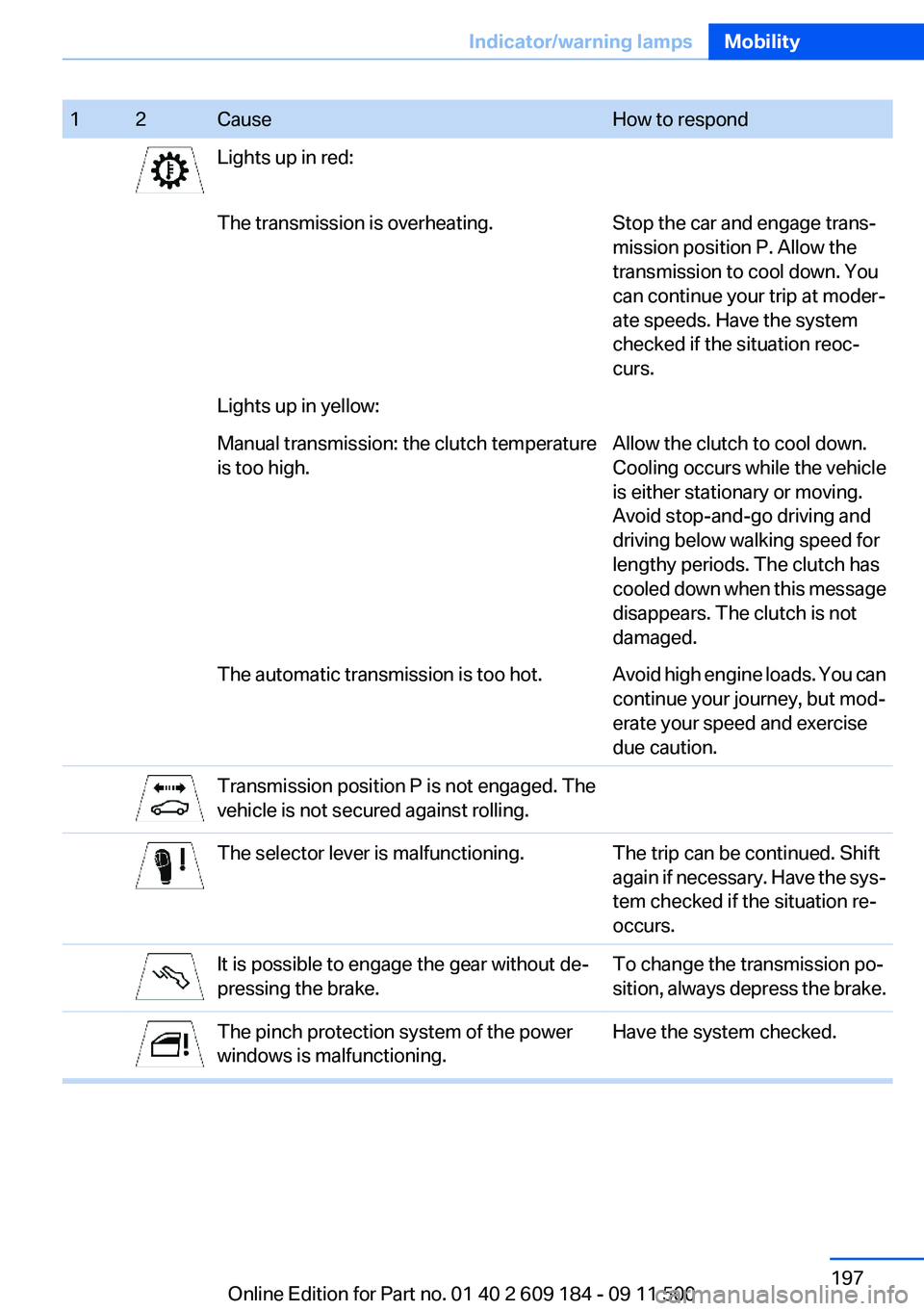
12CauseHow to respondLights up in red:The transmission is overheating.Stop the car and engage trans‐
mission position P. Allow the
transmission to cool down. You
can continue your trip at moder‐
ate speeds. Have the system
checked if the situation reoc‐
curs.Lights up in yellow:Manual transmission: the clutch temperature
is too high.Allow the clutch to cool down.
Cooling occurs while the vehicle
is either stationary or moving.
Avoid stop-and-go driving and
driving below walking speed for
lengthy periods. The clutch has
cooled down when this message
disappears. The clutch is not
damaged.The automatic transmission is too hot.Avoid high engine loads. You can
continue your journey, but mod‐
erate your speed and exercise
due caution.Transmission position P is not engaged. The
vehicle is not secured against rolling.The selector lever is malfunctioning.The trip can be continued. Shift
again if necessary. Have the sys‐
tem checked if the situation re‐
occurs.It is possible to engage the gear without de‐
pressing the brake.To change the transmission po‐
sition, always depress the brake.The pinch protection system of the power
windows is malfunctioning.Have the system checked.Seite 197Indicator/warning lampsMobility197
Online Edition for Part no. 01 40 2 609 184 - 09 11 500