start stop button BMW Z4 SDRIVE28I 2012 User Guide
[x] Cancel search | Manufacturer: BMW, Model Year: 2012, Model line: Z4 SDRIVE28I, Model: BMW Z4 SDRIVE28I 2012Pages: 220, PDF Size: 9.9 MB
Page 125 of 220
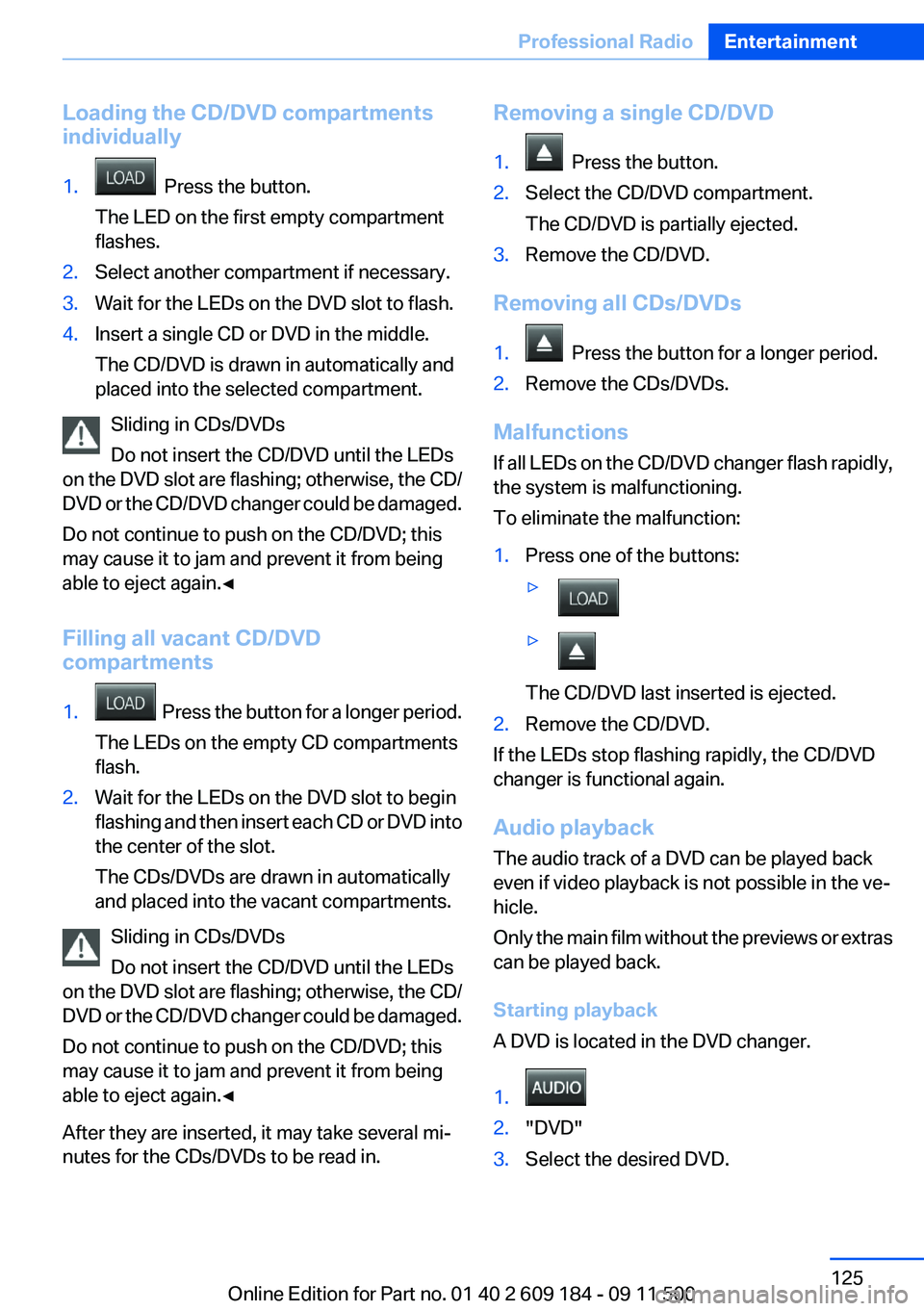
Loading the CD/DVD compartments
individually1. Press the button.
The LED on the first empty compartment
flashes.2.Select another compartment if necessary.3.Wait for the LEDs on the DVD slot to flash.4.Insert a single CD or DVD in the middle.
The CD/DVD is drawn in automatically and
placed into the selected compartment.
Sliding in CDs/DVDs
Do not insert the CD/DVD until the LEDs
on the DVD slot are flashing; otherwise, the CD/
DVD or the CD/DVD changer could be damaged.
Do not continue to push on the CD/DVD; this
may cause it to jam and prevent it from being
able to eject again.◀
Filling all vacant CD/DVD
compartments
1. Press the button for a longer period.
The LEDs on the empty CD compartments
flash.2.Wait for the LEDs on the DVD slot to begin
flashing and then insert each CD or DVD into
the center of the slot.
The CDs/DVDs are drawn in automatically
and placed into the vacant compartments.
Sliding in CDs/DVDs
Do not insert the CD/DVD until the LEDs
on the DVD slot are flashing; otherwise, the CD/
DVD or the CD/DVD changer could be damaged.
Do not continue to push on the CD/DVD; this
may cause it to jam and prevent it from being
able to eject again.◀
After they are inserted, it may take several mi‐
nutes for the CDs/DVDs to be read in.
Removing a single CD/DVD1. Press the button.2.Select the CD/DVD compartment.
The CD/DVD is partially ejected.3.Remove the CD/DVD.
Removing all CDs/DVDs
1. Press the button for a longer period.2.Remove the CDs/DVDs.
Malfunctions
If all LEDs on the CD/DVD changer flash rapidly,
the system is malfunctioning.
To eliminate the malfunction:
1.Press one of the buttons:▷▷
The CD/DVD last inserted is ejected.
2.Remove the CD/DVD.
If the LEDs stop flashing rapidly, the CD/DVD
changer is functional again.
Audio playback
The audio track of a DVD can be played back
even if video playback is not possible in the ve‐
hicle.
Only the main film without the previews or extras
can be played back.
Starting playback
A DVD is located in the DVD changer.
1. 2."DVD"3.Select the desired DVD.Seite 125Professional RadioEntertainment125
Online Edition for Part no. 01 40 2 609 184 - 09 11 500
Page 189 of 220
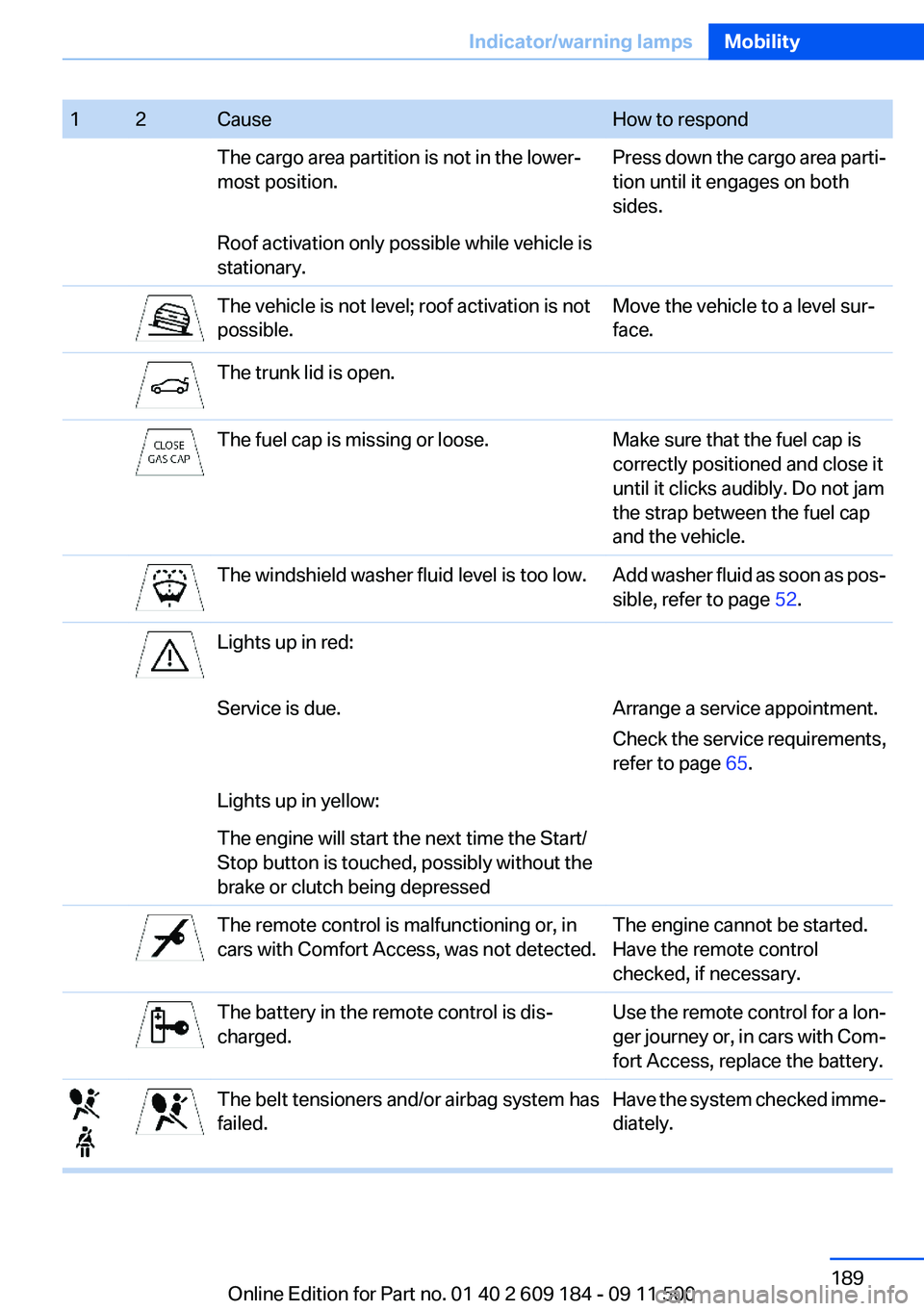
12CauseHow to respondThe cargo area partition is not in the lower‐
most position.Press down the cargo area parti‐
tion until it engages on both
sides.Roof activation only possible while vehicle is
stationary.The vehicle is not level; roof activation is not
possible.Move the vehicle to a level sur‐
face.The trunk lid is open.The fuel cap is missing or loose.Make sure that the fuel cap is
correctly positioned and close it
until it clicks audibly. Do not jam
the strap between the fuel cap
and the vehicle.The windshield washer fluid level is too low.Add washer fluid as soon as pos‐
sible, refer to page 52.Lights up in red:Service is due.Arrange a service appointment.
Check the service requirements,
refer to page 65.Lights up in yellow:The engine will start the next time the Start/
Stop button is touched, possibly without the
brake or clutch being depressedThe remote control is malfunctioning or, in
cars with Comfort Access, was not detected.The engine cannot be started.
Have the remote control
checked, if necessary.The battery in the remote control is dis‐
charged.Use the remote control for a lon‐
ger journey or, in cars with Com‐
fort Access, replace the battery.The belt tensioners and/or airbag system has
failed.Have the system checked imme‐
diately.Seite 189Indicator/warning lampsMobility189
Online Edition for Part no. 01 40 2 609 184 - 09 11 500
Page 199 of 220
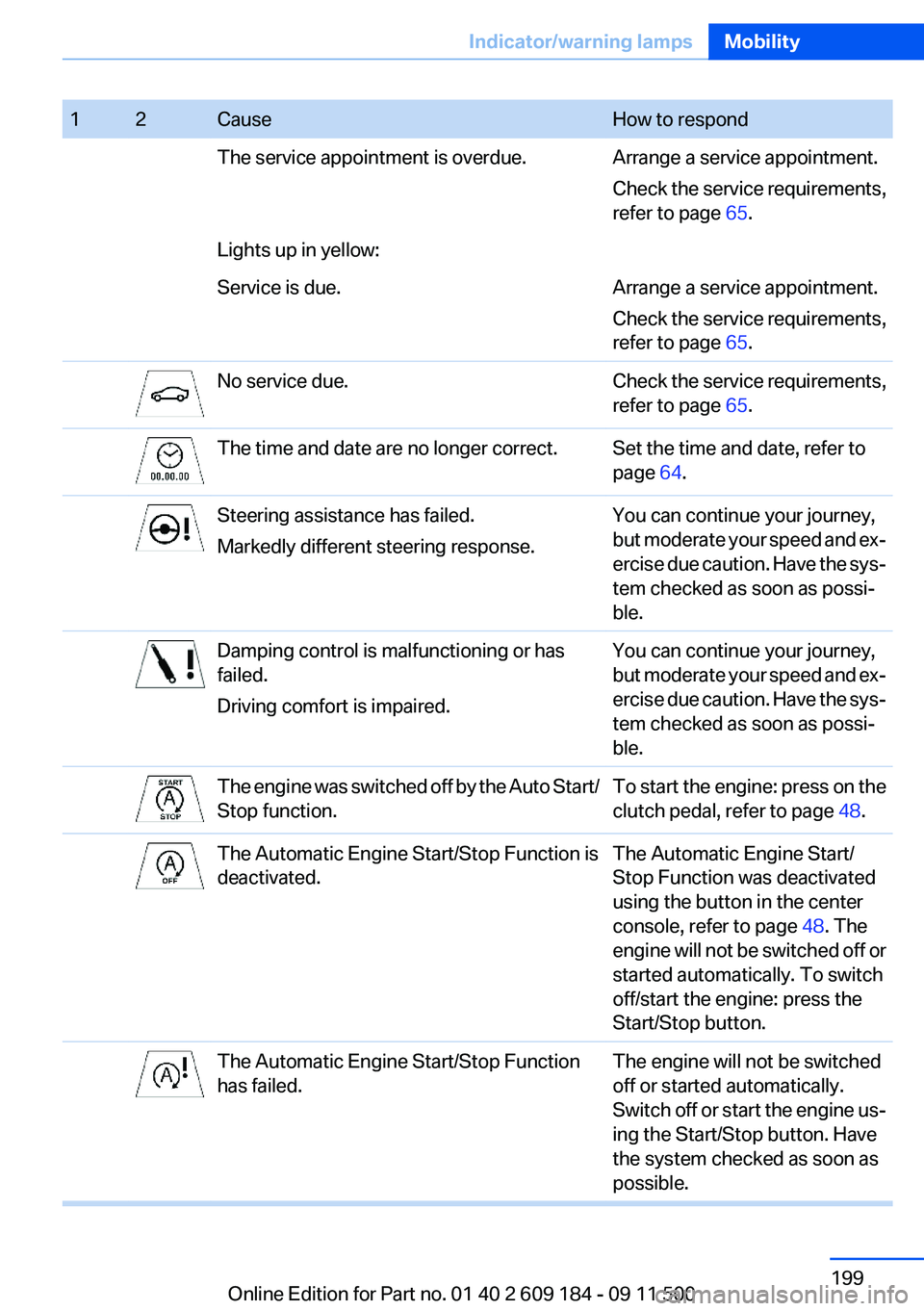
12CauseHow to respondThe service appointment is overdue.Arrange a service appointment.
Check the service requirements,
refer to page 65.Lights up in yellow:Service is due.Arrange a service appointment.
Check the service requirements,
refer to page 65.No service due.Check the service requirements,
refer to page 65.The time and date are no longer correct.Set the time and date, refer to
page 64.Steering assistance has failed.
Markedly different steering response.You can continue your journey,
but moderate your speed and ex‐
ercise due caution. Have the sys‐
tem checked as soon as possi‐
ble.Damping control is malfunctioning or has
failed.
Driving comfort is impaired.You can continue your journey,
but moderate your speed and ex‐
ercise due caution. Have the sys‐
tem checked as soon as possi‐
ble.The engine was switched off by the Auto Start/
Stop function.To start the engine: press on the
clutch pedal, refer to page 48.The Automatic Engine Start/Stop Function is
deactivated.The Automatic Engine Start/
Stop Function was deactivated
using the button in the center
console, refer to page 48. The
engine will not be switched off or
started automatically. To switch
off/start the engine: press the
Start/Stop button.The Automatic Engine Start/Stop Function
has failed.The engine will not be switched
off or started automatically.
Switch off or start the engine us‐
ing the Start/Stop button. Have
the system checked as soon as
possible.Seite 199Indicator/warning lampsMobility199
Online Edition for Part no. 01 40 2 609 184 - 09 11 500
Page 209 of 220
Band-aids, refer to First aidkit 177
Bar, refer to Towing meth‐ ods 180
Battery– Disposal 30, 175– Power failure 174– Remote control 20– Replacement in the remote
control 30– Replacement, vehicle bat‐
tery 174– Vehicle 174
Before entering the car
wash 182
Being towed 179
Belts, refer to Safety belts 38
Belt tensioners, refer to Safety belts 38
Beverage holder, refer to Cu‐ pholder 105
Blower, refer to Air flow rate 90, 93
BMW Assist 145
BMW Assist, refer to Connec‐ tedDrive 145
BMW EfficientDynamics, refer to Saving fuel 112
BMW homepage 6
BMW Internet page 6
BMW Maintenance Sys‐ tem 168
Bottle holder, refer to Cu‐ pholder 105
Brake assistant, refer to Dy‐ namic Brake Control 81
Brake discs, breaking in 108
Brake force display 80
Brake force distribution, elec‐ tronic 81
Brake lamps
– Brake force display 80– Bulb replacement 172, 173
Brake lights, adaptive 80
Brake pads, breaking in 108
Brakes
– ABS 81Braking– Notes 109– Parking brake 49
Braking safely 109
Breakdown assistance 177
Breaking in 108
Bulbs, replacing, refer to Lamps and bulbs 170
Button for starting the engine, refer to Start/Stop button 45
Buttons on the steering wheel 12
Bypassing, see Starting aid 177
C
California Proposition 65 Warning 7
Camera, care 185
Can holder, refer to Cu‐ pholder 105
Capacities
– Cargo area, refer to
Weights 204– Fuel tank, refer to Filling ca‐
pacities 206
Car battery 174
Car care products 183
Care 182
Care, displays 185
Care, vehicle 183
Cargo 110
Cargo area
– Capacity 204– Lamp, refer to Interior
lamps 72– Opening from the inside 27– Opening from the out‐
side 27
Cargo, securing 101
Cargo straps, securing cargo 112
Car key, refer to Integrated key/remote control 20
Carpet, care 184
Car phone– Installation location, refer to
Center armrest 103
Car vacuum cleaner, connect‐
ing, refer to Connecting elec‐
trical devices 100
Car wash 182
Car wash
– With Comfort Access 29
Catalytic converter, refer to
Hot exhaust system 109
CBS Condition Based Serv‐ ice 168
CD/DVD changer 124
CD/DVD notes 126
Cell phone, installation loca‐ tion, refer to Center arm‐
rest 103
Center armrest 103
Center brake lamp
– Bulb replacement 173
Center console, refer to
Around the center con‐
sole 15
Central locking
– Comfort Access 28– From the inside 26– Setting the unlocking char‐
acteristics 22
Central locking system
– From the outside 21– Principle 21
Changes, technical, refer to
Safety 6
Changing wheels/tires 161
Chassis number, refer to En‐ gine compartment 163
Check Control 66
Children, transporting safely 43
Child restraint fixing sys‐ tem 43
Child seats, refer to Transport‐ ing children safely 43
Chrome parts, care 184
Circulation of air, refer to Re‐ circulated air mode 90, 94
Seite 209Everything from A to ZReference209
Online Edition for Part no. 01 40 2 609 184 - 09 11 500
Page 211 of 220
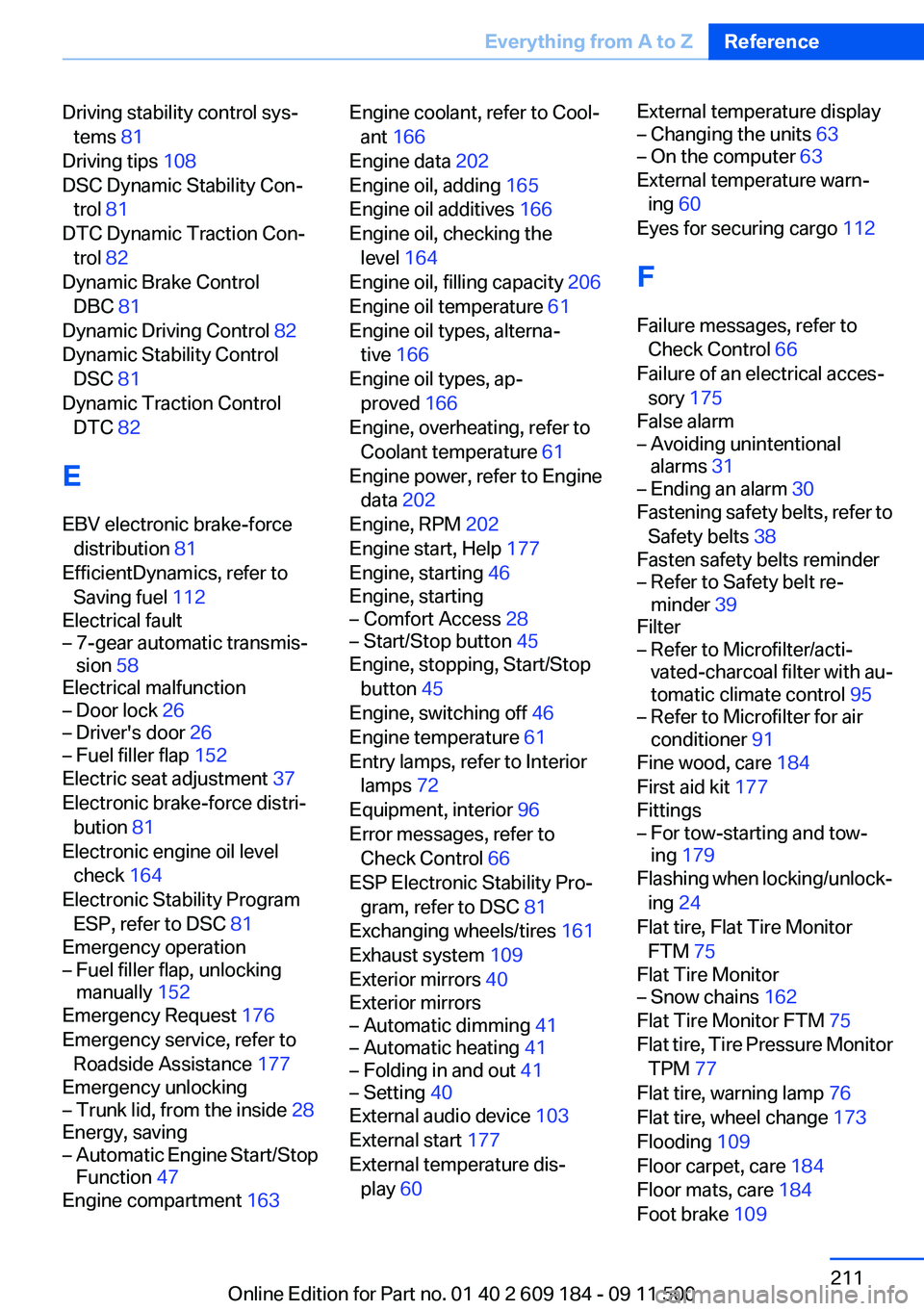
Driving stability control sys‐tems 81
Driving tips 108
DSC Dynamic Stability Con‐ trol 81
DTC Dynamic Traction Con‐ trol 82
Dynamic Brake Control DBC 81
Dynamic Driving Control 82
Dynamic Stability Control DSC 81
Dynamic Traction Control DTC 82
E
EBV electronic brake-force distribution 81
EfficientDynamics, refer to Saving fuel 112
Electrical fault– 7-gear automatic transmis‐
sion 58
Electrical malfunction
– Door lock 26– Driver's door 26– Fuel filler flap 152
Electric seat adjustment 37
Electronic brake-force distri‐ bution 81
Electronic engine oil level check 164
Electronic Stability Program ESP, refer to DSC 81
Emergency operation
– Fuel filler flap, unlocking
manually 152
Emergency Request 176
Emergency service, refer to Roadside Assistance 177
Emergency unlocking
– Trunk lid, from the inside 28
Energy, saving
– Automatic Engine Start/Stop
Function 47
Engine compartment 163
Engine coolant, refer to Cool‐
ant 166
Engine data 202
Engine oil, adding 165
Engine oil additives 166
Engine oil, checking the level 164
Engine oil, filling capacity 206
Engine oil temperature 61
Engine oil types, alterna‐ tive 166
Engine oil types, ap‐ proved 166
Engine, overheating, refer to Coolant temperature 61
Engine power, refer to Engine data 202
Engine, RPM 202
Engine start, Help 177
Engine, starting 46
Engine, starting– Comfort Access 28– Start/Stop button 45
Engine, stopping, Start/Stop
button 45
Engine, switching off 46
Engine temperature 61
Entry lamps, refer to Interior lamps 72
Equipment, interior 96
Error messages, refer to Check Control 66
ESP Electronic Stability Pro‐ gram, refer to DSC 81
Exchanging wheels/tires 161
Exhaust system 109
Exterior mirrors 40
Exterior mirrors
– Automatic dimming 41– Automatic heating 41– Folding in and out 41– Setting 40
External audio device 103
External start 177
External temperature dis‐ play 60
External temperature display– Changing the units 63– On the computer 63
External temperature warn‐
ing 60
Eyes for securing cargo 112
F
Failure messages, refer to Check Control 66
Failure of an electrical acces‐ sory 175
False alarm
– Avoiding unintentional
alarms 31– Ending an alarm 30
Fastening safety belts, refer to
Safety belts 38
Fasten safety belts reminder
– Refer to Safety belt re‐
minder 39
Filter
– Refer to Microfilter/acti‐
vated-charcoal filter with au‐
tomatic climate control 95– Refer to Microfilter for air
conditioner 91
Fine wood, care 184
First aid kit 177
Fittings
– For tow-starting and tow‐
ing 179
Flashing when locking/unlock‐
ing 24
Flat tire, Flat Tire Monitor FTM 75
Flat Tire Monitor
– Snow chains 162
Flat Tire Monitor FTM 75
Flat tire, Tire Pressure Monitor TPM 77
Flat tire, warning lamp 76
Flat tire, wheel change 173
Flooding 109
Floor carpet, care 184
Floor mats, care 184
Foot brake 109
Seite 211Everything from A to ZReference211
Online Edition for Part no. 01 40 2 609 184 - 09 11 500
Page 216 of 220
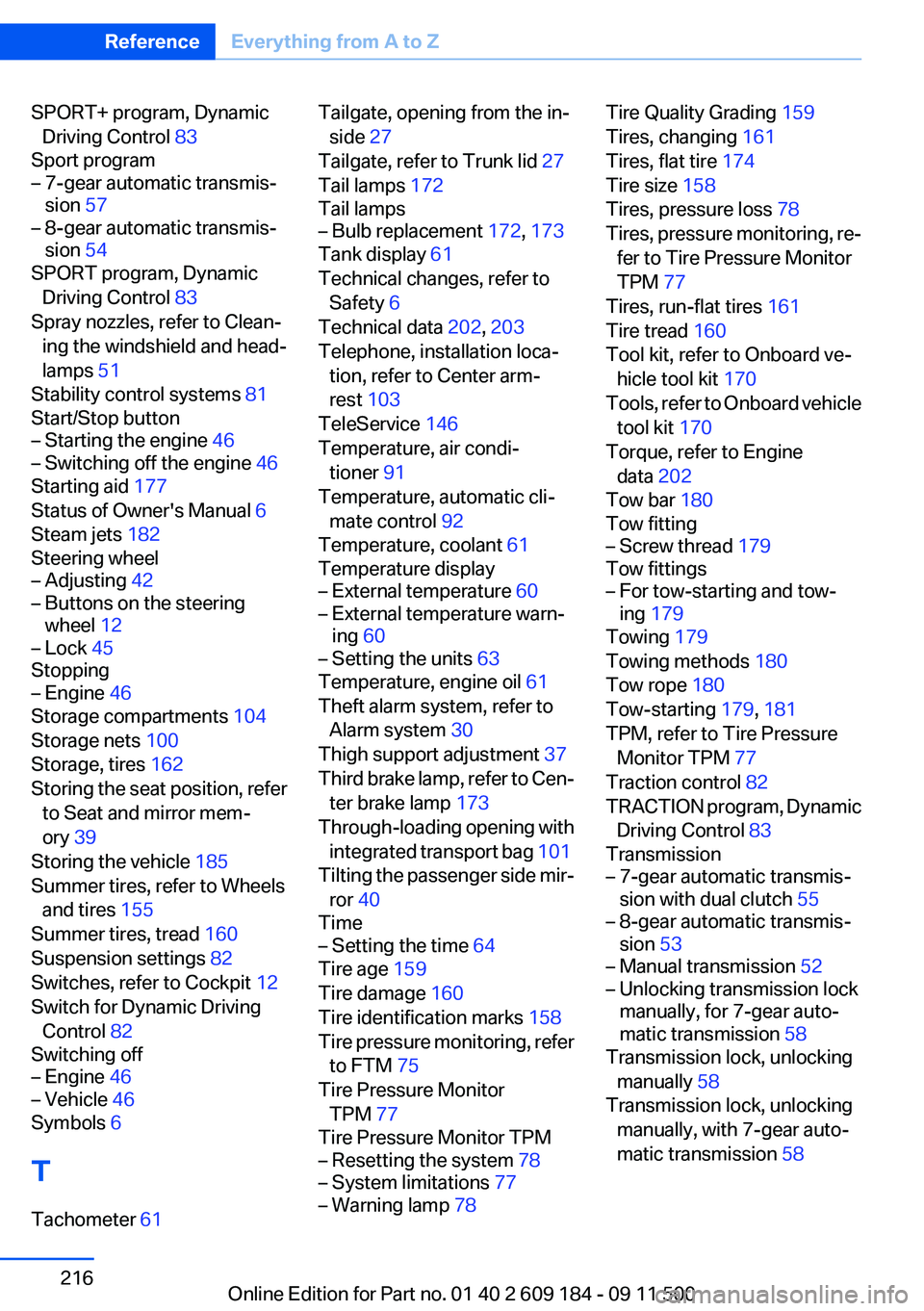
SPORT+ program, DynamicDriving Control 83
Sport program– 7-gear automatic transmis‐
sion 57– 8-gear automatic transmis‐
sion 54
SPORT program, Dynamic
Driving Control 83
Spray nozzles, refer to Clean‐ ing the windshield and head‐
lamps 51
Stability control systems 81
Start/Stop button
– Starting the engine 46– Switching off the engine 46
Starting aid 177
Status of Owner's Manual 6
Steam jets 182
Steering wheel
– Adjusting 42– Buttons on the steering
wheel 12– Lock 45
Stopping
– Engine 46
Storage compartments 104
Storage nets 100
Storage, tires 162
Storing the seat position, refer to Seat and mirror mem‐
ory 39
Storing the vehicle 185
Summer tires, refer to Wheels and tires 155
Summer tires, tread 160
Suspension settings 82
Switches, refer to Cockpit 12
Switch for Dynamic Driving Control 82
Switching off
– Engine 46– Vehicle 46
Symbols 6
T
Tachometer 61
Tailgate, opening from the in‐
side 27
Tailgate, refer to Trunk lid 27
Tail lamps 172
Tail lamps– Bulb replacement 172, 173
Tank display 61
Technical changes, refer to Safety 6
Technical data 202, 203
Telephone, installation loca‐ tion, refer to Center arm‐
rest 103
TeleService 146
Temperature, air condi‐ tioner 91
Temperature, automatic cli‐ mate control 92
Temperature, coolant 61
Temperature display
– External temperature 60– External temperature warn‐
ing 60– Setting the units 63
Temperature, engine oil 61
Theft alarm system, refer to Alarm system 30
Thigh support adjustment 37
Third brake lamp, refer to Cen‐ ter brake lamp 173
Through-loading opening with integrated transport bag 101
Tilting the passenger side mir‐ ror 40
Time
– Setting the time 64
Tire age 159
Tire damage 160
Tire identification marks 158
Tire pressure monitoring, refer to FTM 75
Tire Pressure Monitor TPM 77
Tire Pressure Monitor TPM
– Resetting the system 78– System limitations 77– Warning lamp 78Tire Quality Grading 159
Tires, changing 161
Tires, flat tire 174
Tire size 158
Tires, pressure loss 78
Tires, pressure monitoring, re‐ fer to Tire Pressure Monitor
TPM 77
Tires, run-flat tires 161
Tire tread 160
Tool kit, refer to Onboard ve‐ hicle tool kit 170
Tools, refer to Onboard vehicle tool kit 170
Torque, refer to Engine data 202
Tow bar 180
Tow fitting– Screw thread 179
Tow fittings
– For tow-starting and tow‐
ing 179
Towing 179
Towing methods 180
Tow rope 180
Tow-starting 179, 181
TPM, refer to Tire Pressure Monitor TPM 77
Traction control 82
TRACTION program, Dynamic Driving Control 83
Transmission
– 7-gear automatic transmis‐
sion with dual clutch 55– 8-gear automatic transmis‐
sion 53– Manual transmission 52– Unlocking transmission lock
manually, for 7-gear auto‐
matic transmission 58
Transmission lock, unlocking
manually 58
Transmission lock, unlocking manually, with 7-gear auto‐
matic transmission 58
Seite 216ReferenceEverything from A to Z216
Online Edition for Part no. 01 40 2 609 184 - 09 11 500