stop start BMW Z4 SDRIVE28I 2012 User Guide
[x] Cancel search | Manufacturer: BMW, Model Year: 2012, Model line: Z4 SDRIVE28I, Model: BMW Z4 SDRIVE28I 2012Pages: 220, PDF Size: 9.9 MB
Page 80 of 220
▷A wheel without TPM electronics is fitted:
have the service center check it if necessary.▷Malfunction: have the system checked by
your service center.▷TPM could not be fully reset. Reset the sys‐
tem again.
The small warning lamp flashes in yel‐
low and then lights up continuously;
the larger warning lamp comes on in
yellow. No flat tire can be detected.
Display in the following situations:
▷Disturbance by systems or devices with the
same radio frequency. After leaving the area
of the disturbance, the system automatically
becomes active again.
Declaration according to NHTSA/
FMVSS 138 Tire Pressure Monitoring
Systems
Each tire, including the spare (if provided)
should be checked monthly when cold and in‐
flated to the inflation pressure recommended by
the vehicle manufacturer on the vehicle placard
or tire inflation pressure label (If your vehicle has
tires of a different size than the size indicated on
the vehicle placard or tire inflation pressure la‐
bel, you should determine the proper tire infla‐
tion pressure for those tires.).
As an added safety feature, your vehicle has
been equipped with a tire pressure monitoring
system (TPMS) that illuminates a low tire pres‐
sure telltale when one or more of your tires is
significantly under-inflated. Accordingly, when
the low tire pressure telltale illuminates, you
should stop and check your tires as soon as
possible, and inflate them to the proper pres‐
sure. Driving on a significantly under-inflated tire
causes the tire to overheat and can lead to tire
failure. Under-inflation also reduces fuel effi‐
ciency and tire tread life, and may affect the ve‐
hicle's handling and stopping ability.
Please note that the TPMS is not a substitute for
proper tire maintenance, and it is the driver's re‐
sponsibility to maintain correct tire pressure,
even if under-inflation has not reached the level
to trigger illumination of the TPMS low tire pres‐
sure telltale.
Your vehicle has also been equipped with a
TPMS malfunction indicator to indicate when
the system is not operating properly. The TPMS
malfunction indicator is combined with the low
tire pressure telltale. When the system detects
a malfunction, the telltale will flash for approxi‐
mately one minute and then remain continu‐
ously illuminated. This sequence will continue
upon subsequent vehicle start-ups as long as
the malfunction exists. When the malfunction
indicator is illuminated, the system may not be
able to detect or signal low tire pressure as in‐
tended. TPMS malfunctions may occur for a va‐
riety of reasons, including the installation of re‐
placement or alternate tires or wheels on the
vehicle that prevent the TPMS from functioning
properly. Always check the TPMS malfunction
telltale after replacing one or more tires or
wheels on your vehicle to ensure that the re‐
placement or alternate tires and wheels allow
the TPMS to continue to function properly.
Brake force display
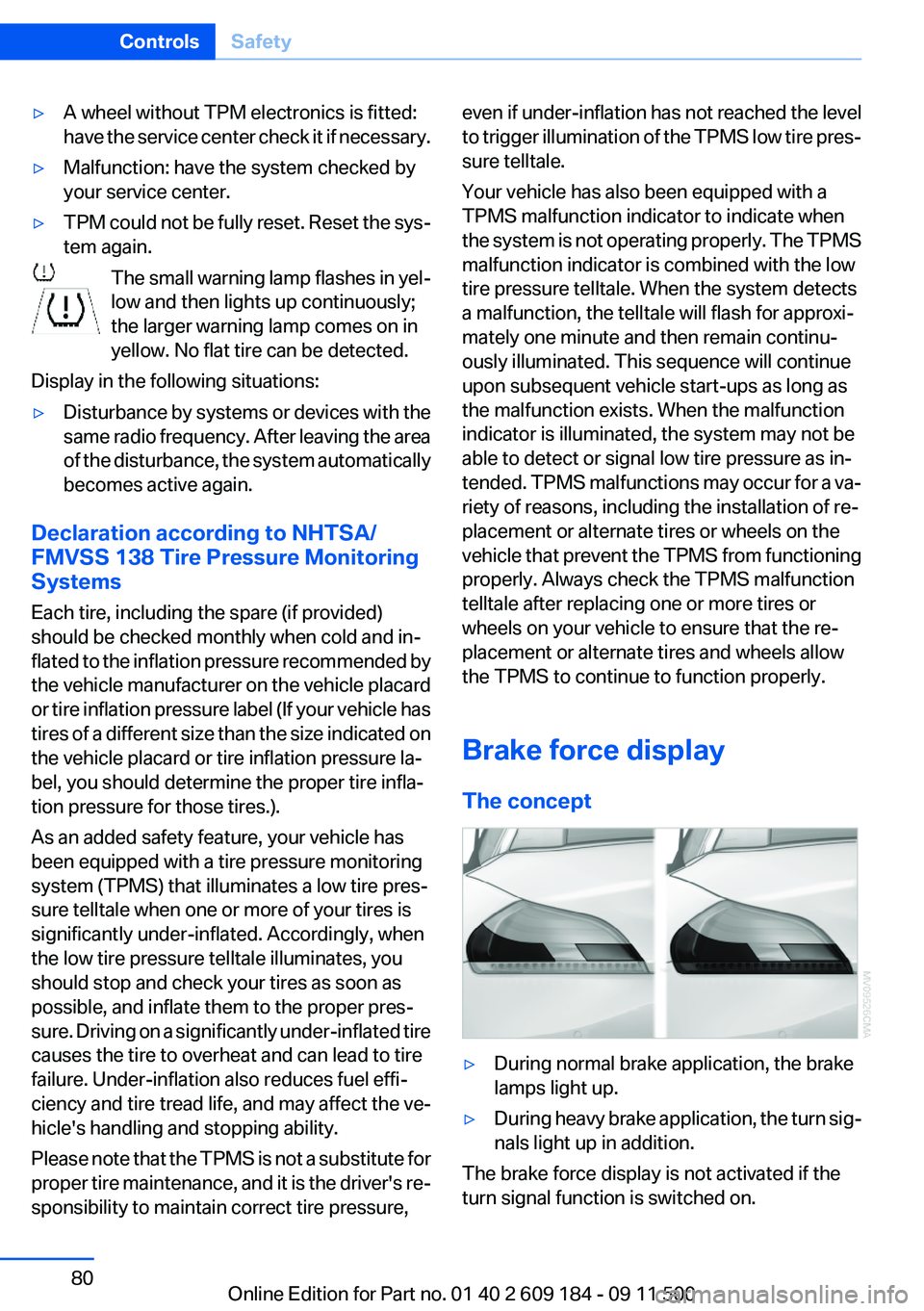
The concept▷During normal brake application, the brake
lamps light up.▷During heavy brake application, the turn sig‐
nals light up in addition.
The brake force display is not activated if the
turn signal function is switched on.
Seite 80ControlsSafety80
Online Edition for Part no. 01 40 2 609 184 - 09 11 500
Page 113 of 220
Close both windows
An open window causes higher air resistance
and thus increases fuel consumption.
Check the tire inflation pressure
regularly
Check and, if necessary, correct the tire inflation
pressure, refer to page 155, at least twice a
month and before starting on a long trip.
Low tire inflation pressure increases rolling re‐
sistance and thus raises fuel consumption and
tire wear.
Drive away without delay
Do not wait for the engine to warm up while the
vehicle remains stationary. Start driving right
away, but at moderate engine speeds.
This is the fastest way for the cold engine to
reach its operating temperature.
Look well ahead when driving
Avoid unnecessary acceleration and braking.
By maintaining a suitable distance to the vehicle
driving ahead of you.
Driving smoothly and looking ahead reduces
fuel consumption.
Avoid high engine speeds
Use 1st gear to get the vehicle in motion. Be‐
ginning with 2nd gear, accelerate rapidly. When
accelerating, shift up before reaching high en‐
gine speeds.
When you reach the desired speed, shift into the
highest applicable gear and drive with the en‐
gine speed as low as possible and at a constant
speed.
As a rule: driving at low engine speeds lowers
fuel consumption and reduces wear.
Use coasting conditions
When approaching a red light, take your foot off
the accelerator and coast to a halt in the highest
applicable gear.On a downhill slope, take your foot off the ac‐
celerator and coast in a suitable gear.
The flow of fuel is interrupted while coasting.
Switch off the engine during longer
stops
Switch off the engine during longer stops, e.g.,
at traffic lights, railroad crossings or in traffic
congestion.
Fuel savings are achieved after the vehicle is
switched off for only approx. 4 seconds.
The Automatic Engine Start/Stop Function au‐
tomatically switches the engine off during a
stop. Additional information on the Automatic
Engine Start/Stop Function, refer to page 47.
Switch off any functions that are not
currently needed
Functions such as the automatic climate control
require a large amount of energy and consume
additional fuel, especially in city and stop-and-
go traffic.
Therefore, switch off these functions if they are
not actually needed.
Have maintenance carried out
Have vehicles maintained regularly to achieve
optimal vehicle economy and operating life.
Have the maintenance carried out by your serv‐
ice center.
Please also note the BMW Maintenance Sys‐
tem, refer to page 168.Seite 113Things to remember when drivingDriving tips113
Online Edition for Part no. 01 40 2 609 184 - 09 11 500
Page 125 of 220
Loading the CD/DVD compartments
individually1. Press the button.
The LED on the first empty compartment
flashes.2.Select another compartment if necessary.3.Wait for the LEDs on the DVD slot to flash.4.Insert a single CD or DVD in the middle.
The CD/DVD is drawn in automatically and
placed into the selected compartment.
Sliding in CDs/DVDs
Do not insert the CD/DVD until the LEDs
on the DVD slot are flashing; otherwise, the CD/
DVD or the CD/DVD changer could be damaged.
Do not continue to push on the CD/DVD; this
may cause it to jam and prevent it from being
able to eject again.◀
Filling all vacant CD/DVD
compartments
1. Press the button for a longer period.
The LEDs on the empty CD compartments
flash.2.Wait for the LEDs on the DVD slot to begin
flashing and then insert each CD or DVD into
the center of the slot.
The CDs/DVDs are drawn in automatically
and placed into the vacant compartments.
Sliding in CDs/DVDs
Do not insert the CD/DVD until the LEDs
on the DVD slot are flashing; otherwise, the CD/
DVD or the CD/DVD changer could be damaged.
Do not continue to push on the CD/DVD; this
may cause it to jam and prevent it from being
able to eject again.◀
After they are inserted, it may take several mi‐
nutes for the CDs/DVDs to be read in.
Removing a single CD/DVD1. Press the button.2.Select the CD/DVD compartment.
The CD/DVD is partially ejected.3.Remove the CD/DVD.
Removing all CDs/DVDs
1. Press the button for a longer period.2.Remove the CDs/DVDs.
Malfunctions
If all LEDs on the CD/DVD changer flash rapidly,
the system is malfunctioning.
To eliminate the malfunction:
1.Press one of the buttons:▷▷
The CD/DVD last inserted is ejected.
2.Remove the CD/DVD.
If the LEDs stop flashing rapidly, the CD/DVD
changer is functional again.
Audio playback
The audio track of a DVD can be played back
even if video playback is not possible in the ve‐
hicle.
Only the main film without the previews or extras
can be played back.
Starting playback
A DVD is located in the DVD changer.
1. 2."DVD"3.Select the desired DVD.Seite 125Professional RadioEntertainment125
Online Edition for Part no. 01 40 2 609 184 - 09 11 500
Page 180 of 220
Contact your service center.◀
Manual transmission
Gearshift lever in neutral position.
7-gear Sport automatic transmission Manually release the transmission lock
Manually release the transmission lock,
even if there is no malfunction involving the
transmission. Otherwise, there is the danger
that the transmission lock will be engaged au‐
tomatically during towing.◀
Manually release the transmission lock, refer to
page 58.
Adhere to the towing speed and distance
Do not exceed a towing speed of 30 mph/
50 km/h and a towing distance of 30 miles/50 km
or damage to the transmission can occur.◀
Observe during towing Observe the notes on towing
Observe all notes on towing or vehicle
damage or accidents can occur.◀▷Make sure that the ignition is switched on;
otherwise, the low beams, tail lamps, turn
signals, and windshield wipers may be un‐
available.▷When the engine is stopped, there is no
power assist. Consequently, more force
needs to be applied when braking and steer‐
ing.▷Larger steering wheel movements are re‐
quired.▷Switch on the hazard warning system, de‐
pending on local regulations.▷If the electrical system has failed, clearly
identify the vehicle being towed by placing
a sign or a warning triangle in the rear win‐
dow.▷Do not tow the vehicle with the rear axle
tilted, as the front wheels could turn.Towing methods
Do not lift the vehicle
Do not lift the vehicle by the tow fitting or
body and chassis parts; otherwise, damage may
result.◀
Tow bar
The tow fittings used should be on the same
side on both vehicles.
Should it prove impossible to avoid mounting
the tow bar at an offset angle, please observe
the following:▷Clearance and maneuvering capability will
be sharply limited during cornering.▷The tow bar will generate lateral forces if it
is attached offset.
Tow rope
When starting to tow the vehicle, make sure that
the tow rope is taut.
To avoid jerking and the associated stresses on
the vehicle components when towing, always
use nylon ropes or nylon straps.
Attaching the tow rope correctly
Only secure the tow rope on the tow fit‐
ting; otherwise, damage can occur when it is se‐
cured on other parts of the vehicle.◀
Tow truck Do not lift the vehicle
Do not lift the vehicle by the tow fitting or
body and chassis parts; otherwise, damage may
result.◀
Secure the vehicle against rolling off
Apply the parking brake after towing and
secure the vehicle against rolling off if neces‐
sary.
Have the operability of transmission position P
checked by the service center.◀
Seite 180MobilityBreakdown assistance180
Online Edition for Part no. 01 40 2 609 184 - 09 11 500
Page 181 of 220
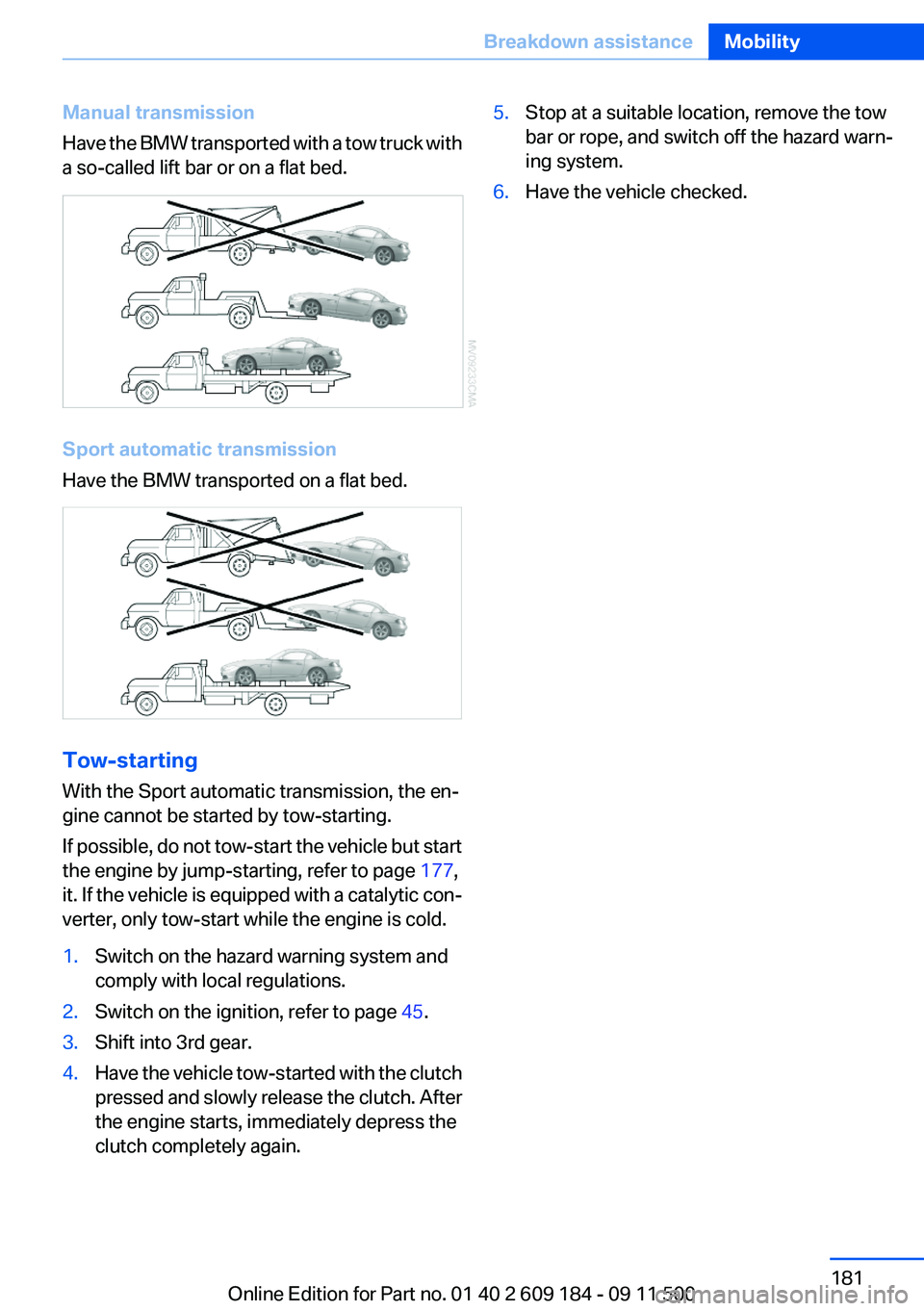
Manual transmission
Have the BMW transported with a tow truck with
a so-called lift bar or on a flat bed.
Sport automatic transmission
Have the BMW transported on a flat bed.
Tow-starting
With the Sport automatic transmission, the en‐
gine cannot be started by tow-starting.
If possible, do not tow-start the vehicle but start
the engine by jump-starting, refer to page 177,
it. If the vehicle is equipped with a catalytic con‐
verter, only tow-start while the engine is cold.
1.Switch on the hazard warning system and
comply with local regulations.2.Switch on the ignition, refer to page 45.3.Shift into 3rd gear.4.Have the vehicle tow-started with the clutch
pressed and slowly release the clutch. After
the engine starts, immediately depress the
clutch completely again.5.Stop at a suitable location, remove the tow
bar or rope, and switch off the hazard warn‐
ing system.6.Have the vehicle checked.Seite 181Breakdown assistanceMobility181
Online Edition for Part no. 01 40 2 609 184 - 09 11 500
Page 189 of 220
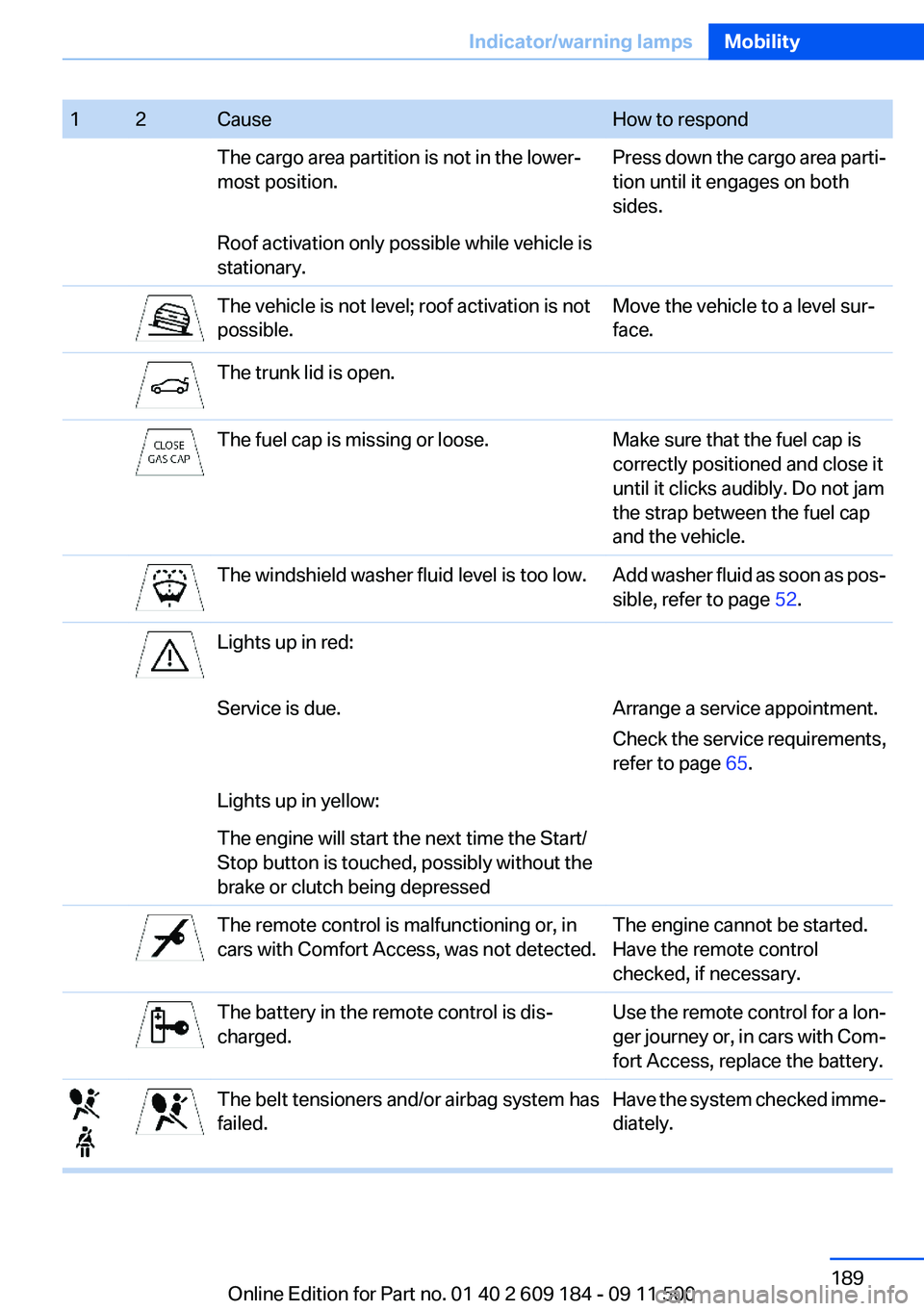
12CauseHow to respondThe cargo area partition is not in the lower‐
most position.Press down the cargo area parti‐
tion until it engages on both
sides.Roof activation only possible while vehicle is
stationary.The vehicle is not level; roof activation is not
possible.Move the vehicle to a level sur‐
face.The trunk lid is open.The fuel cap is missing or loose.Make sure that the fuel cap is
correctly positioned and close it
until it clicks audibly. Do not jam
the strap between the fuel cap
and the vehicle.The windshield washer fluid level is too low.Add washer fluid as soon as pos‐
sible, refer to page 52.Lights up in red:Service is due.Arrange a service appointment.
Check the service requirements,
refer to page 65.Lights up in yellow:The engine will start the next time the Start/
Stop button is touched, possibly without the
brake or clutch being depressedThe remote control is malfunctioning or, in
cars with Comfort Access, was not detected.The engine cannot be started.
Have the remote control
checked, if necessary.The battery in the remote control is dis‐
charged.Use the remote control for a lon‐
ger journey or, in cars with Com‐
fort Access, replace the battery.The belt tensioners and/or airbag system has
failed.Have the system checked imme‐
diately.Seite 189Indicator/warning lampsMobility189
Online Edition for Part no. 01 40 2 609 184 - 09 11 500
Page 199 of 220
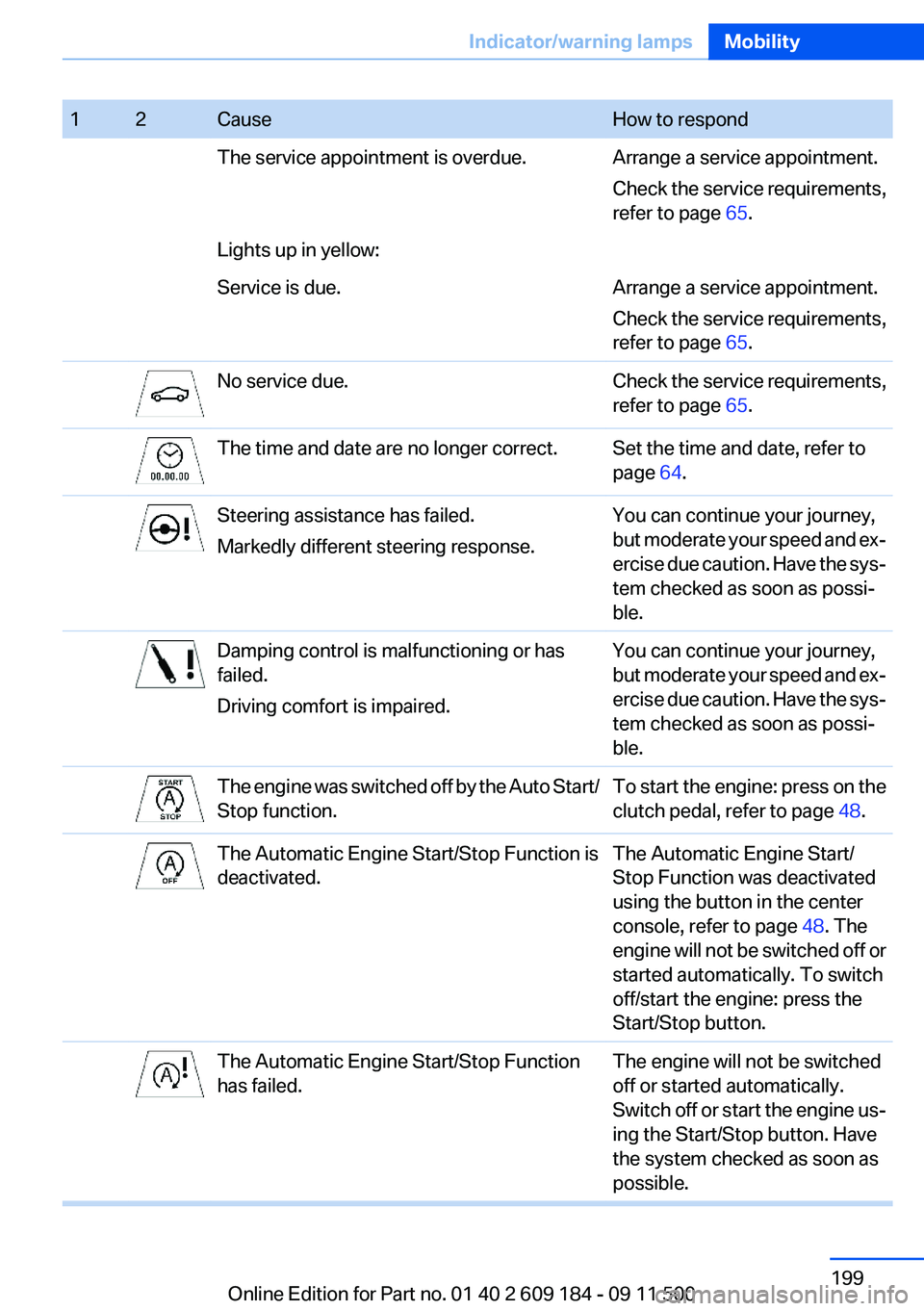
12CauseHow to respondThe service appointment is overdue.Arrange a service appointment.
Check the service requirements,
refer to page 65.Lights up in yellow:Service is due.Arrange a service appointment.
Check the service requirements,
refer to page 65.No service due.Check the service requirements,
refer to page 65.The time and date are no longer correct.Set the time and date, refer to
page 64.Steering assistance has failed.
Markedly different steering response.You can continue your journey,
but moderate your speed and ex‐
ercise due caution. Have the sys‐
tem checked as soon as possi‐
ble.Damping control is malfunctioning or has
failed.
Driving comfort is impaired.You can continue your journey,
but moderate your speed and ex‐
ercise due caution. Have the sys‐
tem checked as soon as possi‐
ble.The engine was switched off by the Auto Start/
Stop function.To start the engine: press on the
clutch pedal, refer to page 48.The Automatic Engine Start/Stop Function is
deactivated.The Automatic Engine Start/
Stop Function was deactivated
using the button in the center
console, refer to page 48. The
engine will not be switched off or
started automatically. To switch
off/start the engine: press the
Start/Stop button.The Automatic Engine Start/Stop Function
has failed.The engine will not be switched
off or started automatically.
Switch off or start the engine us‐
ing the Start/Stop button. Have
the system checked as soon as
possible.Seite 199Indicator/warning lampsMobility199
Online Edition for Part no. 01 40 2 609 184 - 09 11 500
Page 208 of 220
Everything from A to Z
IndexA
ABS, Antilock Brake Sys‐ tem 81
Acceleration assistant, Launch Control 58
Accident, refer to Emergency Request, initiating 176
Activated charcoal filter with automatic climate control 95
Adaptive brake light, refer to Brake force display 80
Adaptive light control 70
Additives– Coolant 166
Additives, oil 166
After washing vehicle 183
Airbags 73
Airbags
– Indicator/warning lamps 75
Air circulation, refer to Recir‐
culated air mode 90, 94
Air conditioner 90
Air conditioning mode
– Air conditioner 90– Automatic climate con‐
trol 92– Ventilation 91, 94
Air distribution
– Automatic 93– Individual 90– Manual 90
Air flow rate 90, 93
Airing, refer to Ventila‐ tion 91, 94
Air outlets, refer to Air vents 89
Air pressure, refer to Tire infla‐ tion pressure 155
Air supply– Air conditioner 90– Automatic climate con‐
trol 92– Ventilation 91, 94
Air vents 89
Air vents
– Refer to Ventilation 91, 94
Alarm system 30
Alarm system
– Avoiding unintentional
alarms 31– Ending an alarm 30– Interior motion sensor 31– Tilt alarm sensor 31
All around the headliner 16
All-season tires, refer to Win‐ ter tires 162
Alternating-code hand-held transmitter 97
Alternative oil types 166
Antifreeze
– Coolant 166– Washer fluid 52
Antilock Brake System,
ABS 81
Anti-slip control, refer to DSC 81
Anti-theft protection 22
Anti-theft protection, lug bolts 174
Approved axle loads, refer to Weights 204
Approved engine oils 166
Approved gross vehicle weight, refer to Weights 204
Armrest, refer to Center arm‐ rest 103
Assist 145
Assistance, Roadside Assis‐ tance 177
Assistance systems, refer to
Driving stability control sys‐
tems 81
Assistance when driving off 84
Audio device, external 103
Automatic air distribution 93
Automatic air flow rate 93
Automatic car wash 182
Automatic climate control– Automatic air distribution 93
Automatic cruise control 85
Automatic Curb Monitor 40
Automatic Engine Start/Stop Function 47
Automatic headlamp con‐ trol 69
Automatic recirculated air control 94
Automatic transmission
– 7-gear with dual clutch 55– 8-gear 53
AUTO program with automatic
climate control 93
AUX-IN port 103, 127
Average fuel consumption 62
Average fuel consumption
– Setting the units 63
Average speed 62
Axle loads, refer to Weights 204
B
Backrest curvature, refer to Lumbar support 37
Backrests, refer to Seat ad‐ justment 36
Backrest width adjustment 37
Backup lamps
– Bulb replacement 172, 173Seite 208ReferenceEverything from A to Z208
Online Edition for Part no. 01 40 2 609 184 - 09 11 500
Page 209 of 220
Band-aids, refer to First aidkit 177
Bar, refer to Towing meth‐ ods 180
Battery– Disposal 30, 175– Power failure 174– Remote control 20– Replacement in the remote
control 30– Replacement, vehicle bat‐
tery 174– Vehicle 174
Before entering the car
wash 182
Being towed 179
Belts, refer to Safety belts 38
Belt tensioners, refer to Safety belts 38
Beverage holder, refer to Cu‐ pholder 105
Blower, refer to Air flow rate 90, 93
BMW Assist 145
BMW Assist, refer to Connec‐ tedDrive 145
BMW EfficientDynamics, refer to Saving fuel 112
BMW homepage 6
BMW Internet page 6
BMW Maintenance Sys‐ tem 168
Bottle holder, refer to Cu‐ pholder 105
Brake assistant, refer to Dy‐ namic Brake Control 81
Brake discs, breaking in 108
Brake force display 80
Brake force distribution, elec‐ tronic 81
Brake lamps
– Brake force display 80– Bulb replacement 172, 173
Brake lights, adaptive 80
Brake pads, breaking in 108
Brakes
– ABS 81Braking– Notes 109– Parking brake 49
Braking safely 109
Breakdown assistance 177
Breaking in 108
Bulbs, replacing, refer to Lamps and bulbs 170
Button for starting the engine, refer to Start/Stop button 45
Buttons on the steering wheel 12
Bypassing, see Starting aid 177
C
California Proposition 65 Warning 7
Camera, care 185
Can holder, refer to Cu‐ pholder 105
Capacities
– Cargo area, refer to
Weights 204– Fuel tank, refer to Filling ca‐
pacities 206
Car battery 174
Car care products 183
Care 182
Care, displays 185
Care, vehicle 183
Cargo 110
Cargo area
– Capacity 204– Lamp, refer to Interior
lamps 72– Opening from the inside 27– Opening from the out‐
side 27
Cargo, securing 101
Cargo straps, securing cargo 112
Car key, refer to Integrated key/remote control 20
Carpet, care 184
Car phone– Installation location, refer to
Center armrest 103
Car vacuum cleaner, connect‐
ing, refer to Connecting elec‐
trical devices 100
Car wash 182
Car wash
– With Comfort Access 29
Catalytic converter, refer to
Hot exhaust system 109
CBS Condition Based Serv‐ ice 168
CD/DVD changer 124
CD/DVD notes 126
Cell phone, installation loca‐ tion, refer to Center arm‐
rest 103
Center armrest 103
Center brake lamp
– Bulb replacement 173
Center console, refer to
Around the center con‐
sole 15
Central locking
– Comfort Access 28– From the inside 26– Setting the unlocking char‐
acteristics 22
Central locking system
– From the outside 21– Principle 21
Changes, technical, refer to
Safety 6
Changing wheels/tires 161
Chassis number, refer to En‐ gine compartment 163
Check Control 66
Children, transporting safely 43
Child restraint fixing sys‐ tem 43
Child seats, refer to Transport‐ ing children safely 43
Chrome parts, care 184
Circulation of air, refer to Re‐ circulated air mode 90, 94
Seite 209Everything from A to ZReference209
Online Edition for Part no. 01 40 2 609 184 - 09 11 500
Page 211 of 220
Driving stability control sys‐tems 81
Driving tips 108
DSC Dynamic Stability Con‐ trol 81
DTC Dynamic Traction Con‐ trol 82
Dynamic Brake Control DBC 81
Dynamic Driving Control 82
Dynamic Stability Control DSC 81
Dynamic Traction Control DTC 82
E
EBV electronic brake-force distribution 81
EfficientDynamics, refer to Saving fuel 112
Electrical fault– 7-gear automatic transmis‐
sion 58
Electrical malfunction
– Door lock 26– Driver's door 26– Fuel filler flap 152
Electric seat adjustment 37
Electronic brake-force distri‐ bution 81
Electronic engine oil level check 164
Electronic Stability Program ESP, refer to DSC 81
Emergency operation
– Fuel filler flap, unlocking
manually 152
Emergency Request 176
Emergency service, refer to Roadside Assistance 177
Emergency unlocking
– Trunk lid, from the inside 28
Energy, saving
– Automatic Engine Start/Stop
Function 47
Engine compartment 163
Engine coolant, refer to Cool‐
ant 166
Engine data 202
Engine oil, adding 165
Engine oil additives 166
Engine oil, checking the level 164
Engine oil, filling capacity 206
Engine oil temperature 61
Engine oil types, alterna‐ tive 166
Engine oil types, ap‐ proved 166
Engine, overheating, refer to Coolant temperature 61
Engine power, refer to Engine data 202
Engine, RPM 202
Engine start, Help 177
Engine, starting 46
Engine, starting– Comfort Access 28– Start/Stop button 45
Engine, stopping, Start/Stop
button 45
Engine, switching off 46
Engine temperature 61
Entry lamps, refer to Interior lamps 72
Equipment, interior 96
Error messages, refer to Check Control 66
ESP Electronic Stability Pro‐ gram, refer to DSC 81
Exchanging wheels/tires 161
Exhaust system 109
Exterior mirrors 40
Exterior mirrors
– Automatic dimming 41– Automatic heating 41– Folding in and out 41– Setting 40
External audio device 103
External start 177
External temperature dis‐ play 60
External temperature display– Changing the units 63– On the computer 63
External temperature warn‐
ing 60
Eyes for securing cargo 112
F
Failure messages, refer to Check Control 66
Failure of an electrical acces‐ sory 175
False alarm
– Avoiding unintentional
alarms 31– Ending an alarm 30
Fastening safety belts, refer to
Safety belts 38
Fasten safety belts reminder
– Refer to Safety belt re‐
minder 39
Filter
– Refer to Microfilter/acti‐
vated-charcoal filter with au‐
tomatic climate control 95– Refer to Microfilter for air
conditioner 91
Fine wood, care 184
First aid kit 177
Fittings
– For tow-starting and tow‐
ing 179
Flashing when locking/unlock‐
ing 24
Flat tire, Flat Tire Monitor FTM 75
Flat Tire Monitor
– Snow chains 162
Flat Tire Monitor FTM 75
Flat tire, Tire Pressure Monitor TPM 77
Flat tire, warning lamp 76
Flat tire, wheel change 173
Flooding 109
Floor carpet, care 184
Floor mats, care 184
Foot brake 109
Seite 211Everything from A to ZReference211
Online Edition for Part no. 01 40 2 609 184 - 09 11 500