ECU BMW Z4 SDRIVE28I 2012 Owner's Manual
[x] Cancel search | Manufacturer: BMW, Model Year: 2012, Model line: Z4 SDRIVE28I, Model: BMW Z4 SDRIVE28I 2012Pages: 220, PDF Size: 9.9 MB
Page 175 of 220
Disposing of old batteriesHave old batteries disposed of by your
service center or bring them to a recy‐
cling center.
Maintain the battery in an upright position for
transport and storage. Secure the battery so
that it does not tip over during transport.
Fuses
Notes Replacing fuses
Never attempt to repair a blown fuse and
do not replace a defective fuse with a substitute
of another color or amperage rating; this could
lead to a circuit overload, ultimately resulting in
a fire in the vehicle.◀
A pair of plastic tweezers is found on the current
distributor.
See the inside of the cover for information on
fuse assignment.
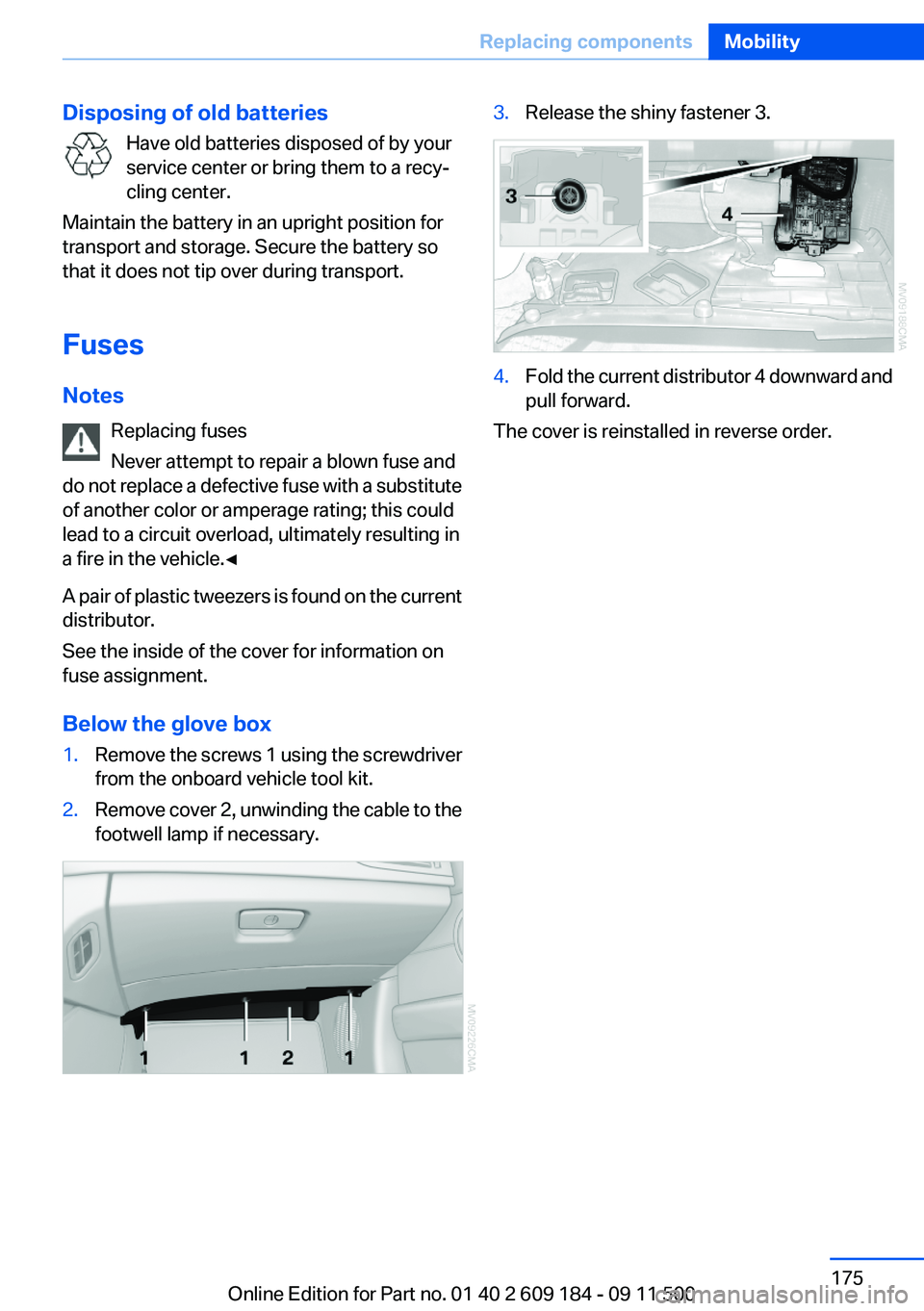
Below the glove box1.Remove the screws 1 using the screwdriver
from the onboard vehicle tool kit.2.Remove cover 2, unwinding the cable to the
footwell lamp if necessary.3.Release the shiny fastener 3.4.Fold the current distributor 4 downward and
pull forward.
The cover is reinstalled in reverse order.
Seite 175Replacing componentsMobility175
Online Edition for Part no. 01 40 2 609 184 - 09 11 500
Page 180 of 220
Contact your service center.◀
Manual transmission
Gearshift lever in neutral position.
7-gear Sport automatic transmission Manually release the transmission lock
Manually release the transmission lock,
even if there is no malfunction involving the
transmission. Otherwise, there is the danger
that the transmission lock will be engaged au‐
tomatically during towing.◀
Manually release the transmission lock, refer to
page 58.
Adhere to the towing speed and distance
Do not exceed a towing speed of 30 mph/
50 km/h and a towing distance of 30 miles/50 km
or damage to the transmission can occur.◀
Observe during towing Observe the notes on towing
Observe all notes on towing or vehicle
damage or accidents can occur.◀▷Make sure that the ignition is switched on;
otherwise, the low beams, tail lamps, turn
signals, and windshield wipers may be un‐
available.▷When the engine is stopped, there is no
power assist. Consequently, more force
needs to be applied when braking and steer‐
ing.▷Larger steering wheel movements are re‐
quired.▷Switch on the hazard warning system, de‐
pending on local regulations.▷If the electrical system has failed, clearly
identify the vehicle being towed by placing
a sign or a warning triangle in the rear win‐
dow.▷Do not tow the vehicle with the rear axle
tilted, as the front wheels could turn.Towing methods
Do not lift the vehicle
Do not lift the vehicle by the tow fitting or
body and chassis parts; otherwise, damage may
result.◀
Tow bar
The tow fittings used should be on the same
side on both vehicles.
Should it prove impossible to avoid mounting
the tow bar at an offset angle, please observe
the following:▷Clearance and maneuvering capability will
be sharply limited during cornering.▷The tow bar will generate lateral forces if it
is attached offset.
Tow rope
When starting to tow the vehicle, make sure that
the tow rope is taut.
To avoid jerking and the associated stresses on
the vehicle components when towing, always
use nylon ropes or nylon straps.
Attaching the tow rope correctly
Only secure the tow rope on the tow fit‐
ting; otherwise, damage can occur when it is se‐
cured on other parts of the vehicle.◀
Tow truck Do not lift the vehicle
Do not lift the vehicle by the tow fitting or
body and chassis parts; otherwise, damage may
result.◀
Secure the vehicle against rolling off
Apply the parking brake after towing and
secure the vehicle against rolling off if neces‐
sary.
Have the operability of transmission position P
checked by the service center.◀
Seite 180MobilityBreakdown assistance180
Online Edition for Part no. 01 40 2 609 184 - 09 11 500
Page 184 of 220
Caring for special components
Light-alloy wheels
Use wheel cleaner, particularly during the winter
months. Do not use aggressive, acidic, strongly
alkaline or abrasive cleaners, or steam jets
above 140 ℉/60 ℃; follow the manufacturer's
instructions.
Chrome surfaces
Carefully clean components such as the radiator
grille or door handles with an ample supply of
water, possibly with shampoo added, particu‐
larly when they have been exposed to road salt.
Rubber components
Aside from water, treat only with rubber cleans‐
ers.
When cleaning rubber seals, do not use any sil‐
icon-containing car care products in order to
avoid damage or reduced noise damping.
Fine wood parts
Clean fine wood facing and fine wood compo‐
nents only with a moist rag. Then dry with a soft
cloth.
Plastic components
These include:▷Imitation leather surfaces.▷Headliner.▷Lamp lenses.▷Instrument cluster cover.▷Matte black spray-coated components.▷Painted parts in the interior.
Clean with a microfiber cloth.
Moisten the cloth lightly with water if necessary.
Do not soak the headliner.
Do not use cleansers that contain alcohol
or solvents
Do not use cleansers that contain alcohol or sol‐
vents, such as lacquer thinners, heavy-duty
grease removers, fuel, or such; this could lead to
surface damage.◀
Safety belts
Dirty belt straps impede the reeling action and
thus have a negative impact on safety.
No chemical cleaning
Do not clean chemically; this can destroy
the webbing.◀
Use only a mild soapy solution, with the safety
belts clipped into their buckles.
Do not allow the reels to retract the safety belts
until they are dry.
Carpets and floor mats No objects in the area around the pedals
Keep floor mats, carpets, and any other
objects out of the area of motion of the pedals;
otherwise, the function of the pedals could be
impeded while driving
Do not place additional floor mats over existing
mats or other objects.
Only use floor mats that have been approved for
the vehicle and can be properly fixed in place.
Ensure that the floor mats are securely fastened
again when they are returned after being re‐
moved, such as for cleaning.◀
Floor mats can be removed from the passenger
compartment for cleaning.
When returning the floor mats, secure them
again to prevent slipping.
If the floor carpets are very dirty, clean with a
microfiber cloth and water or a textile cleaner. To
prevent matting of the carpet, rub back and forth
in the direction of travel only.
Cleaning the interior
When cleaning the interior, do not move
both seats all the way forward while moving
them to their uppermost position and leaning
the backrests forward. Otherwise, the seatsSeite 184MobilityCare184
Online Edition for Part no. 01 40 2 609 184 - 09 11 500
Page 187 of 220
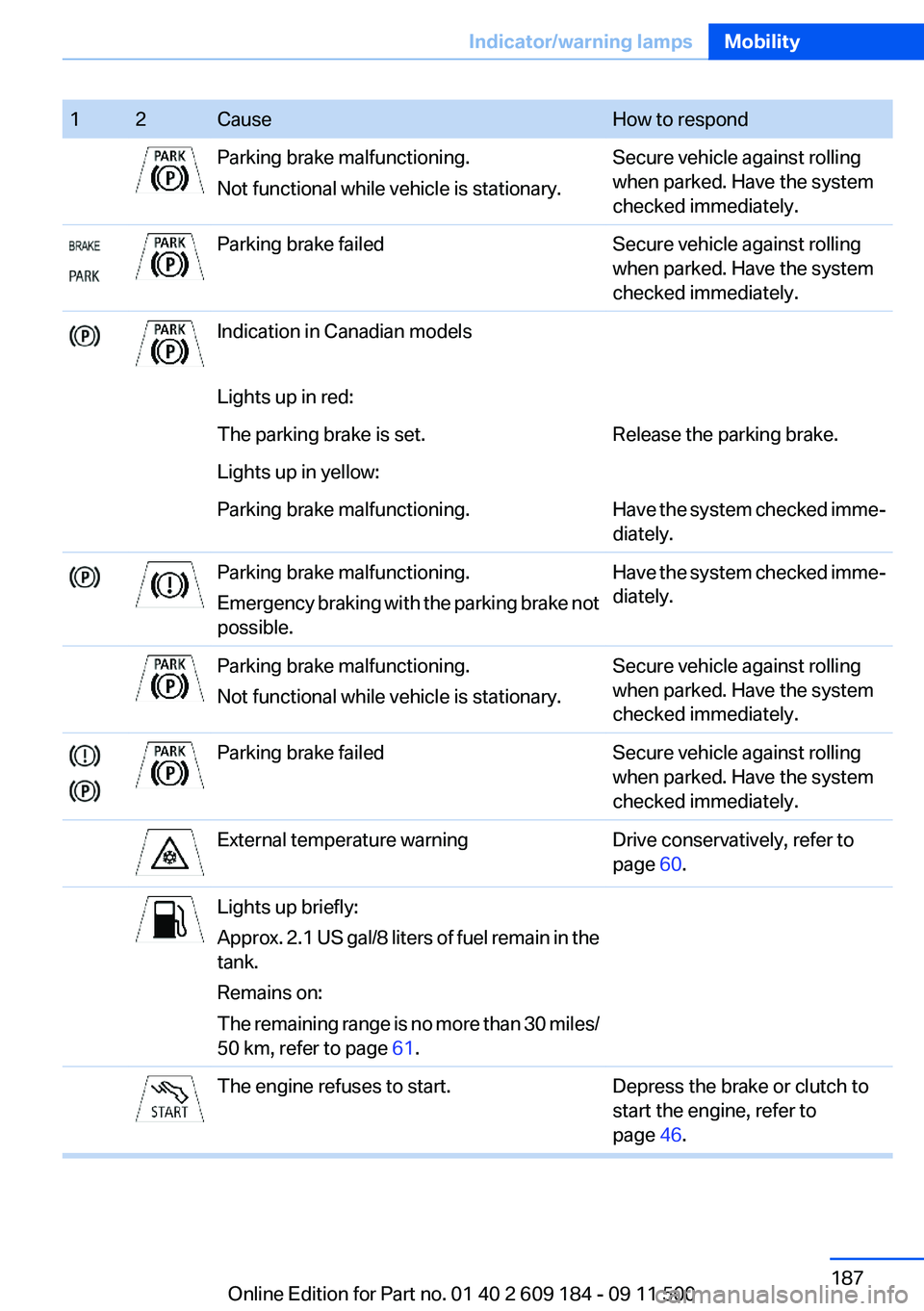
12CauseHow to respondParking brake malfunctioning.
Not functional while vehicle is stationary.Secure vehicle against rolling
when parked. Have the system
checked immediately.Parking brake failedSecure vehicle against rolling
when parked. Have the system
checked immediately.Indication in Canadian modelsLights up in red:The parking brake is set.Release the parking brake.Lights up in yellow:Parking brake malfunctioning.Have the system checked imme‐
diately.Parking brake malfunctioning.
Emergency braking with the parking brake not
possible.Have the system checked imme‐
diately.Parking brake malfunctioning.
Not functional while vehicle is stationary.Secure vehicle against rolling
when parked. Have the system
checked immediately.Parking brake failedSecure vehicle against rolling
when parked. Have the system
checked immediately.External temperature warningDrive conservatively, refer to
page 60.Lights up briefly:
Approx. 2.1 US gal/8 liters of fuel remain in the
tank.
Remains on:
The remaining range is no more than 30 miles/
50 km, refer to page 61.The engine refuses to start.Depress the brake or clutch to
start the engine, refer to
page 46.Seite 187Indicator/warning lampsMobility187
Online Edition for Part no. 01 40 2 609 184 - 09 11 500
Page 188 of 220
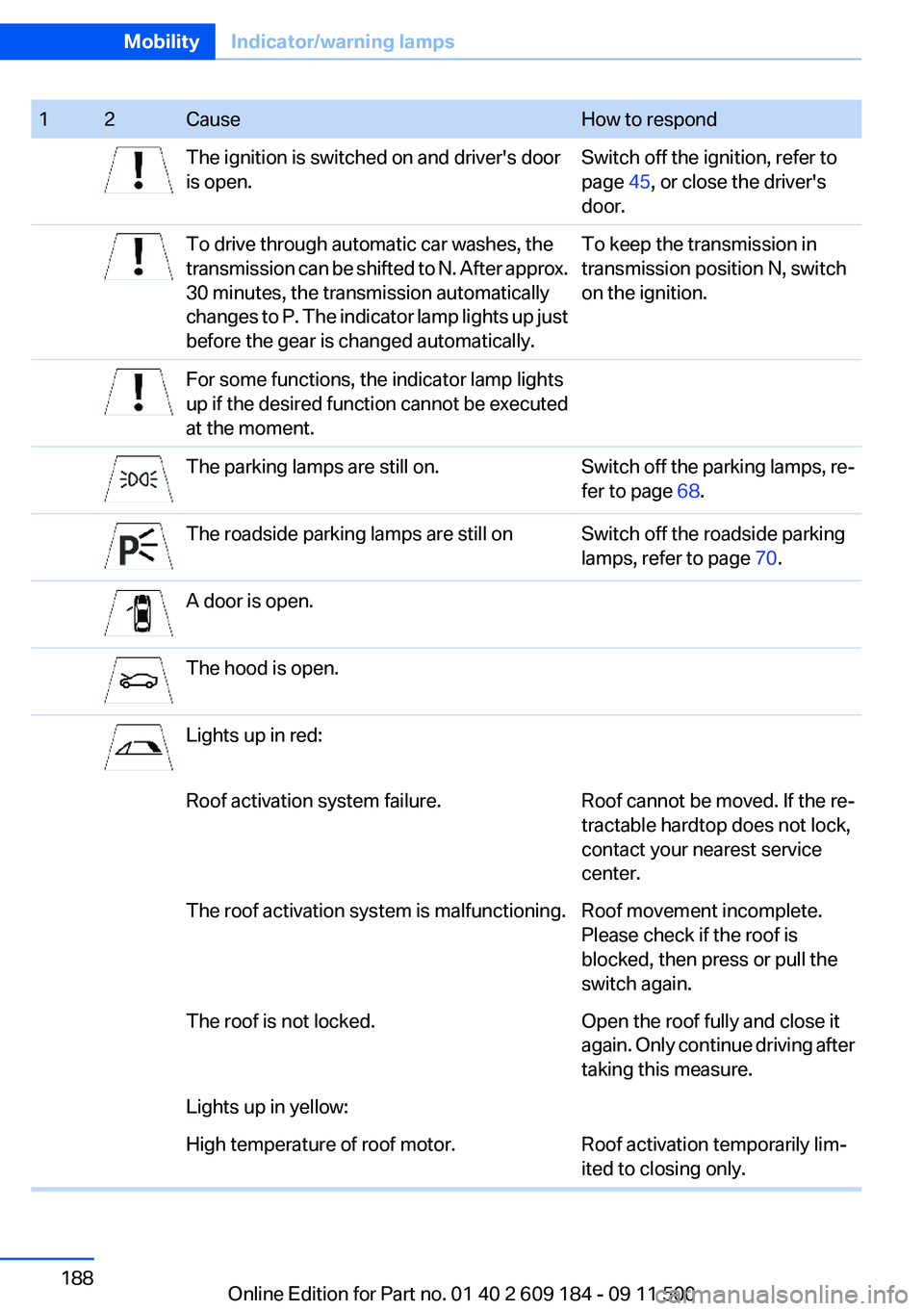
12CauseHow to respondThe ignition is switched on and driver's door
is open.Switch off the ignition, refer to
page 45, or close the driver's
door.To drive through automatic car washes, the
transmission can be shifted to N. After approx.
30 minutes, the transmission automatically
changes to P. The indicator lamp lights up just
before the gear is changed automatically.To keep the transmission in
transmission position N, switch
on the ignition.For some functions, the indicator lamp lights
up if the desired function cannot be executed
at the moment.The parking lamps are still on.Switch off the parking lamps, re‐
fer to page 68.The roadside parking lamps are still onSwitch off the roadside parking
lamps, refer to page 70.A door is open.The hood is open.Lights up in red:Roof activation system failure.Roof cannot be moved. If the re‐
tractable hardtop does not lock,
contact your nearest service
center.The roof activation system is malfunctioning.Roof movement incomplete.
Please check if the roof is
blocked, then press or pull the
switch again.The roof is not locked.Open the roof fully and close it
again. Only continue driving after
taking this measure.Lights up in yellow:High temperature of roof motor.Roof activation temporarily lim‐
ited to closing only.Seite 188MobilityIndicator/warning lamps188
Online Edition for Part no. 01 40 2 609 184 - 09 11 500
Page 191 of 220
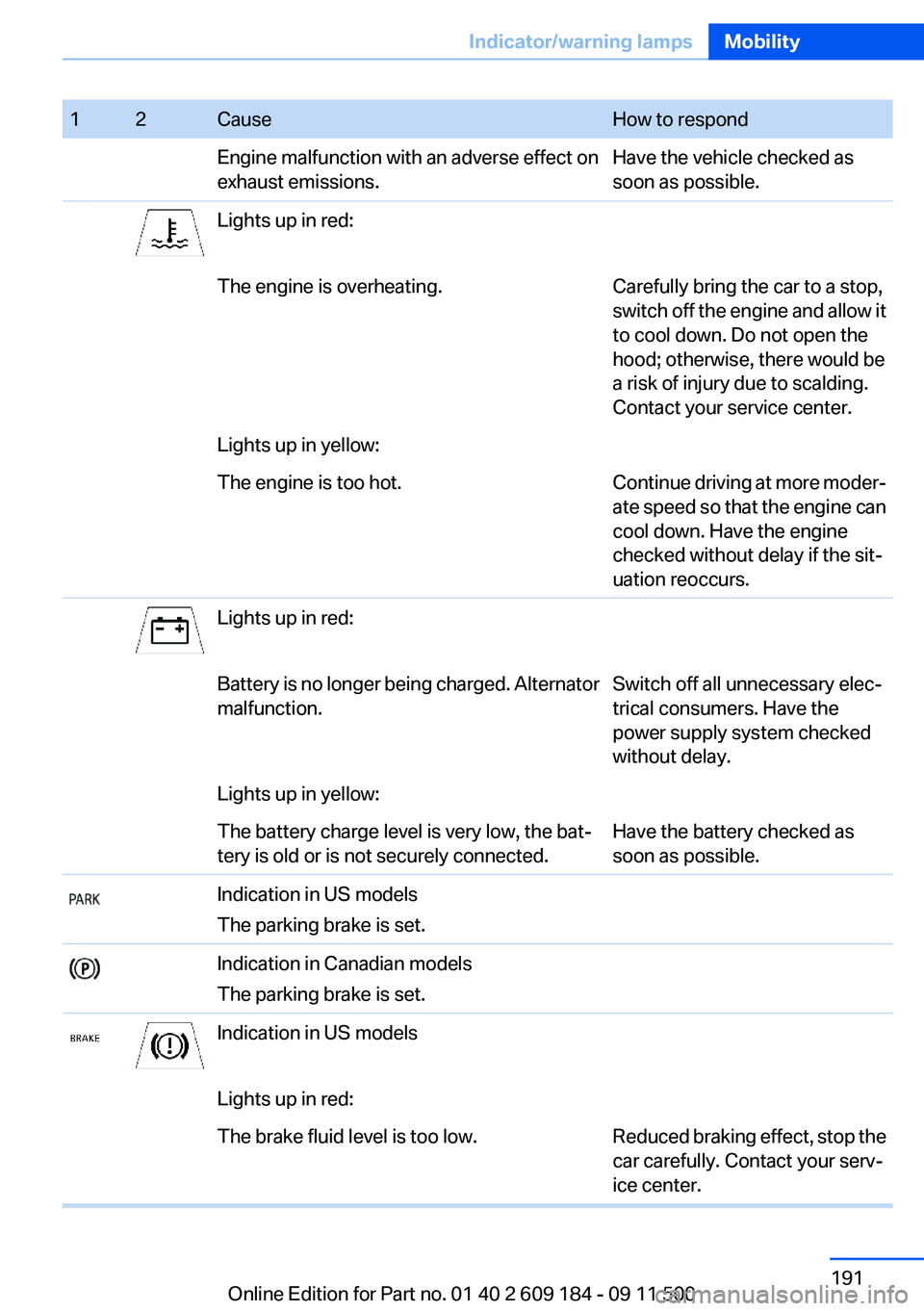
12CauseHow to respondEngine malfunction with an adverse effect on
exhaust emissions.Have the vehicle checked as
soon as possible.Lights up in red:The engine is overheating.Carefully bring the car to a stop,
switch off the engine and allow it
to cool down. Do not open the
hood; otherwise, there would be
a risk of injury due to scalding.
Contact your service center.Lights up in yellow:The engine is too hot.Continue driving at more moder‐
ate speed so that the engine can
cool down. Have the engine
checked without delay if the sit‐
uation reoccurs.Lights up in red:Battery is no longer being charged. Alternator
malfunction.Switch off all unnecessary elec‐
trical consumers. Have the
power supply system checked
without delay.Lights up in yellow:The battery charge level is very low, the bat‐
tery is old or is not securely connected.Have the battery checked as
soon as possible.Indication in US models
The parking brake is set.Indication in Canadian models
The parking brake is set.Indication in US modelsLights up in red:The brake fluid level is too low.Reduced braking effect, stop the
car carefully. Contact your serv‐
ice center.Seite 191Indicator/warning lampsMobility191
Online Edition for Part no. 01 40 2 609 184 - 09 11 500
Page 197 of 220
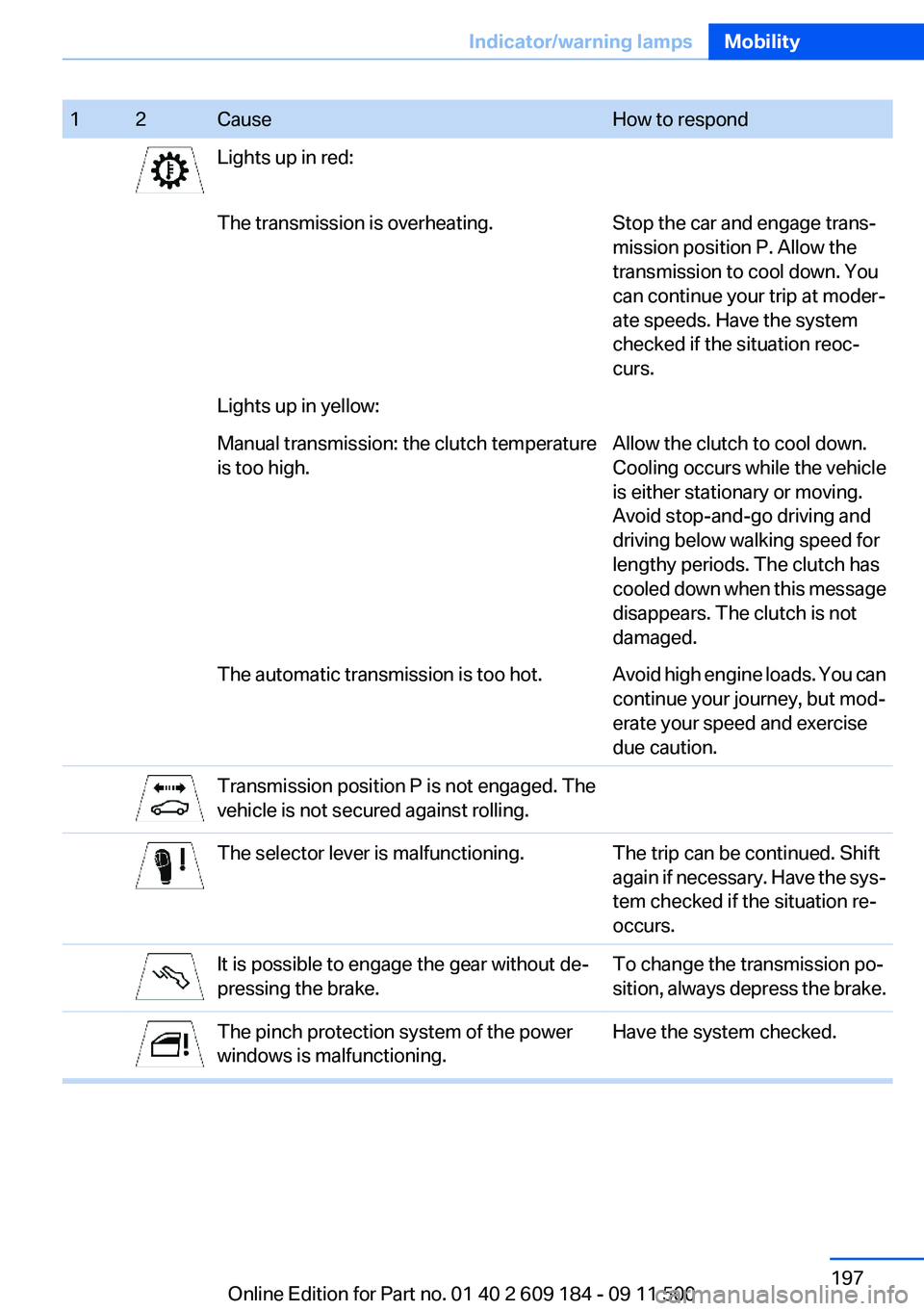
12CauseHow to respondLights up in red:The transmission is overheating.Stop the car and engage trans‐
mission position P. Allow the
transmission to cool down. You
can continue your trip at moder‐
ate speeds. Have the system
checked if the situation reoc‐
curs.Lights up in yellow:Manual transmission: the clutch temperature
is too high.Allow the clutch to cool down.
Cooling occurs while the vehicle
is either stationary or moving.
Avoid stop-and-go driving and
driving below walking speed for
lengthy periods. The clutch has
cooled down when this message
disappears. The clutch is not
damaged.The automatic transmission is too hot.Avoid high engine loads. You can
continue your journey, but mod‐
erate your speed and exercise
due caution.Transmission position P is not engaged. The
vehicle is not secured against rolling.The selector lever is malfunctioning.The trip can be continued. Shift
again if necessary. Have the sys‐
tem checked if the situation re‐
occurs.It is possible to engage the gear without de‐
pressing the brake.To change the transmission po‐
sition, always depress the brake.The pinch protection system of the power
windows is malfunctioning.Have the system checked.Seite 197Indicator/warning lampsMobility197
Online Edition for Part no. 01 40 2 609 184 - 09 11 500
Page 209 of 220
Band-aids, refer to First aidkit 177
Bar, refer to Towing meth‐ ods 180
Battery– Disposal 30, 175– Power failure 174– Remote control 20– Replacement in the remote
control 30– Replacement, vehicle bat‐
tery 174– Vehicle 174
Before entering the car
wash 182
Being towed 179
Belts, refer to Safety belts 38
Belt tensioners, refer to Safety belts 38
Beverage holder, refer to Cu‐ pholder 105
Blower, refer to Air flow rate 90, 93
BMW Assist 145
BMW Assist, refer to Connec‐ tedDrive 145
BMW EfficientDynamics, refer to Saving fuel 112
BMW homepage 6
BMW Internet page 6
BMW Maintenance Sys‐ tem 168
Bottle holder, refer to Cu‐ pholder 105
Brake assistant, refer to Dy‐ namic Brake Control 81
Brake discs, breaking in 108
Brake force display 80
Brake force distribution, elec‐ tronic 81
Brake lamps
– Brake force display 80– Bulb replacement 172, 173
Brake lights, adaptive 80
Brake pads, breaking in 108
Brakes
– ABS 81Braking– Notes 109– Parking brake 49
Braking safely 109
Breakdown assistance 177
Breaking in 108
Bulbs, replacing, refer to Lamps and bulbs 170
Button for starting the engine, refer to Start/Stop button 45
Buttons on the steering wheel 12
Bypassing, see Starting aid 177
C
California Proposition 65 Warning 7
Camera, care 185
Can holder, refer to Cu‐ pholder 105
Capacities
– Cargo area, refer to
Weights 204– Fuel tank, refer to Filling ca‐
pacities 206
Car battery 174
Car care products 183
Care 182
Care, displays 185
Care, vehicle 183
Cargo 110
Cargo area
– Capacity 204– Lamp, refer to Interior
lamps 72– Opening from the inside 27– Opening from the out‐
side 27
Cargo, securing 101
Cargo straps, securing cargo 112
Car key, refer to Integrated key/remote control 20
Carpet, care 184
Car phone– Installation location, refer to
Center armrest 103
Car vacuum cleaner, connect‐
ing, refer to Connecting elec‐
trical devices 100
Car wash 182
Car wash
– With Comfort Access 29
Catalytic converter, refer to
Hot exhaust system 109
CBS Condition Based Serv‐ ice 168
CD/DVD changer 124
CD/DVD notes 126
Cell phone, installation loca‐ tion, refer to Center arm‐
rest 103
Center armrest 103
Center brake lamp
– Bulb replacement 173
Center console, refer to
Around the center con‐
sole 15
Central locking
– Comfort Access 28– From the inside 26– Setting the unlocking char‐
acteristics 22
Central locking system
– From the outside 21– Principle 21
Changes, technical, refer to
Safety 6
Changing wheels/tires 161
Chassis number, refer to En‐ gine compartment 163
Check Control 66
Children, transporting safely 43
Child restraint fixing sys‐ tem 43
Child seats, refer to Transport‐ ing children safely 43
Chrome parts, care 184
Circulation of air, refer to Re‐ circulated air mode 90, 94
Seite 209Everything from A to ZReference209
Online Edition for Part no. 01 40 2 609 184 - 09 11 500
Page 211 of 220
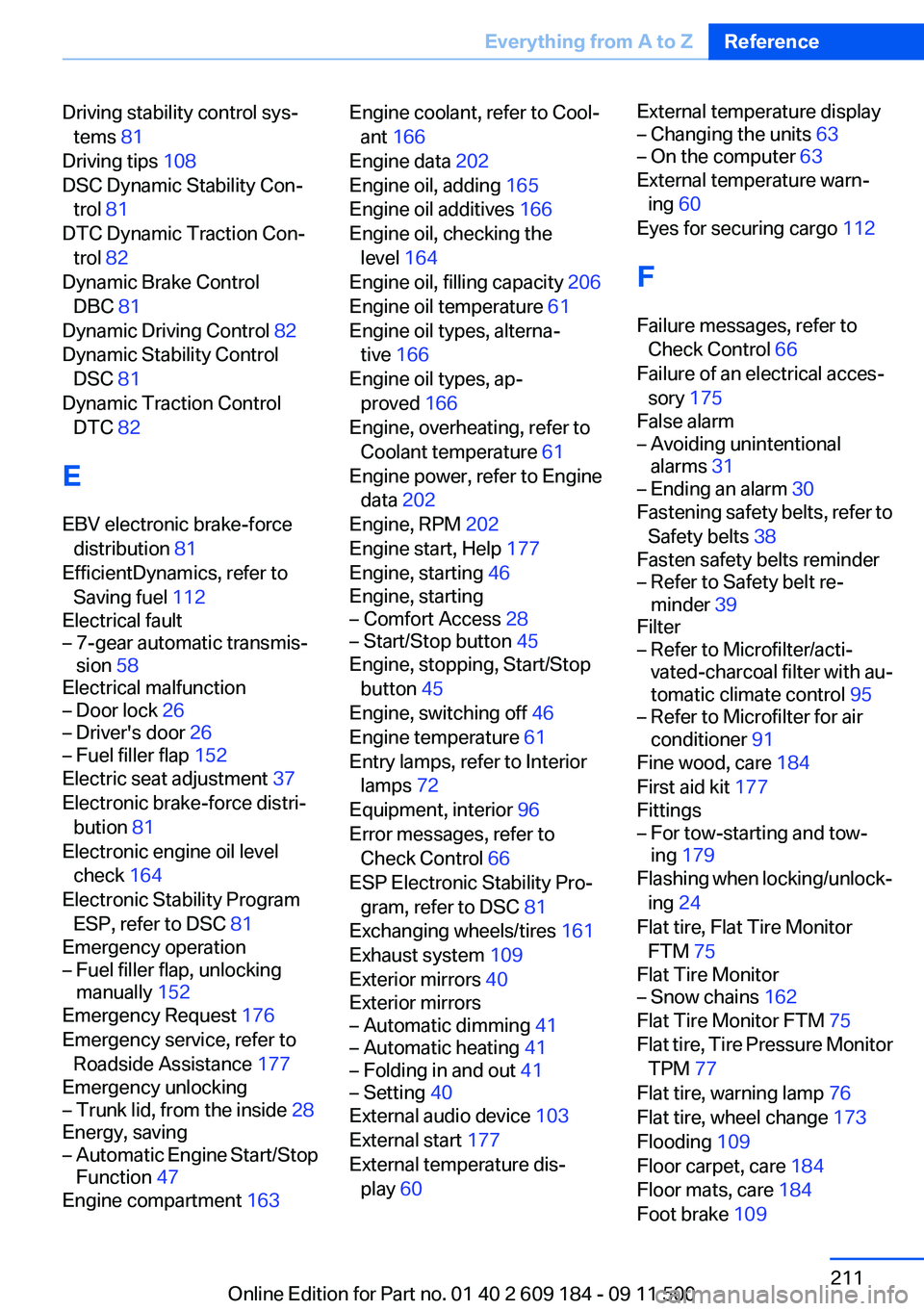
Driving stability control sys‐tems 81
Driving tips 108
DSC Dynamic Stability Con‐ trol 81
DTC Dynamic Traction Con‐ trol 82
Dynamic Brake Control DBC 81
Dynamic Driving Control 82
Dynamic Stability Control DSC 81
Dynamic Traction Control DTC 82
E
EBV electronic brake-force distribution 81
EfficientDynamics, refer to Saving fuel 112
Electrical fault– 7-gear automatic transmis‐
sion 58
Electrical malfunction
– Door lock 26– Driver's door 26– Fuel filler flap 152
Electric seat adjustment 37
Electronic brake-force distri‐ bution 81
Electronic engine oil level check 164
Electronic Stability Program ESP, refer to DSC 81
Emergency operation
– Fuel filler flap, unlocking
manually 152
Emergency Request 176
Emergency service, refer to Roadside Assistance 177
Emergency unlocking
– Trunk lid, from the inside 28
Energy, saving
– Automatic Engine Start/Stop
Function 47
Engine compartment 163
Engine coolant, refer to Cool‐
ant 166
Engine data 202
Engine oil, adding 165
Engine oil additives 166
Engine oil, checking the level 164
Engine oil, filling capacity 206
Engine oil temperature 61
Engine oil types, alterna‐ tive 166
Engine oil types, ap‐ proved 166
Engine, overheating, refer to Coolant temperature 61
Engine power, refer to Engine data 202
Engine, RPM 202
Engine start, Help 177
Engine, starting 46
Engine, starting– Comfort Access 28– Start/Stop button 45
Engine, stopping, Start/Stop
button 45
Engine, switching off 46
Engine temperature 61
Entry lamps, refer to Interior lamps 72
Equipment, interior 96
Error messages, refer to Check Control 66
ESP Electronic Stability Pro‐ gram, refer to DSC 81
Exchanging wheels/tires 161
Exhaust system 109
Exterior mirrors 40
Exterior mirrors
– Automatic dimming 41– Automatic heating 41– Folding in and out 41– Setting 40
External audio device 103
External start 177
External temperature dis‐ play 60
External temperature display– Changing the units 63– On the computer 63
External temperature warn‐
ing 60
Eyes for securing cargo 112
F
Failure messages, refer to Check Control 66
Failure of an electrical acces‐ sory 175
False alarm
– Avoiding unintentional
alarms 31– Ending an alarm 30
Fastening safety belts, refer to
Safety belts 38
Fasten safety belts reminder
– Refer to Safety belt re‐
minder 39
Filter
– Refer to Microfilter/acti‐
vated-charcoal filter with au‐
tomatic climate control 95– Refer to Microfilter for air
conditioner 91
Fine wood, care 184
First aid kit 177
Fittings
– For tow-starting and tow‐
ing 179
Flashing when locking/unlock‐
ing 24
Flat tire, Flat Tire Monitor FTM 75
Flat Tire Monitor
– Snow chains 162
Flat Tire Monitor FTM 75
Flat tire, Tire Pressure Monitor TPM 77
Flat tire, warning lamp 76
Flat tire, wheel change 173
Flooding 109
Floor carpet, care 184
Floor mats, care 184
Foot brake 109
Seite 211Everything from A to ZReference211
Online Edition for Part no. 01 40 2 609 184 - 09 11 500
Page 213 of 220
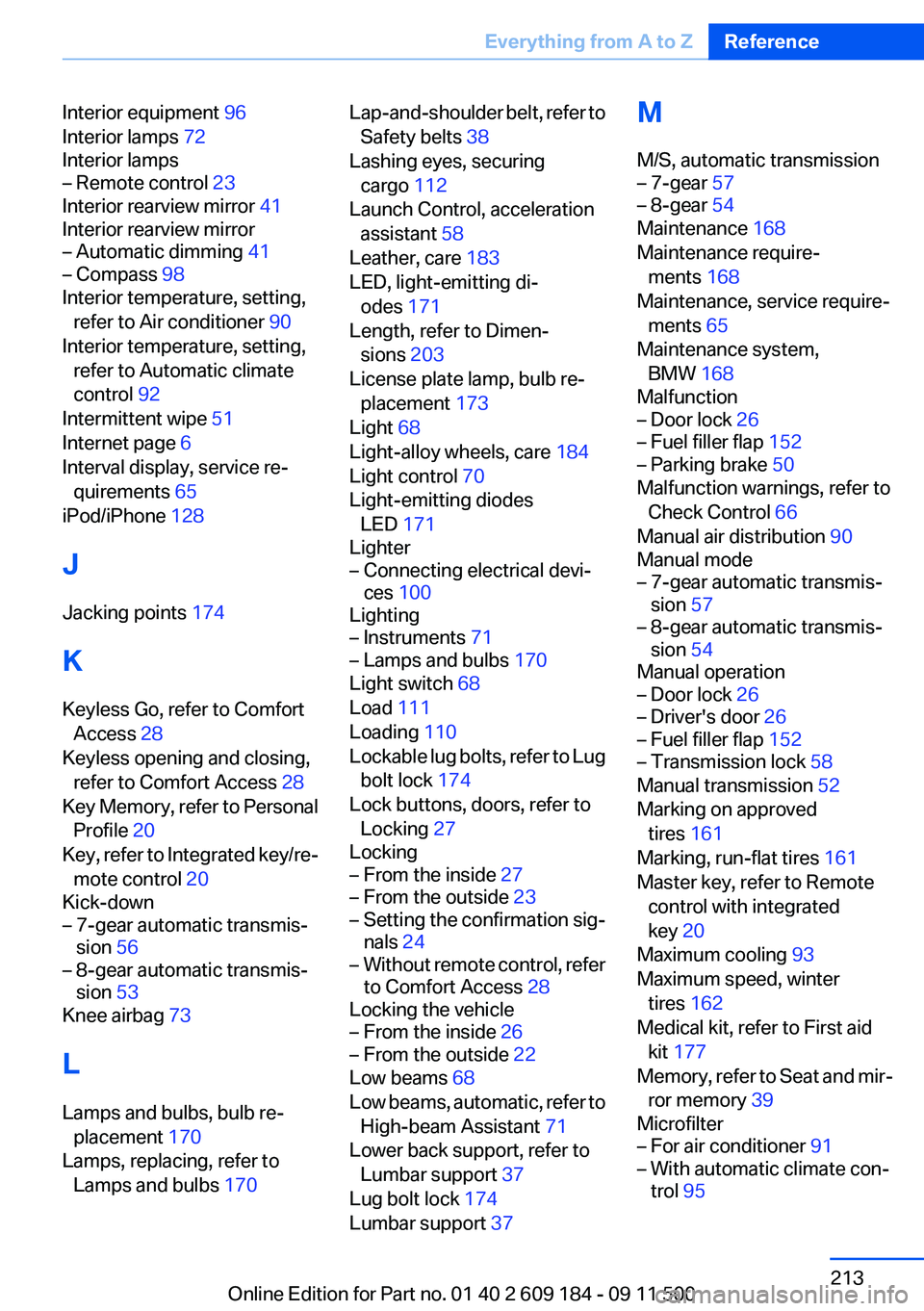
Interior equipment 96
Interior lamps 72
Interior lamps– Remote control 23
Interior rearview mirror 41
Interior rearview mirror
– Automatic dimming 41– Compass 98
Interior temperature, setting,
refer to Air conditioner 90
Interior temperature, setting, refer to Automatic climate
control 92
Intermittent wipe 51
Internet page 6
Interval display, service re‐ quirements 65
iPod/iPhone 128
J
Jacking points 174
K
Keyless Go, refer to Comfort Access 28
Keyless opening and closing, refer to Comfort Access 28
Key Memory, refer to Personal Profile 20
Key, refer to Integrated key/re‐ mote control 20
Kick-down
– 7-gear automatic transmis‐
sion 56– 8-gear automatic transmis‐
sion 53
Knee airbag 73
L
Lamps and bulbs, bulb re‐ placement 170
Lamps, replacing, refer to Lamps and bulbs 170
Lap-and-shoulder belt, refer to
Safety belts 38
Lashing eyes, securing cargo 112
Launch Control, acceleration assistant 58
Leather, care 183
LED, light-emitting di‐ odes 171
Length, refer to Dimen‐ sions 203
License plate lamp, bulb re‐ placement 173
Light 68
Light-alloy wheels, care 184
Light control 70
Light-emitting diodes LED 171
Lighter– Connecting electrical devi‐
ces 100
Lighting
– Instruments 71– Lamps and bulbs 170
Light switch 68
Load 111
Loading 110
Lockable lug bolts, refer to Lug bolt lock 174
Lock buttons, doors, refer to Locking 27
Locking
– From the inside 27– From the outside 23– Setting the confirmation sig‐
nals 24– Without remote control, refer
to Comfort Access 28
Locking the vehicle
– From the inside 26– From the outside 22
Low beams 68
Low beams, automatic, refer to High-beam Assistant 71
Lower back support, refer to Lumbar support 37
Lug bolt lock 174
Lumbar support 37
M
M/S, automatic transmission– 7-gear 57– 8-gear 54
Maintenance 168
Maintenance require‐ ments 168
Maintenance, service require‐ ments 65
Maintenance system, BMW 168
Malfunction
– Door lock 26– Fuel filler flap 152– Parking brake 50
Malfunction warnings, refer to
Check Control 66
Manual air distribution 90
Manual mode
– 7-gear automatic transmis‐
sion 57– 8-gear automatic transmis‐
sion 54
Manual operation
– Door lock 26– Driver's door 26– Fuel filler flap 152– Transmission lock 58
Manual transmission 52
Marking on approved tires 161
Marking, run-flat tires 161
Master key, refer to Remote control with integrated
key 20
Maximum cooling 93
Maximum speed, winter tires 162
Medical kit, refer to First aid kit 177
Memory, refer to Seat and mir‐ ror memory 39
Microfilter
– For air conditioner 91– With automatic climate con‐
trol 95Seite 213Everything from A to ZReference213
Online Edition for Part no. 01 40 2 609 184 - 09 11 500