remote control BMW Z4 SDRIVE28I 2012 Owner's Manual
[x] Cancel search | Manufacturer: BMW, Model Year: 2012, Model line: Z4 SDRIVE28I, Model: BMW Z4 SDRIVE28I 2012Pages: 220, PDF Size: 9.9 MB
Page 50 of 220
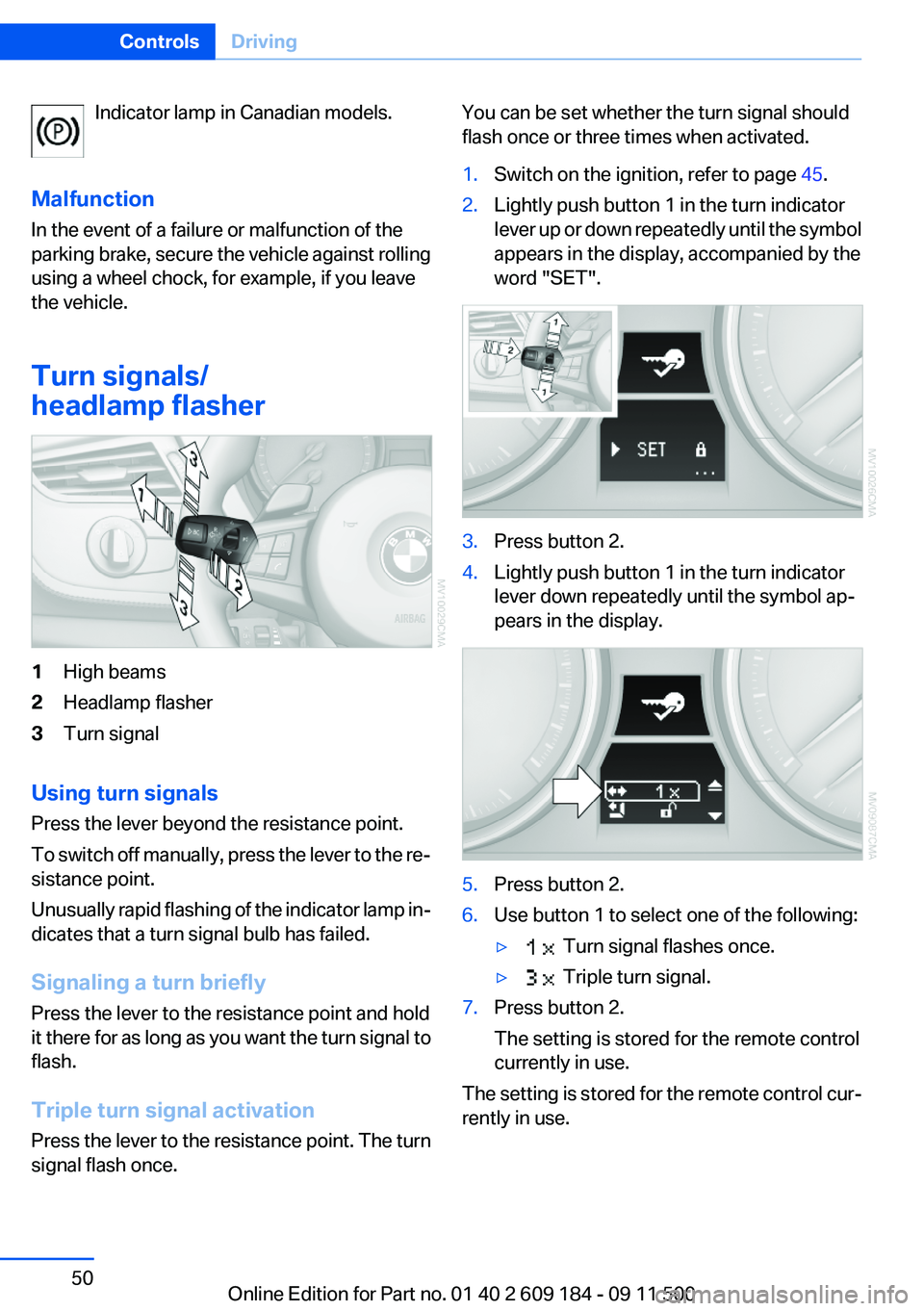
Indicator lamp in Canadian models.
Malfunction
In the event of a failure or malfunction of the
parking brake, secure the vehicle against rolling
using a wheel chock, for example, if you leave
the vehicle.
Turn signals/
headlamp flasher1High beams2Headlamp flasher3Turn signal
Using turn signals
Press the lever beyond the resistance point.
To switch off manually, press the lever to the re‐
sistance point.
Unusually rapid flashing of the indicator lamp in‐
dicates that a turn signal bulb has failed.
Signaling a turn briefly
Press the lever to the resistance point and hold
it there for as long as you want the turn signal to
flash.
Triple turn signal activation
Press the lever to the resistance point. The turn
signal flash once.
You can be set whether the turn signal should
flash once or three times when activated.1.Switch on the ignition, refer to page 45.2.Lightly push button 1 in the turn indicator
lever up or down repeatedly until the symbol
appears in the display, accompanied by the
word "SET".3.Press button 2.4.Lightly push button 1 in the turn indicator
lever down repeatedly until the symbol ap‐
pears in the display.5.Press button 2.6.Use button 1 to select one of the following:▷ Turn signal flashes once.▷ Triple turn signal.7.Press button 2.
The setting is stored for the remote control
currently in use.
The setting is stored for the remote control cur‐
rently in use.
Seite 50ControlsDriving50
Online Edition for Part no. 01 40 2 609 184 - 09 11 500
Page 53 of 220
8-gear Sport automatic
transmission
Transmission positions
D Drive, automatic position
Position for normal vehicle operation. All for‐
ward gears are available.
Under normal operating conditions, fuel con‐
sumption is lowest when you are driving in po‐
sition D.
Kickdown
Kickdown is used to achieve maximum driving
performance. Press on the accelerator beyond
the resistance point at the full throttle position.
R is Reverse
Select only when the vehicle is stationary.
N is Neutral
The vehicle can roll.
N remains engaged after the engine is switched
off if the remote control remains in the ignition
lock. This function can be used in an automatic
car wash, refer to page 182, for example. P is
automatically engaged after approx. 30 minutes.
P Park
The rear wheels are locked.
P is engaged automatically when the following
conditions are met:▷The driver's door is opened while the engine
is running, the safety belt is not fastened and
neither the brake pedal nor the accelerator
is activated.▷The engine is switched off unless N is en‐
gaged and the remote control is in the igni‐
tion lock.▷The remote control is removed from the ig‐
nition lock, refer to page 45.Before leaving the vehicle, ensure that the trans‐
mission position P is engaged; otherwise, the
vehicle may begin to roll.
Engaging transmission position▷Transmission position P can only be disen‐
gaged if the engine is running and the brake
pedal is pressed.▷With the vehicle stationary, press on the
brake pedal before shifting out of P or N;
otherwise, the shift command will not be
executed: shift lock.
Press on the brake pedal until you start
driving
To prevent the vehicle from creeping after you
select a driving position, maintain pressure on
the brake pedal until you are ready to start.◀
Engaging transmission positions D, R,
N
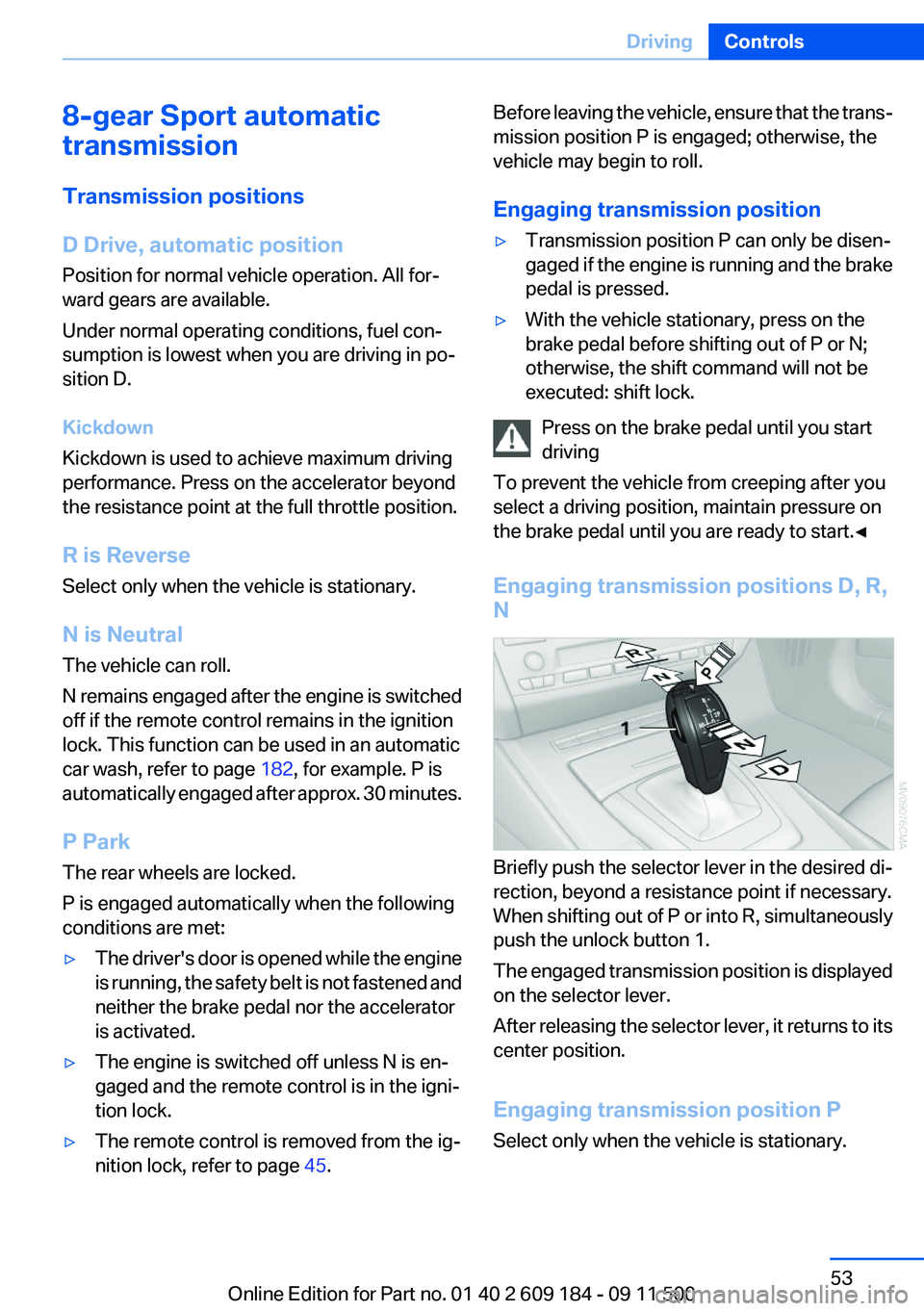
Briefly push the selector lever in the desired di‐
rection, beyond a resistance point if necessary.
When shifting out of P or into R, simultaneously
push the unlock button 1.
The engaged transmission position is displayed
on the selector lever.
After releasing the selector lever, it returns to its
center position.
Engaging transmission position P
Select only when the vehicle is stationary.
Seite 53DrivingControls53
Online Edition for Part no. 01 40 2 609 184 - 09 11 500
Page 56 of 220
Engaging transmission positions N, D,
R▷Transmission position P can only be disen‐
gaged if the engine is running.▷Before moving the lever away from P or N
with the vehicle stationary, depress the
brake; otherwise, the transmission will not
shift.
Press on the brake pedal until you start
driving
To prevent the vehicle from creeping after you
select a driving position, maintain pressure on
the brake pedal until you are ready to start.◀
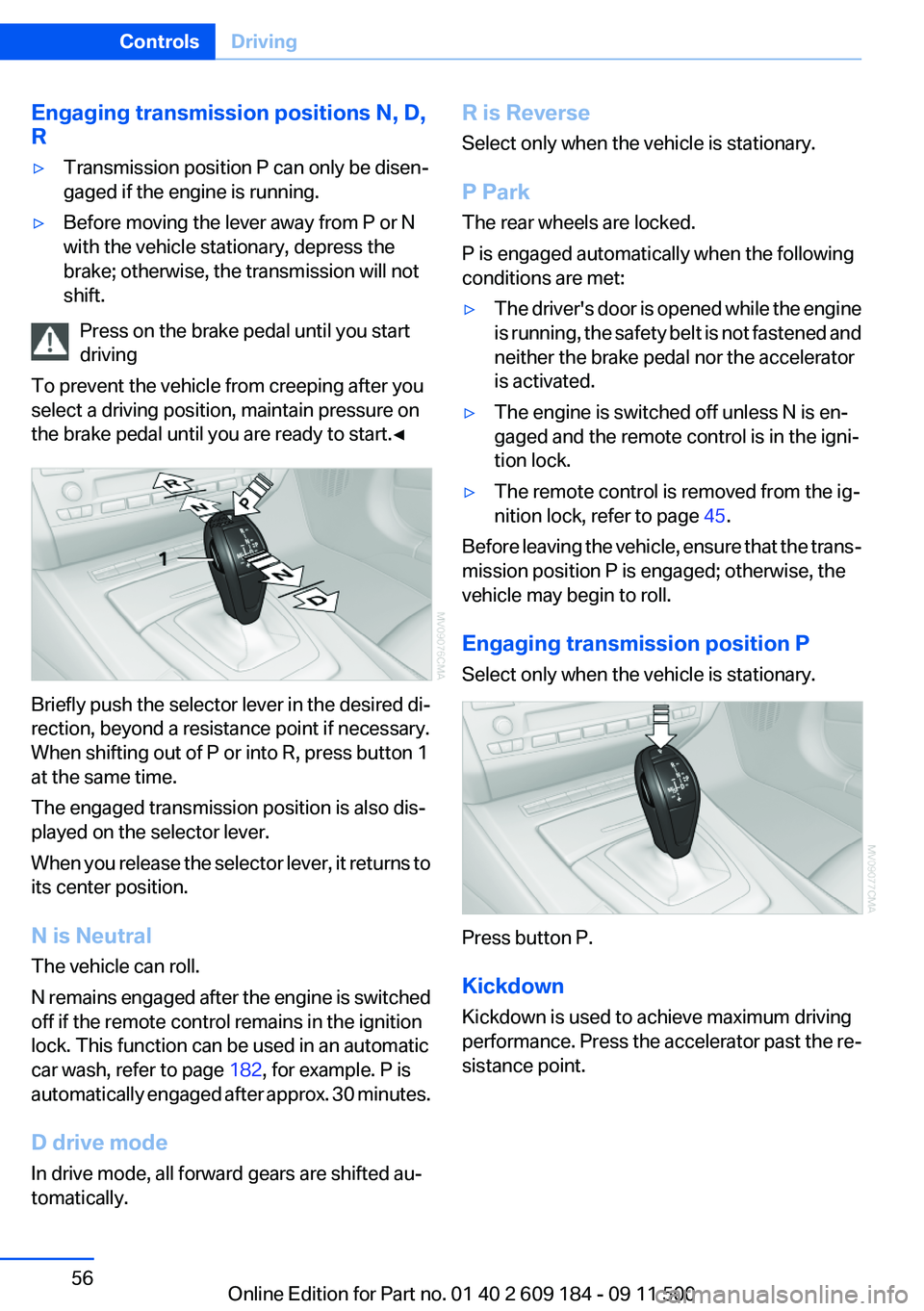
Briefly push the selector lever in the desired di‐
rection, beyond a resistance point if necessary.
When shifting out of P or into R, press button 1
at the same time.
The engaged transmission position is also dis‐
played on the selector lever.
When you release the selector lever, it returns to
its center position.
N is Neutral
The vehicle can roll.
N remains engaged after the engine is switched
off if the remote control remains in the ignition
lock. This function can be used in an automatic
car wash, refer to page 182, for example. P is
automatically engaged after approx. 30 minutes.
D drive mode
In drive mode, all forward gears are shifted au‐
tomatically.
R is Reverse
Select only when the vehicle is stationary.
P Park
The rear wheels are locked.
P is engaged automatically when the following
conditions are met:▷The driver's door is opened while the engine
is running, the safety belt is not fastened and
neither the brake pedal nor the accelerator
is activated.▷The engine is switched off unless N is en‐
gaged and the remote control is in the igni‐
tion lock.▷The remote control is removed from the ig‐
nition lock, refer to page 45.
Before leaving the vehicle, ensure that the trans‐
mission position P is engaged; otherwise, the
vehicle may begin to roll.
Engaging transmission position P
Select only when the vehicle is stationary.
Press button P.
Kickdown
Kickdown is used to achieve maximum driving
performance. Press the accelerator past the re‐
sistance point.
Seite 56ControlsDriving56
Online Edition for Part no. 01 40 2 609 184 - 09 11 500
Page 60 of 220
DisplaysVehicle equipment
This chapter describes all series equipment as
well as country-specific and special equipment
offered for this model series.Therefore, it also
describes equipment that may not be found in
your vehicle, for instance due to the selected
special equipment or the country version. This
also applies to safety-related functions and sys‐
tems.
Odometer, outside
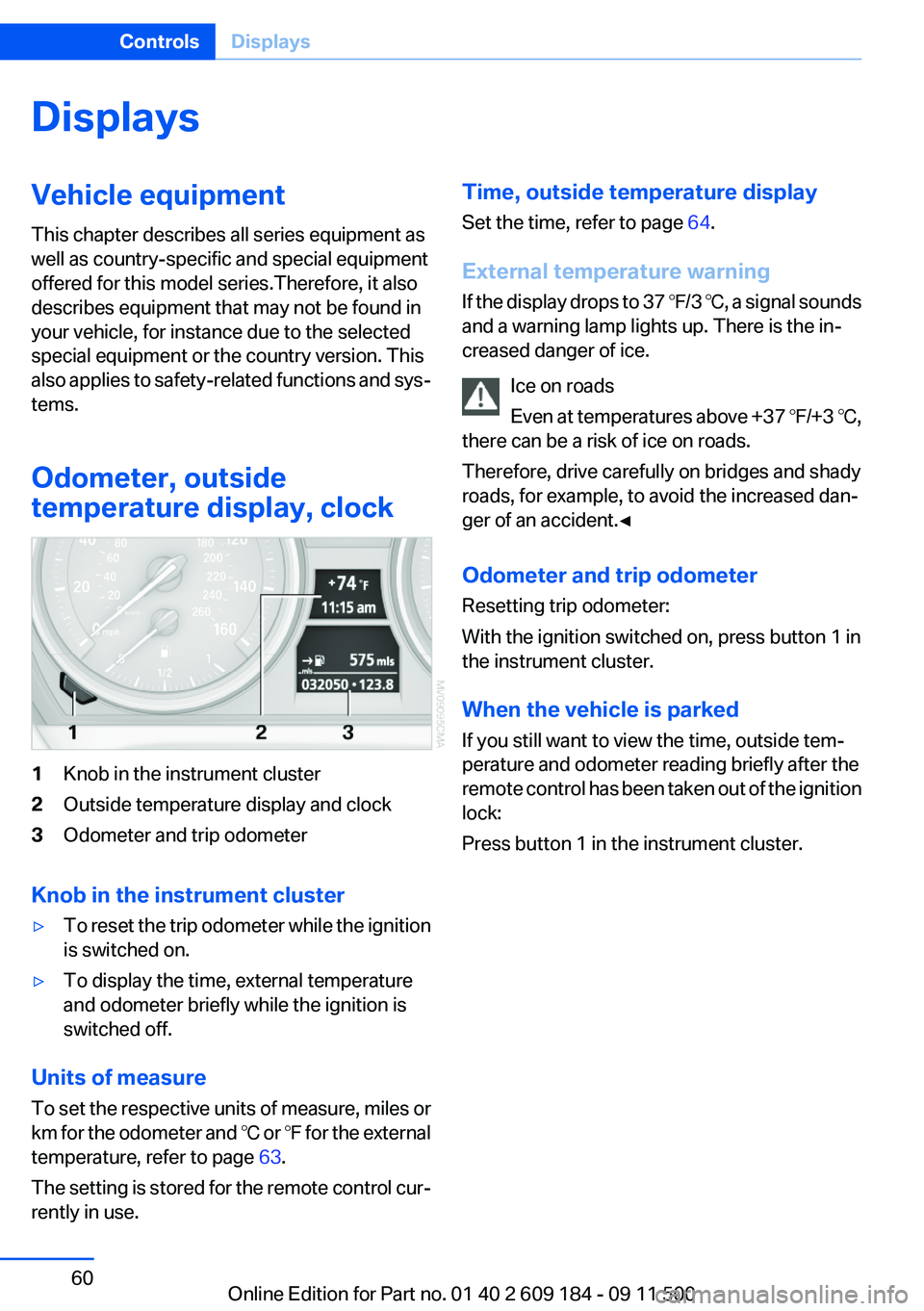
temperature display, clock1Knob in the instrument cluster2Outside temperature display and clock3Odometer and trip odometer
Knob in the instrument cluster
▷To reset the trip odometer while the ignition
is switched on.▷To display the time, external temperature
and odometer briefly while the ignition is
switched off.
Units of measure
To set the respective units of measure, miles or
km for the odometer and ℃ or ℉ for the external
temperature, refer to page 63.
The setting is stored for the remote control cur‐
rently in use.
Time, outside temperature display
Set the time, refer to page 64.
External temperature warning
If the display drops to 37 ℉/3 ℃, a signal sounds
and a warning lamp lights up. There is the in‐
creased danger of ice.
Ice on roads
Even at temperatures above +37 ℉/+3 ℃,
there can be a risk of ice on roads.
Therefore, drive carefully on bridges and shady
roads, for example, to avoid the increased dan‐
ger of an accident.◀
Odometer and trip odometer
Resetting trip odometer:
With the ignition switched on, press button 1 in
the instrument cluster.
When the vehicle is parked
If you still want to view the time, outside tem‐
perature and odometer reading briefly after the
remote control has been taken out of the ignition
lock:
Press button 1 in the instrument cluster.Seite 60ControlsDisplays60
Online Edition for Part no. 01 40 2 609 184 - 09 11 500
Page 64 of 220
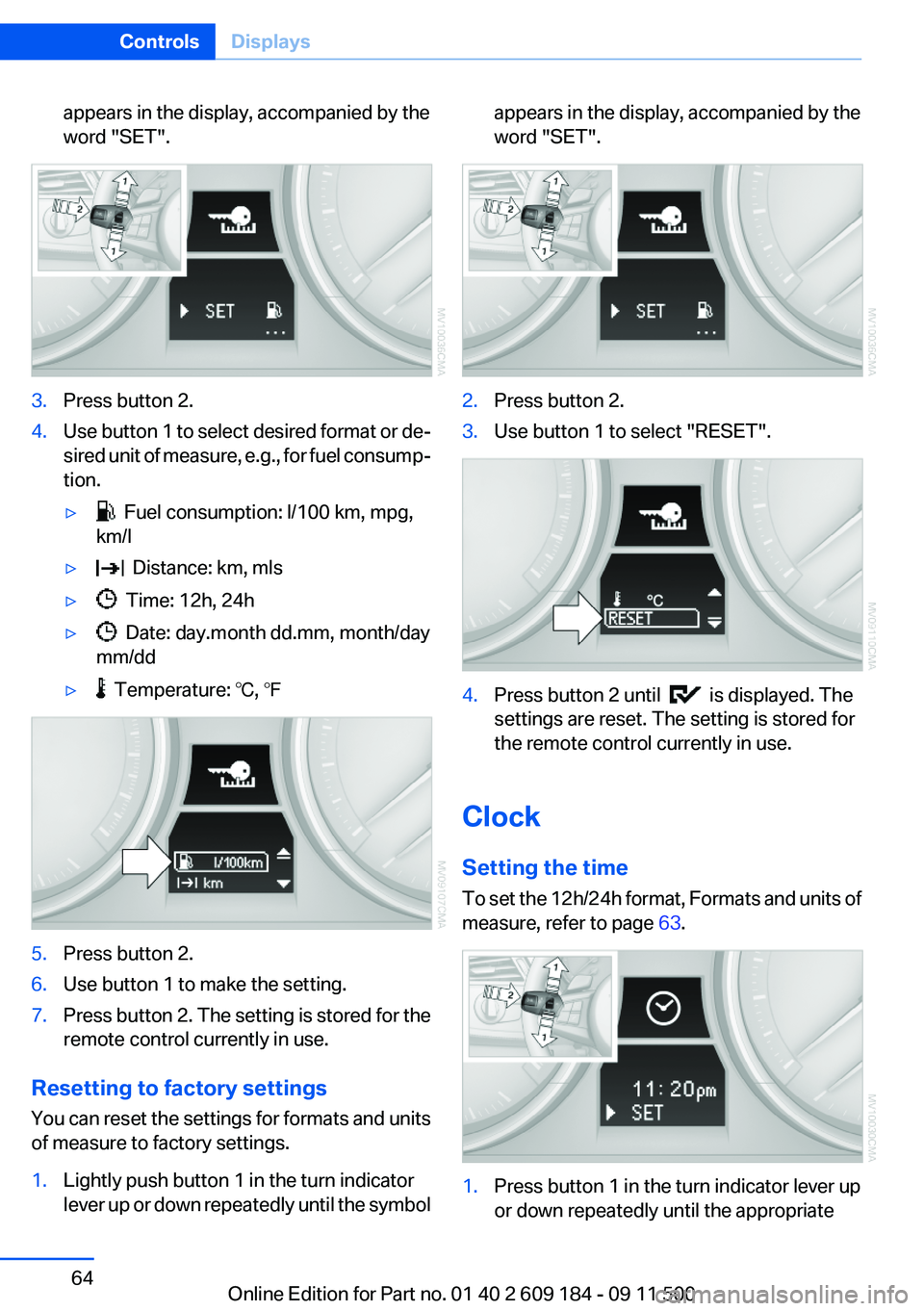
appears in the display, accompanied by the
word "SET".3.Press button 2.4.Use button 1 to select desired format or de‐
sired unit of measure, e.g., for fuel consump‐
tion.▷ Fuel consumption: l/100 km, mpg,
km/l▷ Distance: km, mls▷ Time: 12h, 24h▷ Date: day.month dd.mm, month/day
mm/dd▷ Temperature: ℃, ℉5.Press button 2.6.Use button 1 to make the setting.7.Press button 2. The setting is stored for the
remote control currently in use.
Resetting to factory settings
You can reset the settings for formats and units
of measure to factory settings.
1.Lightly push button 1 in the turn indicator
lever up or down repeatedly until the symbolappears in the display, accompanied by the
word "SET".2.Press button 2.3.Use button 1 to select "RESET".4.Press button 2 until is displayed. The
settings are reset. The setting is stored for
the remote control currently in use.
Clock
Setting the time
To set the 12h/24h format, Formats and units of
measure, refer to page 63.
1.Press button 1 in the turn indicator lever up
or down repeatedly until the appropriateSeite 64ControlsDisplays64
Online Edition for Part no. 01 40 2 609 184 - 09 11 500
Page 65 of 220
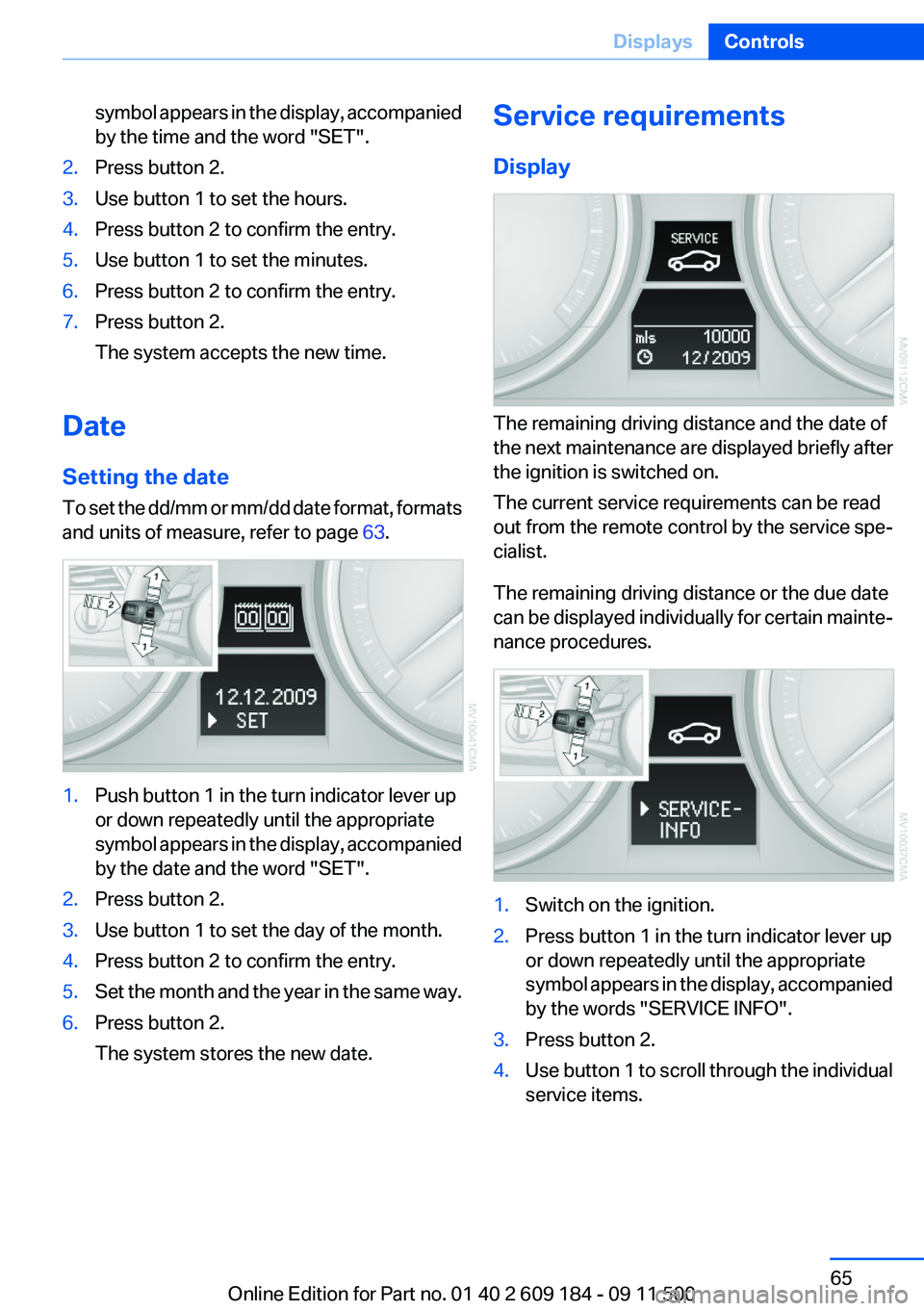
symbol appears in the display, accompanied
by the time and the word "SET".2.Press button 2.3.Use button 1 to set the hours.4.Press button 2 to confirm the entry.5.Use button 1 to set the minutes.6.Press button 2 to confirm the entry.7.Press button 2.
The system accepts the new time.
Date
Setting the date
To set the dd/mm or mm/dd date format, formats
and units of measure, refer to page 63.
1.Push button 1 in the turn indicator lever up
or down repeatedly until the appropriate
symbol appears in the display, accompanied
by the date and the word "SET".2.Press button 2.3.Use button 1 to set the day of the month.4.Press button 2 to confirm the entry.5.Set the month and the year in the same way.6.Press button 2.
The system stores the new date.Service requirements
Display
The remaining driving distance and the date of
the next maintenance are displayed briefly after
the ignition is switched on.
The current service requirements can be read
out from the remote control by the service spe‐
cialist.
The remaining driving distance or the due date
can be displayed individually for certain mainte‐
nance procedures.
1.Switch on the ignition.2.Press button 1 in the turn indicator lever up
or down repeatedly until the appropriate
symbol appears in the display, accompanied
by the words "SERVICE INFO".3.Press button 2.4.Use button 1 to scroll through the individual
service items.Seite 65DisplaysControls65
Online Edition for Part no. 01 40 2 609 184 - 09 11 500
Page 69 of 220
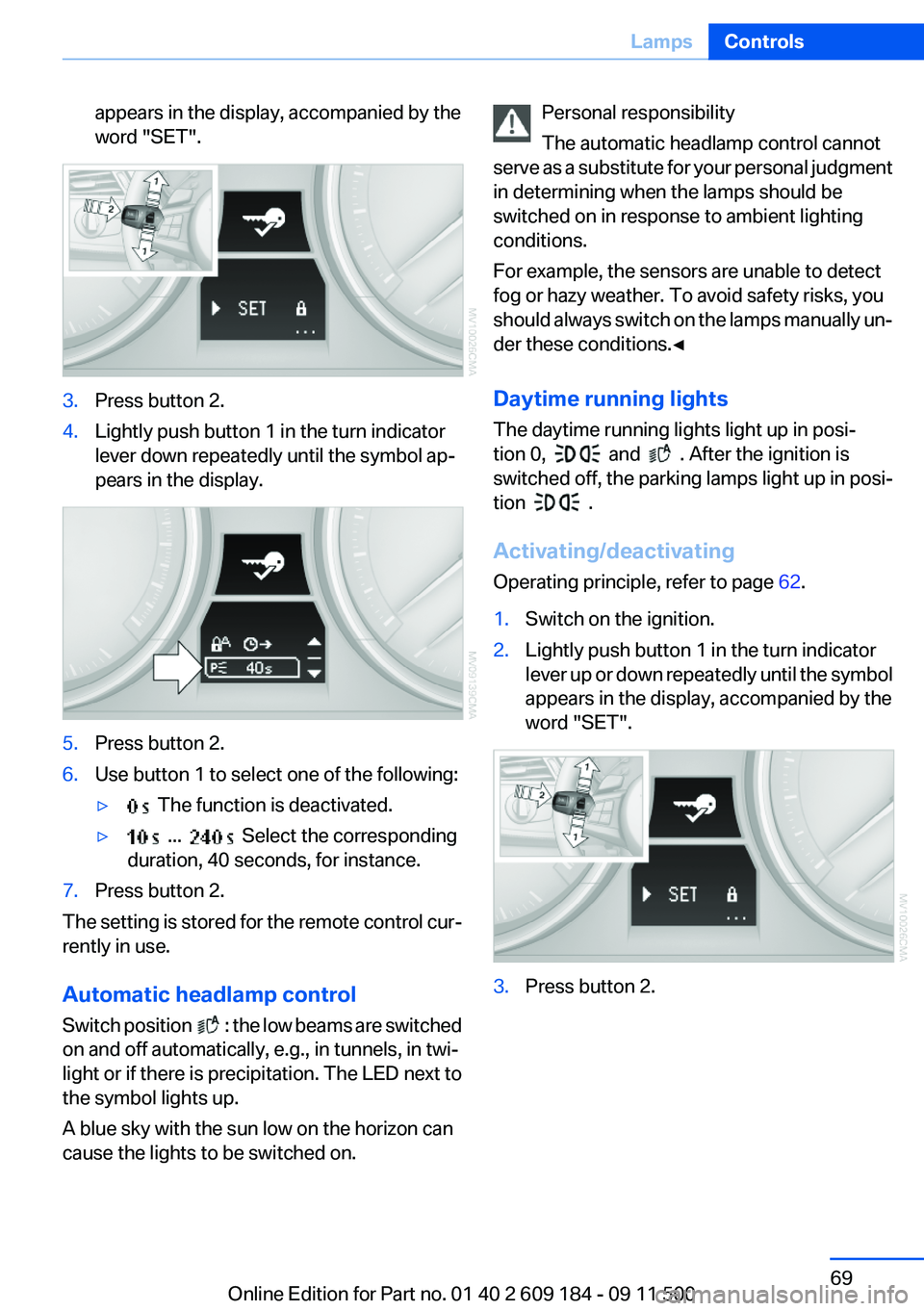
appears in the display, accompanied by the
word "SET".3.Press button 2.4.Lightly push button 1 in the turn indicator
lever down repeatedly until the symbol ap‐
pears in the display.5.Press button 2.6.Use button 1 to select one of the following:▷ The function is deactivated.▷ ... Select the corresponding
duration, 40 seconds, for instance.7.Press button 2.
The setting is stored for the remote control cur‐
rently in use.
Automatic headlamp control
Switch position
: the low beams are switched
on and off automatically, e.g., in tunnels, in twi‐
light or if there is precipitation. The LED next to
the symbol lights up.
A blue sky with the sun low on the horizon can
cause the lights to be switched on.
Personal responsibility
The automatic headlamp control cannot
serve as a substitute for your personal judgment
in determining when the lamps should be
switched on in response to ambient lighting
conditions.
For example, the sensors are unable to detect
fog or hazy weather. To avoid safety risks, you
should always switch on the lamps manually un‐
der these conditions.◀
Daytime running lights
The daytime running lights light up in posi‐
tion 0,
and . After the ignition is
switched off, the parking lamps light up in posi‐
tion
.
Activating/deactivating
Operating principle, refer to page 62.
1.Switch on the ignition.2.Lightly push button 1 in the turn indicator
lever up or down repeatedly until the symbol
appears in the display, accompanied by the
word "SET".3.Press button 2.Seite 69LampsControls69
Online Edition for Part no. 01 40 2 609 184 - 09 11 500
Page 70 of 220
4.Lightly push button 1 in the turn indicator
lever up or down repeatedly until the symbol
appears in the display.5.Press button 2.6.Use button 1 to select one of the following:▷ Daytime running lights are acti‐
vated.▷ Daytime running lights are de‐
activated.7.Press button 2.
The setting is stored for the remote control cur‐
rently in use.
Adaptive light control
The concept
Adaptive light control is a variable headlamp
control system that enables dynamic illumina‐
tion of the road surface.
Depending on the steering angle and other pa‐
rameters, the light from the headlamp follows
the course of the road.
Controls
Activating
Switch position
with the ignition switched
on.
Auxiliary function:
To avoid blinding oncoming traffic, the adaptive
light control directs light towards the front pas‐
senger side when the vehicle is at a standstill.
Malfunction
Adaptive light control is malfunctioning or has
failed. Have the system checked as soon as pos‐
sible.
High beams/roadside parking
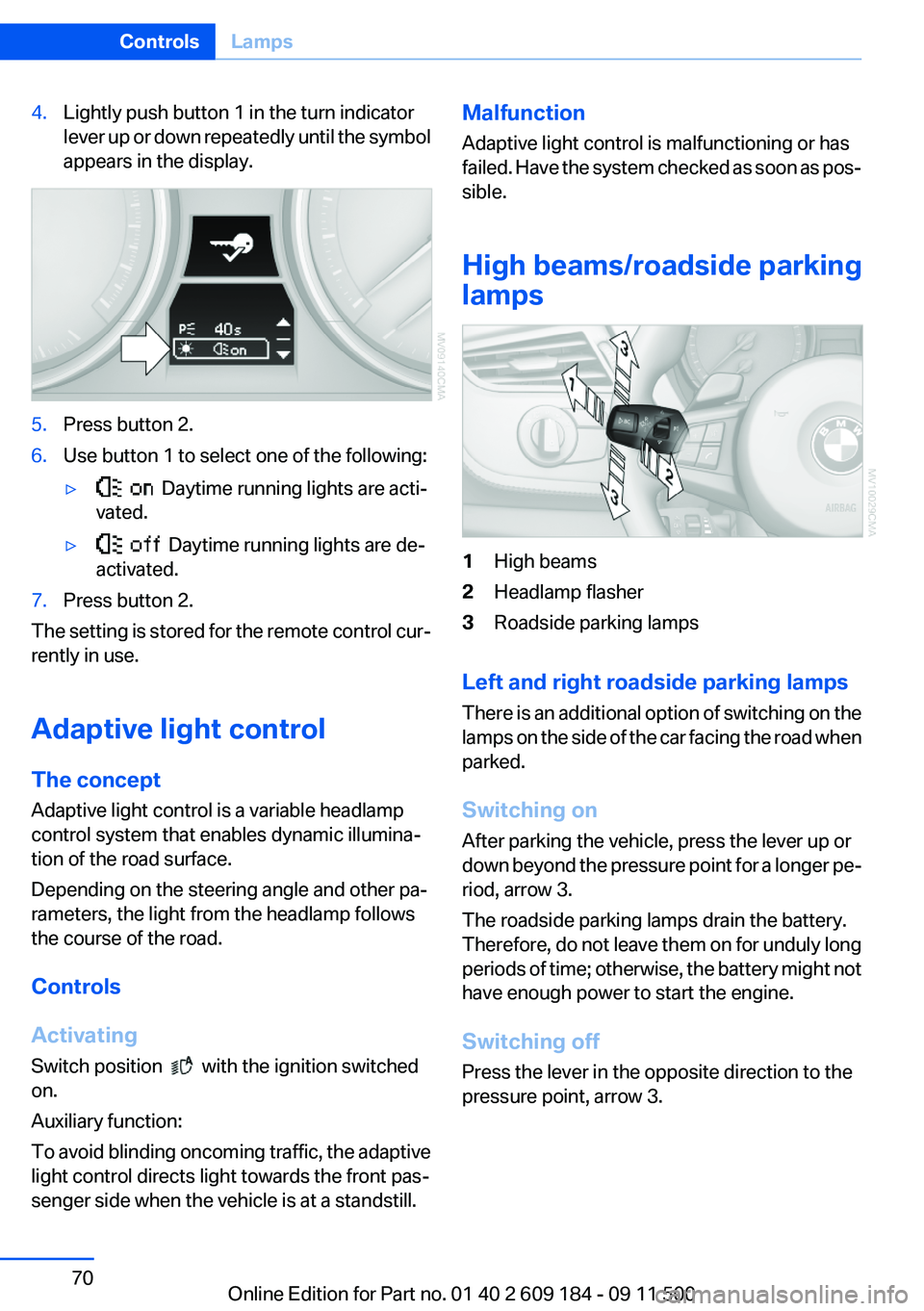
lamps1High beams2Headlamp flasher3Roadside parking lamps
Left and right roadside parking lamps
There is an additional option of switching on the
lamps on the side of the car facing the road when
parked.
Switching on
After parking the vehicle, press the lever up or
down beyond the pressure point for a longer pe‐
riod, arrow 3.
The roadside parking lamps drain the battery.
Therefore, do not leave them on for unduly long
periods of time; otherwise, the battery might not
have enough power to start the engine.
Switching off
Press the lever in the opposite direction to the
pressure point, arrow 3.
Seite 70ControlsLamps70
Online Edition for Part no. 01 40 2 609 184 - 09 11 500
Page 92 of 220
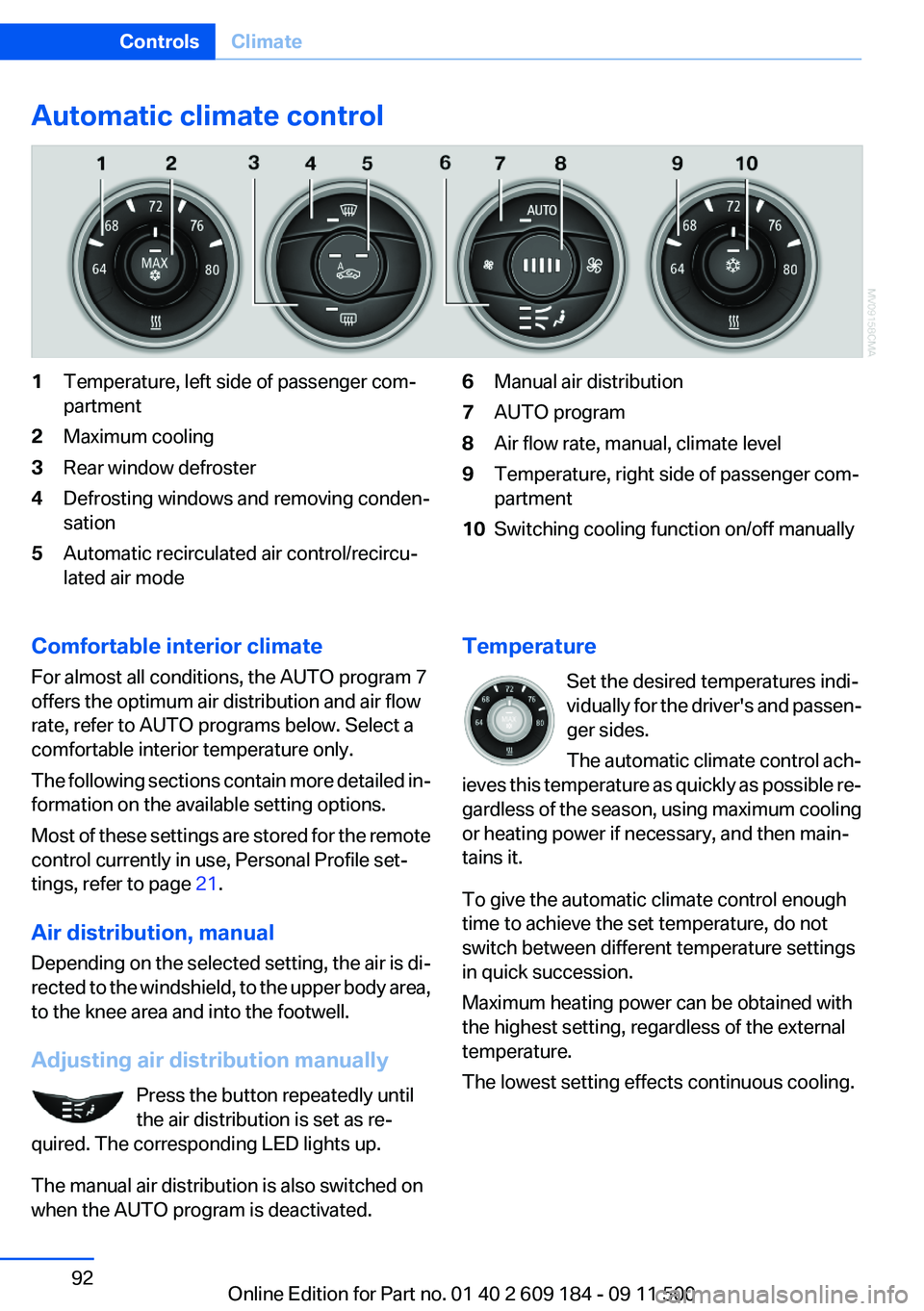
Automatic climate control1Temperature, left side of passenger com‐
partment2Maximum cooling3Rear window defroster4Defrosting windows and removing conden‐
sation5Automatic recirculated air control/recircu‐
lated air mode6Manual air distribution7AUTO program8Air flow rate, manual, climate level9Temperature, right side of passenger com‐
partment10Switching cooling function on/off manuallyComfortable interior climate
For almost all conditions, the AUTO program 7
offers the optimum air distribution and air flow
rate, refer to AUTO programs below. Select a
comfortable interior temperature only.
The following sections contain more detailed in‐
formation on the available setting options.
Most of these settings are stored for the remote
control currently in use, Personal Profile set‐
tings, refer to page 21.
Air distribution, manual
Depending on the selected setting, the air is di‐
rected to the windshield, to the upper body area,
to the knee area and into the footwell.
Adjusting air distribution manually Press the button repeatedly until
the air distribution is set as re‐
quired. The corresponding LED lights up.
The manual air distribution is also switched on
when the AUTO program is deactivated.Temperature
Set the desired temperatures indi‐
vidually for the driver's and passen‐
ger sides.
The automatic climate control ach‐
ieves this temperature as quickly as possible re‐
gardless of the season, using maximum cooling
or heating power if necessary, and then main‐
tains it.
To give the automatic climate control enough
time to achieve the set temperature, do not
switch between different temperature settings
in quick succession.
Maximum heating power can be obtained with
the highest setting, regardless of the external
temperature.
The lowest setting effects continuous cooling.Seite 92ControlsClimate92
Online Edition for Part no. 01 40 2 609 184 - 09 11 500
Page 96 of 220
Interior equipmentVehicle equipment
This chapter describes all series equipment as
well as country-specific and special equipment
offered for this model series.Therefore, it also
describes equipment that may not be found in
your vehicle, for instance due to the selected
special equipment or the country version. This
also applies to safety-related functions and sys‐
tems.
Universal Garage Door
Opener
The concept
The Universal Garage Door Opener can be used
to operate up to 3 functions in radio-controlled
systems, such as garage door drives or lighting
systems. The Universal Garage Door Opener
replaces up to 3 different hand-held transmit‐
ters. To operate it, the buttons on the interior
rearview mirror must be programmed for the de‐
sired functions. The hand-held transmitter for
the system is needed for the programming pro‐
cedure.
During programming
During programming and before activat‐
ing a device using the integrated universal re‐
mote control, ensure that there are no people,
animals, or objects in the range of movement of
the remote-controlled device; otherwise, there
is a risk of injury or damage.
Also follow the safety instructions of the hand-
held transmitter.◀
Before selling the vehicle, delete the stored
functions for security reasons.
Compatibility If this symbol is printed on the packaging
or in the operating instructions of thesystem being operated, the system is generally
compatible with the Universal Garage Door
Opener.
If you have any questions, please contact:▷Your service center.▷www.homelink.com on the Internet.
HomeLink is a registered trademark of Johnson
Controls, Inc.
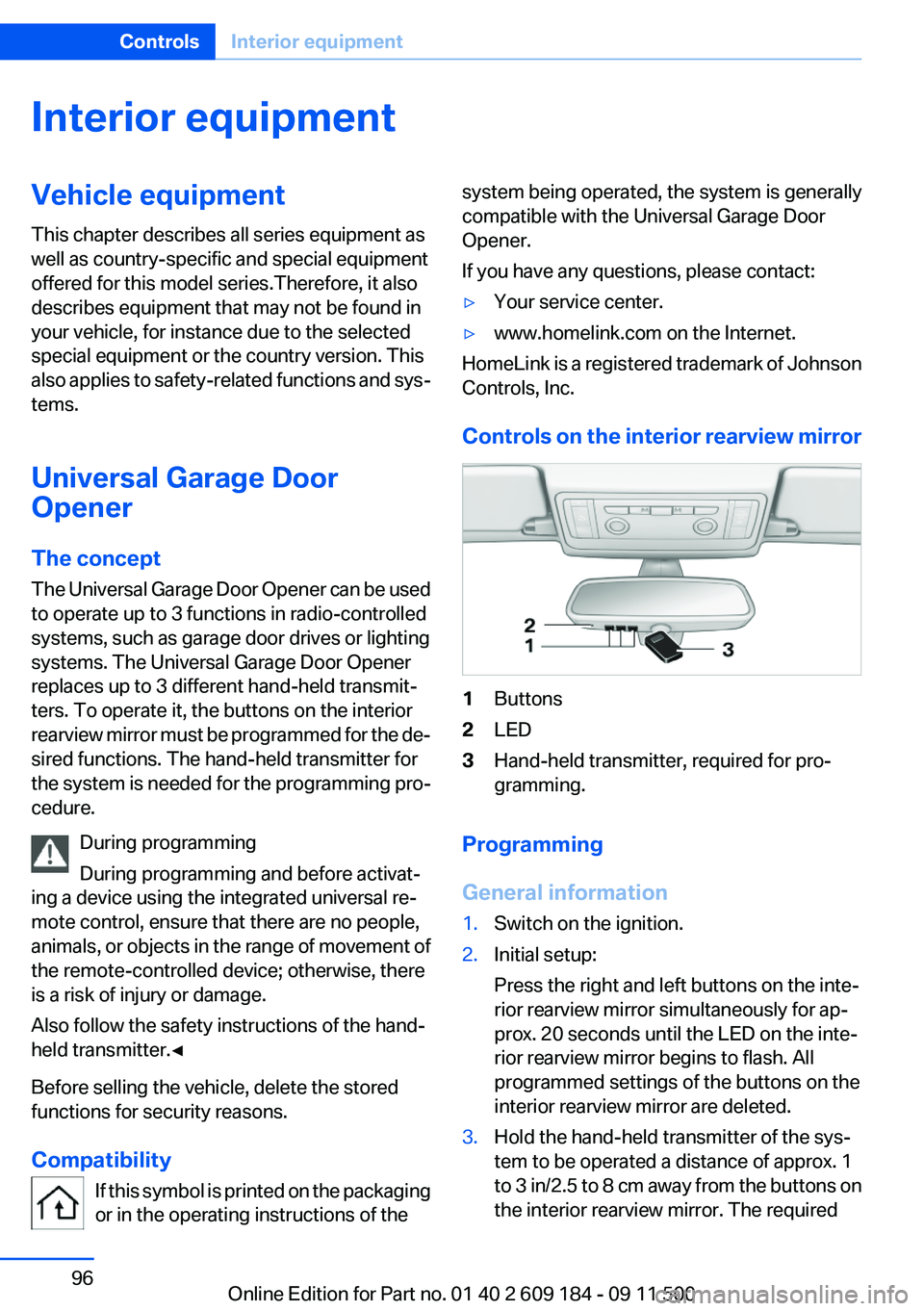
Controls on the interior rearview mirror
1Buttons2LED3Hand-held transmitter, required for pro‐
gramming.
Programming
General information
1.Switch on the ignition.2.Initial setup:
Press the right and left buttons on the inte‐
rior rearview mirror simultaneously for ap‐
prox. 20 seconds until the LED on the inte‐
rior rearview mirror begins to flash. All
programmed settings of the buttons on the
interior rearview mirror are deleted.3.Hold the hand-held transmitter of the sys‐
tem to be operated a distance of approx. 1
to 3 in/2.5 to 8 cm away from the buttons on
the interior rearview mirror. The requiredSeite 96ControlsInterior equipment96
Online Edition for Part no. 01 40 2 609 184 - 09 11 500