transmission BMW Z4 SDRIVE28I 2012 Owner's Manual
[x] Cancel search | Manufacturer: BMW, Model Year: 2012, Model line: Z4 SDRIVE28I, Model: BMW Z4 SDRIVE28I 2012Pages: 220, PDF Size: 9.9 MB
Page 110 of 220
Ensure that the floor mats are securely fastened
again when they are returned after being re‐
moved, such as for cleaning.◀
Driving in wet conditions
When roads are wet or there is heavy rain, briefly
exert gentle pressure on the brake pedal every
few miles.
Ensure that this action does not endanger other
road users.
The heat generated in this process helps dry the
brake discs and pads.
In this way braking efficiency will be available
when you need it.
Hills
Drive long or steep downhill gradients in the gear
in which the least braking is required. Otherwise,
the brake system may overheat, resulting in a
reduction in the brake system efficiency.
You can increase the engine's braking effect by
shifting down, going all the way to first gear, if
necessary.
Downshifting in manual mode of the 8-gear
Sport automatic transmission, refer to page 54.
Downshifting in manual mode of the 7-gear
Sport automatic transmission with dual clutch,
refer to page 57.
Avoid load on the brakes
Avoid placing excessive load on the brake
system. Light but consistent brake pressure can
lead to high temperatures, brake wear and pos‐
sibly even brake failure.◀
Do not drive in neutral
Never drive with the transmission in neu‐
tral, with the engine switched off or with the
clutch depressed; otherwise, you will have nei‐
ther the braking action of the engine or nor its
power assistance when braking or steering.◀Brake disc corrosion
Corrosion on the brake discs and contamination
on the brake pads are furthered by:▷Low mileage.▷Extended periods when the vehicle is not
used at all.▷Infrequent use of the brakes.
Corrosion occurs when the minimum pressure
that must be exerted by the pads during brake
applications to clean the discs is not reached.
Should corrosion form on the brake discs, the
brakes will tend to respond with a pulsating ef‐
fect that generally cannot be corrected.
Condensation under the parked vehicle
When using the automatic climate control, con‐
densation water develops that exits underneath
the vehicle.
Therefore, traces of condensed water under the
vehicle are normal.
Loading Overloading the vehicle
To avoid exceeding the approved carrying
capacity of the tires, never overload the vehicle.
Overloading can lead to overheating and in‐
creases the rate at which damage develops in‐
side the tires. This could result in a sudden loss
of tire inflation pressure.◀
Secure heavy objects
Never transport unsecured heavy or hard
objects in the passenger compartment, as they
could be thrown around and pose a safety haz‐
ard to the vehicle's occupants during abrupt
braking or evasive maneuvers.◀
No fluids in the cargo area
Make sure that fluids do not leak into the
cargo area; otherwise, the vehicle may be dam‐
aged.◀
Seite 110Driving tipsThings to remember when driving110
Online Edition for Part no. 01 40 2 609 184 - 09 11 500
Page 128 of 220
Adjusting the volume1. Press the button.2."AUX"3."Vol-AUX"4.Connect the audio device, switch it on and
select a track on the audio device.
USB audio interface/mobile phone
audio interface
At a glance
It is possible to connect external audio devices.
The sound is output on the vehicle loudspeak‐
ers.
Connectors for external devices
▷Connection via USB audio interface: Apple
iPod/iPhone, USB devices, e.g., MP3 play‐
ers, USB flash drives, or mobile phones that
are supported by the USB audio interface.▷Connection via snap-in adapter, refer to
page 143, when equipped with extended
connectivity of the music player in the mo‐
bile phone: Apple iPhone or mobile phones.
Playback is only possible if no audio device
is connected to the analog AUX-IN port.
Due to the large number of different audio devi‐
ces available on the market, it cannot be ensured
that every audio device/mobile phone is opera‐
ble on the vehicle.
Ask your service center about suitable audio de‐
vices/mobile phones.
Audio files
Standard audio files can be played back:
▷MP3.▷WMA.▷WAV (PCM).▷AAC, M4A.▷Playback lists: M3U, WPL, PLS.File system
Standard file systems for USB devices are sup‐
ported. The FAT 32 format is recommended.
Connecting
The USB audio interface is in the center armrest.
Connection of Apple iPod/iPhone via USB
audio interface
To connect the iPod, use the BMW cable
adapter for the Apple iPod. Additional informa‐
tion can be obtained from your service center or
on the Internet: www.bmw.com.
Connect the Apple iPod/iPhone with the AUX-
IN port and USB interface.
The Apple iPod/iPhone menu structure is sup‐
ported by the USB audio interface.
Connection of a USB device via the USB
audio interface
Connect using a flexible adapter cable to protect
the USB audio interface and the USB device
against physical damage.
Connect the USB device to the USB interface.
After connecting for the first time
Information on all music tracks, e.g. artist or type
of music, as well as playback lists are transmit‐
ted into the vehicle. This may take some time,
depending on the USB device and the number
of tracks.
During transmission, the tracks can be called up
via the file directory.
Seite 128EntertainmentProfessional Radio128
Online Edition for Part no. 01 40 2 609 184 - 09 11 500
Page 137 of 220
▷The phone book entries of the telephone
stored on the SIM card or mobile phone are
transmitted to the vehicle after detection,
depending on the mobile phone.▷Four mobile phones can be paired.▷Specific settings may be necessary in some
mobile phones, e.g., authorization or a se‐
cure connection; refer to the mobile phone
operating instructions.
Connecting a particular mobile phone
If more than one mobile phone is detected by the
vehicle, the first mobile phone on the list is con‐
nected. A different detected mobile phone may
be connected with the vehicle.
The mobile phone is connected with the ve‐
hicle.
A different mobile phone can be connected by
selecting it.
1.Switch on the radio ready state or the igni‐
tion.2. Press the button.3."PHONE"4."BT"5.Turn the right knob until the mobile phone
to be connected is displayed.6."PRIO"
Press the button repeatedly until the desired
position is reached.
Unpairing the mobile phone
1.Switch on the radio ready state or the igni‐
tion.2. Press the button.3."PHONE"4."BT"5.Turn the right knob until the mobile phone
to be unpaired is displayed.6."DELETE"7."YES"
What to do if...
Information on suitable mobile phones, refer to
page 134.
The mobile phone could not be paired or con‐
nected.
▷Is Bluetooth activated in the vehicle and on
the mobile phone? Activate Bluetooth on
the vehicle and on the mobile phone.▷Do the Bluetooth passkeys on the mobile
phone and the vehicle match? Enter the
same passkey on the mobile phone and on
the radio.▷Did it take longer than 30 seconds to enter
the passkey? Repeat the pairing procedure.▷Are too many Bluetooth devices connected
to the mobile phone or vehicle? Delete con‐
nections with other devices if necessary.▷Is the mobile phone in power-save mode or
does it have only a limited remaining battery
life? Charge the mobile phone in the snap-
in adapter or via the charging cable.▷Depending on the mobile phone, it is possi‐
ble that only one mobile phone can be con‐
nected to the vehicle. Unpair the connected
mobile phone from the vehicle and pair and
connect only one mobile phone.
The mobile phone no longer reacts?
▷Switch the mobile phone off and on again.▷Is the ambient temperature too high or low?
Do not expose the mobile phone to extreme
environmental conditions.
No phone book entries or only some phone book
entries are displayed, or they are incomplete.
▷Transmission of the phone book entries is
not yet complete.▷It is possible that only the phone book en‐
tries of the mobile phone or the SIM card are
transmitted.Seite 137TelephoneCommunication137
Online Edition for Part no. 01 40 2 609 184 - 09 11 500
Page 145 of 220
ConnectedDriveVehicle equipment
This chapter describes all series equipment as
well as country-specific and special equipment
offered for this model series.Therefore, it also
describes equipment that may not be found in
your vehicle, for instance due to the selected
special equipment or the country version. This
also applies to safety-related functions and sys‐
tems.
BMW Assist
General information
BMW Assist provides you with certain services,
e.g., transmission of the position data of your
vehicle to the BMW Assist Response Center if
an Emergency Request has been initiated.
Many BMW Assist services depend on the indi‐
vidually agreed upon contract.
After your contract has expired, the BMW Assist
system will be deactivated by the BMW Assist
Response Center without your having to visit a
service center. After the BMW Assist system
has been deactivated, no BMW Assist services
will be available. The BMW Assist system can be
reactivated by a service center after you sign a
new contract.
Requirements▷The installed BMW Assist system is logged
in to a wireless communications network.
This network must be capable of transmit‐
ting the services.▷To transmit position data, the vehicle must
be able to determine the current position.▷The BMW Assist service contract was
signed with your service center or with the
BMW Assist Response Center. Enabling
must have been completed.▷BMW Assist is activated.
Services offered
▷Emergency Request: when you press the
SOS button, a connection to the BMW As‐
sist Response Center is established. The
BMW Assist Response Center then speaks
with you and takes further steps to help you.▷Automatic Collision Notification: under cer‐
tain conditions, a connection is established
to the BMW Assist Response Center after a
serious accident. If possible, the BMW As‐
sist Response Center then speaks with you
and takes further steps to help you.▷Enhanced Roadside Assistance: BMW
Roadside Assistance can be contacted if as‐
sistance is needed in the event of a break‐
down. If possible, the vehicle and position
data are transmitted in the process.▷Customer Relations: connection with Cus‐
tomer Relations for information on all as‐
pects of your vehicle.▷TeleService: data on your vehicle's service
status or required inspections are transmit‐
ted to your service center, either automati‐
cally before a service due date or when you
request a BMW service appointment.▷Remote Door Unlock: the BMW Assist Re‐
sponse Center provides assistance if, for ex‐
ample, the remote control is not available
and the vehicle needs to be opened.▷Stolen Vehicle Recovery: after you report
that your vehicle was stolen to the police, the
BMW Assist Response Center can deter‐
mine its position.▷In addition to these services, the optional
Convenience Plan offers Concierge service
and information for route planning, traffic,
and weather. A limited number of calls can
be made via the BMW Assist Response
Center with Critical Calling if, for example,Seite 145ConnectedDriveCommunication145
Online Edition for Part no. 01 40 2 609 184 - 09 11 500
Page 179 of 220
Tow-starting and towing
Tow fitting
The screw-in tow fitting should always be car‐
ried in the vehicle. It can be screwed in at the
front or rear of the BMW.
It is stored in the onboard vehicle tool kit under
the floor panel in the trunk, refer to page 170.
Tow fitting, information on use▷Use only the tow fitting provided with
the vehicle and screw it all the way in.▷Use the tow fitting for towing on paved roads
only.▷Avoid lateral loading of the tow fitting, e.g.,
do not lift the vehicle by the tow fitting.
Otherwise, damage to the tow fitting and the ve‐
hicle can occur.◀
Screw thread
Front
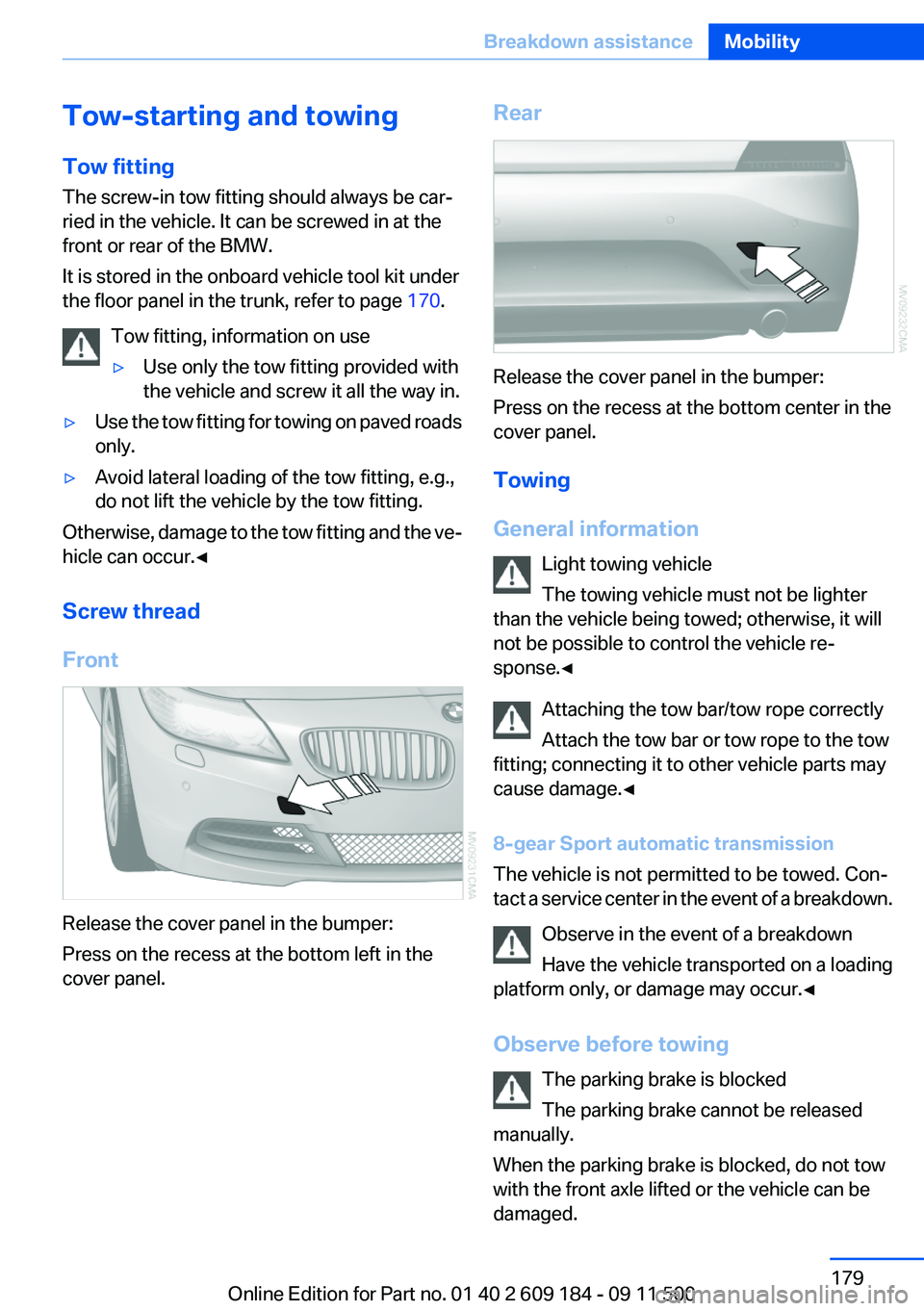
Release the cover panel in the bumper:
Press on the recess at the bottom left in the
cover panel.
Rear
Release the cover panel in the bumper:
Press on the recess at the bottom center in the
cover panel.
Towing
General information Light towing vehicle
The towing vehicle must not be lighter
than the vehicle being towed; otherwise, it will
not be possible to control the vehicle re‐
sponse.◀
Attaching the tow bar/tow rope correctly
Attach the tow bar or tow rope to the tow
fitting; connecting it to other vehicle parts may
cause damage.◀
8-gear Sport automatic transmission
The vehicle is not permitted to be towed. Con‐
tact a service center in the event of a breakdown.
Observe in the event of a breakdown
Have the vehicle transported on a loading
platform only, or damage may occur.◀
Observe before towing The parking brake is blocked
The parking brake cannot be released
manually.
When the parking brake is blocked, do not tow
with the front axle lifted or the vehicle can be
damaged.
Seite 179Breakdown assistanceMobility179
Online Edition for Part no. 01 40 2 609 184 - 09 11 500
Page 180 of 220
Contact your service center.◀
Manual transmission
Gearshift lever in neutral position.
7-gear Sport automatic transmission Manually release the transmission lock
Manually release the transmission lock,
even if there is no malfunction involving the
transmission. Otherwise, there is the danger
that the transmission lock will be engaged au‐
tomatically during towing.◀
Manually release the transmission lock, refer to
page 58.
Adhere to the towing speed and distance
Do not exceed a towing speed of 30 mph/
50 km/h and a towing distance of 30 miles/50 km
or damage to the transmission can occur.◀
Observe during towing Observe the notes on towing
Observe all notes on towing or vehicle
damage or accidents can occur.◀▷Make sure that the ignition is switched on;
otherwise, the low beams, tail lamps, turn
signals, and windshield wipers may be un‐
available.▷When the engine is stopped, there is no
power assist. Consequently, more force
needs to be applied when braking and steer‐
ing.▷Larger steering wheel movements are re‐
quired.▷Switch on the hazard warning system, de‐
pending on local regulations.▷If the electrical system has failed, clearly
identify the vehicle being towed by placing
a sign or a warning triangle in the rear win‐
dow.▷Do not tow the vehicle with the rear axle
tilted, as the front wheels could turn.Towing methods
Do not lift the vehicle
Do not lift the vehicle by the tow fitting or
body and chassis parts; otherwise, damage may
result.◀
Tow bar
The tow fittings used should be on the same
side on both vehicles.
Should it prove impossible to avoid mounting
the tow bar at an offset angle, please observe
the following:▷Clearance and maneuvering capability will
be sharply limited during cornering.▷The tow bar will generate lateral forces if it
is attached offset.
Tow rope
When starting to tow the vehicle, make sure that
the tow rope is taut.
To avoid jerking and the associated stresses on
the vehicle components when towing, always
use nylon ropes or nylon straps.
Attaching the tow rope correctly
Only secure the tow rope on the tow fit‐
ting; otherwise, damage can occur when it is se‐
cured on other parts of the vehicle.◀
Tow truck Do not lift the vehicle
Do not lift the vehicle by the tow fitting or
body and chassis parts; otherwise, damage may
result.◀
Secure the vehicle against rolling off
Apply the parking brake after towing and
secure the vehicle against rolling off if neces‐
sary.
Have the operability of transmission position P
checked by the service center.◀
Seite 180MobilityBreakdown assistance180
Online Edition for Part no. 01 40 2 609 184 - 09 11 500
Page 181 of 220
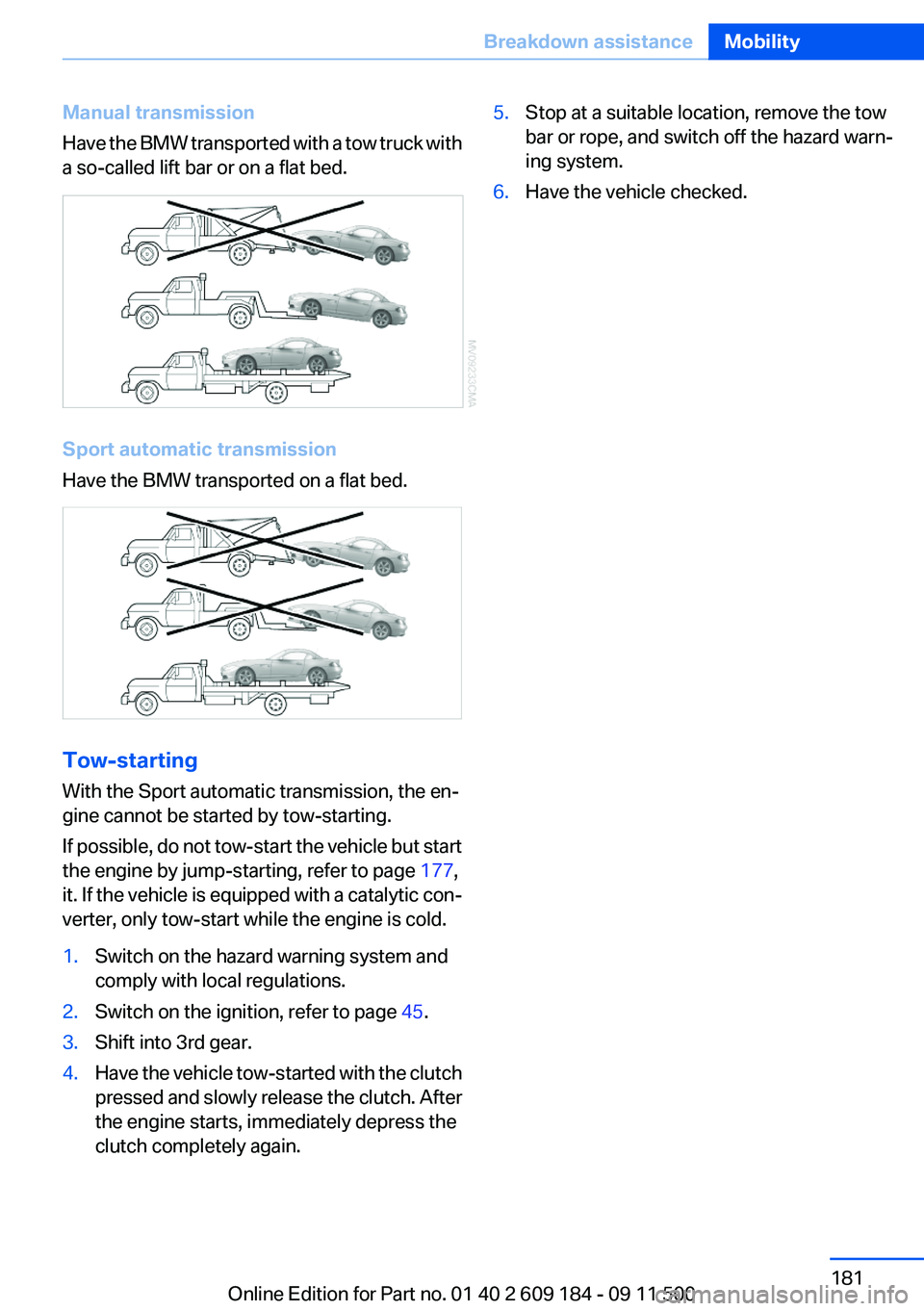
Manual transmission
Have the BMW transported with a tow truck with
a so-called lift bar or on a flat bed.
Sport automatic transmission
Have the BMW transported on a flat bed.
Tow-starting
With the Sport automatic transmission, the en‐
gine cannot be started by tow-starting.
If possible, do not tow-start the vehicle but start
the engine by jump-starting, refer to page 177,
it. If the vehicle is equipped with a catalytic con‐
verter, only tow-start while the engine is cold.
1.Switch on the hazard warning system and
comply with local regulations.2.Switch on the ignition, refer to page 45.3.Shift into 3rd gear.4.Have the vehicle tow-started with the clutch
pressed and slowly release the clutch. After
the engine starts, immediately depress the
clutch completely again.5.Stop at a suitable location, remove the tow
bar or rope, and switch off the hazard warn‐
ing system.6.Have the vehicle checked.Seite 181Breakdown assistanceMobility181
Online Edition for Part no. 01 40 2 609 184 - 09 11 500
Page 182 of 220
CareVehicle equipment
This chapter describes all series equipment as
well as country-specific and special equipment
offered for this model series.Therefore, it also
describes equipment that may not be found in
your vehicle, for instance due to the selected
special equipment or the country version. This
also applies to safety-related functions and sys‐
tems.
Car washes
Notes Steam jets or high-pressure washers
When using steam jets or high-pressure
washers, hold them a sufficient distance away
and use a maximum temperature of 140 ℉/
60 ℃.
Holding them too close or using excessively
high pressures or temperatures can cause dam‐
age or preliminary damage that may then lead to
long-term damage.
Follow the operating instructions for the high-
pressure washer.◀
Cleaning sensors/cameras with high-
pressure washers
When using high-pressure washers, do not
spray the seals of the retractable hardtop and
the exterior sensors and cameras, for Park Dis‐
tance Control, for instance, for extended periods
of time and only from a distance of at least 12 in/
30 cm.◀
Wash your vehicle frequently, particularly in win‐
ter.
Intense soiling and road salt can damage the ve‐
hicle.Washing in automatic car washes
Give preference to cloth car washes or those
that use soft brushes in order to avoid paint
damage.
Notes
Note the following:▷Make sure that the wheels and tires are not
damaged by the transport mechanisms.▷Fold in the exterior mirrors; otherwise, they
may be damaged, depending on the width of
the vehicle.▷Deactivate the rain sensor, refer to page 51,
to avoid unintentional wiper activation.▷Unscrew the road antenna.
Guide rails in car washes
Avoid car washes with guide rails higher
than 4 in/10 cm; otherwise, the vehicle body
could be damaged.◀
Before driving into a car wash
The vehicle is able to roll if the following steps
are taken.
Manual transmission
1.Shift to neutral.2.Release the parking brake, refer to page 49.3.Switch the engine off.4.Leave the remote control in the ignition lock.
Sport automatic transmission
1.Insert the remote control into the ignition
lock, even with Comfort Access.2.Engage transmission position N.3.Release the parking brake, refer to page 49.4.Switch the engine off.5.Leave the remote control in the ignition lock
so that the vehicle can roll.Seite 182MobilityCare182
Online Edition for Part no. 01 40 2 609 184 - 09 11 500
Page 183 of 220
Transmission position P is engaged automati‐
cally:▷Automatically after approx. 30 minutes.▷When the remote control is removed from
the ignition lock.
Headlamps
▷Do not rub dry and do not use abrasive or
caustic cleansers.▷Soak areas that have been soiled e.g. due to
insects, with shampoo and wash off with
water.▷Thaw ice with de-icing spray; do not use an
ice scraper.
Retractable hardtop
When you open a wet hardtop, water drops may
run into the cargo area. If necessary, remove
items from the cargo area beforehand to avoid
water stains or soiling.
After washing the vehicle
After washing the vehicle, apply the brakes
briefly to dry them; otherwise, braking action can
be reduced and corrosion of the brake discs can
occur.
Vehicle care
Car care products
BMW recommends using cleaning and care
products from BMW, since these have been
tested and approved.
Car care and cleaning products
Follow the instructions on the container.
When cleaning the interior, open the doors or
windows.
Only use products intended for cleaning vehi‐
cles.
Cleansers can contain substances that are dan‐
gerous and harmful to your health.◀
Vehicle paint
Regular care contributes to driving safety and
value retention.
Environmental influences can act on the vehicle
paint. Tailor the frequency and extent of your car
care to these influences.
Leather care
Remove dust from the leather often, using a
cloth or vacuum cleaner.
Otherwise, particles of dust and road grime
chafe in pores and folds, and lead to increased
wear and premature degradation of the leather
surface.
To guard against discoloration, such as from
clothing, provide leather care roughly every two
months.
Clean light-colored leather more frequently as
dust and dirt are more noticeable.
Use leather care products; otherwise, dirt and
grease will gradually break down the protective
layer of the leather surface.
Suitable care products are available from the
service center.
Upholstery material care
Vacuum regularly with a vacuum cleaner.
If they are very dirty, e.g., beverage stains, use a
soft sponge or microfiber cloth with a suitable
interior cleaner.
Clean the upholstery down to the seams using
large sweeping motions. Avoid rubbing the ma‐
terial vigorously.
Damage from Velcro® fasteners
Open Velcro® fasteners on pants or other
articles of clothing can damage the seat covers.
Ensure that any Velcro® fasteners are closed. ◀Seite 183CareMobility183
Online Edition for Part no. 01 40 2 609 184 - 09 11 500
Page 188 of 220
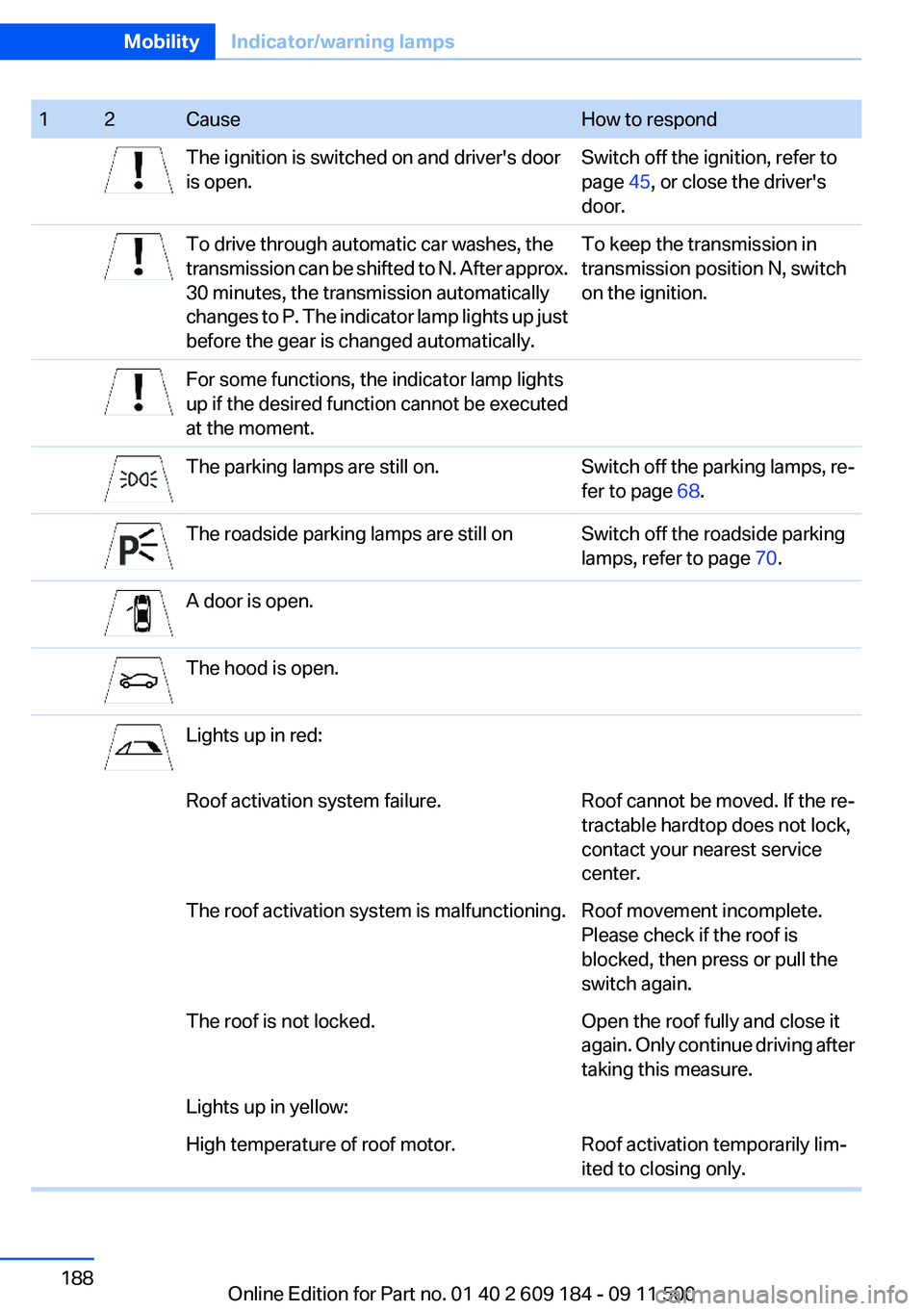
12CauseHow to respondThe ignition is switched on and driver's door
is open.Switch off the ignition, refer to
page 45, or close the driver's
door.To drive through automatic car washes, the
transmission can be shifted to N. After approx.
30 minutes, the transmission automatically
changes to P. The indicator lamp lights up just
before the gear is changed automatically.To keep the transmission in
transmission position N, switch
on the ignition.For some functions, the indicator lamp lights
up if the desired function cannot be executed
at the moment.The parking lamps are still on.Switch off the parking lamps, re‐
fer to page 68.The roadside parking lamps are still onSwitch off the roadside parking
lamps, refer to page 70.A door is open.The hood is open.Lights up in red:Roof activation system failure.Roof cannot be moved. If the re‐
tractable hardtop does not lock,
contact your nearest service
center.The roof activation system is malfunctioning.Roof movement incomplete.
Please check if the roof is
blocked, then press or pull the
switch again.The roof is not locked.Open the roof fully and close it
again. Only continue driving after
taking this measure.Lights up in yellow:High temperature of roof motor.Roof activation temporarily lim‐
ited to closing only.Seite 188MobilityIndicator/warning lamps188
Online Edition for Part no. 01 40 2 609 184 - 09 11 500