high BMW Z4 SDRIVE28I 2013 Owners Manual
[x] Cancel search | Manufacturer: BMW, Model Year: 2013, Model line: Z4 SDRIVE28I, Model: BMW Z4 SDRIVE28I 2013Pages: 220, PDF Size: 9.9 MB
Page 6 of 220
NotesUsing this Owner's Manual
The fastest way to find information on a partic‐
ular topic is by using the index.
An initial overview of the vehicle is provided in
the first chapter.
Additional sources of information
Should you have any questions, your service
center will be glad to advise you at any time.
Information on BMW, e.g., on technology, is
available on the Internet: bmwusa.com
Symbols
Indicates precautions that must be followed
precisely in order to avoid the possibility of per‐
sonal injury and serious damage to the vehicle.
◄ Marks the end of a specific item of informa‐
tion.
"..." Identifies radio display texts used to select
individual functions.
›...‹ Verbal instructions to use with the voice ac‐
tivation system.
››...‹‹ Identifies the answers generated by the
voice activation system.
Refers to measures that can be taken to help
protect the environment.
Symbols on vehicle components
Indicates that you should consult the rele‐
vant section of this Owner's Manual for infor‐
mation on a particular part or assembly.
Vehicle equipment
This Owner's Manual describes all models, all
series equipment, as well as country-specific
and special equipment offered in the model ser‐
ies.Therefore, this Owner's Manual also de‐
scribes and depicts equipment that may not be
contained in your vehicle because of the se‐
lected special equipment or country version, for
example.
This also applies to safety-related functions and
systems.
For options and equipment not described in this
Owner's Manual, please refer to the Supple‐
mentary Owner's Manuals.
On right-hand drive vehicles, some controls are
arranged differently than shown in the illustra‐
tions.
Status of this Owner's Manual
at time of printing
The manufacturer of your vehicle pursues a pol‐
icy of constant development that is conceived
to ensure that our vehicles continue to embody
the highest quality and safety standards. In rare
cases, therefore, the features described in this
Owner's Manual may differ from those in your
vehicle.
Updates made after the editorial
deadline
Any updates made after the editorial deadline for
the Owner's Manuals are located in the appen‐
dix of the printed quick reference for the vehicle.
For your own safety
Maintenance and repairs
Advanced technology, e.g., the use of modern
materials and high-performance electronics, re‐
quires suitable maintenance and repair meth‐
ods.
Therefore, have this work performed only by a
BMW center or a workshop that works accord‐Seite 6Notes6
Online Edition for Part no. 01 40 2 609 184 - 09 11 500
Page 8 of 220
also be aware of any applicable warranty limita‐
tions or exclusions for such country or region. In
such case, please contact Customer Relations
for further information.
Maintenance
Maintain the vehicle regularly to sustain the road
safety, operational reliability and the New Vehi‐
cle Limited Warranty.
Specifications for required maintenance meas‐
ures:▷BMW Maintenance system▷Service and Warranty Information Booklet
for US models▷Warranty and Service Guide Booklet for
Canadian models
If the vehicle is not maintained according to
these specifications, this could result in serious
damage to the vehicle. Such damage is not cov‐
ered by the BMW New Vehicle Limited War‐
ranty.
Reporting safety defects
For US customers
The following only applies to vehicles owned
and operated in the US.
If you believe that your vehicle has a defect
which could cause a crash or could cause injury
or death, you should immediately inform the Na‐
tional Highway Traffic Safety Administration
NHTSA, in addition to notifying BMW of North
America, LLC, P.O. Box 1227, Westwood, New
Jersey 07675-1227, Telephone
1-800-831-1117.
If NHTSA receives similar complaints, it may
open an investigation, and if it finds that a safety
defect exists in a group of vehicles, it may order
a recall and remedy campaign.
However, NHTSA cannot become involved in
individual problems between you, your dealer,
or BMW of North America, LLC.
To contact NHTSA, you may call the Vehicle
Safety Hotline toll-free at 1-888-327-4236
(TTY: 1-800-424-9153); go to http://www.safe‐
rcar.gov; or write to: Administrator, NHTSA, 400
Seventh Street, SW., Washington, DC 20590.
You can also obtain other information about mo‐
tor vehicle safety from http://www.safercar.gov
For Canadian customers
Canadian customers who wish to report a
safety- related defect to Transport Canada, De‐
fect Investigations and Recalls, may telephone
the toll-free hotline 1-800-333-0510. You can
also obtain other information about motor vehi‐
cle safety from http://www.tc.gc.ca/roadsafety.Seite 8Notes8
Online Edition for Part no. 01 40 2 609 184 - 09 11 500
Page 13 of 220
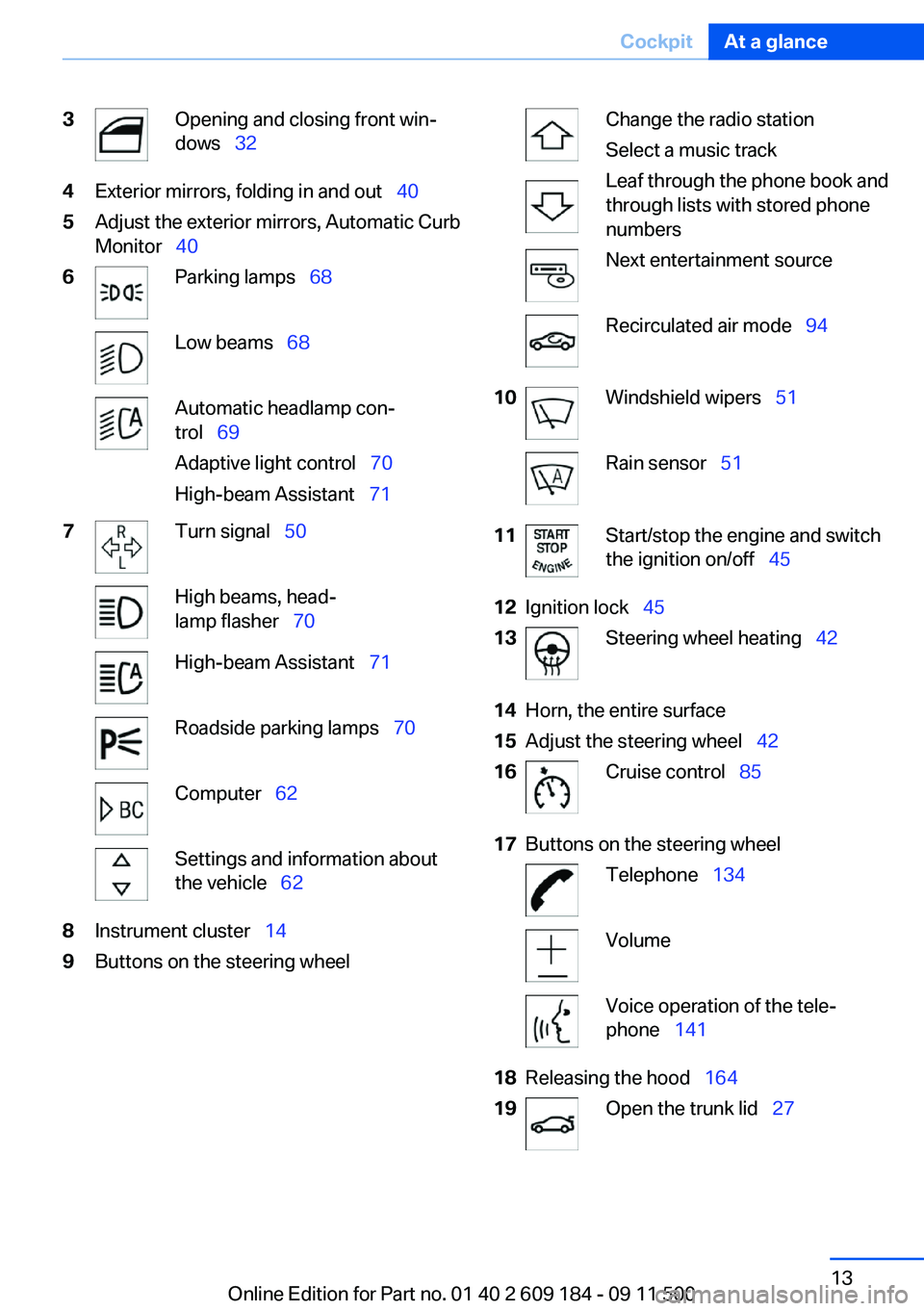
3Opening and closing front win‐
dows 324Exterior mirrors, folding in and out 405Adjust the exterior mirrors, Automatic Curb
Monitor 406Parking lamps 68Low beams 68Automatic headlamp con‐
trol 69
Adaptive light control 70
High-beam Assistant 717Turn signal 50High beams, head‐
lamp flasher 70High-beam Assistant 71Roadside parking lamps 70Computer 62Settings and information about
the vehicle 628Instrument cluster 149Buttons on the steering wheelChange the radio station
Select a music track
Leaf through the phone book and
through lists with stored phone
numbersNext entertainment sourceRecirculated air mode 9410Windshield wipers 51Rain sensor 5111Start/stop the engine and switch
the ignition on/off 4512Ignition lock 4513Steering wheel heating 4214Horn, the entire surface15Adjust the steering wheel 4216Cruise control 8517Buttons on the steering wheelTelephone 134VolumeVoice operation of the tele‐
phone 14118Releasing the hood 16419Open the trunk lid 27Seite 13CockpitAt a glance13
Online Edition for Part no. 01 40 2 609 184 - 09 11 500
Page 14 of 220
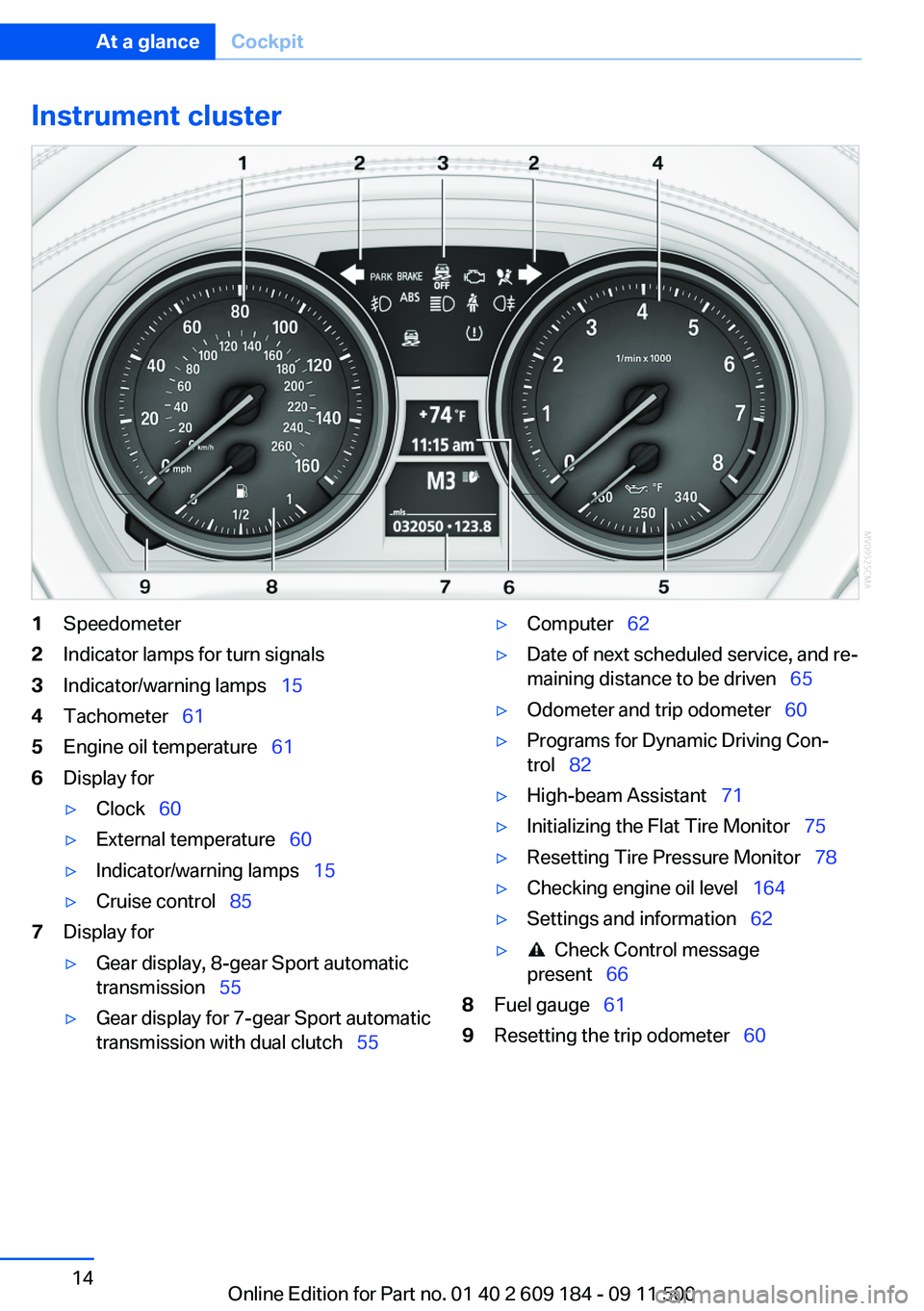
Instrument cluster1Speedometer2Indicator lamps for turn signals3Indicator/warning lamps 154Tachometer 615Engine oil temperature 616Display for▷Clock 60▷External temperature 60▷Indicator/warning lamps 15▷Cruise control 857Display for▷Gear display, 8-gear Sport automatic
transmission 55▷Gear display for 7-gear Sport automatic
transmission with dual clutch 55▷Computer 62▷Date of next scheduled service, and re‐
maining distance to be driven 65▷Odometer and trip odometer 60▷Programs for Dynamic Driving Con‐
trol 82▷High-beam Assistant 71▷Initializing the Flat Tire Monitor 75▷Resetting Tire Pressure Monitor 78▷Checking engine oil level 164▷Settings and information 62▷ Check Control message
present 668Fuel gauge 619Resetting the trip odometer 60Seite 14At a glanceCockpit14
Online Edition for Part no. 01 40 2 609 184 - 09 11 500
Page 21 of 220
▷The remote control used is detected when
the vehicle is unlocked and the stored profile
is called up.▷Your personal settings will be recognized
and called up again even if the vehicle has
been used in the meantime by someone else
with another remote control.
The individual settings are stored for a maximum
of four remote controls. They are stored for two
remote controls if Comfort Access is in use.
Personal Profile settings
The following functions and settings can be
stored in a profile.
More information on the settings can be found
under:
▷Response of the central locking system
when the car is being unlocked, refer to
page 22.▷Automatic locking of the vehicle, refer to
page 26.▷Automatic retrieval of the driver's seat and
exterior mirror positions after unlocking, re‐
fer to page 24.▷Triple turn signal activation, refer to
page 50.▷Settings for the display in the instrument
cluster:▷12h/24h clock format, refer to
page 63.▷Date format, refer to page 63.▷Units of measure for fuel consumption,
distance covered/remaining distances,
and temperature, refer to page 63.▷Light settings:▷Headlamp courtesy delay feature, refer
to page 68.▷Daytime running lights, refer to
page 69.▷High-beam Assistant, refer to
page 71.▷Automatic climate control: AUTO program,
cooling function, and automatic recirculated
air control activated/deactivated, tempera‐
ture, air flow rate, and air distribution, refer
to page 92.▷Entertainment:▷Audio volume, Professional Radio, refer
to page 118.
Central locking system
The concept
The central locking system becomes active
when the driver's door is closed.
The system simultaneously engages and re‐
leases the locks on the following:
▷Doors.▷Trunk lid.▷Fuel filler flap.▷Center armrest.
Operating from the outside
▷Via the remote control.▷Via the driver's door lock.▷In cars with Comfort Access, via the door
handles on the driver's and front passenger
sides.
The following takes place simultaneously when
locking/unlocking the vehicle via the remote
control:
▷The welcome lamps, interior lamps and
courtesy lamps are switched on and off.▷The alarm system is armed or disarmed, re‐
fer to page 30.Seite 21Opening and closingControls21
Online Edition for Part no. 01 40 2 609 184 - 09 11 500
Page 30 of 220
Replacing the battery
The remote control for Comfort Access con‐
tains a battery that will need to be replaced from
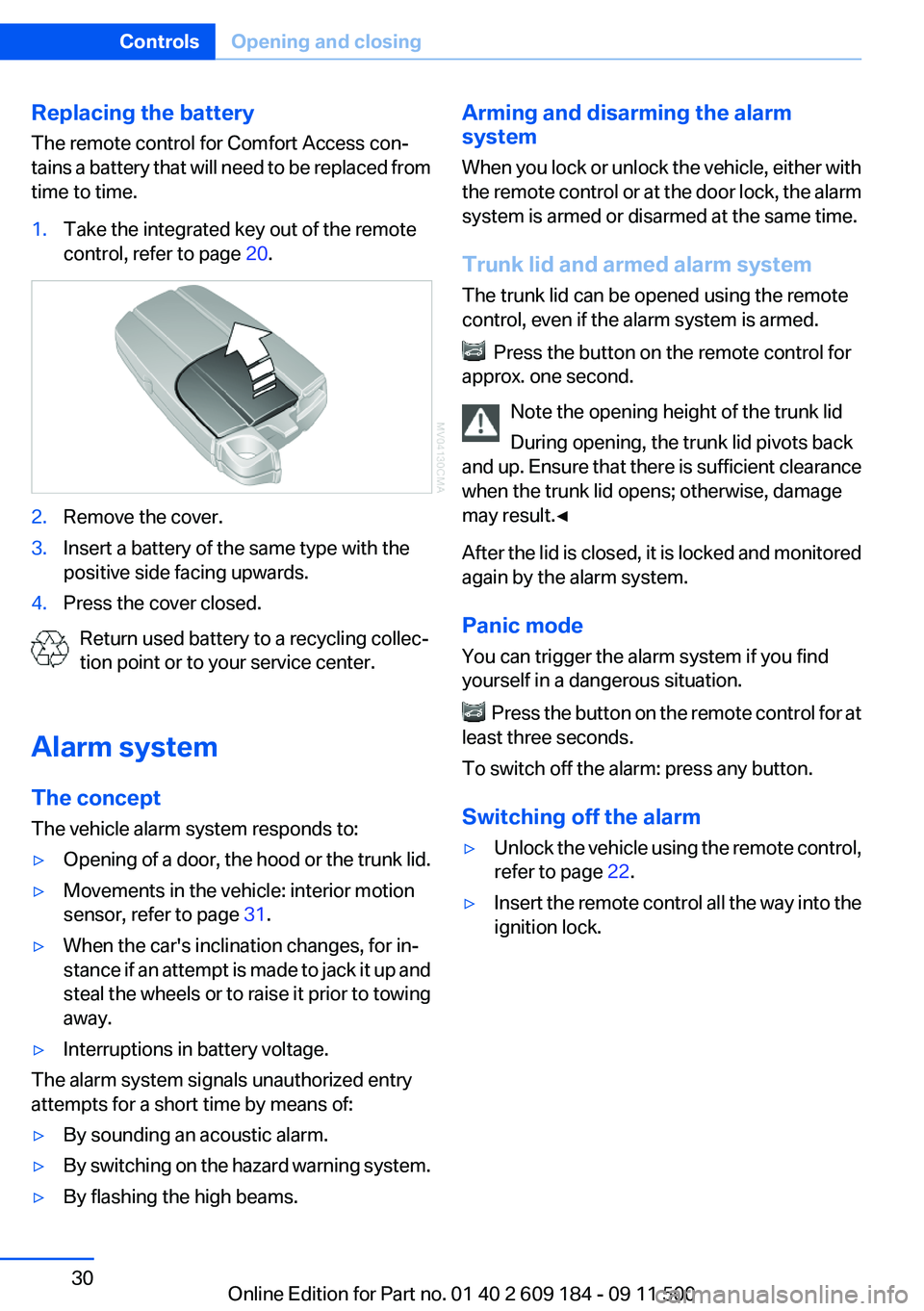
time to time.1.Take the integrated key out of the remote
control, refer to page 20.2.Remove the cover.3.Insert a battery of the same type with the
positive side facing upwards.4.Press the cover closed.
Return used battery to a recycling collec‐
tion point or to your service center.
Alarm system
The concept
The vehicle alarm system responds to:
▷Opening of a door, the hood or the trunk lid.▷Movements in the vehicle: interior motion
sensor, refer to page 31.▷When the car's inclination changes, for in‐
stance if an attempt is made to jack it up and
steal the wheels or to raise it prior to towing
away.▷Interruptions in battery voltage.
The alarm system signals unauthorized entry
attempts for a short time by means of:
▷By sounding an acoustic alarm.▷By switching on the hazard warning system.▷By flashing the high beams.Arming and disarming the alarm
system
When you lock or unlock the vehicle, either with
the remote control or at the door lock, the alarm
system is armed or disarmed at the same time.
Trunk lid and armed alarm system
The trunk lid can be opened using the remote
control, even if the alarm system is armed.
Press the button on the remote control for
approx. one second.
Note the opening height of the trunk lid
During opening, the trunk lid pivots back
and up. Ensure that there is sufficient clearance
when the trunk lid opens; otherwise, damage
may result.◀
After the lid is closed, it is locked and monitored
again by the alarm system.
Panic mode
You can trigger the alarm system if you find
yourself in a dangerous situation.
Press the button on the remote control for at
least three seconds.
To switch off the alarm: press any button.
Switching off the alarm
▷Unlock the vehicle using the remote control,
refer to page 22.▷Insert the remote control all the way into the
ignition lock.Seite 30ControlsOpening and closing30
Online Edition for Part no. 01 40 2 609 184 - 09 11 500
Page 34 of 220
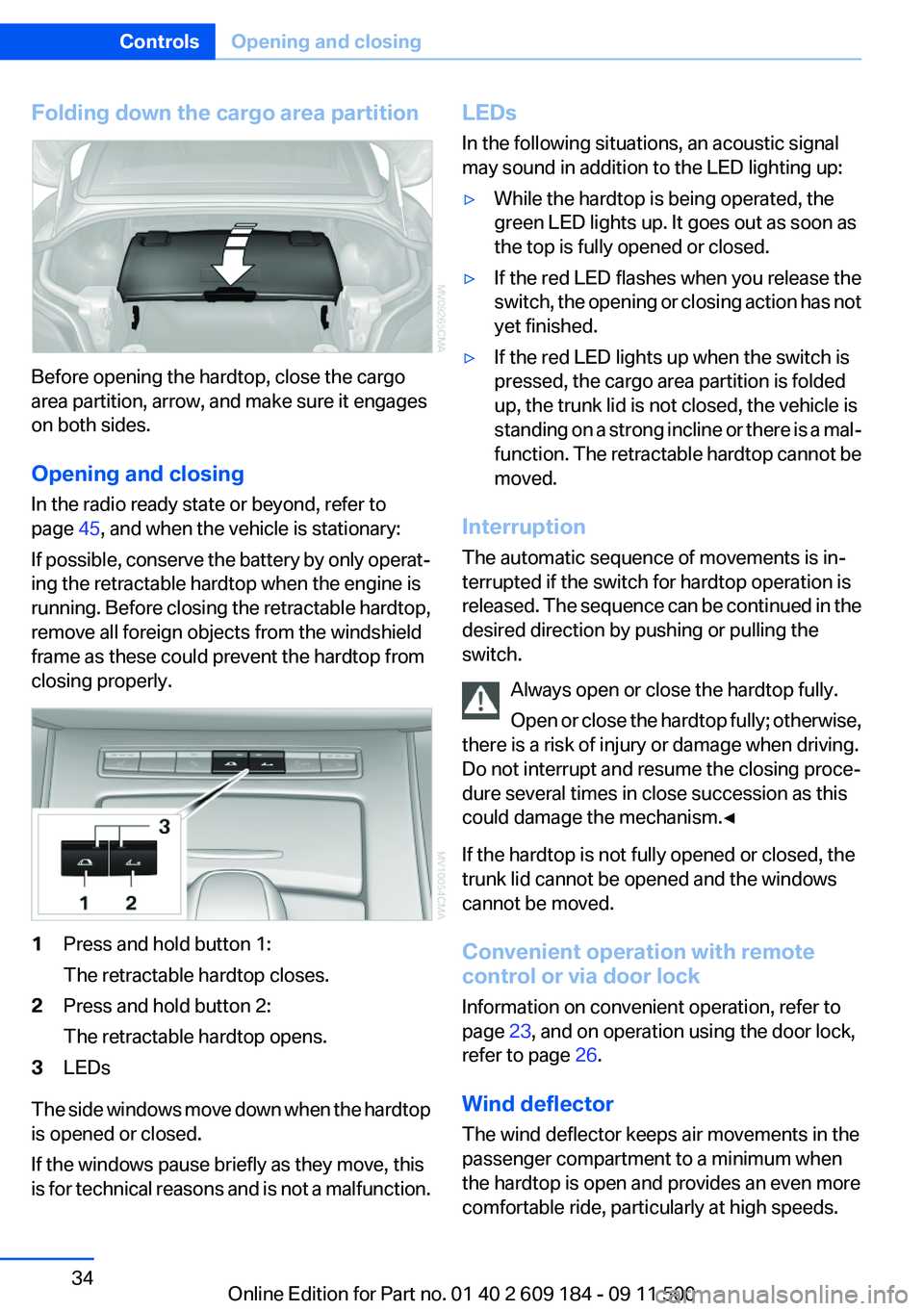
Folding down the cargo area partition
Before opening the hardtop, close the cargo
area partition, arrow, and make sure it engages
on both sides.
Opening and closing
In the radio ready state or beyond, refer to
page 45, and when the vehicle is stationary:
If possible, conserve the battery by only operat‐
ing the retractable hardtop when the engine is
running. Before closing the retractable hardtop,
remove all foreign objects from the windshield
frame as these could prevent the hardtop from
closing properly.
1Press and hold button 1:
The retractable hardtop closes.2Press and hold button 2:
The retractable hardtop opens.3LEDs
The side windows move down when the hardtop
is opened or closed.
If the windows pause briefly as they move, this
is for technical reasons and is not a malfunction.
LEDs
In the following situations, an acoustic signal
may sound in addition to the LED lighting up:▷While the hardtop is being operated, the
green LED lights up. It goes out as soon as
the top is fully opened or closed.▷If the red LED flashes when you release the
switch, the opening or closing action has not
yet finished.▷If the red LED lights up when the switch is
pressed, the cargo area partition is folded
up, the trunk lid is not closed, the vehicle is
standing on a strong incline or there is a mal‐
function. The retractable hardtop cannot be
moved.
Interruption
The automatic sequence of movements is in‐
terrupted if the switch for hardtop operation is
released. The sequence can be continued in the
desired direction by pushing or pulling the
switch.
Always open or close the hardtop fully.
Open or close the hardtop fully; otherwise,
there is a risk of injury or damage when driving.
Do not interrupt and resume the closing proce‐
dure several times in close succession as this
could damage the mechanism.◀
If the hardtop is not fully opened or closed, the
trunk lid cannot be opened and the windows
cannot be moved.
Convenient operation with remote
control or via door lock
Information on convenient operation, refer to
page 23, and on operation using the door lock,
refer to page 26.
Wind deflector
The wind deflector keeps air movements in the
passenger compartment to a minimum when
the hardtop is open and provides an even more
comfortable ride, particularly at high speeds.
Seite 34ControlsOpening and closing34
Online Edition for Part no. 01 40 2 609 184 - 09 11 500
Page 35 of 220
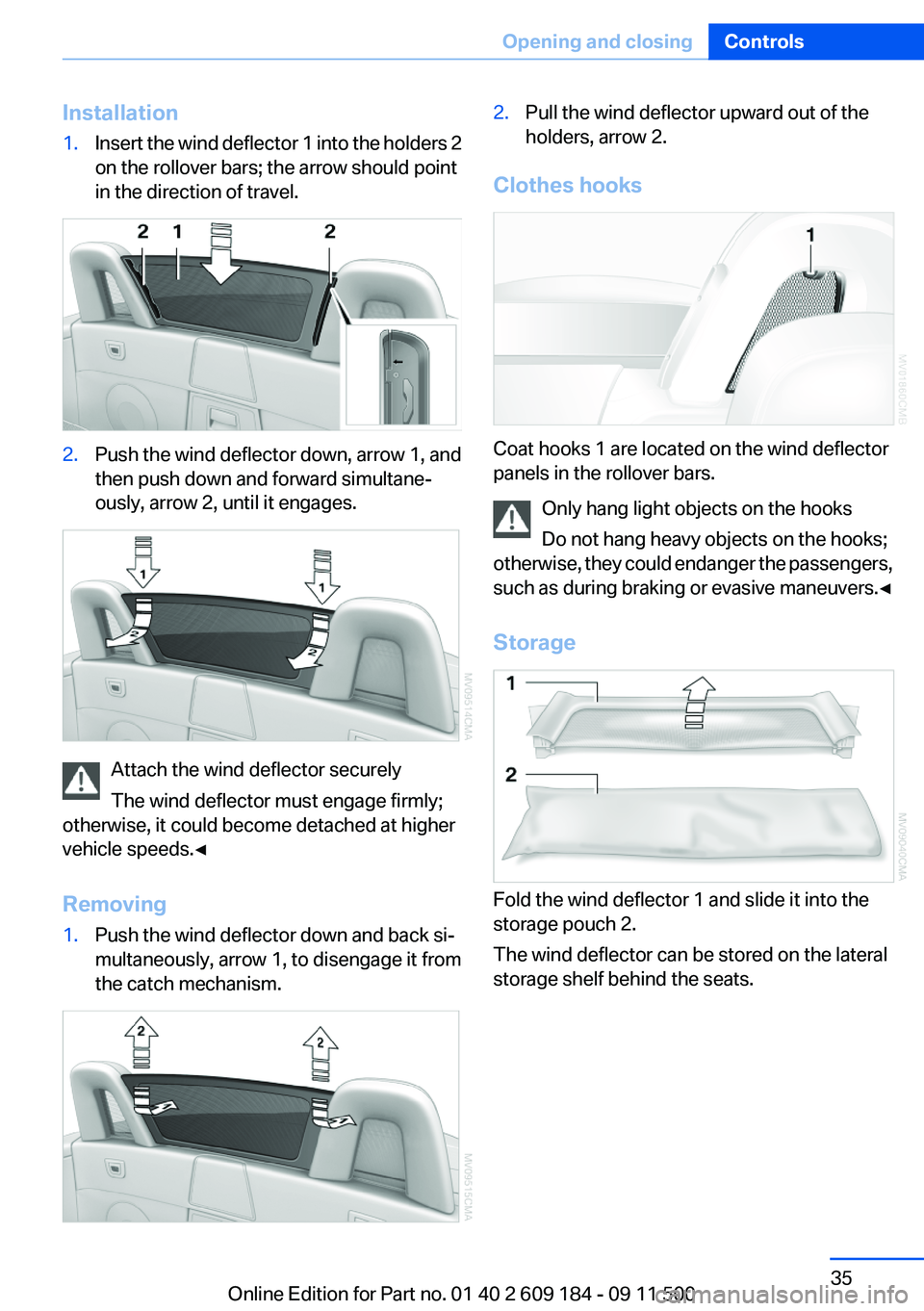
Installation1.Insert the wind deflector 1 into the holders 2
on the rollover bars; the arrow should point
in the direction of travel.2.Push the wind deflector down, arrow 1, and
then push down and forward simultane‐
ously, arrow 2, until it engages.
Attach the wind deflector securely
The wind deflector must engage firmly;
otherwise, it could become detached at higher
vehicle speeds.◀
Removing
1.Push the wind deflector down and back si‐
multaneously, arrow 1, to disengage it from
the catch mechanism.2.Pull the wind deflector upward out of the
holders, arrow 2.
Clothes hooks
Coat hooks 1 are located on the wind deflector
panels in the rollover bars.
Only hang light objects on the hooks
Do not hang heavy objects on the hooks;
otherwise, they could endanger the passengers,
such as during braking or evasive maneuvers.◀
Storage
Fold the wind deflector 1 and slide it into the
storage pouch 2.
The wind deflector can be stored on the lateral
storage shelf behind the seats.
Seite 35Opening and closingControls35
Online Edition for Part no. 01 40 2 609 184 - 09 11 500
Page 37 of 220
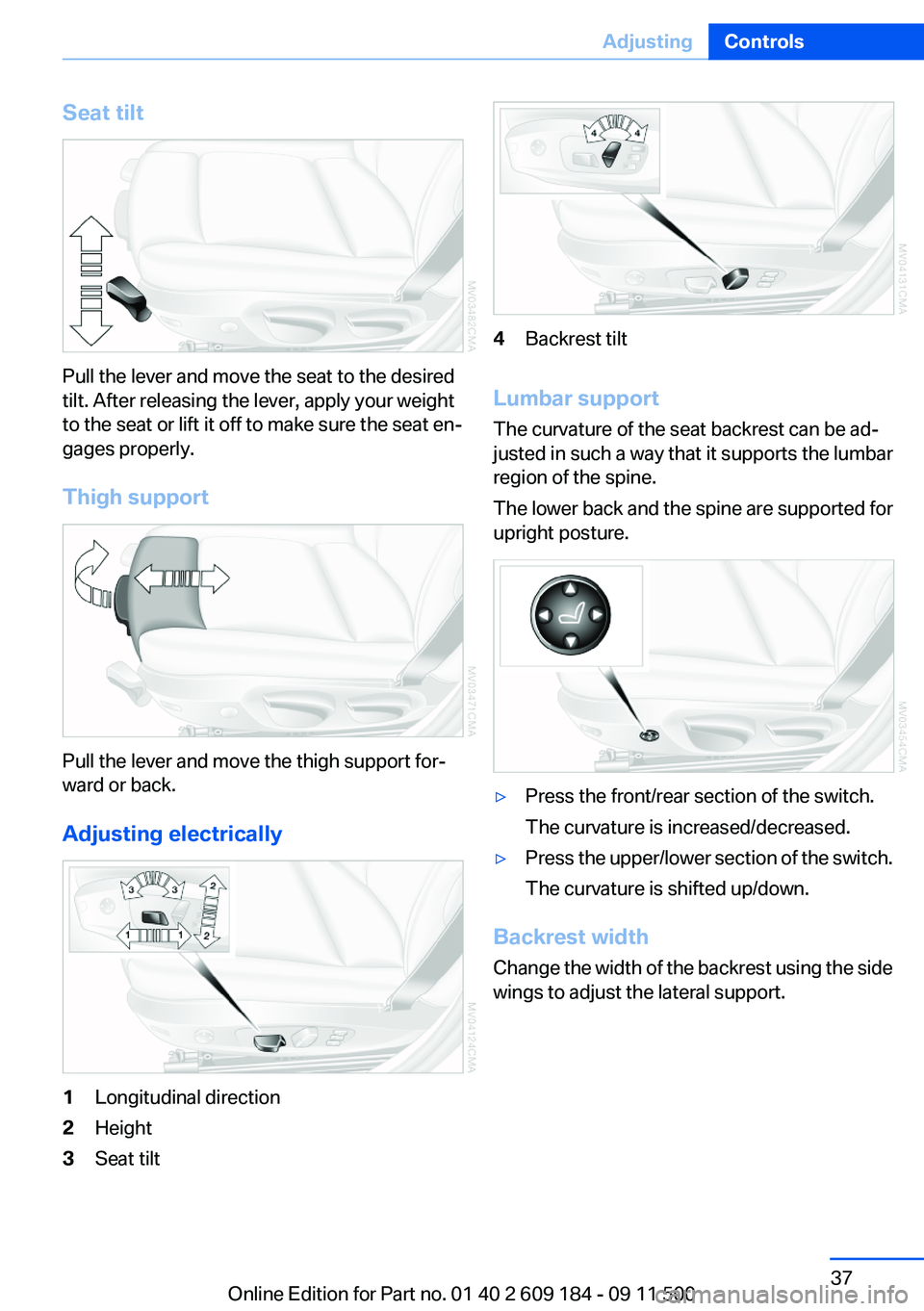
Seat tilt
Pull the lever and move the seat to the desired
tilt. After releasing the lever, apply your weight
to the seat or lift it off to make sure the seat en‐
gages properly.
Thigh support
Pull the lever and move the thigh support for‐
ward or back.
Adjusting electrically
1Longitudinal direction2Height3Seat tilt4Backrest tilt
Lumbar support
The curvature of the seat backrest can be ad‐
justed in such a way that it supports the lumbar
region of the spine.
The lower back and the spine are supported for
upright posture.
▷Press the front/rear section of the switch.
The curvature is increased/decreased.▷Press the upper/lower section of the switch.
The curvature is shifted up/down.
Backrest width
Change the width of the backrest using the side
wings to adjust the lateral support.
Seite 37AdjustingControls37
Online Edition for Part no. 01 40 2 609 184 - 09 11 500
Page 43 of 220
Transporting children safelyVehicle equipment
This chapter describes all series equipment as
well as country-specific and special equipment
offered for this model series.Therefore, it also
describes equipment that may not be found in
your vehicle, for instance due to the selected
special equipment or the country version. This
also applies to safety-related functions and sys‐
tems.
The right place for children
Note Children in the vehicle
Do not leave children unattended in the
vehicle; otherwise, they could endanger them‐
selves and other persons, e.g., by opening the
doors.◀
Children on the front passenger seat
Should it be necessary to use a child restraint
fixing system on the front passenger seat, make
sure that the front and side airbags on the front
passenger side are deactivated. Automatic de‐
activation of front passenger airbags, refer to
page 74.
Deactivating the front passenger airbags
If a child restraint fixing system is used in
the front passenger seat, the front passenger
airbags must be deactivated; otherwise, there is
an increased risk of injury to the child when the
airbags are triggered, even with a child restraint
fixing system.◀
Transport children in suitable child re‐
straint fixing systems
Only transport children younger than 13 years
of age or shorter than 5 ft/150 cm in child re‐
straint fixing systems suitable for the age,weight and size of the child; otherwise, there is
an increased risk of injury in an accident.
Children 13 years of age or older must wear a
safety belt as soon as a suitable child restraint
fixing system can no longer be used, due to their
age, weight and size.◀
Installing child restraint fixing
systems
Notes Manufacturer's information for child re‐
straint fixing systems
To select, mount and use child restraint fixing
systems, observe the information provided by
the system manufacturer; otherwise, the pro‐
tective effect can be impaired.◀
Standard child restraint systems are designed
to be secured with a lap belt or with the lap-belt
section of a lap-and-shoulder belt. Incorrectly or
improperly installed child restraint systems can
increase the risk of injury to children. Always fol‐
low the installation instructions for the system
with the greatest care.
on the front passenger seat Check the deactivation of the passenger
airbag
After installing a child restraint fixing system on
the passenger seat, make sure that the front and
side airbags on the passenger side have been
deactivated; otherwise, there is an increased
risk of injury when the airbags are deployed.◀
Seat position
Before installing a child restraint fixing system,
move the passenger seat as far back and as
high as possible to obtain the best possible po‐
sition for the belt.Seite 43Transporting children safelyControls43
Online Edition for Part no. 01 40 2 609 184 - 09 11 500