display BMW Z4 SDRIVE28I 2014 Service Manual
[x] Cancel search | Manufacturer: BMW, Model Year: 2014, Model line: Z4 SDRIVE28I, Model: BMW Z4 SDRIVE28I 2014Pages: 285, PDF Size: 7.21 MB
Page 84 of 285
speed a second time if your vehicle speed falls
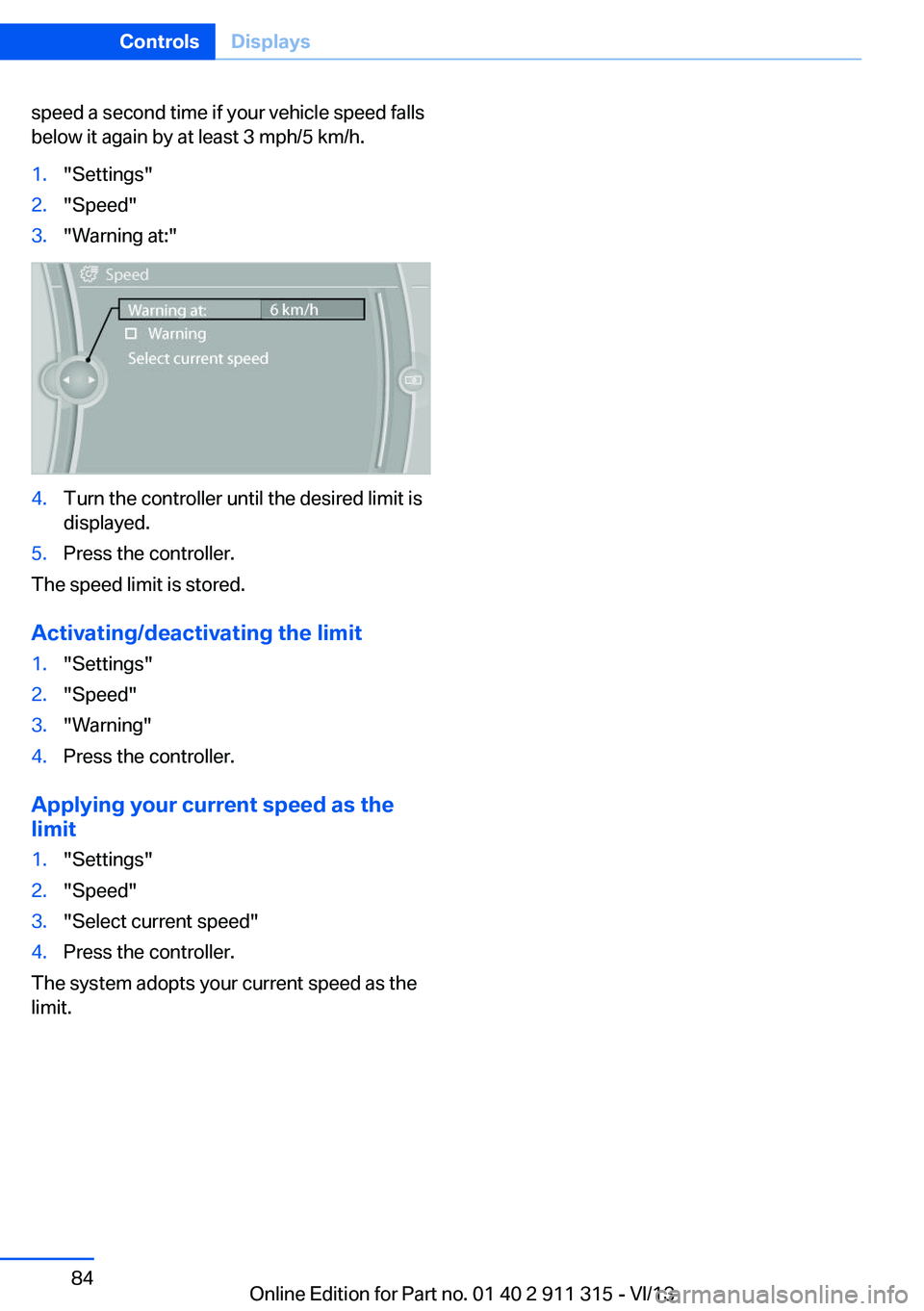
below it again by at least 3 mph/5 km/h.1."Settings"2."Speed"3."Warning at:"4.Turn the controller until the desired limit is
displayed.5.Press the controller.
The speed limit is stored.
Activating/deactivating the limit
1."Settings"2."Speed"3."Warning"4.Press the controller.
Applying your current speed as the
limit
1."Settings"2."Speed"3."Select current speed"4.Press the controller.
The system adopts your current speed as the
limit.
Seite 84ControlsDisplays84
Online Edition for Part no. 01 40 2 911 315 - VI/13
Page 87 of 285
To avoid blinding oncoming traffic, the Adap‐
tive Light Control does not swivel to the driv‐
er's side when the vehicle is at a standstill.
Malfunction
A message is displayed.
Adaptive light control is malfunctioning or has
failed. Have the system checked as soon as
possible.
High beams/roadside
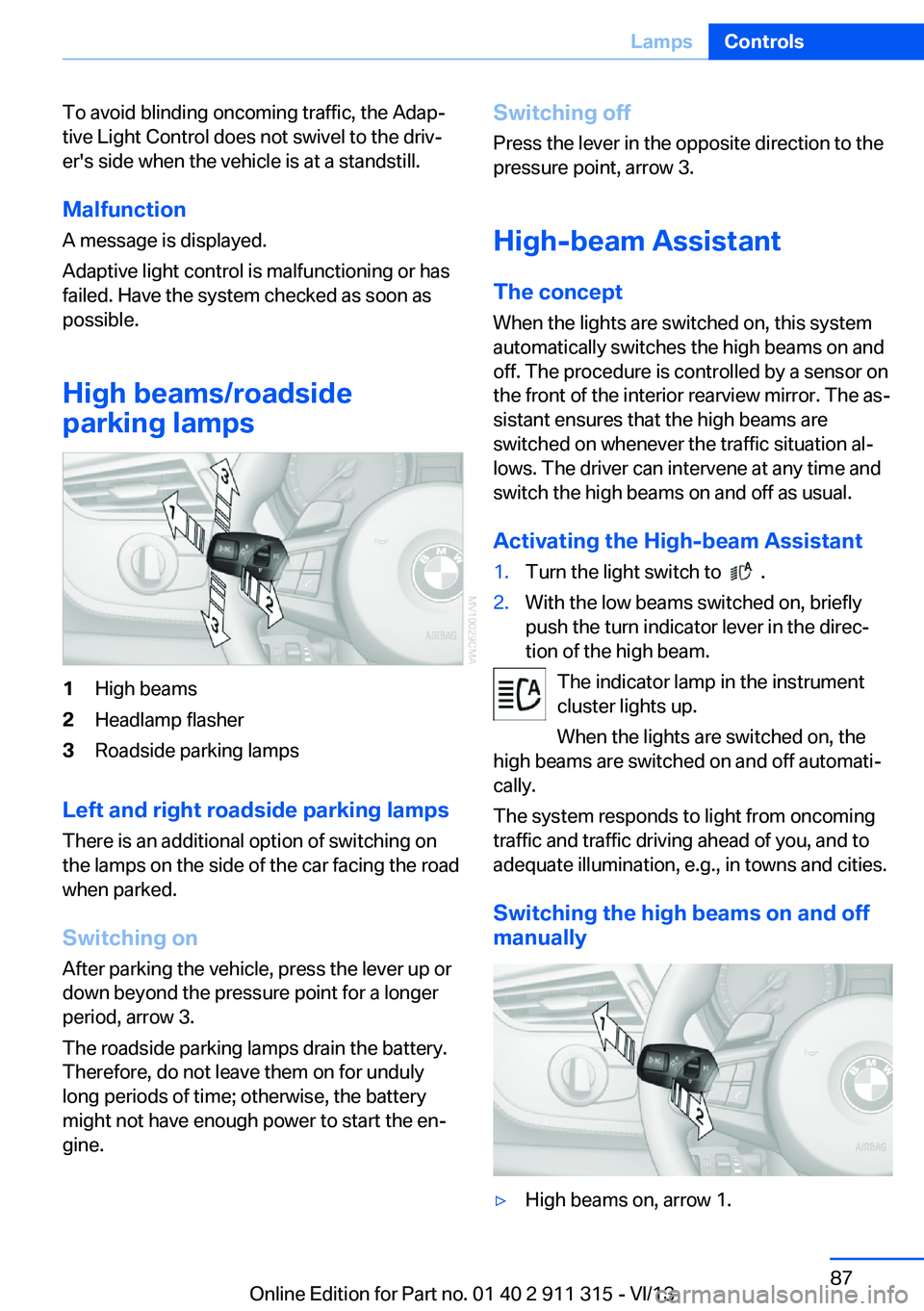
parking lamps1High beams2Headlamp flasher3Roadside parking lamps
Left and right roadside parking lamps
There is an additional option of switching on
the lamps on the side of the car facing the road
when parked.
Switching on After parking the vehicle, press the lever up or
down beyond the pressure point for a longer
period, arrow 3.
The roadside parking lamps drain the battery.
Therefore, do not leave them on for unduly
long periods of time; otherwise, the battery
might not have enough power to start the en‐
gine.
Switching off
Press the lever in the opposite direction to the
pressure point, arrow 3.
High-beam Assistant The concept
When the lights are switched on, this system
automatically switches the high beams on and
off. The procedure is controlled by a sensor on
the front of the interior rearview mirror. The as‐
sistant ensures that the high beams are
switched on whenever the traffic situation al‐
lows. The driver can intervene at any time and
switch the high beams on and off as usual.
Activating the High-beam Assistant1.Turn the light switch to .2.With the low beams switched on, briefly
push the turn indicator lever in the direc‐
tion of the high beam.
The indicator lamp in the instrument
cluster lights up.
When the lights are switched on, the
high beams are switched on and off automati‐
cally.
The system responds to light from oncoming
traffic and traffic driving ahead of you, and to
adequate illumination, e.g., in towns and cities.
Switching the high beams on and off
manually
▷High beams on, arrow 1.Seite 87LampsControls87
Online Edition for Part no. 01 40 2 911 315 - VI/13
Page 89 of 285
3.Push button 1 up or down to select the de‐
sired brightness level.4.Press button 2.
The display again shows the outside tem‐
perature and the time.
Interior lamps
The interior lamps, footwell lamps, entry
lamps, trunk lamp, and courtesy lamps are
controlled automatically.
The LEDs for the courtesy lamps are set in the
door handles and illuminate the ground in front
of the doors.
To avoid draining the battery, all lamps inside
the car are switched off about 8 minutes after
the ignition is switched off, Start/Stop button,
refer to page 55.
Switching interior lamps on/off manually
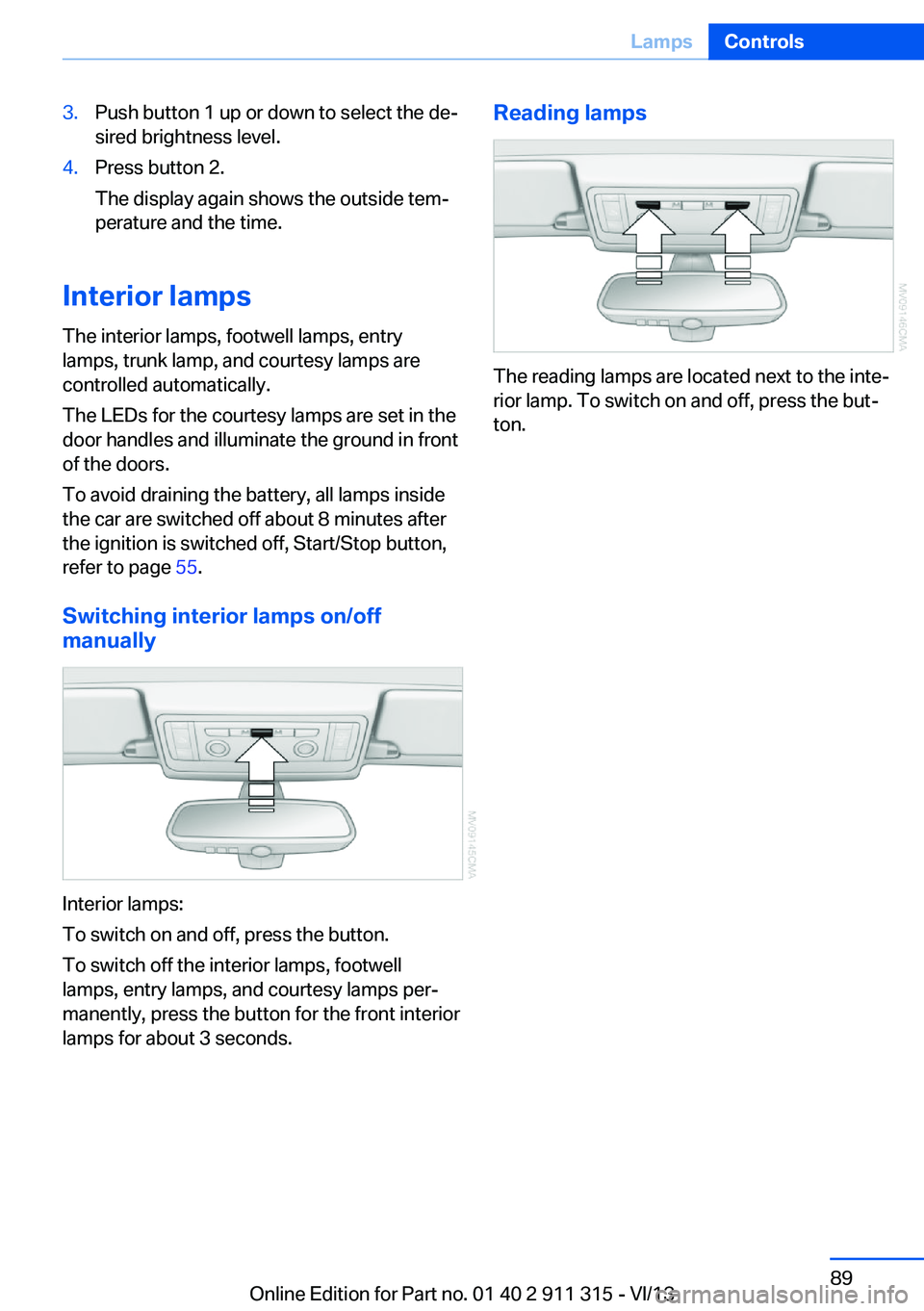
Interior lamps:
To switch on and off, press the button.
To switch off the interior lamps, footwell
lamps, entry lamps, and courtesy lamps per‐
manently, press the button for the front interior
lamps for about 3 seconds.
Reading lamps
The reading lamps are located next to the inte‐
rior lamp. To switch on and off, press the but‐
ton.
Seite 89LampsControls89
Online Edition for Part no. 01 40 2 911 315 - VI/13
Page 93 of 285
wise, reliable signaling of a flat tire is not en‐
sured. Initialize the system after each correc‐
tion of the tire inflation pressure and after
every tire or wheel change.
System limits Sudden tire damage
Sudden serious tire damage caused by
external influences cannot be indicated in ad‐
vance.◀
A natural, even pressure loss in all four tires
cannot be detected.
The system could be delayed or malfunction in
the following situations:▷When the system has not been initialized.▷When driving on a snowy or slippery road
surface.▷Sporty driving style: slip in the drive
wheels, high lateral acceleration.▷When driving with snow chains.
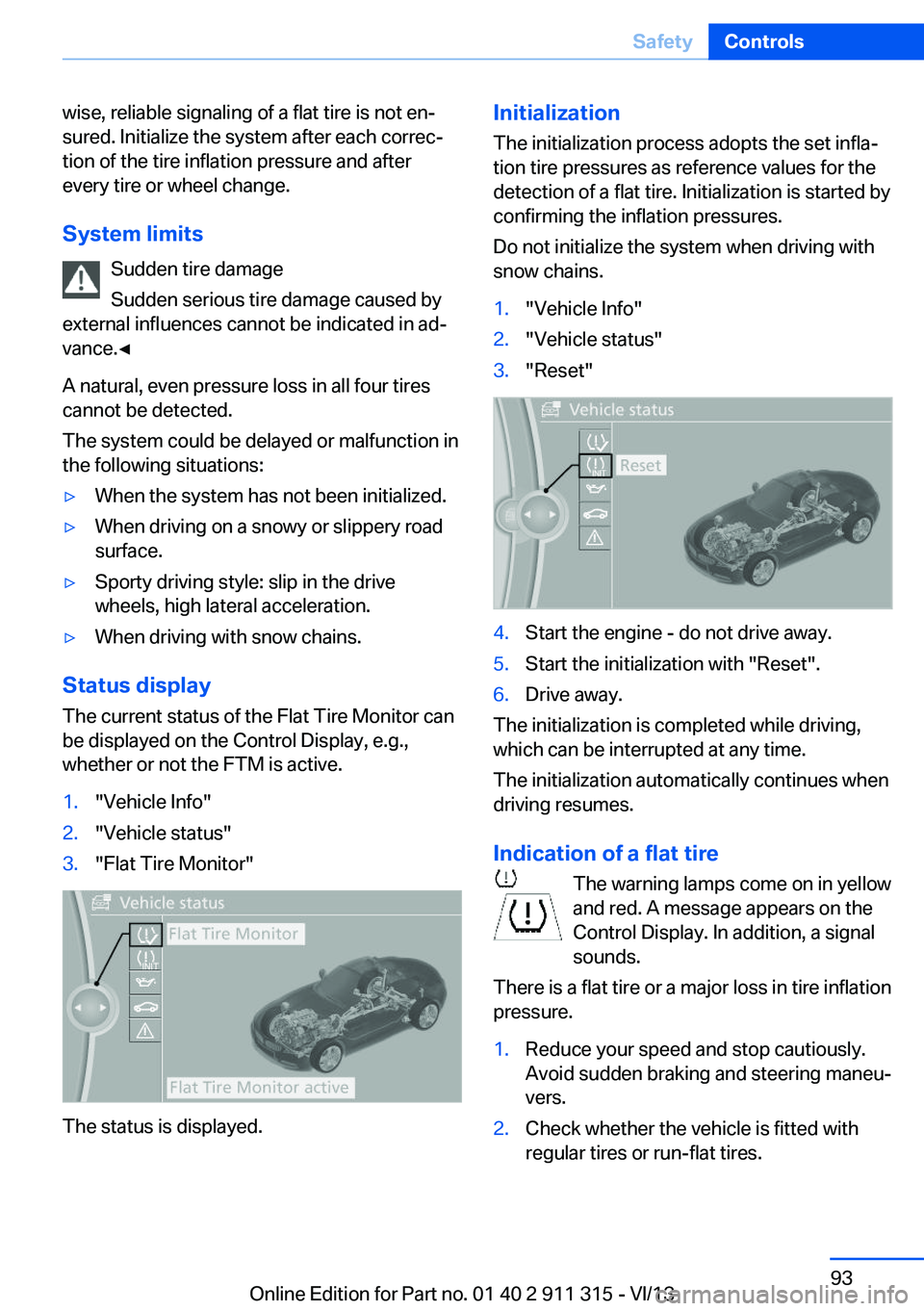
Status display
The current status of the Flat Tire Monitor can
be displayed on the Control Display, e.g.,
whether or not the FTM is active.
1."Vehicle Info"2."Vehicle status"3."Flat Tire Monitor"
The status is displayed.
Initialization
The initialization process adopts the set infla‐
tion tire pressures as reference values for the
detection of a flat tire. Initialization is started by
confirming the inflation pressures.
Do not initialize the system when driving with
snow chains.1."Vehicle Info"2."Vehicle status"3."Reset"4.Start the engine - do not drive away.5.Start the initialization with "Reset".6.Drive away.
The initialization is completed while driving,
which can be interrupted at any time.
The initialization automatically continues when
driving resumes.
Indication of a flat tire The warning lamps come on in yellow
and red. A message appears on the
Control Display. In addition, a signal
sounds.
There is a flat tire or a major loss in tire inflation
pressure.
1.Reduce your speed and stop cautiously.
Avoid sudden braking and steering maneu‐
vers.2.Check whether the vehicle is fitted with
regular tires or run-flat tires.Seite 93SafetyControls93
Online Edition for Part no. 01 40 2 911 315 - VI/13
Page 95 of 285
Functional requirementIn order to assure the reliable reporting of a flat
tire, the system must be reset while all tire in‐
flation pressures are correct.
Always use wheels with TPM electronics. Oth‐
erwise, the system may malfunction.
Reset the system after each correction of the
tire inflation pressure and after every tire or
wheel change.
System limits Sudden tire damage
Sudden serious tire damage caused by
external influences cannot be indicated in ad‐
vance.◀
The system does not function properly if it has
not been reset, e.g., it may identify a tire as flat
in spite of the fact that the tire is filled to the
correct inflation pressure.
The system is deactivated and is unable to de‐
tect flat tires if a wheel not equipped with TPM
electronics has been mounted, e.g., a compact
wheel, or if TPM is experiencing temporary in‐
terference from other systems or devices that
use the same frequency.
Status display1. Press the button. The start menu
opens.2."Vehicle Info"3."Vehicle status"4."TPM"5.The status is displayed.
Status indicator on the Control
Display
The tire and system status is indicated by the
color of the tires.
TPM takes into account that tire pressures
change while the vehicle is being driven. The
tire pressures do not need to be corrected un‐
less the TPM instructs you to do so by means
of color indicators.
Green
The tire inflation pressure corresponds to the
established target value.
"TPM active" appears on the Control Display.
One wheel is yellow
There is a flat tire or substantial loss of tire
pressure in the indicated tire. A message ap‐ pears on the Control Display.
All wheels are yellow▷There is a flat tire or substantial loss of tire
pressure in several tires.▷The system was not reset after a wheel
change and thus issues a warning based
on the inflation pressures initialized last.▷A flat tire in one or more tires while the sys‐
tem is being reset.
A message appears on the Control Display.
Gray The system cannot detect a flat tire.
Possible reasons for this:
▷TPM is being reset.▷Temporary malfunction caused by systems
or devices using the same radio frequency.▷Malfunction.
Resetting the system
Reset the system after each correction of the
tire inflation pressure and after every tire or
wheel change.
1. Press the button. The start menu
opens.2."Vehicle Info"3."Vehicle status"Seite 95SafetyControls95
Online Edition for Part no. 01 40 2 911 315 - VI/13
Page 96 of 285
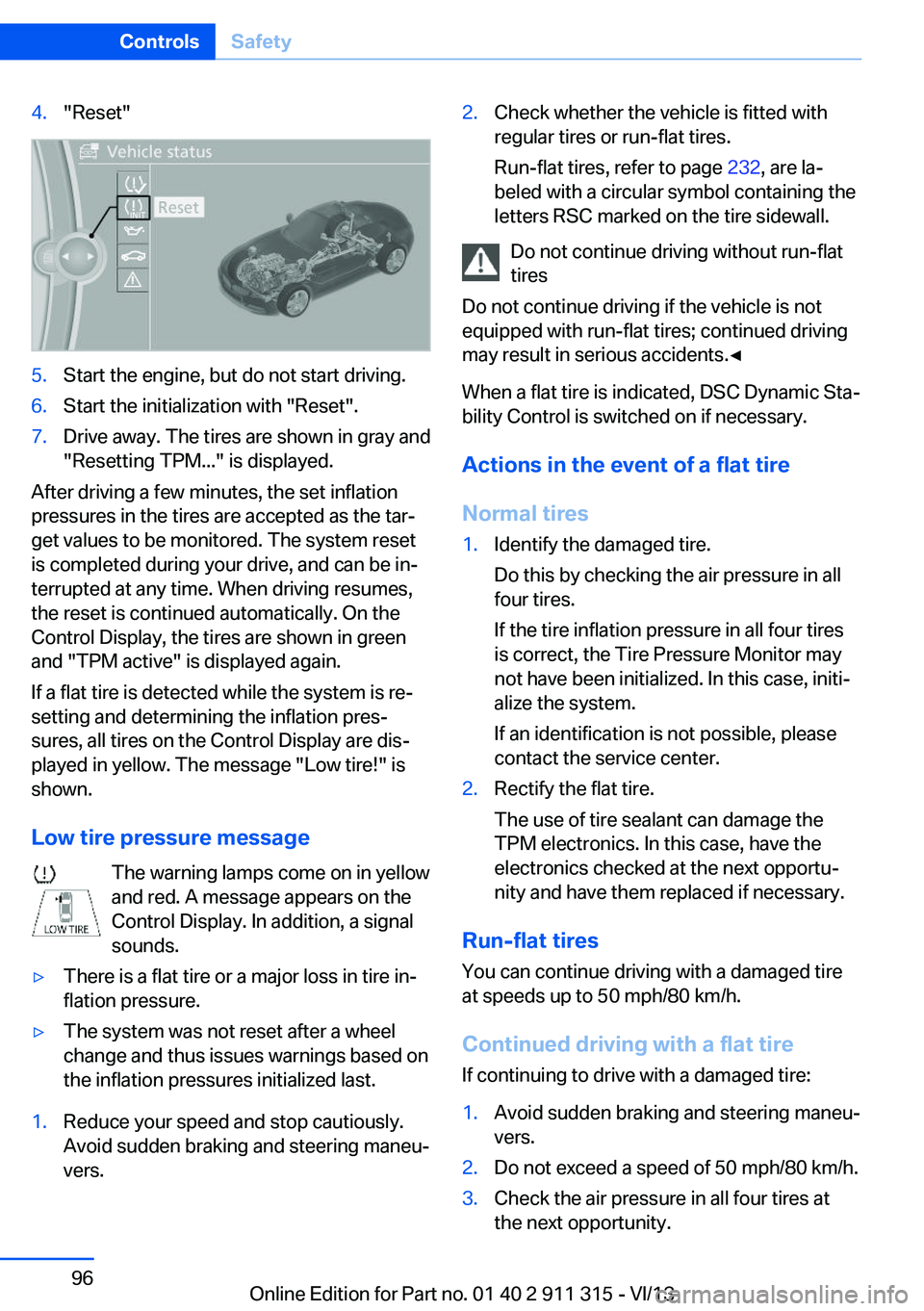
4."Reset"5.Start the engine, but do not start driving.6.Start the initialization with "Reset".7.Drive away. The tires are shown in gray and
"Resetting TPM..." is displayed.
After driving a few minutes, the set inflation
pressures in the tires are accepted as the tar‐
get values to be monitored. The system reset
is completed during your drive, and can be in‐
terrupted at any time. When driving resumes,
the reset is continued automatically. On the
Control Display, the tires are shown in green
and "TPM active" is displayed again.
If a flat tire is detected while the system is re‐
setting and determining the inflation pres‐
sures, all tires on the Control Display are dis‐
played in yellow. The message "Low tire!" is
shown.
Low tire pressure message The warning lamps come on in yellow
and red. A message appears on the
Control Display. In addition, a signal
sounds.
▷There is a flat tire or a major loss in tire in‐
flation pressure.▷The system was not reset after a wheel
change and thus issues warnings based on
the inflation pressures initialized last.1.Reduce your speed and stop cautiously.
Avoid sudden braking and steering maneu‐
vers.2.Check whether the vehicle is fitted with
regular tires or run-flat tires.
Run-flat tires, refer to page 232, are la‐
beled with a circular symbol containing the
letters RSC marked on the tire sidewall.
Do not continue driving without run-flat
tires
Do not continue driving if the vehicle is not
equipped with run-flat tires; continued driving
may result in serious accidents.◀
When a flat tire is indicated, DSC Dynamic Sta‐
bility Control is switched on if necessary.
Actions in the event of a flat tire Normal tires
1.Identify the damaged tire.
Do this by checking the air pressure in all
four tires.
If the tire inflation pressure in all four tires
is correct, the Tire Pressure Monitor may
not have been initialized. In this case, initi‐
alize the system.
If an identification is not possible, please
contact the service center.2.Rectify the flat tire.
The use of tire sealant can damage the
TPM electronics. In this case, have the
electronics checked at the next opportu‐
nity and have them replaced if necessary.
Run-flat tires
You can continue driving with a damaged tire
at speeds up to 50 mph/80 km/h.
Continued driving with a flat tire If continuing to drive with a damaged tire:
1.Avoid sudden braking and steering maneu‐
vers.2.Do not exceed a speed of 50 mph/80 km/h.3.Check the air pressure in all four tires at
the next opportunity.Seite 96ControlsSafety96
Online Edition for Part no. 01 40 2 911 315 - VI/13
Page 97 of 285
If the tire inflation pressure in all four tires
is correct, the Tire Pressure Monitor may
not have been initialized. In this case, initi‐
alize the system.
Possible driving distance with complete loss of
tire inflation pressure:
The possible driving distance after a loss of tire
inflation pressure depends on the cargo load
and the driving style and conditions.
For a vehicle containing an average load, the
possible driving distance is approx.
50 miles/80 km.
When the vehicle is driven with a damaged tire,
its handling characteristics change, e.g., re‐
duced lane stability during braking, a longer
braking distance, and altered self-steering
properties. Adjust your driving style accord‐
ingly. Avoid abrupt steering maneuvers or driv‐
ing over obstacles, e. g., curbs, potholes, etc.
Because the possible driving distance de‐
pends on how the vehicle is used during the
trip, the actual distance may be smaller or
greater depending on the driving speed, road
conditions, external temperature, cargo load,
etc.
Continued driving with a flat tire
Drive moderately and do not exceed a
speed of 50 mph/80 km/h.
A loss of tire inflation pressure results in a
change in the handling characteristics, e.g., re‐
duced lane stability during braking, a longer
braking distance and altered self-steering
properties.◀
Final tire failure
Vibrations or loud noises while driving
can indicate the final failure of the tire. Reduce
speed and stop; otherwise, pieces of the tire
could come loose and cause an accident. Do
not continue driving, and contact your service
center.◀
Message when not reset
The warning lamp lights up yellow. A
message appears on the Control Dis‐
play. The system detected a wheel
change but was not reset. Warnings regarding
the current tire inflation pressure are not relia‐
ble.
Check the tire inflation pressure and reset the
system, refer to page 95.
Malfunction The small warning lamp flashes in
yellow and then lights up continu‐
ously; the larger warning lamp comes
on in yellow. On the Control Display,
the tires are shown in gray and a message ap‐
pears. No flat tire can be detected.
Display in the following situations:▷A wheel without TPM electronics is fitted:
have the service center check it if neces‐
sary.▷Malfunction: have the system checked by
your service center.▷TPM could not be fully reset. Reset the
system again.
The small warning lamp flashes in yellow and then lights up continu‐
ously; the larger warning lamp comes
on in yellow. The tires are displayed
in gray on the Control Display. No flat tire can
be detected.
Display in the following situations:
▷Disturbance by systems or devices with
the same radio frequency. After leaving the
area of the disturbance, the system auto‐
matically becomes active again.
Declaration according to NHTSA/
FMVSS 138 Tire Pressure Monitoring
Systems
Each tire, including the spare (if provided)
should be checked monthly when cold and in‐
Seite 97SafetyControls97
Online Edition for Part no. 01 40 2 911 315 - VI/13
Page 98 of 285
flated to the inflation pressure recommended
by the vehicle manufacturer on the vehicle
placard or tire inflation pressure label (If your
vehicle has tires of a different size than the size
indicated on the vehicle placard or tire inflation
pressure label, you should determine the
proper tire inflation pressure for those tires.).
As an added safety feature, your vehicle has
been equipped with a tire pressure monitoring
system (TPMS) that illuminates a low tire pres‐
sure telltale when one or more of your tires is
significantly under-inflated. Accordingly, when
the low tire pressure telltale illuminates, you
should stop and check your tires as soon as
possible, and inflate them to the proper pres‐
sure. Driving on a significantly under-inflated
tire causes the tire to overheat and can lead to
tire failure. Under-inflation also reduces fuel ef‐
ficiency and tire tread life, and may affect the
vehicle's handling and stopping ability.
Please note that the TPMS is not a substitute
for proper tire maintenance, and it is the driv‐
er's responsibility to maintain correct tire pres‐
sure, even if under-inflation has not reached
the level to trigger illumination of the TPMS
low tire pressure telltale.
Your vehicle has also been equipped with a
TPMS malfunction indicator to indicate when
the system is not operating properly. The
TPMS malfunction indicator is combined with
the low tire pressure telltale. When the system
detects a malfunction, the telltale will flash for
approximately one minute and then remain
continuously illuminated. This sequence will
continue upon subsequent vehicle start-ups as
long as the malfunction exists. When the mal‐
function indicator is illuminated, the system
may not be able to detect or signal low tire
pressure as intended. TPMS malfunctions may
occur for a variety of reasons, including the in‐
stallation of replacement or alternate tires or
wheels on the vehicle that prevent the TPMS
from functioning properly. Always check the
TPMS malfunction telltale after replacing one
or more tires or wheels on your vehicle to en‐
sure that the replacement or alternate tires andwheels allow the TPMS to continue to function
properly.
Brake force display
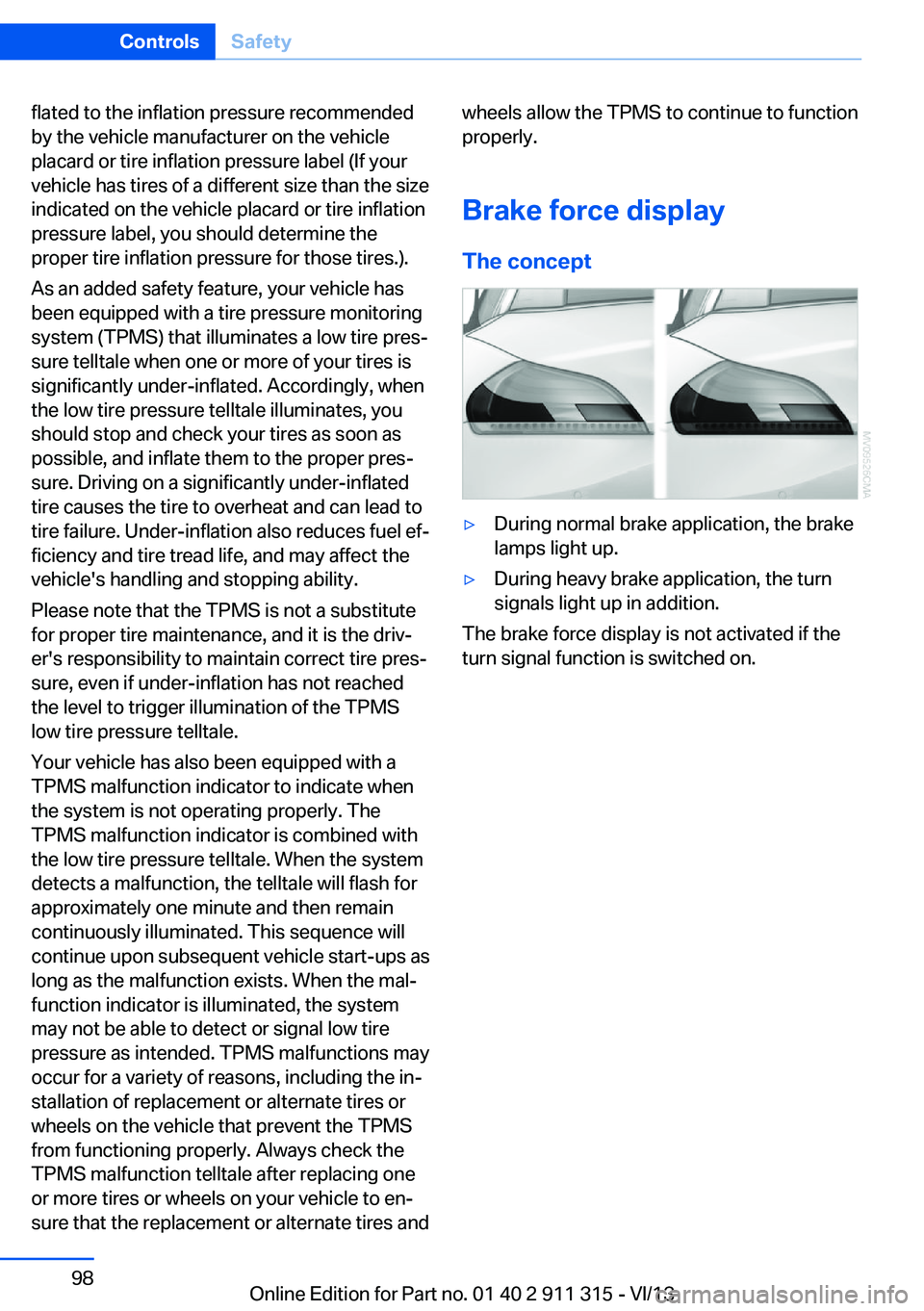
The concept▷During normal brake application, the brake
lamps light up.▷During heavy brake application, the turn
signals light up in addition.
The brake force display is not activated if the
turn signal function is switched on.
Seite 98ControlsSafety98
Online Edition for Part no. 01 40 2 911 315 - VI/13
Page 101 of 285
Activating DSCPress the button.
DSC OFF and the DSC OFF indicator
lamp go out.
Indicator/warning lamps
When DSC is deactivated, DSC OFF is dis‐
played in the instrument cluster.
The DSC OFF indicator lamp lights up:
DSC is deactivated.
TRACTION Maximum traction on loose road surfaces. Dy‐
namic Traction Control DTC is switched on.
Driving stability is limited during acceleration
and when driving in bends.
Activating TRACTION Press the button.
TRACTION is displayed in the instru‐
ment cluster.
The DSC OFF indicator lamp lights up in the
instrument cluster.
Deactivating TRACTION Press the button again.
TRACTION and the DSC OFF indica‐
tor lamp go out.
Indicator/warning lamps
When DTC is activated, TRACTION is dis‐
played in the instrument cluster.
The DSC OFF indicator lamp lights up:
Dynamic Traction Control DTC is acti‐
vated.SPORT+
Sporty driving with optimized chassis and sus‐
pension during limited driving stabilization.
Dynamic Traction Control is switched on.
The driver handles several of the stabilization
tasks.
Activating SPORT+ Press the button repeatedly until
SPORT+
is selected in the in‐
strument cluster and the DSC OFF indicator
lamp is displayed.
Indicator/warning lamps SPORT+ is displayed in the instrument cluster.
The DSC OFF indicator lamp lights up:
Dynamic Traction Control DTC is acti‐
vated.
SPORT Consistently sporty tuning of the suspension
for greater driving agility with maximum driving
stabilization.
Activating SPORT Press the button repeatedly until
SPORT is selected in the instrument
cluster.
COMFORT For a balanced tuning with maximum driving
stabilization.
Seite 101Driving stability control systemsControls101
Online Edition for Part no. 01 40 2 911 315 - VI/13
Page 102 of 285
Activating COMFORTPress the button repeatedly until
COMFORT is selected in the instru‐
ment cluster.
Displays in the instrument cluster
The selected program is displayed in the in‐
strument cluster.
Drive-off assistant
This system supports driving away on gradi‐
ents. The parking brake is not required.
1.Hold the vehicle in place with the foot
brake.2.Release the foot brake and drive away
without delay.
After the foot brake is released, the vehicle is
held in place for approx. 2 seconds.
Depending on the vehicle load, the vehicle may
roll back slightly.
Driving off without delay
After releasing the foot brake, start driv‐
ing without delay, since the drive-off assistant
will not hold the vehicle in place for more than
approx. 2 seconds and the vehicle will begin
rolling back.◀
Servotronic
The concept
The Servotronic varies the steering force re‐
quired to turn the wheels depending on the
speed at which you are driving. Power steering
provides strong support at low speeds, which
means that little effort is needed to turn the
wheels. Power steering support lessens as
your speed increases.
The system works automatically.
Malfunction
Malfunctions are displayed via Check Control,
refer to page 82.Seite 102ControlsDriving stability control systems102
Online Edition for Part no. 01 40 2 911 315 - VI/13