ECU BMW Z4 SDRIVE30I 2009 User Guide
[x] Cancel search | Manufacturer: BMW, Model Year: 2009, Model line: Z4 SDRIVE30I, Model: BMW Z4 SDRIVE30I 2009Pages: 248, PDF Size: 7.63 MB
Page 107 of 248
Controls
105Reference
At a glance
Driving tips
Communications
Navigation
Entertainment
Mobility
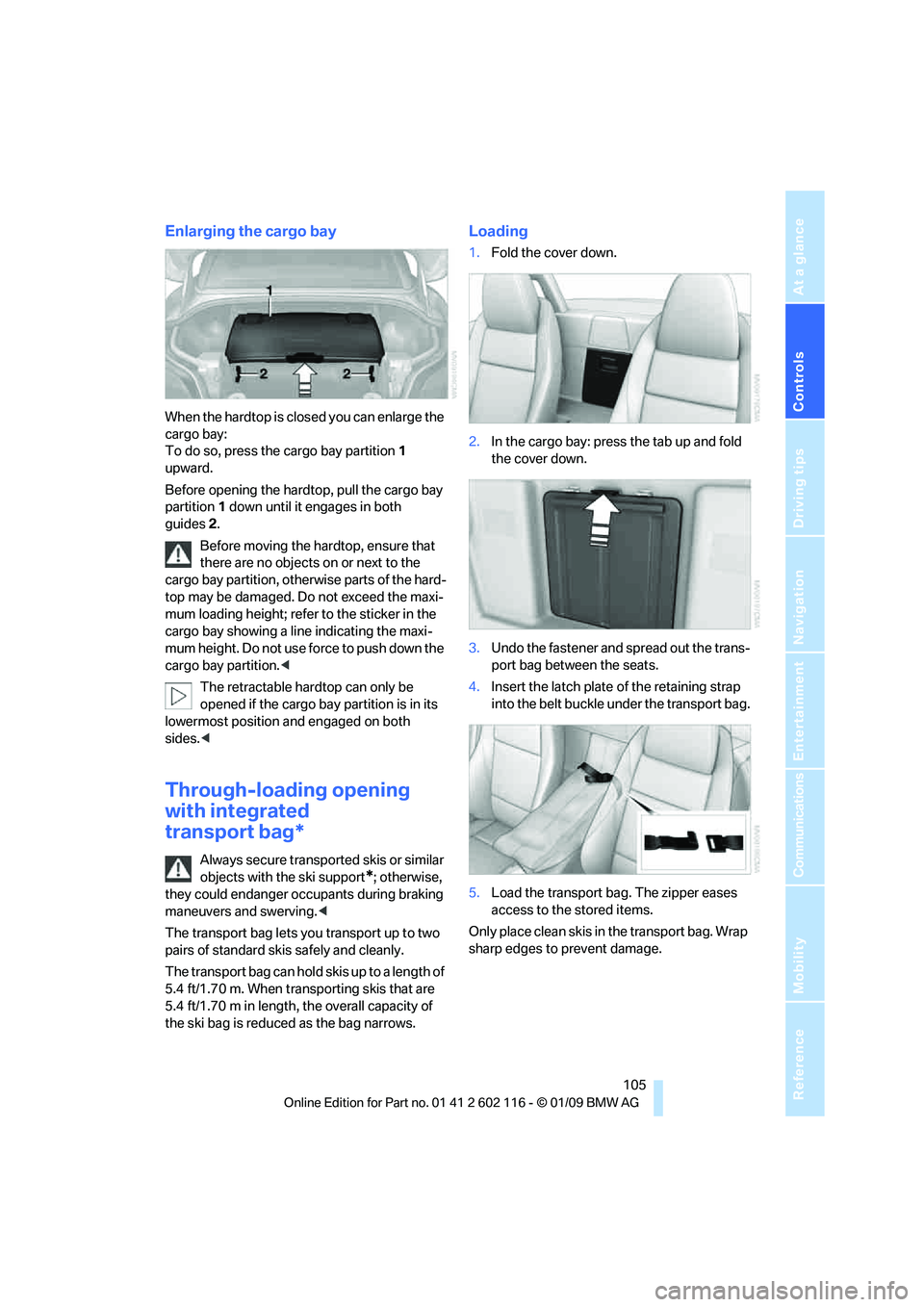
Enlarging the cargo bay
When the hardtop is closed you can enlarge the
cargo bay:
To do so, press the cargo bay partition 1
upward.
Before opening the hardtop, pull the cargo bay
partition 1 down until it engages in both
guides 2.
Before moving the hardtop, ensure that
there are no objects on or next to the
cargo bay partition, othe rwise parts of the hard-
top may be damaged. Do not exceed the maxi-
mum loading height; refer to the sticker in the
cargo bay showing a line indicating the maxi-
mum height. Do not use fo rce to push down the
cargo bay partition. <
The retractable hard top can only be
opened if the cargo bay partition is in its
lowermost position and engaged on both
sides. <
Through-loading opening
with integrated
transport bag*
Always secure transported skis or similar
objects with the ski support
*; otherwise,
they could endanger occupants during braking
maneuvers and swerving. <
The transport bag lets you transport up to two
pairs of standard skis safely and cleanly.
The transport bag can hold skis up to a length of
5.4 ft/1.70 m. When transporting skis that are
5.4 ft/1.70 m in length, th e overall capacity of
the ski bag is reduced as the bag narrows.
Loading
1. Fold the cover down.
2. In the cargo bay: press the tab up and fold
the cover down.
3. Undo the fastener and spread out the trans-
port bag between the seats.
4. Insert the latch plate of the retaining strap
into the belt buckle under the transport bag.
5. Load the transport bag. The zipper eases
access to the stored items.
Only place clean skis in the transport bag. Wrap
sharp edges to prevent damage.
Page 108 of 248
Practical interior accessories
106
Securing cargo
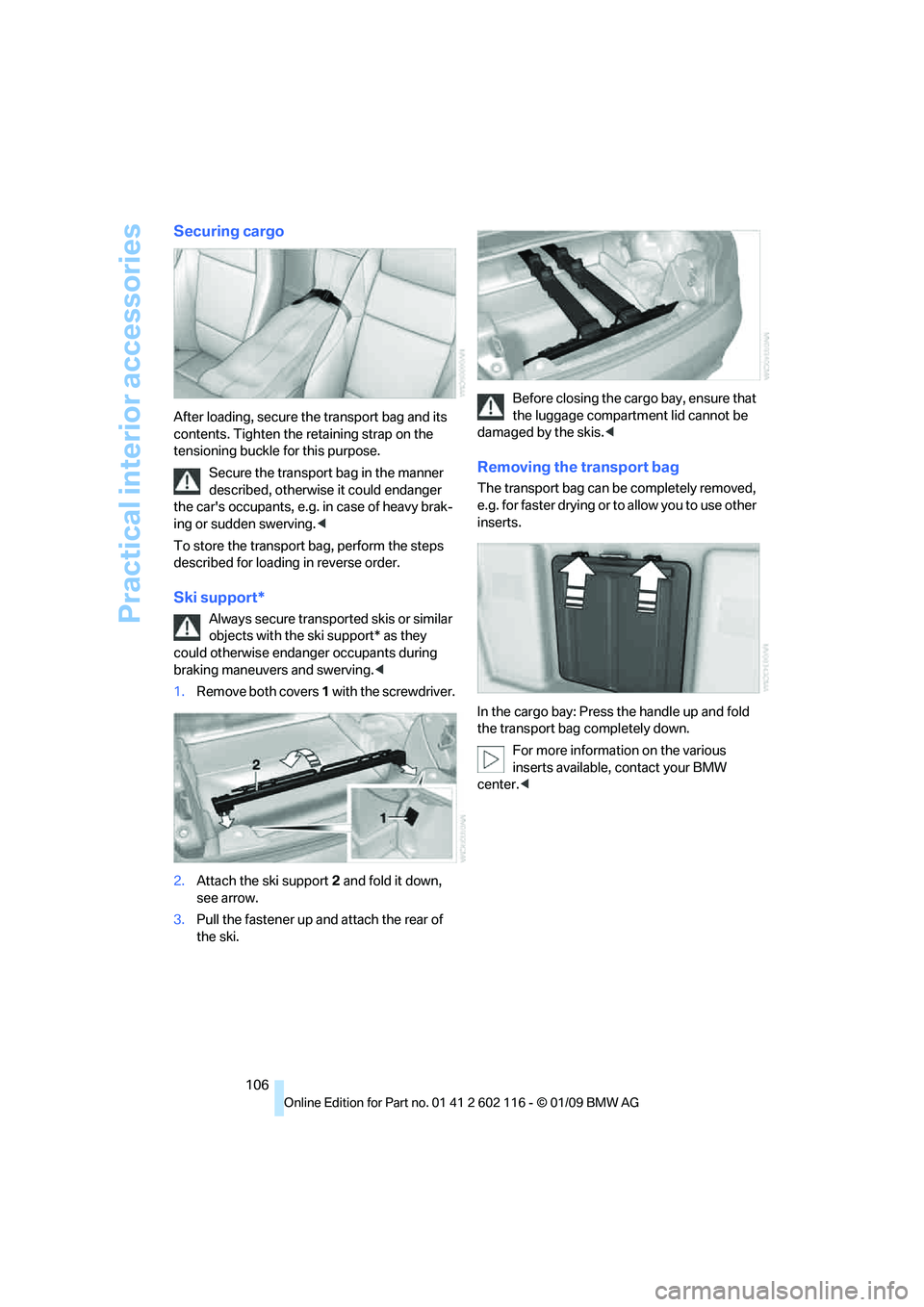
After loading, secure the transport bag and its
contents. Tighten the retaining strap on the
tensioning buckle for this purpose.
Secure the transport bag in the manner
described, otherwise it could endanger
the car's occupants, e.g. in case of heavy brak-
ing or sudden swerving. <
To store the transport bag, perform the steps
described for loading in reverse order.
Ski support*
Always secure transported skis or similar
objects with the ski support* as they
could otherwise endanger occupants during
braking maneuvers and swerving. <
1. Remove both covers 1 with the screwdriver.
2. Attach the ski support 2 and fold it down,
see arrow.
3. Pull the fastener up and attach the rear of
the ski. Before closing the cargo bay, ensure that
the luggage compartment lid cannot be
damaged by the skis. <
Removing the transport bag
The transport bag can be completely removed,
e.g. for faster drying or to allow you to use other
inserts.
In the cargo bay: Press the handle up and fold
the transport bag completely down.
For more information on the various
inserts available, contact your BMW
center. <
Page 116 of 248
Things to remember when driving
114
Load
The permissible load is the sum of the occu-
pants' weights and the weight of the cargo. The
greater the weight of the occupants, the less
cargo/luggage can be transported.
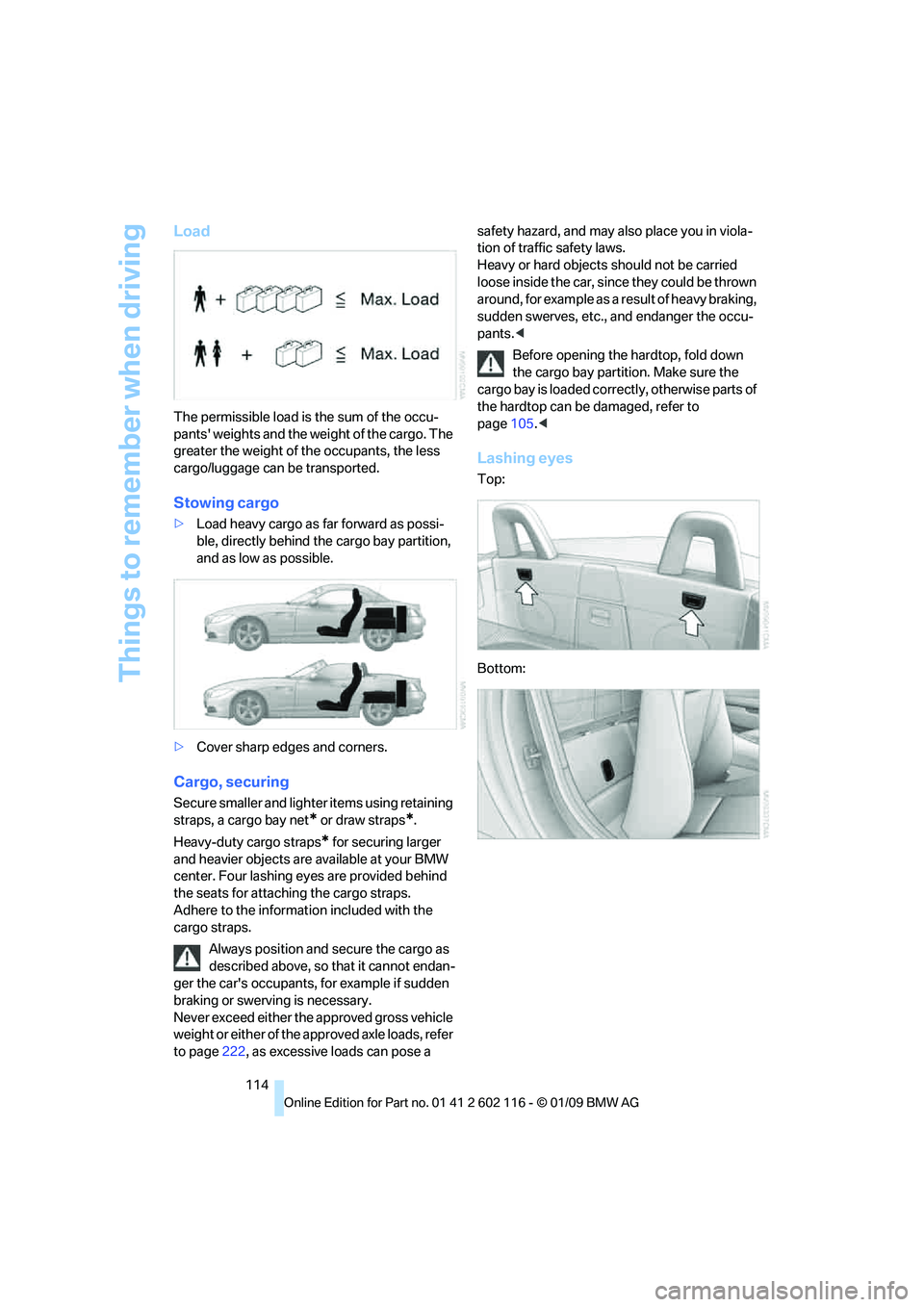
Stowing cargo
>Load heavy cargo as far forward as possi-
ble, directly behind the cargo bay partition,
and as low as possible.
> Cover sharp edges and corners.
Cargo, securing
Secure smaller and lighter items using retaining
straps, a cargo bay net
* or draw straps*.
Heavy-duty cargo straps
* for securing larger
and heavier objects are available at your BMW
center. Four lashing eyes are provided behind
the seats for attaching the cargo straps.
Adhere to the informat ion included with the
cargo straps.
Always position and secure the cargo as
described above, so that it cannot endan-
ger the car's occupants, for example if sudden
braking or swerving is necessary.
Never exceed either the approved gross vehicle
weight or either of the a pproved axle loads, refer
to page 222, as excessive loads can pose a safety hazard, and may al
so place you in viola-
tion of traffic safety laws.
Heavy or hard objects should not be carried
loose inside the car, since they could be thrown
around, for example as a result of heavy braking,
sudden swerves, etc., and endanger the occu-
pants. <
Before opening the hardtop, fold down
the cargo bay partition. Make sure the
cargo bay is loaded correctly, otherwise parts of
the hardtop can be damaged, refer to
page 105.<
Lashing eyes
Top:
Bottom:
Page 184 of 248
BMW Assist
182
Using the Internet
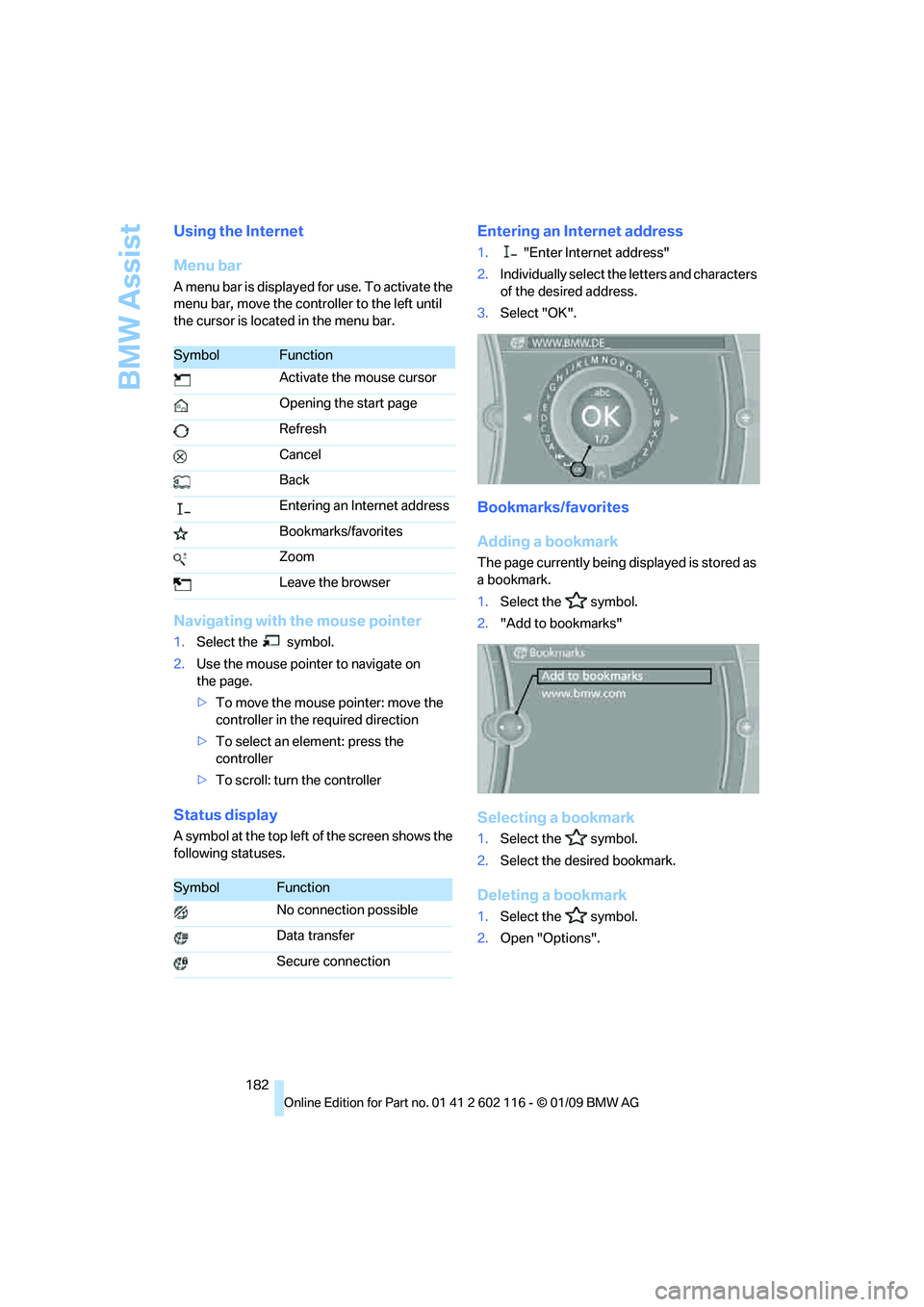
Menu bar
A menu bar is displayed for use. To activate the
menu bar, move the controller to the left until
the cursor is located in the menu bar.
Navigating with the mouse pointer
1.Select the symbol.
2. Use the mouse pointer to navigate on
the page.
>To move the mouse pointer: move the
controller in the required direction
> To select an element: press the
controller
> To scroll: turn the controller
Status display
A symbol at the top left of the screen shows the
following statuses.
Entering an Internet address
1. "Enter Internet address"
2. Individually select the letters and characters
of the desired address.
3. Select "OK".
Bookmarks/favorites
Adding a bookmark
The page currently being displayed is stored as
a bookmark.
1. Select the symbol.
2. "Add to bookmarks"
Selecting a bookmark
1.Select the symbol.
2. Select the desired bookmark.
Deleting a bookmark
1.Select the symbol.
2. Open "Options".
SymbolFunction
Activate the mouse cursor
Opening the start page
Refresh
Cancel
Back
Entering an Internet address
Bookmarks/favorites
Zoom
Leave the browser
SymbolFunction
No connection possible
Data transfer
Secure connection
Page 199 of 248
Mobility
197Reference
At a glance
Controls
Driving tips
Communications
Navigation
Entertainment
Under the hood
Do not work on the car unless you pos-
sess the necessary technical knowledge.
If you are unfamiliar with the statutory guide-
lines, have any work on the vehicle performed
only by a BMW center or by a workshop that
work according to BMW repair procedures with
correspondingly trained pe rsonnel. If this work
is not carried out properly, there is a danger of
subsequent damage and related safety
hazards. <
Hood
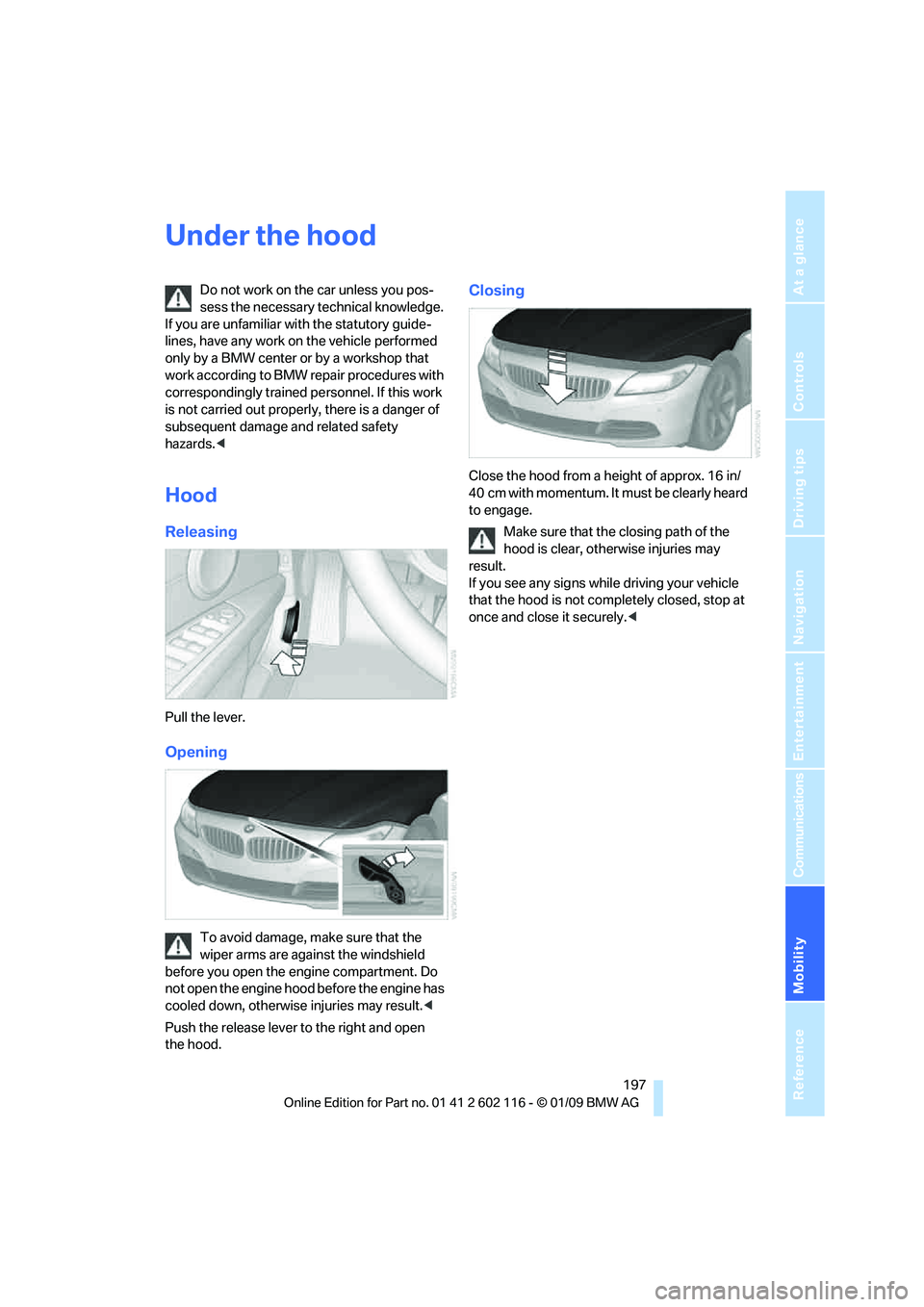
Releasing
Pull the lever.
Opening
To avoid damage, make sure that the
wiper arms are against the windshield
before you open the en gine compartment. Do
not open the engine hood before the engine has
cooled down, otherwise injuries may result. <
Push the release lever to the right and open
the hood.
Closing
Close the hood from a height of approx. 16 in/
40 cm with momentum. It must be clearly heard
to engage.
Make sure that the closing path of the
hood is clear, otherwise injuries may
result.
If you see any signs while driving your vehicle
that the hood is not comp letely closed, stop at
once and close it securely. <
Page 214 of 248
Replacing components
212
Vehicle battery
Battery care
The battery is 100 % maintenance-free, the
electrolyte will last for the life of the battery
when the vehicle is operated in a temperate cli-
mate. Your BMW center will be glad to advise in
all matters concerning the battery.
Charging the battery
Only charge the battery in the vehicle via the
terminals in the engine compartment with the
engine off. Connections, refer to Jump starting
on page 214.
Disposal
Have old batteries disposed of by your
BMW center or hand them in to a recy-
cling center. Maintain th e battery in an upright
position for transport and storage. Always
secure the battery agains t tipping over during
transport. <
Power failure
After a temporary power lo ss, the functioning of
some equipment may be limited and require
reinitialization. Individual settings may likewise
have been lost and will have to be programmed:
> Time and date
These values must be updated, refer to
page 71.
> Radio
In some cases, statio ns may have to be
stored again, refer to page 142.
> Navigation system
Operability must be waited for, refer to
page 118.
> Seat and mirror memory
The positions must be stored again, refer to
page 43.
> Inside rearview mirror with digital compass
The system must be calibrated, refer to
page 101.
Fuses
Never attempt to repa ir a blown fuse and
do not replace a defective fuse with a sub-
stitute of another color or amperage rating, oth-
erwise this could lead to a circuit overload, ulti-
mately resulting in a fire in the vehicle. <
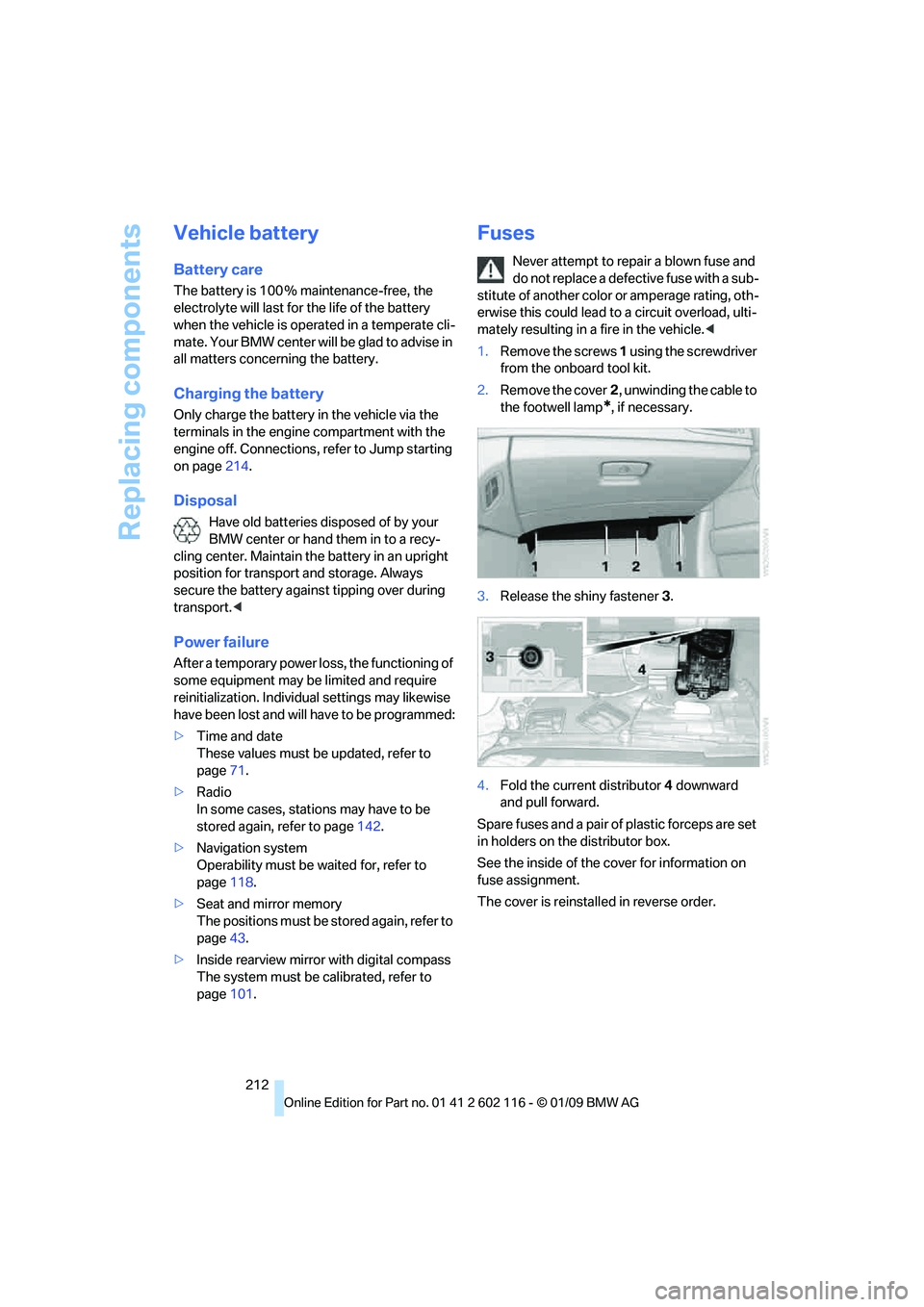
1. Remove the screws 1 using the screwdriver
from the onboard tool kit.
2. Remove the cover 2, unwinding the cable to
the footwell lamp
*, if necessary.
3. Release the shiny fastener 3.
4. Fold the current distributor 4 downward
and pull forward.
Spare fuses and a pair of plastic forceps are set
in holders on the distributor box.
See the inside of the cover for information on
fuse assignment.
The cover is reinsta lled in reverse order.
Page 234 of 248
Everything from A to Z
232
Care
204
– automatic car washes 204
– care products 204
– carpets 206
– CD/DVD drives 207
– chrome parts 206
– displays 207
– exterior 204
– fine wood parts 207
– headlamps 205
– high-pressure washer 205
– interior 206
– leather 206
– light-alloy wheels 206
– paintwork 205
– plastic parts 207
– retractable hardtop 205
– rubber seals 206
– safety belts 207
– sensors and cameras 207
– upholstery and cloth trim 206
– washing the car manually 205
– windows 205
Cargo, securing 114
Cargo bay
– capacity 222
– convenient access 35
– lamp, refer to Interior lamps 90
– opening from inside 33
– opening from outside 33
Cargo loading
– securing cargo 114
– stowing cargo 114
– vehicle 113
Car jack
– jacking points 211
Car key, refer to Integrated
key/remote control 28
Car phone
– installation location, refer to
Center armrest 102
– refer to separate Owner's Manual
Car phone, refer to Telephone 164
Car radio, refer to Radio 141Car shampoo
207
Car wash 113
– with convenient access 36
Car wash, refer to the Caring for your vehicle brochure
Catalytic converter, refer to Hot exhaust system 111
CBS Condition Based
Service 202
CD, audio playback 146
CD/DVD changer 14
6
– controls 138
– fast forward/reverse 148
– random sequence 147
– switching on/off 138
– tone control 138
– volume 138
CD/DVD player 146
– controls 138
– fast forward/reverse 148
– random sequence 147
– switching on/off 138
– tone control 138
– volume 138
CD changer
– selecting a track 146
CD player
– selecting a track 146
Center armrest 102
Center brake lamp
– replacing bulb 211
Center console, refer to Around the center
console 14
Central locking
– from inside 32
– from outside 29
Central locking system 29
– convenient access 35
– setting unlocking
characteristics 29
Changes, technical, refer to For your own safety 5
Changing bulbs, refer to Lamps and bulbs 208
Changing the measurement
units on the Control
Display 68
Changing wheels 211Chassis number, refer to
Engine compartment 198
Check Control 73
Child-restraint systems 48
Child seats, refer to
Transporting children
safely 48
Chrome parts 207
Chrome polish 207
Cigarette lighter, refer to Lighter 104
Cleaning headlamps 60
– washer fluid 61
Cleaning your BMW, refer to Care 204
Clock 64
– 12h/24h mode 72
– setting the time and date 72
– setting time 71
Closing
– from inside 32
– from outside 29
Cockpit 10
Cold start, refer to Starting
the
engine 51
Combined instrument, refer to Instrument cluster 12
Comfort access, refer to
Convenient access 35
Comfort area, refer to Around the center console 14
Compartment for remote control, refer to
Ignition lock 50
Compass 100
Computer 65
– displays on Control
Display 66
Computer, refer to iDrive 16
Concierge service 179
Condensation, refer to When the vehicle is parked 112
Condition Based Service
CBS 202
Configuring settings, refer to Personal Profile 28
Confirmation signals for locking/unlocking the
vehicle 31
Page 238 of 248
Everything from A to Z
236
Hills
112
Holders for cups 103
Home address 176
Homepage BMW 4
Hood 197
Horn 10,11
Hot exhaust system 111
Hydraulic brake assist, refer to
Dynamic Brake Control
DBC 78
Hydroplaning 111
I
IBOC, refer to High Definition
Radio 142
Ice warning, refer to Outside temperature warning 64
ID3 tag, refer to Information
about the track 147
Identification marks
– Run-Flat Tires 195
– tire coding 193
iDrive 16
– adjusting brightness 76
– changing language 75
– changing settings 75
– changing units of measure
and display format 68
– controls 16
– menu guidance 17
– operating principle 16
– overview 16
– setting the date and
time 71,72
– status information 20
iDrive operating principle 16
Ignition 50
– switched off 50
– switched on 50
Ignition key, refer to Remote control with integrated
key 28
Ignition key position 1, refer to Radio readiness 50Ignition key position 2, refer to
Ignition on 50
Ignition lock 50
Imprint 2
Indicator and warning lamps
– Tire Pressure Monitor TPM 83
Indicator and warning
lamps 13
Individual air distribution 93
Inflation pressure, refer to Tire
inflation pressure 190
Inflation pressure monitoring,
refer to Tire Pressure
Monitor TPM 82
Initializing
– after power failure 212
– compass, refer to Calibrating 101
– Flat Tire Monitor FTM 81
– radio, refer to Station, storing 142
– refer to Setting the time and date 72
Installation location
– navigation DVD drive 118
– telephone 102
Instructions for navigation
system, refer to Voice
instructions 129
Instrument cluster 12
Instrument lighting 90
In
strument panel, refer to Cockpit 10
Integrated key 28
Integrated universal remote control 98
Interactive map 124
Interior lamps 90
– remote control 30
Interior motion sensor 34
Interior rearview mirror 46
– automatic dimming
feature 46
– compass 100
Interlock, refer to Disengaging
the remote control 53Intermittent mode of the
wipers 60
Intersection, entering, navigation 120
iPod, connecting, refer to
AUX-IN port 158
iPod, connecting, refer to USB-audio interface 158
J
Jacking points211
Joystick, refer to iDrive 16
Jumpering, refer to Jump starting 214
Jump starting 214
K
Key, refer to Integrated key/
remote control 28
Keyless go, refer to
Convenient access 35
Keyless opening and closing, refer to Convenient
access 35
Key Memory, refer to Personal Profile 28
Kick-down 54
– automatic transmission with Steptronic 54
Knock control 189
L
Lamps
– automatic headlamp
control 88
– parking lamps/low beams 88
Lamps and bulbs, replacing
bulbs 208
Language, changing on Control Display 75
Lap-and-shoulder belt, refer to Safety belts 44
Lashing eyes, refer to
Securing cargo 114
Last destinations 122
Page 239 of 248
Reference 237
At a glance
Controls
Driving tips
Communications
Navigation
Entertainment
Mobility
Launch Control58
Leather care 206
LED Light-emitting diodes 208
Length, refer to
Dimensions 221
License plate lamp, replacing bulb 211
Light-alloy wheels 206
Light-emitting diodes LED 208
Lighter 104
– connecting electrical
appliances 104
Lighting
– instruments 90
– lamps and bulbs 208
– vehicle, refer to Lamps 88
Light switch 88
Limit, refer to Speed limit 74
Load securing equipment, refer to Securing cargo 114
Lockable lug bolts, refer to Lug bolt lock 211
Lock buttons, doors, refer to
Locking 32
Locking
– adjusting confirmation
signal 31
– from inside 32
– from outside 30
– without remote control, refer to Convenient access 35
Locking and unlocking doors
– confirmation signals 31
– from inside 32
– from outside 29
Low-beam headlamps 88
– automatic 88
Lower back support, refer to
Lumbar support 43
Lug bolt lock 211
Luggage compartment lid 32
– convenient access 35
– emergency release 33
– opening from inside 33
– opening from outside 33
– remote control 30
Lumbar support 43 LW, waveband
141
M
M+S tires, refer to Winter
tires 196
Maintenance, refer to Service Booklet
Maintenance system 202
Malfunction
– automatic transmission with
Steptronic 55
– tires 81
Malfunction warnings, refer to Check Control 73
Managing music 156
Manual air distribution 93
Manual car wash 205
Manual mode, automatic
transmission with
Steptronic 54
Manual operation
– door lock 32
– driver's door 32
– fuel filler door 188
– transmission lock 58
– transmission lock, automatic transmission 55
Manual transmission 53
Map display 130
Map for navigation
– changing scale 130
– entering destination 124
– interactive map 124
Master key, refer to Remote control with integrated
key 28
Maximum cooling 96
Maximum speed
– with winter tires 196M dual clutch transmission
with Drivelogic
– Launch Control 58
– manually releasing transmission lock 58
– neutral 57
– reverse gear 57
Measurements, refer to
Dimensions 221
Memory, refer to Seat and mirror memory 43
MENU button 16
Menus, refer to iDrive 16
Messages 170
Microfilter
– BMW Maintenance
System 202
– for air conditioner 94
– for automatic climate
control 97
Microfilter/activated-charcoal filter
– BMW Maintenance System 202
Mirror dimming feature 46
Mirrors 45
– automatic curb monitor 46
– exterior mirrors 45
– heating 46
– interior rearview mirror 46
–
memory, refer to Seat and
mirror memory 43
Mobile phone
– adjusting volume 167
– connecting, refer to Mobile phone, pairing 164
– installation location, refer to
Center armrest 102
– operation via iDrive 167
– pairing 164
– refer to separate Owner's Manual
Mobile phone, installation
location, refer to Center
armrest 102
Mobile phone, refer to
Telephone 164
Page 242 of 248
Everything from A to Z
240
Roadside parking lamps
90
Roadworthiness test, refer to
Service requirements 69
Roof load capacity 222
Rope, refer to Tow-starting,
towing away 216
Rotary/pushbutton, refer to iDrive 16
Route 128,129
– bypassing sections 129
– changing 128
– changing criteria 128
– displaying streets or towns/
cities 129
– map display 130
– selecting 128
Route instructions, refer to Destination guidance
through voice
instructions 129
Route map, refer to Map display 130
Route section, changing 129
Route selection 128
RSC Runflat System
Component, refer to Run-
Flat Tires 195
Runflat System Component
RSC, refer to Run-Flat
Tires 195
Run-Flat Tires 195
– continuing driving with a damaged tire 82
– flat tire 81
– Flat Tire Monitor 81
– new tires 195
– replacing 195
– tire inflation pressure 190
– winter tires 196
S
Safety-belt height
adjustment 45
Safety belts 44
– damage 45
– indicator/warning lamp 45
– reminder 45
– sitting safely 41 Safety systems
– airbags
85
– Antilock Brake System ABS 78
– brake system 78
– driving stability control systems 78
– Dynamic Stability Control
DSC 78
– safety belts 44
Safety tires, refer to Run-Flat
Tires 195
Satellite radio 144
– enabling channel 144
– selecting channel 145
– storing channel 145
Saving fuel 110
Screen, refer to iDrive controls 16
Screw thread for tow fitting 215
SDARS, refer to Satellite
radio 144
Seat adjustment
– electric 42
– mechanical 42
Seat and mirror memory 43
Seat belt reminder, refer to
'Fasten safety belts'
reminder 45
Seat heating 43
Seats 41
– adjusting electrically 42
– adjusting the seats 42
– heating 43
– memory, refer to Seat and mirror memory 43
– saving a setting, refer to Seat and mirror memory 43
– sitting safely 41
Securing cargo 106
Securing the vehicle
– from inside 32
– from outside 29
Selecting new scale for navigation 130
Selector lever 56
– automatic transmission with Steptronic 54 Selector lever lock, refer to
Changing selector lever
positions, shiftlock 54
Selector lever positions
– automatic transmission with
Steptronic 54
Service, refer to Roadside Assistance 213
Ser
vice car, refer to Roadside
Assistance 213
Service data in the remote
control 202
Service Interval Display, refer
to Condition Based Service
CBS 202
Service Request 183
Service requirement display, refer to Condition Based
Service CBS 202
Service requirements 69
Services status 184
Servotronic 85
Settings
– changing on Control Display 75
– clock, 12h/24h mode 72
– DVD 149
– language 75
Settings and information 68
Shifting 57
Shifting, sport automatic
transmission 57
Shifting gears
– automatic transmission with
Steptronic 54
– manual transmission 53
Shiftlock
– automatic transmission, refer to Changing selector
lever positions 54
Shift paddles on steering wheel 57
Short commands for the voice
activation system 223
Short route in navigation, refer to Selecting route 128
Side airbags 85