reset BMW Z4 SDRIVE30I 2009 User Guide
[x] Cancel search | Manufacturer: BMW, Model Year: 2009, Model line: Z4 SDRIVE30I, Model: BMW Z4 SDRIVE30I 2009Pages: 248, PDF Size: 7.63 MB
Page 142 of 248
On/off and tone
140
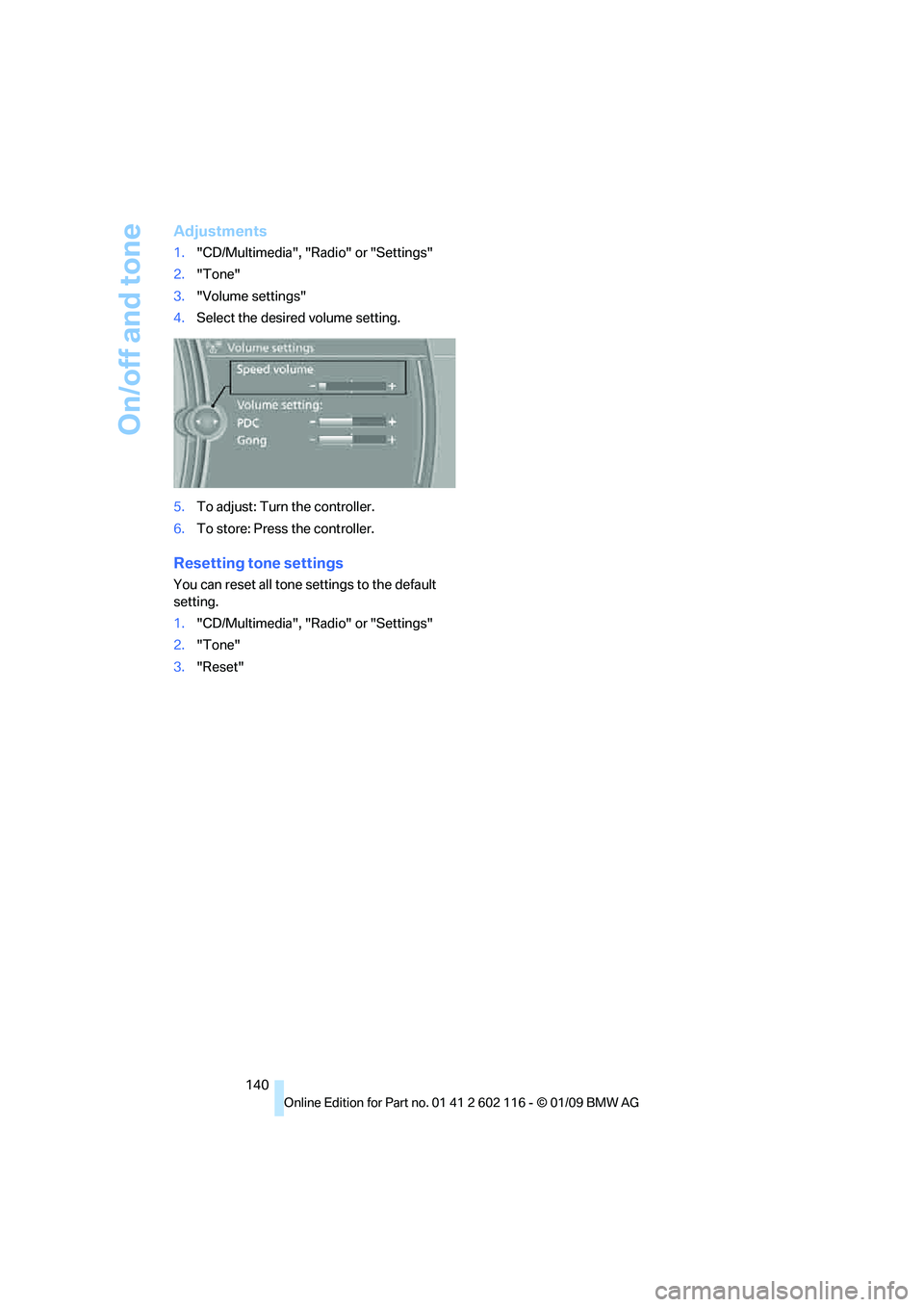
Adjustments
1."CD/Multimedia", "Radio" or "Settings"
2. "Tone"
3. "Volume settings"
4. Select the desired volume setting.
5. To adjust: Turn the controller.
6. To store: Press the controller.
Resetting tone settings
You can reset all tone settings to the default
setting.
1. "CD/Multimedia", "Radio" or "Settings"
2. "Tone"
3. "Reset"
Page 145 of 248
Navigation
Entertainment
Driving tips
143Reference
At a glance
Controls
Communications
Mobility
Displaying additional information
Some stations broadcast additional information
on the current track, such as the name of the
artist.
1.Select the desired station.
2. Open "Options".
3. "Station info"
Selecting a substation
1.Select the desired station.
2. Press the controller.
3. Select the substation.
Presets
It is possible to stor e up to 40 stations.
Calling up a station
1."Radio"
2. "Presets"
3. Call up the desired station.
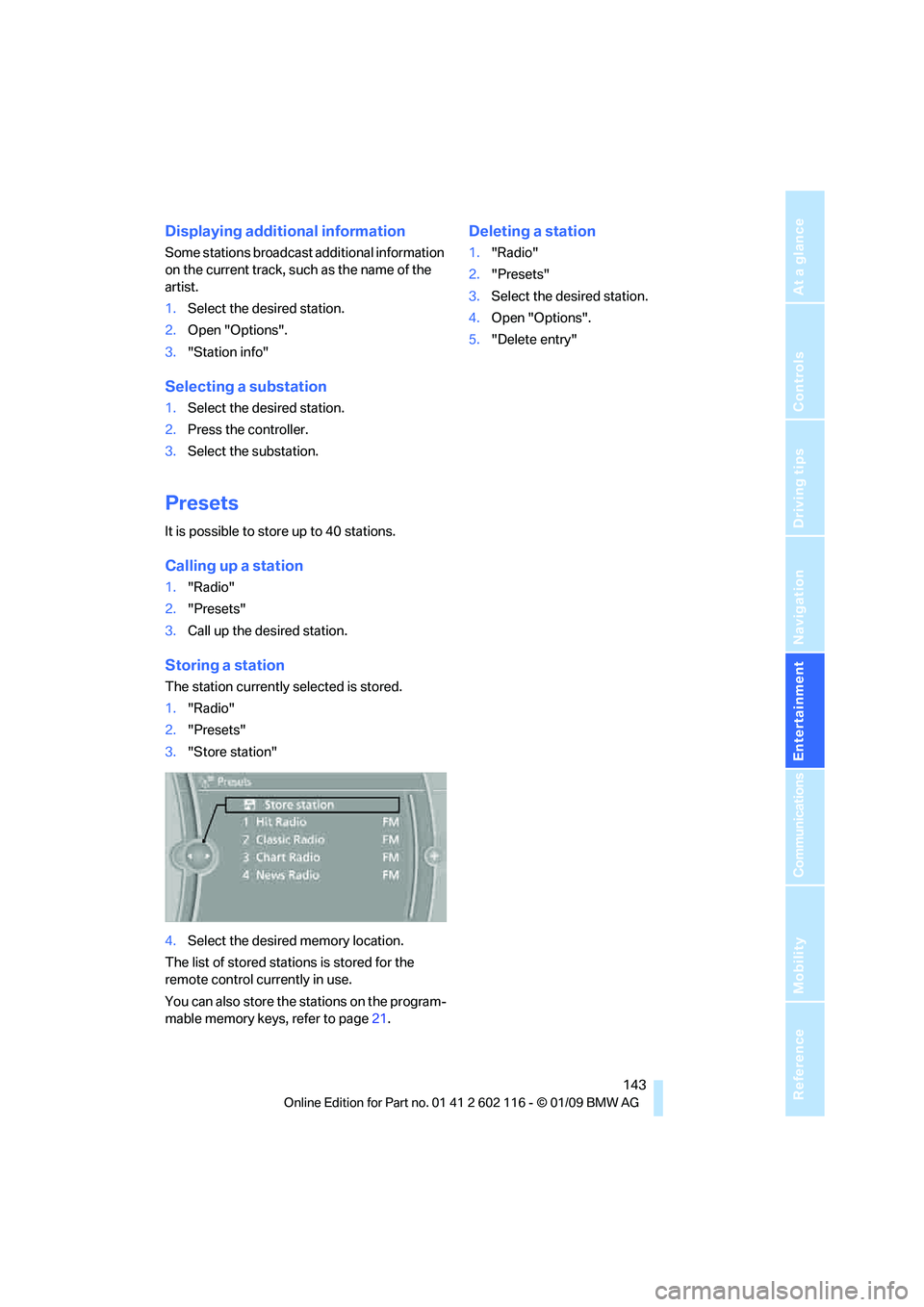
Storing a station
The station currently selected is stored.
1."Radio"
2. "Presets"
3. "Store station"
4. Select the desired memory location.
The list of stored stations is stored for the
remote control currently in use.
You can also store the st ations on the program-
mable memory keys, refer to page 21.
Deleting a station
1."Radio"
2. "Presets"
3. Select the desired station.
4. Open "Options".
5. "Delete entry"
Page 167 of 248
165
Entertainment
Reference
At a glance
Controls
Driving tips
Communications
Navigation
Mobility
> Bluetooth is activated in the vehicle, refer to
page 166, and on the mobile phone.
> Certain presettings ma y be necessary on
some mobile phones: e.g. using the follow-
ing menu items:
> Bluetooth switched on
> Connection must be allowed without
requiring further confirmation
> Reconnection
> Depending on the mobile phone type, the
power-saving mode setting, for example,
may result in a paired mobile phone not
being detected by the vehicle.
> For pairing purposes, define any 4 to 16-
digit number as a Bluetooth passkey,
e.g. 123. A long and complex number offers
the best protection against unauthorized
access. This Bluetooth passkey is no longer
required after pairing has been successful.
> The ignition is switched on.
Pair the mobile phone with the vehicle
only when the car is stationary, to avoid
endangering the car's occupants and other
road users by be ing distracted.<
Switching on the ignition
1.Insert the remote contro l all the way into the
ignition lock.
2. Switch on the ignition without operating the
brake or clutch or pressing the start/stop
button.
Preparation via iDrive
iDrive, for operating principle refer to page 16.
3. "Telephone"
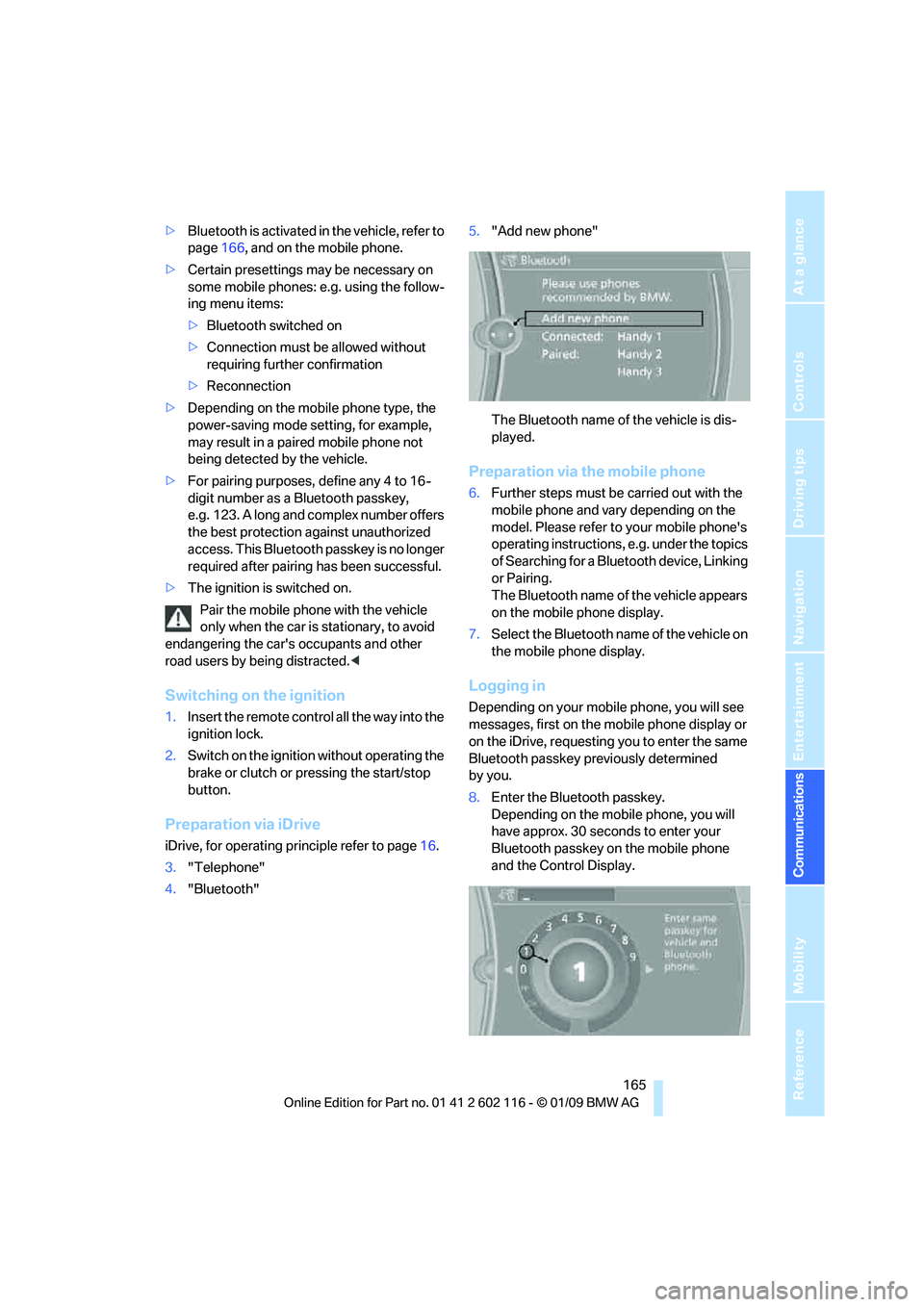
4. "Bluetooth" 5.
"Add new phone"
The Bluetooth name of the vehicle is dis-
played.
Preparation via the mobile phone
6.Further steps must be carried out with the
mobile phone and vary depending on the
model. Please refer to your mobile phone's
operating instructions, e.g. under the topics
of Searching for a Bluetooth device, Linking
or Pairing.
The Bluetooth name of the vehicle appears
on the mobile phone display.
7. Select the Bluetooth na me of the vehicle on
the mobile phone display.
Logging in
Depending on your mob ile phone, you will see
messages, first on the mobile phone display or
on the iDrive, requesting you to enter the same
Bluetooth passkey previously determined
by you.
8. Enter the Bluetooth passkey.
Depending on the mobile phone, you will
have approx. 30 seco nds to enter your
Bluetooth passkey on the mobile phone
and the Control Display.
Page 227 of 248
Reference 225
At a glance
Controls
Driving tips
Communications
Navigation
Entertainment
Mobility
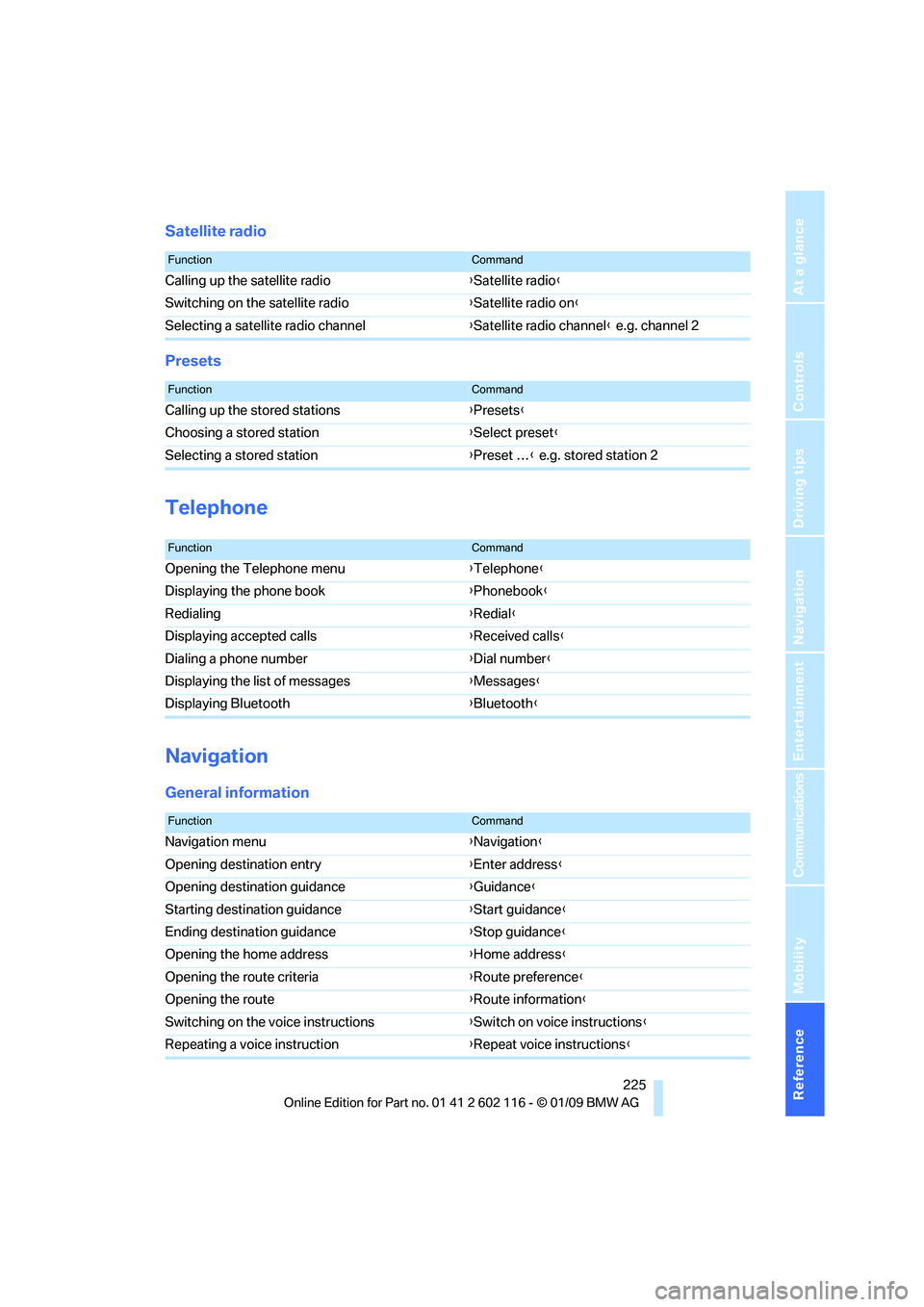
Satellite radio
Presets
Telephone
Navigation
General information
FunctionCommand
Calling up the satellite radio{Satellite radio}
Switching on the satellite radio {Satellite radio on }
Selecting a satellite radio channel {Satellite radio channel } e.g. channel 2
FunctionCommand
Calling up the stored stations {Presets }
Choosing a stored station {Select preset }
Selecting a stored station {Preset … } e.g. stored station 2
FunctionCommand
Opening the Telephone menu {Telephone }
Displaying the phone book {Phonebook }
Redialing {Redial }
Displaying accepted calls {Received calls }
Dialing a phone number {Dial number }
Displaying the list of messages {Messages}
Displaying Bluetooth {Bluetooth }
FunctionCommand
Navigation menu {Navigation }
Opening destination entry {Enter address }
Opening destination guidance {Guidance}
Starting destination guidance {Start guidance }
Ending destination guidance {Stop guidance }
Opening the home address {Home address }
Opening the route criteria {Route preference }
Opening the route {Route information }
Switching on the voice instructions {Switch on voice instructions }
Repeating a voice instruction {Repeat voice instructions }
Page 241 of 248
Reference 239
At a glance
Controls
Driving tips
Communications
Navigation
Entertainment
Mobility
Parking lamps/low beams88
Passenger-side mirror tilt
function 46
Pathway lighting 89
Personal Profile 28
Phone book 167
Phone numbers
– dialing 168
Pinch protection system
– windows 37
Placing a call, refer to
telephone owner's manual
Playback lists for external
devices 160
Polish 207
Pollen
– refer to Microfilter/activated- charcoal filter for automatic
climate control 97
– refer to Microfilter for air conditioner 94
Position, refer to Current
position, displaying 134
Postal code, entering for navigation 120
Power failure 212
Power windows 37
Power windows, refer to
Windows 36
Pressure, tires 190
Pressure monitoring, tires 81
– Flat Tire Monitor 81
Pressure monitoring of tires, refer to Tire Pressure
Monitor TPM 82
Programmable buttons on the steering wheel 11
Protection function, refer to Pinch protection system
– windows 37
Providing medical assistance, refer to First add pouch 214
Puncture
– Flat Tire Monitor 81R
Radio
– controls138
– High Definition Radio 142
– satellite radio 144
– selecting a waveband 141
– storing stations 142
– switching on/off 138
– tone control 138
– volume 138
– Weather Band, refer to Weather information 144
Radio position, refer to Radio readiness 50
Radio readiness 50
– switched off 50
– switched on 50
Radio-remote key, refer to
Remote control with
integrated key 28
Rain sensor 60
Random sequence
– CD/DVD changer 147
– CD/DVD player 147
Reading lamps 91
Rear fog lamps
– indicator lamp 13
Rear lamp, refer to Tail lamps
– replacing bulb 210
Rear lamps, refer to
Tail lamps 210
Rear turn signals
– replacing bulb 210
Rearview mirror, refer to Mirrors 45
Rear window defroster 94,97
Receiving level of mobile phone, refer to Status
information 20
Reception
– quality 142
– radio station 142
Recirculated-air mode 93,97
Recirculation of air, refer to Recirculated-air
mode 93,97 Reclining seat, refer to
Backrest 42
Refueling 188
Releasing
– hood 197
Remaining distance, refer to Cruising range 65
Remote control 28
– battery renewal 36
– convenient access 35
– garage door opener 98
– luggage compartment lid 30
– malfunction 31,36
– removing from the ignition lo
ck50
– service data 202
Replacement remote control 28
Replacing bulbs, refer to
Lamps and bulbs 208
Replacing tires 195
Replacing tires, refer to New
wheels and tires 195
Reporting safety defects 7
Reserve warning, refer to Fuel
gauge 65
Reset, refer to Resetting tone settings 140
Restraint systems
– for children 48
– refer to Safety belts 44
Retractable hardtop
– care, refer to Caring for your vehicle brochure
– convenient operation 30
– opening and closing 39
– remote control 30
retractable hardtop 38
Reverse
– CD/DVD changer 148
– CD/DVD player 148
Reverse gear 57
– automatic transmission with
Steptronic 54
– manual transmission 53
Road map 130
Roadside Assistance 179,213
Page 244 of 248
Everything from A to Z
242
Temperature
– air conditioner
94
– automatic climate control 95
– changing unit of measure 68
– coolant, refer to Coolant
temperature 65
Temperature display
– outside temperature 64
– outside temperature warning 64
– setting the units 68
Tempomat, refer to Cruise control 61
Tensioning straps, refer to Securing cargo 114
The individual vehicle 5
Third brake lamp, refer to Center brake lamp 211
Through-loading opening with
integrated transport
bag 105
Tilt alarm sensor 34
Tilt function, passenger-side mirror 46
Tire inflation pressure 190
– loss 81,83
Tire pressure monitoring, refer to Flat Tire Monitor 81
Tire Pressure Monitor TPM
– resetting the system 83
– system limitations 82
– warning lamp 83
Tire Pressure Monitor TPM 82
Tire puncture, refer to Flat Tire Monitor 81
Tire Quality Grading 193Tires
– age
193,195
– air loss 83
– breaking in 110
– changing, refer to Changing
wheels 211
– condition 194
– damage 194
– inflation pressure 190
– labels 193
– minimum tread depth 194
– new wheels and tires 195
– pressure monitoring, refer to
Flat Tire Monitor 81
– pressure monitoring, refer to Tire Pressure Monitor
TPM 82
– puncture 81
– replacing 195
– Run-Flat 195
– size 193
– storage 19
6
– tread depth 194
– wear indicators, refer to Minimum tread depth 194
– wheel/tire combination, refer to Correct wheels and
tires 195
– winter tires 196
TMC station, refer to Traffic bulletins 131
Tone
– control 138
– middle setting 140
Tools, refer to Onboard tool kit 208
Top, refer to Retractable
hardtop 38
Top 50 of music collection 155
Torque, refer to Engine data 220
Tow bar 216
Tow fitting 215
– screw thread 215
Tow fittings for tow-starting
and towing away 215Towing
215
– car with automatic
transmission 215
– methods 216
Towing and tow-starting 215
Town/city, for navigation 119
Tow rope 216
Tow-starting 215,217
TPM, refer to Tire Pressure Monitor 82
Track
– selecting on CD 146
Traction control, refer to
Dynamic Stability Control
DSC 78
TRACTION program,
Dynamic Driving Control 79
Traffic bulletins
– categories 133
Traffic bulletins for navigation
– during destination guidance 133
– in map display 133
Traffic bulletins for navigation 131
Traffic bulletins for navigation system
– filtering 133
Traffic jam
– displaying traffic bulletins 131
Transmission
– automatic transmission with Steptronic 53
– dual clutch transmission 55
– Launch Control 58
– manual transmission 53
– neutral 57
– ov
erriding selector lever lock
for automatic transmission
with Steptronic 55
– reverse gear 57
– transmission lock, releasing
manually 58
Transmission interlock
– refer to Changing selector
lever position 54
– refer to P Park 54