armrest BMW Z4 SDRIVE30I 2009 Owners Manual
[x] Cancel search | Manufacturer: BMW, Model Year: 2009, Model line: Z4 SDRIVE30I, Model: BMW Z4 SDRIVE30I 2009Pages: 248, PDF Size: 7.63 MB
Page 31 of 248
Controls
29Reference
At a glance
Driving tips
Communications
Navigation
Entertainment
Mobility
>Settings for the display on the Control Dis-
play and in the instrument cluster:
>12h/24h format of the clock, refer to
page 71
> Date format, refer to page 72
> Brightness of Control Display, refer to
page 76
> Language on the Control Display, refer
to page 75
> Units of measure for fuel consumption,
distance covered/remaining distances,
and temperature, refer to page 68
> Show visual warning for Park Distance Con-
trol PDC
*, refer to page 77
> Light settings:
>Welcome lamps, refer to page 88
> Pathway lighting, refer to page 89
> Daytime running lamps, refer to page 89
> Automatic climate control: activating/deac-
tivating AUTO program, cooling function
and automatic recirculated-air control, set-
ting temperature, air fl ow rate and distribu-
tion, refer to page 95 ff
> Entertainment:
>Audio volume, refer to page 138
> Tone control, refer to page 138
> Volume, refer to page 139
Central locking system
The concept
The central locking system functions when the
driver's door is closed.
The system simultaneously engages and
releases the locks on the following:
>Doors
> Luggage compartment lid
> Fuel filler door
> Center armrest
*
Operating from outside
>Via the remote control
> Using the door lock
> In cars with convenient access
*, via the
handles on the driver's and passenger's
doors
In addition, if the remo te control is used, the
welcome lamps, interior lamps and the door's
courtesy lamps
* are switched on or off. The
alarm system
* is also armed or disarmed.
For further details of the alarm system,
refer to
page 33.
Operating from inside
By means of the button for central locking, refer
to page 32.
In the event of a sufficiently severe accident, the
central locking system un locks automatically. In
addition, the hazard warning flashers and inte-
rior lamps come on.
Opening and closing:
Using the remote control
Persons or animals in a parked vehicle
could lock the doors from the inside. You
should therefore take the remote control with
you when you leave the ve hicle so that the latter
can be opened from outside. <
To operate the retractable hardtop with
the remote control, the doors and lug-
gage compartment lid must be closed and the
cargo bay partition must be folded down and
engaged on both sides. Refer also to page38.<
Unlocking
Press the button.
The interior lamps, the courtesy lamps
* and the
welcome lamps come on.
Setting unlocking characteristics
You can set whether only the driver's door or
the entire vehicle is to be unlocked when the
button is pressed for the first time.
Page 34 of 248
Opening and closing
32
Manual operation
In the event of an electrical malfunction, you can
lock and unlock the driver's door by turning the
integrated key to the corresponding limit posi-
tions in the door lock.
Opening and closing:
From the inside*
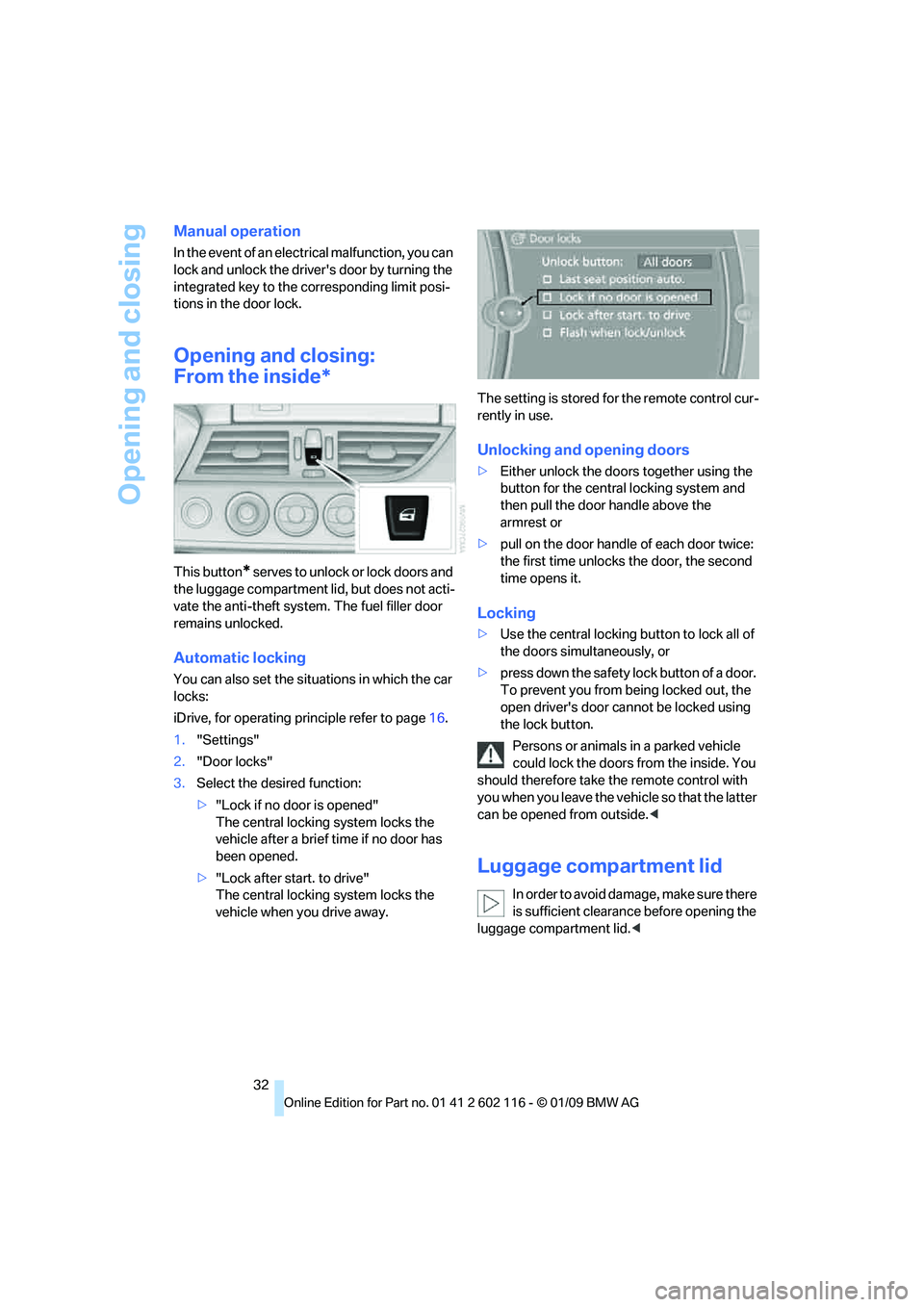
This button* s e r v e s t o u n l o c k o r l o ck d o o r s a nd
the luggage compartment lid, but does not acti-
vate the anti-theft system. The fuel filler door
remains unlocked.
Automatic locking
You can also set the situ ations in which the car
locks:
iDrive, for operating pr inciple refer to page16.
1. "Settings"
2. "Door locks"
3. Select the desired function:
>"Lock if no door is opened"
The central locking system locks the
vehicle after a brief time if no door has
been opened.
> "Lock after start. to drive"
The central locking system locks the
vehicle when you drive away. The setting is stored fo
r the remote control cur-
rently in use.
Unlocking and opening doors
>Either unlock the doors together using the
button for the central locking system and
then pull the door handle above the
armrest or
> pull on the door handle of each door twice:
the first time unlocks the door, the second
time opens it.
Locking
> Use the central locking button to lock all of
the doors simultaneously, or
> press down the safety lock button of a door.
To prevent you from being locked out, the
open driver's door cannot be locked using
the lock button.
Persons or animals in a parked vehicle
could lock the doors from the inside. You
should therefore take th e remote control with
you when you leave the ve hicle so that the latter
can be opened from outside. <
Luggage compartment lid
In order to avoid damage, make sure there
is sufficient clearance before opening the
luggage compartment lid. <
Page 104 of 248
Practical interior accessories
102
Observe the following when connecting:
>
Do not use force when plugging the con-
nector into the USB audio interface.
> Do not connect devices such as fans or
lamps to the USB audio interface.
> Do not connect a USB hard disk.
> Do not use the USB in terface to recharge
external devices.
Center armrest
Storage compartment
The center armrest contains either two cup
holders, a compartment or the cover for the
snap-in adapter
*, depending on the equipment
version. For more details on this mobile phone
cradle, see page 174.
Locking the storage compartment*
When you lock the vehicle from the outside, the
storage compartment in the center armrest is
locked as well.
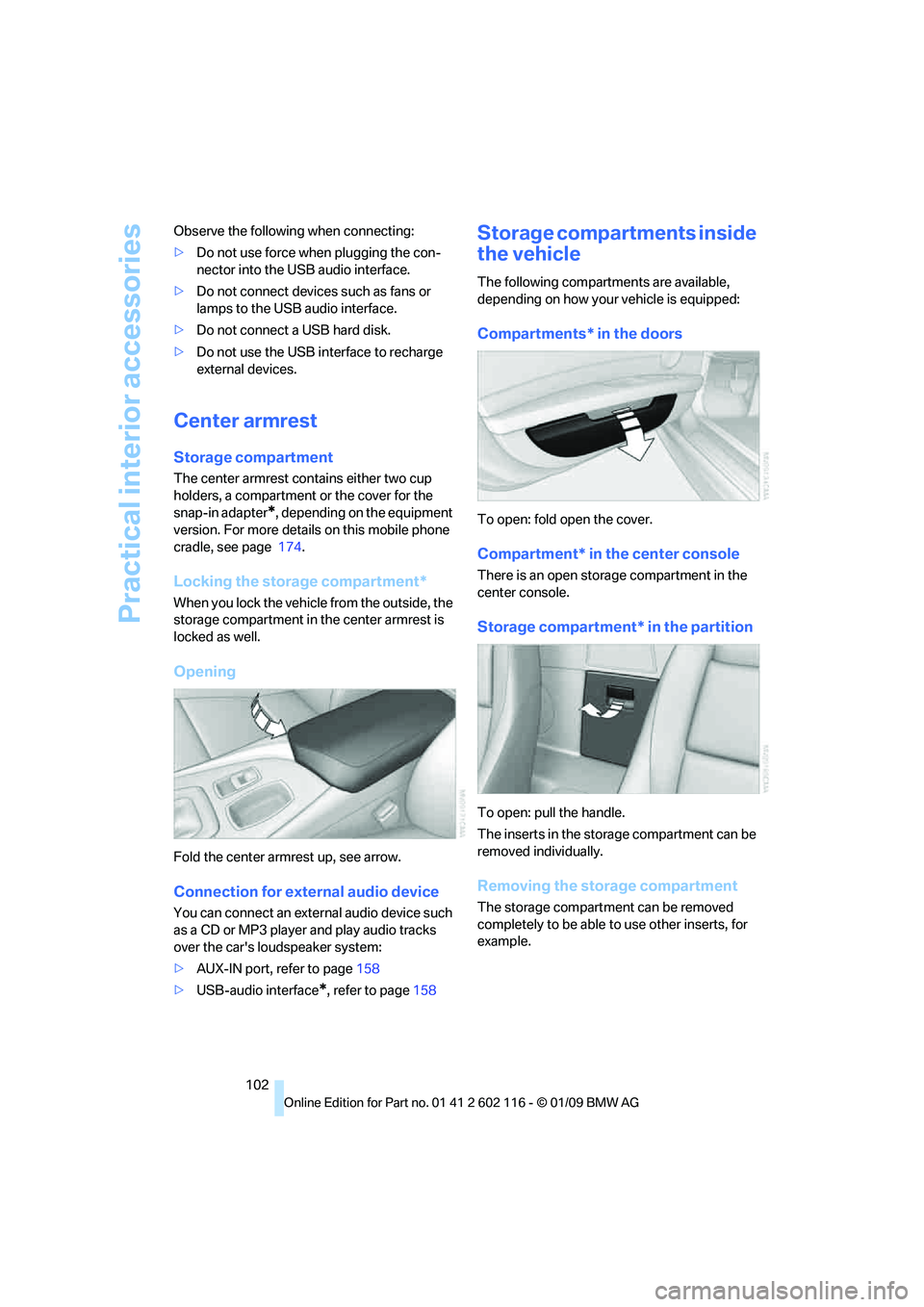
Opening
Fold the center armrest up, see arrow.
Connection for exte rnal audio device
You can connect an external audio device such
as a CD or MP3 player and play audio tracks
over the car's loudspeaker system:
>AUX-IN port, refer to page 158
> USB-audio interface
*, refer to page 158
Storage compartments inside
the vehicle
The following compartments are available,
depending on how your vehicle is equipped:
Compartments* in the doors
To open: fold open the cover.
Compartment* in the center console
There is an open storage compartment in the
center console.
Storage compartment* in the partition
To open: pull the handle.
The inserts in the storage compartment can be
removed individually.
Removing the storage compartment
The storage compartment can be removed
completely to be able to use other inserts, for
example.
Page 105 of 248
Controls
103Reference
At a glance
Driving tips
Communications
Navigation
Entertainment
Mobility
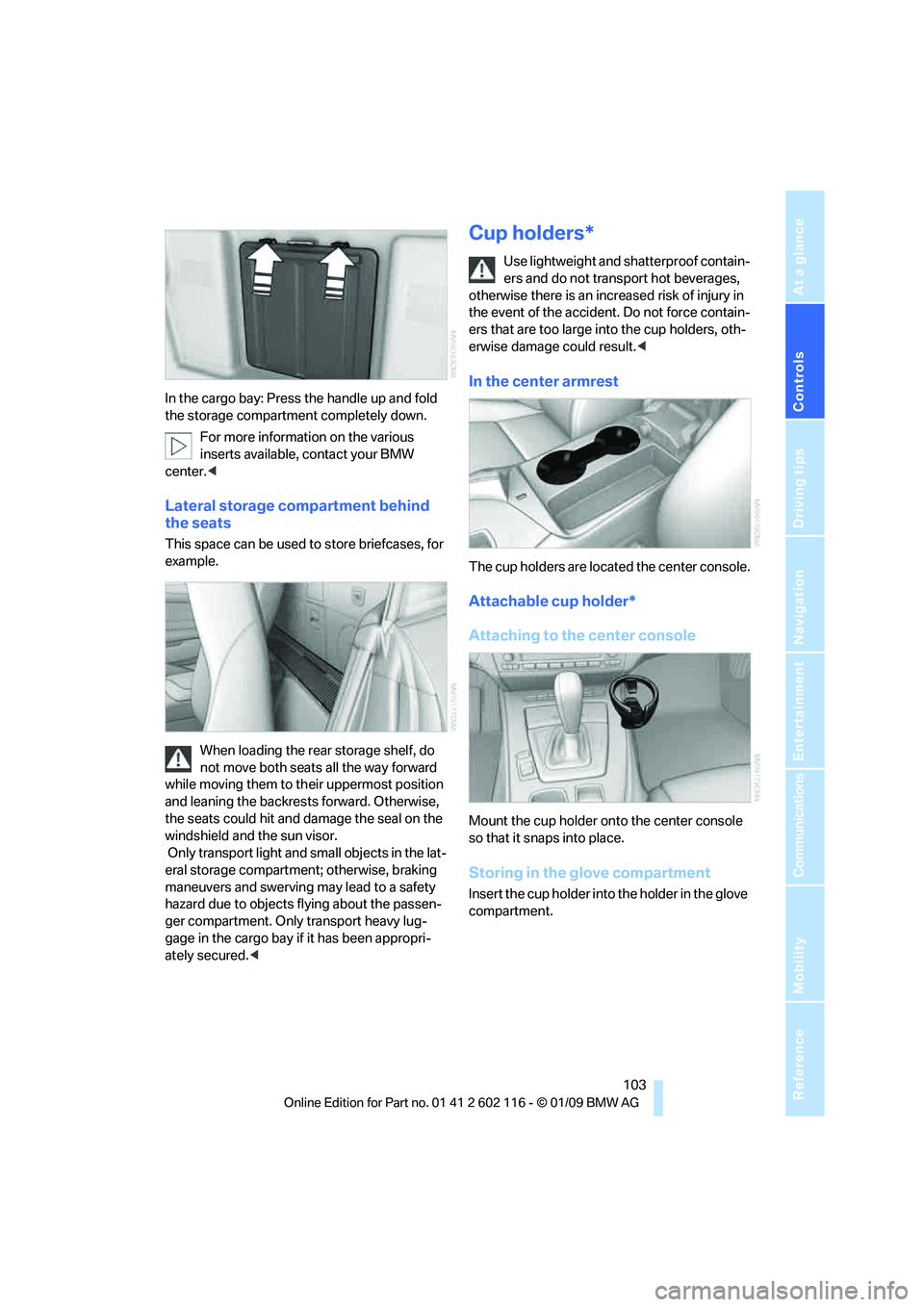
In the cargo bay: Press the handle up and fold
the storage compartment completely down.For more information on the various
inserts available, contact your BMW
center. <
Lateral storage compartment behind
the seats
This space can be used to store briefcases, for
example.
When loading the rear storage shelf, do
not move both seats all the way forward
while moving them to th eir uppermost position
and leaning the backrests forward. Otherwise,
the seats could hit and damage the seal on the
windshield and the sun visor.
Only transport light and small objects in the lat-
eral storage compartment; otherwise, braking
maneuvers and swerving may lead to a safety
hazard due to objects flying about the passen-
ger compartment. Only transport heavy lug-
gage in the cargo bay if it has been appropri-
ately secured. <
Cup holders*
Use lightweight and shatterproof contain-
ers and do not transp ort hot beverages,
otherwise there is an increased risk of injury in
the event of the accident. Do not force contain-
ers that are too large in to the cup holders, oth-
erwise damage could result. <
In the center armrest
The cup holders are located the center console.
Attachable cup holder*
Attaching to the center console
Mount the cup holder onto the center console
so that it snaps into place.
Storing in the glove compartment
Insert the cup holder into the holder in the glove
compartment.
Page 106 of 248
Practical interior accessories
104
Ashtray, front
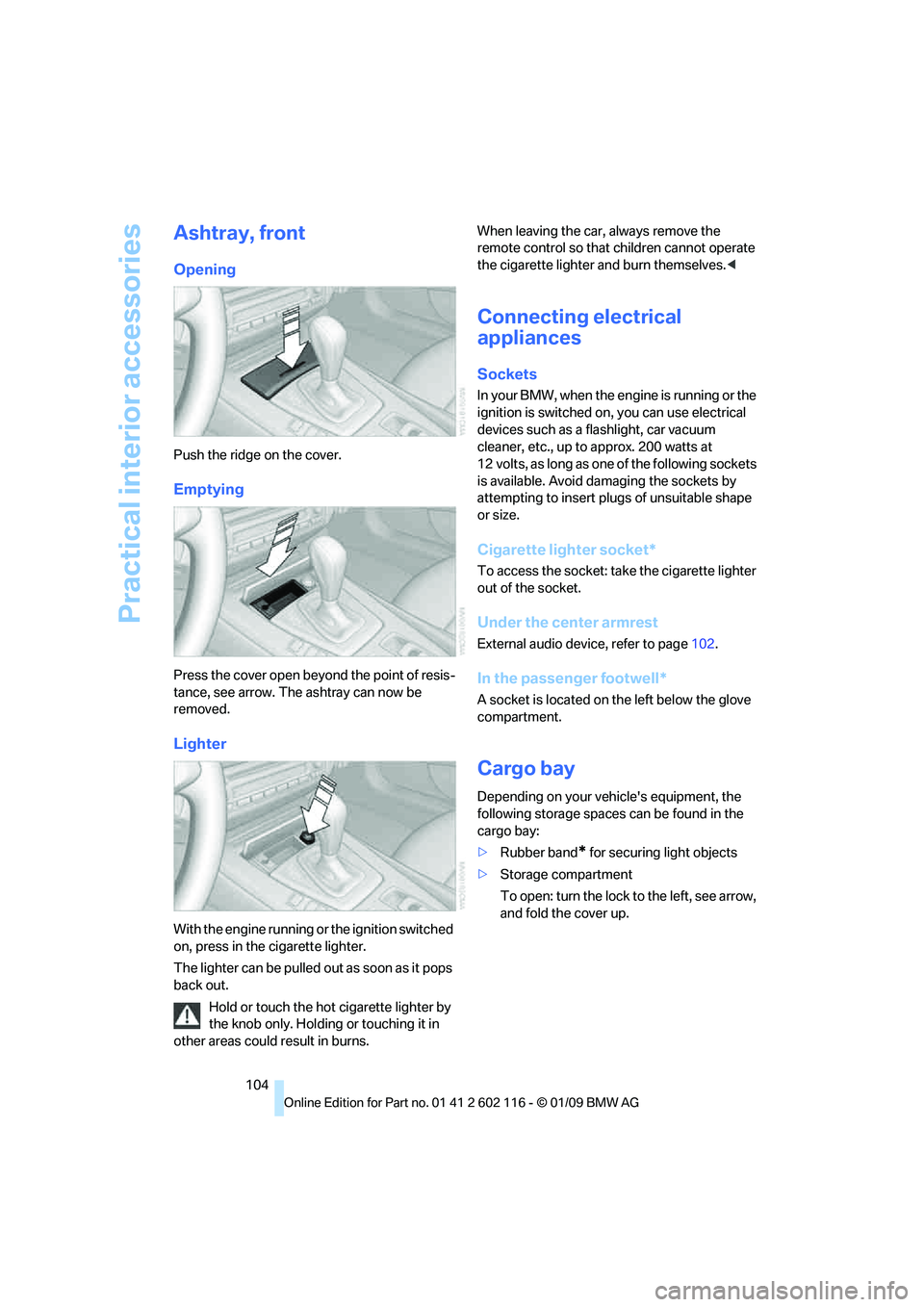
Opening
Push the ridge on the cover.
Emptying
Press the cover open beyond the point of resis-
tance, see arrow. The ashtray can now be
removed.
Lighter
With the engine running or the ignition switched
on, press in the cigarette lighter.
The lighter can be pulled out as soon as it pops
back out.
Hold or touch the hot cigarette lighter by
the knob only. Holding or touching it in
other areas could result in burns. When leaving the car,
always remove the
remote control so that children cannot operate
the cigarette lighter and burn themselves. <
Connecting electrical
appliances
Sockets
In your BMW, when the engine is running or the
ignition is switched on , you can use electrical
devices such as a flashlight, car vacuum
cleaner, etc., up to approx. 200 watts at
12 volts, as long as one of the following sockets
is available. Avoid damaging the sockets by
attempting to insert pl ugs of unsuitable shape
or size.
Cigarette lighter socket*
To access the socket: take the cigarette lighter
out of the socket.
Under the center armrest
External audio device, refer to page 102.
In the passenger footwell*
A socket is located on the left below the glove
compartment.
Cargo bay
Depending on your vehicle's equipment, the
following storage spaces can be found in the
cargo bay:
>Rubber band
* for securing light objects
> Storage compartment
To open: turn the lock to the left, see arrow,
and fold the cover up.
Page 160 of 248
External devices
158
External devices
AUX-IN port
You can connect an external audio device, for
instance an MP3 player, and play audio tracks
over the car's loudspeaker system. You can
adjust the tone using iDrive.
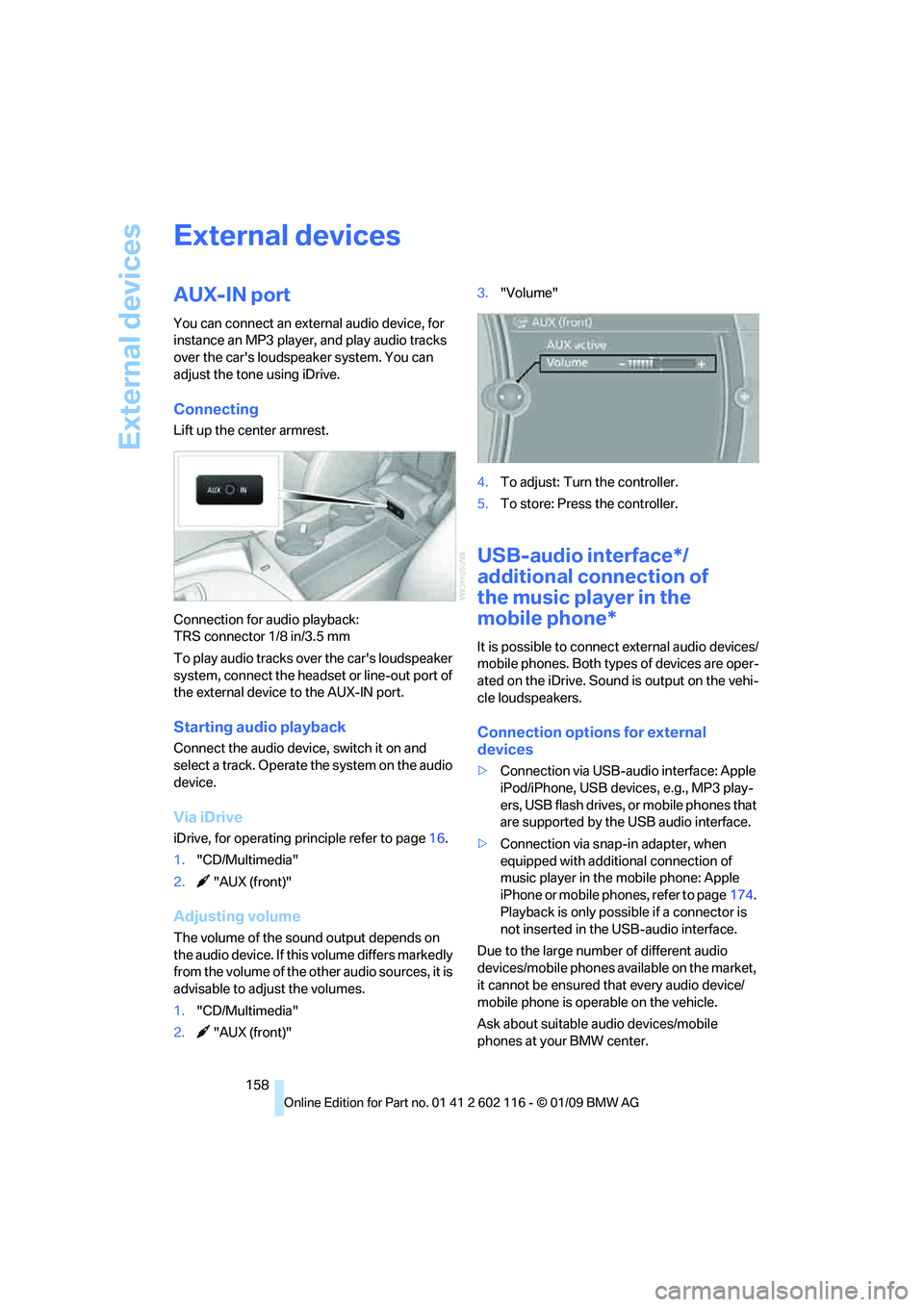
Connecting
Lift up the center armrest.
Connection for audio playback:
TRS connector 1/8 in/3.5 mm
To play audio tracks over the car's loudspeaker
system, connect the headset or line-out port of
the external device to the AUX-IN port.
Starting audio playback
Connect the audio device, switch it on and
select a track. Operate the system on the audio
device.
Via iDrive
iDrive, for operating pr inciple refer to page16.
1. "CD/Multimedia"
2. "AUX (front)"
Adjusting volume
The volume of the sound output depends on
the audio device. If this volume differs markedly
from the volume of the other audio sources, it is
advisable to adjust the volumes.
1. "CD/Multimedia"
2. "AUX (front)" 3.
"Volume"
4. To adjust: Turn the controller.
5. To store: Press the controller.
USB-audio interface*/
additional connection of
the music player in the
mobile phone*
It is possible to connec t external audio devices/
mobile phones. Both types of devices are oper-
ated on the iDrive. Sound is output on the vehi-
cle loudspeakers.
Connection options for external
devices
> Connection via USB-audio interface: Apple
iPod/iPhone, USB devices, e.g., MP3 play-
ers, USB flash drives, or mobile phones that
are supported by the USB audio interface.
> Connection via snap-in adapter, when
equipped with additional connection of
music player in the mobile phone: Apple
iPhone or mobile phones, refer to page 174.
Playback is only possib le if a connector is
not inserted in the USB-audio interface.
Due to the large number of different audio
devices/mobile phones av ailable on the market,
it cannot be ensured that every audio device/
mobile phone is operable on the vehicle.
Ask about suitable audio devices/mobile
phones at your BMW center.
Page 161 of 248
Navigation
Entertainment
Driving tips
159Reference
At a glance
Controls
Communications
Mobility
Audio files
Standard audio formats, e.g. MP3, WMA, WAV
(PCM) and AAC, and playlists in the M3U format
can be played.
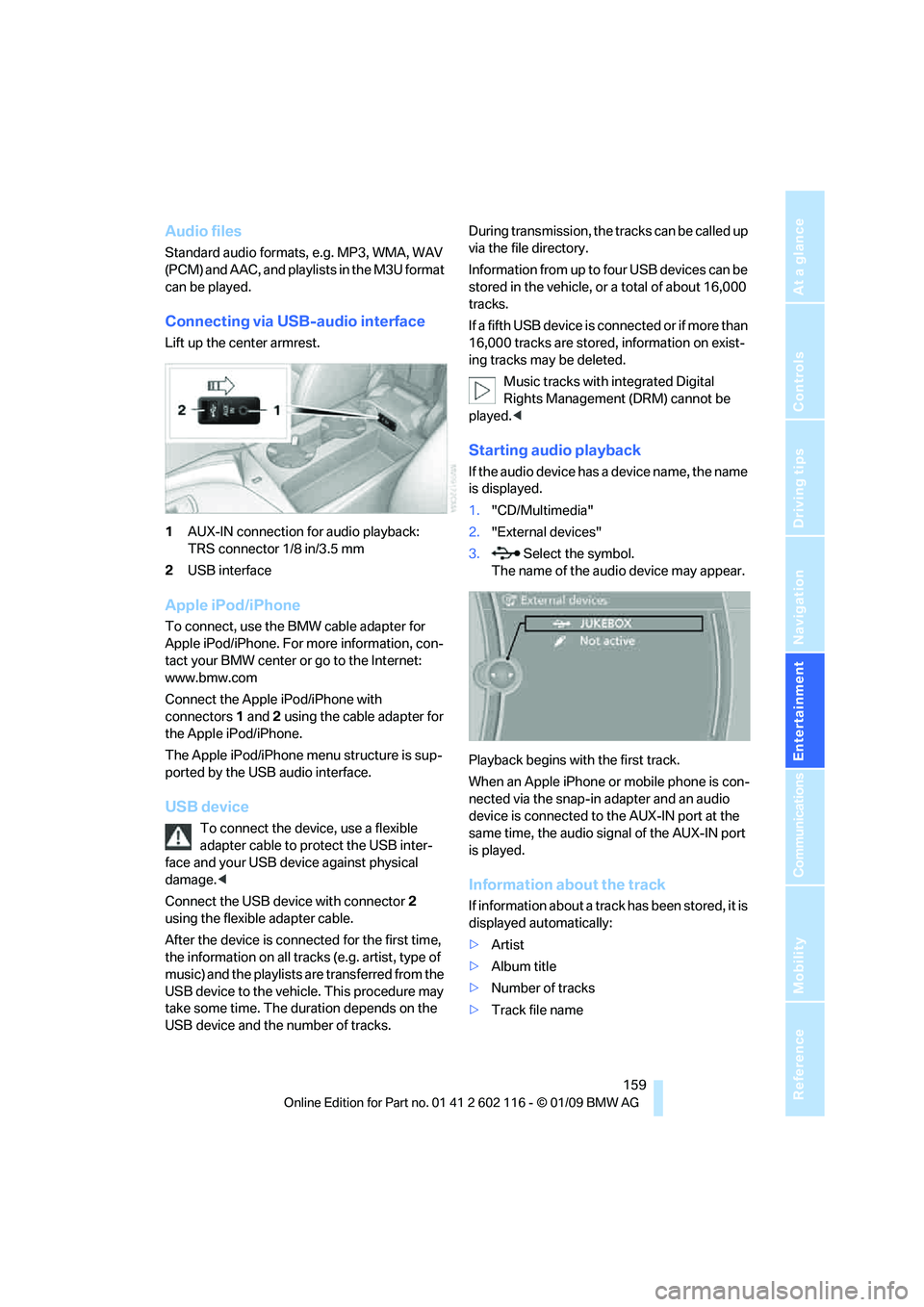
Connecting via USB-audio interface
Lift up the center armrest.
1AUX-IN connection for audio playback:
TRS connector 1/8 in/3.5 mm
2 USB interface
Apple iPod/iPhone
To connect, use the BMW cable adapter for
Apple iPod/iPhone. For more information, con-
tact your BMW center or go to the Internet:
www.bmw.com
Connect the Apple iPod/iPhone with
connectors 1 and 2 using the cable adapter for
the Apple iPod/iPhone.
The Apple iPod/iPhone menu structure is sup-
ported by the USB audio interface.
USB device
To connect the device, use a flexible
adapter cable to protect the USB inter-
face and your USB device against physical
damage. <
Connect the USB device with connector 2
using the flexible adapter cable.
After the device is connected for the first time,
the information on all trac ks (e.g. artist, type of
music) and the playlists are transferred from the
USB device to the vehicle. This procedure may
take some time. The du ration depends on the
USB device and the number of tracks. During transmission, the tracks can be called up
via the file directory.
Information from up to four USB devices can be
stored in the vehicle, or a total of about 16,000
tracks.
I f a f i f t h U S B d e v i c e i s c o n n e c t e d o r i f m o r e t h a n
16,000 tracks are stored, information on exist-
ing tracks may be deleted.
Music tracks with integrated Digital
Rights Management (DRM) cannot be
played. <
Starting audio playback
If the audio device has a device name, the name
is displayed.
1."CD/Multimedia"
2. "External devices"
3. Select the symbol.
The name of the audio device may appear.
Playback begins with the first track.
When an Apple iPhone or mobile phone is con-
nected via the snap-in adapter and an audio
device is connected to the AUX-IN port at the
same time, the audio signal of the AUX-IN port
is played.
Information about the track
If information about a track has been stored, it is
displayed automatically:
> Artist
> Album title
> Number of tracks
> Track file name
Page 232 of 248
Everything from A to Z
230
Everything from A to Z
Index
"..." Identifies Control Display texts used to select
individual functions and
refers you to the page where
these texts can be found.
A
ABS Antilock Brake System 78
Acceleration assistant, refer to Launch Control 58
Accident, refer to Sending an Emergency Request 213
Activated-charcoal filter for
automatic climate
control 97
Adaptive Head Light 89
Additional connection of the music player in the mobile
phone 158
Additives
– coolant 200
Address for navigation,
entering 119
Adjusting temperature inside the car, refer to Air
conditioner 93
Adjusting temperature inside the car, refer to Automatic
climate control 95
Adjusting the thigh support 42
Adjusting the tone during audio operation, refer to
Tone control 138
Airbags 85
– indicator/warning lamp 87
– sitting safely 41
Air conditioner 92 Air conditioning mode
– air conditioner
93
– automatic climate control 95
– ventilation 94,97
Air distribution
– automatic 96
– individual 93
– manual 93
Air flow rate 93,96
Airing, refer to Ventilation 94
Airing, refer to Ventilation 94,97
Air outlets, refer to Air vents 92
Air pressure, refer to Tire
inflation pressure 190
Air recirculation, refer to Recirculated-air
mode 93,97
Air supply
– air conditioner 93
– automatic climate control 95
– ventilation 94,97
Air vents 92
AKI, refer to Fuel specifications 189
Alarm system 33
– avoiding unintentional alarms 34
–
interior motion sensor 34
– switching off an alarm 34
– tilt alarm sensor 34
Albums of music
collection 155
All-season tires, refer to Winter tires 196
AM, waveband 141
Ambient air, refer to Recirculated-air
mode 93,97
Antenna for mobile phone 164Antifreeze
– coolant
200
– washer fluid 61
Antilock Brake System ABS 78
Anti-theft alarm system, refer
to Alarm system 33
Anti-theft system 29
– for lug bolts, refer to Lug bolt
lock 211
Approved axle loads, refer to Weights 222
Approved gross vehicle weight, refer to Weights 222
Armrest, refer to Center
armrest 102
Arrival time, refer to Computer 66
Ashtray
– front 104
Assistance systems, refer to
Driving stability control
systems 78
AUC automatic recirculated-
air control 97
Audio 138
– controls 138
– switching on/off 138
– tone control 138
– volume 138
Audio device, external 102
Automatic
– air distribution 96
– air flow rate 96
– cruise control 61
– headlamp control 88
Automatic car washes 204
Automatic climate control 92
– automatic air distribution 96
Automatic curb monitor 46
Automatic recirculated-air control AUC 97
Page 233 of 248
Reference 231
At a glance
Controls
Driving tips
Communications
Navigation
Entertainment
Mobility
Automatic Service Request 184
Automatic transmission with Steptronic 53
– interlock 53,54
– overriding selector lever lock 55
– shiftlock, refer to Changing
selector lever position 54
– sport program 54
– towing 215
– tow-starting 215
AUTO program for automatic
climate control 96
AUX-IN
– port 102
AUX-IN port 158
Average fuel consumption 66
– setting the units 68
Average speed 66
Avoiding unintentional alarms 34
Axle loads, refer to Weights 222
B
Backrest contour, refer to
Lumbar support 43
Backrests, refer to Seat adjustment 42
Backrest width adjustment 43
Backup lamps
– replacing bulb 210
Backup lamps, refer to Tail lamps 210
Band-aids, refer to First-aid
pouch 214
Bar, refer to Towing methods 216
Base plate for telephone or mobile phone
– refer to Snap-in adapter 174
– refer to Snap-in adapter in the center armrest storage
compartment 102
Bass, tone setting 138Battery
212
– charging 212
– disposal 36,212
– jump starting 214
– remote control 28
– temporary power failure 212
Battery for mobile phone 175
Battery renewal
– remote control 36
– remote control for vehicle 36
Being towed 216
Belts, refer to Safety belts 44
Belt tensioner, refer to Safety
belts 44
Beverage holders, refer to Cup holders 103
Blower, refer to Air flow rate 93,96
Bluetooth, activating/
deactivating 166
Bluetooth, refer to separate Owner's Manual
BMW
– car shampoo 207
BMW Assist, activating 180
BMW Assist 178
BMW center 184
BMW Homepage 4
BMW Maintenance System 202
BMW Search 180
BMW webpage 4
Bottle holders, refer to Cup holders 103
Brake
– parking brake 52
Brake assist, refer to Dynamic
Brake Control DBC 78
Brake fluid, refer to Service requirements 69
Brake lamps
– replacing bulb 210
Br
ake pads 110
– breaking in 110
Brake rotors 112
– brakes 110
– breaking in 110 Brakes
– ABS
78
– BMW Maintenance System 202
– breaking in 110
– service requirements 69
Brakes, refer to Braking safely 112
Brake system 110
– BMW Maintenance System 202
– breaking in 110
– disc brakes 112
Breakdown services, refer to Roadside Assistance 213
Breaking in the clutch 110
Breaking in the differential, refer to Engine and
differential 110
Break-in period 110
Brightness of Control Display 76
Bulb changing, refer to Lamps and bulbs 208
Button for starting the engine,
refer to Start/stop button 50
Buttons on the steering wheel 11
Buttons on the steering wheel 11
C
California Proposition 65
warning 6
Call
– accepting 167
– ending 168
– rejecting 168
Calling, refer to Phone
numbers, dialing 168
Can holders, refer to Cup holders 103
Capacities 222
Capacity of the cargo bay 222
Car battery, refer to Vehicle
battery 212
Car care, refer to Care 204
Page 234 of 248
Everything from A to Z
232
Care
204
– automatic car washes 204
– care products 204
– carpets 206
– CD/DVD drives 207
– chrome parts 206
– displays 207
– exterior 204
– fine wood parts 207
– headlamps 205
– high-pressure washer 205
– interior 206
– leather 206
– light-alloy wheels 206
– paintwork 205
– plastic parts 207
– retractable hardtop 205
– rubber seals 206
– safety belts 207
– sensors and cameras 207
– upholstery and cloth trim 206
– washing the car manually 205
– windows 205
Cargo, securing 114
Cargo bay
– capacity 222
– convenient access 35
– lamp, refer to Interior lamps 90
– opening from inside 33
– opening from outside 33
Cargo loading
– securing cargo 114
– stowing cargo 114
– vehicle 113
Car jack
– jacking points 211
Car key, refer to Integrated
key/remote control 28
Car phone
– installation location, refer to
Center armrest 102
– refer to separate Owner's Manual
Car phone, refer to Telephone 164
Car radio, refer to Radio 141Car shampoo
207
Car wash 113
– with convenient access 36
Car wash, refer to the Caring for your vehicle brochure
Catalytic converter, refer to Hot exhaust system 111
CBS Condition Based
Service 202
CD, audio playback 146
CD/DVD changer 14
6
– controls 138
– fast forward/reverse 148
– random sequence 147
– switching on/off 138
– tone control 138
– volume 138
CD/DVD player 146
– controls 138
– fast forward/reverse 148
– random sequence 147
– switching on/off 138
– tone control 138
– volume 138
CD changer
– selecting a track 146
CD player
– selecting a track 146
Center armrest 102
Center brake lamp
– replacing bulb 211
Center console, refer to Around the center
console 14
Central locking
– from inside 32
– from outside 29
Central locking system 29
– convenient access 35
– setting unlocking
characteristics 29
Changes, technical, refer to For your own safety 5
Changing bulbs, refer to Lamps and bulbs 208
Changing the measurement
units on the Control
Display 68
Changing wheels 211Chassis number, refer to
Engine compartment 198
Check Control 73
Child-restraint systems 48
Child seats, refer to
Transporting children
safely 48
Chrome parts 207
Chrome polish 207
Cigarette lighter, refer to Lighter 104
Cleaning headlamps 60
– washer fluid 61
Cleaning your BMW, refer to Care 204
Clock 64
– 12h/24h mode 72
– setting the time and date 72
– setting time 71
Closing
– from inside 32
– from outside 29
Cockpit 10
Cold start, refer to Starting
the
engine 51
Combined instrument, refer to Instrument cluster 12
Comfort access, refer to
Convenient access 35
Comfort area, refer to Around the center console 14
Compartment for remote control, refer to
Ignition lock 50
Compass 100
Computer 65
– displays on Control
Display 66
Computer, refer to iDrive 16
Concierge service 179
Condensation, refer to When the vehicle is parked 112
Condition Based Service
CBS 202
Configuring settings, refer to Personal Profile 28
Confirmation signals for locking/unlocking the
vehicle 31