change time BMW Z4 SDRIVE35I 2012 User Guide
[x] Cancel search | Manufacturer: BMW, Model Year: 2012, Model line: Z4 SDRIVE35I, Model: BMW Z4 SDRIVE35I 2012Pages: 220, PDF Size: 9.9 MB
Page 116 of 220
Professional RadioVehicle equipment
This chapter describes all series equipment as
well as country-specific and special equipment
offered for this model series.Therefore, it alsodescribes equipment that may not be found in
your vehicle, for instance due to the selected
special equipment or the country version. This
also applies to safety-related functions and sys‐
tems.
General information
At a glance
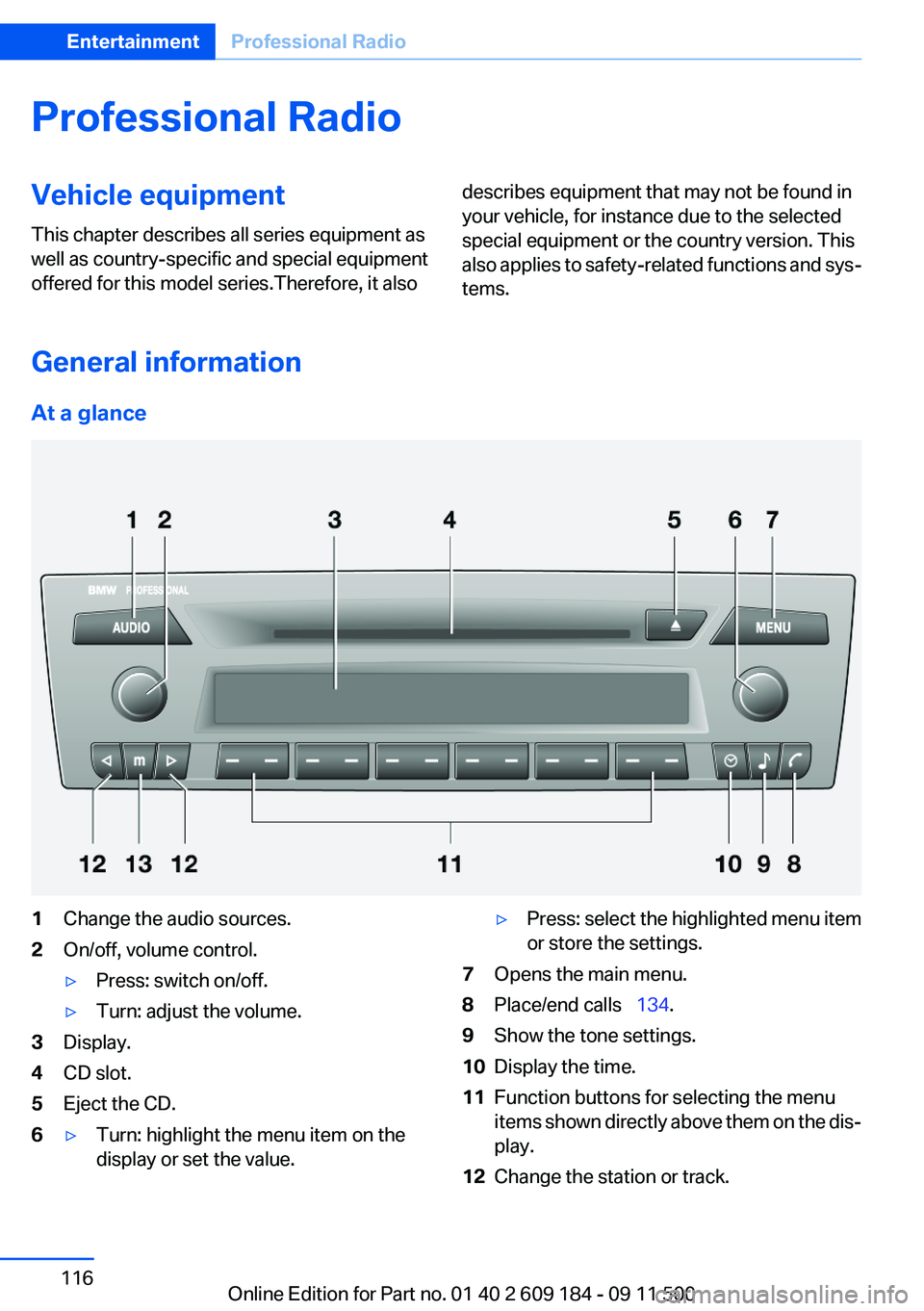
1Change the audio sources.2On/off, volume control.▷Press: switch on/off.▷Turn: adjust the volume.3Display.4CD slot.5Eject the CD.6▷Turn: highlight the menu item on the
display or set the value.▷Press: select the highlighted menu item
or store the settings.7Opens the main menu.8Place/end calls 134.9Show the tone settings.10Display the time.11Function buttons for selecting the menu
items shown directly above them on the dis‐
play.12Change the station or track.Seite 116EntertainmentProfessional Radio116
Online Edition for Part no. 01 40 2 609 184 - 09 11 500
Page 119 of 220
2."RESET"
Time
Displaying the time
Press the button.
When the ignition or the radio ready state is
switched off, the time is displayed for several
seconds.
Setting the time, date, and time format
1.Switch on the radio ready state or the igni‐
tion.2. Press the button.3."CONFIG"4."TIME"5.Select the desired category.6.Create the settings and press the right knob.
Setting the units of measure of the
computer and the language
1.Switch on the radio ready state or the igni‐
tion.2. Press the button.3."CONFIG"4.▷"DIST": change the unit of measure for
the range.▷"LANG": select the language of the dis‐
play texts.▷"CONSMP" : change the unit of measure
for the average fuel consumption.▷"TEMP" : change the unit of measure for
the external temperature.5.Highlight the desired menu item and press
the button.6.Create the desired setting.
The settings of the units of measure are adopted
for display on the radio and in the instrument
cluster and are stored in the remote control cur‐
rently in use.
Computer
The following vehicle information can be call up
via the computer:▷Average fuel consumption▷Average speed▷Range▷External temperature
Displaying information
1.Switch on the radio ready state or the igni‐
tion.2. Press the button.3."COMP"
Average fuel consumption
The average fuel consumption is calculated for
the time during which the engine is running.
To start calculation of the average fuel con‐
sumption:
1."CONSMP"2."RESET"
The previous display is set to zero and the sys‐
tem begins recalculating the average fuel con‐
sumption.
Average speed
The average speed is calculated for the time
during which the engine is running.
To start calculation of the average speed:
1."SPEED"2."RESET"
Estimated range
"RANGE"
The display shows the distance that can be
driven on the remaining fuel quantity, taking into
Seite 119Professional RadioEntertainment119
Online Edition for Part no. 01 40 2 609 184 - 09 11 500
Page 123 of 220
Changing the channel using the buttons
Press the button for the correspond‐
ing direction. The next enabled channel is
opened.
Search
1. Press and hold the button for the
corresponding direction. The activated
channels appear on the display one after the
other.2.Release the button to select the displayed
channel.
Notes
When there is a signal blockage or the transmis‐
sion is suspended momentarily for more than
4 seconds, a message will appear on the display.
Service may be interrupted or unavailable for
specific reasons such as environmental or topo‐
graphic conditions and others that Satellite
Radio cannot directly control. Signal may not be
available under tunnels, in parking garages, next
to tall buildings, nearby trees with dense foliage,
nearby mountains or other possible strong sour‐
ces of radio interference. Service should resume
normally after the source of signal unavailability
has been cleared.
CD/multimedia
CD player and CD/DVD changer
Filling the CD player
Insert the CD into the CD drive with the printed
side up.
Playback begins automatically.
Reading can take a few minutes with com‐
pressed audio files.
Starting the CD player
A CD is contained in the CD player.1.Switch on the car radio if necessary.2. Press the button.3."CD"
Starting the CD/DVD changer
1.Switch on the car radio if necessary.2.Fill the CD/DVD compartments, refer to
page 125.3. Press the button.4."DVD"5.Press the button of the desired CD/DVD
number.
The corresponding CD/DVD number is shown
on the display. At the end of the last track, the
device changes to the next CD/DVD.
Skipping to another track
Press the button repeatedly until the
desired track is played.
With the right knob:
Turn the right knob until the desired track is
played back.
Fast forward/reverse
Hold the button down.
Tracks can be heard but are distorted.
Briefly playing and selecting a track
"SC"
All tracks are played briefly one after the other.
To interrupt the function and select a track:
"SC"
Random playback
"RND"
Seite 123Professional RadioEntertainment123
Online Edition for Part no. 01 40 2 609 184 - 09 11 500
Page 171 of 220
Use a clean tissue, cloth or something similar, or
hold the bulb by its base.◀
Light-emitting diodes LED
Light-emitting diodes installed behind translu‐
cent lenses serve as the light source for many of
the controls and displays in your vehicle.
These light-emitting diodes, which operate us‐
ing a concept similar to that applied in conven‐
tional lasers, are officially designated as Class 1
light-emitting diodes.
Do not remove the covers
Do not remove the covers, and never stare
into the unfiltered light for several hours; other‐
wise, irritation of the retina could result.◀
Headlamp glass
Condensation can form on the inside of the ex‐
ternal lamps in cool or humid weather. When you
drive with the lights switched on, the conden‐
sation evaporates after a short time. The head‐
lamp glasses do not need to be changed.
If the condensation in the headlamps does not
evaporate after trips with the lights switched on,
and the amount of moisture in the headlamps
increases, for example if water droplets form,
have them checked by your service center.
Xenon headlamps
Because of the long life of these bulbs, the like‐
lihood of failure is very low. Switching the lamps
on and off frequently shortens their life.
Do not perform work/bulb replacement on
xenon headlamps
Have any work on the xenon lighting system, in‐
cluding bulb replacement, performed only by a
service center.
Due to the high voltage present in the system,
there is the danger of fatal injuries if work is car‐
ried out improperly.◀Parking lamps, roadside parking lamps,
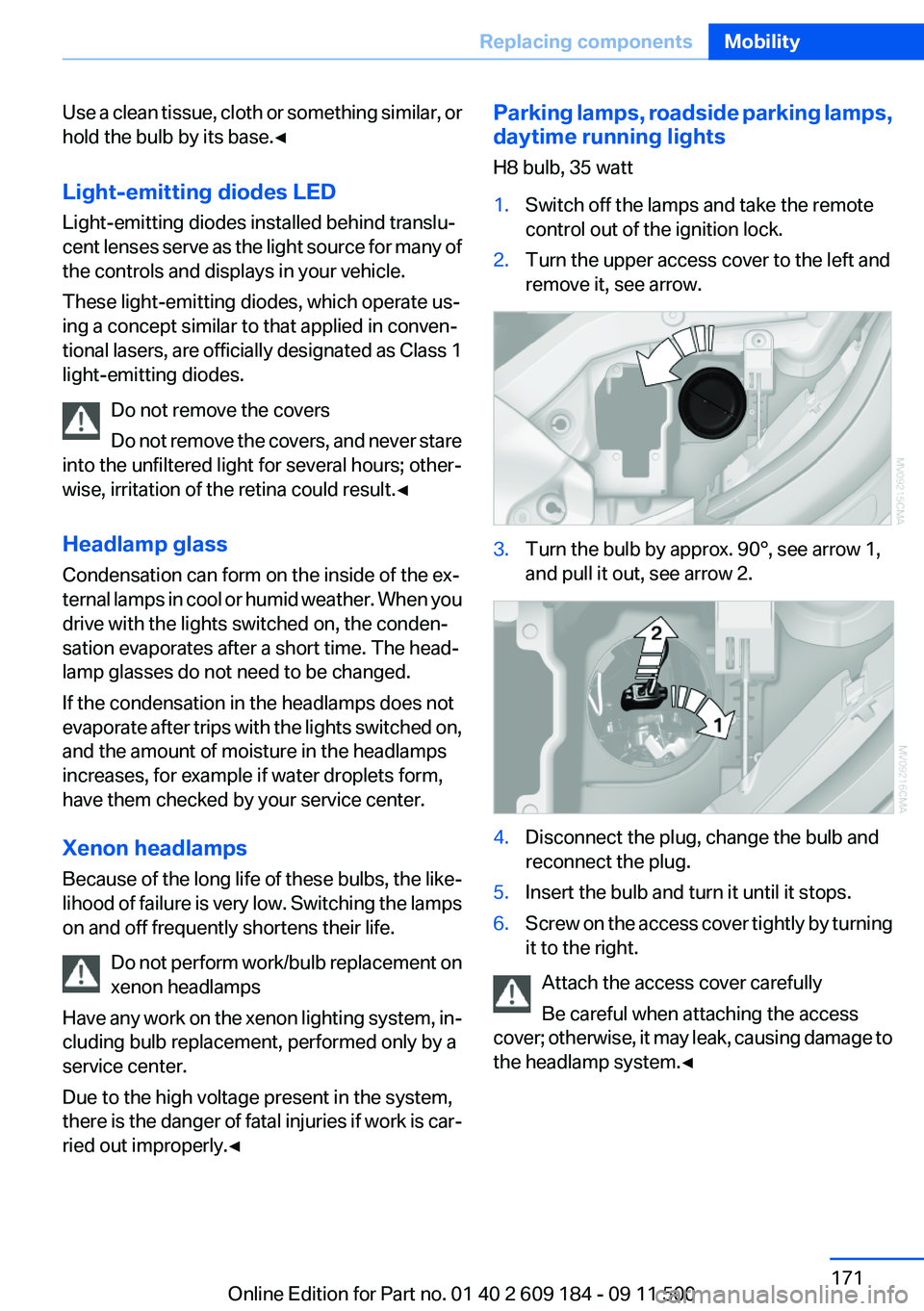
daytime running lights
H8 bulb, 35 watt1.Switch off the lamps and take the remote
control out of the ignition lock.2.Turn the upper access cover to the left and
remove it, see arrow.3.Turn the bulb by approx. 90°, see arrow 1,
and pull it out, see arrow 2.4.Disconnect the plug, change the bulb and
reconnect the plug.5.Insert the bulb and turn it until it stops.6.Screw on the access cover tightly by turning
it to the right.
Attach the access cover carefully
Be careful when attaching the access
cover; otherwise, it may leak, causing damage to
the headlamp system.◀
Seite 171Replacing componentsMobility171
Online Edition for Part no. 01 40 2 609 184 - 09 11 500
Page 216 of 220
SPORT+ program, DynamicDriving Control 83
Sport program– 7-gear automatic transmis‐
sion 57– 8-gear automatic transmis‐
sion 54
SPORT program, Dynamic
Driving Control 83
Spray nozzles, refer to Clean‐ ing the windshield and head‐
lamps 51
Stability control systems 81
Start/Stop button
– Starting the engine 46– Switching off the engine 46
Starting aid 177
Status of Owner's Manual 6
Steam jets 182
Steering wheel
– Adjusting 42– Buttons on the steering
wheel 12– Lock 45
Stopping
– Engine 46
Storage compartments 104
Storage nets 100
Storage, tires 162
Storing the seat position, refer to Seat and mirror mem‐
ory 39
Storing the vehicle 185
Summer tires, refer to Wheels and tires 155
Summer tires, tread 160
Suspension settings 82
Switches, refer to Cockpit 12
Switch for Dynamic Driving Control 82
Switching off
– Engine 46– Vehicle 46
Symbols 6
T
Tachometer 61
Tailgate, opening from the in‐
side 27
Tailgate, refer to Trunk lid 27
Tail lamps 172
Tail lamps– Bulb replacement 172, 173
Tank display 61
Technical changes, refer to Safety 6
Technical data 202, 203
Telephone, installation loca‐ tion, refer to Center arm‐
rest 103
TeleService 146
Temperature, air condi‐ tioner 91
Temperature, automatic cli‐ mate control 92
Temperature, coolant 61
Temperature display
– External temperature 60– External temperature warn‐
ing 60– Setting the units 63
Temperature, engine oil 61
Theft alarm system, refer to Alarm system 30
Thigh support adjustment 37
Third brake lamp, refer to Cen‐ ter brake lamp 173
Through-loading opening with integrated transport bag 101
Tilting the passenger side mir‐ ror 40
Time
– Setting the time 64
Tire age 159
Tire damage 160
Tire identification marks 158
Tire pressure monitoring, refer to FTM 75
Tire Pressure Monitor TPM 77
Tire Pressure Monitor TPM
– Resetting the system 78– System limitations 77– Warning lamp 78Tire Quality Grading 159
Tires, changing 161
Tires, flat tire 174
Tire size 158
Tires, pressure loss 78
Tires, pressure monitoring, re‐ fer to Tire Pressure Monitor
TPM 77
Tires, run-flat tires 161
Tire tread 160
Tool kit, refer to Onboard ve‐ hicle tool kit 170
Tools, refer to Onboard vehicle tool kit 170
Torque, refer to Engine data 202
Tow bar 180
Tow fitting– Screw thread 179
Tow fittings
– For tow-starting and tow‐
ing 179
Towing 179
Towing methods 180
Tow rope 180
Tow-starting 179, 181
TPM, refer to Tire Pressure Monitor TPM 77
Traction control 82
TRACTION program, Dynamic Driving Control 83
Transmission
– 7-gear automatic transmis‐
sion with dual clutch 55– 8-gear automatic transmis‐
sion 53– Manual transmission 52– Unlocking transmission lock
manually, for 7-gear auto‐
matic transmission 58
Transmission lock, unlocking
manually 58
Transmission lock, unlocking manually, with 7-gear auto‐
matic transmission 58
Seite 216ReferenceEverything from A to Z216
Online Edition for Part no. 01 40 2 609 184 - 09 11 500