mirror BMW Z4 SDRIVE35I 2012 User Guide
[x] Cancel search | Manufacturer: BMW, Model Year: 2012, Model line: Z4 SDRIVE35I, Model: BMW Z4 SDRIVE35I 2012Pages: 220, PDF Size: 9.9 MB
Page 96 of 220
Interior equipmentVehicle equipment
This chapter describes all series equipment as
well as country-specific and special equipment
offered for this model series.Therefore, it also
describes equipment that may not be found in
your vehicle, for instance due to the selected
special equipment or the country version. This
also applies to safety-related functions and sys‐
tems.
Universal Garage Door
Opener
The concept
The Universal Garage Door Opener can be used
to operate up to 3 functions in radio-controlled
systems, such as garage door drives or lighting
systems. The Universal Garage Door Opener
replaces up to 3 different hand-held transmit‐
ters. To operate it, the buttons on the interior
rearview mirror must be programmed for the de‐
sired functions. The hand-held transmitter for
the system is needed for the programming pro‐
cedure.
During programming
During programming and before activat‐
ing a device using the integrated universal re‐
mote control, ensure that there are no people,
animals, or objects in the range of movement of
the remote-controlled device; otherwise, there
is a risk of injury or damage.
Also follow the safety instructions of the hand-
held transmitter.◀
Before selling the vehicle, delete the stored
functions for security reasons.
Compatibility If this symbol is printed on the packaging
or in the operating instructions of thesystem being operated, the system is generally
compatible with the Universal Garage Door
Opener.
If you have any questions, please contact:▷Your service center.▷www.homelink.com on the Internet.
HomeLink is a registered trademark of Johnson
Controls, Inc.
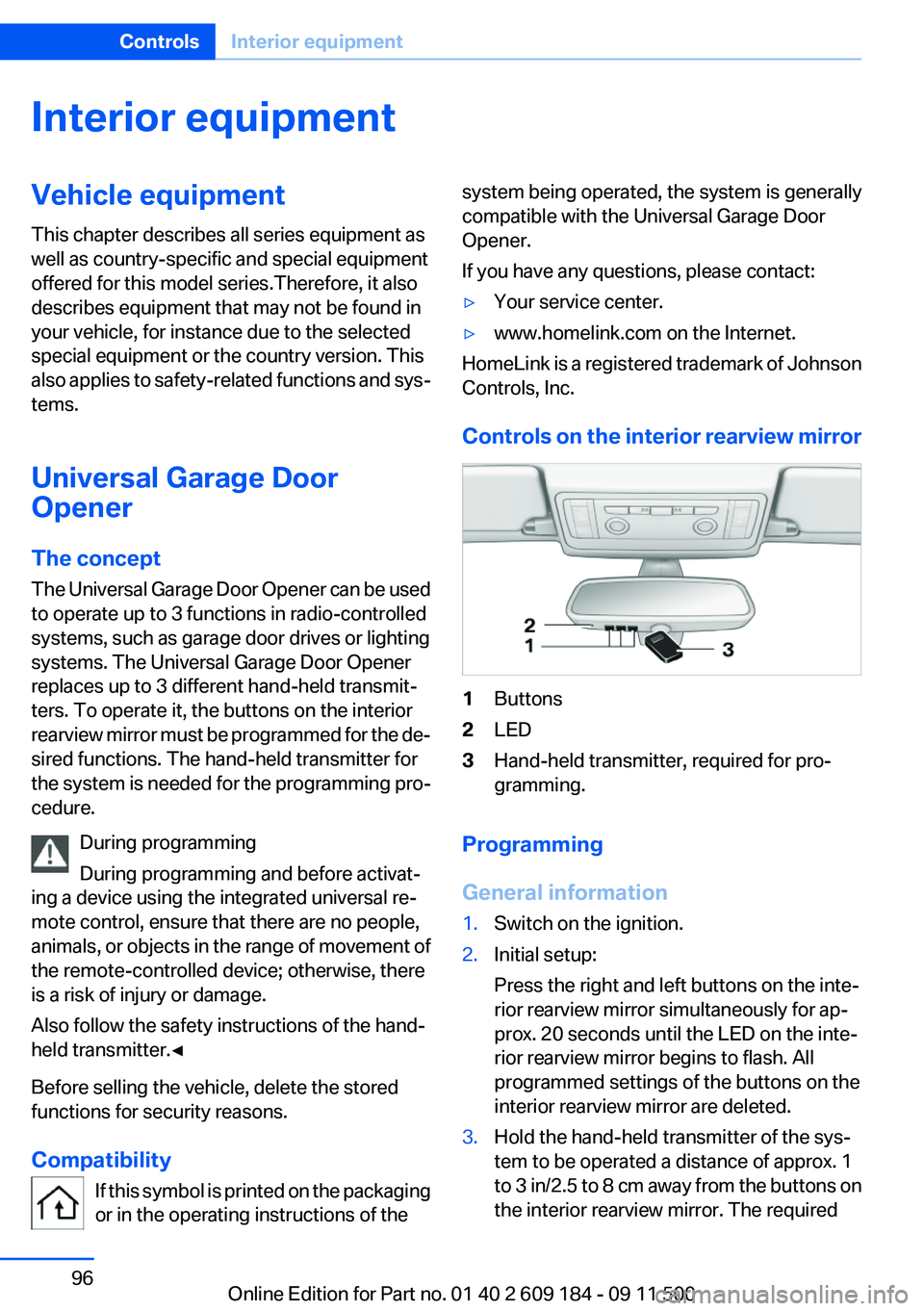
Controls on the interior rearview mirror
1Buttons2LED3Hand-held transmitter, required for pro‐
gramming.
Programming
General information
1.Switch on the ignition.2.Initial setup:
Press the right and left buttons on the inte‐
rior rearview mirror simultaneously for ap‐
prox. 20 seconds until the LED on the inte‐
rior rearview mirror begins to flash. All
programmed settings of the buttons on the
interior rearview mirror are deleted.3.Hold the hand-held transmitter of the sys‐
tem to be operated a distance of approx. 1
to 3 in/2.5 to 8 cm away from the buttons on
the interior rearview mirror. The requiredSeite 96ControlsInterior equipment96
Online Edition for Part no. 01 40 2 609 184 - 09 11 500
Page 97 of 220
distance depends on the particular hand-
held transmitter.4.Press the button of the desired function on
the hand-held transmitter and the button
being programmed on the interior rearview
mirror simultaneously and hold. The LED on
the interior rearview mirror flashes slowly at
first.5.When the LED flashes more rapidly, release
both buttons. Rapid flashing indicates that
the button on the interior rearview mirror has
been programmed.
If the LED does not flash faster after 60 sec‐
onds, change the distance between the in‐
terior rearview mirror and the hand-held
transmitter and repeat the step. Multiple tri‐
als at different distances may be necessary.
Wait at least 15 seconds between trials.
Canada: If the programming procedure with
the hand-held transmitter was interrupted,
press and hold the button on the interior
rearview mirror and press the button on the
hand-held transmitter multiple times for
2 seconds each and release.6.To program additional functions on other
buttons, repeat steps 3 to 5.
The systems can be operated with the buttons
on the interior rearview mirror.
Special characteristics of alternating-
code radio systems
If the system cannot be operated after repeated
programming, check whether the system to be
operated uses an alternating-code system.
Read the operating instructions of the system or
press and hold the programmed button on the
interior rearview mirror. If the LED on the interior
rearview mirror flashes rapidly at first and then
lights up continuously for 2 seconds, the system
is equipped with an alternating-code system.
This flashing LED pattern repeats itself for ap‐
prox. 20 seconds.
In systems with an alternating-code system, the
Universal Garage Door Opener and the system
must be additionally synchronized.
Please obtain additional information on syn‐
chronization in the operating instructions of the
system being set up.
The systems will be easier to synchronize with
the aid of a second person.
Synchronization:1.Park the vehicle within range of the remote-
controlled system.2.Program the corresponding button on the
interior rearview mirror as described.3.Identify and press the synchronization but‐
ton on the system being set up. You have
approx. 30 seconds for the next step.4.Press and hold the button on the interior
rearview mirror for approx. 3 seconds and
then release it. Repeat this step up to three
times if necessary to complete the synchro‐
nization procedure. When synchronization
is completed, the programmed function is
executed.
Reprogramming individual buttons
1.Switch on the ignition.2.Hold the hand-held transmitter at a distance
of approx. 1 to 3 in/2.5 to 8 cm from the
memory buttons.
The required distance depends on the par‐
ticular hand-held transmitter.3.Press the memory button of the Universal
Garage Door Opener.4.If the LED flashes slowly after approx.
20 seconds, press the transmit button on
the hand-held transmitter.5.Release both buttons when the LED flashes
rapidly.
If the LED does not flash rapidly after approx.
60 seconds, change the distance and repeat
the step.Seite 97Interior equipmentControls97
Online Edition for Part no. 01 40 2 609 184 - 09 11 500
Page 98 of 220
Canada: if the LED does not flash rapidly af‐
ter approx. 60 seconds, change the distance
and repeat the step. If programming was
aborted by the hand-held transmitter, hold
down the memory button and press and re‐
lease the button on the hand-held transmit‐
ter several times for 2 seconds.
Controls
Prior to operation
Before operating a unit with the Universal
Garage Door Opener, ensure that there are no
people, animals, or objects in the range of move‐
ment of the system; otherwise, there is a risk of
injury or damage.
Also follow the safety instructions of the hand-
held transmitter.◀
The system, such as the garage door, can be
operated using the button on the interior rear‐
view mirror with the engine running or the igni‐
tion switched on. When you are within the re‐
ception range of the system, press and hold the
button until the function is initiated. The LED on
the interior rearview mirror lights up continu‐
ously while the radio signal is being transmitted.
Deleting stored functions
Press the right and left buttons on the interior
rearview mirror simultaneously for approx.
20 seconds until the LED flashes rapidly. All
stored functions are deleted. The functions can‐
not be deleted individually.
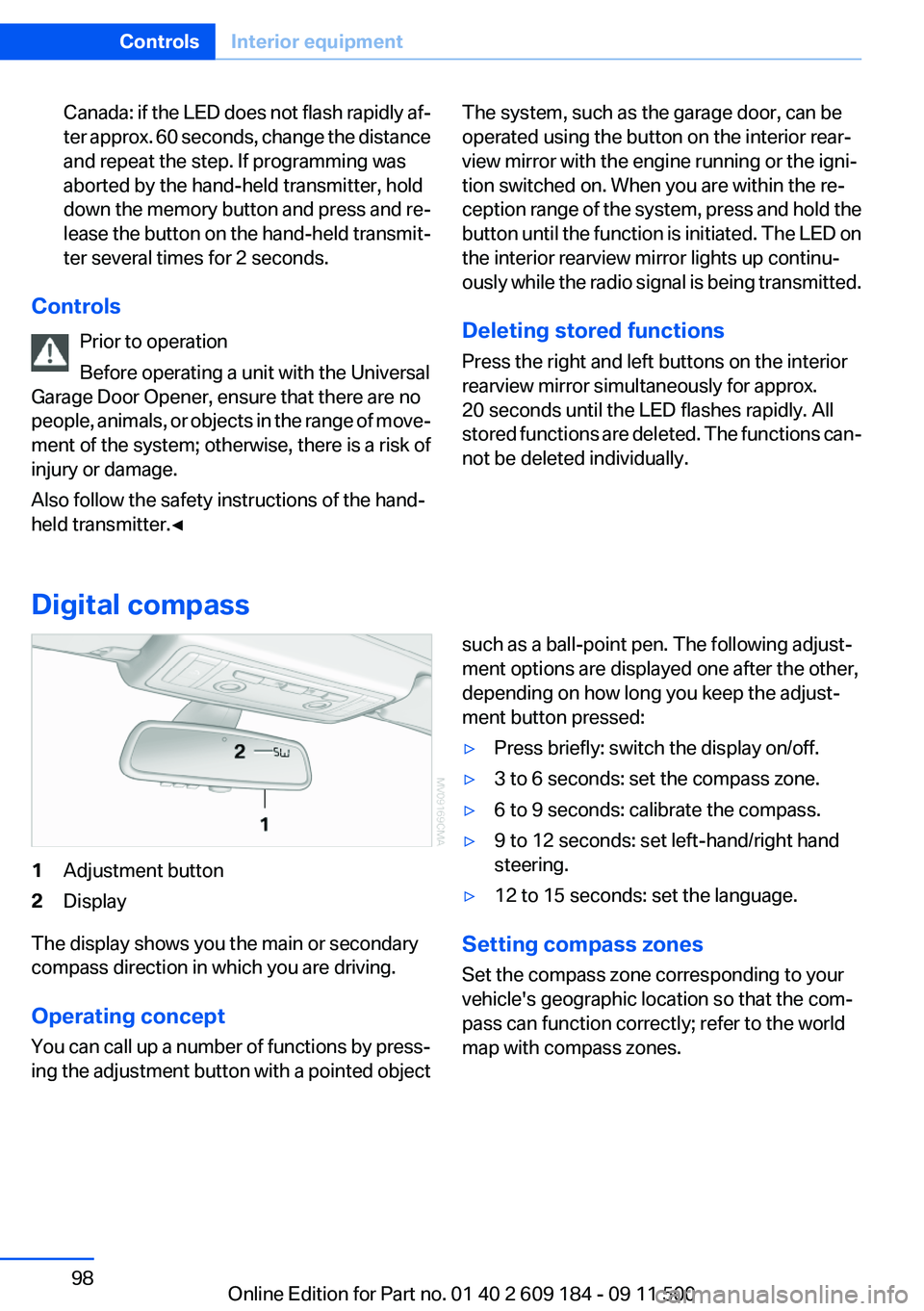
Digital compass
1Adjustment button2Display
The display shows you the main or secondary
compass direction in which you are driving.
Operating concept
You can call up a number of functions by press‐
ing the adjustment button with a pointed object
such as a ball-point pen. The following adjust‐
ment options are displayed one after the other,
depending on how long you keep the adjust‐
ment button pressed:▷Press briefly: switch the display on/off.▷3 to 6 seconds: set the compass zone.▷6 to 9 seconds: calibrate the compass.▷9 to 12 seconds: set left-hand/right hand
steering.▷12 to 15 seconds: set the language.
Setting compass zones
Set the compass zone corresponding to your
vehicle's geographic location so that the com‐
pass can function correctly; refer to the world
map with compass zones.
Seite 98ControlsInterior equipment98
Online Edition for Part no. 01 40 2 609 184 - 09 11 500
Page 112 of 220
Lateral storage shelfLoading the rear storage shelf
When loading the rear storage shelf, do
not move both seats all the way forward while
moving them to their uppermost position and
leaning the backrests forward. Otherwise, the
seats could hit and damage the seal on the wind‐
shield and the sun visor.◀
Light and small objects can be stored on the lat‐
eral storage shelf.
Securing cargo
Trunk
Use retaining straps, a luggage net or draw
straps to secure small and lightweight items.
Lateral storage shelf
You can obtain cargo straps from your service
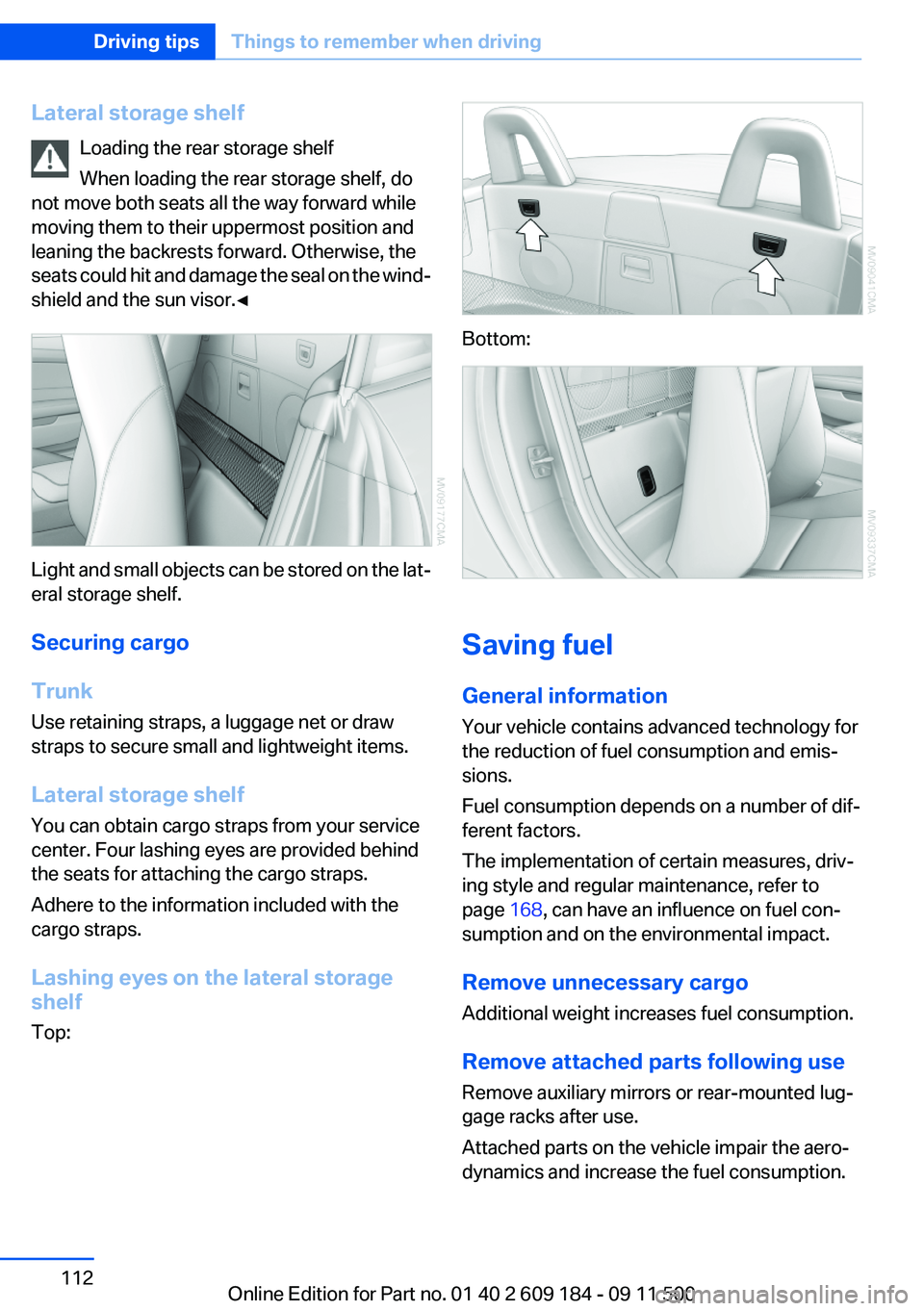
center. Four lashing eyes are provided behind
the seats for attaching the cargo straps.
Adhere to the information included with the
cargo straps.
Lashing eyes on the lateral storage
shelf
Top:
Bottom:
Saving fuel
General information
Your vehicle contains advanced technology for
the reduction of fuel consumption and emis‐
sions.
Fuel consumption depends on a number of dif‐
ferent factors.
The implementation of certain measures, driv‐
ing style and regular maintenance, refer to
page 168, can have an influence on fuel con‐
sumption and on the environmental impact.
Remove unnecessary cargo
Additional weight increases fuel consumption.
Remove attached parts following use
Remove auxiliary mirrors or rear-mounted lug‐
gage racks after use.
Attached parts on the vehicle impair the aero‐
dynamics and increase the fuel consumption.
Seite 112Driving tipsThings to remember when driving112
Online Edition for Part no. 01 40 2 609 184 - 09 11 500
Page 142 of 220
Redialing
›Redial‹
Voice phone book
Depending on how your vehicle is equipped, it
may be necessary to create your own voice
phone book.
The entries must be entered using voice activa‐
tion and are separate from the memory in the
mobile phone. Up to 50 entries can be set up.
Saving an entry1.›Save name‹2.Say the name. Do not exceed the speaking
duration of approx. 2 seconds.3.Say the phone number after being prompted
to do so by the system.4.›Save‹
Deleting an entry
1.›Delete name‹2.Say the name after being prompted to do so.3.Confirm the prompt: ›Yes‹
Deleting all entries
1.›Delete phonebook‹2.Confirm the prompt: ›Yes‹3.Confirm the prompt again: ›Yes‹
Reading and selecting entries
1.›Read phonebook‹2.When the desired entry is read aloud:
say ›Dial number‹
Selecting an entry
1.›Dial name‹2.Say the name after being prompted to do so.3.Confirm the prompt: ›Yes‹Adjusting the volume
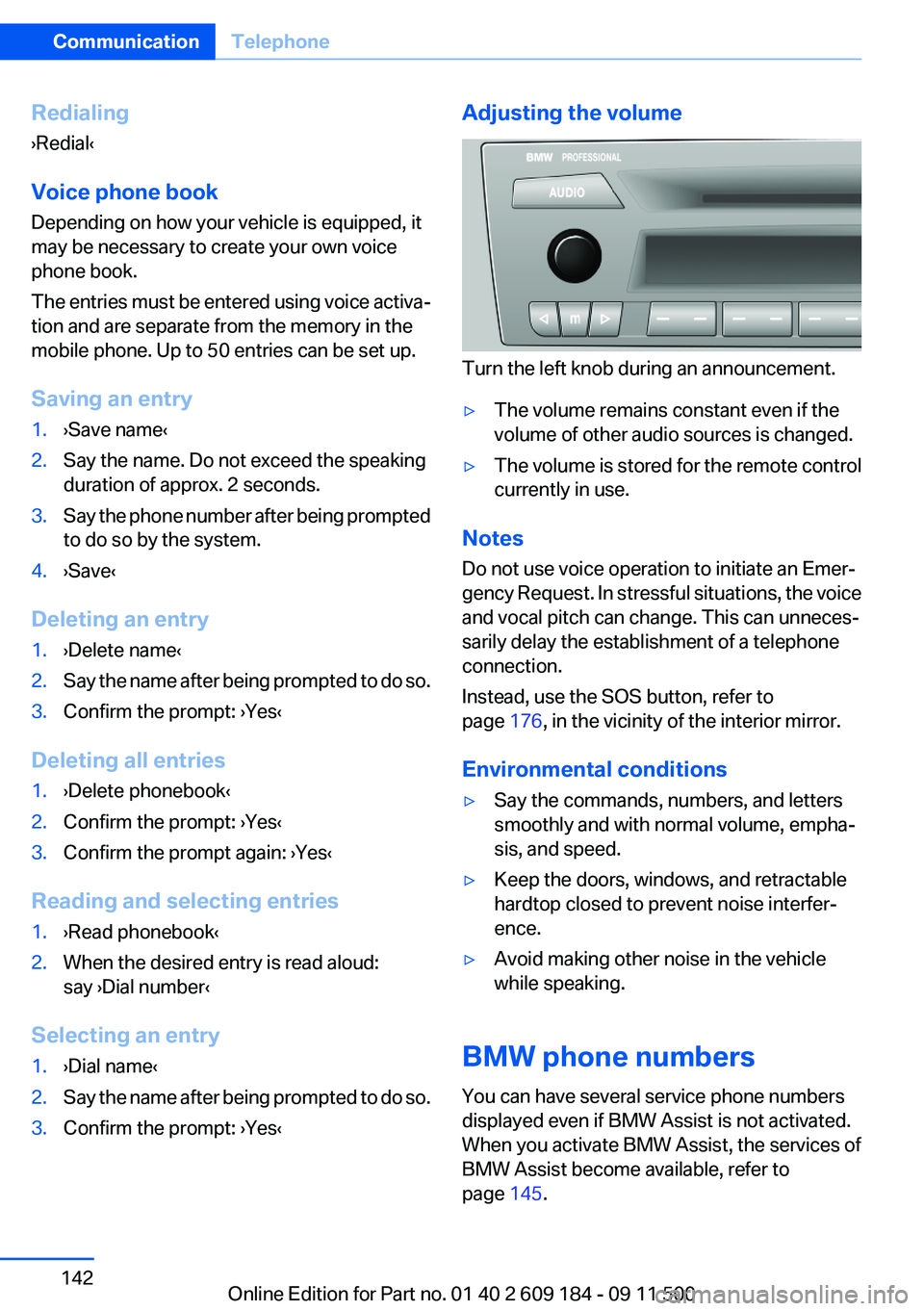
Turn the left knob during an announcement.
▷The volume remains constant even if the
volume of other audio sources is changed.▷The volume is stored for the remote control
currently in use.
Notes
Do not use voice operation to initiate an Emer‐
gency Request. In stressful situations, the voice
and vocal pitch can change. This can unneces‐
sarily delay the establishment of a telephone
connection.
Instead, use the SOS button, refer to
page 176, in the vicinity of the interior mirror.
Environmental conditions
▷Say the commands, numbers, and letters
smoothly and with normal volume, empha‐
sis, and speed.▷Keep the doors, windows, and retractable
hardtop closed to prevent noise interfer‐
ence.▷Avoid making other noise in the vehicle
while speaking.
BMW phone numbers
You can have several service phone numbers
displayed even if BMW Assist is not activated.
When you activate BMW Assist, the services of
BMW Assist become available, refer to
page 145.
Seite 142CommunicationTelephone142
Online Edition for Part no. 01 40 2 609 184 - 09 11 500
Page 174 of 220
No spare tire is available in the case of a flat tire.
The tools for changing wheels are available as
accessories from your service center.
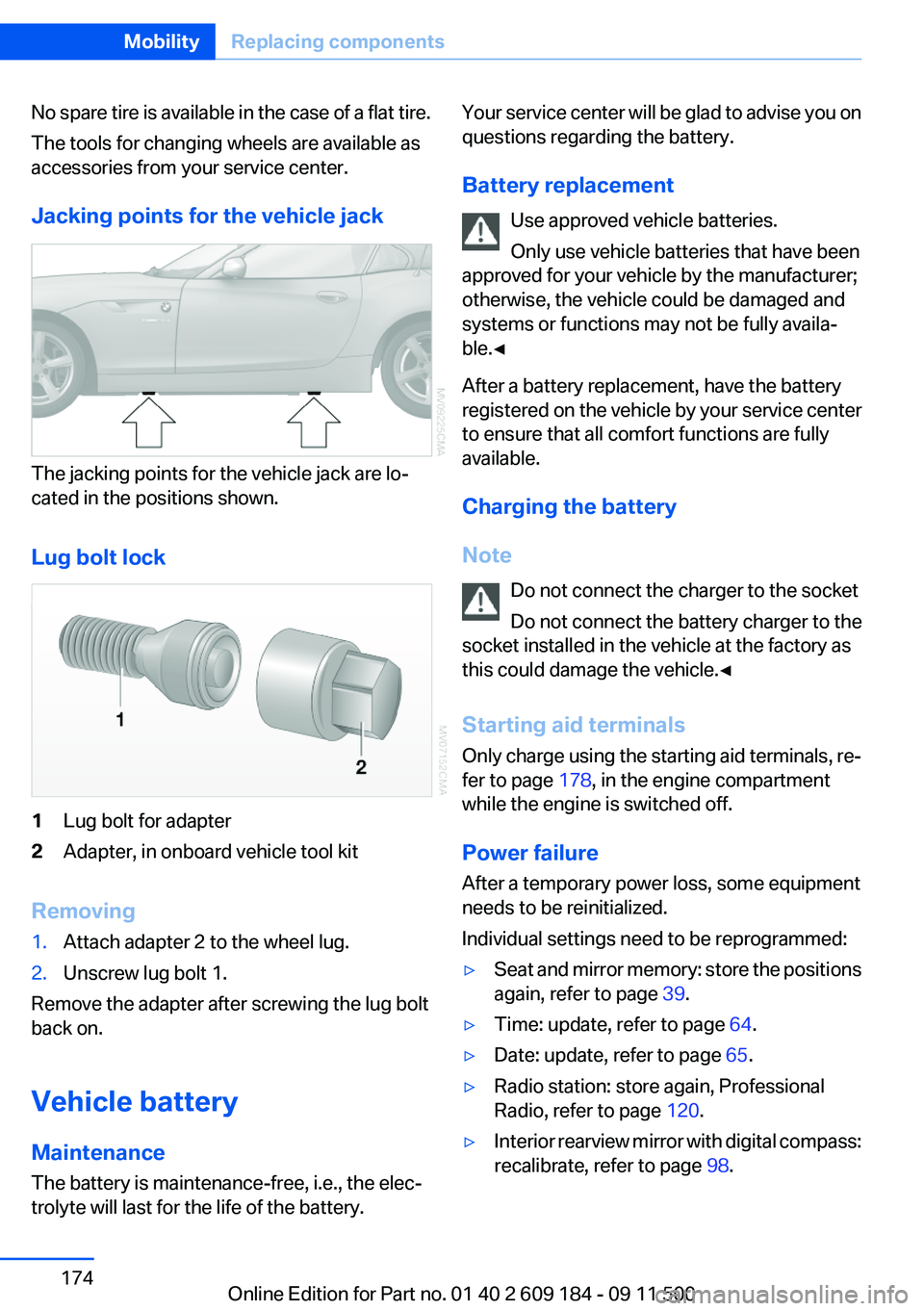
Jacking points for the vehicle jack
The jacking points for the vehicle jack are lo‐
cated in the positions shown.
Lug bolt lock
1Lug bolt for adapter2Adapter, in onboard vehicle tool kit
Removing
1.Attach adapter 2 to the wheel lug.2.Unscrew lug bolt 1.
Remove the adapter after screwing the lug bolt
back on.
Vehicle battery
Maintenance
The battery is maintenance-free, i.e., the elec‐
trolyte will last for the life of the battery.
Your service center will be glad to advise you on
questions regarding the battery.
Battery replacement Use approved vehicle batteries.
Only use vehicle batteries that have been
approved for your vehicle by the manufacturer;
otherwise, the vehicle could be damaged and
systems or functions may not be fully availa‐
ble.◀
After a battery replacement, have the battery
registered on the vehicle by your service center
to ensure that all comfort functions are fully
available.
Charging the battery
Note Do not connect the charger to the socket
Do not connect the battery charger to the
socket installed in the vehicle at the factory as
this could damage the vehicle.◀
Starting aid terminals
Only charge using the starting aid terminals, re‐
fer to page 178, in the engine compartment
while the engine is switched off.
Power failure
After a temporary power loss, some equipment
needs to be reinitialized.
Individual settings need to be reprogrammed:▷Seat and mirror memory: store the positions
again, refer to page 39.▷Time: update, refer to page 64.▷Date: update, refer to page 65.▷Radio station: store again, Professional
Radio, refer to page 120.▷Interior rearview mirror with digital compass:
recalibrate, refer to page 98.Seite 174MobilityReplacing components174
Online Edition for Part no. 01 40 2 609 184 - 09 11 500
Page 182 of 220
CareVehicle equipment
This chapter describes all series equipment as
well as country-specific and special equipment
offered for this model series.Therefore, it also
describes equipment that may not be found in
your vehicle, for instance due to the selected
special equipment or the country version. This
also applies to safety-related functions and sys‐
tems.
Car washes
Notes Steam jets or high-pressure washers
When using steam jets or high-pressure
washers, hold them a sufficient distance away
and use a maximum temperature of 140 ℉/
60 ℃.
Holding them too close or using excessively
high pressures or temperatures can cause dam‐
age or preliminary damage that may then lead to
long-term damage.
Follow the operating instructions for the high-
pressure washer.◀
Cleaning sensors/cameras with high-
pressure washers
When using high-pressure washers, do not
spray the seals of the retractable hardtop and
the exterior sensors and cameras, for Park Dis‐
tance Control, for instance, for extended periods
of time and only from a distance of at least 12 in/
30 cm.◀
Wash your vehicle frequently, particularly in win‐
ter.
Intense soiling and road salt can damage the ve‐
hicle.Washing in automatic car washes
Give preference to cloth car washes or those
that use soft brushes in order to avoid paint
damage.
Notes
Note the following:▷Make sure that the wheels and tires are not
damaged by the transport mechanisms.▷Fold in the exterior mirrors; otherwise, they
may be damaged, depending on the width of
the vehicle.▷Deactivate the rain sensor, refer to page 51,
to avoid unintentional wiper activation.▷Unscrew the road antenna.
Guide rails in car washes
Avoid car washes with guide rails higher
than 4 in/10 cm; otherwise, the vehicle body
could be damaged.◀
Before driving into a car wash
The vehicle is able to roll if the following steps
are taken.
Manual transmission
1.Shift to neutral.2.Release the parking brake, refer to page 49.3.Switch the engine off.4.Leave the remote control in the ignition lock.
Sport automatic transmission
1.Insert the remote control into the ignition
lock, even with Comfort Access.2.Engage transmission position N.3.Release the parking brake, refer to page 49.4.Switch the engine off.5.Leave the remote control in the ignition lock
so that the vehicle can roll.Seite 182MobilityCare182
Online Edition for Part no. 01 40 2 609 184 - 09 11 500
Page 210 of 220
Cleaning, displays 185
Cleaning your BMW, refer to Care 182
Clock 60
Clock– 12h/24h format 63
Closing
– From the inside 26– From the outside 22
Cockpit 12
Cold start, refer to Starting the engine 46
Combination instrument, refer to Instrument cluster 14
Combination switch
– Refer to Washer/wiper sys‐
tem 51
Comfort Access
– Battery replacement 30– In a car wash 29
Comfort area, refer to Around
the center console 15
COMFORT program, Dynamic Driving Control 83
Compartment for remote con‐ trol, refer to Ignition lock 45
Compartments, refer to Stor‐ age compartments 104
Compass 98
Computer 62
Computer
– Displays on the radio dis‐
play 62
Condensation under the vehi‐
cle 110
Condition Based Service CBS 168
Confirmation signals for lock‐ ing/unlocking the vehicle 24
ConnectedDrive 145
Consumption, refer to Aver‐ age fuel consumption 62
Control Display, care 185
Controls and displays 12
Control systems, driving sta‐ bility 81
Convenient loading 23
Convenient opening and clos‐
ing– Retractable hardtop 23– Window 23
Convenient operation 26
Convertible
– Enlarging the trunk 34, 100
Convertible top, refer to Re‐
tractable hardtop 33
Coolant
– Checking the level 167– Temperature 61
Cooling, maximum 93
Cooling system, refer to Cool‐ ant 166
Corrosion on brake discs 110
Courtesy lamps, refer to Inte‐ rior lamps 72
Cradle for telephone or mobile
phone
– Refer to Snap-in adapter in
center armrest storage com‐
partment 103
Cradle for telephone or mobile
phone, refer to Snap-in
adapter 143
Cruise control 85
Cruise control
– Malfunction 86
Cupholder 105
Curb weight, refer to Weights 204
Cylinders, number of, refer to Engine data 202
D
Damage, tires 160
Dashboard lighting, refer to In‐ strument lighting 71
Dashboard, refer to Cock‐ pit 12
Data, technical 202
Data, technical
– Dimensions 203– Engine 202– Filling capacities 206– Weights 204Date– Setting 65
Daytime running lights 69
DBC Dynamic Brake Con‐ trol 81
DCC, refer to Cruise con‐ trol 85
Defogging windows 91
Defroster
– Rear window 91, 94
Defrosting windows 91
Digital clock 60
Digital compass 98
Dimming mirrors 41
Directional indicators, refer to Turn signals 50
Displacement, refer to Engine data 202
Display lighting, refer to Instru‐ ment lighting 71
Displays and controls 12
Displays, care 185
Displays, cleaning 185
Displays, refer to Instrument
cluster 14
Disposal
– Coolant 166– Remote control battery 30– Vehicle battery 175
Distance control, refer to
PDC 87
Door key, refer to Remote con‐ trol with integrated key 20
Door lock 25
Doors, manual operation 26
Doors, unlocking and locking
– Confirmation signals 24– From the inside 26– From the outside 22
DOT Quality Grades 159
Draft-free ventilation 91, 95
Drive-off assistant 84
Drive-off assistant, refer to DSC 81
Driving notes, breaking in 108
Driving notes, general 108
Seite 210ReferenceEverything from A to Z210
Online Edition for Part no. 01 40 2 609 184 - 09 11 500
Page 211 of 220
Driving stability control sys‐tems 81
Driving tips 108
DSC Dynamic Stability Con‐ trol 81
DTC Dynamic Traction Con‐ trol 82
Dynamic Brake Control DBC 81
Dynamic Driving Control 82
Dynamic Stability Control DSC 81
Dynamic Traction Control DTC 82
E
EBV electronic brake-force distribution 81
EfficientDynamics, refer to Saving fuel 112
Electrical fault– 7-gear automatic transmis‐
sion 58
Electrical malfunction
– Door lock 26– Driver's door 26– Fuel filler flap 152
Electric seat adjustment 37
Electronic brake-force distri‐ bution 81
Electronic engine oil level check 164
Electronic Stability Program ESP, refer to DSC 81
Emergency operation
– Fuel filler flap, unlocking
manually 152
Emergency Request 176
Emergency service, refer to Roadside Assistance 177
Emergency unlocking
– Trunk lid, from the inside 28
Energy, saving
– Automatic Engine Start/Stop
Function 47
Engine compartment 163
Engine coolant, refer to Cool‐
ant 166
Engine data 202
Engine oil, adding 165
Engine oil additives 166
Engine oil, checking the level 164
Engine oil, filling capacity 206
Engine oil temperature 61
Engine oil types, alterna‐ tive 166
Engine oil types, ap‐ proved 166
Engine, overheating, refer to Coolant temperature 61
Engine power, refer to Engine data 202
Engine, RPM 202
Engine start, Help 177
Engine, starting 46
Engine, starting– Comfort Access 28– Start/Stop button 45
Engine, stopping, Start/Stop
button 45
Engine, switching off 46
Engine temperature 61
Entry lamps, refer to Interior lamps 72
Equipment, interior 96
Error messages, refer to Check Control 66
ESP Electronic Stability Pro‐ gram, refer to DSC 81
Exchanging wheels/tires 161
Exhaust system 109
Exterior mirrors 40
Exterior mirrors
– Automatic dimming 41– Automatic heating 41– Folding in and out 41– Setting 40
External audio device 103
External start 177
External temperature dis‐ play 60
External temperature display– Changing the units 63– On the computer 63
External temperature warn‐
ing 60
Eyes for securing cargo 112
F
Failure messages, refer to Check Control 66
Failure of an electrical acces‐ sory 175
False alarm
– Avoiding unintentional
alarms 31– Ending an alarm 30
Fastening safety belts, refer to
Safety belts 38
Fasten safety belts reminder
– Refer to Safety belt re‐
minder 39
Filter
– Refer to Microfilter/acti‐
vated-charcoal filter with au‐
tomatic climate control 95– Refer to Microfilter for air
conditioner 91
Fine wood, care 184
First aid kit 177
Fittings
– For tow-starting and tow‐
ing 179
Flashing when locking/unlock‐
ing 24
Flat tire, Flat Tire Monitor FTM 75
Flat Tire Monitor
– Snow chains 162
Flat Tire Monitor FTM 75
Flat tire, Tire Pressure Monitor TPM 77
Flat tire, warning lamp 76
Flat tire, wheel change 173
Flooding 109
Floor carpet, care 184
Floor mats, care 184
Foot brake 109
Seite 211Everything from A to ZReference211
Online Edition for Part no. 01 40 2 609 184 - 09 11 500
Page 212 of 220
Footwell lamps, refer to Inte‐rior lamps 72
For your own safety 6
Front airbags 73
FTM Flat Tire Monitor 75
Fuel– Refer to Average fuel con‐
sumption 62
Fuel, average consump‐
tion 62
Fuel consumption display
– Average fuel consump‐
tion 62
Fuel display 61
Fuel filler flap
– Unlocking in case of an elec‐
trical malfunction 152
Fuel gauge 61
Fuel quality 154
Fuel tank capacity, refer to Fill‐ ing capacities 206
Fuel tank contents, refer to Filling capacities 206
Fuses 175
G
Garage door opener, refer to Universal Garage Door
Opener 96
Gasoline 154
Gasoline display 61
Gear display
– 7-gear automatic transmis‐
sion 55– 8-gear automatic transmis‐
sion 55
General driving notes 108
Glove compartment 103
Grilles, refer to Air vents 89
Gross vehicle weight, refer to Weights 204
H
Handbrake, refer to Parking brake 49
Hand-held transmitter, alter‐
nating code 97
Hands-free microphone 15
Hardtop 33
Hazard warning system 15
Head airbags 73
Headlamp control, auto‐ matic 69
Headlamp courtesy delay fea‐ ture 68
Headlamp flasher 50
Headlamps, care 183
Headlamps, cleaning 51
Headliner 16
Heating 89
Heating– Mirrors 41– Rear window 91, 94– Seats 38
Heavy cargo, stowing 111
Height adjustment
– Seats 36– Steering wheel 42
Height, refer to Dimen‐
sions 203
High-beam Assistant 71
High beams 70
High beams/low beams, refer to High-beam Assistant 71
High beams, headlamp flasher 70
High-pressure washers 182
Hills 110
Hill start assistant, refer to Drive-off assistant 84
Holder for beverages 105
Holder for remote control, re‐ fer to Ignition lock 45
Homepage 6
Hood 164
Horn 12
Hot exhaust system 109
Hydroplaning 109
I
Ice warning, refer to External temperature warning 60
Icy roads, refer to External temperature warning 60
Identification marks– Tires 158
Ignition 46
Ignition
– Switched off 46– Switched on 46
Ignition key position 1, refer to
Radio ready state 45
Ignition key position 2, refer to Ignition on 46
Ignition key, refer to Remote control with integrated
key 20
Ignition lock 45
Indication of a flat tire 76
Indicator and warning lamps 15
Indicator and warning lamps, Tire Pressure Monitor
TPM 78
Individual air distribution 90
Inflation pressure monitoring, refer to Tire Pressure Monitor
TPM 77
Inflation pressure, refer to Tire inflation pressure 155
Inflation pressure warning, tires 75
Initializing
– Compass, refer to Calibrat‐
ing 99– Flat Tire Monitor FTM 76
Installation location
– Telephone 103
Instrument cluster 14
Instrument lighting 71
Instrument panel, refer to In‐ strument cluster 14
Instruments, refer to Cock‐ pit 12
Integrated key 20
Seite 212ReferenceEverything from A to Z212
Online Edition for Part no. 01 40 2 609 184 - 09 11 500