steering wheel BMW Z4 SDRIVE35I 2012 User Guide
[x] Cancel search | Manufacturer: BMW, Model Year: 2012, Model line: Z4 SDRIVE35I, Model: BMW Z4 SDRIVE35I 2012Pages: 220, PDF Size: 9.9 MB
Page 74 of 220
▷Do not hang pieces of clothing, such as jack‐
ets, over the backrests.▷Make sure that passengers do not lean their
heads against the side airbag; otherwise, se‐
rious injuries could result if the airbag sud‐
denly deployed.▷Do not remove the airbag restraint system.▷Do not remove the steering wheel.▷Do not apply adhesive materials to the air‐
bag cover panels, cover them or modify
them in any way.▷Never modify either the individual compo‐
nents or the wiring in the airbag system. This
also applies to the covers of the steering
wheel, the dashboard and the seats.◀
In the case of a malfunction, deactivation
and after triggering of the airbags
Do not touch the individual components imme‐
diately after the system has been triggered; oth‐
erwise, there is the danger of burns.
Only have the airbags checked, repaired or dis‐
mantled and the airbag generator scrapped by
your service center or a workshop that has the
necessary authorization for handling explosives.
Non-professional attempts to service the sys‐
tem could lead to failure in an emergency or un‐
desired triggering of the airbag, either of which
could result in injury.◀
Warning notices and information about the air‐
bags can also be found on the sun visors.
Automatic deactivation of the
passenger airbags
The system determines whether the front pas‐
senger seat is occupied by measuring the re‐
sistance of the human body. The front and side
airbags on the front passenger side are acti‐
vated or deactivated accordingly by the system.
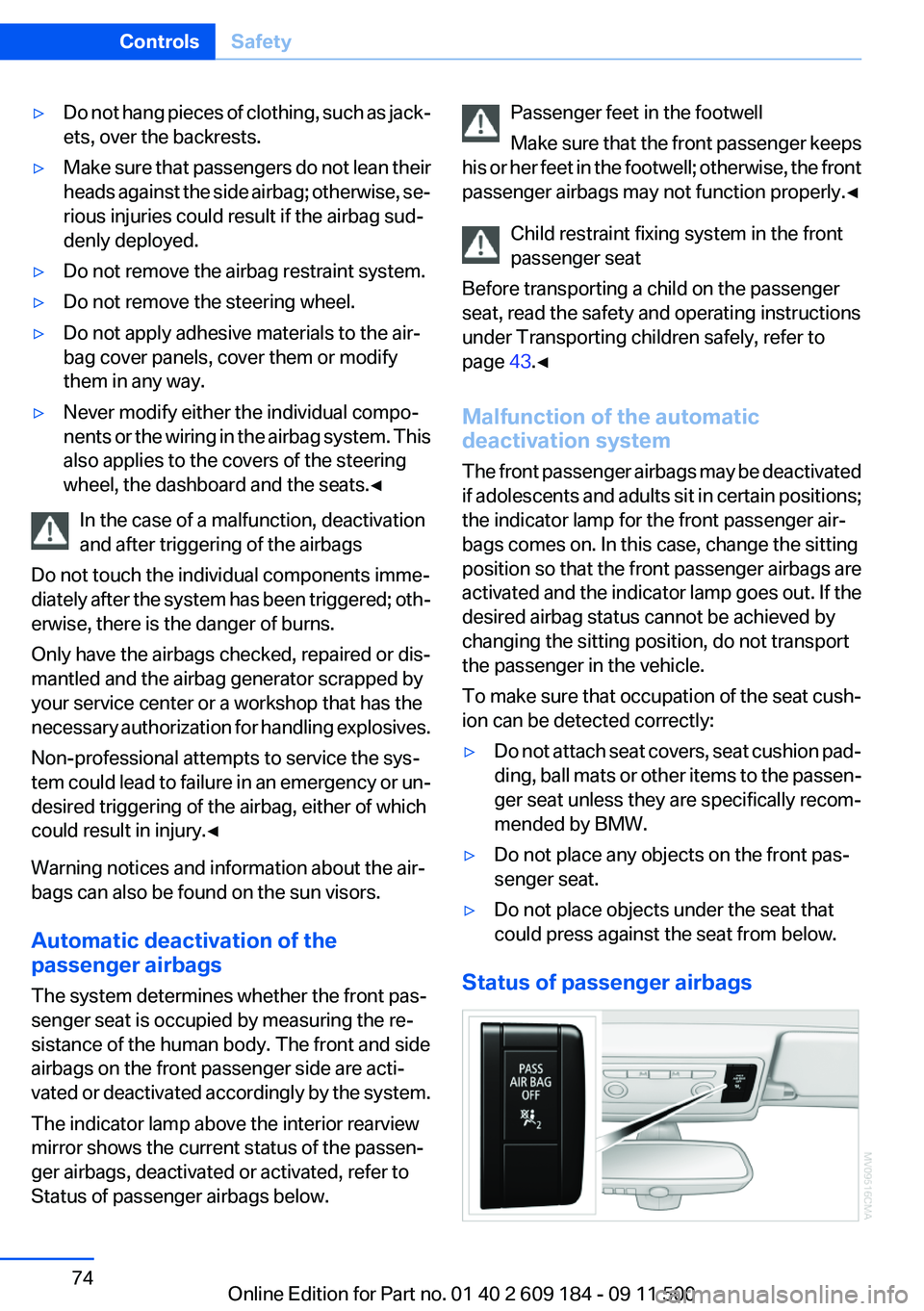
The indicator lamp above the interior rearview
mirror shows the current status of the passen‐
ger airbags, deactivated or activated, refer to
Status of passenger airbags below.
Passenger feet in the footwell
Make sure that the front passenger keeps
his or her feet in the footwell; otherwise, the front
passenger airbags may not function properly.◀
Child restraint fixing system in the front
passenger seat
Before transporting a child on the passenger
seat, read the safety and operating instructions
under Transporting children safely, refer to
page 43.◀
Malfunction of the automatic
deactivation system
The front passenger airbags may be deactivated
if adolescents and adults sit in certain positions;
the indicator lamp for the front passenger air‐
bags comes on. In this case, change the sitting
position so that the front passenger airbags are
activated and the indicator lamp goes out. If the
desired airbag status cannot be achieved by
changing the sitting position, do not transport
the passenger in the vehicle.
To make sure that occupation of the seat cush‐
ion can be detected correctly:▷Do not attach seat covers, seat cushion pad‐
ding, ball mats or other items to the passen‐
ger seat unless they are specifically recom‐
mended by BMW.▷Do not place any objects on the front pas‐
senger seat.▷Do not place objects under the seat that
could press against the seat from below.
Status of passenger airbags
Seite 74ControlsSafety74
Online Edition for Part no. 01 40 2 609 184 - 09 11 500
Page 76 of 220
▷When driving on a snowy or slippery road
surface.▷Sporty driving style: slip in the drive wheels,
high lateral acceleration.▷When driving with snow chains.
Initialization
The initialization process adopts the set inflation
tire pressures as reference values for the detec‐
tion of a flat tire. Initialization is started by con‐
firming the inflation pressures.
Do not initialize the system when driving with
snow chains.
Operating principle, refer to page 62.
1.Start the engine immediately before pulling
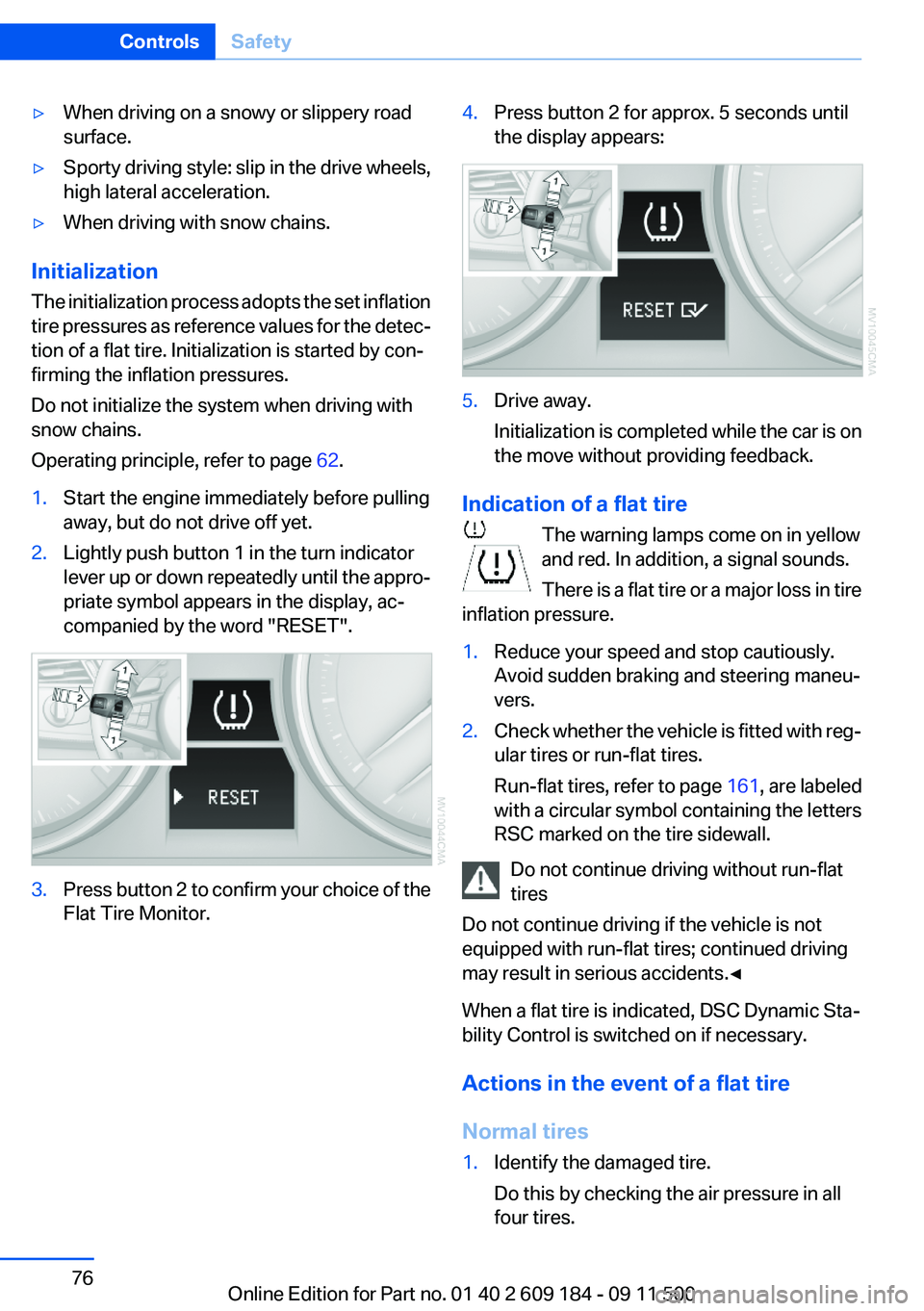
away, but do not drive off yet.2.Lightly push button 1 in the turn indicator
lever up or down repeatedly until the appro‐
priate symbol appears in the display, ac‐
companied by the word "RESET".3.Press button 2 to confirm your choice of the
Flat Tire Monitor.4.Press button 2 for approx. 5 seconds until
the display appears:5.Drive away.
Initialization is completed while the car is on
the move without providing feedback.
Indication of a flat tire
The warning lamps come on in yellow
and red. In addition, a signal sounds.
There is a flat tire or a major loss in tire
inflation pressure.
1.Reduce your speed and stop cautiously.
Avoid sudden braking and steering maneu‐
vers.2.Check whether the vehicle is fitted with reg‐
ular tires or run-flat tires.
Run-flat tires, refer to page 161, are labeled
with a circular symbol containing the letters
RSC marked on the tire sidewall.
Do not continue driving without run-flat
tires
Do not continue driving if the vehicle is not
equipped with run-flat tires; continued driving
may result in serious accidents.◀
When a flat tire is indicated, DSC Dynamic Sta‐
bility Control is switched on if necessary.
Actions in the event of a flat tire
Normal tires
1.Identify the damaged tire.
Do this by checking the air pressure in all
four tires.Seite 76ControlsSafety76
Online Edition for Part no. 01 40 2 609 184 - 09 11 500
Page 77 of 220
If the tire inflation pressure in all four tires is
correct, the Flat Tire Monitor may not have
been initialized. In this case, initialize the
system.
If an identification is not possible, please
contact the service center.2.Rectify the flat tire.
Run-flat tires
You can continue driving with a damaged tire at
speeds up to 50 mph/80 km/h.
Continued driving with a flat tire
If continuing to drive with a damaged tire:
1.Avoid sudden braking and steering maneu‐
vers.2.Do not exceed a speed of 50 mph/80 km/h.3.Check the air pressure in all four tires at the
next opportunity.
If the tire inflation pressure in all four tires is
correct, the Flat Tire Monitor may not have
been initialized. In this case, initialize the
system.
Possible driving distance with complete loss of
tire inflation pressure:
The possible driving distance after a loss of tire
inflation pressure depends on the cargo load
and the driving style and conditions.
For a vehicle containing an average load, the
possible driving distance is approx. 50 miles/
80 km.
When the vehicle is driven with a damaged tire,
its handling characteristics change, e.g., re‐
duced lane stability during braking, a longer
braking distance, and altered self-steering
properties. Adjust your driving style accord‐
ingly. Avoid abrupt steering maneuvers or driv‐
ing over obstacles, e. g., curbs, potholes, etc.
Because the possible driving distance depends
on how the vehicle is used during the trip, the
actual distance may be smaller or greater de‐
pending on the driving speed, road conditions,
external temperature, cargo load, etc.
Continued driving with a flat tire
Drive moderately and do not exceed a
speed of 50 mph/80 km/h.
A loss of tire inflation pressure results in a
change in the handling characteristics, e.g., re‐
duced lane stability during braking, a longer
braking distance and altered self-steering prop‐
erties.◀
Final tire failure
Vibrations or loud noises while driving can
indicate the final failure of the tire. Reduce speed
and stop; otherwise, pieces of the tire could
come loose and cause an accident. Do not con‐
tinue driving, and contact your service center. ◀
Tire Pressure Monitor TPM
The concept
TPM checks the inflation pressures of the four
mounted tires. The system notifies you if there
is a significant loss of pressure in one or more
tires.
Functional requirement
In order to assure the reliable reporting of a flat
tire, the system must be reset while all tire infla‐
tion pressures are correct.
Always use wheels with TPM electronics. Oth‐
erwise, the system may malfunction.
Reset the system after each correction of the
tire inflation pressure and after every tire or
wheel change.
System limits Sudden tire damage
Sudden serious tire damage caused by
external influences cannot be indicated in ad‐
vance.◀
The system does not function properly if it has
not been reset, e.g., it may identify a tire as flatSeite 77SafetyControls77
Online Edition for Part no. 01 40 2 609 184 - 09 11 500
Page 78 of 220
in spite of the fact that the tire is filled to the cor‐
rect inflation pressure.
The system is deactivated and is unable to de‐
tect flat tires if a wheel not equipped with TPM
electronics has been mounted, e.g., a compact
wheel, or if TPM is experiencing temporary in‐
terference from other systems or devices that
use the same frequency.
Resetting the system
Reset the system after each correction of the
tire inflation pressure and after every tire or
wheel change.
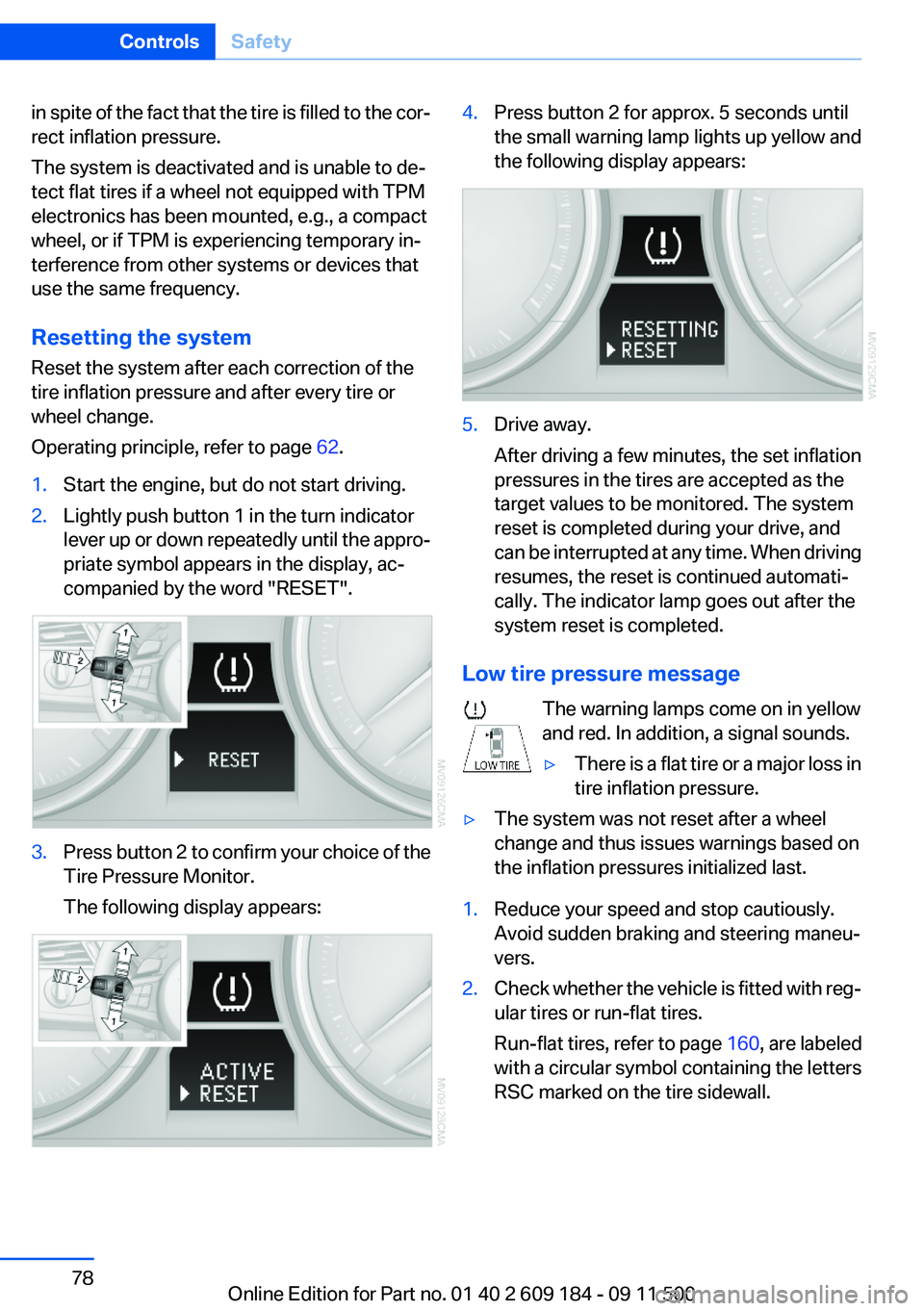
Operating principle, refer to page 62.1.Start the engine, but do not start driving.2.Lightly push button 1 in the turn indicator
lever up or down repeatedly until the appro‐
priate symbol appears in the display, ac‐
companied by the word "RESET".3.Press button 2 to confirm your choice of the
Tire Pressure Monitor.
The following display appears:4.Press button 2 for approx. 5 seconds until
the small warning lamp lights up yellow and
the following display appears:5.Drive away.
After driving a few minutes, the set inflation
pressures in the tires are accepted as the
target values to be monitored. The system
reset is completed during your drive, and
can be interrupted at any time. When driving
resumes, the reset is continued automati‐
cally. The indicator lamp goes out after the
system reset is completed.
Low tire pressure message
The warning lamps come on in yellow
and red. In addition, a signal sounds.
▷There is a flat tire or a major loss in
tire inflation pressure.▷The system was not reset after a wheel
change and thus issues warnings based on
the inflation pressures initialized last.1.Reduce your speed and stop cautiously.
Avoid sudden braking and steering maneu‐
vers.2.Check whether the vehicle is fitted with reg‐
ular tires or run-flat tires.
Run-flat tires , refer to page 160, are labeled
with a circular symbol containing the letters
RSC marked on the tire sidewall.Seite 78ControlsSafety78
Online Edition for Part no. 01 40 2 609 184 - 09 11 500
Page 84 of 220
Activating COMFORTPress the button repeatedly until COM‐
FORT is selected in the instrument
cluster.
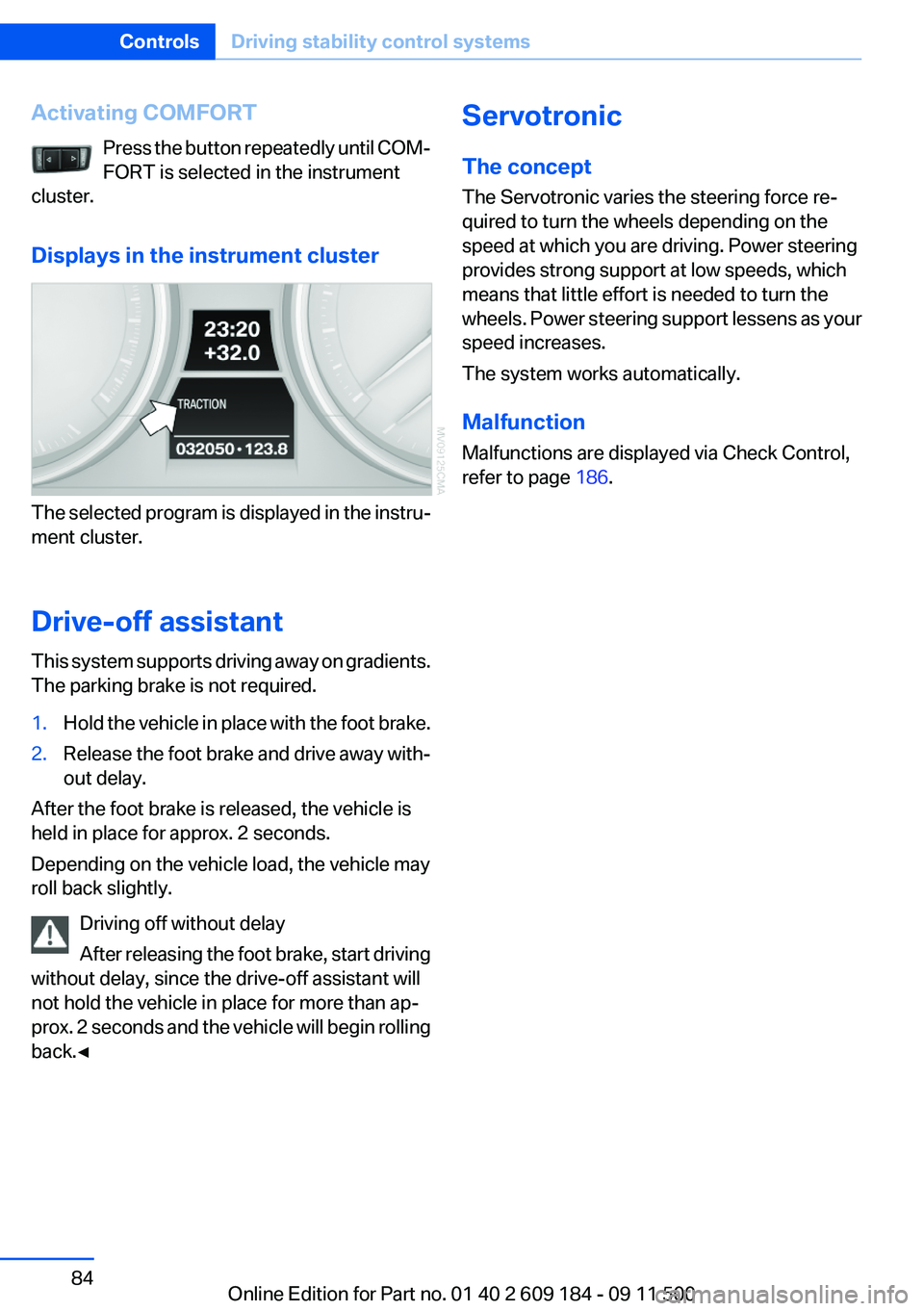
Displays in the instrument cluster
The selected program is displayed in the instru‐
ment cluster.
Drive-off assistant
This system supports driving away on gradients.
The parking brake is not required.
1.Hold the vehicle in place with the foot brake.2.Release the foot brake and drive away with‐
out delay.
After the foot brake is released, the vehicle is
held in place for approx. 2 seconds.
Depending on the vehicle load, the vehicle may
roll back slightly.
Driving off without delay
After releasing the foot brake, start driving
without delay, since the drive-off assistant will
not hold the vehicle in place for more than ap‐
prox. 2 seconds and the vehicle will begin rolling
back.◀
Servotronic
The concept
The Servotronic varies the steering force re‐
quired to turn the wheels depending on the
speed at which you are driving. Power steering
provides strong support at low speeds, which
means that little effort is needed to turn the
wheels. Power steering support lessens as your
speed increases.
The system works automatically.
Malfunction
Malfunctions are displayed via Check Control,
refer to page 186.Seite 84ControlsDriving stability control systems84
Online Edition for Part no. 01 40 2 609 184 - 09 11 500
Page 90 of 220
supply continuously; the levers change the
direction of the airflow.5Air vent: air for the knee area, footwell
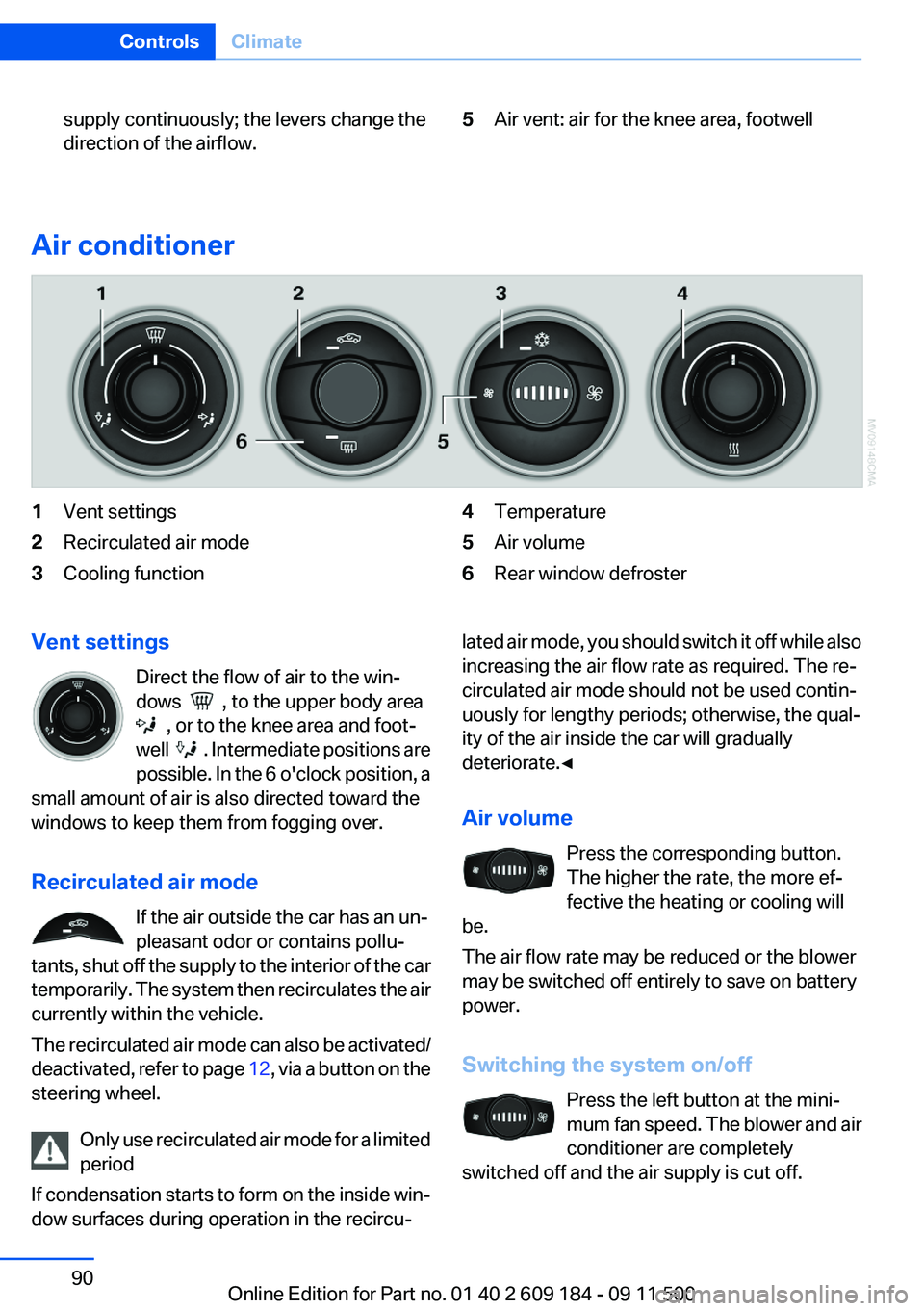
Air conditioner
1Vent settings2Recirculated air mode3Cooling function4Temperature5Air volume6Rear window defrosterVent settings
Direct the flow of air to the win‐
dows
, to the upper body area
, or to the knee area and foot‐
well
. Intermediate positions are
possible. In the 6 o'clock position, a
small amount of air is also directed toward the
windows to keep them from fogging over.
Recirculated air mode If the air outside the car has an un‐
pleasant odor or contains pollu‐
tants, shut off the supply to the interior of the car
temporarily. The system then recirculates the air
currently within the vehicle.
The recirculated air mode can also be activated/
deactivated, refer to page 12, via a button on the
steering wheel.
Only use recirculated air mode for a limited
period
If condensation starts to form on the inside win‐
dow surfaces during operation in the recircu‐
lated air mode, you should switch it off while also
increasing the air flow rate as required. The re‐
circulated air mode should not be used contin‐
uously for lengthy periods; otherwise, the qual‐
ity of the air inside the car will gradually
deteriorate.◀
Air volume Press the corresponding button.
The higher the rate, the more ef‐
fective the heating or cooling will
be.
The air flow rate may be reduced or the blower
may be switched off entirely to save on battery
power.
Switching the system on/off Press the left button at the mini‐
mum fan speed. The blower and air
conditioner are completely
switched off and the air supply is cut off.Seite 90ControlsClimate90
Online Edition for Part no. 01 40 2 609 184 - 09 11 500
Page 134 of 220
TelephoneVehicle equipment
This chapter describes all series equipment as
well as country-specific and special equipment
offered for this model series.Therefore, it also
describes equipment that may not be found in
your vehicle, for instance due to the selected
special equipment or the country version. This
also applies to safety-related functions and sys‐
tems.
At a glance
Note
Equipment version with the full preparation
package mobile phone or a hands-free system.
The concept
Mobile phones can be connected with the vehi‐
cle via Bluetooth.
After these devices are paired once, they are
recognized automatically when the ignition is
switched on as soon as they are in the vehicle
and can then be operated via the radio, the but‐
tons on the steering wheel, and via voice acti‐
vation.
After a suitable mobile phone is paired with the
vehicle once, you can operate the mobile phone
via the radio, the buttons on the steering wheel,
and via voice activation.
Bluetooth® is a registered trademark of Blue‐
tooth® SIG, Inc.
Using the mobile phone while driving
Make entries only when traffic and road
conditions allow. Do not hold the mobile phone
in your hand while you are driving; use the
hands-free system instead. If you do not ob‐
serve this precaution, you can endanger the ve‐
hicle occupants and other road users.◀Snap-in adapter
The snap-in adapter is used to:▷Hold the mobile phone.▷Recharge the battery.▷Connect the mobile phone to an outside an‐
tenna of the vehicle.
This provides for better network reception
and consistent sound quality.
Avoid operating a mobile phone that has been
detected by the vehicle on the keypad of the
mobile phone, as this may lead to malfunctions.
Approved mobile phones
Details on which mobile phones and external
devices with a Bluetooth interface are sup‐
ported by the mobile phone preparation pack‐
age can be obtained at www.bmwusa.com/blue‐
tooth.
Notes
At high temperatures, the charging function of
the mobile phone may be limited and functions
may not be executed.
Playing music from the mobile phone
Depending on your mobile phone and the vehi‐
cle equipment, you can play the music data of
the mobile phone in the vehicle.
Seite 134CommunicationTelephone134
Online Edition for Part no. 01 40 2 609 184 - 09 11 500
Page 138 of 220
▷It may not be possible to display phone book
entries with special characters.▷The number of phone book entries to be
stored is too high.▷Is the data volume of the contact too large,
e. g., due to stored information such as
notes? Reduce the data volume of the con‐
tact.
The phone connection quality is poor.
▷The strength of the Bluetooth signal on the
mobile phone can be adjusted, depending
on the mobile phone.▷Insert the mobile phone into the snap-in
adapter or place it in the area of the center
console.▷Adjust the volume of the microphone and
loudspeakers.
If all points in this list have been checked and the
required function is still not available, contact
Customer Relations or the service center.
Controls
The following functions can be operated on the
radio:
▷Accept/reject a call.▷Dial a phone number.▷Dial a phone number from the phone book.▷Dial a stored phone number, such as from
the list of accepted calls.▷In conjunction with the full preparation pack‐
age mobile phone: BMW Assist, refer to
page 145.
When the ignition and the radio ready state are
switched off, such as after the remote control is
removed, an existing call can be continued for
up to 25 minutes on the hands-free system.
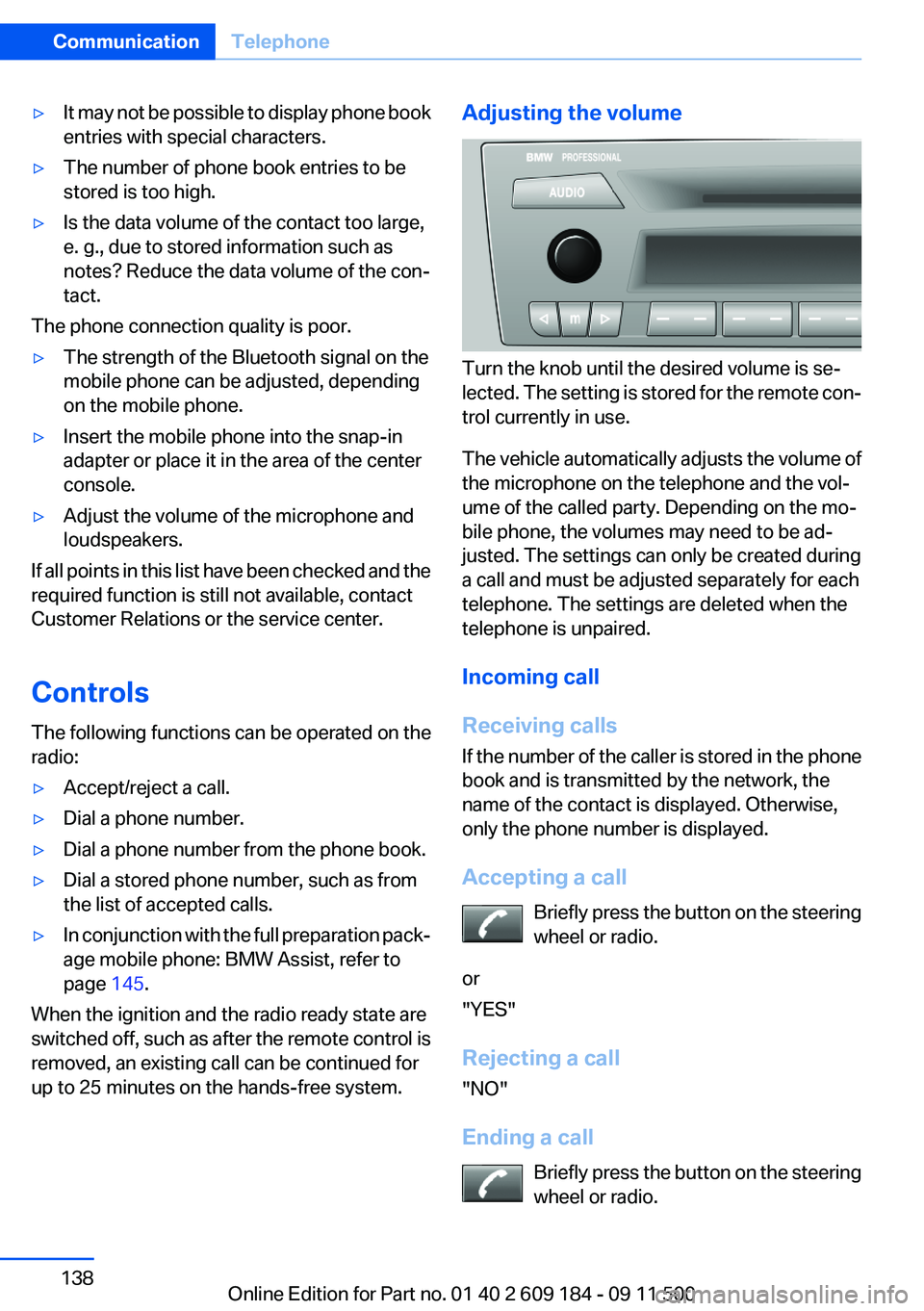
Adjusting the volume
Turn the knob until the desired volume is se‐
lected. The setting is stored for the remote con‐
trol currently in use.
The vehicle automatically adjusts the volume of
the microphone on the telephone and the vol‐
ume of the called party. Depending on the mo‐
bile phone, the volumes may need to be ad‐
justed. The settings can only be created during
a call and must be adjusted separately for each
telephone. The settings are deleted when the
telephone is unpaired.
Incoming call
Receiving calls
If the number of the caller is stored in the phone
book and is transmitted by the network, the
name of the contact is displayed. Otherwise,
only the phone number is displayed.
Accepting a call Briefly press the button on the steering
wheel or radio.
or
"YES"
Rejecting a call
"NO"
Ending a call Briefly press the button on the steering
wheel or radio.
Seite 138CommunicationTelephone138
Online Edition for Part no. 01 40 2 609 184 - 09 11 500
Page 139 of 220
or
"END"
Entering a phone number
Dialing a number1.Switch on the radio ready state or the igni‐
tion.2. Press the button.3."PHONE"4."#"5.Enter the desired phone number on the but‐
tons 0–9.
To delete the last digit: "DEL"6. Briefly press the button on the
steering wheel or radio.
or
Press the right knob to dial the phone num‐
ber.
Phone book
Dialed phone numbers, incoming calls and en‐
tries in the phone book are stored on lists if the
mobile phone is connected to the vehicle via
Bluetooth.
Five lists are available:
▷"A-Z"
Entries of the phone book of the SIM card or
of the mobile phone, which consist of a
name and phone number, are sorted in al‐
phabetical order.▷"TOP8"
The Top 8 list contains the eight phone
numbers that were dialed most frequently.▷"LAST8"
The last eight phone numbers that were di‐
aled are stored. The phone number dialed
last is at the top of the list.▷"CALLS"The phone numbers of the last eight ac‐
cepted calls are stored. For this to be pos‐
sible, it must be possible to transmit the
phone number of the caller.▷"MISSED"
The phone numbers of the last eight calls
that were not accepted are stored. For this
to be possible, it must be possible to trans‐
mit the phone number of the caller.
Dialing a phone number from the phone
book
The list A-Z is available for phone book entries.
If entries with different names but the same
phone number are transferred to the vehicle
from the mobile phone, only one entry is dis‐
played.
The display of the phone book entries on the
radio may differ from the display on the mobile
phone, such as the order of the first and last
names.
1.Switch on the radio ready state or the igni‐
tion.2. Press the button.3."PHONE"4."A-Z"5. The arrows indicate that additional
letters can be displayed.
Turn the right knob to display additional let‐
ters if necessary.6.Turn the right knob to select the first letter
of the entry.7.Select the entry with the function button.
The phone number is dialed.
To display all entries:
1.Turn the right knob to select the first letter
of the entry and press the knob.2.Turn the right knob to select the desired en‐
try and press the knob.
orSeite 139TelephoneCommunication139
Online Edition for Part no. 01 40 2 609 184 - 09 11 500
Page 140 of 220
Press the button on the steering
wheel or radio to dial the number.
The phone number is dialed.
Editing and dialing a phone number
from the phone book
You can edit the phone number of an entry be‐
fore making a call. This change is not stored in
the phone book.
1.Selecting an entry.2."EDIT"3.To delete a digit: "DEL"4.Enter additional digits on the buttons 0–9.5.Press the right knob to dial the phone num‐
ber.
Dialing a phone number from the phone
book using the buttons on the steering
wheel
1. Press and hold the button to display
the Telephone menu.2.Press the arrow buttons on the steering
wheel to leaf through the phone book.3. Press the button to dial the phone
number.
Dialing a phone number stored in a list
To select an entry and establish a connection:
1.Switch on the radio ready state or the igni‐
tion.2. Press the button.3."PHONE"4.Select a list, for instance "TOP8"5.Turn the right knob to select an entry and
press the knob to dial the phone number.
Deleting an individual entry
1.Select an entry from the list.2."DEL"
DTMF suffix dialing
DTMF suffix dialing can be used for gaining ac‐
cess to network services or for controlling devi‐
ces, e.g., to make a remote inquiry of an answer‐
ing machine. The DTMF code is needed for this
purpose.
This function is only available if a connection ex‐
ists and if the hands-free system is being used.
1."Keypad"2.Enter the DTMF code on the buttons 0–9.3.If necessary, press and hold the function
button on the right or left to enter special
characters.
Displaying the call duration
During a call:
"DURAT"
Hands-free system
General information
Calls that are being made on the hands-free
system can be continued on the mobile phone
and vice versa.
From the mobile phone to the hands-
free system
Calls that were begun outside of the Bluetooth
range of the vehicle can be continued on the
hands-free system with the ignition switched
on.
Depending on the mobile phone, the system au‐
tomatically switches to the hands-free system.
If the system does not switch over automatically,
follow the instructions on the mobile phone dis‐
play; refer also to the mobile phone operating
instructions.
Seite 140CommunicationTelephone140
Online Edition for Part no. 01 40 2 609 184 - 09 11 500