fuel BMW Z4 SDRIVE35I 2012 Owner's Manual
[x] Cancel search | Manufacturer: BMW, Model Year: 2012, Model line: Z4 SDRIVE35I, Model: BMW Z4 SDRIVE35I 2012Pages: 220, PDF Size: 9.9 MB
Page 169 of 220
Socket for OBD Onboard
Diagnosis
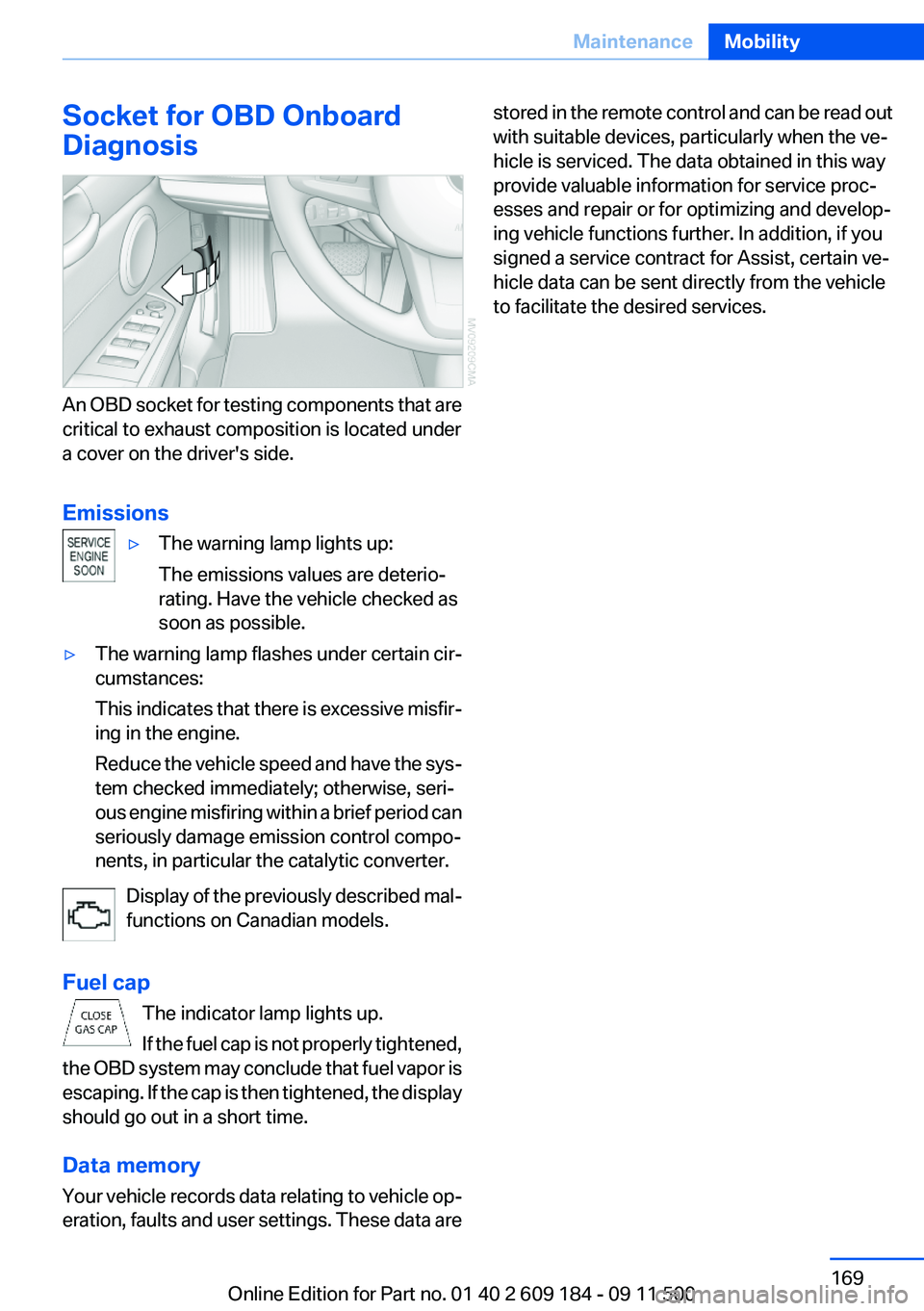
An OBD socket for testing components that are
critical to exhaust composition is located under
a cover on the driver's side.
Emissions
▷The warning lamp lights up:
The emissions values are deterio‐
rating. Have the vehicle checked as
soon as possible.▷The warning lamp flashes under certain cir‐
cumstances:
This indicates that there is excessive misfir‐
ing in the engine.
Reduce the vehicle speed and have the sys‐
tem checked immediately; otherwise, seri‐
ous engine misfiring within a brief period can
seriously damage emission control compo‐
nents, in particular the catalytic converter.
Display of the previously described mal‐
functions on Canadian models.
Fuel cap The indicator lamp lights up.
If the fuel cap is not properly tightened,
the OBD system may conclude that fuel vapor is
escaping. If the cap is then tightened, the display
should go out in a short time.
Data memory
Your vehicle records data relating to vehicle op‐
eration, faults and user settings. These data are
stored in the remote control and can be read out
with suitable devices, particularly when the ve‐
hicle is serviced. The data obtained in this way
provide valuable information for service proc‐
esses and repair or for optimizing and develop‐
ing vehicle functions further. In addition, if you
signed a service contract for Assist, certain ve‐
hicle data can be sent directly from the vehicle
to facilitate the desired services.Seite 169MaintenanceMobility169
Online Edition for Part no. 01 40 2 609 184 - 09 11 500
Page 184 of 220
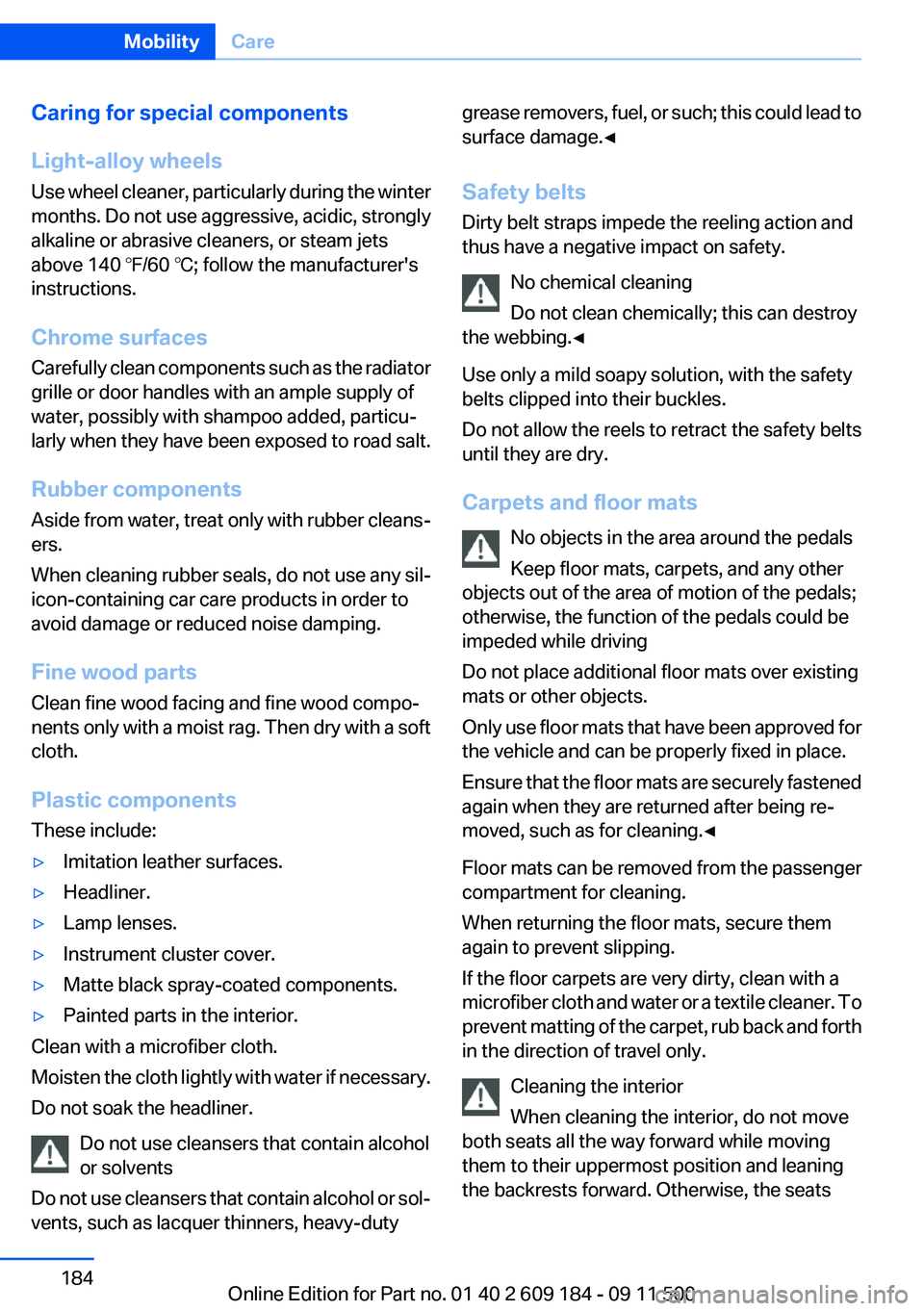
Caring for special components
Light-alloy wheels
Use wheel cleaner, particularly during the winter
months. Do not use aggressive, acidic, strongly
alkaline or abrasive cleaners, or steam jets
above 140 ℉/60 ℃; follow the manufacturer's
instructions.
Chrome surfaces
Carefully clean components such as the radiator
grille or door handles with an ample supply of
water, possibly with shampoo added, particu‐
larly when they have been exposed to road salt.
Rubber components
Aside from water, treat only with rubber cleans‐
ers.
When cleaning rubber seals, do not use any sil‐
icon-containing car care products in order to
avoid damage or reduced noise damping.
Fine wood parts
Clean fine wood facing and fine wood compo‐
nents only with a moist rag. Then dry with a soft
cloth.
Plastic components
These include:▷Imitation leather surfaces.▷Headliner.▷Lamp lenses.▷Instrument cluster cover.▷Matte black spray-coated components.▷Painted parts in the interior.
Clean with a microfiber cloth.
Moisten the cloth lightly with water if necessary.
Do not soak the headliner.
Do not use cleansers that contain alcohol
or solvents
Do not use cleansers that contain alcohol or sol‐
vents, such as lacquer thinners, heavy-duty
grease removers, fuel, or such; this could lead to
surface damage.◀
Safety belts
Dirty belt straps impede the reeling action and
thus have a negative impact on safety.
No chemical cleaning
Do not clean chemically; this can destroy
the webbing.◀
Use only a mild soapy solution, with the safety
belts clipped into their buckles.
Do not allow the reels to retract the safety belts
until they are dry.
Carpets and floor mats No objects in the area around the pedals
Keep floor mats, carpets, and any other
objects out of the area of motion of the pedals;
otherwise, the function of the pedals could be
impeded while driving
Do not place additional floor mats over existing
mats or other objects.
Only use floor mats that have been approved for
the vehicle and can be properly fixed in place.
Ensure that the floor mats are securely fastened
again when they are returned after being re‐
moved, such as for cleaning.◀
Floor mats can be removed from the passenger
compartment for cleaning.
When returning the floor mats, secure them
again to prevent slipping.
If the floor carpets are very dirty, clean with a
microfiber cloth and water or a textile cleaner. To
prevent matting of the carpet, rub back and forth
in the direction of travel only.
Cleaning the interior
When cleaning the interior, do not move
both seats all the way forward while moving
them to their uppermost position and leaning
the backrests forward. Otherwise, the seatsSeite 184MobilityCare184
Online Edition for Part no. 01 40 2 609 184 - 09 11 500
Page 187 of 220
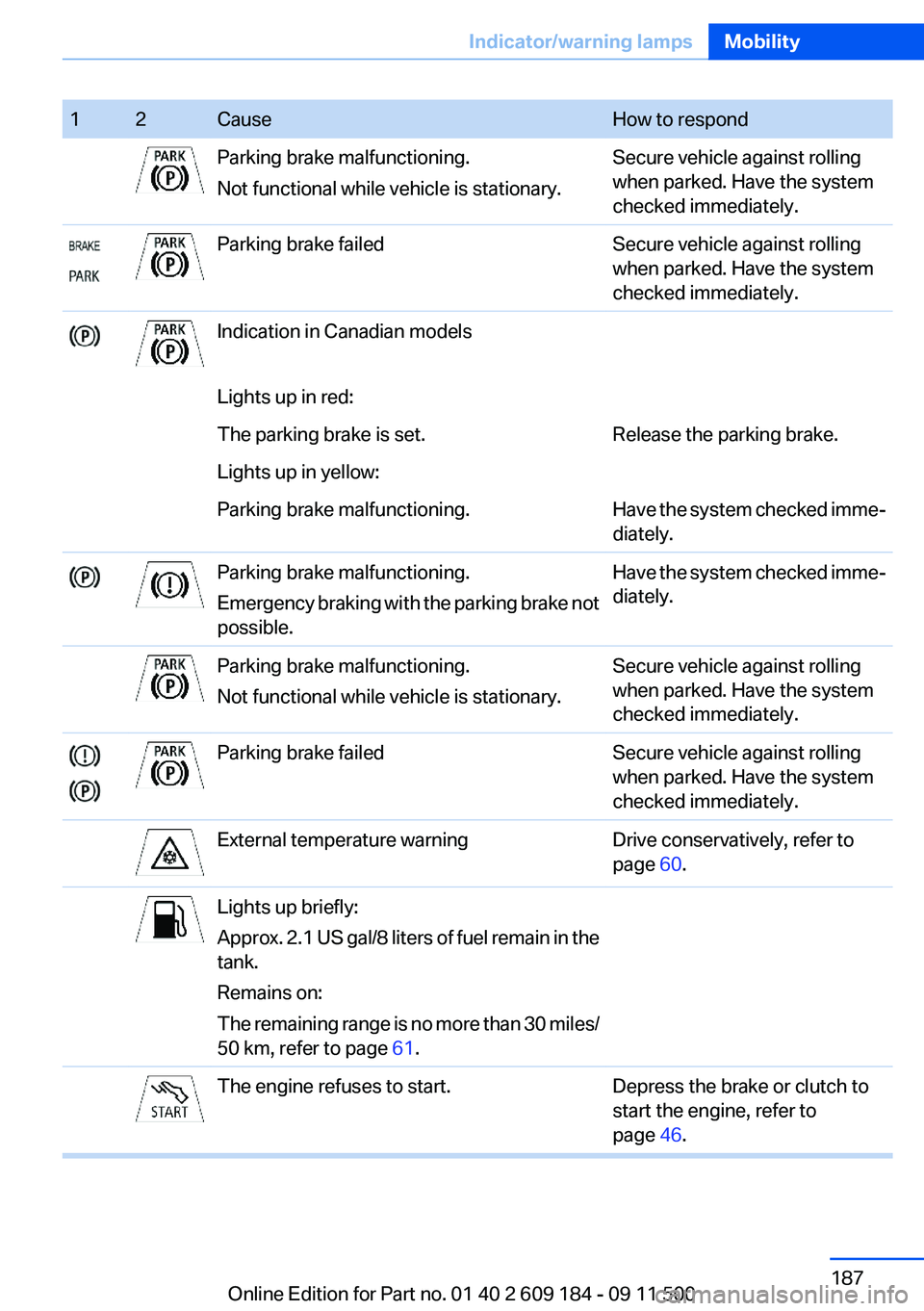
12CauseHow to respondParking brake malfunctioning.
Not functional while vehicle is stationary.Secure vehicle against rolling
when parked. Have the system
checked immediately.Parking brake failedSecure vehicle against rolling
when parked. Have the system
checked immediately.Indication in Canadian modelsLights up in red:The parking brake is set.Release the parking brake.Lights up in yellow:Parking brake malfunctioning.Have the system checked imme‐
diately.Parking brake malfunctioning.
Emergency braking with the parking brake not
possible.Have the system checked imme‐
diately.Parking brake malfunctioning.
Not functional while vehicle is stationary.Secure vehicle against rolling
when parked. Have the system
checked immediately.Parking brake failedSecure vehicle against rolling
when parked. Have the system
checked immediately.External temperature warningDrive conservatively, refer to
page 60.Lights up briefly:
Approx. 2.1 US gal/8 liters of fuel remain in the
tank.
Remains on:
The remaining range is no more than 30 miles/
50 km, refer to page 61.The engine refuses to start.Depress the brake or clutch to
start the engine, refer to
page 46.Seite 187Indicator/warning lampsMobility187
Online Edition for Part no. 01 40 2 609 184 - 09 11 500
Page 189 of 220
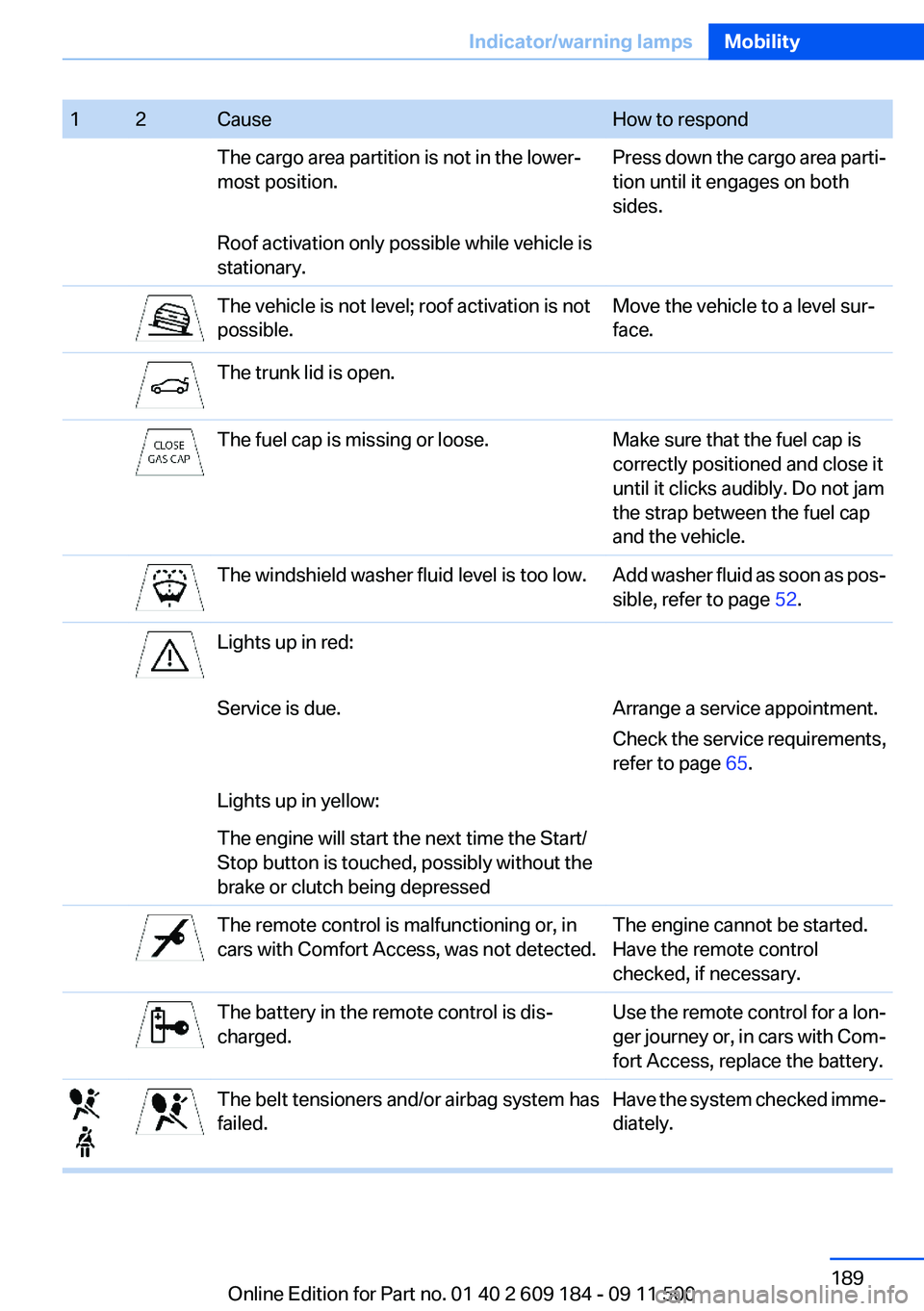
12CauseHow to respondThe cargo area partition is not in the lower‐
most position.Press down the cargo area parti‐
tion until it engages on both
sides.Roof activation only possible while vehicle is
stationary.The vehicle is not level; roof activation is not
possible.Move the vehicle to a level sur‐
face.The trunk lid is open.The fuel cap is missing or loose.Make sure that the fuel cap is
correctly positioned and close it
until it clicks audibly. Do not jam
the strap between the fuel cap
and the vehicle.The windshield washer fluid level is too low.Add washer fluid as soon as pos‐
sible, refer to page 52.Lights up in red:Service is due.Arrange a service appointment.
Check the service requirements,
refer to page 65.Lights up in yellow:The engine will start the next time the Start/
Stop button is touched, possibly without the
brake or clutch being depressedThe remote control is malfunctioning or, in
cars with Comfort Access, was not detected.The engine cannot be started.
Have the remote control
checked, if necessary.The battery in the remote control is dis‐
charged.Use the remote control for a lon‐
ger journey or, in cars with Com‐
fort Access, replace the battery.The belt tensioners and/or airbag system has
failed.Have the system checked imme‐
diately.Seite 189Indicator/warning lampsMobility189
Online Edition for Part no. 01 40 2 609 184 - 09 11 500
Page 193 of 220
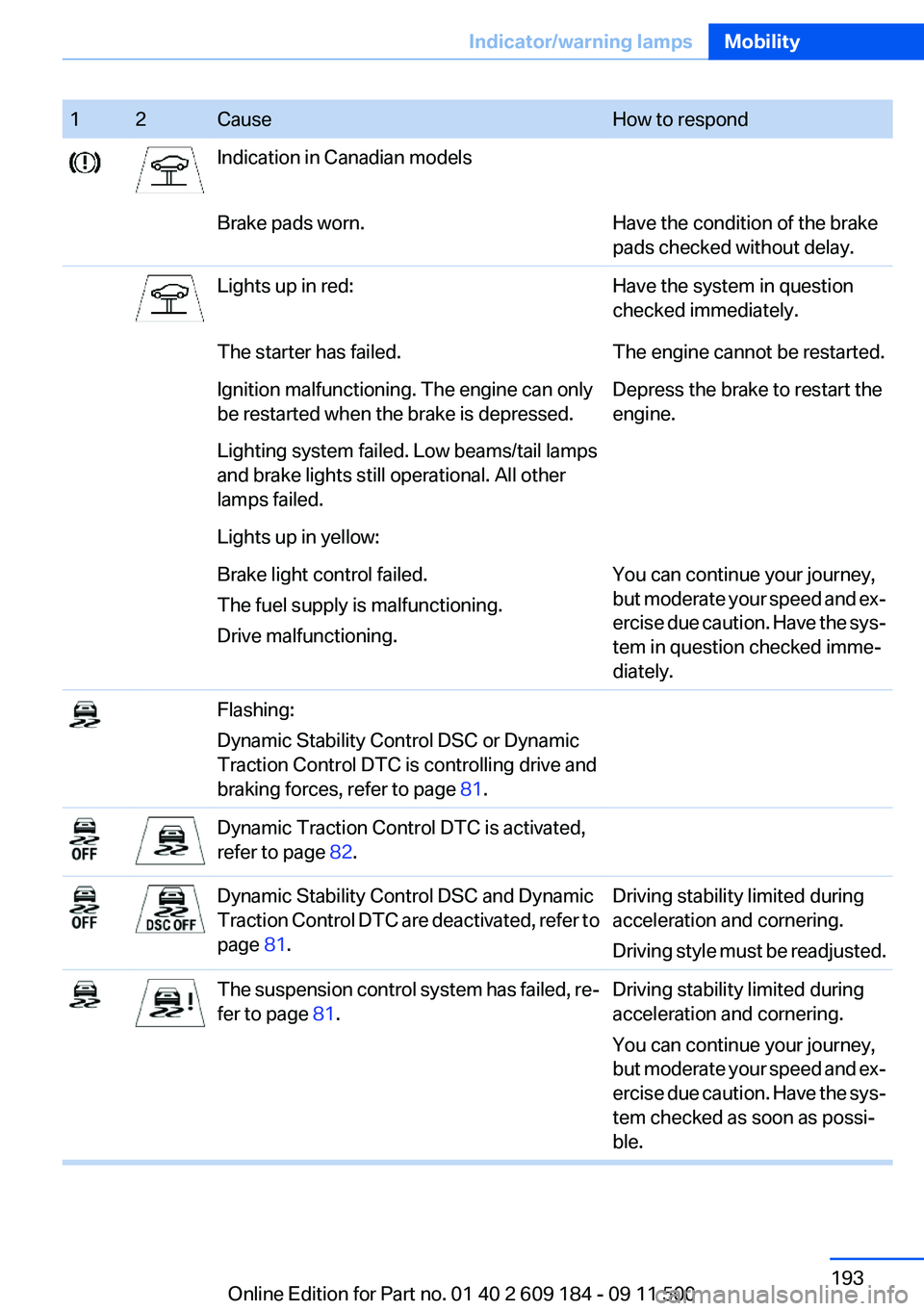
12CauseHow to respondIndication in Canadian modelsBrake pads worn.Have the condition of the brake
pads checked without delay.Lights up in red:Have the system in question
checked immediately.The starter has failed.The engine cannot be restarted.Ignition malfunctioning. The engine can only
be restarted when the brake is depressed.Depress the brake to restart the
engine.Lighting system failed. Low beams/tail lamps
and brake lights still operational. All other
lamps failed.Lights up in yellow:Brake light control failed.
The fuel supply is malfunctioning.
Drive malfunctioning.You can continue your journey,
but moderate your speed and ex‐
ercise due caution. Have the sys‐
tem in question checked imme‐
diately.Flashing:
Dynamic Stability Control DSC or Dynamic
Traction Control DTC is controlling drive and
braking forces, refer to page 81.Dynamic Traction Control DTC is activated,
refer to page 82.Dynamic Stability Control DSC and Dynamic
Traction Control DTC are deactivated, refer to
page 81.Driving stability limited during
acceleration and cornering.
Driving style must be readjusted.The suspension control system has failed, re‐
fer to page 81.Driving stability limited during
acceleration and cornering.
You can continue your journey,
but moderate your speed and ex‐
ercise due caution. Have the sys‐
tem checked as soon as possi‐
ble.Seite 193Indicator/warning lampsMobility193
Online Edition for Part no. 01 40 2 609 184 - 09 11 500
Page 206 of 220
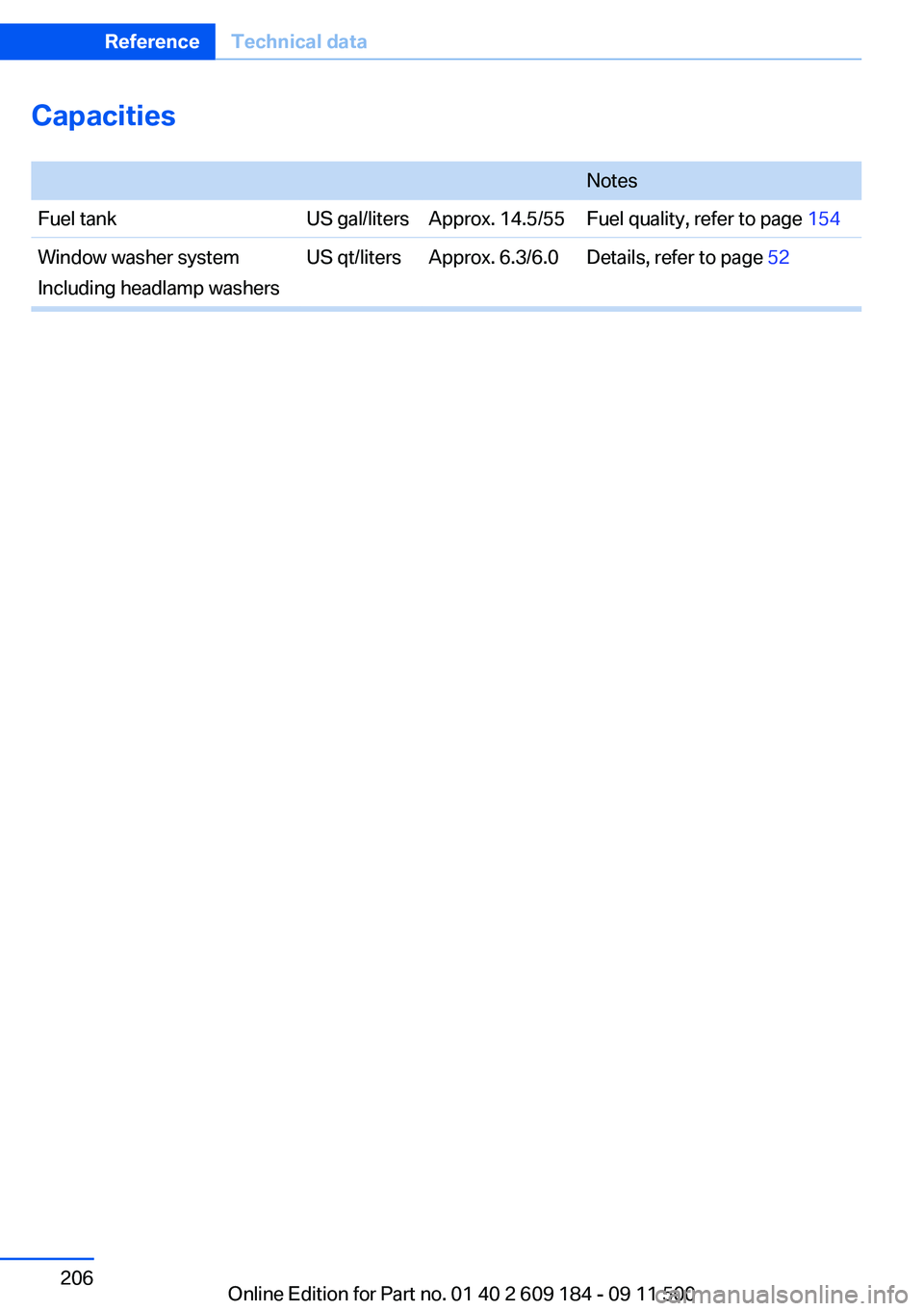
Capacities
NotesFuel tankUS gal/litersApprox. 14.5/55Fuel quality, refer to page 154Window washer system
Including headlamp washersUS qt/litersApprox. 6.3/6.0Details, refer to page 52Seite 206ReferenceTechnical data206
Online Edition for Part no. 01 40 2 609 184 - 09 11 500
Page 208 of 220
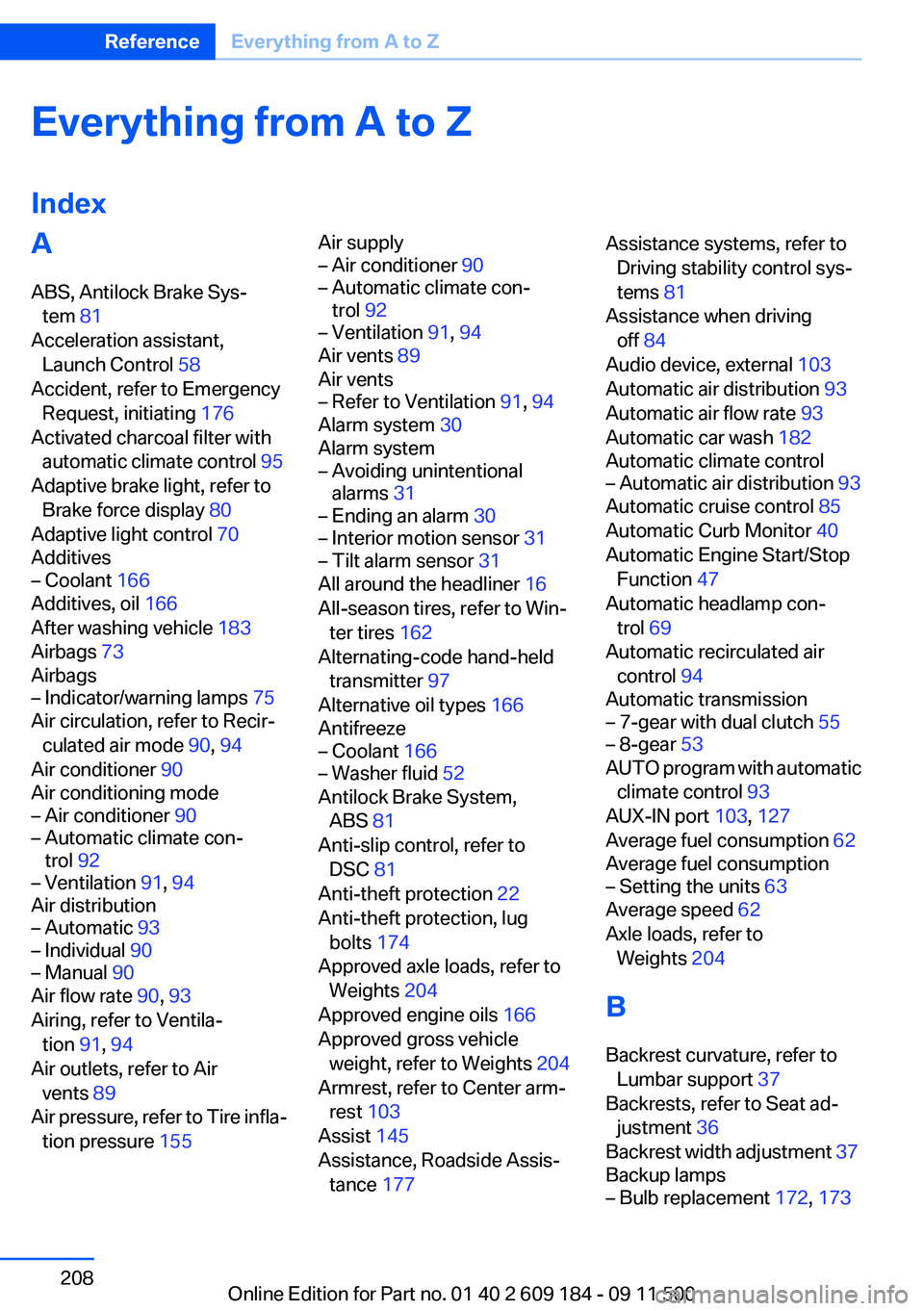
Everything from A to Z
IndexA
ABS, Antilock Brake Sys‐ tem 81
Acceleration assistant, Launch Control 58
Accident, refer to Emergency Request, initiating 176
Activated charcoal filter with automatic climate control 95
Adaptive brake light, refer to Brake force display 80
Adaptive light control 70
Additives– Coolant 166
Additives, oil 166
After washing vehicle 183
Airbags 73
Airbags
– Indicator/warning lamps 75
Air circulation, refer to Recir‐
culated air mode 90, 94
Air conditioner 90
Air conditioning mode
– Air conditioner 90– Automatic climate con‐
trol 92– Ventilation 91, 94
Air distribution
– Automatic 93– Individual 90– Manual 90
Air flow rate 90, 93
Airing, refer to Ventila‐ tion 91, 94
Air outlets, refer to Air vents 89
Air pressure, refer to Tire infla‐ tion pressure 155
Air supply– Air conditioner 90– Automatic climate con‐
trol 92– Ventilation 91, 94
Air vents 89
Air vents
– Refer to Ventilation 91, 94
Alarm system 30
Alarm system
– Avoiding unintentional
alarms 31– Ending an alarm 30– Interior motion sensor 31– Tilt alarm sensor 31
All around the headliner 16
All-season tires, refer to Win‐ ter tires 162
Alternating-code hand-held transmitter 97
Alternative oil types 166
Antifreeze
– Coolant 166– Washer fluid 52
Antilock Brake System,
ABS 81
Anti-slip control, refer to DSC 81
Anti-theft protection 22
Anti-theft protection, lug bolts 174
Approved axle loads, refer to Weights 204
Approved engine oils 166
Approved gross vehicle weight, refer to Weights 204
Armrest, refer to Center arm‐ rest 103
Assist 145
Assistance, Roadside Assis‐ tance 177
Assistance systems, refer to
Driving stability control sys‐
tems 81
Assistance when driving off 84
Audio device, external 103
Automatic air distribution 93
Automatic air flow rate 93
Automatic car wash 182
Automatic climate control– Automatic air distribution 93
Automatic cruise control 85
Automatic Curb Monitor 40
Automatic Engine Start/Stop Function 47
Automatic headlamp con‐ trol 69
Automatic recirculated air control 94
Automatic transmission
– 7-gear with dual clutch 55– 8-gear 53
AUTO program with automatic
climate control 93
AUX-IN port 103, 127
Average fuel consumption 62
Average fuel consumption
– Setting the units 63
Average speed 62
Axle loads, refer to Weights 204
B
Backrest curvature, refer to Lumbar support 37
Backrests, refer to Seat ad‐ justment 36
Backrest width adjustment 37
Backup lamps
– Bulb replacement 172, 173Seite 208ReferenceEverything from A to Z208
Online Edition for Part no. 01 40 2 609 184 - 09 11 500
Page 209 of 220
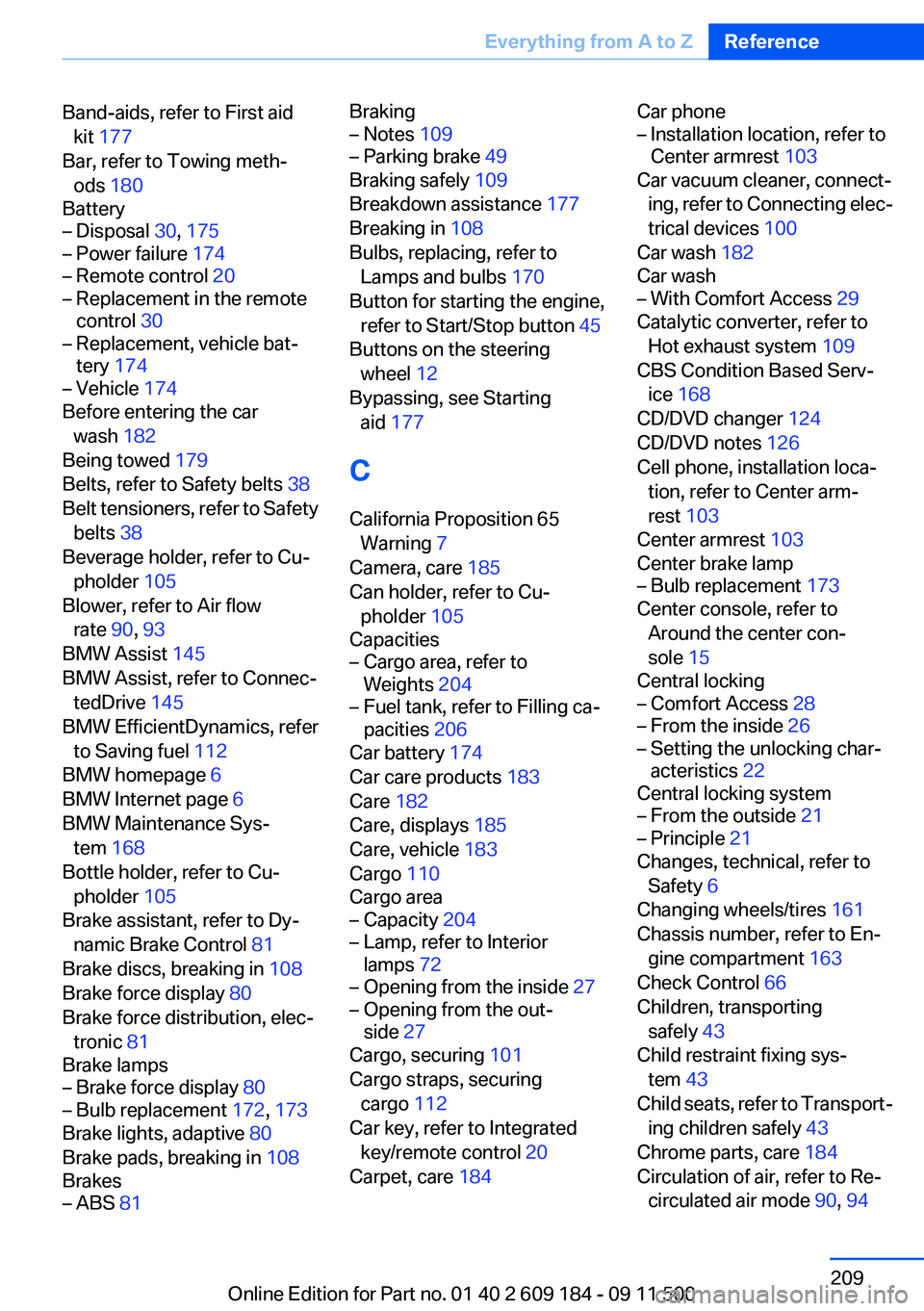
Band-aids, refer to First aidkit 177
Bar, refer to Towing meth‐ ods 180
Battery– Disposal 30, 175– Power failure 174– Remote control 20– Replacement in the remote
control 30– Replacement, vehicle bat‐
tery 174– Vehicle 174
Before entering the car
wash 182
Being towed 179
Belts, refer to Safety belts 38
Belt tensioners, refer to Safety belts 38
Beverage holder, refer to Cu‐ pholder 105
Blower, refer to Air flow rate 90, 93
BMW Assist 145
BMW Assist, refer to Connec‐ tedDrive 145
BMW EfficientDynamics, refer to Saving fuel 112
BMW homepage 6
BMW Internet page 6
BMW Maintenance Sys‐ tem 168
Bottle holder, refer to Cu‐ pholder 105
Brake assistant, refer to Dy‐ namic Brake Control 81
Brake discs, breaking in 108
Brake force display 80
Brake force distribution, elec‐ tronic 81
Brake lamps
– Brake force display 80– Bulb replacement 172, 173
Brake lights, adaptive 80
Brake pads, breaking in 108
Brakes
– ABS 81Braking– Notes 109– Parking brake 49
Braking safely 109
Breakdown assistance 177
Breaking in 108
Bulbs, replacing, refer to Lamps and bulbs 170
Button for starting the engine, refer to Start/Stop button 45
Buttons on the steering wheel 12
Bypassing, see Starting aid 177
C
California Proposition 65 Warning 7
Camera, care 185
Can holder, refer to Cu‐ pholder 105
Capacities
– Cargo area, refer to
Weights 204– Fuel tank, refer to Filling ca‐
pacities 206
Car battery 174
Car care products 183
Care 182
Care, displays 185
Care, vehicle 183
Cargo 110
Cargo area
– Capacity 204– Lamp, refer to Interior
lamps 72– Opening from the inside 27– Opening from the out‐
side 27
Cargo, securing 101
Cargo straps, securing cargo 112
Car key, refer to Integrated key/remote control 20
Carpet, care 184
Car phone– Installation location, refer to
Center armrest 103
Car vacuum cleaner, connect‐
ing, refer to Connecting elec‐
trical devices 100
Car wash 182
Car wash
– With Comfort Access 29
Catalytic converter, refer to
Hot exhaust system 109
CBS Condition Based Serv‐ ice 168
CD/DVD changer 124
CD/DVD notes 126
Cell phone, installation loca‐ tion, refer to Center arm‐
rest 103
Center armrest 103
Center brake lamp
– Bulb replacement 173
Center console, refer to
Around the center con‐
sole 15
Central locking
– Comfort Access 28– From the inside 26– Setting the unlocking char‐
acteristics 22
Central locking system
– From the outside 21– Principle 21
Changes, technical, refer to
Safety 6
Changing wheels/tires 161
Chassis number, refer to En‐ gine compartment 163
Check Control 66
Children, transporting safely 43
Child restraint fixing sys‐ tem 43
Child seats, refer to Transport‐ ing children safely 43
Chrome parts, care 184
Circulation of air, refer to Re‐ circulated air mode 90, 94
Seite 209Everything from A to ZReference209
Online Edition for Part no. 01 40 2 609 184 - 09 11 500
Page 210 of 220
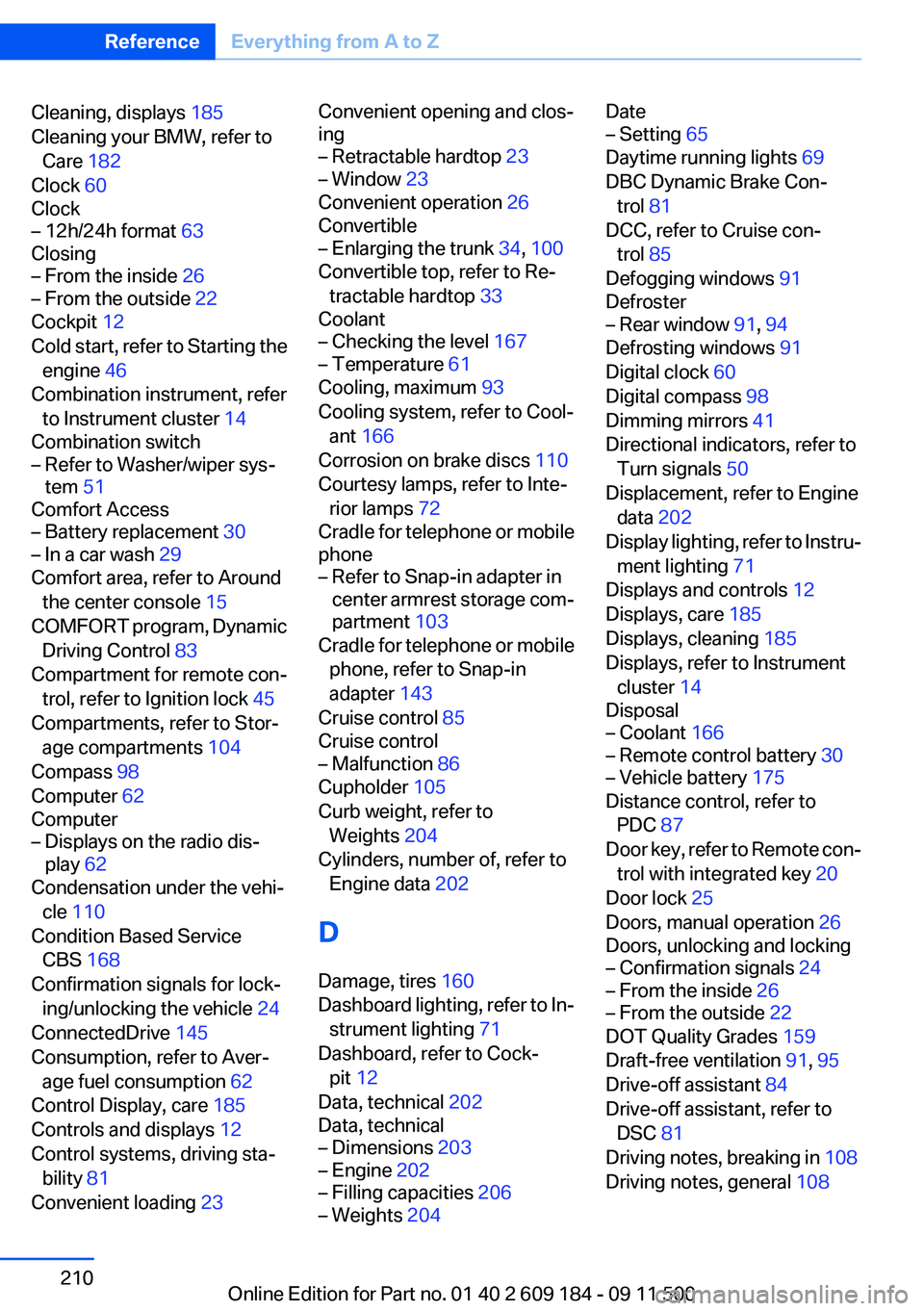
Cleaning, displays 185
Cleaning your BMW, refer to Care 182
Clock 60
Clock– 12h/24h format 63
Closing
– From the inside 26– From the outside 22
Cockpit 12
Cold start, refer to Starting the engine 46
Combination instrument, refer to Instrument cluster 14
Combination switch
– Refer to Washer/wiper sys‐
tem 51
Comfort Access
– Battery replacement 30– In a car wash 29
Comfort area, refer to Around
the center console 15
COMFORT program, Dynamic Driving Control 83
Compartment for remote con‐ trol, refer to Ignition lock 45
Compartments, refer to Stor‐ age compartments 104
Compass 98
Computer 62
Computer
– Displays on the radio dis‐
play 62
Condensation under the vehi‐
cle 110
Condition Based Service CBS 168
Confirmation signals for lock‐ ing/unlocking the vehicle 24
ConnectedDrive 145
Consumption, refer to Aver‐ age fuel consumption 62
Control Display, care 185
Controls and displays 12
Control systems, driving sta‐ bility 81
Convenient loading 23
Convenient opening and clos‐
ing– Retractable hardtop 23– Window 23
Convenient operation 26
Convertible
– Enlarging the trunk 34, 100
Convertible top, refer to Re‐
tractable hardtop 33
Coolant
– Checking the level 167– Temperature 61
Cooling, maximum 93
Cooling system, refer to Cool‐ ant 166
Corrosion on brake discs 110
Courtesy lamps, refer to Inte‐ rior lamps 72
Cradle for telephone or mobile
phone
– Refer to Snap-in adapter in
center armrest storage com‐
partment 103
Cradle for telephone or mobile
phone, refer to Snap-in
adapter 143
Cruise control 85
Cruise control
– Malfunction 86
Cupholder 105
Curb weight, refer to Weights 204
Cylinders, number of, refer to Engine data 202
D
Damage, tires 160
Dashboard lighting, refer to In‐ strument lighting 71
Dashboard, refer to Cock‐ pit 12
Data, technical 202
Data, technical
– Dimensions 203– Engine 202– Filling capacities 206– Weights 204Date– Setting 65
Daytime running lights 69
DBC Dynamic Brake Con‐ trol 81
DCC, refer to Cruise con‐ trol 85
Defogging windows 91
Defroster
– Rear window 91, 94
Defrosting windows 91
Digital clock 60
Digital compass 98
Dimming mirrors 41
Directional indicators, refer to Turn signals 50
Displacement, refer to Engine data 202
Display lighting, refer to Instru‐ ment lighting 71
Displays and controls 12
Displays, care 185
Displays, cleaning 185
Displays, refer to Instrument
cluster 14
Disposal
– Coolant 166– Remote control battery 30– Vehicle battery 175
Distance control, refer to
PDC 87
Door key, refer to Remote con‐ trol with integrated key 20
Door lock 25
Doors, manual operation 26
Doors, unlocking and locking
– Confirmation signals 24– From the inside 26– From the outside 22
DOT Quality Grades 159
Draft-free ventilation 91, 95
Drive-off assistant 84
Drive-off assistant, refer to DSC 81
Driving notes, breaking in 108
Driving notes, general 108
Seite 210ReferenceEverything from A to Z210
Online Edition for Part no. 01 40 2 609 184 - 09 11 500
Page 211 of 220
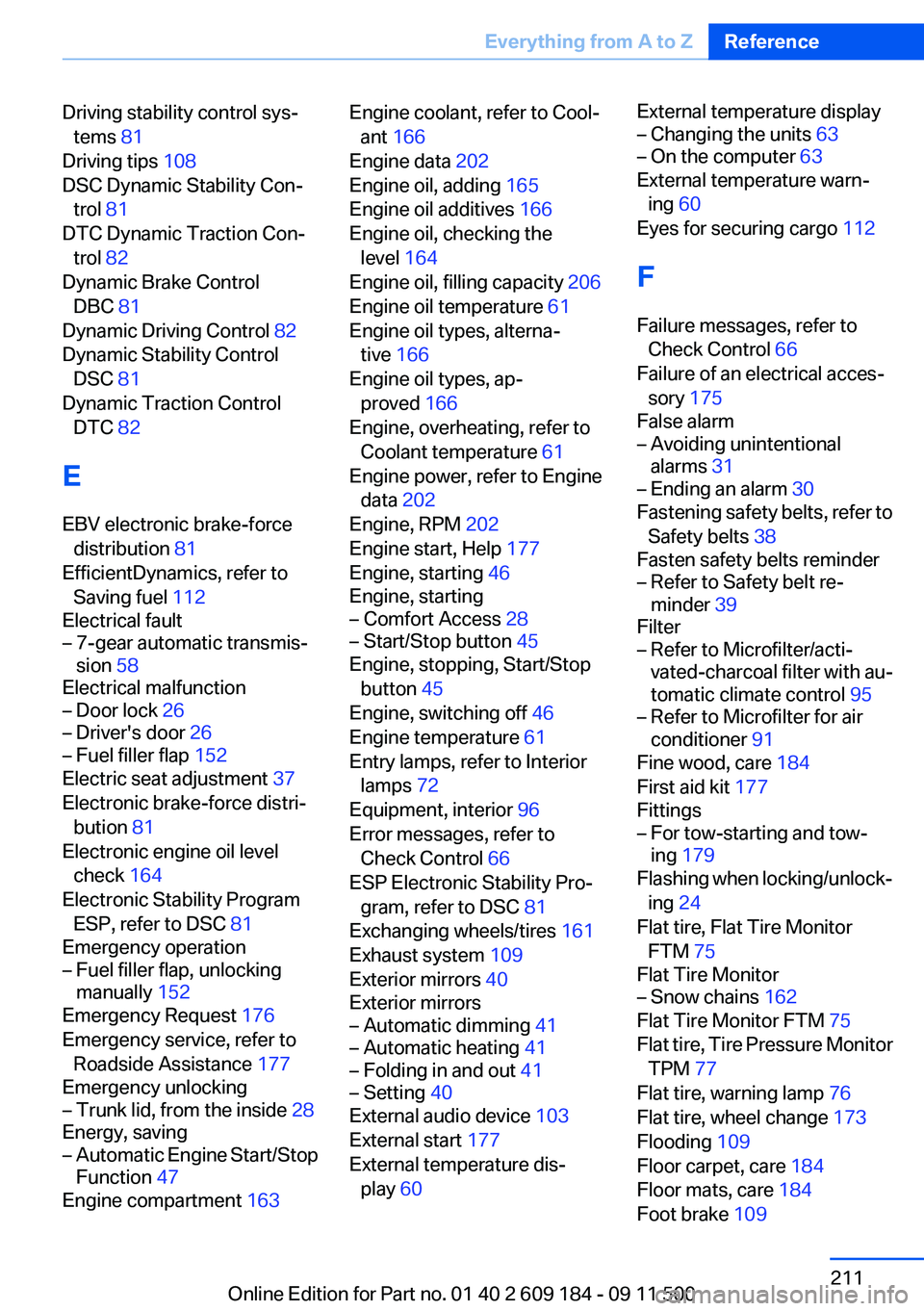
Driving stability control sys‐tems 81
Driving tips 108
DSC Dynamic Stability Con‐ trol 81
DTC Dynamic Traction Con‐ trol 82
Dynamic Brake Control DBC 81
Dynamic Driving Control 82
Dynamic Stability Control DSC 81
Dynamic Traction Control DTC 82
E
EBV electronic brake-force distribution 81
EfficientDynamics, refer to Saving fuel 112
Electrical fault– 7-gear automatic transmis‐
sion 58
Electrical malfunction
– Door lock 26– Driver's door 26– Fuel filler flap 152
Electric seat adjustment 37
Electronic brake-force distri‐ bution 81
Electronic engine oil level check 164
Electronic Stability Program ESP, refer to DSC 81
Emergency operation
– Fuel filler flap, unlocking
manually 152
Emergency Request 176
Emergency service, refer to Roadside Assistance 177
Emergency unlocking
– Trunk lid, from the inside 28
Energy, saving
– Automatic Engine Start/Stop
Function 47
Engine compartment 163
Engine coolant, refer to Cool‐
ant 166
Engine data 202
Engine oil, adding 165
Engine oil additives 166
Engine oil, checking the level 164
Engine oil, filling capacity 206
Engine oil temperature 61
Engine oil types, alterna‐ tive 166
Engine oil types, ap‐ proved 166
Engine, overheating, refer to Coolant temperature 61
Engine power, refer to Engine data 202
Engine, RPM 202
Engine start, Help 177
Engine, starting 46
Engine, starting– Comfort Access 28– Start/Stop button 45
Engine, stopping, Start/Stop
button 45
Engine, switching off 46
Engine temperature 61
Entry lamps, refer to Interior lamps 72
Equipment, interior 96
Error messages, refer to Check Control 66
ESP Electronic Stability Pro‐ gram, refer to DSC 81
Exchanging wheels/tires 161
Exhaust system 109
Exterior mirrors 40
Exterior mirrors
– Automatic dimming 41– Automatic heating 41– Folding in and out 41– Setting 40
External audio device 103
External start 177
External temperature dis‐ play 60
External temperature display– Changing the units 63– On the computer 63
External temperature warn‐
ing 60
Eyes for securing cargo 112
F
Failure messages, refer to Check Control 66
Failure of an electrical acces‐ sory 175
False alarm
– Avoiding unintentional
alarms 31– Ending an alarm 30
Fastening safety belts, refer to
Safety belts 38
Fasten safety belts reminder
– Refer to Safety belt re‐
minder 39
Filter
– Refer to Microfilter/acti‐
vated-charcoal filter with au‐
tomatic climate control 95– Refer to Microfilter for air
conditioner 91
Fine wood, care 184
First aid kit 177
Fittings
– For tow-starting and tow‐
ing 179
Flashing when locking/unlock‐
ing 24
Flat tire, Flat Tire Monitor FTM 75
Flat Tire Monitor
– Snow chains 162
Flat Tire Monitor FTM 75
Flat tire, Tire Pressure Monitor TPM 77
Flat tire, warning lamp 76
Flat tire, wheel change 173
Flooding 109
Floor carpet, care 184
Floor mats, care 184
Foot brake 109
Seite 211Everything from A to ZReference211
Online Edition for Part no. 01 40 2 609 184 - 09 11 500