display BMW Z4 SDRIVE35I 2012 Workshop Manual
[x] Cancel search | Manufacturer: BMW, Model Year: 2012, Model line: Z4 SDRIVE35I, Model: BMW Z4 SDRIVE35I 2012Pages: 220, PDF Size: 9.9 MB
Page 138 of 220
▷It may not be possible to display phone book
entries with special characters.▷The number of phone book entries to be
stored is too high.▷Is the data volume of the contact too large,
e. g., due to stored information such as
notes? Reduce the data volume of the con‐
tact.
The phone connection quality is poor.
▷The strength of the Bluetooth signal on the
mobile phone can be adjusted, depending
on the mobile phone.▷Insert the mobile phone into the snap-in
adapter or place it in the area of the center
console.▷Adjust the volume of the microphone and
loudspeakers.
If all points in this list have been checked and the
required function is still not available, contact
Customer Relations or the service center.
Controls
The following functions can be operated on the
radio:
▷Accept/reject a call.▷Dial a phone number.▷Dial a phone number from the phone book.▷Dial a stored phone number, such as from
the list of accepted calls.▷In conjunction with the full preparation pack‐
age mobile phone: BMW Assist, refer to
page 145.
When the ignition and the radio ready state are
switched off, such as after the remote control is
removed, an existing call can be continued for
up to 25 minutes on the hands-free system.
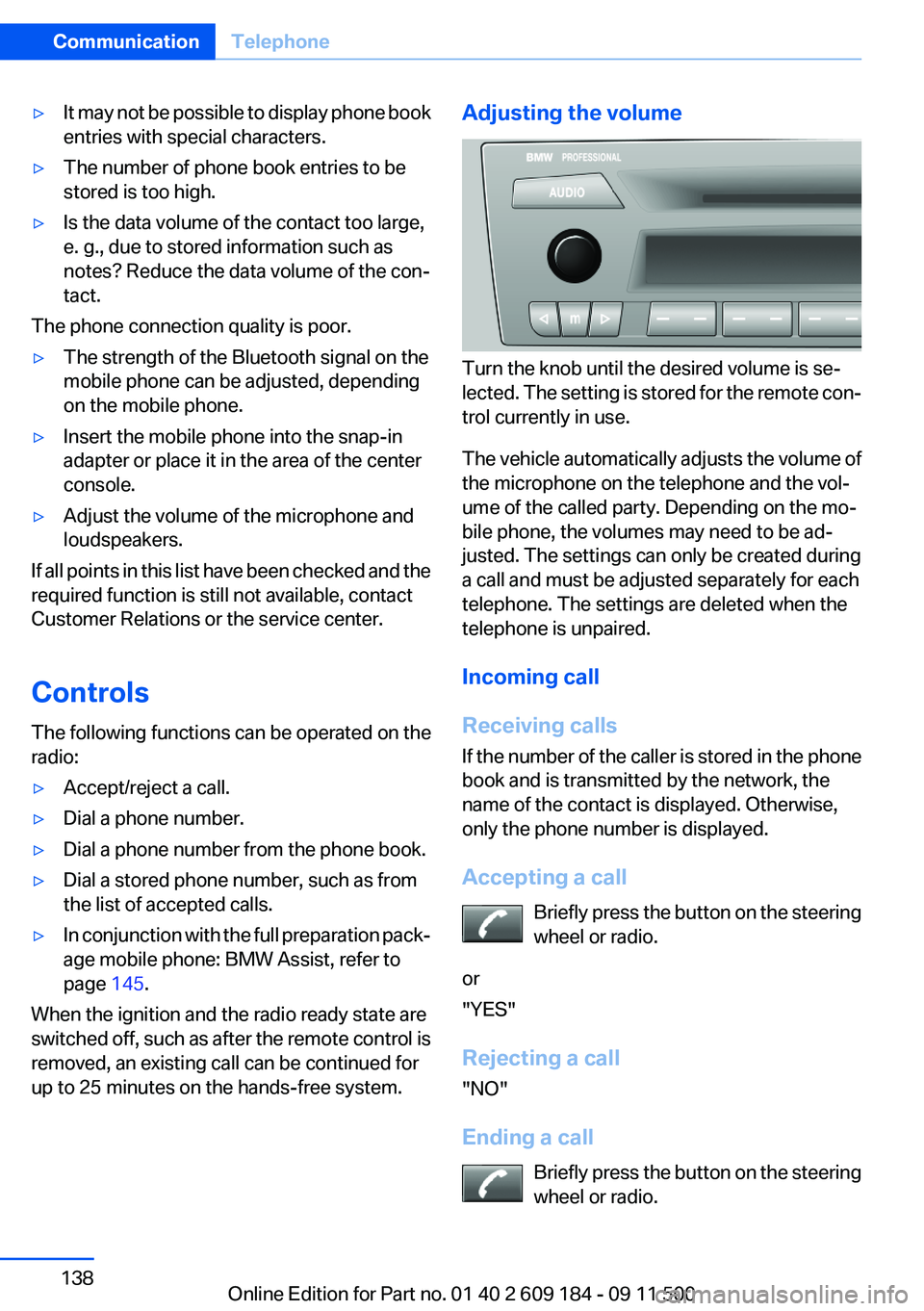
Adjusting the volume
Turn the knob until the desired volume is se‐
lected. The setting is stored for the remote con‐
trol currently in use.
The vehicle automatically adjusts the volume of
the microphone on the telephone and the vol‐
ume of the called party. Depending on the mo‐
bile phone, the volumes may need to be ad‐
justed. The settings can only be created during
a call and must be adjusted separately for each
telephone. The settings are deleted when the
telephone is unpaired.
Incoming call
Receiving calls
If the number of the caller is stored in the phone
book and is transmitted by the network, the
name of the contact is displayed. Otherwise,
only the phone number is displayed.
Accepting a call Briefly press the button on the steering
wheel or radio.
or
"YES"
Rejecting a call
"NO"
Ending a call Briefly press the button on the steering
wheel or radio.
Seite 138CommunicationTelephone138
Online Edition for Part no. 01 40 2 609 184 - 09 11 500
Page 139 of 220
or
"END"
Entering a phone number
Dialing a number1.Switch on the radio ready state or the igni‐
tion.2. Press the button.3."PHONE"4."#"5.Enter the desired phone number on the but‐
tons 0–9.
To delete the last digit: "DEL"6. Briefly press the button on the
steering wheel or radio.
or
Press the right knob to dial the phone num‐
ber.
Phone book
Dialed phone numbers, incoming calls and en‐
tries in the phone book are stored on lists if the
mobile phone is connected to the vehicle via
Bluetooth.
Five lists are available:
▷"A-Z"
Entries of the phone book of the SIM card or
of the mobile phone, which consist of a
name and phone number, are sorted in al‐
phabetical order.▷"TOP8"
The Top 8 list contains the eight phone
numbers that were dialed most frequently.▷"LAST8"
The last eight phone numbers that were di‐
aled are stored. The phone number dialed
last is at the top of the list.▷"CALLS"The phone numbers of the last eight ac‐
cepted calls are stored. For this to be pos‐
sible, it must be possible to transmit the
phone number of the caller.▷"MISSED"
The phone numbers of the last eight calls
that were not accepted are stored. For this
to be possible, it must be possible to trans‐
mit the phone number of the caller.
Dialing a phone number from the phone
book
The list A-Z is available for phone book entries.
If entries with different names but the same
phone number are transferred to the vehicle
from the mobile phone, only one entry is dis‐
played.
The display of the phone book entries on the
radio may differ from the display on the mobile
phone, such as the order of the first and last
names.
1.Switch on the radio ready state or the igni‐
tion.2. Press the button.3."PHONE"4."A-Z"5. The arrows indicate that additional
letters can be displayed.
Turn the right knob to display additional let‐
ters if necessary.6.Turn the right knob to select the first letter
of the entry.7.Select the entry with the function button.
The phone number is dialed.
To display all entries:
1.Turn the right knob to select the first letter
of the entry and press the knob.2.Turn the right knob to select the desired en‐
try and press the knob.
orSeite 139TelephoneCommunication139
Online Edition for Part no. 01 40 2 609 184 - 09 11 500
Page 140 of 220
Press the button on the steering
wheel or radio to dial the number.
The phone number is dialed.
Editing and dialing a phone number
from the phone book
You can edit the phone number of an entry be‐
fore making a call. This change is not stored in
the phone book.
1.Selecting an entry.2."EDIT"3.To delete a digit: "DEL"4.Enter additional digits on the buttons 0–9.5.Press the right knob to dial the phone num‐
ber.
Dialing a phone number from the phone
book using the buttons on the steering
wheel
1. Press and hold the button to display
the Telephone menu.2.Press the arrow buttons on the steering
wheel to leaf through the phone book.3. Press the button to dial the phone
number.
Dialing a phone number stored in a list
To select an entry and establish a connection:
1.Switch on the radio ready state or the igni‐
tion.2. Press the button.3."PHONE"4.Select a list, for instance "TOP8"5.Turn the right knob to select an entry and
press the knob to dial the phone number.
Deleting an individual entry
1.Select an entry from the list.2."DEL"
DTMF suffix dialing
DTMF suffix dialing can be used for gaining ac‐
cess to network services or for controlling devi‐
ces, e.g., to make a remote inquiry of an answer‐
ing machine. The DTMF code is needed for this
purpose.
This function is only available if a connection ex‐
ists and if the hands-free system is being used.
1."Keypad"2.Enter the DTMF code on the buttons 0–9.3.If necessary, press and hold the function
button on the right or left to enter special
characters.
Displaying the call duration
During a call:
"DURAT"
Hands-free system
General information
Calls that are being made on the hands-free
system can be continued on the mobile phone
and vice versa.
From the mobile phone to the hands-
free system
Calls that were begun outside of the Bluetooth
range of the vehicle can be continued on the
hands-free system with the ignition switched
on.
Depending on the mobile phone, the system au‐
tomatically switches to the hands-free system.
If the system does not switch over automatically,
follow the instructions on the mobile phone dis‐
play; refer also to the mobile phone operating
instructions.
Seite 140CommunicationTelephone140
Online Edition for Part no. 01 40 2 609 184 - 09 11 500
Page 142 of 220
Redialing
›Redial‹
Voice phone book
Depending on how your vehicle is equipped, it
may be necessary to create your own voice
phone book.
The entries must be entered using voice activa‐
tion and are separate from the memory in the
mobile phone. Up to 50 entries can be set up.
Saving an entry1.›Save name‹2.Say the name. Do not exceed the speaking
duration of approx. 2 seconds.3.Say the phone number after being prompted
to do so by the system.4.›Save‹
Deleting an entry
1.›Delete name‹2.Say the name after being prompted to do so.3.Confirm the prompt: ›Yes‹
Deleting all entries
1.›Delete phonebook‹2.Confirm the prompt: ›Yes‹3.Confirm the prompt again: ›Yes‹
Reading and selecting entries
1.›Read phonebook‹2.When the desired entry is read aloud:
say ›Dial number‹
Selecting an entry
1.›Dial name‹2.Say the name after being prompted to do so.3.Confirm the prompt: ›Yes‹Adjusting the volume
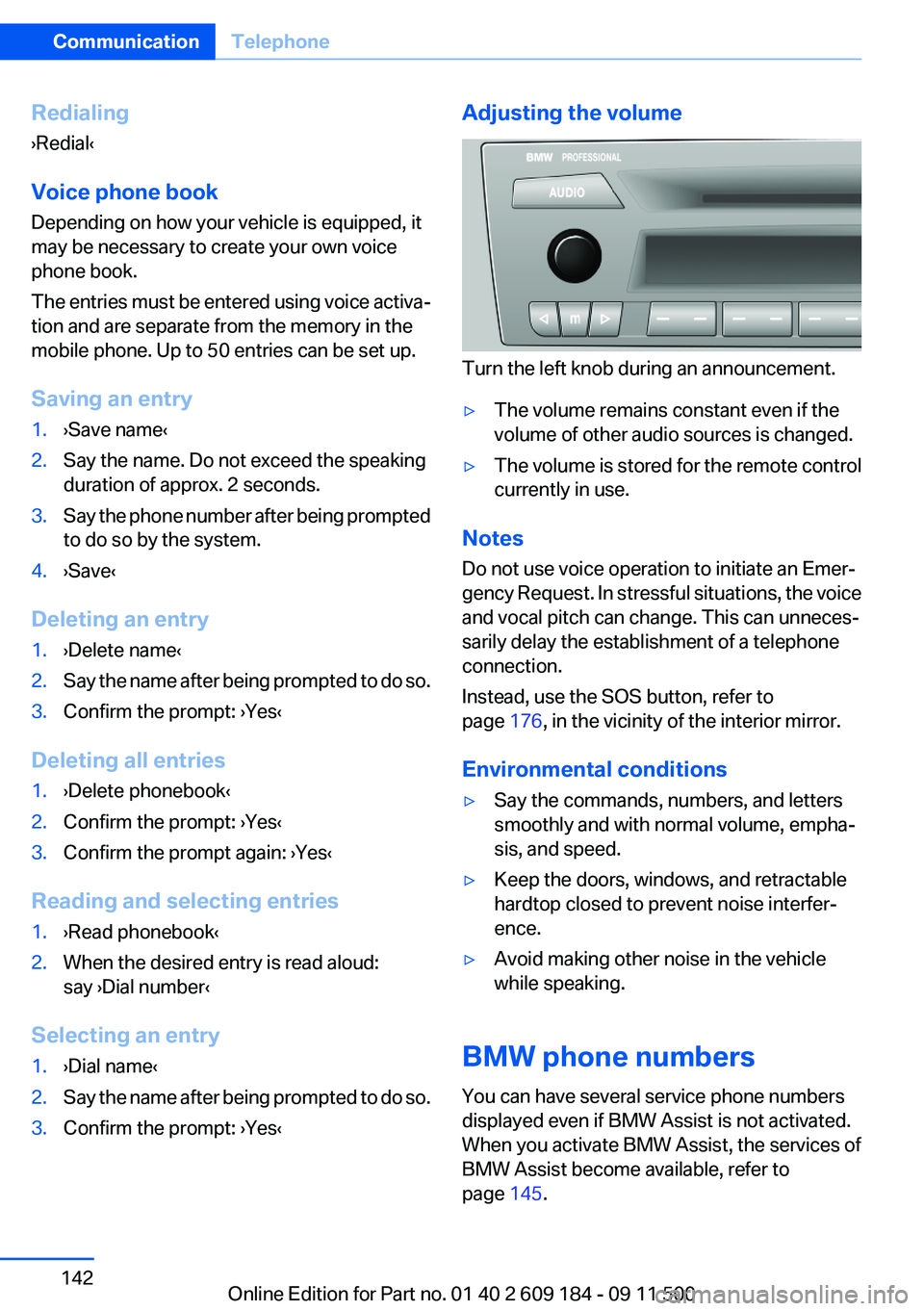
Turn the left knob during an announcement.
▷The volume remains constant even if the
volume of other audio sources is changed.▷The volume is stored for the remote control
currently in use.
Notes
Do not use voice operation to initiate an Emer‐
gency Request. In stressful situations, the voice
and vocal pitch can change. This can unneces‐
sarily delay the establishment of a telephone
connection.
Instead, use the SOS button, refer to
page 176, in the vicinity of the interior mirror.
Environmental conditions
▷Say the commands, numbers, and letters
smoothly and with normal volume, empha‐
sis, and speed.▷Keep the doors, windows, and retractable
hardtop closed to prevent noise interfer‐
ence.▷Avoid making other noise in the vehicle
while speaking.
BMW phone numbers
You can have several service phone numbers
displayed even if BMW Assist is not activated.
When you activate BMW Assist, the services of
BMW Assist become available, refer to
page 145.
Seite 142CommunicationTelephone142
Online Edition for Part no. 01 40 2 609 184 - 09 11 500
Page 143 of 220
▷"Road Assist": BMW Roadside Assistance,
if you require help in the event of a break‐
down.▷"Serv. Appt.": BMW center, if you wish to
arrange a service appointment.▷"Cust Relat": Customer Relations, for infor‐
mation on all aspects of your vehicle.
Displaying the phone numbers
1.Switch on the radio ready state or the igni‐
tion.2. Press the button.3."BMW"4.Turn the right knob until the desired phone
number is displayed.
Snap-in adapter
General information
More information on compatible snap-in adapt‐
ers that support the functions of the mobile
phone is available at the service center.
Notes
At high temperatures, the charging function of
the mobile phone may be limited and functions
may not be executed.
When using the mobile phone via the vehicle,
note the operating instructions of the mobile
phone.
Installation position
In the center armrest.
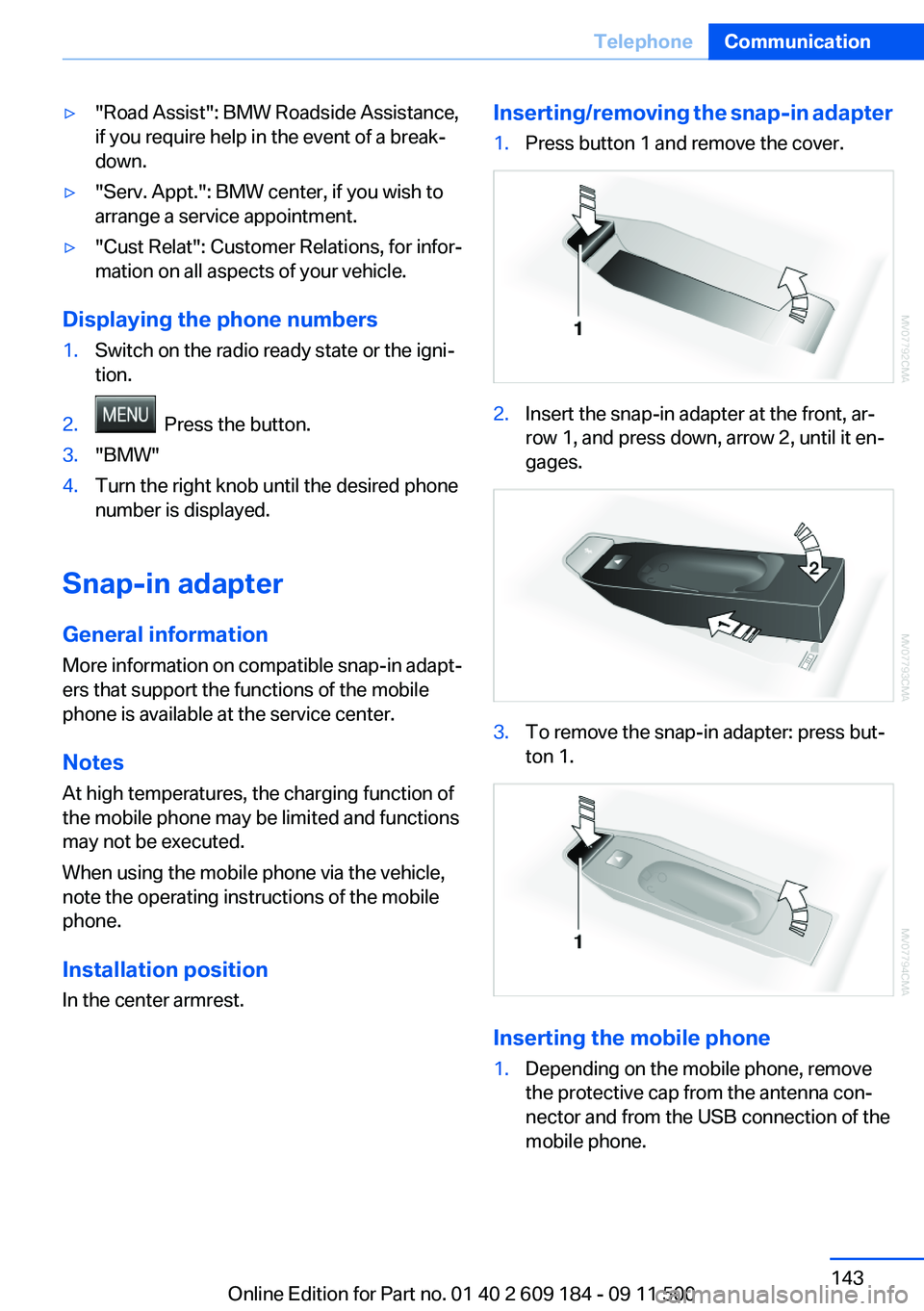
Inserting/removing the snap-in adapter1.Press button 1 and remove the cover.2.Insert the snap-in adapter at the front, ar‐
row 1, and press down, arrow 2, until it en‐
gages.3.To remove the snap-in adapter: press but‐
ton 1.
Inserting the mobile phone
1.Depending on the mobile phone, remove
the protective cap from the antenna con‐
nector and from the USB connection of the
mobile phone.Seite 143TelephoneCommunication143
Online Edition for Part no. 01 40 2 609 184 - 09 11 500
Page 146 of 220
the mobile phone is not available or dis‐
charged.
Press the SOS button to contact the BMW
Assist Response Center.
TeleService
General information
TeleService supports communication with your
service center.
▷Data on the vehicle's service requirements
can be sent directly to the service center. In
this way, the service center can plan its work
in advance. This shortens the duration of the
service appointment.▷In the event of a breakdown, data on the ve‐
hicle's condition can be sent directly to
Roadside Assistance.▷The service varies by country.▷Connection costs may ensue.▷Services may be restricted abroad.
Requirements
▷The vehicle is equipped with the BMW As‐
sist and Bluetooth system.▷BMW Assist is activated.
If BMW Assist is not activated, a mobile
phone that has been recommended by
BMW for TeleService and that is configured
for mobile data communication must be
connected with the vehicle.▷Wireless reception is available.▷The ignition is switched on.
Using TeleService
The TeleServices are typically activated in the
vehicle.
Even if the TeleServices are not active, a voice
contact to Roadside Assistance is still possible.
To continue using or to deactivate the services,
please contact your service partner or the BMW
customer hotline.
Activating or updating
TeleServices or BMW Assist
To be able to use the services of TeleServices
or BMW Assist, they must be activated.1.Switch on the radio ready state or the igni‐
tion.2. Press the button.3."ASSIST"4."SET"5."SETUP"6."YES"
TeleServices and, if necessary, BMW Assist
are activated and the data exchange with the
service center can begin. Activation take
several minutes. The respective status is
shown on the display.
Concierge service
General information
The BMW Assist Concierge service offers infor‐
mation on events, gas stations, and hotels, and
provides phone numbers and addresses. Hotels
can be booked directly by the BMW Assist Con‐
cierge service. The Concierge service is part of
the optional Convenience Plan.
Starting the Concierge service
1.Switch on the radio ready state or the igni‐
tion.2. Press the button.3."ASSIST"Seite 146CommunicationConnectedDrive146
Online Edition for Part no. 01 40 2 609 184 - 09 11 500
Page 147 of 220
4."CONCIE"5.Press the right knob to call the Concierge
service.
Reading messages
Message was not read yet.
Dialing a transferred phone number
1.Select the message and press the knob.2.Select the phone number and press the
knob.
Deleting a message
1.Select the message and press the knob.2."DEL"
Roadside Assistance
BMW Roadside Assistance can be contacted if
assistance is needed in the event of a break‐
down.
1.Switch on the radio ready state or the igni‐
tion.2. Press the button.3."ASSIST"4."RDASST"
Contact is established to Roadside Assis‐
tance. Roadside Assistance performs an in-
depth diagnosis of the vehicle.5."ACCEPT"
Depending on the procedure Roadside As‐
sistance uses to assist you, press the but‐
ton.
Automatic Service Request
The data regarding the maintenance status of
your vehicle or pertaining to legally mandated
inspections are automatically transmitted be‐
fore a service due date.
Manual service request1.Switch on the radio ready state or the igni‐
tion.2. Press the button.3."ASSIST"4."SERV."
The data relevant to the service are transmitted.
Your service center will contact you to arrange a
service appointment.
Customer Relations
Contact Customer Relations for information on
all aspects of your vehicle.
1.Switch on the radio ready state or the igni‐
tion.2. Press the button.3."ASSIST"4."BMW"
My Info
This service can be used to transmit text mes‐
sages to the vehicle in conjunction with phone
numbers via the BMW Assist Internet portal and
to display these.
1.Switch on the radio ready state or the igni‐
tion.2. Press the button.3."ASSIST"4."MYINF"
The transmitted messages are displayed
automatically.5.To display an existing message: select the
message and press the knob.Seite 147ConnectedDriveCommunication147
Online Edition for Part no. 01 40 2 609 184 - 09 11 500
Page 148 of 220
Up to ten messages can be displayed. If more
messages are received, existing messages are
deleted automatically.
Reading messages
Message was not read yet.
Dialing a transferred phone number
If you received a message containing a phone
number, you can forward it to your phone and
dial the phone number.
1.Select the message and press the knob.2."CALL"
Deleting a message
1.Select the message and press the knob.2."DEL"
Services status
Displaying the services
You are informed of any changes to the Tele‐
Services or BMW Assist offer. In this case, you
should update the services.
1.Switch on the radio ready state or the igni‐
tion.2. Press the button.3."ASSIST"4."SET"5."STATUS"6.Turn the right knob to display the activated
services.Displaying vehicle data
If TeleServices or BMW Assist is activated, you
can have the vehicle identification number of
your vehicle displayed.1.Switch on the radio ready state or the igni‐
tion.2. Press the button.3."ASSIST"4."SET"5."PROFIL"
The BMW Assist profile of the vehicle is dis‐
played.
Seite 148CommunicationConnectedDrive148
Online Edition for Part no. 01 40 2 609 184 - 09 11 500
Page 152 of 220
RefuelingVehicle equipment
This chapter describes all series equipment as
well as country-specific and special equipment
offered for this model series.Therefore, it also
describes equipment that may not be found in
your vehicle, for instance due to the selected
special equipment or the country version. This
also applies to safety-related functions and sys‐
tems.
General information Refuel promptly
At the latest, refuel at a range of 30 miles/
50 km; otherwise, the engine function is not en‐
sured and damage may occur.◀
Notes Switch off the engine before refueling
Always switch off the engine before refu‐
eling; otherwise, fuel cannot be added to the
tank and a message will be displayed.◀
Observe when handling fuel▷Take all precautionary measures and
observe all applicable regulations
when handling fuel.▷Do not carry any spare fuel containers in
your vehicle. They can develop a leak and
cause an explosion or cause a fire in the
event of an accident.◀Fuel filler flap
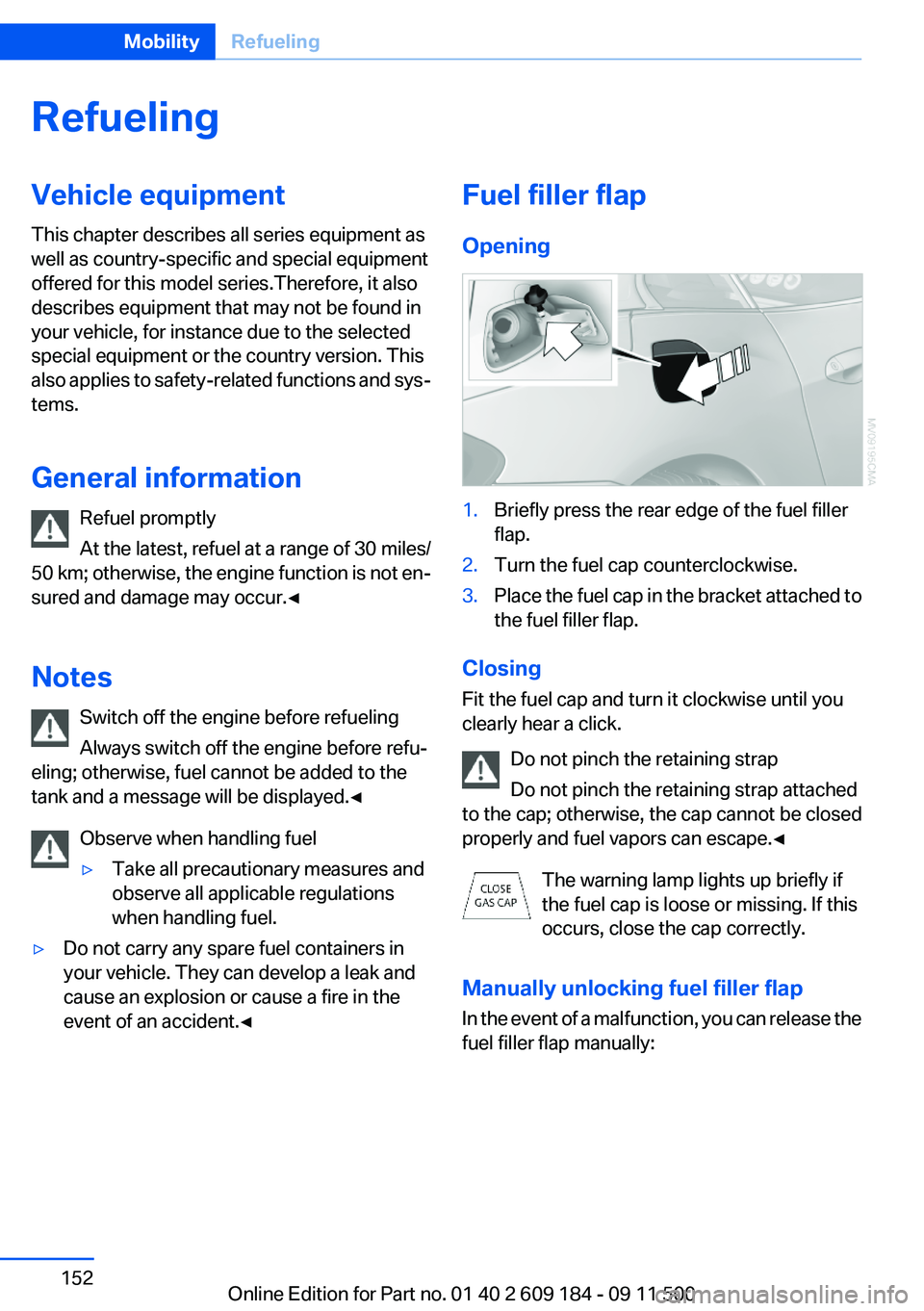
Opening1.Briefly press the rear edge of the fuel filler
flap.2.Turn the fuel cap counterclockwise.3.Place the fuel cap in the bracket attached to
the fuel filler flap.
Closing
Fit the fuel cap and turn it clockwise until you
clearly hear a click.
Do not pinch the retaining strap
Do not pinch the retaining strap attached
to the cap; otherwise, the cap cannot be closed
properly and fuel vapors can escape.◀
The warning lamp lights up briefly if
the fuel cap is loose or missing. If this
occurs, close the cap correctly.
Manually unlocking fuel filler flap
In the event of a malfunction, you can release the
fuel filler flap manually:
Seite 152MobilityRefueling152
Online Edition for Part no. 01 40 2 609 184 - 09 11 500
Page 162 of 220
Retreaded tires
Possibly substantial variations in the de‐
sign and age of the tire casing structures can
limit service life and have a negative impact on
road safety.◀
Winter tires
The manufacturer of your vehicle recommends
winter tires for winter roads or at temperatures
below +45 ℉/+7 ℃.
Although so-called all-season M+S tires do pro‐
vide better winter traction than summer tires,
they do not provide the same level of perform‐
ance as winter tires.
Maximum speed of winter tires
If the maximum speed of the vehicle is higher
than the permissible speed for the winter tires,
then display a corresponding sign in the field of
vision. You can obtain this sign from the tire spe‐
cialist or from your service center.
Maximum speed for winter tires
Do not exceed the maximum speed for the
winter tires; otherwise, tire damage and acci‐
dents can occur.◀
Run-flat tires
For your own safety, only use run-flat tires. No
spare tire is available in the case of a flat tire. Your
service center will be glad to advise you.
Rotating wheels between axles
The manufacturer of your vehicle advises
against swapping wheels between the front and
rear axles.
This can impair the handling characteristics.
Rotating the tires is not permissible when using
different types of tires.
Storage
Store wheels and tires in a cool, dry place with
as little exposure to light as possible.Always protect tires against all contact with oil,
grease and fuels.
Do not exceed the maximum tire inflation pres‐
sure indicated on the side wall of the tire.
Snow chains
Only certain fine-link snow chains have been
tested by BMW, classified as safe for use and
recommended. Consult your service center for
more information.
Snow chains must be mounted in pairs and on
the rear wheels only. Observe the manufactur‐
er's instructions when mounting snow chains.
Do not exceed a speed of 30 mph/50 km/h when
using snow chains.
Do not initialize the Flat Tire Monitor if snow
chains are mounted; otherwise, the instrument
might issue an incorrect reading.
When driving with snow chains, it can be bene‐
ficial to temporarily activate DTC, refer to
page 83.Seite 162MobilityWheels and tires162
Online Edition for Part no. 01 40 2 609 184 - 09 11 500