high BMW Z4 SDRIVE35I 2016 Owners Manual
[x] Cancel search | Manufacturer: BMW, Model Year: 2016, Model line: Z4 SDRIVE35I, Model: BMW Z4 SDRIVE35I 2016Pages: 289, PDF Size: 7.13 MB
Page 7 of 289
Addendum
The manufacturer of your vehicle
does not evaluate non-
recommended wheels and tires to
determine if they are suitable for
use on your vehicle.
13.At page 233, under the heading:
“Snow chains,” the first paragraph
should be disregarded and the
following text should be read in lieu
thereof:
Only certain types of fine-link snow
chains have been tested by the
manufacturer of your vehicle and
are determined by the manufacturer
of your vehicle to be road safe and
are recommended by the
manufacturer of your vehicle.
Information about recommended
snow chains is available from a
service center.
14.At page 236, under the heading
“Hood,” the sentence beginning, “If
you are unfamiliar” should be
disregarded.
15.At page 239, under the heading:
“Approved oil types,” the references
to “Approved” should be read as
“Suitable.” The reference to
“Specification” should be read as
“Rating.” Immediately preceding
the “Specification” chart, the
following sentence should be
inserted: “Add engine oils that meet
the following oil rating
standards: . . .” The reference to
“BMW High Performance SAE 5W-
30” should be disregarded.
16.At page 239, under the heading:
“Alternative oil types,” the text
preceding the chart should be
disregarded, and in lieu thereof
should be read as follows: “If an
engine oil suitable for continuous
use is not available, up to 1 US
quart/liter of an engine oil with the
following oil rating can be
added: . . .” The reference to
“Specification” should be read as
“Rating.”At page 239, under the
heading: “Oil change,” the text
should be disregarded and in lieu
thereof should be read as follows:
BMW recommends that you have
the oil changed at your BMW
dealer’s service center or at another
service center that has trained
personnel that can perform the work
in accordance with BMW
specifications
17.At page 241, under the heading:
“Service and Warranty Information
Booklet for US models and
Warranty and Service Guide
Booklet for Canadian models,” the
second paragraph should be
disregarded and the following text
read in lieu thereof:
The manufacturer of your vehicle
recommends that you have
maintenance and repair performed
by your BMW dealer’s service
center or another service center or
repair shop that employs trained
personnel that can perform
maintenance and repair work on
your vehicle in accordance with
BMW specifications. The
manufacturer of your vehicle
Page 10 of 289
NotesUsing this Owner's Manual
The fastest way to find information on a partic‐
ular topic is by using the index.
An initial overview of the vehicle is provided in
the first chapter.
Additional sources of information Should you have any questions, your service
center will be glad to advise you at any time.
Information on BMW, e.g., on technology, is
available on the Internet: bmwusa.com
Symbols
Indicates precautions that must be followed
precisely in order to avoid the possibility of
personal injury and serious damage to the
vehicle.
◄ Marks the end of a specific item of
information.
"..." Identifies display texts in vehicle used to
select individual functions.
›...‹ Verbal instructions to use with the voice
activation system.
››...‹‹ Identifies the answers generated by the
voice activation system.
Refers to measures that can be taken to
help protect the environment.
Symbols on vehicle components
Indicates that you should consult the
relevant section of this Owner's Manual for
information on a particular part or assembly.
Vehicle equipment
This Owner's Manual describes all models, all
series equipment, as well as country-specific
and special equipment offered in the model
series.Therefore, this Owner's Manual also de‐
scribes and depicts equipment that may not be
contained in your vehicle because of the se‐
lected special equipment or country version,
for example.
This also applies to safety-related functions
and systems.
For options and equipment not described in
this Owner's Manual, please refer to the Sup‐
plementary Owner's Manuals.
On right-hand drive vehicles, some controls
are arranged differently than shown in the illus‐
trations.
Status of this Owner's
Manual at time of printing
The manufacturer of your vehicle pursues a
policy of constant development that is con‐
ceived to ensure that our vehicles continue to
embody the highest quality and safety stan‐
dards. In rare cases, therefore, the features de‐
scribed in this Owner's Manual may differ from
those in your vehicle.
Updates made after the editorial
deadline
Any updates made after the editorial deadline
for the Owner's Manuals are located in the ap‐
pendix of the printed quick reference for the
vehicle.
For your own safety Warranty
Your vehicle is technically configured for the
operating conditions and registration require‐
ments applying in the country of first delivery
— homologation. If your vehicle is to be oper‐
ated in a different country it might be neces‐Seite 6Notes6
Online Edition for Part no. 01 40 2 957 403 - X/14
Page 11 of 289
sary to adapt your vehicle to potentially differ‐
ing operating conditions and permit
requirements. If your vehicle does not comply
with the homologation requirements in a cer‐
tain country you cannot lodge warranty claims
for your vehicle there. Further information can
be obtained from your Service Center.
Maintenance and repairs
Advanced technology, e.g., the use of modern
materials and high-performance electronics,
requires suitable maintenance and repair methods.
Therefore, have this work performed only by a
BMW center or a workshop that works accord‐
ing to BMW repair procedures with appropri‐
ately trained personnel.
If this work is not carried out properly, there is
the danger of subsequent damage and related
safety hazards.
Parts and accessories
For your own safety, it is recommended that
you use genuine parts and accessories ap‐
proved by BMW. When you purchase accesso‐
ries tested and approved by BMW and Genu‐
ine BMW Parts, you simultaneously acquire
the assurance that they have been thoroughly
tested by BMW to ensure optimum perform‐
ance when installed on your vehicle. BMW
warrants these parts to be free from defects in
material and workmanship. BMW will not ac‐
cept any liability for damage resulting from in‐
stallation of parts and accessories not ap‐
proved by BMW. BMW cannot test every
product made by other manufacturers to verify
if it can be used on a BMW safely and without
risk to either the vehicle, its operation, or its
occupants. Genuine BMW Parts, BMW Acces‐
sories and other products approved by BMW,
together with professional advice on using
these items, are available from all BMW cen‐
ters. Installation and operation of non BMW
approved accessories such as alarms, radios,
amplifiers, radar detectors, wheels, suspensioncomponents, brake dust shields, telephones,
including operation of any mobile phone from
within the vehicle without using an externally
mounted antenna, or transceiver equipment,
for instance, CBs, walkie-talkies, ham radios or
similar accessories, may cause extensive dam‐
age to the vehicle, compromise its safety, in‐
terfere with the vehicle's electrical system or
affect the validity of the BMW Limited War‐
ranty. See your BMW center for additional in‐
formation. Maintenance, replacement, or repair
of the emission control devices and systems
may be performed by any automotive repair
establishment or individual using any certified
automotive part.
California Proposition 65 WarningCalifornia laws require us to state the following
warning:
Engine exhaust and a wide variety of automo‐
bile components and parts, including compo‐
nents found in the interior furnishings in a vehi‐
cle, contain or emit chemicals known to the
State of California to cause cancer and birth
defects and reproductive harm. In addition,
certain fluids contained in vehicles and certain
products of component wear contain or emit
chemicals known to the State of California to
cause cancer and birth defects or other repro‐
ductive harm. Battery posts, terminals and re‐
lated accessories contain lead and lead com‐
pounds. Wash your hands after handling. Used
engine oil contains chemicals that have caused
cancer in laboratory animals. Always protect
your skin by washing thoroughly with soap and
water.
Service and warranty We recommend that you read this publication
thoroughly. Your vehicle is covered by the fol‐
lowing warranties:▷New Vehicle Limited Warranty▷Rust Perforation Limited WarrantySeite 7Notes7
Online Edition for Part no. 01 40 2 957 403 - X/14
Page 13 of 289
Additional functions that are contractually
agreed with the customer, such as vehicle lo‐
calization in the event of an emergency, permit
the transfer of certain vehicle data out of the
vehicle.
Event Data Recorder EDR
This vehicle is equipped with an event data re‐
corder EDR. The main purpose of an EDR is to
record, in certain crash or near crash-like situa‐
tions, such as an air bag deployment or hitting
a road obstacle, data that will assist in under‐
standing how a vehicle's systems performed.
The EDR is designed to record data related to
vehicle dynamics and safety systems for a short period of time, typically 30 seconds or
less.
The EDR in this vehicle is designed to record
such data as:▷How various systems in your vehicle were
operating.▷Whether or not the driver and passenger
safety belts were fastened.▷How far, if at all, the driver was depressing
the accelerator and/or brake pedal.▷How fast the vehicle was traveling.
These data can help provide a better under‐
standing of the circumstances in which
crashes and injuries occur.
EDR data are recorded by your vehicle only if a
nontrivial crash situation occurs; no data are
recorded by the EDR under normal driving
conditions and no personal data, e.g., name,
gender, age, and crash location, are recorded.
However, other parties, such as law enforce‐
ment, could combine the EDR data with the
type of personally identifying data routinely ac‐
quired during a crash investigation.
To read data recorded by an EDR, special
equipment is required, and access to the vehi‐
cle or the EDR is needed. In addition to the ve‐
hicle manufacturer, other parties, such as law
enforcement, that have the special equipment,
can read the information if they have access to
the vehicle or the EDR.
Reporting safety defects
For US customers The following only applies to vehicles owned
and operated in the US.
If you believe that your vehicle has a defect
which could cause a crash or could cause in‐
jury or death, you should immediately inform
the National Highway Traffic Safety Adminis‐
tration NHTSA, in addition to notifying BMW of
North America, LLC, P.O. Box 1227, West‐
wood, New Jersey 07675-1227, Telephone
1-800-831-1117.
If NHTSA receives similar complaints, it may
open an investigation, and if it finds that a
safety defect exists in a group of vehicles, it
may order a recall and remedy campaign.
However, NHTSA cannot become involved in
individual problems between you, your dealer,
or BMW of North America, LLC.
To contact NHTSA, you may call the Vehicle
Safety Hotline toll-free at 1-888-327-4236
(TTY: 1-800-424-9153); go to http://
www.safercar.gov; or write to: Administrator,
NHTSA, 400 Seventh Street, SW., Washing‐
ton, DC 20590. You can also obtain other in‐
formation about motor vehicle safety from
http://www.safercar.gov
For Canadian customers Canadian customers who wish to report a
safety- related defect to Transport Canada,
Defect Investigations and Recalls, may tele‐
phone the toll-free hotline 1-800-333-0510.
You can also obtain other information about
motor vehicle safety from http://www.tc.gc.ca/
roadsafety.Seite 9Notes9
Online Edition for Part no. 01 40 2 957 403 - X/14
Page 17 of 289
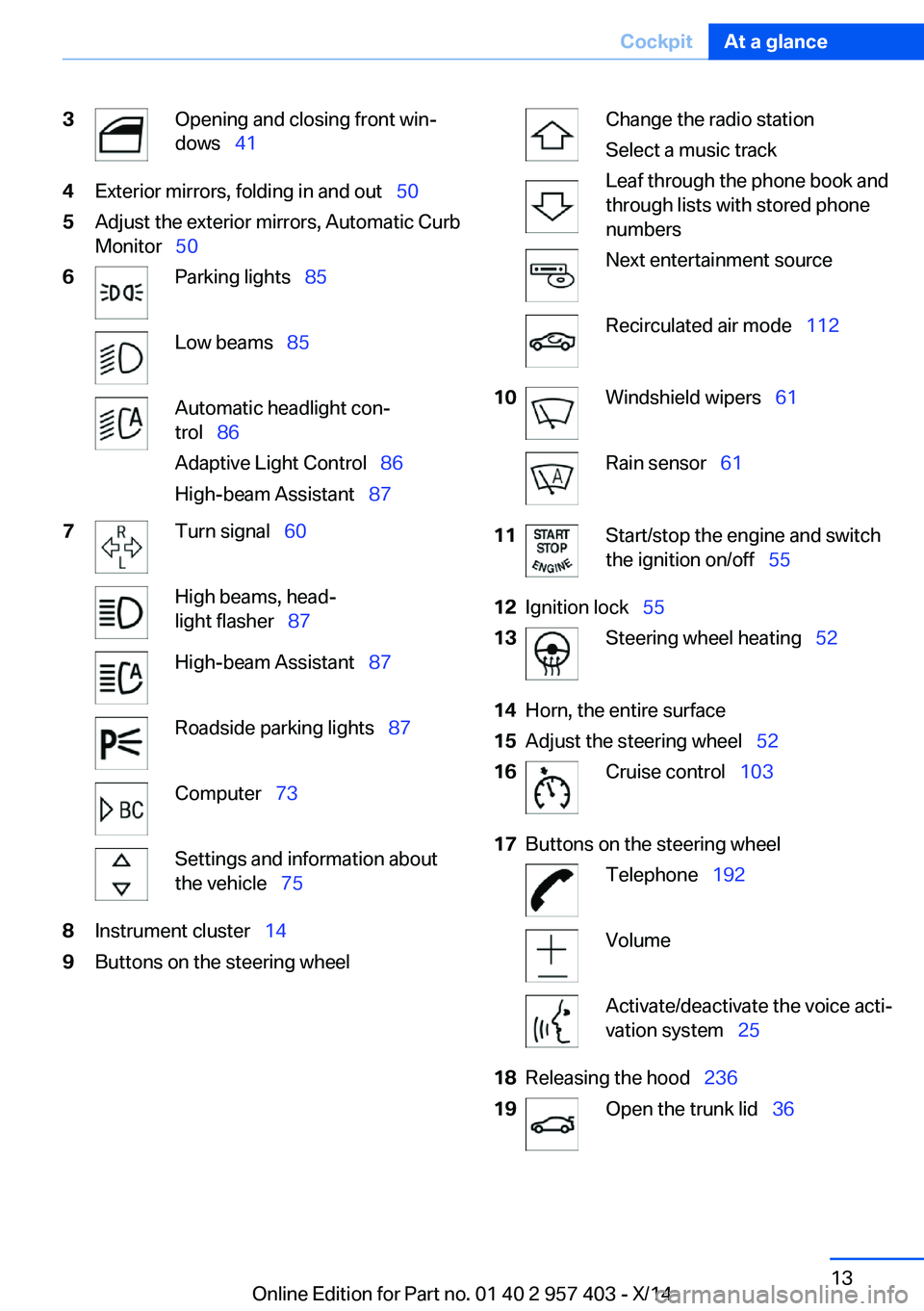
3Opening and closing front win‐
dows 414Exterior mirrors, folding in and out 505Adjust the exterior mirrors, Automatic Curb
Monitor 506Parking lights 85Low beams 85Automatic headlight con‐
trol 86
Adaptive Light Control 86
High-beam Assistant 877Turn signal 60High beams, head‐
light flasher 87High-beam Assistant 87Roadside parking lights 87Computer 73Settings and information about
the vehicle 758Instrument cluster 149Buttons on the steering wheelChange the radio station
Select a music track
Leaf through the phone book and
through lists with stored phone
numbersNext entertainment sourceRecirculated air mode 11210Windshield wipers 61Rain sensor 6111Start/stop the engine and switch
the ignition on/off 5512Ignition lock 5513Steering wheel heating 5214Horn, the entire surface15Adjust the steering wheel 5216Cruise control 10317Buttons on the steering wheelTelephone 192VolumeActivate/deactivate the voice acti‐
vation system 2518Releasing the hood 23619Open the trunk lid 36Seite 13CockpitAt a glance13
Online Edition for Part no. 01 40 2 957 403 - X/14
Page 18 of 289
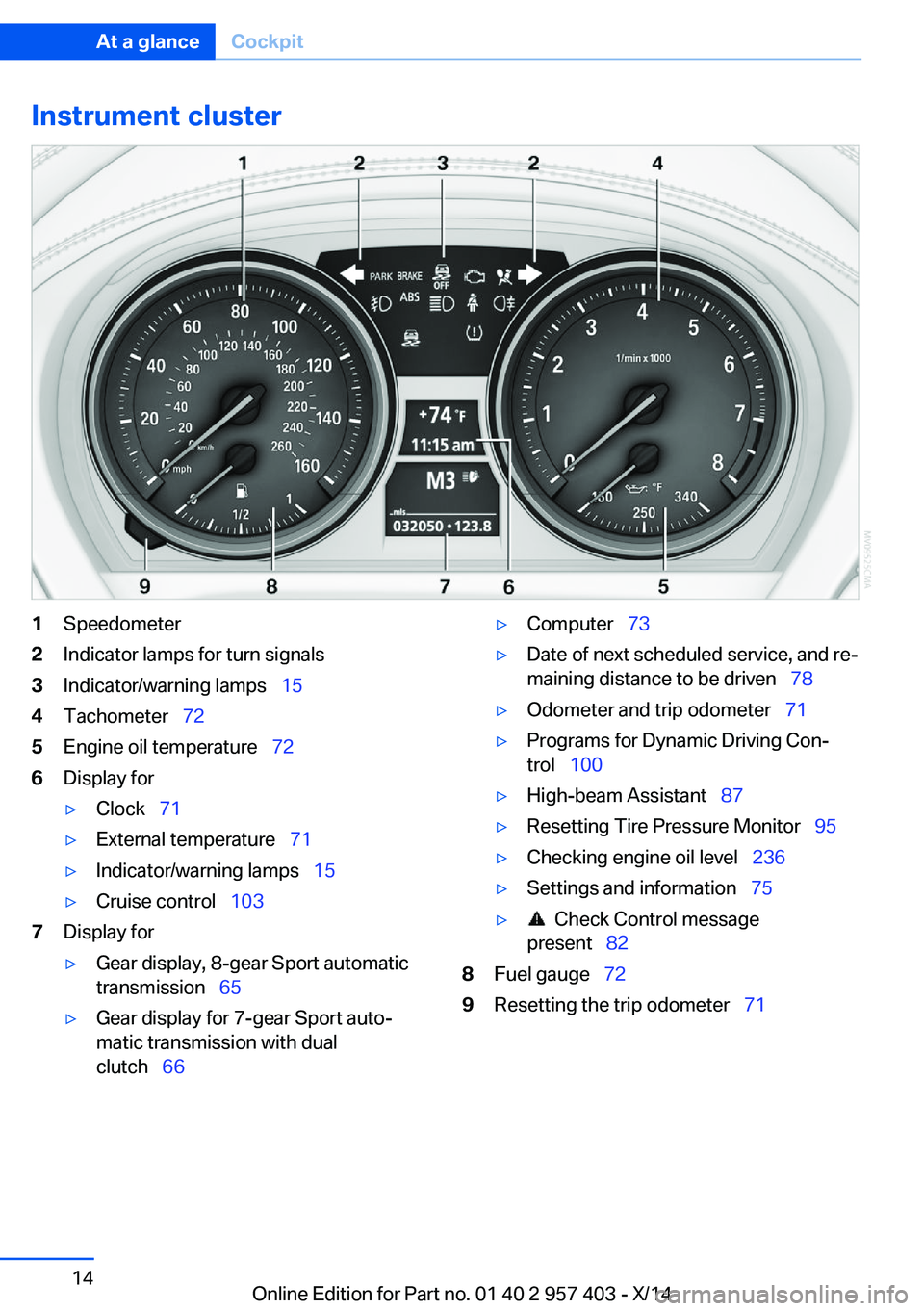
Instrument cluster1Speedometer2Indicator lamps for turn signals3Indicator/warning lamps 154Tachometer 725Engine oil temperature 726Display for▷Clock 71▷External temperature 71▷Indicator/warning lamps 15▷Cruise control 1037Display for▷Gear display, 8-gear Sport automatic
transmission 65▷Gear display for 7-gear Sport auto‐
matic transmission with dual
clutch 66▷Computer 73▷Date of next scheduled service, and re‐
maining distance to be driven 78▷Odometer and trip odometer 71▷Programs for Dynamic Driving Con‐
trol 100▷High-beam Assistant 87▷Resetting Tire Pressure Monitor 95▷Checking engine oil level 236▷Settings and information 75▷ Check Control message
present 828Fuel gauge 729Resetting the trip odometer 71Seite 14At a glanceCockpit14
Online Edition for Part no. 01 40 2 957 403 - X/14
Page 19 of 289
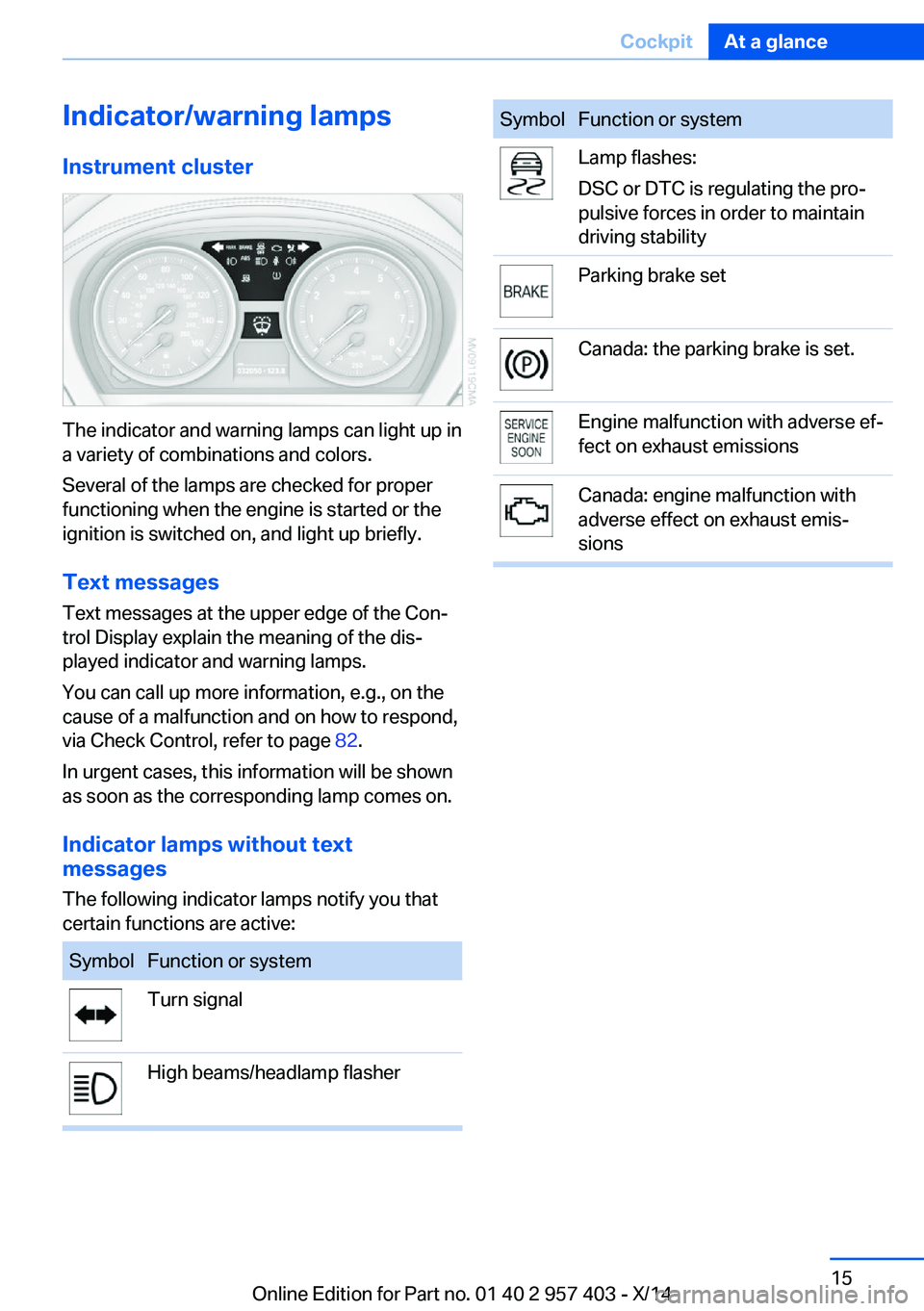
Indicator/warning lampsInstrument cluster
The indicator and warning lamps can light up in
a variety of combinations and colors.
Several of the lamps are checked for proper
functioning when the engine is started or the
ignition is switched on, and light up briefly.
Text messages Text messages at the upper edge of the Con‐
trol Display explain the meaning of the dis‐
played indicator and warning lamps.
You can call up more information, e.g., on the
cause of a malfunction and on how to respond,
via Check Control, refer to page 82.
In urgent cases, this information will be shown
as soon as the corresponding lamp comes on.
Indicator lamps without text
messages
The following indicator lamps notify you that
certain functions are active:
SymbolFunction or systemTurn signalHigh beams/headlamp flasherSymbolFunction or systemLamp flashes:
DSC or DTC is regulating the pro‐
pulsive forces in order to maintain
driving stabilityParking brake setCanada: the parking brake is set.Engine malfunction with adverse ef‐
fect on exhaust emissionsCanada: engine malfunction with
adverse effect on exhaust emis‐
sionsSeite 15CockpitAt a glance15
Online Edition for Part no. 01 40 2 957 403 - X/14
Page 23 of 289
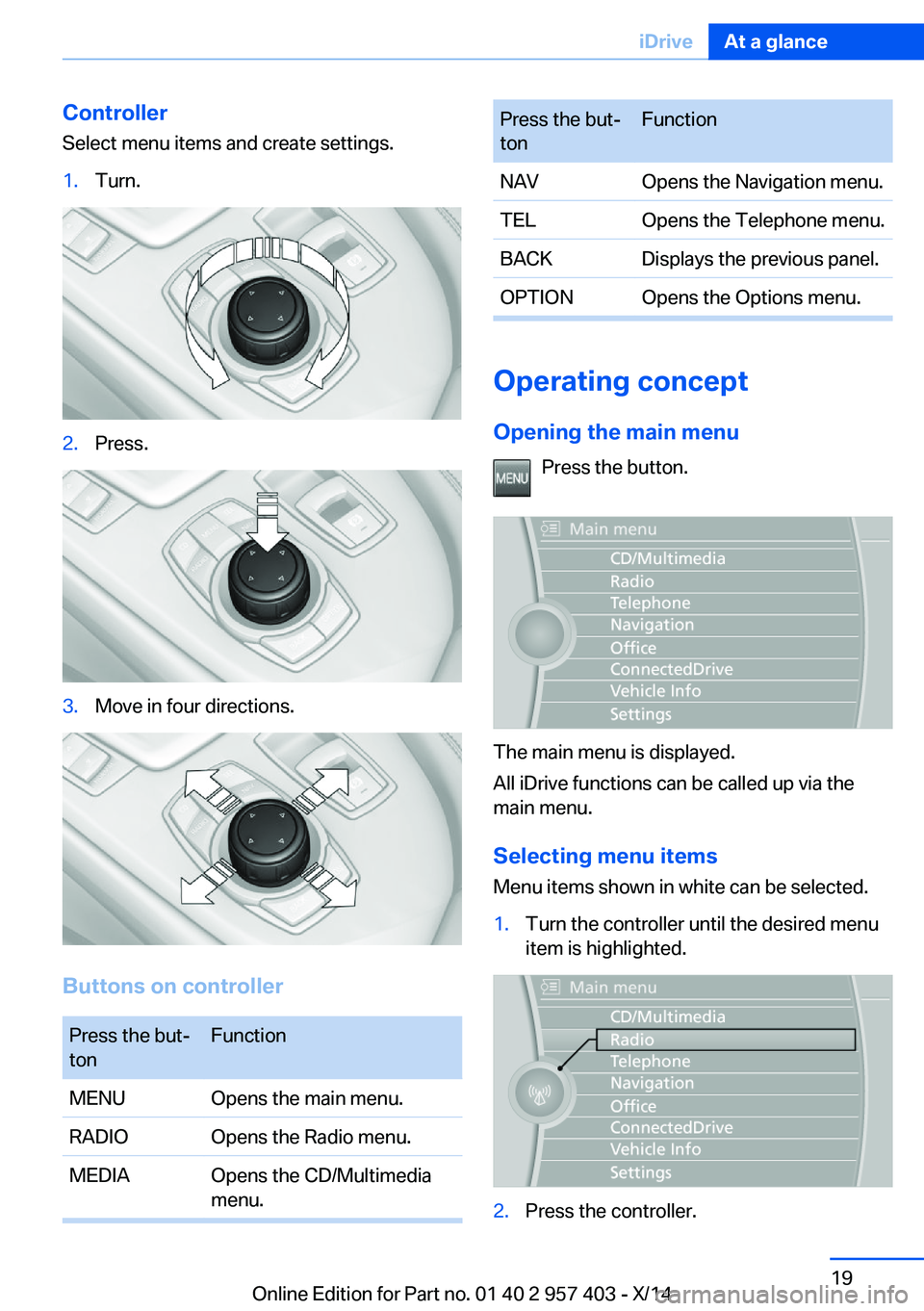
Controller
Select menu items and create settings.1.Turn.2.Press.3.Move in four directions.
Buttons on controller
Press the but‐
tonFunctionMENUOpens the main menu.RADIOOpens the Radio menu.MEDIAOpens the CD/Multimedia
menu.Press the but‐
tonFunctionNAVOpens the Navigation menu.TELOpens the Telephone menu.BACKDisplays the previous panel.OPTIONOpens the Options menu.
Operating concept
Opening the main menu Press the button.
The main menu is displayed.
All iDrive functions can be called up via the
main menu.
Selecting menu items
Menu items shown in white can be selected.
1.Turn the controller until the desired menu
item is highlighted.2.Press the controller.Seite 19iDriveAt a glance19
Online Edition for Part no. 01 40 2 957 403 - X/14
Page 25 of 289
Function is activated.
The function is deactivated.
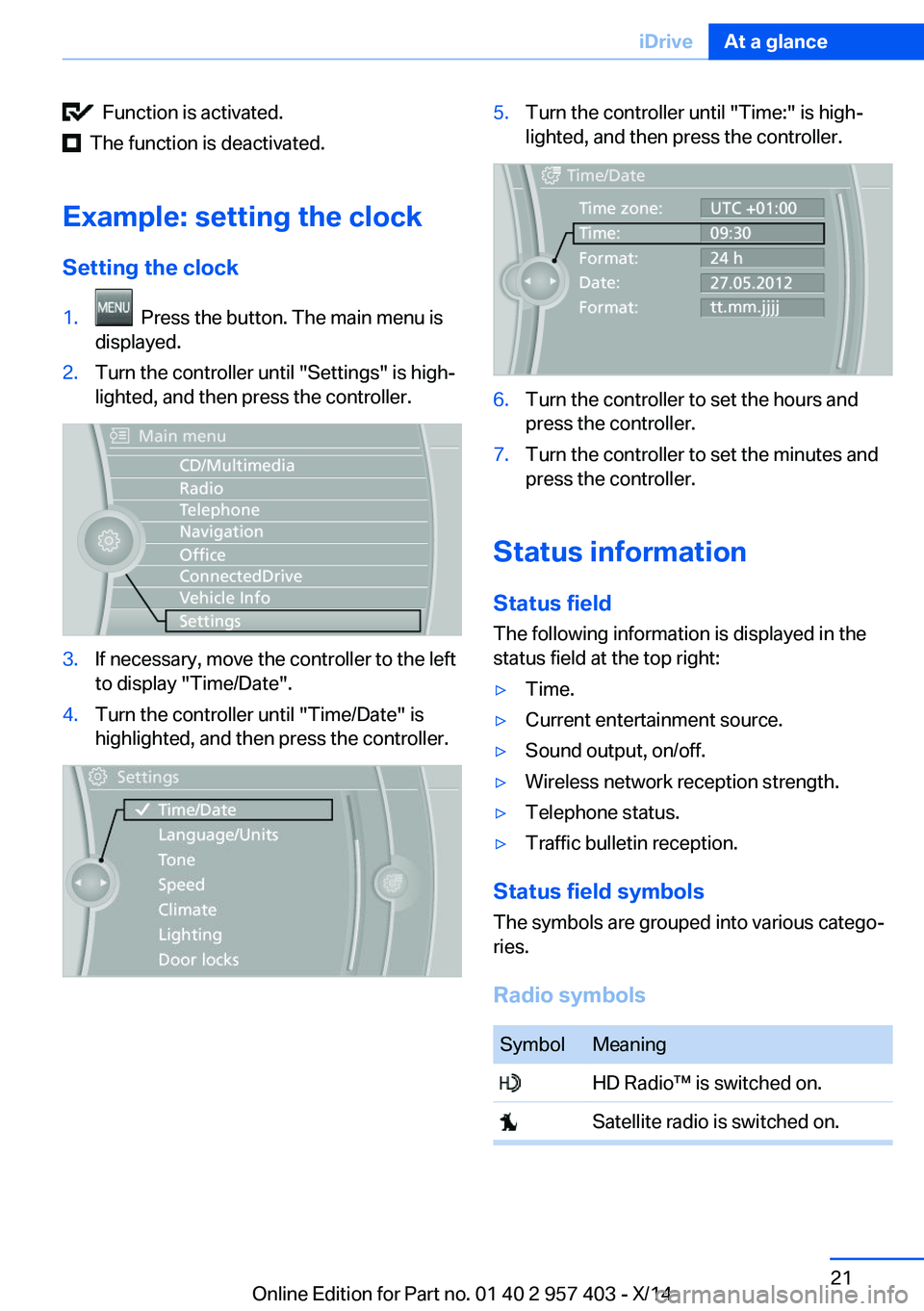
Example: setting the clock Setting the clock
1. Press the button. The main menu is
displayed.2.Turn the controller until "Settings" is high‐
lighted, and then press the controller.3.If necessary, move the controller to the left
to display "Time/Date".4.Turn the controller until "Time/Date" is
highlighted, and then press the controller.5.Turn the controller until "Time:" is high‐
lighted, and then press the controller.6.Turn the controller to set the hours and
press the controller.7.Turn the controller to set the minutes and
press the controller.
Status information
Status field The following information is displayed in the
status field at the top right:
▷Time.▷Current entertainment source.▷Sound output, on/off.▷Wireless network reception strength.▷Telephone status.▷Traffic bulletin reception.
Status field symbols
The symbols are grouped into various catego‐
ries.
Radio symbols
SymbolMeaning HD Radio™ is switched on. Satellite radio is switched on.Seite 21iDriveAt a glance21
Online Edition for Part no. 01 40 2 957 403 - X/14
Page 27 of 289
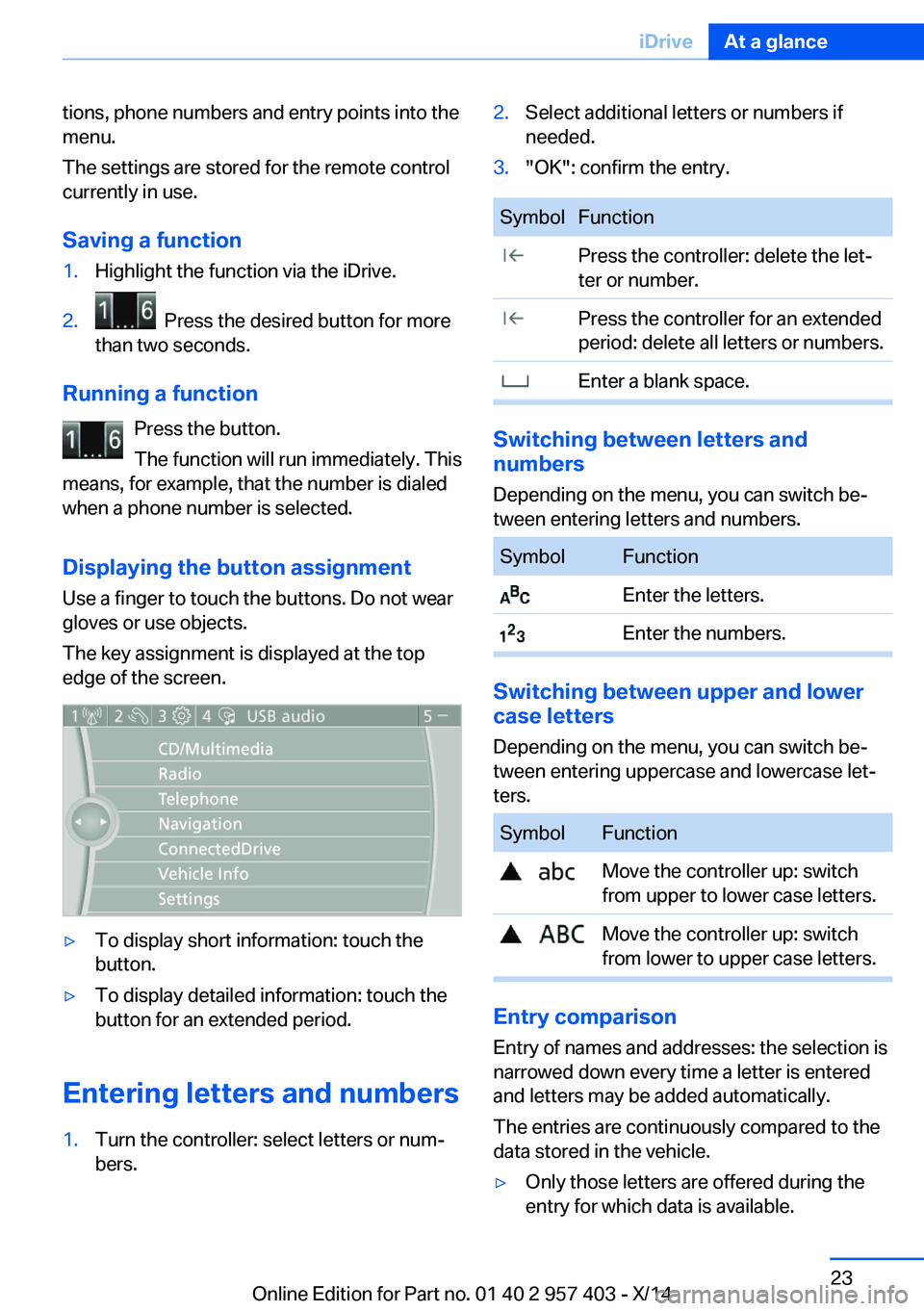
tions, phone numbers and entry points into the
menu.
The settings are stored for the remote control
currently in use.
Saving a function1.Highlight the function via the iDrive.2. Press the desired button for more
than two seconds.
Running a function
Press the button.
The function will run immediately. This
means, for example, that the number is dialed
when a phone number is selected.
Displaying the button assignment Use a finger to touch the buttons. Do not wear
gloves or use objects.
The key assignment is displayed at the top
edge of the screen.
▷To display short information: touch the
button.▷To display detailed information: touch the
button for an extended period.
Entering letters and numbers
1.Turn the controller: select letters or num‐
bers.2.Select additional letters or numbers if
needed.3."OK": confirm the entry.SymbolFunction Press the controller: delete the let‐
ter or number. Press the controller for an extended
period: delete all letters or numbers. Enter a blank space.
Switching between letters and
numbers
Depending on the menu, you can switch be‐
tween entering letters and numbers.
SymbolFunction Enter the letters. Enter the numbers.
Switching between upper and lower
case letters
Depending on the menu, you can switch be‐
tween entering uppercase and lowercase let‐
ters.
SymbolFunction Move the controller up: switch
from upper to lower case letters. Move the controller up: switch
from lower to upper case letters.
Entry comparison
Entry of names and addresses: the selection is
narrowed down every time a letter is entered
and letters may be added automatically.
The entries are continuously compared to the
data stored in the vehicle.
▷Only those letters are offered during the
entry for which data is available.Seite 23iDriveAt a glance23
Online Edition for Part no. 01 40 2 957 403 - X/14