change wheel BMW Z4 SDRIVE35I ROADSTER 2010 User Guide
[x] Cancel search | Manufacturer: BMW, Model Year: 2010, Model line: Z4 SDRIVE35I ROADSTER, Model: BMW Z4 SDRIVE35I ROADSTER 2010Pages: 254, PDF Size: 8.04 MB
Page 86 of 254
Technology for driving comfort and safety
84 >With a medium load:
1 person, cargo area full, or 2 people
without luggage:
approx. 95 miles/150 km
>With a full load:
2 people, cargo area full:
approx. 30 miles/50 km
Drive cautiously and do not exceed a
speed of 50 mph/80 km/h. In the event of
pressure loss, vehicle handling changes. This
includes reduced tracking stability in braking,
extended braking distance and altered natural
steering characteristics.
If unusual vibration or loud noises occur during
the journey, this may be an indication that the
damaged tire has finally failed. Reduce your
speed and pull over as soon as possible at a
suitable location. Otherwise, parts of the tire
could come loose, resulting in an accident. Do
not continue driving. Instead, contact your
BMW center.<
Message for unsuccessful system
reset
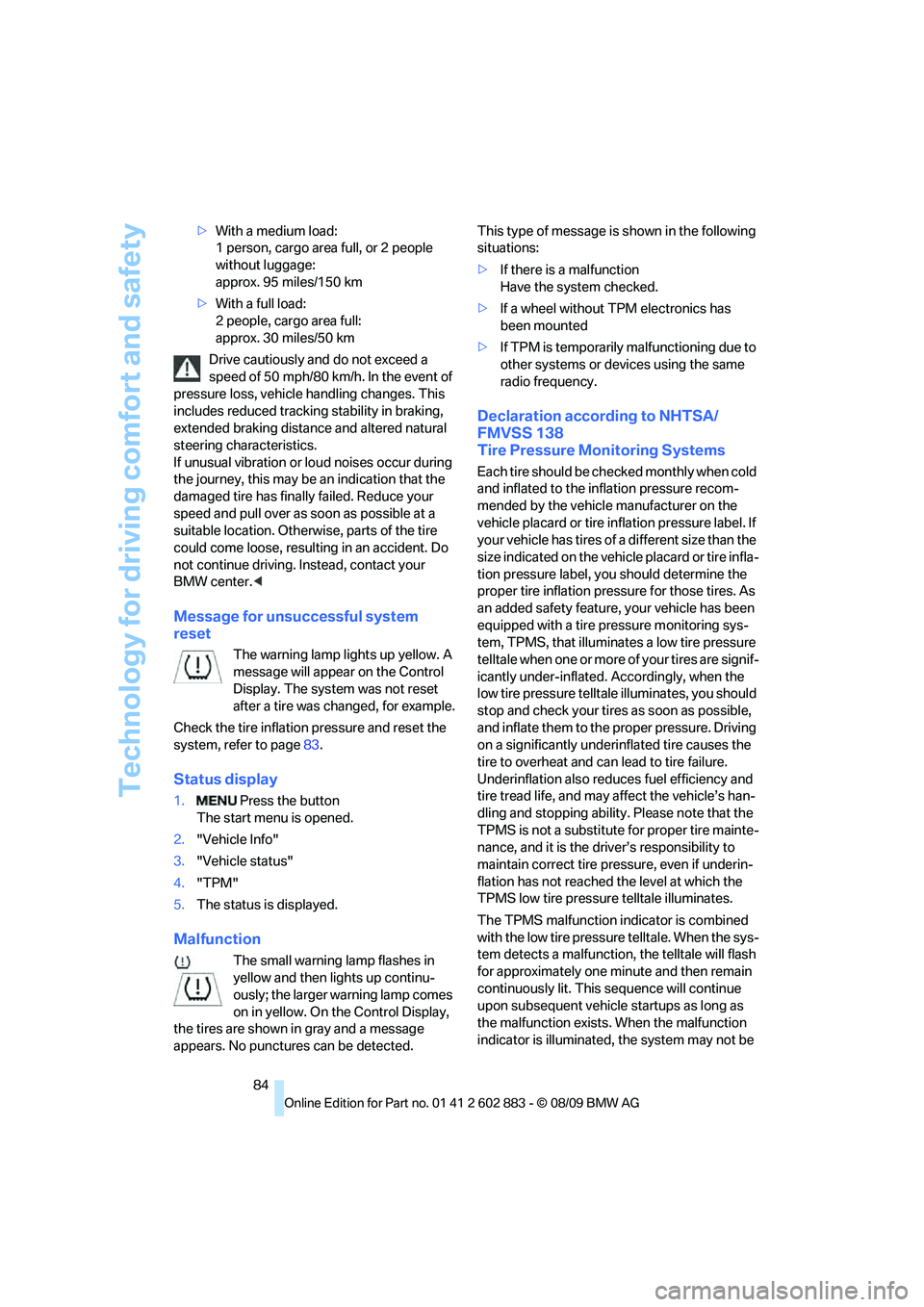
The warning lamp lights up yellow. A
message will appear on the Control
Display. The system was not reset
after a tire was changed, for example.
Check the tire inflation pressure and reset the
system, refer to page83.
Status display
1. Press the button
The start menu is opened.
2."Vehicle Info"
3."Vehicle status"
4."TPM"
5.The status is displayed.
Malfunction
The small warning lamp flashes in
yellow and then lights up continu-
ously; the larger warning lamp comes
on in yellow. On the Control Display,
the tires are shown in gray and a message
appears. No punctures can be detected.This type of message is shown in the following
situations:
>If there is a malfunction
Have the system checked.
>If a wheel without TPM electronics has
been mounted
>If TPM is temporarily malfunctioning due to
other systems or devices using the same
radio frequency.
Declaration according to NHTSA/
FMVSS 138
Tire Pressure Monitoring Systems
Each tire should be checked monthly when cold
and inflated to the inflation pressure recom-
mended by the vehicle manufacturer on the
vehicle placard or tire inflation pressure label. If
your vehicle has tires of a different size than the
size indicated on the vehicle placard or tire infla-
tion pressure label, you should determine the
proper tire inflation pressure for those tires. As
an added safety feature, your vehicle has been
equipped with a tire pressure monitoring sys-
tem, TPMS, that illuminates a low tire pressure
telltale when one or more of your tires are signif-
icantly under-inflated. Accordingly, when the
low tire pressure telltale illuminates, you should
stop and check your tires as soon as possible,
and inflate them to the proper pressure. Driving
on a significantly underinflated tire causes the
tire to overheat and can lead to tire failure.
Underinflation also reduces fuel efficiency and
tire tread life, and may affect the vehicle’s han-
dling and stopping ability. Please note that the
TPMS is not a substitute for proper tire mainte-
nance, and it is the driver’s responsibility to
maintain correct tire pressure, even if underin-
flation has not reached the level at which the
TPMS low tire pressure telltale illuminates.
The TPMS malfunction indicator is combined
with the low tire pressure telltale. When the sys-
tem detects a malfunction, the telltale will flash
for approximately one minute and then remain
continuously lit. This sequence will continue
upon subsequent vehicle startups as long as
the malfunction exists. When the malfunction
indicator is illuminated, the system may not be
Page 88 of 254
Technology for driving comfort and safety
86 vidual components of the system or its wiring in
any way. This includes the upholstered covers
of the steering wheel, the dashboard and the
seats. Do not attempt to remove or dismantle
the steering wheel.
Do not touch the individual components imme-
diately after the system has been triggered,
because there is a danger of burns.
In the event of malfunctions, deactivation or
triggering of the airbag restraint system, have
the testing, repair, removal and disposal of air-
bag generators executed only by a BMW center
or a workshop that works according to repair
procedures of BMW with correspondingly
trained personnel and that has the required
explosives licenses. Unprofessional attempts to
work on the system could lead to failure in an
emergency or to undesired airbag activation,
either of which could result in personal injury.<
Warning notices and information about the air-
bags can also be found on the sun visors.
Automatic deactivation of the
passenger airbags
The system determines whether the passenger
seat is occupied by measuring the resistance of
the human body. Front, knee and side airbags
on the passenger side are activated or deacti-
vated accordingly.
Make sure that the passenger keeps his
or her feet in the footwell; otherwise, the
passenger airbags may not function properly.<
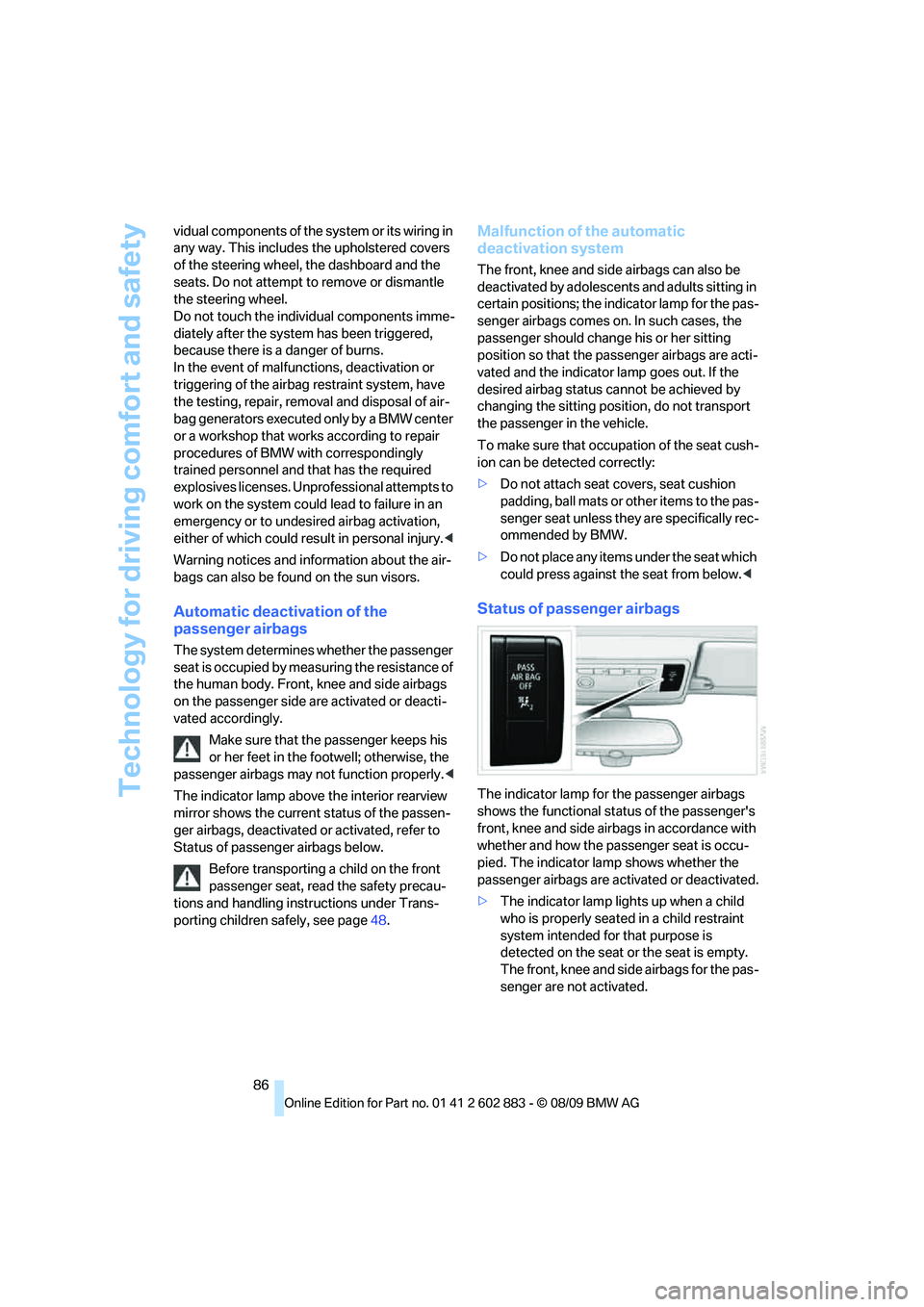
The indicator lamp above the interior rearview
mirror shows the current status of the passen-
ger airbags, deactivated or activated, refer to
Status of passenger airbags below.
Before transporting a child on the front
passenger seat, read the safety precau-
tions and handling instructions under Trans-
porting children safely, see page48.
Malfunction of the automatic
deactivation system
The front, knee and side airbags can also be
deactivated by adolescents and adults sitting in
certain positions; the indicator lamp for the pas-
senger airbags comes on. In such cases, the
passenger should change his or her sitting
position so that the passenger airbags are acti-
vated and the indicator lamp goes out. If the
desired airbag status cannot be achieved by
changing the sitting position, do not transport
the passenger in the vehicle.
To make sure that occupation of the seat cush-
ion can be detected correctly:
>Do not attach seat covers, seat cushion
padding, ball mats or other items to the pas-
senger seat unless they are specifically rec-
ommended by BMW.
>Do not place any items under the seat which
could press against the seat from below.<
Status of passenger airbags
The indicator lamp for the passenger airbags
shows the functional status of the passenger's
front, knee and side airbags in accordance with
whether and how the passenger seat is occu-
pied. The indicator lamp shows whether the
passenger airbags are activated or deactivated.
>The indicator lamp lights up when a child
who is properly seated in a child restraint
system intended for that purpose is
detected on the seat or the seat is empty.
The front, knee and side airbags for the pas-
senger are not activated.
Page 97 of 254
Controls
95Reference
At a glance
Driving tips
Communications
Navigation
Entertainment
Mobility
Rear window defroster
The defroster switches off auto-
matically after a certain time or
when the hardtop is opened.
Temperature
To increase the temperature, turn
the rotary switch clockwise
towards red.
For a lower temperature, turn the
rotary switch counterclockwise towards blue.
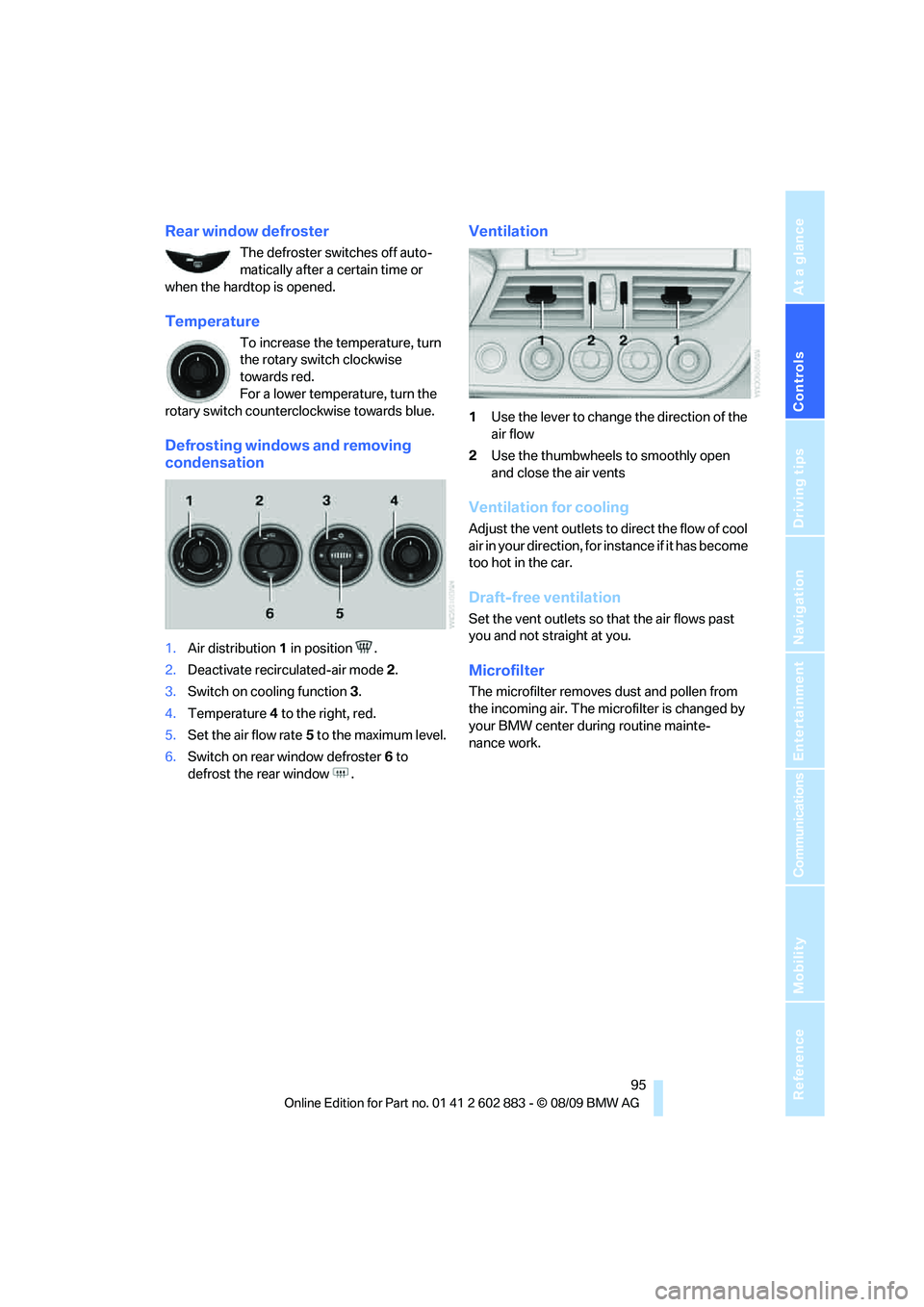
Defrosting windows and removing
condensation
1.Air distribution1 in position .
2.Deactivate recirculated-air mode 2.
3.Switch on cooling function 3.
4.Temperature4 to the right, red.
5.Set the air flow rate5 to the maximum level.
6.Switch on rear window defroster 6 to
defrost the rear window .
Ventilation
1Use the lever to change the direction of the
air flow
2Use the thumbwheels to smoothly open
and close the air vents
Ventilation for cooling
Adjust the vent outlets to direct the flow of cool
air in your direction, for instance if it has become
too hot in the car.
Draft-free ventilation
Set the vent outlets so that the air flows past
you and not straight at you.
Microfilter
The microfilter removes dust and pollen from
the incoming air. The microfilter is changed by
your BMW center during routine mainte-
nance work.
Page 142 of 254
On/off and tone
140
On/off and tone
The following audio and video sources share
the same control elements and adjustments:
>Radio
>CD/DVD player
>CD/DVD changer
*
>Video*
>External devices, e.g., MP3 player
Controls
The audio and video sources can be controlled
using the:
>Buttons near the CD/DVD player
>iDrive
>Buttons on the steering wheel, refer
to page10
>Programmable memory keys, refer
to page21
>Voice activation system
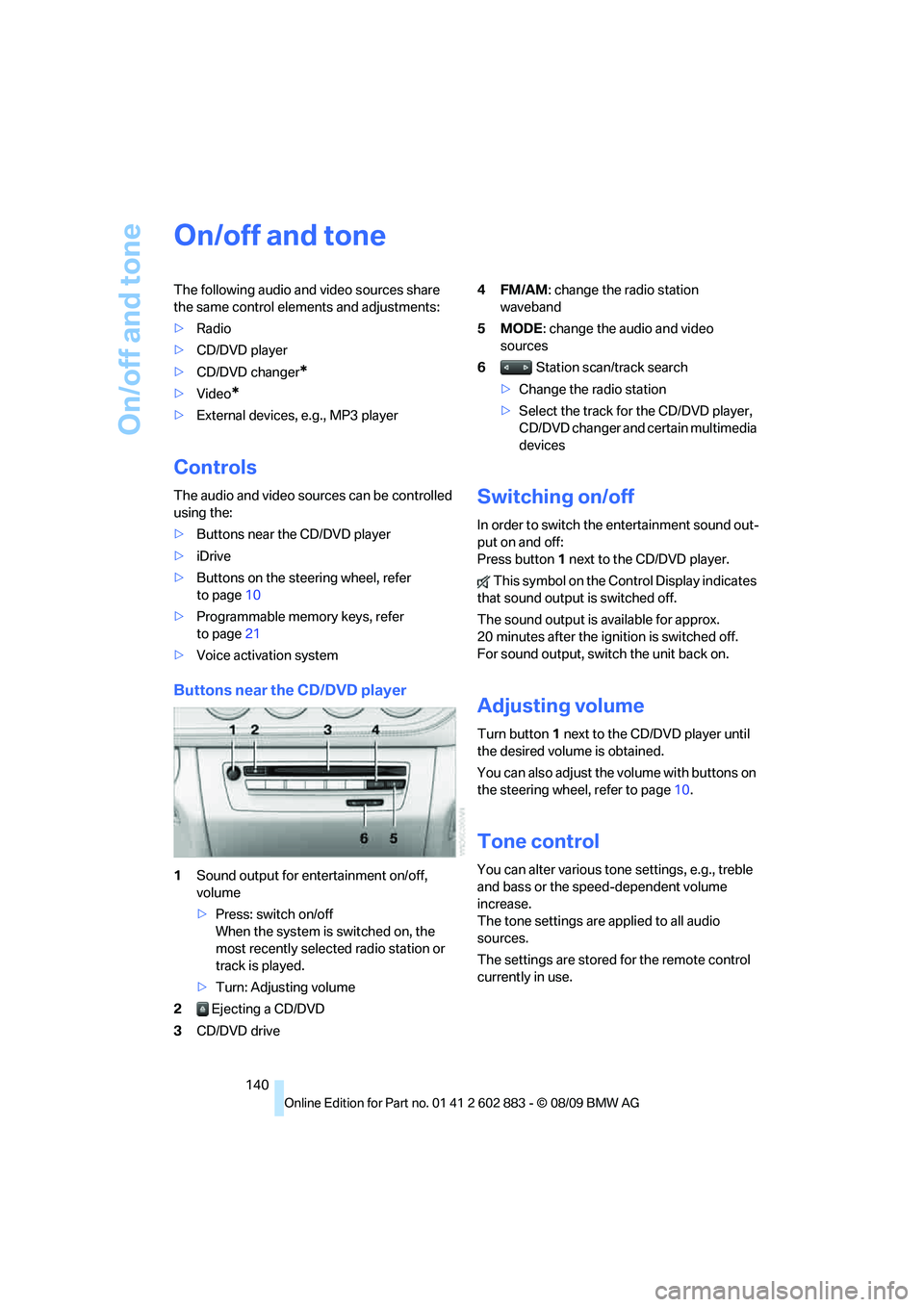
Buttons near the CD/DVD player
1Sound output for entertainment on/off,
volume
>Press: switch on/off
When the system is switched on, the
most recently selected radio station or
track is played.
>Turn: Adjusting volume
2 Ejecting a CD/DVD
3CD/DVD drive4FM/AM: change the radio station
waveband
5MODE: change the audio and video
sources
6 Station scan/track search
>Change the radio station
>Select the track for the CD/DVD player,
CD/DVD changer and certain multimedia
devices
Switching on/off
In order to switch the entertainment sound out-
put on and off:
Press button1 next to the CD/DVD player.
This symbol on the Control Display indicates
that sound output is switched off.
The sound output is available for approx.
20 minutes after the ignition is switched off.
For sound output, switch the unit back on.
Adjusting volume
Turn button1 next to the CD/DVD player until
the desired volume is obtained.
You can also adjust the volume with buttons on
the steering wheel, refer to page10.
Tone control
You can alter various tone settings, e.g., treble
and bass or the speed-dependent volume
increase.
The tone settings are applied to all audio
sources.
The settings are stored for the remote control
currently in use.
Page 215 of 254
Mobility
213Reference
At a glance
Controls
Driving tips
Communications
Navigation
Entertainment
Xenon lamps
Have any work on the xenon lamp system,
including bulb replacements, performed
only by a BMW center or a workshop that works
according to BMW repair procedures with cor-
respondingly trained personnel. Otherwise, if
such work is carried out improperly, the high
voltage in the system presents the danger of
fatal injuries.<
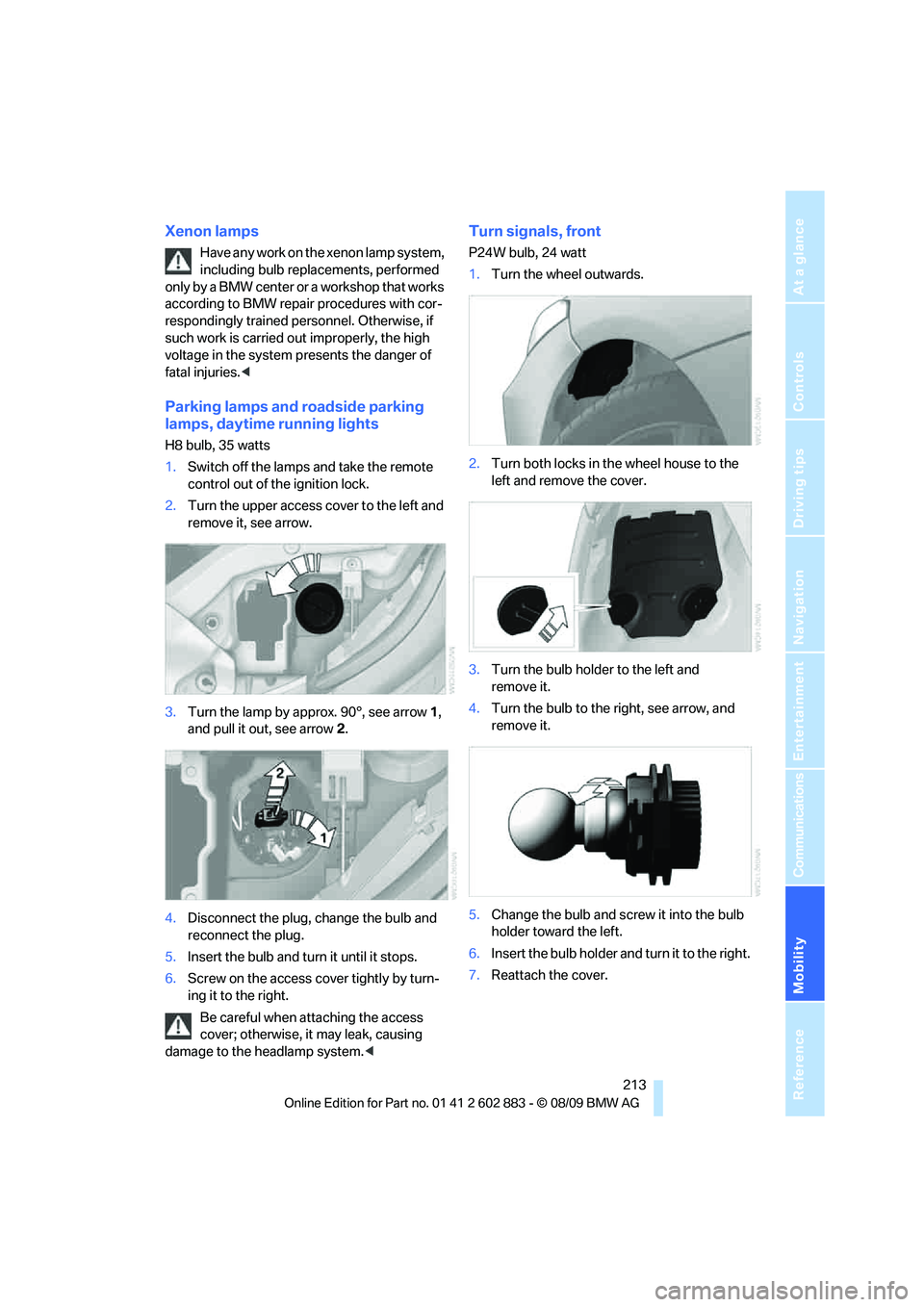
Parking lamps and roadside parking
lamps, daytime running lights
H8 bulb, 35 watts
1.Switch off the lamps and take the remote
control out of the ignition lock.
2.Turn the upper access cover to the left and
remove it, see arrow.
3.Turn the lamp by approx. 90°, see arrow 1,
and pull it out, see arrow 2.
4.Disconnect the plug, change the bulb and
reconnect the plug.
5.Insert the bulb and turn it until it stops.
6.Screw on the access cover tightly by turn-
ing it to the right.
Be careful when attaching the access
cover; otherwise, it may leak, causing
damage to the headlamp system.<
Turn signals, front
P24W bulb, 24 watt
1.Turn the wheel outwards.
2.Turn both locks in the wheel house to the
left and remove the cover.
3.Turn the bulb holder to the left and
remove it.
4.Turn the bulb to the right, see arrow, and
remove it.
5.Change the bulb and screw it into the bulb
holder toward the left.
6.Insert the bulb holder and turn it to the right.
7.Reattach the cover.
Page 217 of 254
Mobility
215Reference
At a glance
Controls
Driving tips
Communications
Navigation
Entertainment
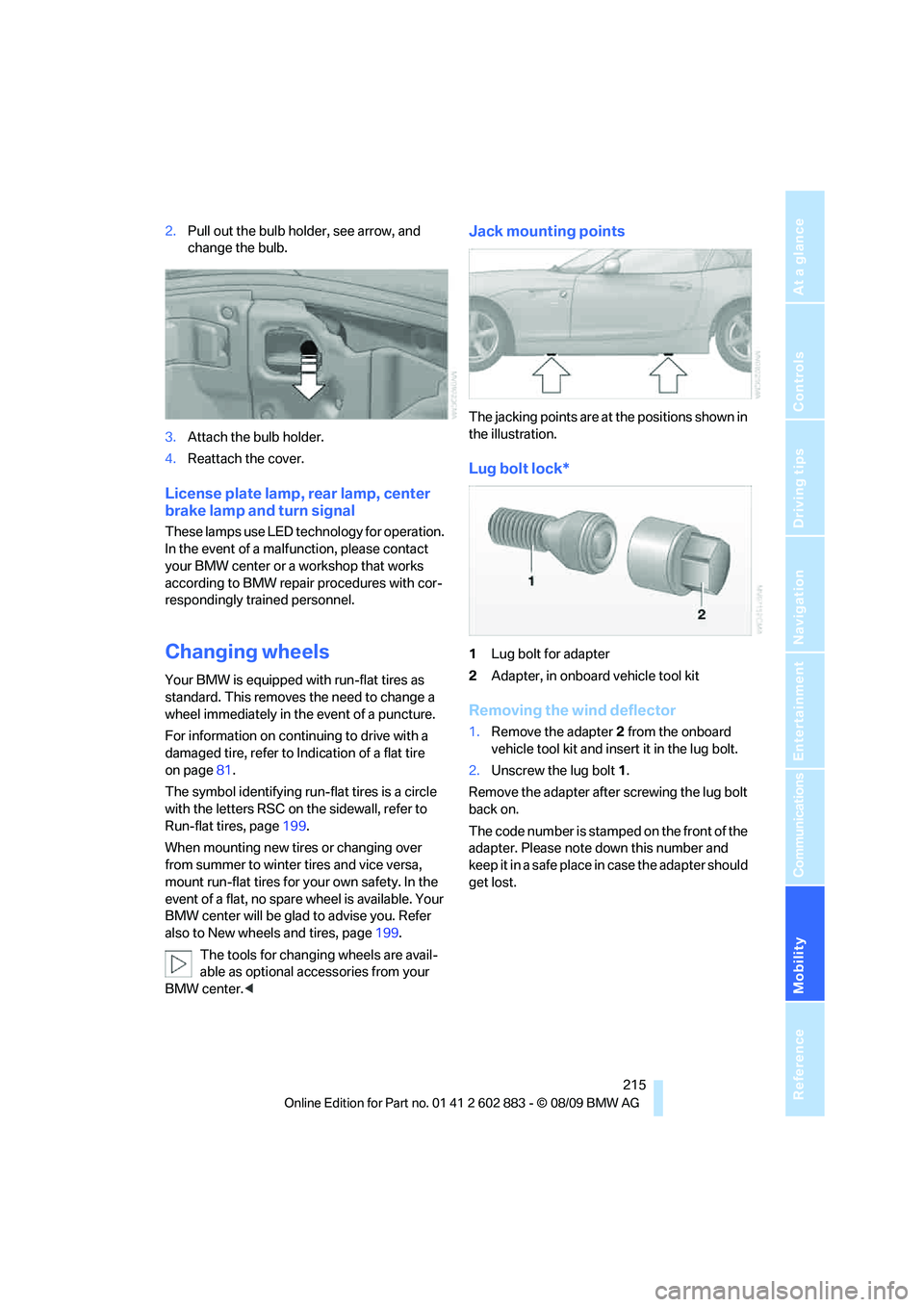
2.Pull out the bulb holder, see arrow, and
change the bulb.
3.Attach the bulb holder.
4.Reattach the cover.
License plate lamp, rear lamp, center
brake lamp and turn signal
These lamps use LED technology for operation.
In the event of a malfunction, please contact
your BMW center or a workshop that works
according to BMW repair procedures with cor-
respondingly trained personnel.
Changing wheels
Your BMW is equipped with run-flat tires as
standard. This removes the need to change a
wheel immediately in the event of a puncture.
For information on continuing to drive with a
damaged tire, refer to Indication of a flat tire
on page81.
The symbol identifying run-flat tires is a circle
with the letters RSC on the sidewall, refer to
Run-flat tires, page199.
When mounting new tires or changing over
from summer to winter tires and vice versa,
mount run-flat tires for your own safety. In the
event of a flat, no spare wheel is available. Your
BMW center will be glad to advise you. Refer
also to New wheels and tires, page199.
The tools for changing wheels are avail-
able as optional accessories from your
BMW center.<
Jack mounting points
The jacking points are at the positions shown in
the illustration.
Lug bolt lock*
1Lug bolt for adapter
2Adapter, in onboard vehicle tool kit
Removing the wind deflector
1.Remove the adapter 2 from the onboard
vehicle tool kit and insert it in the lug bolt.
2.Unscrew the lug bolt1.
Remove the adapter after screwing the lug bolt
back on.
The code number is stamped on the front of the
adapter. Please note down this number and
keep it in a safe place in case the adapter should
get lost.
Page 240 of 254
Everything from A to Z
238 Call
– accepting174
– ending174
– rejecting174
Calling, refer to Phone
numbers, dialing174
Can holders, refer to
Cupholders105
Capacities228
Capacity of the cargo area228
Car battery, refer to Vehicle
battery216
Car care, refer to Care208
Care208
– automatic car washes208
– care products208
– carpets210
– CD/DVD drives211
– chrome parts210
– displays211
– exterior208
– fine wood parts211
– headlamps209
– high-pressure washer209
– interior210
– leather210
– light-alloy wheels210
– paintwork209
– plastic parts211
– retractable hardtop209
– rubber seals210
– safety belts211
– sensors and cameras211
– upholstery and cloth
trim210
– washing the car
manually209
– windows209
Cargo, securing116
Cargo area
– capacity228
– Comfort Access35
– lamp, refer to Interior
lamps92
– opening from inside32
– opening from outside33Cargo loading
– securing cargo116
– stowing cargo116
– vehicle115
Car jack
– jacking points215
Car key, refer to Integrated
key/remote control28
Car phone
– installation location, refer to
Center armrest
104
– refer to separate Owner's
Manual
Car phone, refer to
Telephone170
Car radio, refer to Radio143
Car shampoo211
Car wash115
– with Comfort Access36
Car wash, refer to the Caring
for your vehicle brochure
Catalytic converter, refer to
Hot exhaust system113
CBS Condition Based
Service206
CD, audio playback152
CD/DVD changer
– filling or emptying the
magazine156
CD changer151,155
– controls140
– fast forward/reverse153
– random play sequence152
– selecting a track152
– switching on/off140
– tone control140
– volume140
CD player151
– controls140
– fast forward/reverse153
– random play sequence152
– selecting a track152
– switching on/off140
– tone control140
– volume140
Center armrest104
Center brake lamp
– replacing bulb215Center console, refer to
Around the center
console14
Central locking
– from inside32
– from outside29
Central locking system29
– Comfort Access34
– setting unlocking
characteristics29
Changes, technical, refer to
For your own safety5
Changing bulbs, refer to
Lamps and bulbs212
Changing the measurement
units on the Control
Display68
Changing wheels215
Chassis number, refer to
Engine compartment202
Check Control73
Child restraint systems48
Child seats, refer to
Transporting children
safely48
Chrome parts211
Chrome polish211
Cleaning headlamps61
– washer fluid61
Cleaning your BMW, refer to
Care208
Clock64
– 12h/24h mode72
– setting the time and date72
– setting time71
Closing
– from inside32
– from outside29
Cockpit10
Cold start, refer to Starting the
engine51
Combined instrument, refer to
Instrument cluster12
Comfort Access34
– replacing the battery36
– what to observe before
entering a car wash36
Comfort access, refer to
Comfort Access34
Page 242 of 254
Everything from A to Z
240 Display, refer to iDrive
controls16
Display lighting, refer to
Instrument lighting91
Displays
– on the Control Display16
Displays, refer to Instrument
cluster12
Displays and controls10
Disposal
– coolant204
– remote control battery36
– vehicle battery216
Distance remaining to service,
refer to Service
requirements69
Distance warning, refer to
Park Distance Control
PDC77
Door key, refer to Remote
control with integrated
key28
Door lock31
Doors, emergency
operation31
DOT Quality Grades197
Draft-free ventilation95,98
Drinks holders, refer to
Cupholders105
Drive mode56
Drive-off assistance, refer to
Dynamic Stability Control
DSC78
Drive-off assistant80
Driving lamps, refer to Parking
lamps/low beams88
Driving notes112
Driving off on hills, refer to
Drive-off assistant80
Driving position, engaging,
refer to Transmission
positions56
Driving stability control
systems78,79
Driving through water114
Driving tips, refer to Driving
notes112
DSC Dynamic Stability
Control78Dual clutch transmission55
– kickdown56
DVD
– country codes153
– settings154
– video playback153
DVD changer155
– malfunctions157
DVD changer, refer to CD
changer151
DVD menu154
DVD player, refer to CD
player151
DVD video153
Dynamic Brake Control
DBC78
Dynamic destination
guidance131
Dynamic Driving Control79
E
Eject button, refer to Buttons
on the CD/DVD player140
Electrical malfunction
– door lock31
– driver's door31
– fuel filler flap192
– M dual clutch transmission
with Drivelogic58
Electric seat adjustment42
Electric steering wheel lock
– with Comfort Access35
Electronic brake-force
distribution EBV78
Electronic oil level check202
Electronic Stability Program
ESP, refer to Dynamic
Stability Control DSC78
Emergency actuation,
automatic transmission,
refer to Overriding selector
lever lock55
Emergency operation
– fuel filler flap, manual
release192
Emergency operation, refer to
Manual operation
– door lock31Emergency release
– luggage compartment lid
from inside33
Emergency Request218
Emergency services, refer to
Roadside Assistance218
Energy, saving
– saving fuel112
Engine
– breaking in112
– data226
– overheated, refer to Coolant
temperature65
– speed226
– starting51
– starting, Comfort Access34
– switching off52
Engine compartment202
Engine coolant, refer to
Coolant204
Engine oil
– adding204
– additives, refer to Specified
engine oils204
– alternative oil types204
– BMW Maintenance
System206
– capacity228
– checking level202
– intervals between changes,
refer to Service
requirements69
– specified engine oils204
Engine output, refer to Engine
data226
Engine speed, refer to Engine
data226
Engine starting, refer to
Starting the engine51
Entering special destinations
by name126
Entering the
address121,127
Entry lamps, refer to Interior
lamps92
Entry map for destination126
Equalizer, tone setting141
Error messages, refer to
Check Control73
Page 247 of 254
Reference 245
At a glance
Controls
Driving tips
Communications
Navigation
Entertainment
Mobility
O
OBD socket, refer to Socket
for Onboard Diagnosis207
Octane ratings, refer to Fuel
specifications193
Odometer64
Oil, refer to Engine oil202
Oil consumption202
Oil level202
Old batteries, refer to
Disposal216
Onboard vehicle tool kit212
Opening and closing
– Comfort Access34
– from inside32
– from outside29
– using the door lock31
– via the remote control29
Options, selecting for
navigation130
Outlets
– refer to Ventilation95,98
Outlets, refer to Air vents93
Output, refer to Engine
data226
Outside-air mode
– automatic climate control98
Outside temperature
display64
– changing units of
measure68
– in computer68
Outside temperature
warning64
Overheated engine, refer to
Coolant temperature65
Overriding selector lever
lock55
Overview
– radio control140
P
Paintwork care209Park assistant, refer to Park
Distance Control77
Park Distance Control PDC77
Parking
– vehicle52
Parking aid, refer to Park
Distance Control PDC77
Parking brake52
Parking lamps88
Parking lamps/low beams88
Passenger-side mirror tilt
function46
Pathway lighting89
Personal Profile28
Phone book173
Phone numbers
– dialing174
Pinch protection system
– windows37
Placing a call, refer to
telephone owner's manual
Polish211
Pollen
– refer to Microfilter/activated-
charcoal filter for automatic
climate control98
– refer to Microfilter for air
conditioner95
Postal code, entering for
navigation122
Power failure216
Power windows37
Power windows, refer to
Windows36
Pressure, tires194
Pressure monitoring, tires81
– Flat Tire Monitor81
Pressure monitoring of tires,
refer to Tire Pressure
Monitor TPM82
Programmable buttons on the
steering wheel11
Protection function, refer to
Pinch protection system
– windows37Providing medical assistance,
refer to First add pouch219
Puncture
– Flat Tire Monitor81
R
Radio
– controls140
– HD Radio144
– satellite radio146
– selecting a waveband143
– storing stations144
– switching on/off140
– tone control140
– volume140
Radio position, refer to Radio
readiness50
Radio readiness50
– switched off50
– switched on50
Radio-remote key, refer to
Remote control with
integrated key28
Rain sensor60
Random sequence
– CD changer152
– CD player152
– external devices165
– music collection161
Reading lamps92
Rear fog lamps
– indicator lamp13
Rear lamp, refer to Tail lamps
– replacing bulb214
Rear lamps, refer to Tail
lamps214
Rear turn signals
– replacing bulb214
Rearview mirror, refer to
Mirrors45
Rear window defroster95,98
Receiving level of mobile
phone, refer to Status
information20
Page 248 of 254
Everything from A to Z
246 Reception
– quality144
– radio station144
Recirculated-air mode94,98
Recirculation of air, refer to
Recirculated-air
mode94,98
Reclining seat, refer to
Backrest42
Refueling192
Releasing
– hood201
Remaining distance, refer to
Cruising range66
Remote control28
– battery renewal36
– Comfort Access34
– garage door opener100
– luggage compartment lid30
– malfunction31,36
– removing from the ignition
lock50
– service data206
Replacement remote
control28
Replacing bulbs, refer to
Lamps and bulbs212
Replacing tires199
Replacing tires, refer to New
wheels and tires199
Reporting safety defects6
Reserve warning, refer to Fuel
gauge65
Reset, refer to Resetting tone
settings142
Restraint systems
– for children48
– refer to Safety belts44
Retractable hardtop
– care, refer to Caring for your
vehicle brochure
– convenient operation30
– opening and closing39
– remote control30
retractable hardtop38
Reverse
– CD changer153
– CD player153Reverse gear56
– automatic transmission with
Steptronic54
– manual transmission53
Road map132
Roadside
Assistance185,218
Roadside parking lamps90
Roadworthiness test, refer to
Service requirements69
Roof load capacity228
Rope, refer to Tow-starting,
towing away222
Rotary/pushbutton, refer to
iDrive16
Route130,131
– bypassing sections131
– changing130,131
– changing criteria130
– displaying streets or towns/
cities131
– map display132
– selecting130
Route instructions, refer to
Destination guidance
through voice
instructions132
Route map, refer to Map
display132
Route section, changing131
Route selection130
RSC Runflat System
Component, refer to Run-
flat tires199
Runflat System Component
RSC, refer to Run-flat
tires199
Run-flat tires199
– continuing driving with a
damaged tire82
– flat tire81
– Flat Tire Monitor81
– new tires199
– replacing199
– tire inflation pressure194
– winter tires200
S
Safety-belt height
adjustment45
Safety belts44
– damage45
– indicator/warning lamp45
– reminder45
– sitting safely41
Safety systems
– airbags85
– Antilock Brake System
ABS78
– brake system78
– driving stability control
systems78
– Dynamic Stability Control
DSC78
– safety belts44
Safety tires, refer to Run-flat
tires199
Satellite radio146
– enabling or unsubscribing
from a channel146
– favorites148
– selecting channel147
– storing channel147
– timeshift148
– Traffic Jump149
Saving fuel112
Screen, refer to iDrive
controls16
Screw thread for tow
fitting220
SDARS, refer to Satellite
radio146
Seat adjustment
– electric42
– mechanical42
Seat and mirror memory43
Seat belt reminder, refer to
"Fasten safety belts"
reminder45
Seat heating43