reset BMW Z4 SDRIVE35I ROADSTER 2010 User Guide
[x] Cancel search | Manufacturer: BMW, Model Year: 2010, Model line: Z4 SDRIVE35I ROADSTER, Model: BMW Z4 SDRIVE35I ROADSTER 2010Pages: 254, PDF Size: 8.04 MB
Page 144 of 254
On/off and tone
142
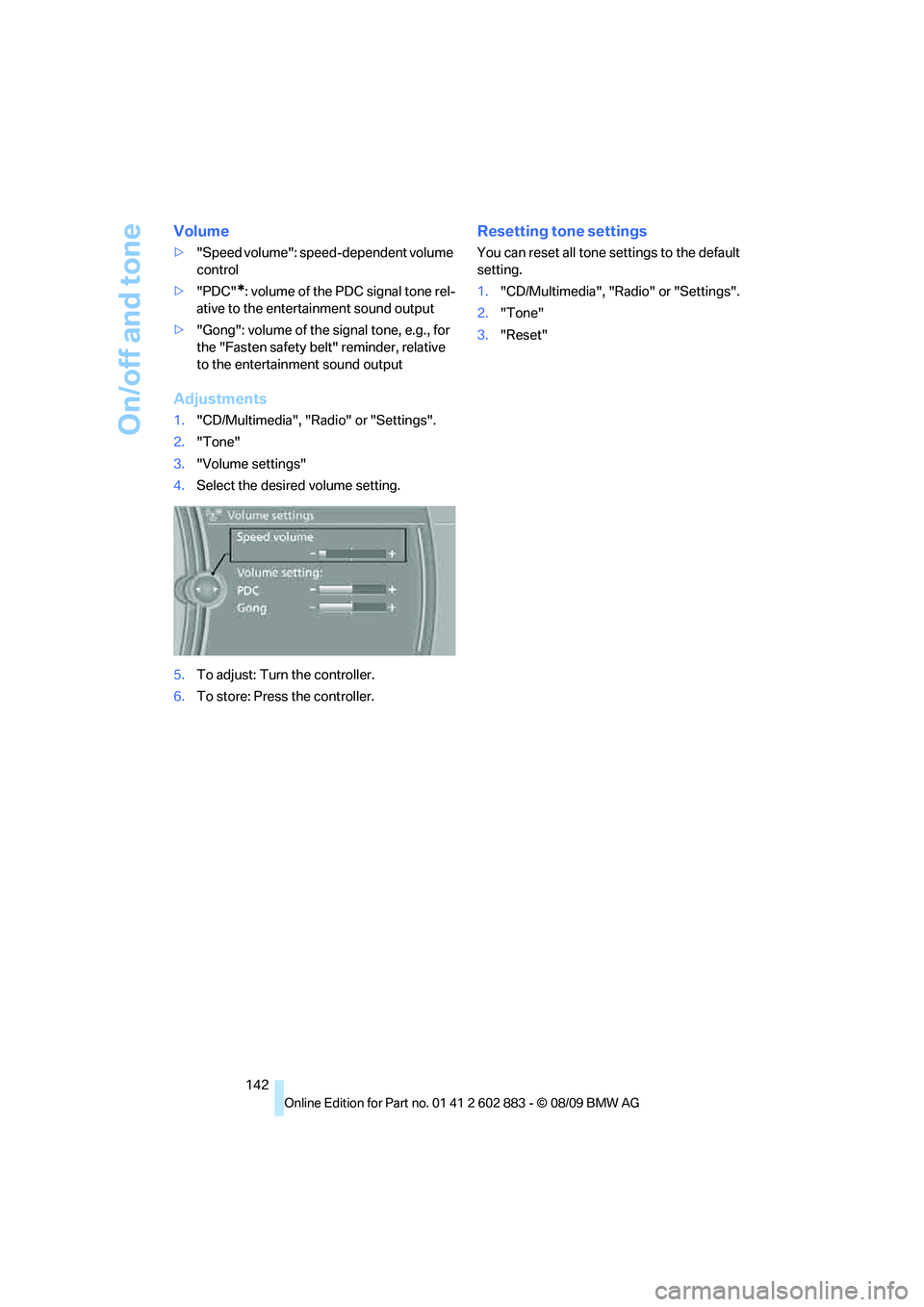
Volume
>"Speed volume": speed-dependent volume
control
>"PDC"
*: volume of the PDC signal tone rel-
ative to the entertainment sound output
>"Gong": volume of the signal tone, e.g., for
the "Fasten safety belt" reminder, relative
to the entertainment sound output
Adjustments
1."CD/Multimedia", "Radio" or "Settings".
2."Tone"
3."Volume settings"
4.Select the desired volume setting.
5.To adjust: Turn the controller.
6.To store: Press the controller.
Resetting tone settings
You can reset all tone settings to the default
setting.
1."CD/Multimedia", "Radio" or "Settings".
2."Tone"
3."Reset"
Page 147 of 254
Navigation
Entertainment
Driving tips
145Reference
At a glance
Controls
Communications
Mobility
Displaying additional information
Some stations broadcast additional information
on the current track, such as the name of the
artist.
1.Select the desired station.
2.Open "Options".
3."Station info"
Selecting a substation
1.Select the desired station.
2.Press the controller.
3.Select the substation.
Presets
It is possible to store up to 40 stations.
Calling up a station
1."Radio"
2."Presets"
3.Select the desired station.
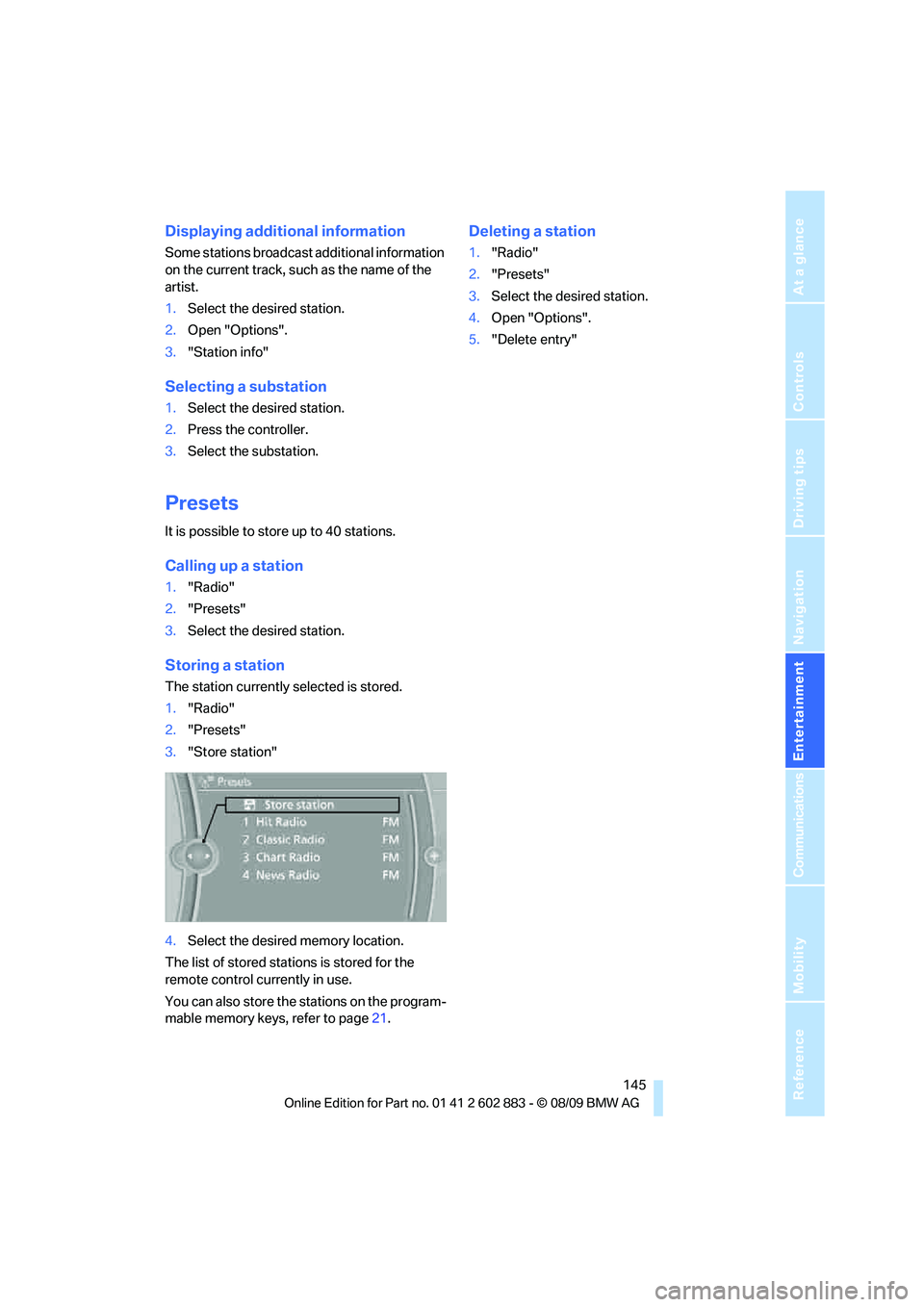
Storing a station
The station currently selected is stored.
1."Radio"
2."Presets"
3."Store station"
4.Select the desired memory location.
The list of stored stations is stored for the
remote control currently in use.
You can also store the stations on the program-
mable memory keys, refer to page21.
Deleting a station
1."Radio"
2."Presets"
3.Select the desired station.
4.Open "Options".
5."Delete entry"
Page 233 of 254
Reference 231
At a glance
Controls
Driving tips
Communications
Navigation
Entertainment
Mobility
Satellite radio
Presets
Telephone
Navigation
General information
FunctionCommand
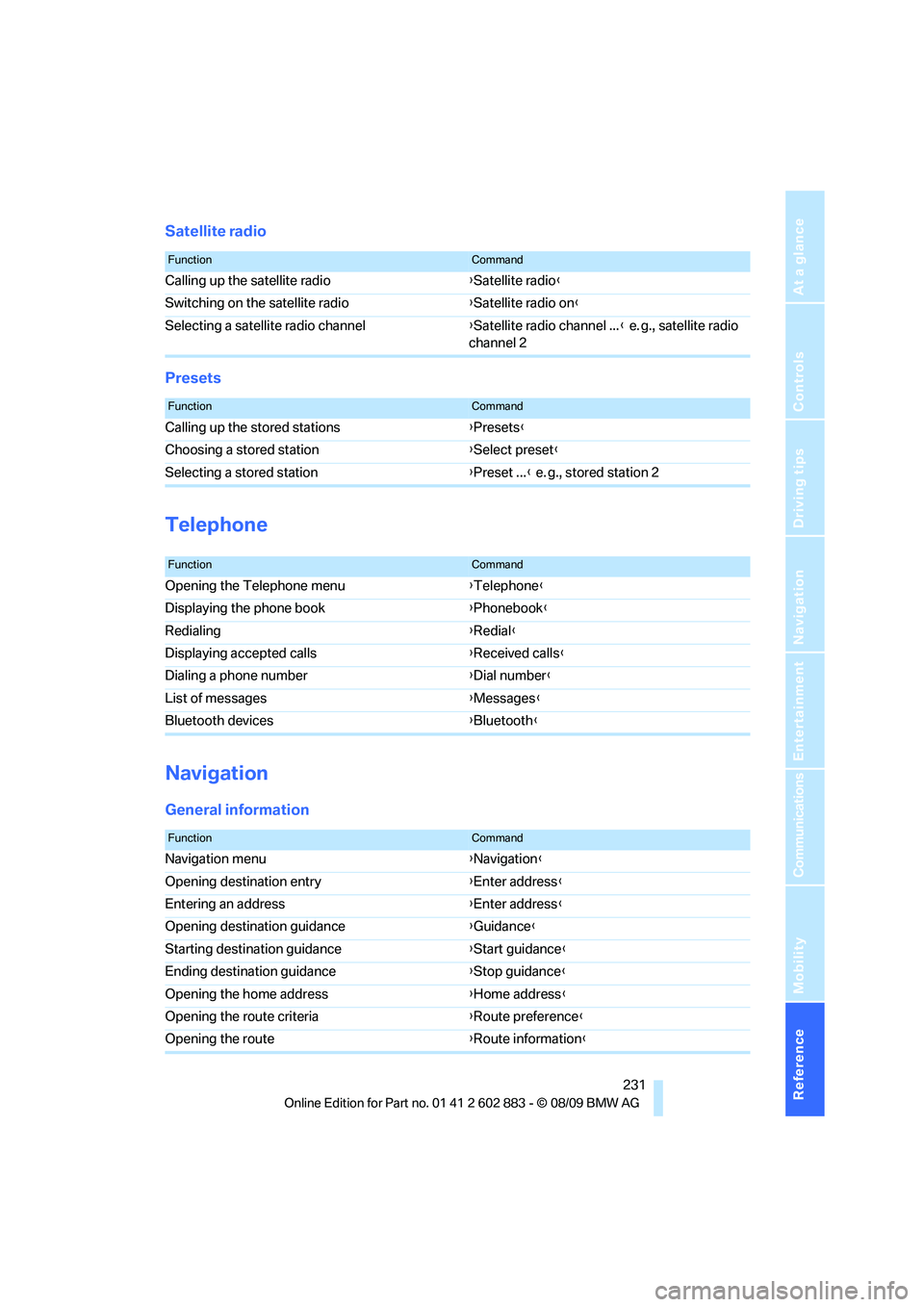
Calling up the satellite radio{Satellite radio}
Switching on the satellite radio{Satellite radio on}
Selecting a satellite radio channel{Satellite radio channel ...} e. g., satellite radio
channel 2
FunctionCommand
Calling up the stored stations{Presets}
Choosing a stored station{Select preset}
Selecting a stored station{Preset ...} e. g., stored station 2
FunctionCommand
Opening the Telephone menu{Telephone}
Displaying the phone book{Phonebook}
Redialing{Redial}
Displaying accepted calls{Received calls}
Dialing a phone number{Dial number}
List of messages{Messages}
Bluetooth devices{Bluetooth}
FunctionCommand
Navigation menu{Navigation}
Opening destination entry{Enter address}
Entering an address{Enter address}
Opening destination guidance{Guidance}
Starting destination guidance{Start guidance}
Ending destination guidance{Stop guidance}
Opening the home address{Home address}
Opening the route criteria{Route preference}
Opening the route{Route information}
Page 248 of 254
Everything from A to Z
246 Reception
– quality144
– radio station144
Recirculated-air mode94,98
Recirculation of air, refer to
Recirculated-air
mode94,98
Reclining seat, refer to
Backrest42
Refueling192
Releasing
– hood201
Remaining distance, refer to
Cruising range66
Remote control28
– battery renewal36
– Comfort Access34
– garage door opener100
– luggage compartment lid30
– malfunction31,36
– removing from the ignition
lock50
– service data206
Replacement remote
control28
Replacing bulbs, refer to
Lamps and bulbs212
Replacing tires199
Replacing tires, refer to New
wheels and tires199
Reporting safety defects6
Reserve warning, refer to Fuel
gauge65
Reset, refer to Resetting tone
settings142
Restraint systems
– for children48
– refer to Safety belts44
Retractable hardtop
– care, refer to Caring for your
vehicle brochure
– convenient operation30
– opening and closing39
– remote control30
retractable hardtop38
Reverse
– CD changer153
– CD player153Reverse gear56
– automatic transmission with
Steptronic54
– manual transmission53
Road map132
Roadside
Assistance185,218
Roadside parking lamps90
Roadworthiness test, refer to
Service requirements69
Roof load capacity228
Rope, refer to Tow-starting,
towing away222
Rotary/pushbutton, refer to
iDrive16
Route130,131
– bypassing sections131
– changing130,131
– changing criteria130
– displaying streets or towns/
cities131
– map display132
– selecting130
Route instructions, refer to
Destination guidance
through voice
instructions132
Route map, refer to Map
display132
Route section, changing131
Route selection130
RSC Runflat System
Component, refer to Run-
flat tires199
Runflat System Component
RSC, refer to Run-flat
tires199
Run-flat tires199
– continuing driving with a
damaged tire82
– flat tire81
– Flat Tire Monitor81
– new tires199
– replacing199
– tire inflation pressure194
– winter tires200
S
Safety-belt height
adjustment45
Safety belts44
– damage45
– indicator/warning lamp45
– reminder45
– sitting safely41
Safety systems
– airbags85
– Antilock Brake System
ABS78
– brake system78
– driving stability control
systems78
– Dynamic Stability Control
DSC78
– safety belts44
Safety tires, refer to Run-flat
tires199
Satellite radio146
– enabling or unsubscribing
from a channel146
– favorites148
– selecting channel147
– storing channel147
– timeshift148
– Traffic Jump149
Saving fuel112
Screen, refer to iDrive
controls16
Screw thread for tow
fitting220
SDARS, refer to Satellite
radio146
Seat adjustment
– electric42
– mechanical42
Seat and mirror memory43
Seat belt reminder, refer to
"Fasten safety belts"
reminder45
Seat heating43
Page 250 of 254
Everything from A to Z
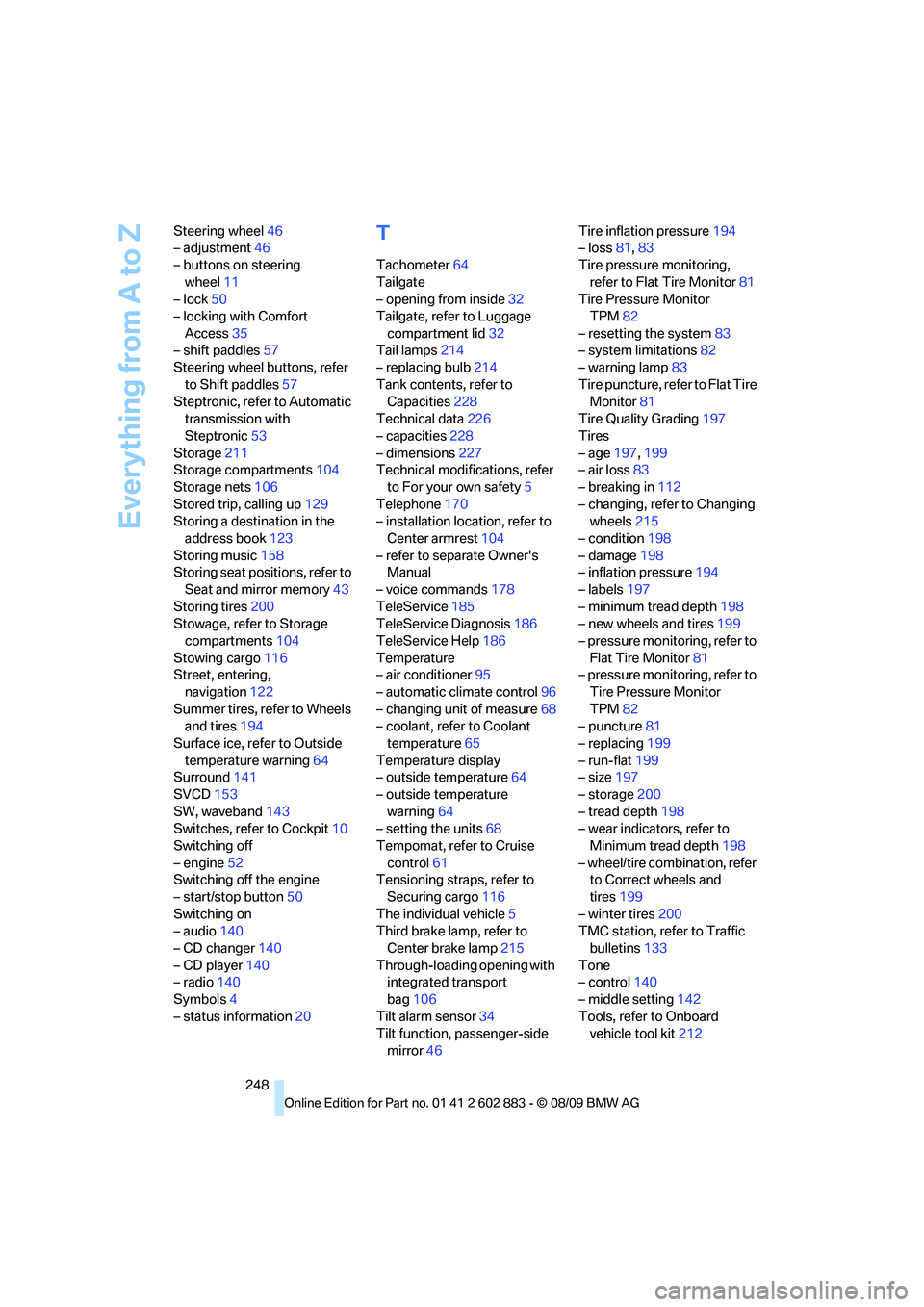
248 Steering wheel46
– adjustment46
– buttons on steering
wheel11
– lock50
– locking with Comfort
Access35
– shift paddles57
Steering wheel buttons, refer
to Shift paddles57
Steptronic, refer to Automatic
transmission with
Steptronic53
Storage211
Storage compartments104
Storage nets106
Stored trip, calling up129
Storing a destination in the
address book123
Storing music158
Storing seat positions, refer to
Seat and mirror memory43
Storing tires200
Stowage, refer to Storage
compartments104
Stowing cargo116
Street, entering,
navigation122
Summer tires, refer to Wheels
and tires194
Surface ice, refer to Outside
temperature warning64
Surround141
SVCD153
SW, waveband143
Switches, refer to Cockpit10
Switching off
– engine52
Switching off the engine
– start/stop button50
Switching on
– audio140
– CD changer140
– CD player140
– radio140
Symbols4
– status information20
T
Tachometer64
Tailgate
– opening from inside32
Tailgate, refer to Luggage
compartment lid32
Tail lamps214
– replacing bulb214
Tank contents, refer to
Capacities228
Technical data226
– capacities228
– dimensions227
Technical modifications, refer
to For your own safety5
Telephone170
– installation location, refer to
Center armrest104
– refer to separate Owner's
Manual
– voice commands178
TeleService185
TeleService Diagnosis186
TeleService Help186
Temperature
– air conditioner95
– automatic climate control96
– changing unit of measure68
– coolant, refer to Coolant
temperature65
Temperature display
– outside temperature64
– outside temperature
warning64
– setting the units68
Tempomat, refer to Cruise
control61
Tensioning straps, refer to
Securing cargo116
The individual vehicle5
Third brake lamp, refer to
Center brake lamp215
Through-loading opening with
integrated transport
bag106
Tilt alarm sensor34
Tilt function, passenger-side
mirror46Tire inflation pressure194
– loss81,83
Tire pressure monitoring,
refer to Flat Tire Monitor81
Tire Pressure Monitor
TPM82
– resetting the system83
– system limitations82
– warning lamp83
Tire puncture, refer to Flat Tire
Monitor81
Tire Quality Grading197
Tires
– age197,199
– air loss83
– breaking in112
– changing, refer to Changing
wheels215
– condition198
– damage198
– inflation pressure194
– labels197
– minimum tread depth198
– new wheels and tires199
– pressure monitoring, refer to
Flat Tire Monitor81
– pressure monitoring, refer to
Tire Pressure Monitor
TPM82
– puncture81
– replacing199
– run-flat199
– size197
– storage200
– tread depth198
– wear indicators, refer to
Minimum tread depth198
– wheel/tire combination, refer
to Correct wheels and
tires199
– winter tires200
TMC station, refer to Traffic
bulletins133
Tone
– control140
– middle setting142
Tools, refer to Onboard
vehicle tool kit212