navigation BMW Z4 SDRIVE35I ROADSTER 2010 Owners Manual
[x] Cancel search | Manufacturer: BMW, Model Year: 2010, Model line: Z4 SDRIVE35I ROADSTER, Model: BMW Z4 SDRIVE35I ROADSTER 2010Pages: 254, PDF Size: 8.04 MB
Page 5 of 254
Reference
At a glance
Controls
Driving tips
Communications
Navigation
Entertainment
Mobility
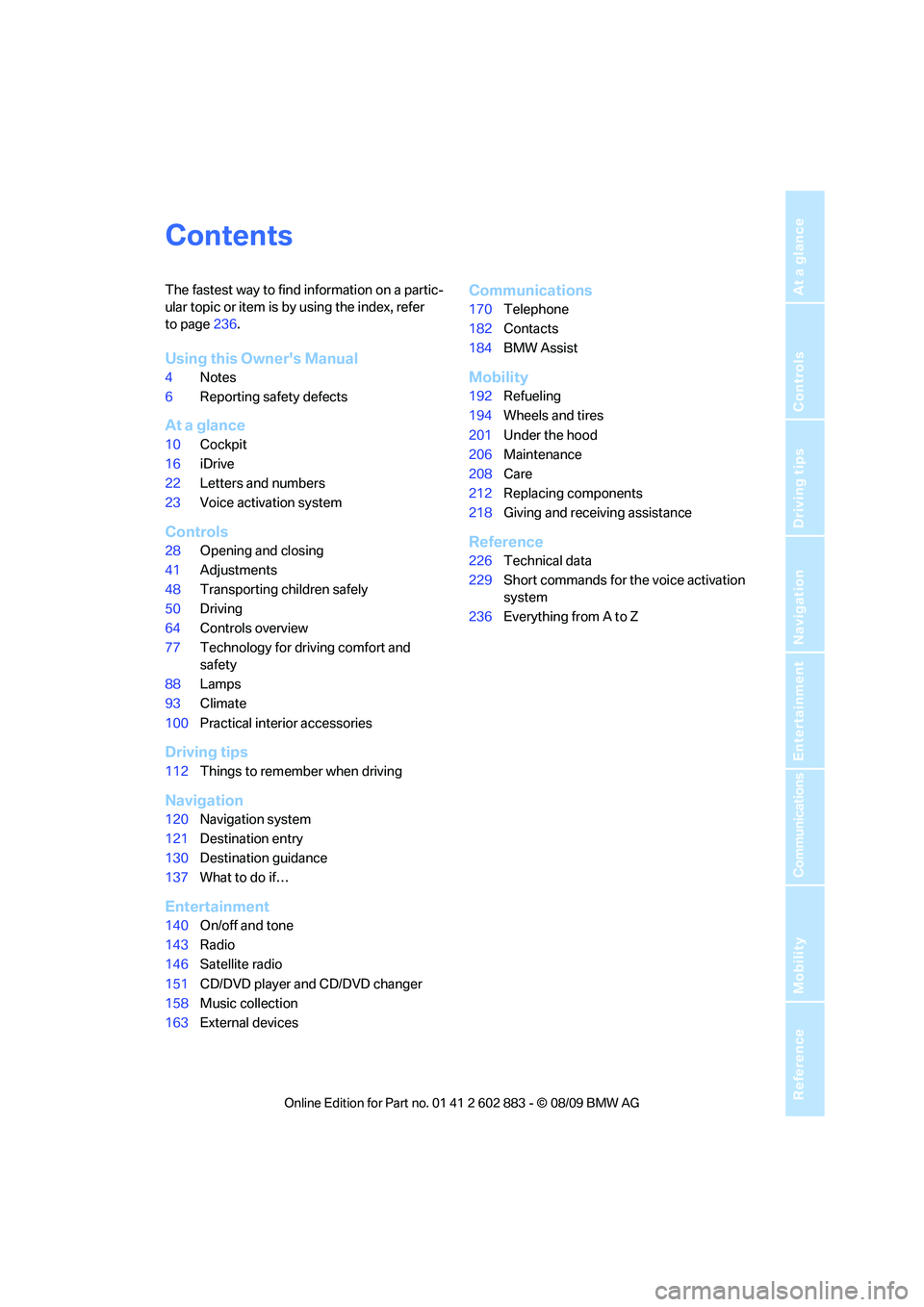
Contents
The fastest way to find information on a partic-
ular topic or item is by using the index, refer
to page236.
Using this Owner's Manual
4Notes
6Reporting safety defects
At a glance
10Cockpit
16iDrive
22Letters and numbers
23Voice activation system
Controls
28Opening and closing
41Adjustments
48Transporting children safely
50Driving
64Controls overview
77Technology for driving comfort and
safety
88Lamps
93Climate
100Practical interior accessories
Driving tips
112Things to remember when driving
Navigation
120Navigation system
121Destination entry
130Destination guidance
137What to do if…
Entertainment
140On/off and tone
143Radio
146Satellite radio
151CD/DVD player and CD/DVD changer
158Music collection
163External devices
Communications
170Telephone
182Contacts
184BMW Assist
Mobility
192Refueling
194Wheels and tires
201Under the hood
206Maintenance
208Care
212Replacing components
218Giving and receiving assistance
Reference
226Technical data
229Short commands for the voice activation
system
236Everything from A to Z
Page 7 of 254
5Reference
At a glance
Controls
Driving tips
Communications
Navigation
Entertainment
Mobility
The individual vehicle
When you ordered your BMW, you chose vari-
ous items of equipment. This Owner's Manual
describes the entire array of options and equip-
ment available with a specific BMW model.
Please bear in mind that the manual may con-
tain information on accessories and equipment
that you have not specified for your own vehicle.
Sections describing options and special equip-
ment are marked by asterisks
* to assist you in
identifying possible differences between the
descriptions in this manual and your own vehi-
cle's equipment.
If equipment in your BMW is not described in
this Owner's Manual, please refer to the accom-
panying Supplementary Owner's Manuals.
Editorial notice
BMW pursues a policy of continuous, ongoing
development that is conceived to ensure that
our vehicles continue to embody the highest
quality and safety standards combined with
advanced, state-of-the-art technology. For this
reason, it is possible in exceptional cases that
features described in this Owner's Manual
could differ from those on your vehicle.
For your own safety
Maintenance and repair
Advanced technology, e.g., the use of
modern materials and powerful electron-
ics, requires specially adapted maintenance
and repair methods. You should therefore have
the corresponding work on your vehicle per-
formed only by your BMW center or at a work-
shop that works according to BMW repair pro-
cedures with correspondingly trained
personnel. If this work is not carried out prop-
erly, there is a danger of subsequent damage
and related safety hazards.<
Parts and accessories
For your own safety, use genuine parts
and accessories approved by BMW.
When you purchase accessories tested and
approved by BMW and Original BMW Parts, you
simultaneously acquire the assurance that they
have been thoroughly tested by BMW to ensure
optimum performance when installed on your
vehicle.
BMW warrants these parts to be free from
defects in material and workmanship.
BMW will not accept any liability for damage
resulting from installation of parts and accesso-
ries not approved by BMW.
BMW cannot test every product made by other
manufacturers to verify if it can be used on a
BMW safely and without risk to either the vehi-
cle, its operation, or its occupants.
Original BMW Parts, BMW Accessories and
other products approved by BMW, together
with professional advice on using these items,
are available from all BMW centers.
Page 9 of 254
7Reference
At a glance
Controls
Driving tips
Communications
Navigation
Entertainment
Mobility
If NHTSA receives similar complaints, it may
open an investigation, and if it finds that a safety
defect exists in a group of vehicles, it may order
a recall and remedy campaign. However,
NHTSA cannot become involved in individual
problems between you, your center, or BMW of
North America, LLC.
To contact NHTSA, you may call the Vehicle
Safety Hotline toll-free at 1-888-327-4236
(TTY: 1-800-424-9153); go to
http://www.safercar.gov; or write to: Adminis-
trator, NHTSA, 400 Seventh Street, SW.,
Washington, DC 20590. You can also obtain
other information about motor vehicle safety
from http://www.safercar.gov
For Canadian customers
Canadian customers who wish to report a
safety-related defect to Transport Canada,
Defect Investigations and Recalls, may call
1-800-333-0510 toll-free from anywhere in
Canada or 1-613-993-9851 from the Ottawa
region and from other countries, or contact
Transport Canada by mail at: Transport Can-
ada, ASFAD, Place de Ville, Tower C,
330 Sparks Street, Ottawa, ON, K1A 0N5.
You can also obtain other information about
motor vehicle safety from http://www.tc.gc.ca
Page 13 of 254
At a glance
11Reference
Controls
Driving tips
Communications
Navigation
Entertainment
Mobility
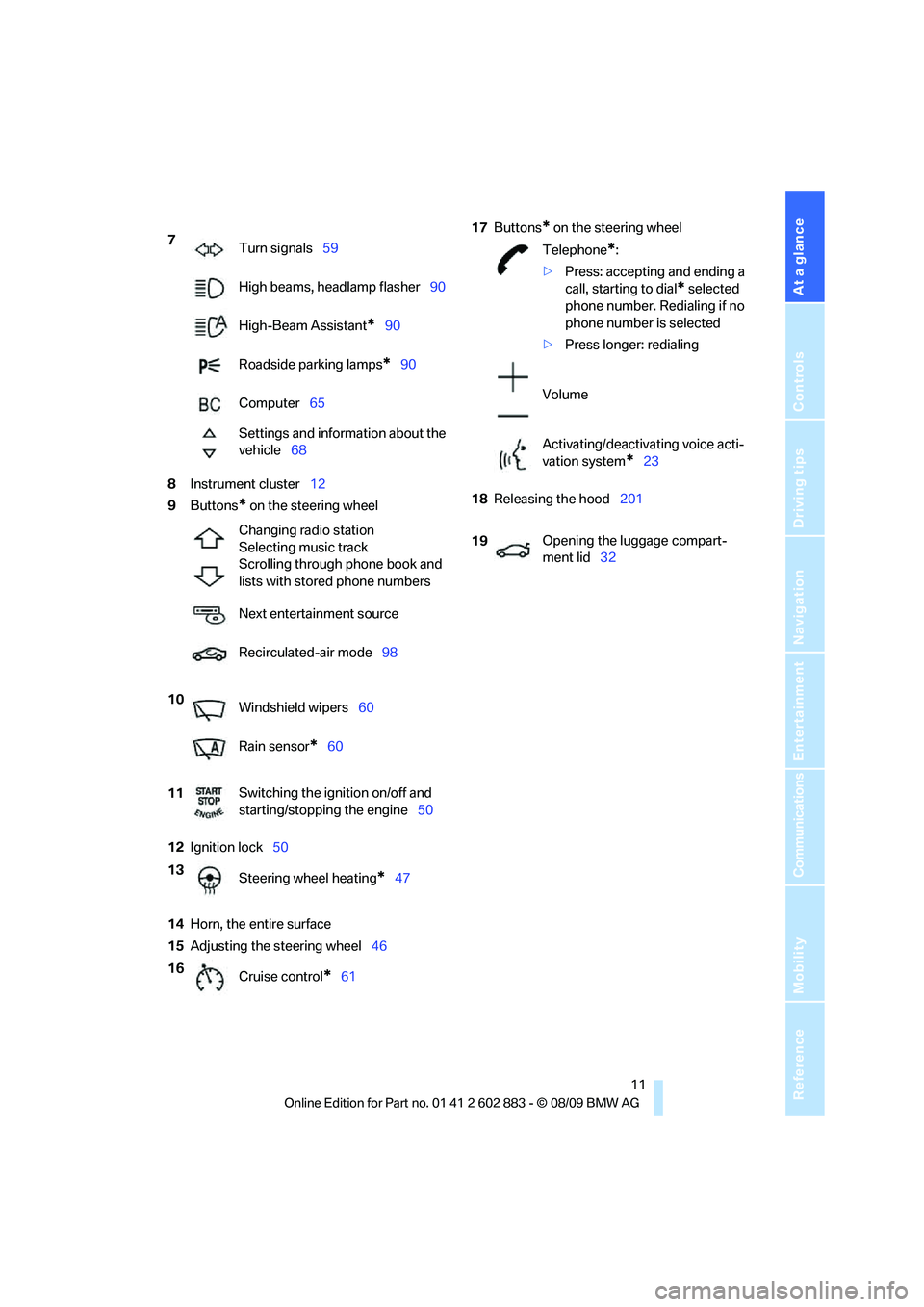
8Instrument cluster12
9Buttons
* on the steering wheel
12Ignition lock50
14Horn, the entire surface
15Adjusting the steering wheel4617Buttons
* on the steering wheel
18Releasing the hood201 7
Turn signals59
High beams, headlamp flasher90
High-Beam Assistant
*90
Roadside parking lamps
*90
Computer65
Settings and information about the
vehicle68
Changing radio station
Selecting music track
Scrolling through phone book and
lists with stored phone numbers
Next entertainment source
Recirculated-air mode98
10
Windshield wipers60
Rain sensor
*60
11Switching the ignition on/off and
starting/stopping the engine50
13
Steering wheel heating
*47
16
Cruise control
*61
Telephone*:
>Press: accepting and ending a
call, starting to dial
* selected
phone number. Redialing if no
phone number is selected
>Press longer: redialing
Volume
Activating/deactivating voice acti-
vation system
*23
19Opening the luggage compart-
ment lid32
Page 15 of 254
At a glance
13Reference
Controls
Driving tips
Communications
Navigation
Entertainment
Mobility
Indicator and warning lamps
The concept
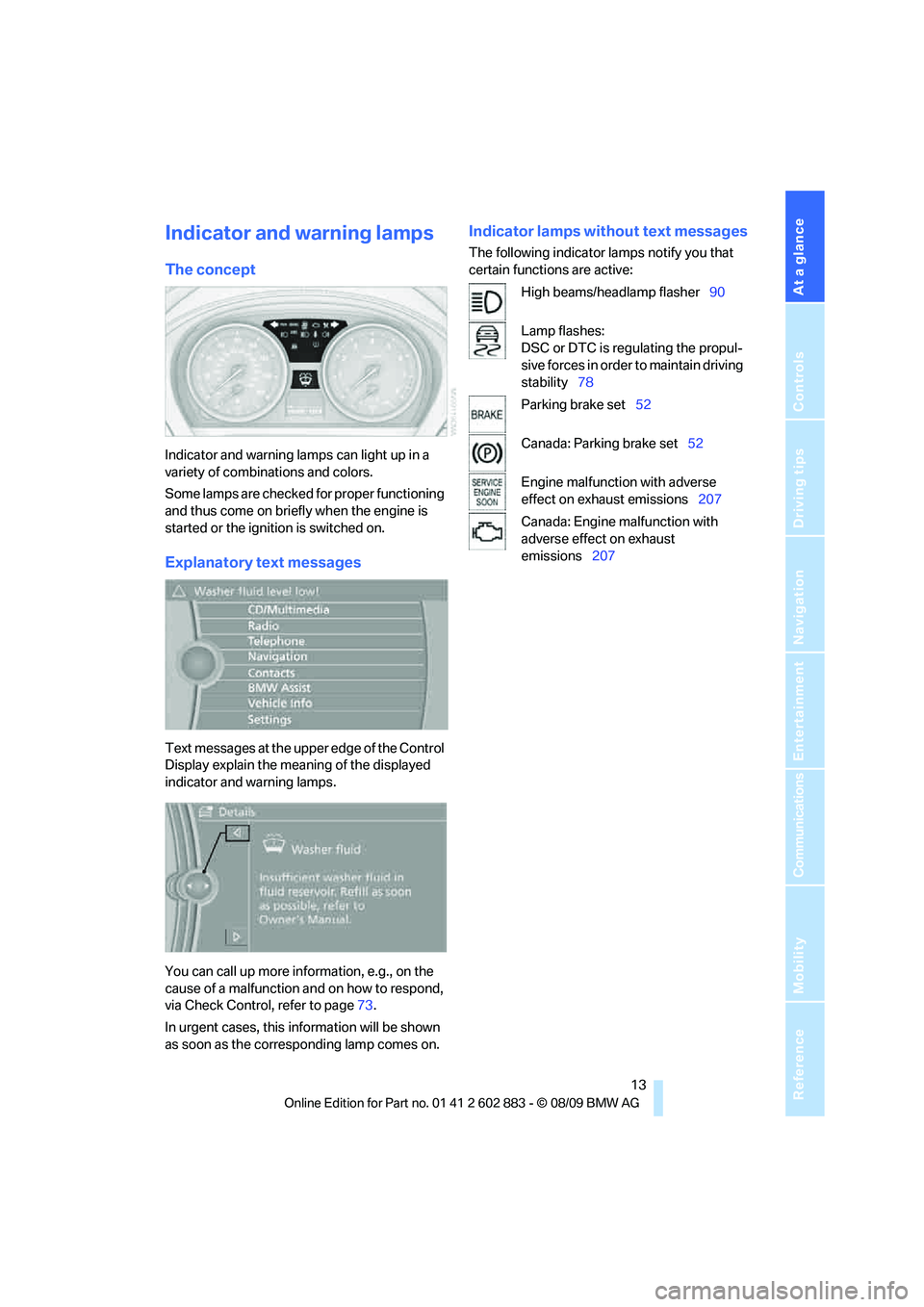
Indicator and warning lamps can light up in a
variety of combinations and colors.
Some lamps are checked for proper functioning
and thus come on briefly when the engine is
started or the ignition is switched on.
Explanatory text messages
Text messages at the upper edge of the Control
Display explain the meaning of the displayed
indicator and warning lamps.
You can call up more information, e.g., on the
cause of a malfunction and on how to respond,
via Check Control, refer to page73.
In urgent cases, this information will be shown
as soon as the corresponding lamp comes on.
Indicator lamps without text messages
The following indicator lamps notify you that
certain functions are active:
High beams/headlamp flasher90
Lamp flashes:
DSC or DTC is regulating the propul-
sive forces in order to maintain driving
stability78
Parking brake set52
Canada: Parking brake set52
Engine malfunction with adverse
effect on exhaust emissions207
Canada: Engine malfunction with
adverse effect on exhaust
emissions207
Page 17 of 254
At a glance
15Reference
Controls
Driving tips
Communications
Navigation
Entertainment
Mobility
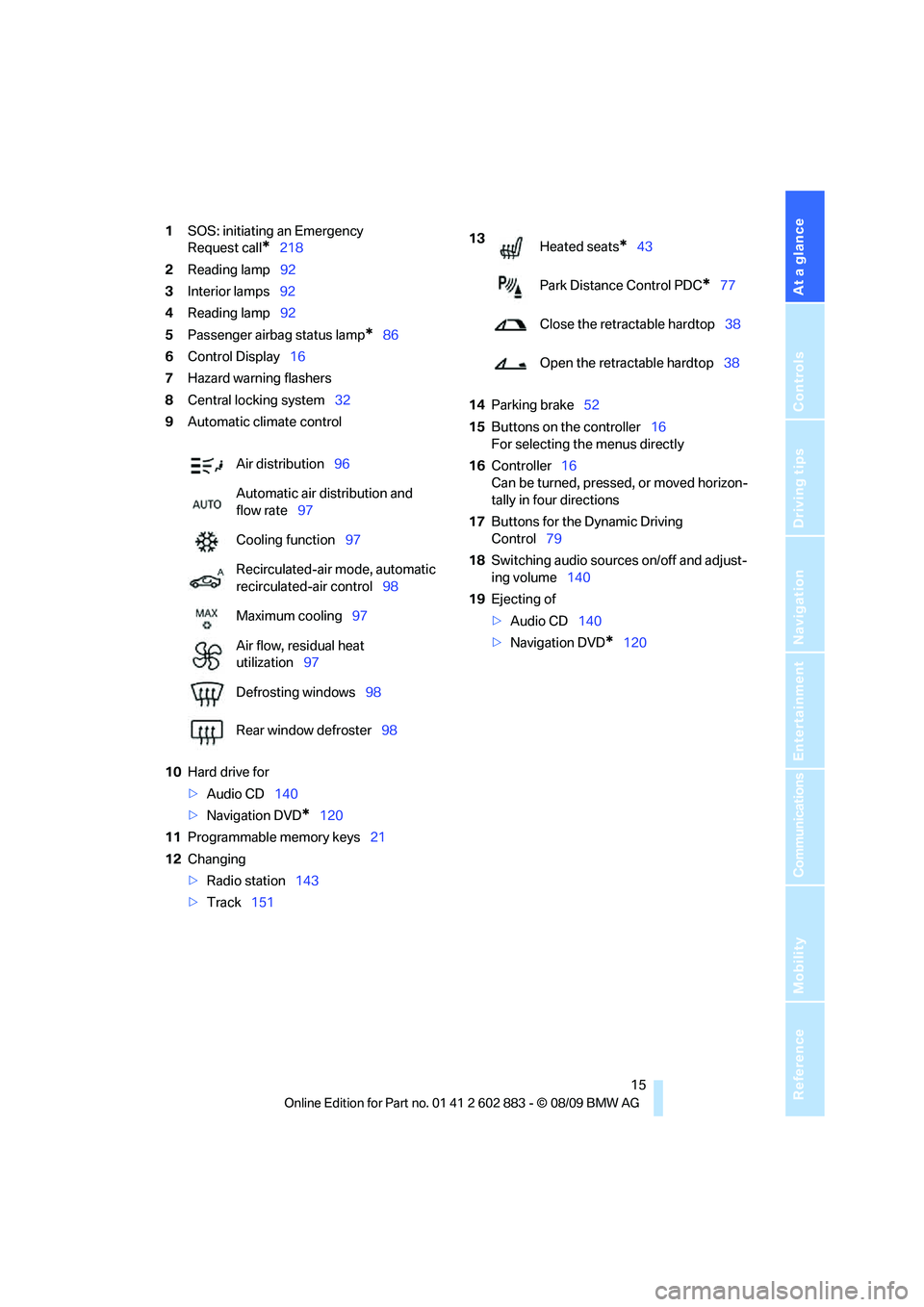
1SOS: initiating an Emergency
Request call
*218
2Reading lamp92
3Interior lamps92
4Reading lamp92
5Passenger airbag status lamp
*86
6Control Display16
7Hazard warning flashers
8Central locking system32
9Automatic climate control
10Hard drive for
>Audio CD140
>Navigation DVD
*120
11Programmable memory keys21
12Changing
>Radio station143
>Track15114Parking brake52
15Buttons on the controller16
For selecting the menus directly
16Controller16
Can be turned, pressed, or moved horizon-
tally in four directions
17Buttons for the Dynamic Driving
Control79
18Switching audio sources on/off and adjust-
ing volume140
19Ejecting of
>Audio CD140
>Navigation DVD
*120 Air distribution96
Automatic air distribution and
flow rate97
Cooling function97
Recirculated-air mode, automatic
recirculated-air control98
Maximum cooling97
Air flow, residual heat
utilization97
Defrosting windows98
Rear window defroster98
13
Heated seats*43
Park Distance Control PDC
*77
Close the retractable hardtop38
Open the retractable hardtop38
Page 18 of 254
iDrive
16
iDrive
iDrive integrates the functions of a large num-
ber of switches. This allows these functions to
be operated from a single central position. The
following section provides an introduction to basic menu navigation. The control of the indi-
vidual functions is described in connection with
the relevant equipment.
Controls
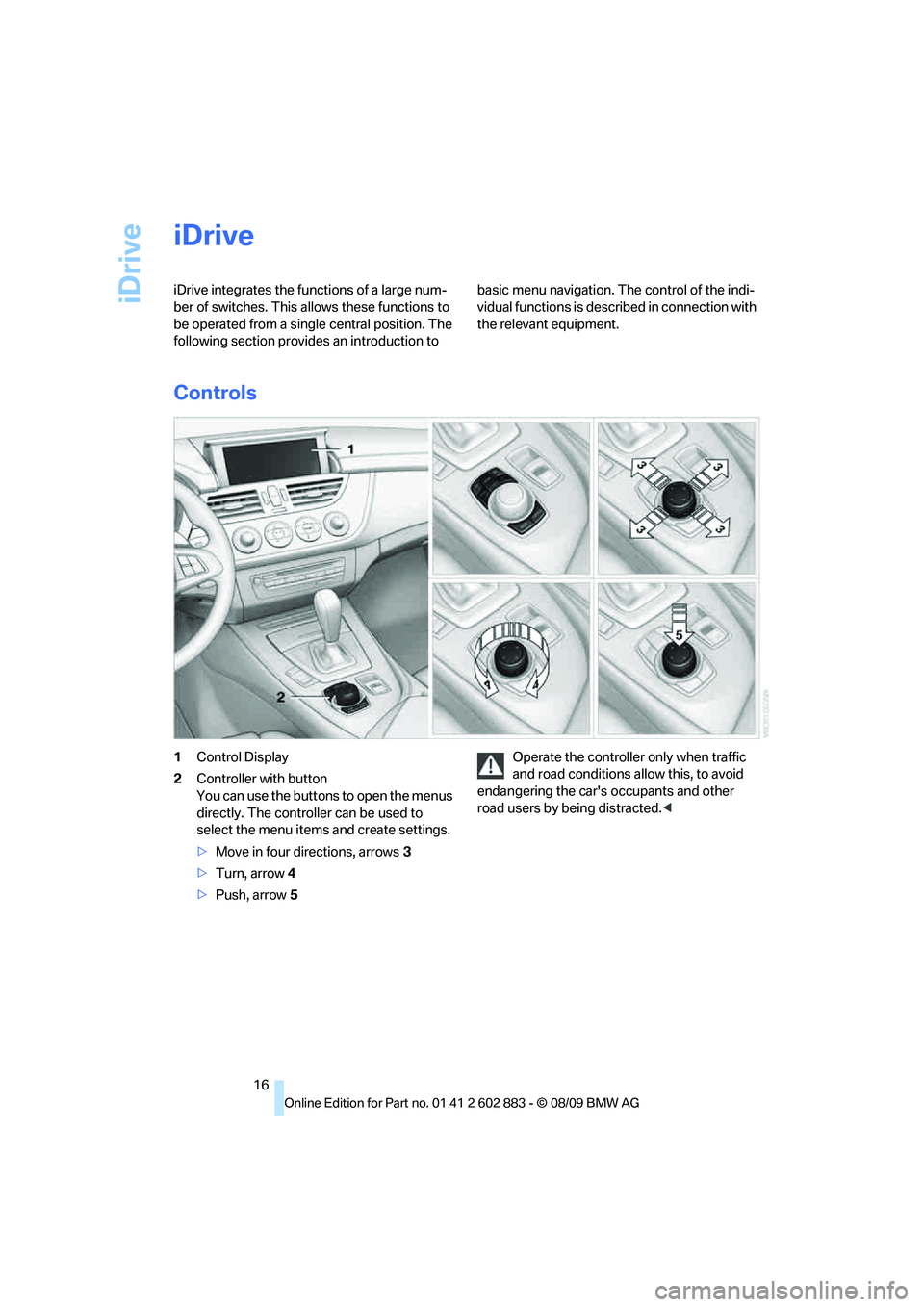
1Control Display
2Controller with button
You can use the buttons to open the menus
directly. The controller can be used to
select the menu items and create settings.
>Move in four directions, arrows3
>Turn, arrow 4
>Push, arrow 5Operate the controller only when traffic
and road conditions allow this, to avoid
endangering the car's occupants and other
road users by being distracted.<
Page 19 of 254
At a glance
17Reference
Controls
Driving tips
Communications
Navigation
Entertainment
Mobility
Buttons on the controller
Operating principle
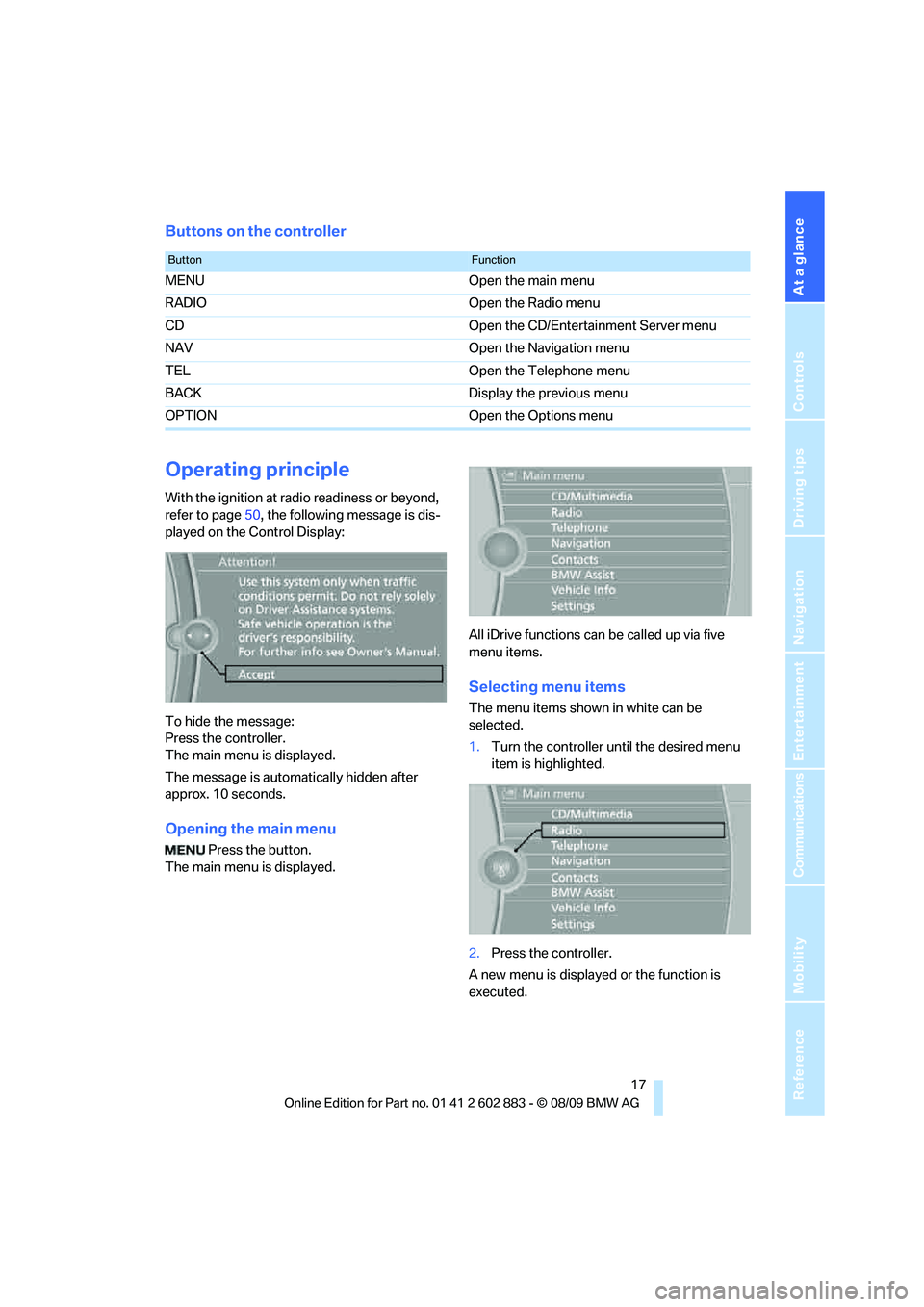
With the ignition at radio readiness or beyond,
refer to page50, the following message is dis-
played on the Control Display:
To hide the message:
Press the controller.
The main menu is displayed.
The message is automatically hidden after
approx. 10 seconds.
Opening the main menu
Press the button.
The main menu is displayed.All iDrive functions can be called up via five
menu items.
Selecting menu items
The menu items shown in white can be
selected.
1.Turn the controller until the desired menu
item is highlighted.
2.Press the controller.
A new menu is displayed or the function is
executed.
ButtonFunction
MENU Open the main menu
RADIO Open the Radio menu
CD Open the CD/Entertainment Server menu
NAV Open the Navigation menu
TEL Open the Telephone menu
BACK Display the previous menu
OPTION Open the Options menu
Page 21 of 254
At a glance
19Reference
Controls
Driving tips
Communications
Navigation
Entertainment
Mobility
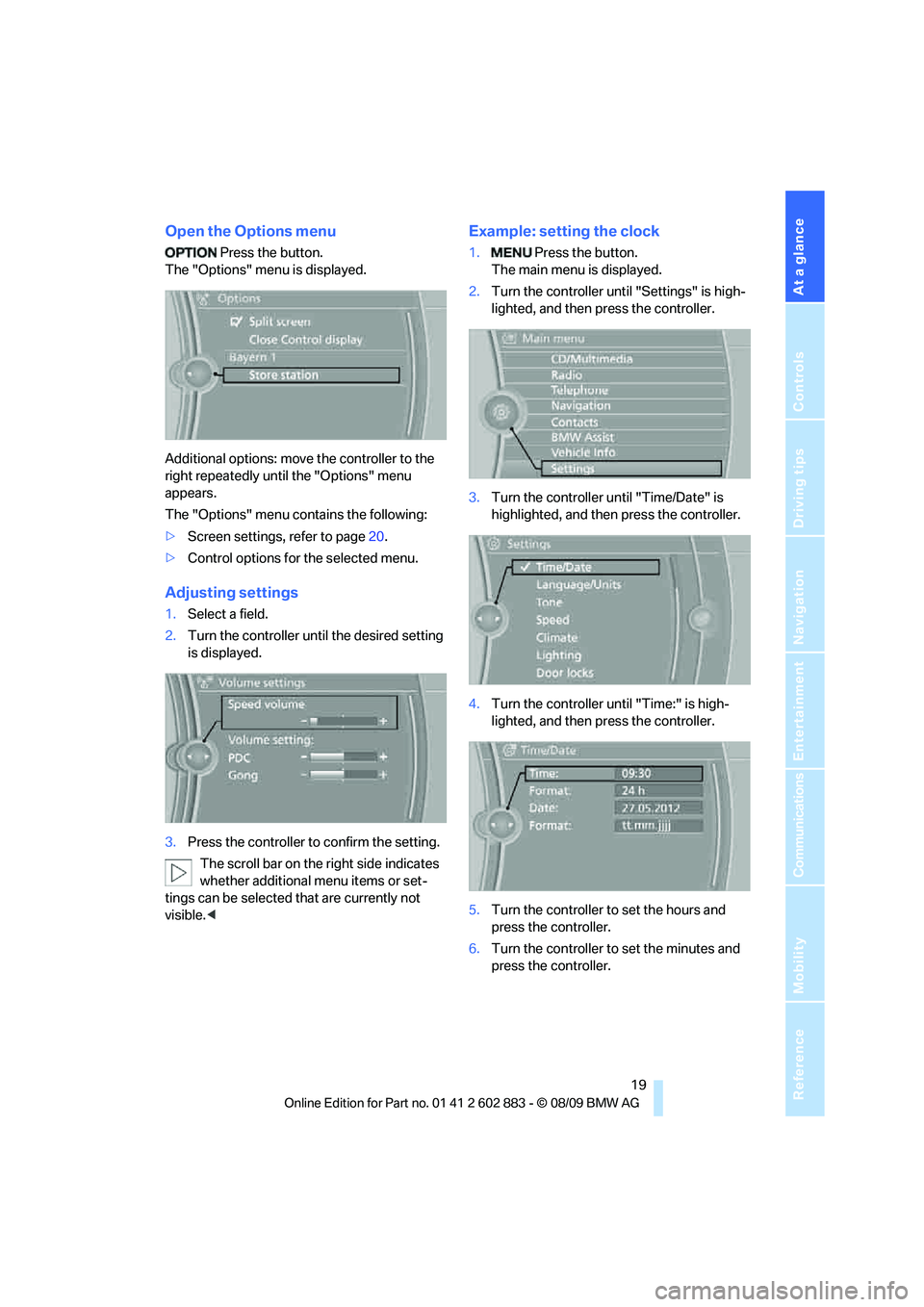
Open the Options menu
Press the button.
The "Options" menu is displayed.
Additional options: move the controller to the
right repeatedly until the "Options" menu
appears.
The "Options" menu contains the following:
>Screen settings, refer to page20.
>Control options for the selected menu.
Adjusting settings
1.Select a field.
2.Turn the controller until the desired setting
is displayed.
3.Press the controller to confirm the setting.
The scroll bar on the right side indicates
whether additional menu items or set-
tings can be selected that are currently not
visible.<
Example: setting the clock
1. Press the button.
The main menu is displayed.
2.Turn the controller until "Settings" is high-
lighted, and then press the controller.
3.Turn the controller until "Time/Date" is
highlighted, and then press the controller.
4.Turn the controller until "Time:" is high-
lighted, and then press the controller.
5.Turn the controller to set the hours and
press the controller.
6.Turn the controller to set the minutes and
press the controller.
Page 23 of 254
At a glance
21Reference
Controls
Driving tips
Communications
Navigation
Entertainment
Mobility
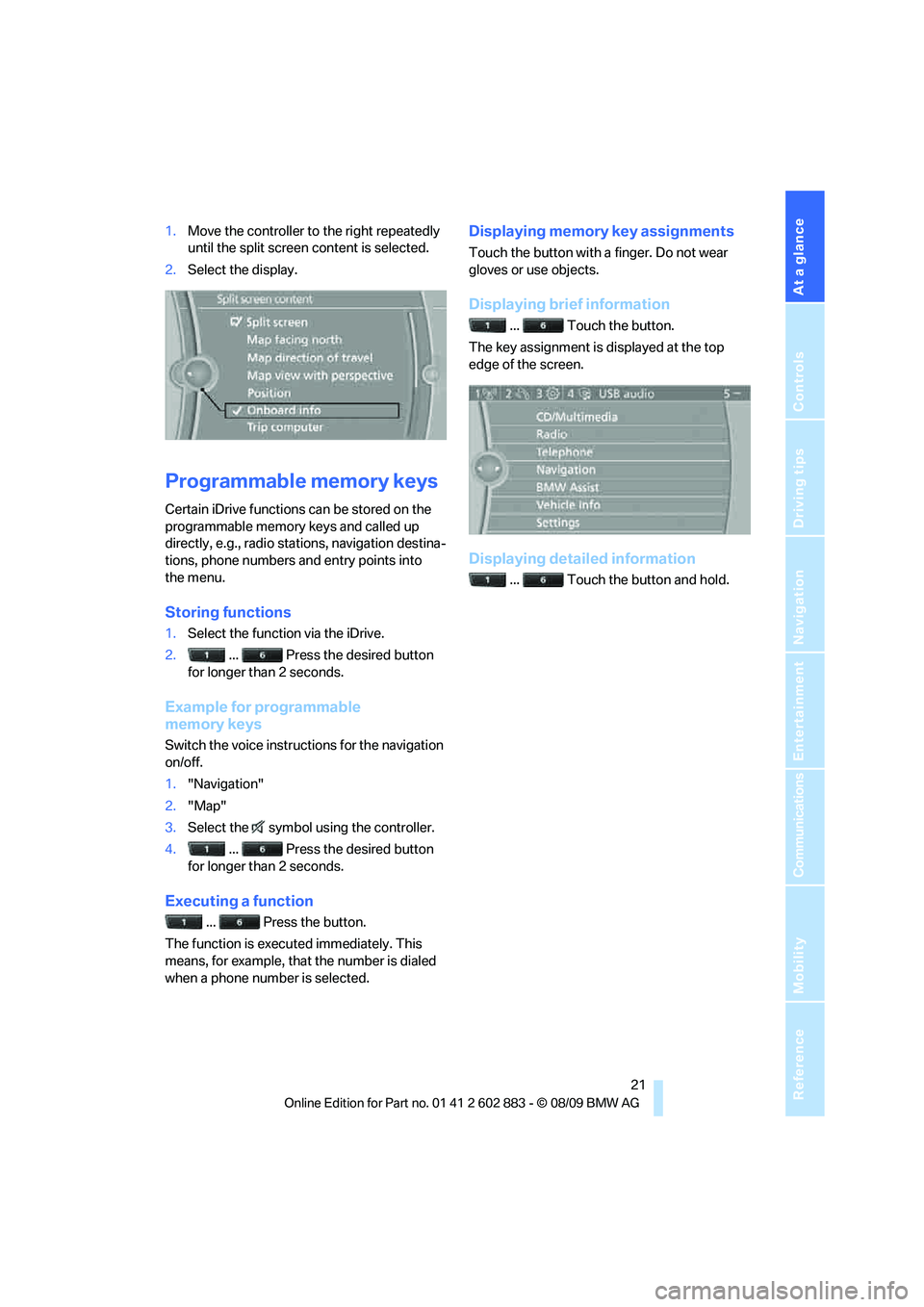
1.Move the controller to the right repeatedly
until the split screen content is selected.
2.Select the display.
Programmable memory keys
Certain iDrive functions can be stored on the
programmable memory keys and called up
directly, e.g., radio stations, navigation destina-
tions, phone numbers and entry points into
the menu.
Storing functions
1.Select the function via the iDrive.
2. ... Press the desired button
for longer than 2 seconds.
Example for programmable
memory keys
Switch the voice instructions for the navigation
on/off.
1."Navigation"
2."Map"
3.Select the symbol using the controller.
4. ... Press the desired button
for longer than 2 seconds.
Executing a function
... Press the button.
The function is executed immediately. This
means, for example, that the number is dialed
when a phone number is selected.
Displaying memory key assignments
Touch the button with a finger. Do not wear
gloves or use objects.
Displaying brief information
... Touch the button.
The key assignment is displayed at the top
edge of the screen.
Displaying detailed information
... Touch the button and hold.