brake light BMW Z4 SDRIVE35IS 2015 User Guide
[x] Cancel search | Manufacturer: BMW, Model Year: 2015, Model line: Z4 SDRIVE35IS, Model: BMW Z4 SDRIVE35IS 2015Pages: 289, PDF Size: 7.16 MB
Page 107 of 289
Driving comfortVehicle equipment
This chapter describes all series equipment as
well as country-specific and special equipment
offered for this model series. Therefore, it also
describes equipment that may not be found in
your vehicle, for instance due to the selected
special equipment or the country version. This
also applies to safety-related functions and
systems.
When using the features and systems descri‐
bed here, adhere to local regulations.
Cruise control The concept
Cruise control is available for use at speeds of
approx. 20 mph/30 km/h and higher. The car
then stores and maintains the speed that you
specify using the lever on the steering column.
In order to maintain the specified speed, the
system brakes the vehicle when the engine
braking effect is insufficient on downhill gradi‐
ents.
Do not use cruise control
Do not use the system if unfavorable
conditions make it impossible to drive at a con‐
stant speed, for instance:▷On curvy roads.▷In heavy traffic.▷On slippery roads, in fog, snow or rain, or
on a loose road surface.
Otherwise, you could lose control of the vehi‐
cle and cause an accident.◀
Manual transmission
You can shift gears while cruise control is acti‐
vated. An indicator lamp notifies you that you
should shift gears when you drive for an ex‐
tended period at very high or very low engine
speeds, or the system is deactivated.
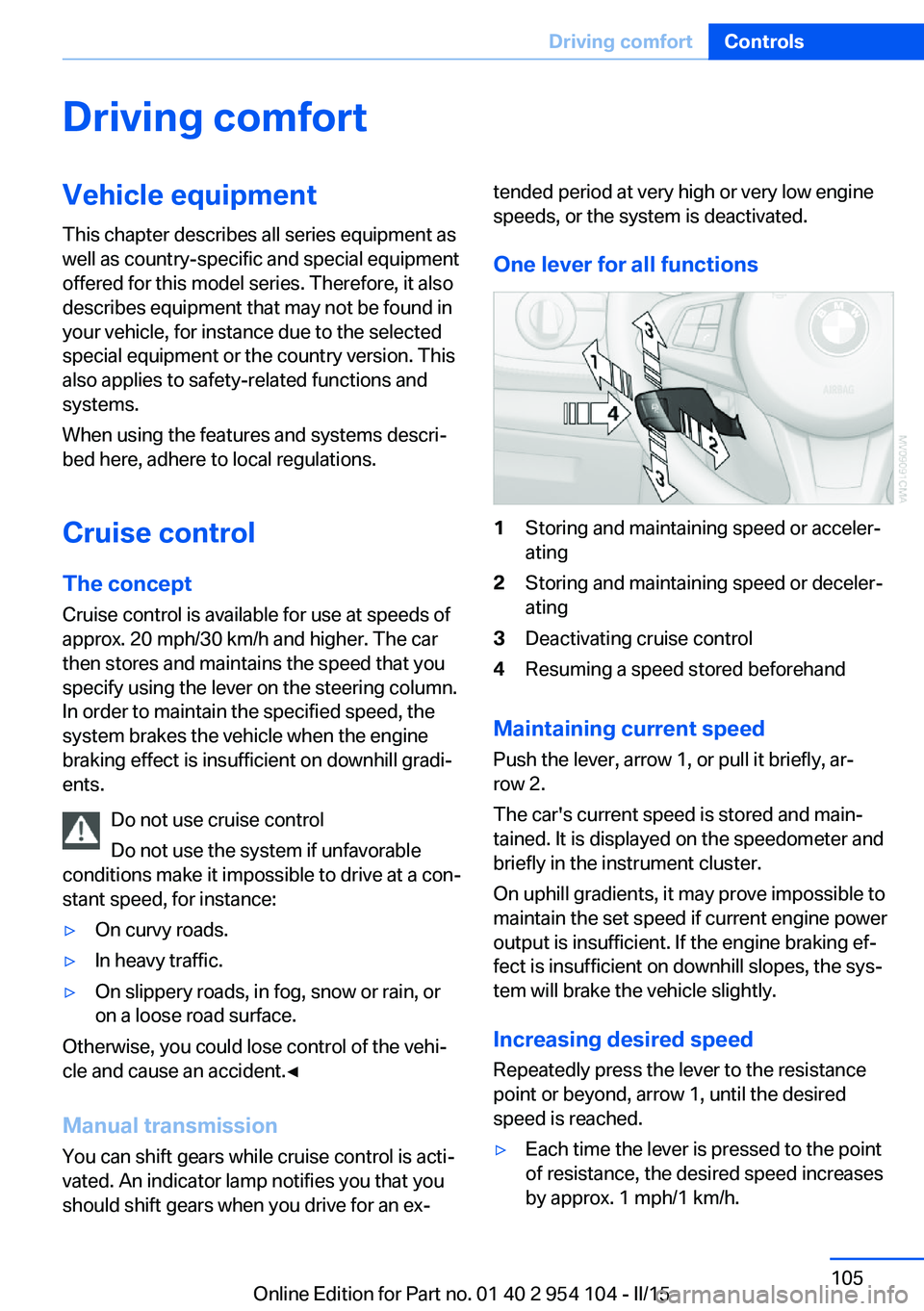
One lever for all functions1Storing and maintaining speed or acceler‐
ating2Storing and maintaining speed or deceler‐
ating3Deactivating cruise control4Resuming a speed stored beforehand
Maintaining current speed
Push the lever, arrow 1, or pull it briefly, ar‐
row 2.
The car's current speed is stored and main‐
tained. It is displayed on the speedometer and briefly in the instrument cluster.
On uphill gradients, it may prove impossible to
maintain the set speed if current engine power
output is insufficient. If the engine braking ef‐
fect is insufficient on downhill slopes, the sys‐
tem will brake the vehicle slightly.
Increasing desired speed
Repeatedly press the lever to the resistance
point or beyond, arrow 1, until the desired
speed is reached.
▷Each time the lever is pressed to the point
of resistance, the desired speed increases
by approx. 1 mph/1 km/h.Seite 105Driving comfortControls105
Online Edition for Part no. 01 40 2 954 104 - II/15
Page 108 of 289
▷Each time the lever is pressed beyond the
resistance point, the desired speed is in‐
creased by up to 5 mph/10 km/h.
The system stores and maintains the speed.
Accelerating using the lever
Accelerating slightly:
Press the lever to the resistance point, arrow 1,
and hold until the desired speed is reached.
Accelerating significantly:
Press the lever beyond the resistance point,
arrow 1, and hold until the desired speed is
reached.
The vehicle accelerates without pressure on
the accelerator pedal. The system stores and
maintains the speed.
Decreasing speed Repeatedly pull the lever to the resistance
point or beyond, arrow 2, until the desired
speed is displayed.
▷Each time the lever is pulled to the resist‐
ance point, the desired speed is decreased
by approx. 1 mph/1 km/h.▷Each time the lever is pulled beyond the
resistance point, the desired speed is re‐
duced by up to 5 mph or 10 km/h until the
minimum speed of 20 mph/30 km/h is ach‐
ieved.
The system stores and maintains the speed.
Interrupting the system
Push the lever upwards or downwards, ar‐
row 3.
The displays in the speedometer change color.
In addition, the system is automatically inter‐
rupted in the following situations:
▷When the brakes are applied.▷In cars with manual transmission, when
gears are shifted very slowly or if neutral is
engaged.▷In cars with Sport automatic transmission,
when transmission position N is engaged.▷When DTC is activated or DSC is deacti‐
vated.▷When DSC or ABS is intervening.
Cruise control is not deactivated by depressing
the accelerator pedal. Once the accelerator
pedal is released, the stored speed is achieved
again and maintained.
Warning light A message appears on the Control
Display.
The warning light comes on, for ex‐
ample, when cruise control has been deacti‐
vated as a result of DSC intervention.
Deactivating the system
▷Press the lever upward or downward twice,
arrow 3.▷Switch off the ignition.
The stored speed is cleared.
Resuming a speed stored beforehand Press the button, arrow 4. The last stored
speed is resumed and maintained.
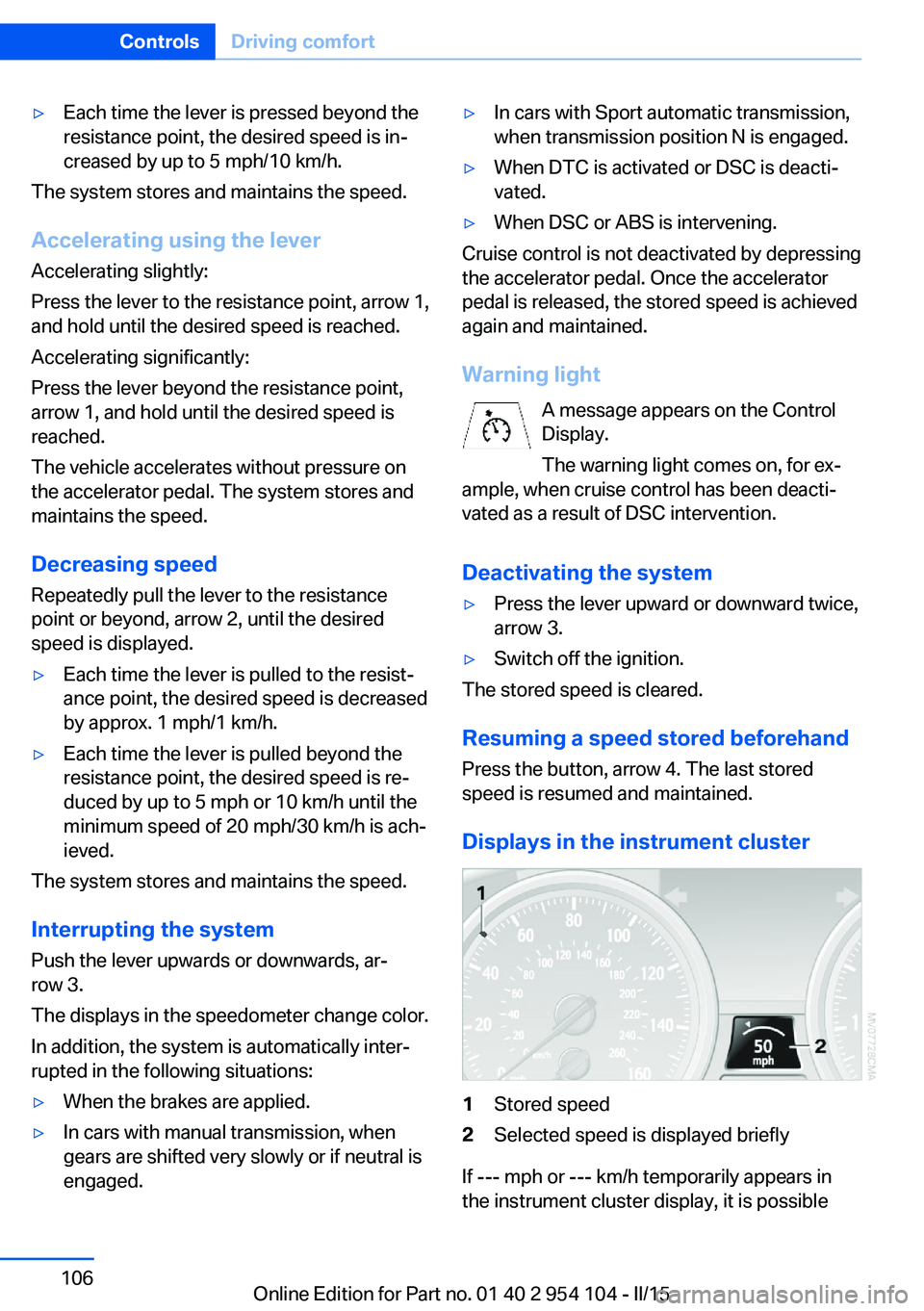
Displays in the instrument cluster
1Stored speed2Selected speed is displayed briefly
If --- mph or --- km/h temporarily appears in
the instrument cluster display, it is possible
Seite 106ControlsDriving comfort106
Online Edition for Part no. 01 40 2 954 104 - II/15
Page 134 of 289
Objects in the area around the pedalsNo objects in the area around the pedals
Keep floor mats, carpets, and any other
objects out of the area of motion of the pedals;
otherwise, the function of the pedals could be
impeded while driving
Do not place additional floor mats over existing
mats or other objects.
Only use floor mats that have been approved
for the vehicle and can be properly fixed in
place.
Ensure that the floor mats are securely fas‐
tened again when they are returned after being
removed, such as for cleaning.◀
Driving in wet conditionsWhen roads are wet or there is heavy rain,
briefly exert gentle pressure on the brake pedal
every few miles.
Ensure that this action does not endanger
other road users.
The heat generated in this process helps dry
the brake discs and pads.
In this way braking efficiency will be available
when you need it.
Hills
Drive long or steep downhill gradients in the
gear in which the least braking is required.
Otherwise, the brake system may overheat, re‐
sulting in a reduction in the brake system effi‐
ciency.
You can increase the engine's braking effect
by shifting down, going all the way to first gear,
if necessary.
Downshifting in manual mode of the 8-gear
Sport automatic transmission, refer to
page 67.
Downshifting in manual mode of the 7-gear
Sport automatic transmission with dual clutch,
refer to page 70.Avoid load on the brakes
Avoid placing excessive load on the
brake system. Light but consistent brake pres‐
sure can lead to high temperatures, brake wear
and possibly even brake failure.◀
Do not drive in neutral
Never drive with the transmission in neu‐
tral, with the engine switched off or with the
clutch depressed; otherwise, you will have nei‐
ther the braking action of the engine or nor its
power assistance when braking or steering.◀
Brake disc corrosion Corrosion on the brake discs and contamina‐
tion on the brake pads are furthered by:▷Low mileage.▷Extended periods when the vehicle is not
used at all.▷Infrequent use of the brakes.
Corrosion occurs when the minimum pressure
that must be exerted by the pads during brake
applications to clean the discs is not reached.
Should corrosion form on the brake discs, the
brakes will tend to respond with a pulsating ef‐
fect that generally cannot be corrected.
Condensation under the parked
vehicle
When using the automatic climate control,
condensation water develops that exits under‐
neath the vehicle.
Therefore, traces of condensed water under
the vehicle are normal.
Loading Overloading the vehicle
To avoid exceeding the approved carry‐
ing capacity of the tires, never overload the ve‐
hicle. Overloading can lead to overheating and
increases the rate at which damage develops
Seite 132Driving tipsThings to remember when driving132
Online Edition for Part no. 01 40 2 954 104 - II/15
Page 249 of 289
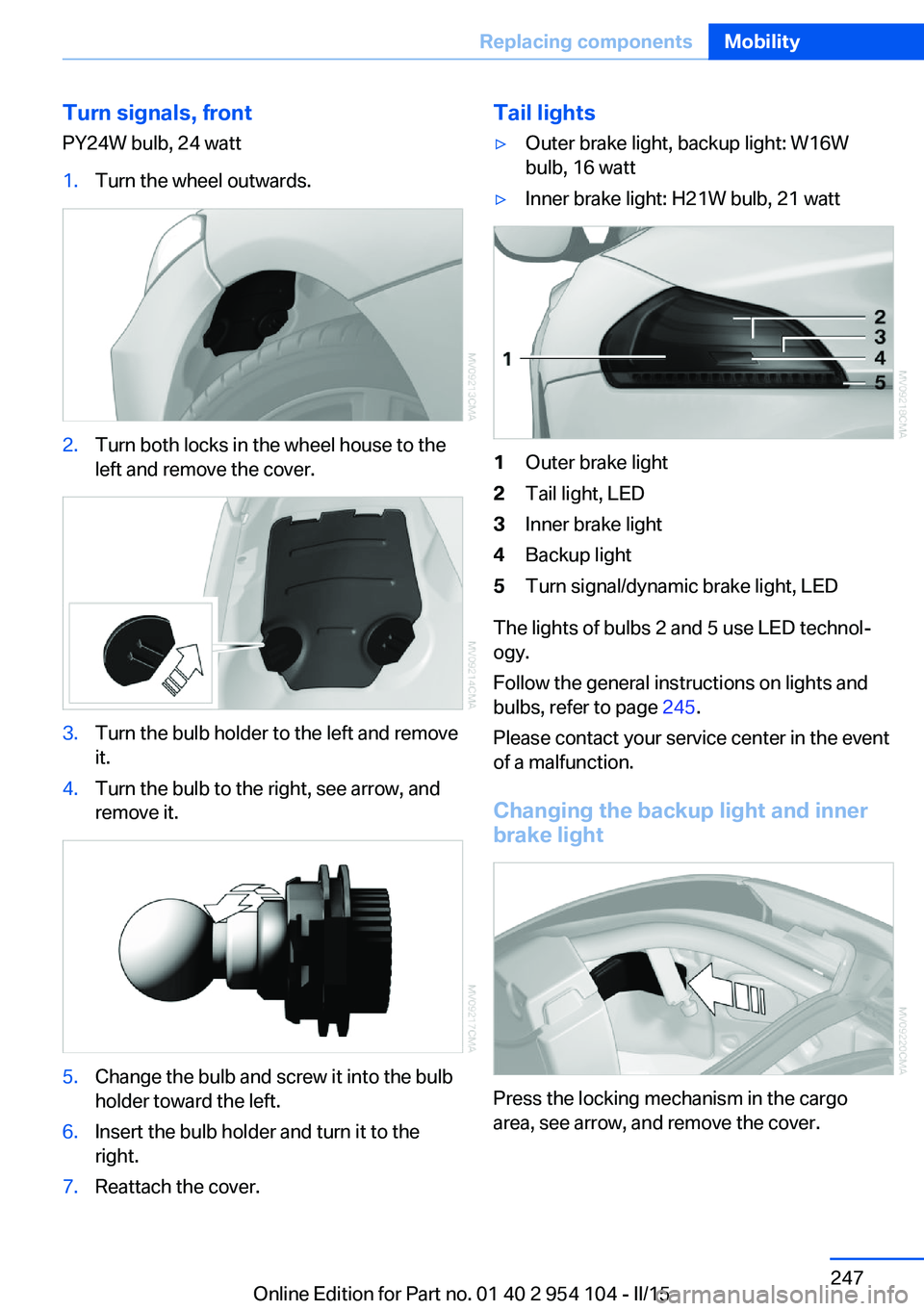
Turn signals, frontPY24W bulb, 24 watt1.Turn the wheel outwards.2.Turn both locks in the wheel house to the
left and remove the cover.3.Turn the bulb holder to the left and remove
it.4.Turn the bulb to the right, see arrow, and
remove it.5.Change the bulb and screw it into the bulb
holder toward the left.6.Insert the bulb holder and turn it to the
right.7.Reattach the cover.Tail lights▷Outer brake light, backup light: W16W
bulb, 16 watt▷Inner brake light: H21W bulb, 21 watt1Outer brake light2Tail light, LED3Inner brake light4Backup light5Turn signal/dynamic brake light, LED
The lights of bulbs 2 and 5 use LED technol‐
ogy.
Follow the general instructions on lights and
bulbs, refer to page 245.
Please contact your service center in the event
of a malfunction.
Changing the backup light and inner brake light
Press the locking mechanism in the cargo
area, see arrow, and remove the cover.
Seite 247Replacing componentsMobility247
Online Edition for Part no. 01 40 2 954 104 - II/15
Page 250 of 289
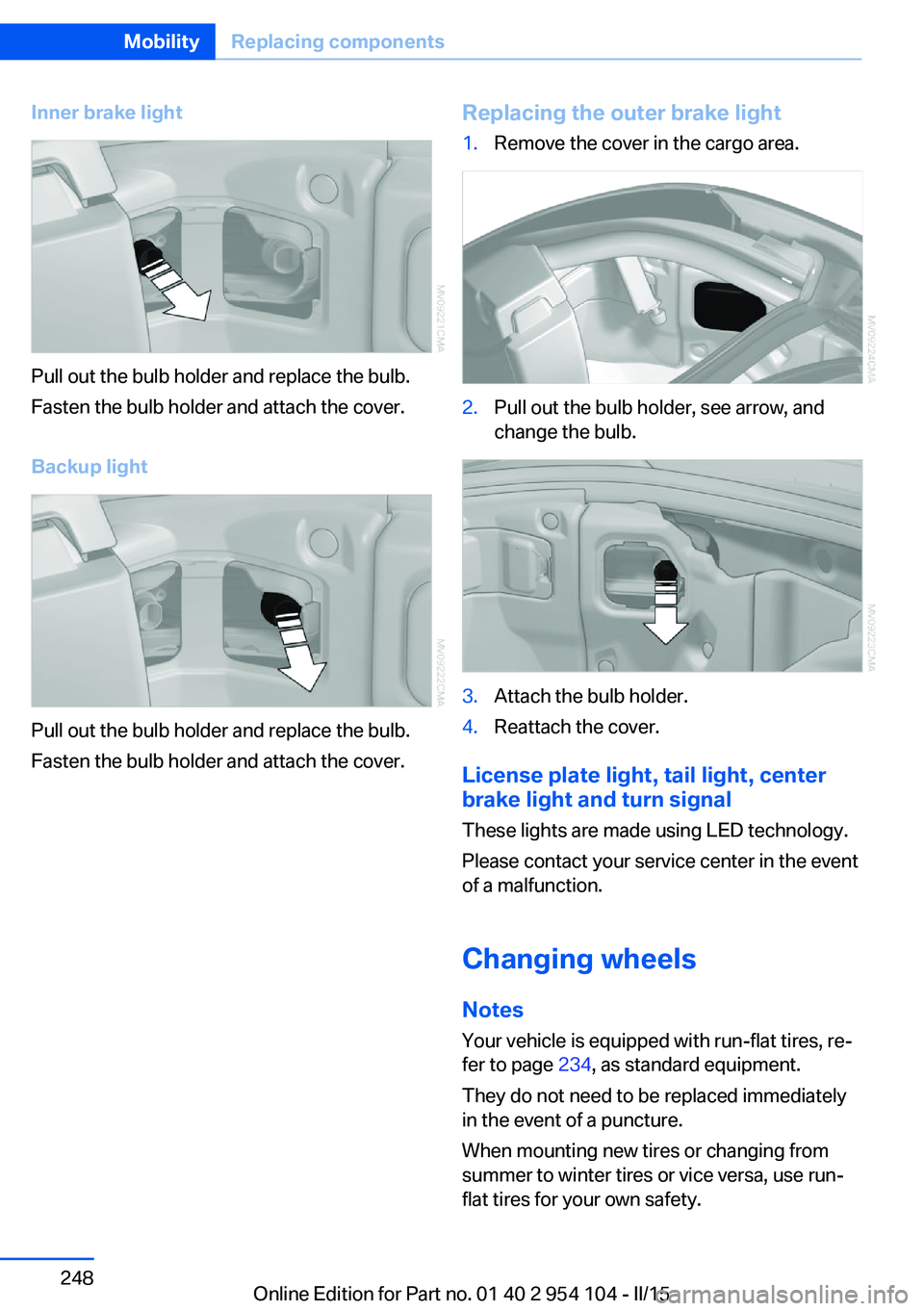
Inner brake light
Pull out the bulb holder and replace the bulb.
Fasten the bulb holder and attach the cover.
Backup light
Pull out the bulb holder and replace the bulb.
Fasten the bulb holder and attach the cover.
Replacing the outer brake light1.Remove the cover in the cargo area.2.Pull out the bulb holder, see arrow, and
change the bulb.3.Attach the bulb holder.4.Reattach the cover.
License plate light, tail light, center
brake light and turn signal
These lights are made using LED technology.
Please contact your service center in the event
of a malfunction.
Changing wheels Notes
Your vehicle is equipped with run-flat tires, re‐
fer to page 234, as standard equipment.
They do not need to be replaced immediately
in the event of a puncture.
When mounting new tires or changing from
summer to winter tires or vice versa, use run-
flat tires for your own safety.
Seite 248MobilityReplacing components248
Online Edition for Part no. 01 40 2 954 104 - II/15
Page 256 of 289
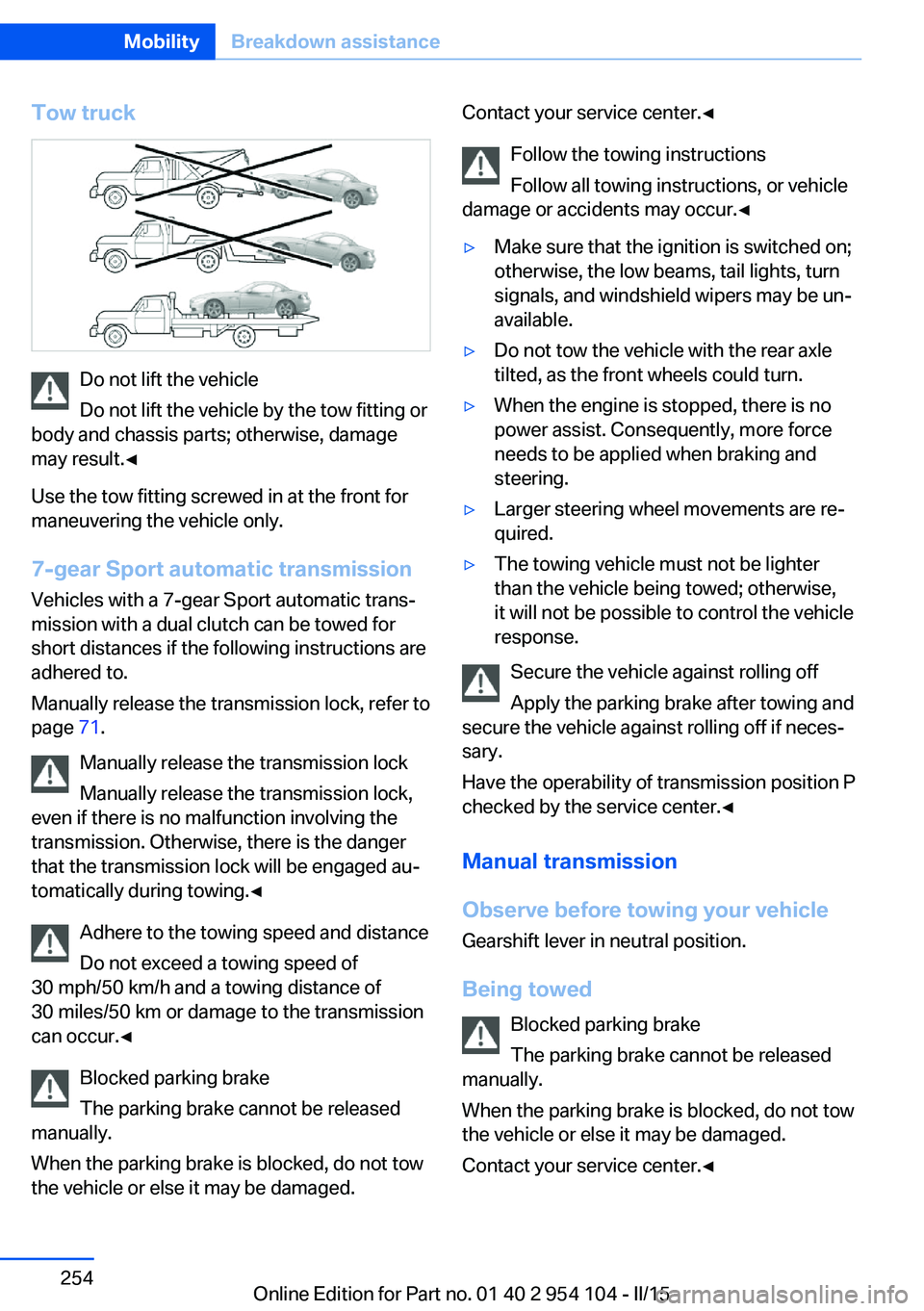
Tow truck
Do not lift the vehicle
Do not lift the vehicle by the tow fitting or
body and chassis parts; otherwise, damage
may result.◀
Use the tow fitting screwed in at the front for
maneuvering the vehicle only.
7-gear Sport automatic transmission
Vehicles with a 7-gear Sport automatic trans‐
mission with a dual clutch can be towed for
short distances if the following instructions are
adhered to.
Manually release the transmission lock, refer to
page 71.
Manually release the transmission lock
Manually release the transmission lock,
even if there is no malfunction involving the
transmission. Otherwise, there is the danger
that the transmission lock will be engaged au‐
tomatically during towing.◀
Adhere to the towing speed and distance
Do not exceed a towing speed of
30 mph/50 km/h and a towing distance of
30 miles/50 km or damage to the transmission
can occur.◀
Blocked parking brake
The parking brake cannot be released
manually.
When the parking brake is blocked, do not tow
the vehicle or else it may be damaged.
Contact your service center.◀
Follow the towing instructions
Follow all towing instructions, or vehicle
damage or accidents may occur.◀▷Make sure that the ignition is switched on;
otherwise, the low beams, tail lights, turn
signals, and windshield wipers may be un‐
available.▷Do not tow the vehicle with the rear axle
tilted, as the front wheels could turn.▷When the engine is stopped, there is no
power assist. Consequently, more force
needs to be applied when braking and
steering.▷Larger steering wheel movements are re‐
quired.▷The towing vehicle must not be lighter
than the vehicle being towed; otherwise,
it will not be possible to control the vehicle
response.
Secure the vehicle against rolling off
Apply the parking brake after towing and
secure the vehicle against rolling off if neces‐
sary.
Have the operability of transmission position P
checked by the service center.◀
Manual transmission
Observe before towing your vehicle Gearshift lever in neutral position.
Being towed Blocked parking brake
The parking brake cannot be released
manually.
When the parking brake is blocked, do not tow
the vehicle or else it may be damaged.
Contact your service center.◀
Seite 254MobilityBreakdown assistance254
Online Edition for Part no. 01 40 2 954 104 - II/15
Page 260 of 289
Sport automatic transmission1.Insert the remote control into the ignition
lock, even with Comfort Access.2.Release the parking brake, refer to
page 61.3.Drive into the car wash.4.Engage transmission position N.5.Switch the engine off.6.Leave the remote control in the ignition
lock so that the vehicle can roll.
When starting the engine:
1.Depress the brake pedal.2.Press the Start/Stop button.
Transmission position P is engaged automati‐
cally:
▷Automatically after approx. 30 minutes.▷When the remote control is removed from
the ignition lock.
Headlights
▷Do not rub dry and do not use abrasive or
caustic cleansers.▷Soak areas that have been soiled e.g. due
to insects, with shampoo and wash off with
water.▷Thaw ice with de-icing spray; do not use an
ice scraper.
Retractable hardtop
When you open a wet hardtop, water drops
may run into the cargo area. If necessary, re‐
move items from the cargo area beforehand to
avoid water stains or soiling.
After washing the vehicle
After washing the vehicle, apply the brakes
briefly to dry them; otherwise, braking action
can be reduced and corrosion of the brake
discs can occur.
Fully remove any residue from the windows to
prevent obstruction of view from streaking,
wiping noises, and wiper wear.
Vehicle careCar care productsBMW recommends using cleaning and care
products from BMW, since these have been
tested and approved.
Car care and cleaning products
Follow the instructions on the container.
When cleaning the interior, open the doors or
windows.
Only use products intended for cleaning vehi‐
cles.
Cleansers can contain substances that are
dangerous and harmful to your health.◀
Vehicle paint Regular care contributes to driving safety and
value retention. Environmental influences in
areas with high air pollution or natural contami‐
nants, such as tree resin or pollen, can have an
impact on the vehicle paint. Tailor the fre‐
quency and extent of your car care to these in‐
fluences.
Immediately remove aggressive substances,
such as spilled fuel, oil, grease, or bird drop‐
pings, to prevent damage to or discoloration of
the paintwork.
Leather care
Remove dust from the leather often, using a
cloth or vacuum cleaner.
Otherwise, particles of dust and road grime
chafe in pores and folds, and lead to increased
wear and premature degradation of the leather
surface.
To guard against discoloration, such as from
clothing, provide leather care roughly every
two months.Seite 258MobilityCare258
Online Edition for Part no. 01 40 2 954 104 - II/15
Page 261 of 289
Clean light-colored leather more frequently as
dust and dirt are more noticeable.
Use leather care products; otherwise, dirt and
grease will gradually break down the protective
layer of the leather surface.
Suitable care products are available from the
service center.
Upholstery material care Vacuum regularly with a vacuum cleaner.
If they are very dirty, e.g., beverage stains, use
a soft sponge or microfiber cloth with a suita‐
ble interior cleaner.
Clean the upholstery down to the seams using
large sweeping motions. Avoid rubbing the
material vigorously.
Damage from Velcro® fasteners
Open Velcro® fasteners on pants or
other articles of clothing can damage the seat
covers. Ensure that any Velcro® fasteners are
closed.◀
Caring for special components
Light-alloy wheels When cleaning the wheels on the vehicle, only
use a neutral wheel rim cleaner with a pH value
of 5 to 9. Do not use abrasive cleaners or a
steam jet hotter than 140 ℉/60 ℃; otherwise,
damage may result. Adhere to the manufac‐
turer instructions.
Aggressive, acidic, or alkaline cleaners may
destroy the protective coating of neighboring
components such as the brake disc.
Chrome surfaces
Carefully clean components such as the radia‐
tor grille or door handles with an ample supply
of water, possibly with shampoo added, partic‐
ularly when they have been exposed to road
salt.Rubber components
Aside from water, treat only with rubber
cleansers.
When cleaning rubber seals, do not use any
silicon-containing car care products in order to
avoid damage or reduced noise damping.
Fine wood partsClean fine wood facing and fine wood compo‐
nents only with a moist rag. Then dry with a
soft cloth.
Plastic components These include:▷Imitation leather surfaces.▷Headliner.▷Lamp lenses.▷Instrument cluster cover.▷Matte black spray-coated components.▷Painted parts in the interior.
Clean with a microfiber cloth.
Moisten the cloth lightly with water if neces‐
sary.
Do not soak the headliner.
Do not use cleansers that contain alcohol
or solvents
Do not use cleansers that contain alcohol or
solvents, such as lacquer thinners, heavy-duty
grease removers, fuel, or such; this could lead
to surface damage.◀
Safety belts
Dirty belt straps impede the reeling action and
thus have a negative impact on safety.
No chemical cleaning
Do not clean chemically; this can destroy
the webbing.◀
Use only a mild soapy solution, with the safety
belts clipped into their buckles.
Seite 259CareMobility259
Online Edition for Part no. 01 40 2 954 104 - II/15
Page 276 of 289
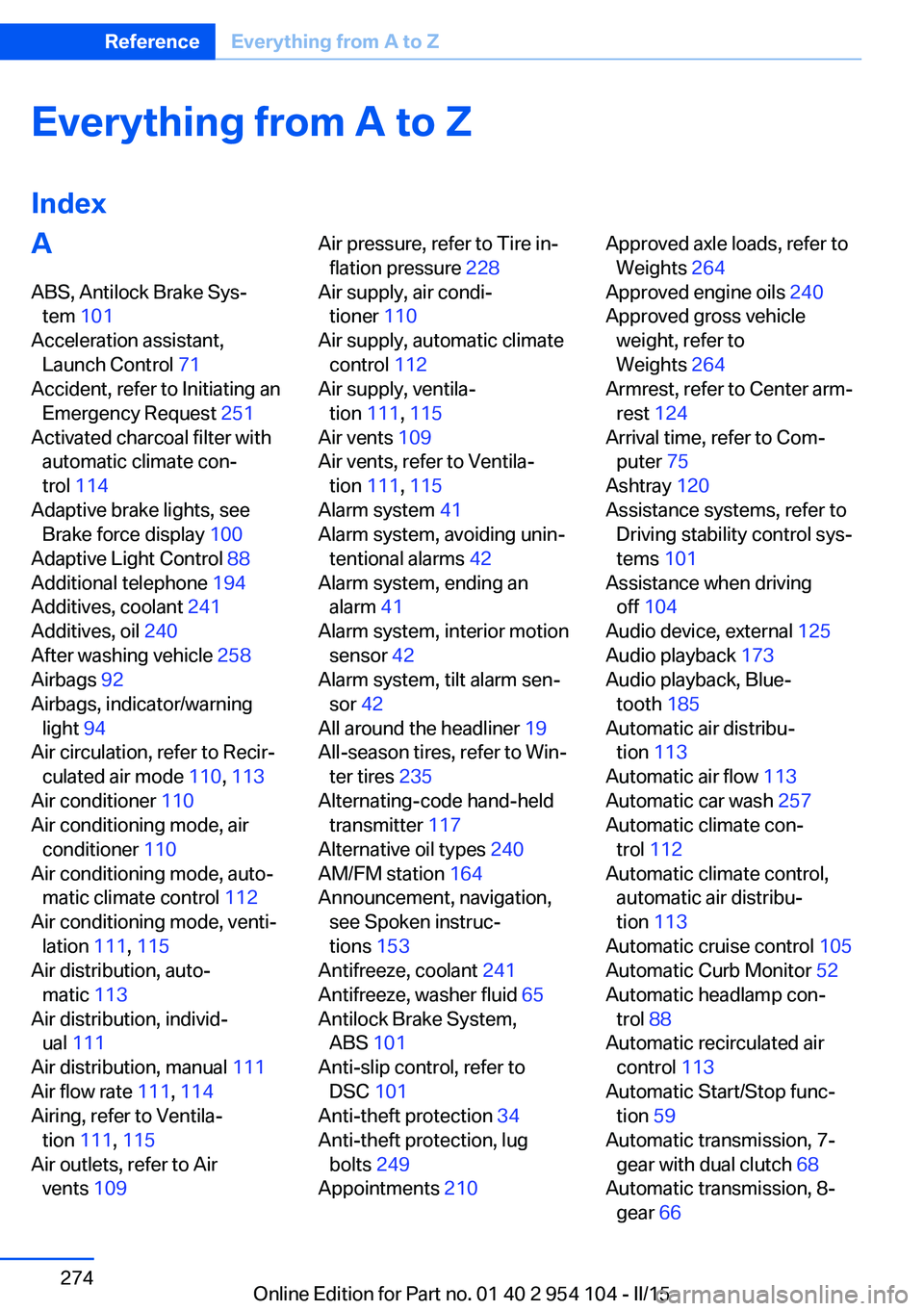
Everything from A to Z
IndexA ABS, Antilock Brake Sys‐ tem 101
Acceleration assistant, Launch Control 71
Accident, refer to Initiating an Emergency Request 251
Activated charcoal filter with automatic climate con‐
trol 114
Adaptive brake lights, see Brake force display 100
Adaptive Light Control 88
Additional telephone 194
Additives, coolant 241
Additives, oil 240
After washing vehicle 258
Airbags 92
Airbags, indicator/warning light 94
Air circulation, refer to Recir‐ culated air mode 110, 113
Air conditioner 110
Air conditioning mode, air conditioner 110
Air conditioning mode, auto‐ matic climate control 112
Air conditioning mode, venti‐ lation 111, 115
Air distribution, auto‐ matic 113
Air distribution, individ‐ ual 111
Air distribution, manual 111
Air flow rate 111, 114
Airing, refer to Ventila‐ tion 111, 115
Air outlets, refer to Air vents 109 Air pressure, refer to Tire in‐
flation pressure 228
Air supply, air condi‐ tioner 110
Air supply, automatic climate control 112
Air supply, ventila‐ tion 111, 115
Air vents 109
Air vents, refer to Ventila‐ tion 111, 115
Alarm system 41
Alarm system, avoiding unin‐ tentional alarms 42
Alarm system, ending an alarm 41
Alarm system, interior motion sensor 42
Alarm system, tilt alarm sen‐ sor 42
All around the headliner 19
All-season tires, refer to Win‐ ter tires 235
Alternating-code hand-held transmitter 117
Alternative oil types 240
AM/FM station 164
Announcement, navigation, see Spoken instruc‐
tions 153
Antifreeze, coolant 241
Antifreeze, washer fluid 65
Antilock Brake System, ABS 101
Anti-slip control, refer to DSC 101
Anti-theft protection 34
Anti-theft protection, lug bolts 249
Appointments 210 Approved axle loads, refer to
Weights 264
Approved engine oils 240
Approved gross vehicle weight, refer to
Weights 264
Armrest, refer to Center arm‐ rest 124
Arrival time, refer to Com‐ puter 75
Ashtray 120
Assistance systems, refer to Driving stability control sys‐
tems 101
Assistance when driving off 104
Audio device, external 125
Audio playback 173
Audio playback, Blue‐ tooth 185
Automatic air distribu‐ tion 113
Automatic air flow 113
Automatic car wash 257
Automatic climate con‐ trol 112
Automatic climate control, automatic air distribu‐
tion 113
Automatic cruise control 105
Automatic Curb Monitor 52
Automatic headlamp con‐ trol 88
Automatic recirculated air control 113
Automatic Start/Stop func‐ tion 59
Automatic transmission, 7- gear with dual clutch 68
Automatic transmission, 8- gear 66 Seite 274ReferenceEverything from A to Z274
Online Edition for Part no. 01 40 2 954 104 - II/15
Page 277 of 289
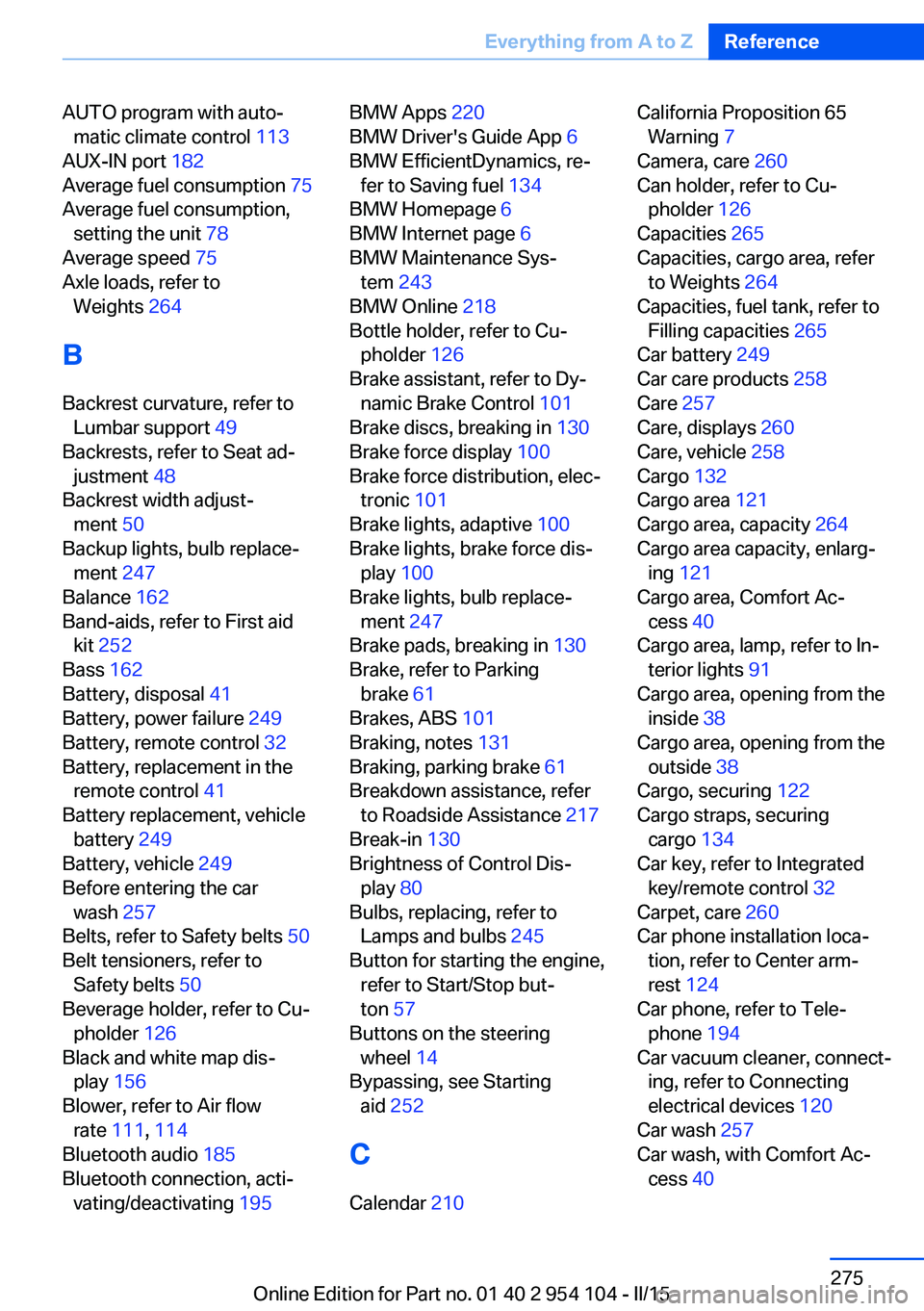
AUTO program with auto‐matic climate control 113
AUX-IN port 182
Average fuel consumption 75
Average fuel consumption, setting the unit 78
Average speed 75
Axle loads, refer to Weights 264
B
Backrest curvature, refer to Lumbar support 49
Backrests, refer to Seat ad‐ justment 48
Backrest width adjust‐ ment 50
Backup lights, bulb replace‐ ment 247
Balance 162
Band-aids, refer to First aid kit 252
Bass 162
Battery, disposal 41
Battery, power failure 249
Battery, remote control 32
Battery, replacement in the remote control 41
Battery replacement, vehicle battery 249
Battery, vehicle 249
Before entering the car wash 257
Belts, refer to Safety belts 50
Belt tensioners, refer to Safety belts 50
Beverage holder, refer to Cu‐ pholder 126
Black and white map dis‐ play 156
Blower, refer to Air flow rate 111, 114
Bluetooth audio 185
Bluetooth connection, acti‐ vating/deactivating 195 BMW Apps 220
BMW Driver's Guide App 6
BMW EfficientDynamics, re‐ fer to Saving fuel 134
BMW Homepage 6
BMW Internet page 6
BMW Maintenance Sys‐ tem 243
BMW Online 218
Bottle holder, refer to Cu‐ pholder 126
Brake assistant, refer to Dy‐ namic Brake Control 101
Brake discs, breaking in 130
Brake force display 100
Brake force distribution, elec‐ tronic 101
Brake lights, adaptive 100
Brake lights, brake force dis‐ play 100
Brake lights, bulb replace‐ ment 247
Brake pads, breaking in 130
Brake, refer to Parking brake 61
Brakes, ABS 101
Braking, notes 131
Braking, parking brake 61
Breakdown assistance, refer to Roadside Assistance 217
Break-in 130
Brightness of Control Dis‐ play 80
Bulbs, replacing, refer to Lamps and bulbs 245
Button for starting the engine, refer to Start/Stop but‐
ton 57
Buttons on the steering wheel 14
Bypassing, see Starting aid 252
C Calendar 210 California Proposition 65
Warning 7
Camera, care 260
Can holder, refer to Cu‐ pholder 126
Capacities 265
Capacities, cargo area, refer to Weights 264
Capacities, fuel tank, refer to Filling capacities 265
Car battery 249
Car care products 258
Care 257
Care, displays 260
Care, vehicle 258
Cargo 132
Cargo area 121
Cargo area, capacity 264
Cargo area capacity, enlarg‐ ing 121
Cargo area, Comfort Ac‐ cess 40
Cargo area, lamp, refer to In‐ terior lights 91
Cargo area, opening from the inside 38
Cargo area, opening from the outside 38
Cargo, securing 122
Cargo straps, securing cargo 134
Car key, refer to Integrated key/remote control 32
Carpet, care 260
Car phone installation loca‐ tion, refer to Center arm‐
rest 124
Car phone, refer to Tele‐ phone 194
Car vacuum cleaner, connect‐ ing, refer to Connecting
electrical devices 120
Car wash 257
Car wash, with Comfort Ac‐ cess 40 Seite 275Everything from A to ZReference275
Online Edition for Part no. 01 40 2 954 104 - II/15