park assist BUICK CASCADA 2016 User Guide
[x] Cancel search | Manufacturer: BUICK, Model Year: 2016, Model line: CASCADA, Model: BUICK CASCADA 2016Pages: 381, PDF Size: 5.52 MB
Page 230 of 381

Buick Cascada Owner Manual (GMNA-Localizing-U.S-9186636) - 2016 - crc -
3/9/16
Driving and Operating 229
Starting the Engine
Move the shift lever to P (Park) or
N (Neutral). To restart the vehicle
when it is already moving, use
N (Neutral) only.
Caution
Do not try to shift to P (Park) if the
vehicle is moving. If you do, you
could damage the transmission.
Shift to P (Park) only when the
vehicle is stopped.
Caution
If you add electrical parts or
accessories, you could change
the way the engine operates. Any
resulting damage would not be
covered by the vehicle warranty.
SeeAdd-On Electrical
Equipment 0252.
Caution
If the steering wheel is turned
until it reaches the end of its
travel, and is held in that position
while starting the vehicle, damage
may occur to the hydraulic power
steering system and there may be
loss of power steering assist.
Starting Procedure 1. With your foot off the accelerator pedal, turn the
ignition key to START. When
the engine starts, let go of the
key. The idle speed will go
down as the engine warms. Do
not race the engine
immediately after starting it.
Operate the engine and
transmission gently to allow the
oil to warm up and lubricate all
moving parts.
Caution
Cranking the engine for long
periods of time, by returning the
ignition to the START position
immediately after cranking has
ended, can overheat and damage
the cranking motor, and drain the
battery. Wait at least 15 seconds
between each try, to let the
cranking motor cool down.
2. If the engine does not start after five to 10 seconds,
especially in very cold weather
(below −18 °C or 0 °F), it could
be flooded with too much
gasoline. Push the accelerator
pedal all the way to the floor
and hold it there as you hold
the key in START for a
maximum of 15 seconds. Wait
at least 15 seconds between
each try, to allow the cranking
motor to cool. When the engine
starts, let go of the key and
accelerator. If the vehicle starts
briefly but then stops again,
repeat the procedure. This
Page 239 of 381

Buick Cascada Owner Manual (GMNA-Localizing-U.S-9186636) - 2016 - crc -
3/9/16
238 Driving and Operating
brake status light is off. If either light
stays on after release is attempted,
see your dealer.
Caution
Driving with the parking brake on
can overheat the brake system
and cause premature wear or
damage to brake system parts.
Make sure that the parking brake
is fully released and the brake
warning light is off before driving.
Automatic EPB Release
The EPB will automatically release if
the vehicle is running, placed into
gear, and an attempt is made to
drive away. Avoid rapid acceleration
when the EPB is applied, to
preserve parking brake lining life.
Brake Assist
The Brake Assist feature is
designed to assist the driver in
stopping or decreasing vehicle
speed in emergency driving
conditions. This feature uses thestability system hydraulic brake
control module to supplement the
power brake system under
conditions where the driver has
quickly and forcefully applied the
brake pedal in an attempt to quickly
stop or slow down the vehicle. The
stability system hydraulic brake
control module increases brake
pressure at each corner of the
vehicle until the ABS activates.
Minor brake pedal pulsation or
pedal movement during this time is
normal and the driver should
continue to apply the brake pedal as
the driving situation dictates. The
Brake Assist feature will
automatically disengage when the
brake pedal is released or brake
pedal pressure is quickly
decreased.
Hill Start Assist (HSA)
This vehicle has a Hill Start Assist
(HSA) feature, which may be useful
when the vehicle is stopped on an
incline. This feature is designed to
prevent the vehicle from rolling,
either forward or rearward, during
vehicle drive off. After the drivercompletely stops and holds the
vehicle in a complete standstill on
an incline, HSA will be automatically
activated. During the transition
period between when the driver
releases the brake pedal and starts
to accelerate to drive off on a grade,
HSA holds the braking pressure to
ensure that there is no rolling. The
brakes will automatically release
when the accelerator pedal is
applied.
Page 244 of 381

Buick Cascada Owner Manual (GMNA-Localizing-U.S-9186636) - 2016 - crc -
3/9/16
Driving and Operating 243
speed down. If the brake pedal is
applied, cruise control will
disengage.
Ending Cruise Control
There are four ways to end cruise
control:
.To disengage cruise control,
step lightly on the brake pedal.
. Press
*.
. Shift the transmission to
N (Neutral).
. To turn off cruise control,
press
1.
Erasing Speed Memory
The cruise control set speed is
erased from memory if
1is pressed
or if the vehicle is turned off.
Driver Assistance
Systems
Assistance Systems for
Parking or Backing
If equipped, the Rear Vision Camera
(RVC), Rear Parking Assist (RPA),
and Front Parking Assist (FPA) may
help the driver park or avoid objects.
Always check around the vehicle
when parking or backing.
Rear Vision Camera (RVC)
When the vehicle is shifted into
R (Reverse), the RVC displays an
image of the area behind the vehicle
in the center stack display.
1. View Displayed by the Camera
1. View Displayed by theCamera
2. Corners of the Rear Bumper
Page 245 of 381
Buick Cascada Owner Manual (GMNA-Localizing-U.S-9186636) - 2016 - crc -
3/9/16
244 Driving and Operating
Displayed images may be farther or
closer than they appear. The area
displayed is limited and objects that
are close to either corner of the
bumper or under the bumper do not
display.
Touch MENU on the infotainment
screen to adjust the display
brightness while viewing the rear
camera display.
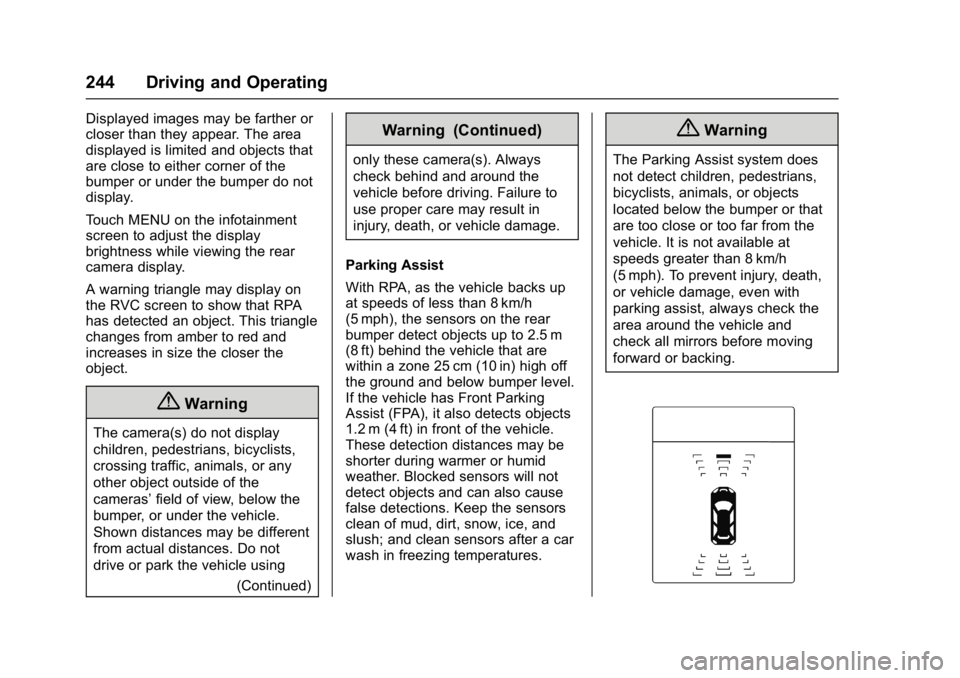
A warning triangle may display on
the RVC screen to show that RPA
has detected an object. This triangle
changes from amber to red and
increases in size the closer the
object.
{Warning
The camera(s) do not display
children, pedestrians, bicyclists,
crossing traffic, animals, or any
other object outside of the
cameras’field of view, below the
bumper, or under the vehicle.
Shown distances may be different
from actual distances. Do not
drive or park the vehicle using
(Continued)
Warning (Continued)
only these camera(s). Always
check behind and around the
vehicle before driving. Failure to
use proper care may result in
injury, death, or vehicle damage.
Parking Assist
With RPA, as the vehicle backs up
at speeds of less than 8 km/h
(5 mph), the sensors on the rear
bumper detect objects up to 2.5 m
(8 ft) behind the vehicle that are
within a zone 25 cm (10 in) high off
the ground and below bumper level.
If the vehicle has Front Parking
Assist (FPA), it also detects objects
1.2 m (4 ft) in front of the vehicle.
These detection distances may be
shorter during warmer or humid
weather. Blocked sensors will not
detect objects and can also cause
false detections. Keep the sensors
clean of mud, dirt, snow, ice, and
slush; and clean sensors after a car
wash in freezing temperatures.
{Warning
The Parking Assist system does
not detect children, pedestrians,
bicyclists, animals, or objects
located below the bumper or that
are too close or too far from the
vehicle. It is not available at
speeds greater than 8 km/h
(5 mph). To prevent injury, death,
or vehicle damage, even with
parking assist, always check the
area around the vehicle and
check all mirrors before moving
forward or backing.
Page 246 of 381
Buick Cascada Owner Manual (GMNA-Localizing-U.S-9186636) - 2016 - crc -
3/9/16
Driving and Operating 245
The instrument cluster may have a
parking assist display with bars that
show“distance to object” and object
location information for RPA, and on
some vehicles, for the FPA system.
As the object gets closer, more bars
light up, and the bars change color
from yellow to amber to red.
When an object is first detected in
the rear, one beep will be heard
from the rear. When an object is
very close (<0.6 m (2 ft) in the
vehicle rear, or <0.3 m (1 ft) in the
vehicle front), five beeps will sound
from the rear or front depending on
object location. Beeps for FPA are
higher pitched than for RPA.
Turning the Features On or Off
TheXbutton on the center stack
is used to turn on or off Parking
Assist. The indicator light next to the button comes on when the features
are on and turns off when the
features have been disabled.
The parking assist symbols and
guidance lines can be turned on or
off through the infotainment system.
See
“Rear Camera Options” in
Vehicle Personalization 0113
Forward Collision Alert
(FCA) System
If equipped, the FCA system may
help to avoid or reduce the harm
caused by front-end crashes. FCA
provides a visual alert and beeps
when approaching a vehicle directly
ahead too quickly.
The forward-looking FCA camera
sensor is on the windshield ahead
of the rearview mirror. FCA detects
vehicles within a distance of
approximately 60 m (197 ft) and
operates at speeds above 40 km/h
(25 mph).
{Warning
FCA is a warning system and
does not apply the brakes. When
approaching a slower-moving or
stopped vehicle ahead too rapidly,
or when following a vehicle too
closely, FCA may not provide a
warning with enough time to help
avoid a crash. It also may not
provide any warning at all. FCA
does not warn of pedestrians,
animals, signs, guardrails,
bridges, construction barrels,
or other objects. Be ready to take
action and apply the brakes. See
Defensive Driving 0217.
Detecting the Vehicle Ahead
Page 269 of 381
Buick Cascada Owner Manual (GMNA-Localizing-U.S-9186636) - 2016 - crc -
3/9/16
268 Vehicle Care
Caution
If the pressure cap is not tightly
installed, coolant loss and
possible engine damage may
occur. Be sure the cap is properly
and tightly secured.
Engine Overheating
The vehicle has an engine coolant
temperature gauge to warn of the
engine overheating. SeeEngine
Coolant Temperature Gauge 0100.
If the decision is made not to lift the
hood when this warning appears,
get service help right away. See
Roadside Assistance
Program 0350.
If the decision is made to lift the
hood, make sure the vehicle is
parked on a level surface.
Then check to see if the engine
cooling fan is running. If the engine
is overheating, the fan should be
running. If it is not, do not continue
to run the engine. Have the vehicle
serviced.
Caution
Running the engine without
coolant may cause damage or a
fire. Vehicle damage would not be
covered by the vehicle warranty.
If Steam Is Coming from the
Engine Compartment
{Warning
Steam from an overheated engine
can burn you badly, even if you
just open the hood. Stay away
from the engine if you see or hear
steam coming from it. Just turn it
off and get everyone away from
the vehicle until it cools down.
Wait until there is no sign of
steam or coolant before you open
the hood.
If you keep driving when the
engine is overheated, the liquids
in it can catch fire. You or others
could be badly burned. Stop the (Continued)
Warning (Continued)
engine if it overheats, and get out
of the vehicle until the engine
is cool.
If No Steam Is Coming from
the Engine Compartment
If an engine overheat warning is
displayed but no steam can be seen
or heard, the problem may not be
too serious. Sometimes the engine
can get a little too hot when the
vehicle:
.Climbs a long hill on a hot day.
. Stops after high-speed driving.
. Idles for long periods in traffic.
If the overheat warning is displayed
with no sign of steam: 1. Turn the air conditioning off.
2. Turn the heater on to the highest temperature and to the
highest fan speed. Open the
windows as necessary.
Page 288 of 381
Buick Cascada Owner Manual (GMNA-Localizing-U.S-9186636) - 2016 - crc -
3/9/16
Vehicle Care 287
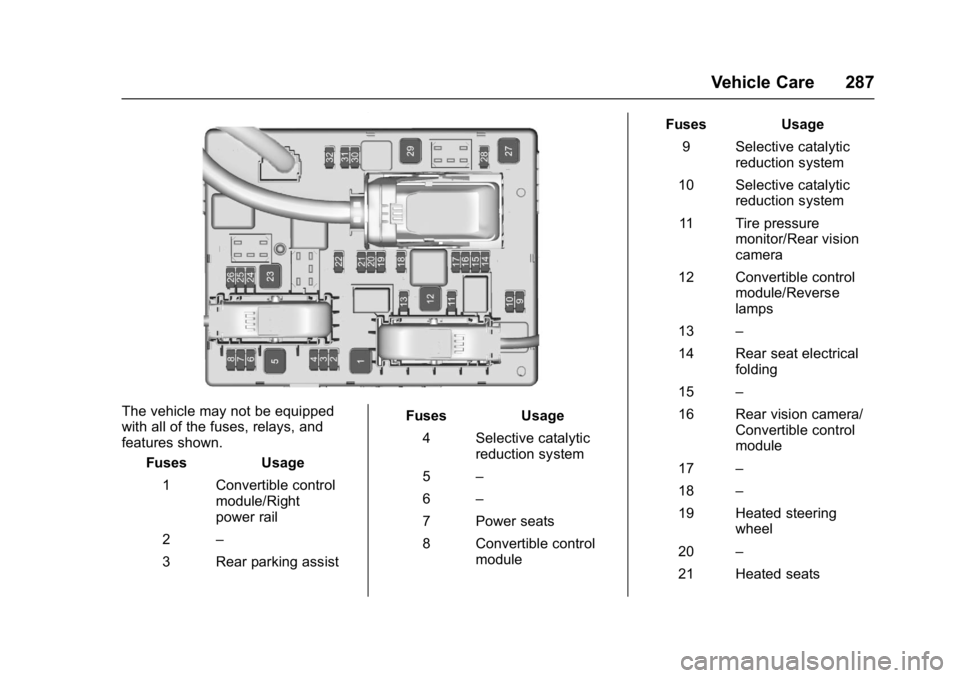
The vehicle may not be equipped
with all of the fuses, relays, and
features shown.Fuses Usage
1 Convertible control module/Right
power rail
2 –
3 Rear parking assist Fuses Usage
4 Selective catalytic reduction system
5 –
6 –
7 Power seats
8 Convertible control module Fuses Usage
9 Selective catalytic reduction system
10 Selective catalytic reduction system
11 Tire pressure monitor/Rear vision
camera
12 Convertible control module/Reverse
lamps
13 –
14 Rear seat electrical folding
15 –
16 Rear vision camera/ Convertible control
module
17 –
18 –
19 Heated steering wheel
20 –
21 Heated seats
Page 309 of 381
Buick Cascada Owner Manual (GMNA-Localizing-U.S-9186636) - 2016 - crc -
3/9/16
308 Vehicle Care
Warning (Continued)
be badly injured or killed if the
vehicle slips off the jack. If a jack
is provided with the vehicle, only
use it for changing a flat tire.
If a tire goes flat, avoid further tire
and wheel damage by driving slowly
to a level place, well off the road,
if possible. Turn on the hazard
warning flashers. See Hazard
Warning Flashers 0122.
{Warning
Changing a tire can be
dangerous. The vehicle can slip
off the jack and roll over or fall
causing injury or death. Find a
level place to change the tire. To
help prevent the vehicle from
moving:
1. Set the parking brake firmly. (Continued)
Warning (Continued)
2. Put an automatictransmission in P (Park) or a
manual transmission in
1 (First) or R (Reverse).
3. Turn off the engine and do not restart while the vehicle
is raised.
4. Do not allow passengers to remain in the vehicle.
5. Place wheel blocks, if equipped, on both sides of
the tire at the opposite
corner of the tire being
changed.
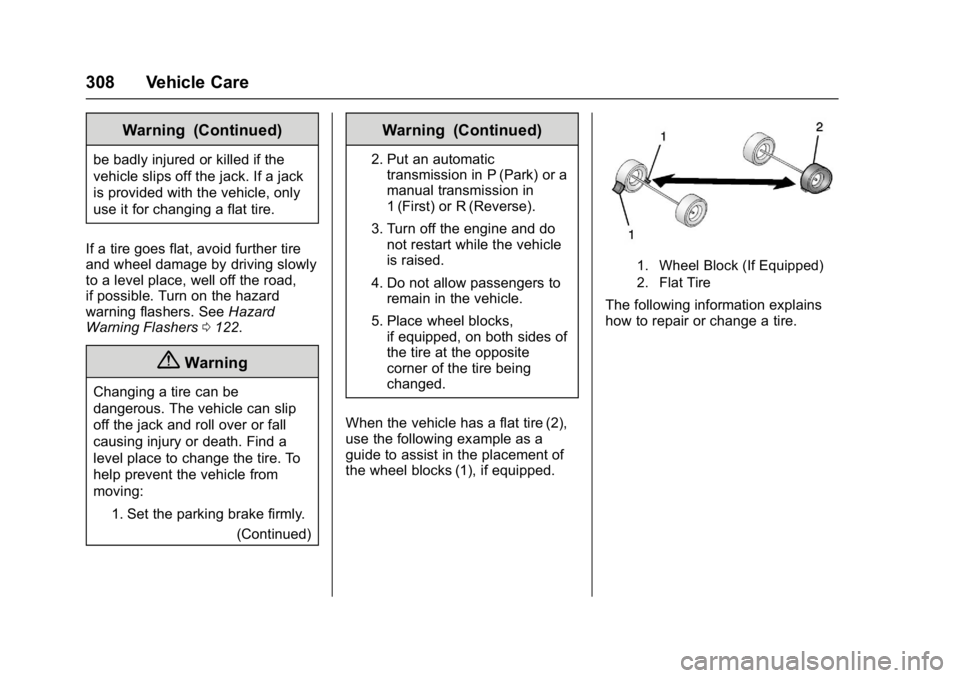
When the vehicle has a flat tire (2),
use the following example as a
guide to assist in the placement of
the wheel blocks (1), if equipped.
1. Wheel Block (If Equipped)
2. Flat Tire
The following information explains
how to repair or change a tire.
Page 367 of 381
Buick Cascada Owner Manual (GMNA-Localizing-U.S-9186636) - 2016 - crc -
3/9/16
366 OnStar
OnStar Personal Identification
Number (PIN)
A PIN is needed to access some
OnStar services. The PIN will need
to be changed the first time when
speaking with an Advisor. To
change the OnStar PIN, contact an
OnStar Advisor by pressing
Qor
calling 1-888-4ONSTAR.
Warranty
OnStar equipment may be
warranted as part of the vehicle
warranty.
Languages
The vehicle can be programmed to
respond in multiple languages.
Press
Qand ask for an Advisor.
Advisors are available in English,
Spanish, and French. Available
languages may vary by country.
Potential Issues
OnStar cannot perform Remote
Door Unlock or Stolen Vehicle
Assistance after the vehicle has
been off continuously for five days
without an ignition cycle. If the vehicle has not been started for
five days, OnStar can contact
Roadside Assistance or a locksmith
to help gain access to the vehicle.
Global Positioning
System (GPS)
.
Obstruction of the GPS can
occur in a large city with tall
buildings; in parking garages;
around airports; in tunnels and
underpasses; or in an area with
very dense trees. If GPS signals
are not available, the OnStar
system should still operate to
call OnStar. However, OnStar
could have difficulty identifying
the exact location.
. In emergency situations, OnStar
can use the last stored GPS
location to send to emergency
responders.
A temporary loss of GPS can cause
loss of the ability to send a
Turn-by-Turn Navigation route. The
Advisor may give a verbal route or
may ask for a call back after the
vehicle is driven into an open area.
Cellular and GPS Antennas
Cellular reception is required for
OnStar to send remote signals to
the vehicle. Do not place items over
or near the antenna to prevent
blocking cellular and GPS signal
reception.
Unable to Connect to OnStar
Message
If there is limited cellular coverage
or the cellular network has reached
maximum capacity, this message
may come on. Press
Qto try the
call again or try again after driving a
few miles into another cellular area.
Vehicle and Power Issues
OnStar services require a vehicle
electrical system, wireless service,
and GPS satellite technologies to be
available and operating for features
to function properly. These systems
may not operate if the battery is
discharged or disconnected.
Page 372 of 381

Buick Cascada Owner Manual (GMNA-Localizing-U.S-9186636) - 2016 - crc -
3/9/16
Index 371
Assistance Program,Roadside . . . . . . . . . . . . . . . . . . . . . . 350
Assistance Systems for Parking and Backing . . . . . . . . . . 243
Audio Bluetooth . . . . . . . . . . . . . . . . . . . . . 164
Audio Players
CD . . . . . . . . . . . . . . . . . . . . . . . . . . . 155
MP3 . . . . . . . . . . . . . . . . . . . . . . . . . . 157
Automatic Door Locks . . . . . . . . . . . . . . . . . . . . . 28
Headlamp System . . . . . . . . . . . . 121
Transmission . . . . . . . . . . . . . . . . . 233
Transmission Fluid . . . . . . . . . . . 263
Automatic Transmission Manual Mode . . . . . . . . . . . . . . . . . 234
Shift Lock Control Function
Check . . . . . . . . . . . . . . . . . . . . . . . 272
Auxiliary Devices . . . . . . . . . . . . . . . . . . . . . . . 164
Avoiding Untrusted Media
Devices . . . . . . . . . . . . . . . . . . . . . . . 155
B
BatteryExterior Lighting Battery
Saver . . . . . . . . . . . . . . . . . . . . . . . 125
Load Management . . . . . . . . . . . . 124 Battery (cont'd)
Power Protection . . . . . . . . . . . . . 125
Battery - North America . . . . 271, 315
Blade Replacement, Wiper . . . . . 273
Bluetooth . . . . . . . . . . . . . . . . . . . . . . . 197
Bluetooth Audio . . . . . . . . . . . . . . . . 164
Brake System Warning Light . . . . . . . . 104
Brakes . . . . . . . . . . . . . . . . . . . . . . . . . . 270
Antilock . . . . . . . . . . . . . . . . . . . . . . . 236
Assist . . . . . . . . . . . . . . . . . . . . . . . . . 238
Fluid . . . . . . . . . . . . . . . . . . . . . . . . . . 270
Parking . . . . . . . . . . . . . . . . . . . . . . . 236
Braking . . . . . . . . . . . . . . . . . . . . . . . . . 218
Break-In, New Vehicle . . . . . . . . . . 226
Bulb Replacement . . . . . . . . . . . . . . 281
Back-up Lamps . . . . . . . . . . . . . . . 279
Fog Lamps . . . . . . . . . . . . . . . . . . . 276
Front Turn Signal Lamps . . . . . 276
Headlamp Aiming . . . . . . . . . . . . . 274
Headlamps . . . . . . . . . . . . . . . . . . . 275
High Intensity Discharge(HID) Lighting . . . . . . . . . . . . . . . 275
License Plate Lamps . . . . . . . . . 280
Side Turn Signal Lamps . . . . . . 278
Sidemarker Lamps . . . . . . . . . . . 277
Buying New Tires . . . . . . . . . . . . . . . 302
C
Calibration . . . . . . . . . . . . . . . . . . . . . . . 95
California Fuel Requirements . . . . . . . . . . . 249
Perchlorate MaterialsRequirements . . . . . . . . . . . . . . . 255
California Proposition
65 Warning . . . . . . . . . .255, 271, 315
Canadian Vehicle Owners . . . . . . . . 2
Capacities and
Specifications . . . . . . . . . . . . . . . . . 344
Carbon Monoxide Engine Exhaust . . . . . . . . . . . . . . . 232
Trunk . . . . . . . . . . . . . . . . . . . . . . . . . . . 29
Winter Driving . . . . . . . . . . . . . . . . 221
Caution, Danger, and Warning . . . . 2
CD Player . . . . . . . . . . . . . . . . . . . . . . 155
Center Console Storage . . . . . . . . . 91
Chains, Tire . . . . . . . . . . . . . . . . . . . . 307
Charging System Light . . . . . . . . . 102
Check Ignition Transmission Lock . . . 273
Malfunction IndicatorEngine Light . . . . . . . . . . . . . . . . 102
Child Restraints Infants and Young Children . . . . . 71