radio controls BUICK CASCADA 2016 User Guide
[x] Cancel search | Manufacturer: BUICK, Model Year: 2016, Model line: CASCADA, Model: BUICK CASCADA 2016Pages: 381, PDF Size: 5.52 MB
Page 138 of 381
Buick Cascada Owner Manual (GMNA-Localizing-U.S-9186636) - 2016 - crc -
3/9/16
Infotainment System 137
To adjust the settings:
.Bass: Touch + or −to change
the level.
. Mid (Midrange): Touch + or −to
change the level.
. Treble: Touch + or −to change
the level.
. EQ: Press or turn the
Z
knob to cycle through the preset
EQ options.
. Fade: Touch F or R for more
sound from the front or rear
speakers. The middle position
balances the sound between the
front and rear speakers.
. Balance: Touch L or R for more
sound from the left or right
speakers. The middle position
balances the sound between the
left and right speakers.
Finding a Station
Press SRCE on the faceplate or
press SRC on the steering wheel
controls to select AM, FM, SiriusXM
(if equipped), Pandora (if equipped),
Stitcher (if equipped), CD, USB,
AUX, and Bluetooth Audio. Turn the
Zknob to find a radio
station. To select a preset station,
press FAV 1/2/3 to scroll through the
favorite pages and then press a
preset button on the radio or the
screen button.
Seeking a Station
Press
s ©or¨\to search for a
station.
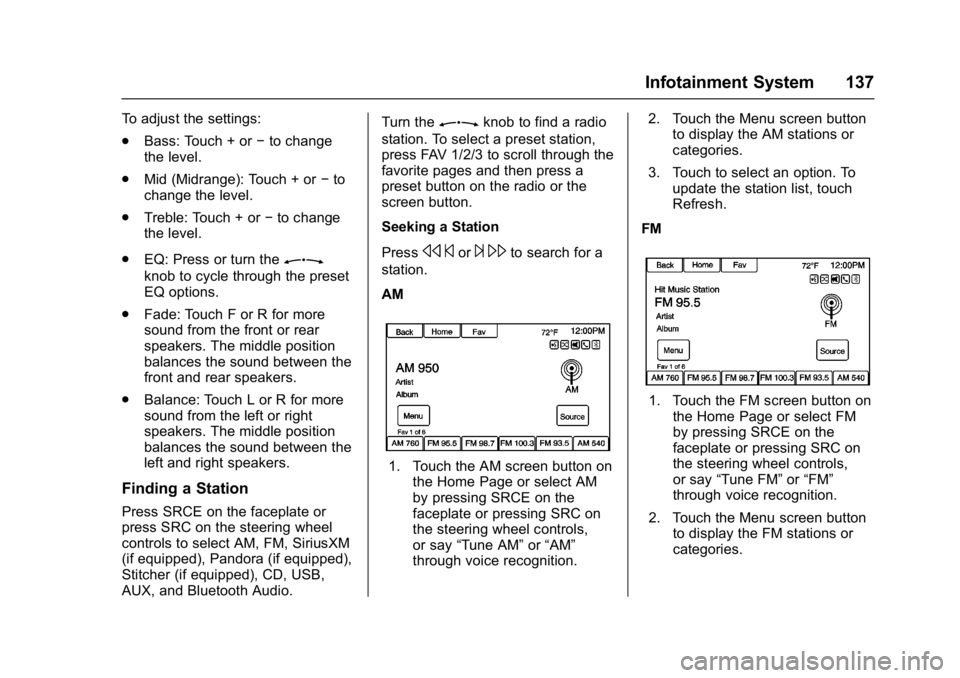
AM
1. Touch the AM screen button on the Home Page or select AM
by pressing SRCE on the
faceplate or pressing SRC on
the steering wheel controls,
or say “Tune AM” or“AM”
through voice recognition. 2. Touch the Menu screen button
to display the AM stations or
categories.
3. Touch to select an option. To update the station list, touch
Refresh.
FM
1. Touch the FM screen button on the Home Page or select FM
by pressing SRCE on the
faceplate or pressing SRC on
the steering wheel controls,
or say “Tune FM” or“FM”
through voice recognition.
2. Touch the Menu screen button to display the FM stations or
categories.
Page 139 of 381
Buick Cascada Owner Manual (GMNA-Localizing-U.S-9186636) - 2016 - crc -
3/9/16
138 Infotainment System
3. Touch to select an option. Toupdate the station list, touch
Refresh.
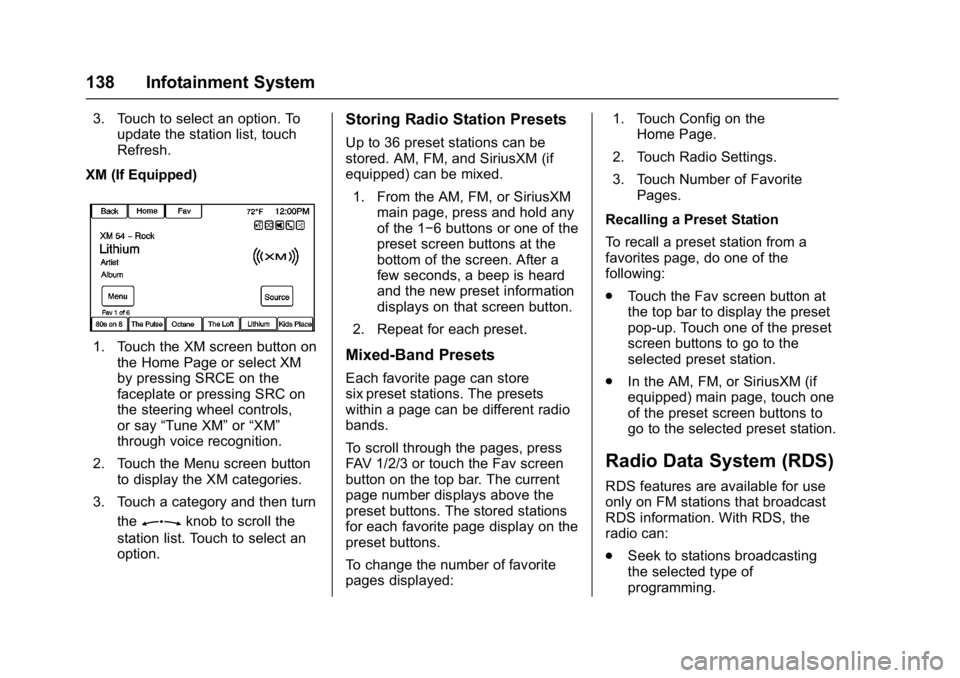
XM (If Equipped)
1. Touch the XM screen button on the Home Page or select XM
by pressing SRCE on the
faceplate or pressing SRC on
the steering wheel controls,
or say “Tune XM” or“XM”
through voice recognition.
2. Touch the Menu screen button to display the XM categories.
3. Touch a category and then turn the
Zknob to scroll the
station list. Touch to select an
option.
Storing Radio Station Presets
Up to 36 preset stations can be
stored. AM, FM, and SiriusXM (if
equipped) can be mixed.
1. From the AM, FM, or SiriusXM main page, press and hold any
of the 1−6 buttons or one of the
preset screen buttons at the
bottom of the screen. After a
few seconds, a beep is heard
and the new preset information
displays on that screen button.
2. Repeat for each preset.
Mixed-Band Presets
Each favorite page can store
six preset stations. The presets
within a page can be different radio
bands.
To scroll through the pages, press
FAV 1/2/3 or touch the Fav screen
button on the top bar. The current
page number displays above the
preset buttons. The stored stations
for each favorite page display on the
preset buttons.
To change the number of favorite
pages displayed: 1. Touch Config on the
Home Page.
2. Touch Radio Settings.
3. Touch Number of Favorite Pages.
Recalling a Preset Station
To recall a preset station from a
favorites page, do one of the
following:
. Touch the Fav screen button at
the top bar to display the preset
pop-up. Touch one of the preset
screen buttons to go to the
selected preset station.
. In the AM, FM, or SiriusXM (if
equipped) main page, touch one
of the preset screen buttons to
go to the selected preset station.
Radio Data System (RDS)
RDS features are available for use
only on FM stations that broadcast
RDS information. With RDS, the
radio can:
.Seek to stations broadcasting
the selected type of
programming.
Page 157 of 381

Buick Cascada Owner Manual (GMNA-Localizing-U.S-9186636) - 2016 - crc -
3/9/16
156 Infotainment System
2. Insert a disc into the slot, rightside up. The player pulls it in
the rest of the way. If the disc
is damaged or improperly
loaded, there is an error and
the disc ejects.
The disc automatically plays once
loaded.
Press
Zto eject a disc from the
CD player. If the disc is not removed
within a short period of time, it is
automatically pulled back into the
player.
Playing an Audio CD
1. Touch CD on the Home Page or select CD from the source
pop-up to display the CD
main page. 2. Touch the Menu screen button
to display the menu options.
3. Touch to select the option.
On the CD main page, the track
number displays and the Song,
Artist, and Album information
displays when available.
Use the following radio controls to
play the disc:
J: Use to pause or resume play.
s ©:
. Press to seek to the beginning of
the current or previous track.
If the track has been playing for
less than five seconds, it seeks
to the previous track. If longer
than five seconds, the current
track starts from the beginning.
. Press and hold to fast reverse
through a track. Release the
button to return to playing
speed. Elapsed time displays.
¨\:
. Press to seek to the next track. .
Press and hold to fast forward
through a track. Release the
button to return to playing
speed. Elapsed time displays.
ZKnob : Turn to the right or
left to select the next or previous
track. Press the outer ring of this
knob to select from the list. If a track
is selected from the menu, the
system plays the track and returns
to the CD screen.
Error Messages
If Disc Error displays and/or the disc
comes out, it could be due to:
. The disc has an invalid or
unknown format.
. The disc is very hot. Try the disc
again when the temperature
returns to normal.
. The road is very rough. Try the
disc again when the road is
smoother.
. The disc is dirty, scratched, wet,
or upside down.
. The air is very humid. Try the
disc again later.
Page 161 of 381
Buick Cascada Owner Manual (GMNA-Localizing-U.S-9186636) - 2016 - crc -
3/9/16
160 Infotainment System
.The following restrictions apply
for the data stored on a USB
MP3 player or USB device:
‐Maximum folder structure
depth: 8 levels.
‐ Maximum number of MP3/
WMA files that can be
displayed: 10,000.
‐ Playlist entries must be in the
form of relative paths.
‐ The system attribute for
folders/files that contain audio
data must not be set.
To play a USB device, do one of the
following:
. Connect the USB and it begins
to play.
. Touch Now Playing on the
Home Page.
. Press SRCE to scroll until the
USB source screen is available.
. Press
b/gon the steering
wheel controls to play CD, Artist,
Album, Song Title, or Song
Genre. See Voice
Recognition 0191. The following playlist formats are
supported:
.
M3U (Standard and Extended)
. iTunes
. PLS (Standard)
. WAX
. ASX
. RMP
The radio supports plugging a cell
phone in as a USB drive as long as
the cell phone supports USB mass
storage class or has USB disc drive
support enabled.
While the USB source is active, use
the following to operate USB
function:
ZKnob : Turn to scroll through
the list. Turn quickly to fast scroll
alphabetically through large lists.
J: Touch to start, pause,
or resume play of the current media
source.
s ©: .
Touch to seek to the beginning
of the current or previous track.
If the track has been playing for
less than five seconds, the
previous track plays. If playing
longer than five seconds, the
current track restarts.
. Touch and hold to reverse
quickly through playback.
Release to return to playing
speed. Elapsed time displays.
¨\:
. Touch to seek to the next track.
. Touch and hold to advance
quickly through playback.
Release to return to playing
speed. Elapsed time displays.
USB Menu
The following are available through
the USB Menu:
Shuffle: Touch to play the tracks
randomly. Touch again to stop
shuffle.
Play More Like This:
1. Touch to automatically create a playlist of songs that are like
the song currently playing.
Page 165 of 381
Buick Cascada Owner Manual (GMNA-Localizing-U.S-9186636) - 2016 - crc -
3/9/16
164 Infotainment System
3. Touch SoftwareVersions Menu.
4. Touch Clear and Reset Radio.
5. Touch Yes.
Pair the phone again and the device
will have to index again.
Bluetooth Audio and Voice
Recognition
See Bluetooth Audio 0164 and
Voice Recognition 0191 for
information on using voice
recognition with Bluetooth audio.
Make sure all devices have the
latest software downloaded.
Auxiliary Devices
If equipped, this vehicle has an
auxiliary input jack in the center
stack. Possible auxiliary audio
sources include:
. Laptop computer
. MP3 player
. Tape player This jack is not an audio output. Do
not plug headphones into the
auxiliary input jack. Set up any
auxiliary device while the vehicle is
in P (Park).
Connect a 3.5 mm (1/8 in) cable
from the auxiliary device to the
auxiliary input jack. When a device
is connected, the system
automatically begins playing audio
from the device over the vehicle
speakers.
If an auxiliary device has already
been connected, but a different
source is currently active, do one of
the following:
.
Press SRCE to scroll all of the
available audio source screens,
until the AUX source screen is
selected.
. Say “Play Front AUX” using
voice recognition to play the
auxiliary device. See Voice
Recognition 0191.
. Touch AUX on the Home Page.
Bluetooth Audio
If equipped, music may be played
from a paired Bluetooth device. See
“Pairing a Phone/Device” under
Bluetooth 0197.
To play music through a Bluetooth
device : 1. Power on the device, pair, and connect the device.
2. Music can be launched by doing one of the following:
.Touch Bluetooth on the
Home Page.
. Press SRCE until Bluetooth
Audio is selected.
. Press SRC on the steering
wheel controls until
Bluetooth Audio is selected.
See Steering Wheel
Controls 0130.
. Use voice recognition. See
Voice Recognition 0191.
The music can be controlled by
either the infotainment controls or
the controls on the device.
Page 198 of 381

Buick Cascada Owner Manual (GMNA-Localizing-U.S-9186636) - 2016 - crc -
3/9/16
Infotainment System 197
.Commands
‐Messages
‐ Virtual Advisor
‐ My Number
‐ Minutes
‐ Number Recall
‐ Advisor Playback
. Virtual Advisor
Virtual Advisor (if available)
Choose this option to connect to a
live Advisor.
Voice Pass-Thru
Voice pass-thru allows access to the
voice recognition commands on the
cell phone, namely Siri
®or Voice
Command. See the cell phone
manufacturer's user guide to see if
the cell phone supports this feature.
To activate the phone voice
recognition system, press and hold
b/gon the steering wheel for
approximately two seconds.
Bluetooth Phone/
Devices
Bluetooth
Overview
For vehicles equipped with
Bluetooth capability, the system can
interact with many cell phones and
devices, allowing:
. Placing and receiving hands-free
calls.
. Sharing of the cell phone’s
address book or contact list with
the vehicle. The phone book will
only display when that phone is
connected.
. Placing outgoing calls by voice
recognition.
The system can be used while in
ON/RUN, ACC/ACCESSORY,
or Retained Accessory Power
(RAP). The range of the Bluetooth
system can be up to 9.1 m (30 ft).
The radio can connect to most Bluetooth-enabled phones.
Available features and functions
may be dependent on the device.
On a current phone call screen, an
image of the contact from your
phone's contact list can be
displayed. Not all phones are
compatible with this feature.
Bluetooth Controls
Use the buttons on the infotainment
system and the steering wheel to
operate the Bluetooth system.
Steering Wheel Controls
b/g:
Press to answer incoming
calls and start voice recognition.
$/i: Press to end a call,
decline an incoming call, or cancel
voice recognition.
+
x− :Press + or −to increase or
decrease the volume.
Infotainment System Controls
For information about how to
navigate the menu system using the
infotainment controls, see
Overview 0127.
Page 199 of 381

Buick Cascada Owner Manual (GMNA-Localizing-U.S-9186636) - 2016 - crc -
3/9/16
198 Infotainment System
PHONE :Press to enter the Phone
main menu. Press and hold to mute
or unmute.
Voice Recognition
The voice recognition system uses
commands to control the system
and dial phone numbers.
When using voice recognition:
. The system may not recognize
voice commands if there is too
much background noise.
. A tone sounds to indicate that
the system is ready for a voice
command. Wait for the tone and
then speak.
. Speak clearly in a calm and
natural voice.
See Voice Recognition 0191.
Audio System
Sound comes through the vehicle's
front audio system speakers and
overrides the audio system. Use the
VOL/
nknob during a call to
change the volume level. The adjusted volume level remains in
memory for later calls. The system
maintains a minimum volume level.
See
Voice Recognition 0191.
Bluetooth Audio
See Bluetooth Audio 0164.
Pairing with Infotainment
Controls
A Bluetooth-enabled cell phone
must be paired and then connected
to the vehicle before it can be used.
See the cell phone manufacturer's
user guide for Bluetooth functions
before pairing the cell phone. If a
Bluetooth phone is not connected,
calls will be made using OnStar
Hands-Free Calling, if available.
See OnStar Overview 0360.
Pairing Information
. A Bluetooth-enabled phone and
an audio playback device can be
paired to the system at the
same time.
. Up to five devices can be paired
to the Bluetooth system. .
The pairing process is disabled
when the vehicle is moving.
. Pairing only needs to be
completed once, unless the
pairing information on the cell
phone changes or the cell phone
is deleted from the system.
. Only one paired cell phone can
be connected to the Bluetooth
system at a time.
. If multiple paired cell phones are
within range of the system, the
radio will connect to the first
phone in the list or to the phone
that was previously connected.
Pairing a Phone/Device 1. Press CONFIG or PHONE.
2. Select Phone Settings.
3. Select Pair Device (Phone). The radio displays “Please
start Bluetooth search on your
phone. Confirm or enter
number :”. If the device
supports a four-digit Personal
Identification Number (PIN), it
will display. The PIN is used in
Step 5.
Page 201 of 381

Buick Cascada Owner Manual (GMNA-Localizing-U.S-9186636) - 2016 - crc -
3/9/16
200 Infotainment System
PIN or confirming the six-digit
passcode. The PIN is used in
Step 4.
4. Locate and select the device named after the vehicle make
and model in the list on the cell
phone. Follow the instructions
on the cell phone to enter the
PIN provided in Step 3 or to
confirm the six-digit code
matches. The system responds
“Successfully paired.”
5. Repeat Steps 1−4 to pair additional phones.
Listing All Paired and Connected
Phones
The system can list all cell phones
paired to it. If a paired cell phone is
also connected to the vehicle, the
system responds to confirm that
phone name is connected.
1. Press
b/g. The system
responds “Please say a
command,” followed by a tone.
2. Say “Device List.” Deleting a Paired Phone
If the phone name to delete is
unknown, see
“Listing All Paired
and Connected Phones.”
1. Press
b/g. The system
responds “Please say a
command,” followed by a tone.
2. Say “Delete Device.”
3. The system responds: “To
delete a device, please select
its name from the list.” Select
the device to delete on the
display and it will be removed.
To cancel this command, press
$/
ion the steering wheel control or
press BACK on the radio faceplate.
Connecting to a Different Phone
or Device
To connect to a different cell phone,
the system looks for the next
available cell phone. Depending on
the cell phone to be connected, this
command may need to be repeated.
1. Press
b/g. The system
responds “Please say a
command,” followed by a tone. 2. Say
“Change Phone.”
. To select a device, touch
the name on the display.
. If another cell phone is not
found, the original phone
remains connected.
Making a Call Using Phone
Book and Infotainment
Controls
For cell phones that support the
phone book feature, the Bluetooth
system can use the contacts stored
on the cell phone to make calls. See
the cell phone manufacturer‘s user
guide or contact the wireless
provider to find out if this feature is
supported.
When a cell phone supports the
phone book feature, the Phone
Book and Call Lists menus are
automatically available.
The Phone Book menu allows
access to the phone book stored in
the cell phone to make a call.
Page 202 of 381

Buick Cascada Owner Manual (GMNA-Localizing-U.S-9186636) - 2016 - crc -
3/9/16
Infotainment System 201
The Call Lists menu allows access
to the phone numbers from the
Incoming Calls, Outgoing Calls, and
Missed Calls menus on the cell
phone to make a call.
The radio will display the first 1,000
contacts and the phone numbers for
each contact including Home, Work,
Mobile, and Other.
To make a call using the Phone
Book menu:1. Press
V/$once on the radio
or the Phone screen button.
2. Select Phone Book.
3. Select the letter group of the phone book entry to scroll
through the list of names/
numbers.
4. Select the name.
5. Select the number to call.
To make a call using the Call
Lists menu: 1. Press PHONE once on the radio or touch the Phone
screen button.
2. Select Call Lists. 3. Select the Incoming Calls,
Outgoing Calls, or Missed
Calls list.
4. Select the name or number to call.
Making a Call Using the
Infotainment Controls
To make a call:
1. Press PHONE once on the radio or touch the Phone
screen button.
2. Touch Enter Number.
3. Enter the phone number.
4. Select OK to start dialing the number.
5. Select Call to place the call.
To make a call using voice
recognition, see “Making a Call”
under Bluetooth 0197.
Accepting or Declining a Call
When an incoming call is received,
the infotainment system mutes and
a ring tone is heard in the vehicle. Using the Infotainment Controls
Turn the
Zknob to
“Answer” or
“Decline” and press the outer ring of
the
Zknob or touch Accept or
Decline on the screen.
Using Steering Wheel Controls
Press
b/gto answer or$/ito
decline the call.
Call Waiting Using the
Infotainment Controls
Call waiting must be supported on
the Bluetooth phone and enabled by
the wireless service carrier to work.
Switching Between Calls (Call
Waiting Calls Only)
To switch between calls, turn and
press the outer ring of the
Z
knob and select Switch Call or
select Switch Call on the screen.
Page 215 of 381
Buick Cascada Owner Manual (GMNA-Localizing-U.S-9186636) - 2016 - crc -
3/9/16
214 Climate Controls
automatically when the interior
temperature is cold and the outside
temperature is about 4 °C (40 °F)
and below. The auto rear defogger
turns off automatically after about
10 minutes. At higher speeds, the
rear window defogger may stay on
continuously.
If equipped with heated outside
rearview mirrors, they turn on when
the rear window defogger button is
on and help to clear fog or frost from
the surface of the mirrors. See
Heated Mirrors033.
Caution
Do not try to clear frost or other
material from the inside of the
front windshield and rear window
with a razor blade or anything
else that is sharp. This may
damage the rear window
defogger grid and affect the
radio's ability to pick up stations
clearly. The repairs would not be
covered by the vehicle warranty.
MorL:Press to turn the heated
seats on or off. See Heated Front
Seats 049.
(:If equipped, press to turn the
heated steering wheel on or off. See
Heated Steering Wheel 094.
Remote Start Climate Control
Operation : If equipped with the
remote vehicle start feature, the
climate control system may run
when the vehicle is started remotely.
The system uses the driver ’s
previous settings to heat or cool the
inside of the vehicle. The rear defog
may come on during remote start
based on cold ambient conditions.
The rear defog indicator light does
not come on during a remote start.
If the vehicle has front heated seats,
they may come on during a remote
start. The heated seat indicator
lights do not come on during a
remote start. See Remote Vehicle
Start 049 and Heated Front
Seats 049.
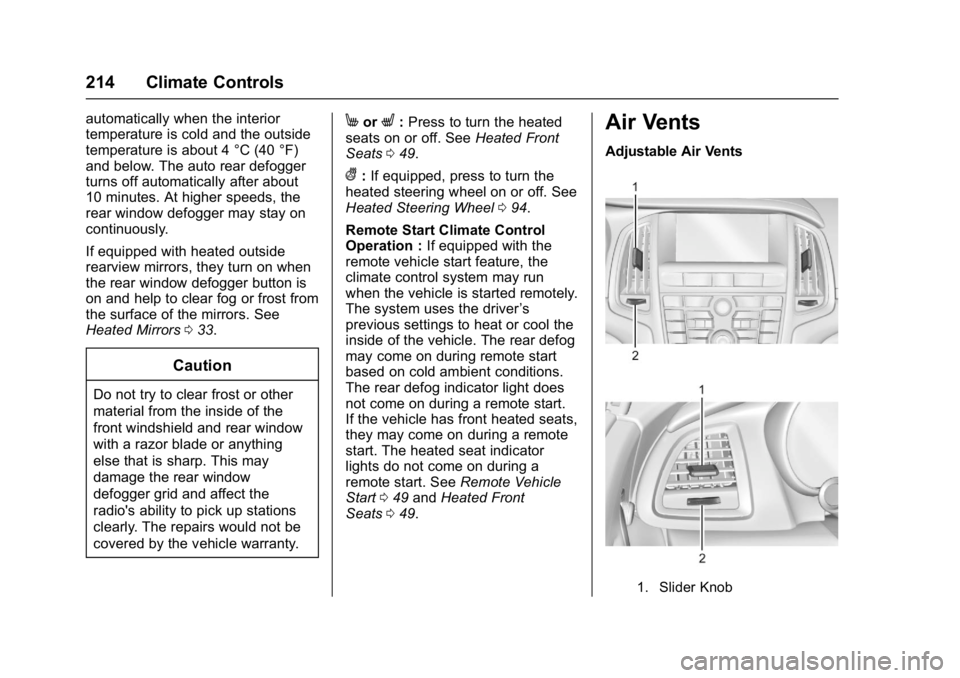
Air Vents
Adjustable Air Vents
1. Slider Knob