door lock BUICK CASCADA 2016 Owner's Guide
[x] Cancel search | Manufacturer: BUICK, Model Year: 2016, Model line: CASCADA, Model: BUICK CASCADA 2016Pages: 381, PDF Size: 5.52 MB
Page 44 of 381
Buick Cascada Owner Manual (GMNA-Localizing-U.S-9186636) - 2016 - crc -
3/9/16
Keys, Doors, and Windows 43
Do not place any objects on the
wind deflectors.
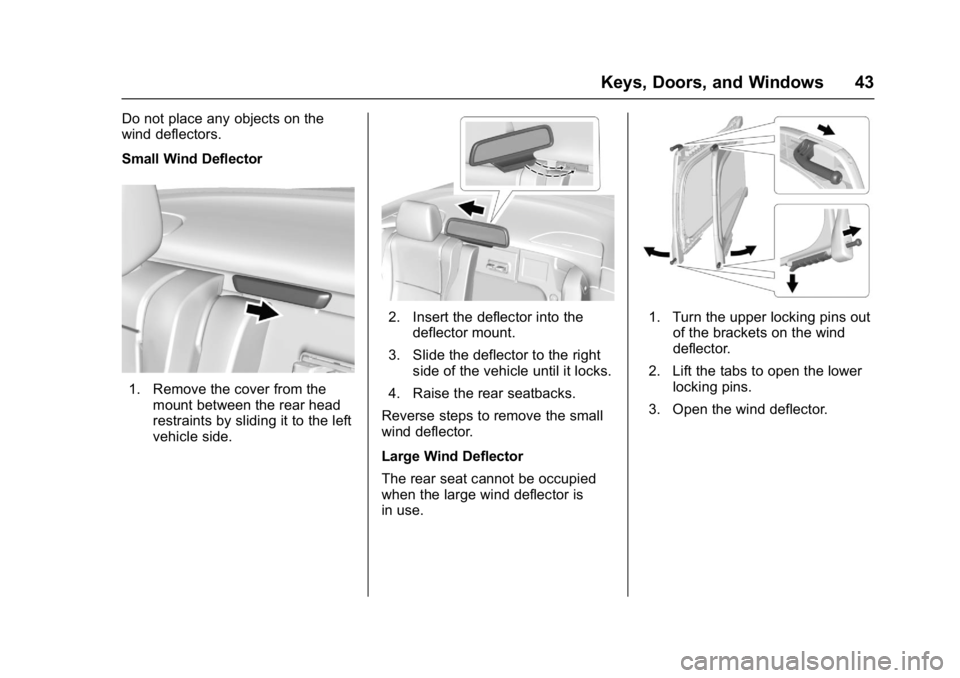
Small Wind Deflector
1. Remove the cover from themount between the rear head
restraints by sliding it to the left
vehicle side.
2. Insert the deflector into the
deflector mount.
3. Slide the deflector to the right side of the vehicle until it locks.
4. Raise the rear seatbacks.
Reverse steps to remove the small
wind deflector.
Large Wind Deflector
The rear seat cannot be occupied
when the large wind deflector is
in use.1. Turn the upper locking pins out of the brackets on the wind
deflector.
2. Lift the tabs to open the lower locking pins.
3. Open the wind deflector.
Page 56 of 381
Buick Cascada Owner Manual (GMNA-Localizing-U.S-9186636) - 2016 - crc -
3/9/16
Seats and Restraints 55
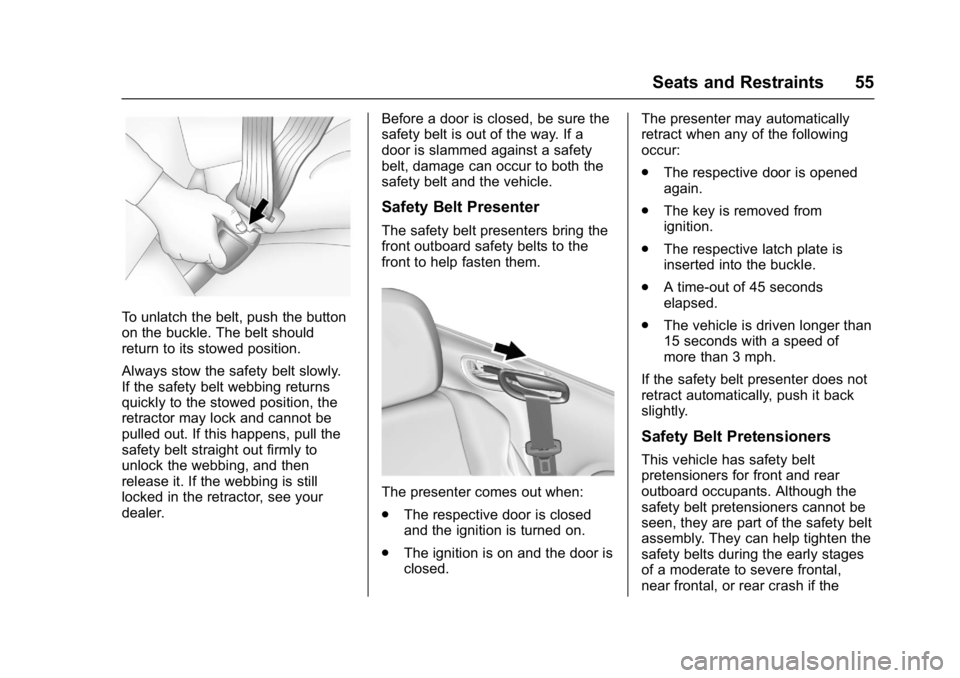
To unlatch the belt, push the button
on the buckle. The belt should
return to its stowed position.
Always stow the safety belt slowly.
If the safety belt webbing returns
quickly to the stowed position, the
retractor may lock and cannot be
pulled out. If this happens, pull the
safety belt straight out firmly to
unlock the webbing, and then
release it. If the webbing is still
locked in the retractor, see your
dealer.Before a door is closed, be sure the
safety belt is out of the way. If a
door is slammed against a safety
belt, damage can occur to both the
safety belt and the vehicle.
Safety Belt Presenter
The safety belt presenters bring the
front outboard safety belts to the
front to help fasten them.
The presenter comes out when:
.
The respective door is closed
and the ignition is turned on.
. The ignition is on and the door is
closed. The presenter may automatically
retract when any of the following
occur:
.
The respective door is opened
again.
. The key is removed from
ignition.
. The respective latch plate is
inserted into the buckle.
. A time-out of 45 seconds
elapsed.
. The vehicle is driven longer than
15 seconds with a speed of
more than 3 mph.
If the safety belt presenter does not
retract automatically, push it back
slightly.
Safety Belt Pretensioners
This vehicle has safety belt
pretensioners for front and rear
outboard occupants. Although the
safety belt pretensioners cannot be
seen, they are part of the safety belt
assembly. They can help tighten the
safety belts during the early stages
of a moderate to severe frontal,
near frontal, or rear crash if the
Page 61 of 381
Buick Cascada Owner Manual (GMNA-Localizing-U.S-9186636) - 2016 - crc -
3/9/16
60 Seats and Restraints
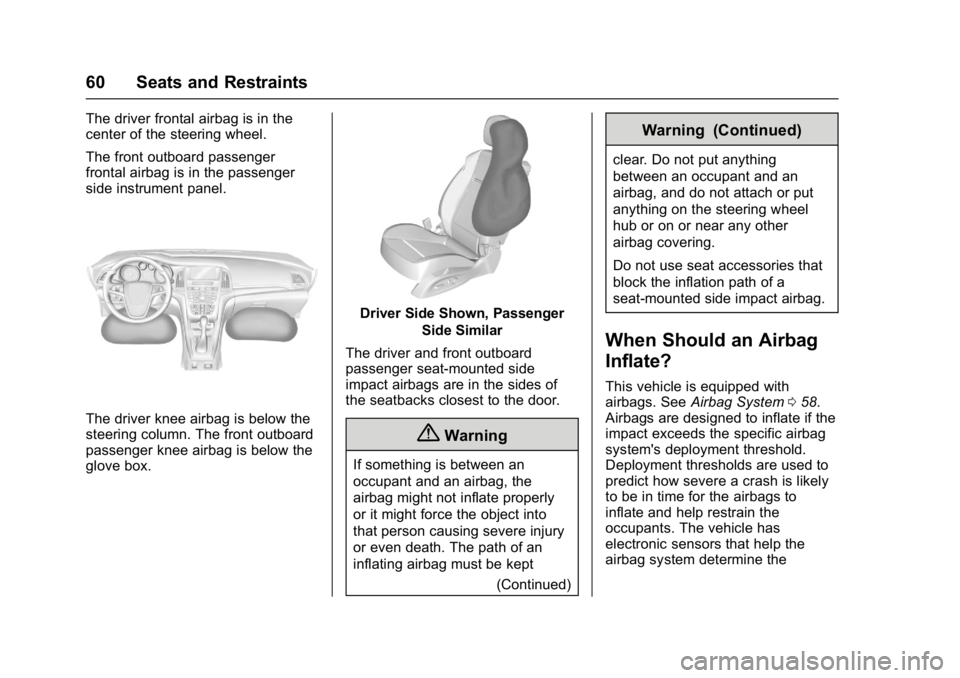
The driver frontal airbag is in the
center of the steering wheel.
The front outboard passenger
frontal airbag is in the passenger
side instrument panel.
The driver knee airbag is below the
steering column. The front outboard
passenger knee airbag is below the
glove box.
Driver Side Shown, PassengerSide Similar
The driver and front outboard
passenger seat-mounted side
impact airbags are in the sides of
the seatbacks closest to the door.
{Warning
If something is between an
occupant and an airbag, the
airbag might not inflate properly
or it might force the object into
that person causing severe injury
or even death. The path of an
inflating airbag must be kept (Continued)
Warning (Continued)
clear. Do not put anything
between an occupant and an
airbag, and do not attach or put
anything on the steering wheel
hub or on or near any other
airbag covering.
Do not use seat accessories that
block the inflation path of a
seat-mounted side impact airbag.
When Should an Airbag
Inflate?
This vehicle is equipped with
airbags. SeeAirbag System 058.
Airbags are designed to inflate if the
impact exceeds the specific airbag
system's deployment threshold.
Deployment thresholds are used to
predict how severe a crash is likely
to be in time for the airbags to
inflate and help restrain the
occupants. The vehicle has
electronic sensors that help the
airbag system determine the
Page 63 of 381
Buick Cascada Owner Manual (GMNA-Localizing-U.S-9186636) - 2016 - crc -
3/9/16
62 Seats and Restraints
But airbags would not help in many
types of collisions, primarily
because the occupant's motion is
not toward those airbags. SeeWhen
Should an Airbag Inflate? 060.
Airbags should never be regarded
as anything more than a supplement
to safety belts.
What Will You See after
an Airbag Inflates?
After the frontal and seat-mounted
side impact airbags inflate, they
quickly deflate, so quickly that some
people may not even realize the
airbags inflated. Some components
of the airbag module may be hot for
several minutes. For location of the
airbags, see Where Are the
Airbags? 059.
The parts of the airbag that come
into contact with you may be warm,
but not too hot to touch. There may
be some smoke and dust coming
from the vents in the deflated
airbags. Airbag inflation does not
prevent the driver from seeing out of the windshield or being able to steer
the vehicle, nor does it prevent
people from leaving the vehicle.
{Warning
When an airbag inflates, there
may be dust in the air. This dust
could cause breathing problems
for people with a history of
asthma or other breathing trouble.
To avoid this, everyone in the
vehicle should get out as soon as
it is safe to do so. If you have
breathing problems but cannot
get out of the vehicle after an
airbag inflates, then get fresh air
by opening a window or a door.
If you experience breathing
problems following an airbag
deployment, you should seek
medical attention.
The vehicle has a feature that may
automatically unlock the doors, turn
on the interior lamps and hazard
warning flashers, and shut off the
fuel system after the airbags inflate.
The feature may also activate, without airbag inflation, after an
event that exceeds a predetermined
threshold. You can lock the doors,
and turn off the interior lamps and
hazard warning flashers by using
the controls for those features.
Turning off the hazard warning
flasher requires an ignition cycle
first.
{Warning
A crash severe enough to inflate
the airbags may have also
damaged important functions in
the vehicle, such as the fuel
system, brake and steering
systems, etc. Even if the vehicle
appears to be drivable after a
moderate crash, there may be
concealed damage that could
make it difficult to safely operate
the vehicle.
Use caution if you should attempt
to restart the engine after a crash
has occurred.
Page 93 of 381
Buick Cascada Owner Manual (GMNA-Localizing-U.S-9186636) - 2016 - crc -
3/9/16
92 Instruments and Controls
Instruments and
Controls
Controls
Steering Wheel Adjustment . . . . 93
Steering Wheel Controls . . . . . . . 93
Heated Steering Wheel . . . . . . . . 94
Horn . . . . . . . . . . . . . . . . . . . . . . . . . . . 94
Windshield Wiper/Washer . . . . . . 94
Compass . . . . . . . . . . . . . . . . . . . . . . 95
Clock . . . . . . . . . . . . . . . . . . . . . . . . . . 96
Power Outlets . . . . . . . . . . . . . . . . . 96
Warning Lights, Gauges, and
Indicators
Warning Lights, Gauges, andIndicators . . . . . . . . . . . . . . . . . . . . 97
Instrument Cluster . . . . . . . . . . . . . 98
Speedometer . . . . . . . . . . . . . . . . . . 99
Odometer . . . . . . . . . . . . . . . . . . . . . . 99
Trip Odometer . . . . . . . . . . . . . . . . . 99
Tachometer . . . . . . . . . . . . . . . . . . . . 99
Fuel Gauge . . . . . . . . . . . . . . . . . . . . 99
Engine Coolant Temperature Gauge . . . . . . . . . . . . . . . . . . . . . . 100
Safety Belt Reminders . . . . . . . . 100
Airbag Readiness Light . . . . . . . 101
Passenger Airbag Status Indicator . . . . . . . . . . . . . . . . . . . . 101 Charging System Light . . . . . . . 102
Malfunction Indicator Lamp
(Check Engine Light) . . . . . . . . 102
Brake System Warning Light . . . . . . . . . . . . . . . . . . . . . . . . 104
Electric Parking Brake Light . . . . . . . . . . . . . . . . . . . . . . . . 105
Service Electric Parking Brake Light . . . . . . . . . . . . . . . . . . . . . . . . 105
Antilock Brake System (ABS) Warning Light . . . . . . . . . . . . . . . 105
Operate Pedal Light . . . . . . . . . . 105
Power Steering Warning Light . . . . . . . . . . . . . . . . . . . . . . . . 106
Lane Departure Warning (LDW) Light . . . . . . . . . . . . . . . . . 106
Vehicle Ahead Indicator . . . . . . 106
StabiliTrak®OFF Light . . . . . . . . 106
Traction Control System (TCS)/ StabiliTrak
®Light . . . . . . . . . . . 107
Tire Pressure Light . . . . . . . . . . . 107
Engine Oil Pressure Light . . . . 107
Low Fuel Warning Light . . . . . . 108
Security Light . . . . . . . . . . . . . . . . . 108
High-Beam On Light . . . . . . . . . . 108
Adaptive Forward Lighting (AFL) Light . . . . . . . . . . . . . . . . . . 109
Front Fog Lamp Light . . . . . . . . . 109
Lamps On Reminder . . . . . . . . . 109
Cruise Control Light . . . . . . . . . . 109
Door Ajar Light . . . . . . . . . . . . . . . 109
Information Displays
Driver Information Center (DIC) . . . . . . . . . . . . . . . . 110
Vehicle Messages
Vehicle Messages . . . . . . . . . . . . 113
Vehicle Personalization
Vehicle Personalization . . . . . . . 113
Page 96 of 381
Buick Cascada Owner Manual (GMNA-Localizing-U.S-9186636) - 2016 - crc -
3/9/16
Instruments and Controls 95
If the windshield wiper lever is then
moved to OFF before the driver
door is opened or within 10 minutes,
the wipers will restart and move to
the base of the windshield.
If the ignition is turned OFF while
the wipers are performing wipes due
to windshield washing or Rainsense
wipes, the wipers continue to run
until they reach the base of the
windshield.
Rainsense
A sensor detects the amount of
water on the windshield and
controls the frequency of the
windshield wiper.
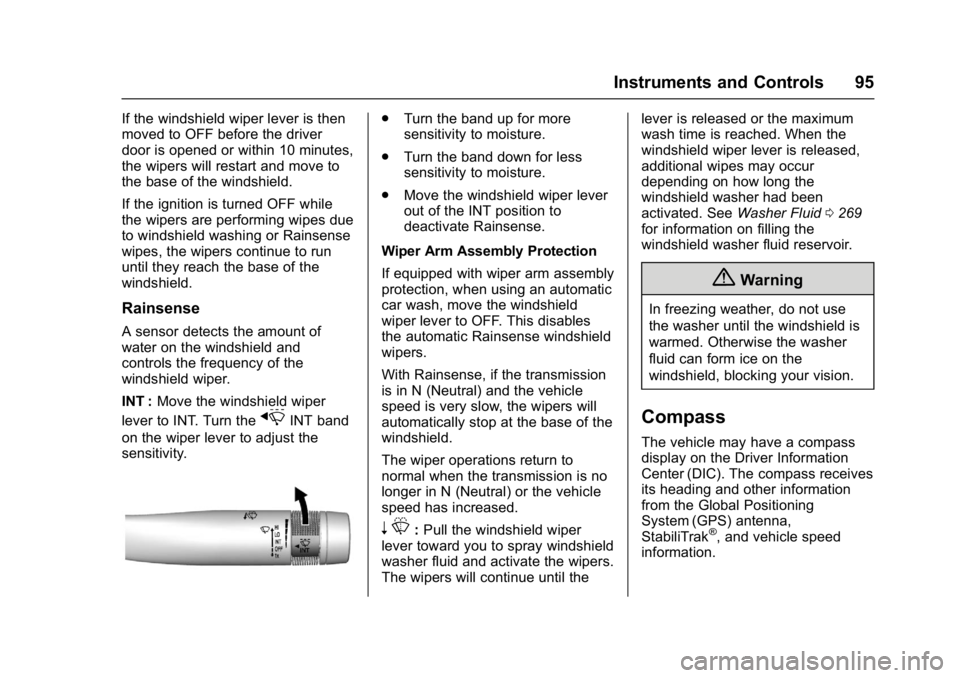
INT :Move the windshield wiper
lever to INT. Turn the
xINT band
on the wiper lever to adjust the
sensitivity.
. Turn the band up for more
sensitivity to moisture.
. Turn the band down for less
sensitivity to moisture.
. Move the windshield wiper lever
out of the INT position to
deactivate Rainsense.
Wiper Arm Assembly Protection
If equipped with wiper arm assembly
protection, when using an automatic
car wash, move the windshield
wiper lever to OFF. This disables
the automatic Rainsense windshield
wipers.
With Rainsense, if the transmission
is in N (Neutral) and the vehicle
speed is very slow, the wipers will
automatically stop at the base of the
windshield.
The wiper operations return to
normal when the transmission is no
longer in N (Neutral) or the vehicle
speed has increased.
n L: Pull the windshield wiper
lever toward you to spray windshield
washer fluid and activate the wipers.
The wipers will continue until the lever is released or the maximum
wash time is reached. When the
windshield wiper lever is released,
additional wipes may occur
depending on how long the
windshield washer had been
activated. See
Washer Fluid0269
for information on filling the
windshield washer fluid reservoir.
{Warning
In freezing weather, do not use
the washer until the windshield is
warmed. Otherwise the washer
fluid can form ice on the
windshield, blocking your vision.
Compass
The vehicle may have a compass
display on the Driver Information
Center (DIC). The compass receives
its heading and other information
from the Global Positioning
System (GPS) antenna,
StabiliTrak
®, and vehicle speed
information.
Page 97 of 381
Buick Cascada Owner Manual (GMNA-Localizing-U.S-9186636) - 2016 - crc -
3/9/16
96 Instruments and Controls
The compass system is designed to
operate for a certain number of
miles or degrees of turn before
needing a signal from the GPS
satellites. When the compass
display shows CAL, drive the
vehicle for a short distance in an
open area where it can receive a
GPS signal. The compass system
will automatically determine when a
GPS signal is restored and provide
a heading again.
Clock
The infotainment system controls
are used to access the time and
date settings through the menu
system. The clock menu can only
be used with the radio while in ON/
RUN or ACC/ACCESSORY. See
Using the System0131 for
information about how to use the
menu system.
Setting the Clock
The clock is in the center stack
display.
To set the time: 1. Press CONFIG to enter the
menu options or press
H. Turn
Zand select Time and
Date or touch Time and Date.
Press
Zor touch the Set
Time screen button to display
other options within that
feature.
2. Touch + or −to increase or
decrease the Hours and
Minutes displayed on the clock.
If Automatic Clock Update is set, the
time displayed on the clock may not
update immediately when driving
into a new time zone.
12/24 hr Format : Select the 12
Hour screen button for standard
time; select the 24 Hour screen
button for military time.
Power Outlets
The accessory power outlets can be
used to plug in electrical equipment,
such as a cell phone or MP3 player.
There is one accessory power outlet
on the center stack below the
climate controls and one on the rear
of the center floor console. These outlets are powered when the key is
in ON/RUN or ACC/ACCESSORY,
or until the driver door is opened
within 10 minutes of turning off the
vehicle. See
Retained Accessory
Power (RAP) 0230.
Caution
Leaving electrical equipment
plugged in for an extended period
of time while the vehicle is off will
drain the battery. Always unplug
electrical equipment when not in
use and do not plug in equipment
that exceeds the maximum
20 amp rating.
Certain electrical accessories may
not be compatible with the
accessory power outlet and could
overload vehicle or adapter fuses.
If a problem is experienced, see
your dealer.
When adding electrical equipment,
be sure to follow the installation
instructions included with the
equipment. See Add-On Electrical
Equipment 0252.
Page 117 of 381
Buick Cascada Owner Manual (GMNA-Localizing-U.S-9186636) - 2016 - crc -
3/9/16
116 Instruments and Controls
Select and follow the screen
prompts.
Restore Home Page Defaults
This feature will restore the Home
Page to the factory settings.
Select and follow the screen
prompts.
Rear Camera Options
Select and the following may
display:
.Symbols
. Guide Lines
Symbols
See Assistance Systems for Parking
or Backing 0243.
Select to enable or disable.
Guide Lines
See Assistance Systems for Parking
or Backing 0243.
Select to enable or disable. Display Off
Select to turn the display off. The
display will return when any radio
buttons are pressed or the screen is
touched (if equipped).
Map Settings
See
“Map Settings” inConfigure
Menu 0183.
Vehicle Settings
Select and the following may
display:
.
Climate and Air Quality
. Comfort and Convenience
. Collision Detection Systems
. Lighting
. Power Door Locks
. Remote Lock/Unlock/Start
. Return to Factory Settings?
Climate and Air Quality
Select and the following may
display:
.
Auto Fan Speed
. Remote Start Auto Heat Seat .
Auto Rear Defog
Auto Fan Speed
Choose from the following blower
speed settings:
Select High, Medium, or Low.
Remote Start Auto Heat Seat
When on, this feature will turn the
heated seats on when using remote
start on cold days.
Select to enable or disable.
Auto Rear Defog
When on, this feature turns on the
rear window defogger at vehicle
start when the interior temperature
is cold and fog is likely. The auto
rear defog function can be disabled
by selecting
1. When off, the
feature can be turned on by
selecting
1. See “Rear Window
Defogger” underDual Automatic
Climate Control System 0212.
Select to enable or disable.
Page 118 of 381

Buick Cascada Owner Manual (GMNA-Localizing-U.S-9186636) - 2016 - crc -
3/9/16
Instruments and Controls 117
Comfort and Convenience
Select and the following may
display:
.Chime Volume
. Button Chime
Chime Volume
This allows the selection of the
chime volume level.
Select Low or High.
Button Chime
This allows the Button Chime
feature to be turned on or off.
Select to enable or disable.
Collision Detection Systems
Select and the following may
display:
. Park Assist
Park Assist
This allows the Parking Assist
feature to be turned on or off.
Select Off or On.
Lighting
Select and the following may
display:
. Vehicle Locator Lights
. Exit Lighting
Vehicle Locator Lights
This allows the vehicle locator lights
to be turned on or off.
Select to enable or disable.
Exit Lighting
This allows the selection of how
long the exterior lamps stay on
when leaving the vehicle when it is
dark outside.
Select Off, 30 Seconds, 1 Minute,
or 2 Minutes.
Power Door Locks
Select and the following may
display:
. Open Door Anti Lock Out
. Auto Door Unlock
. Delay Door Lock Open Door Anti Lock Out
When on, this feature will keep the
driver door from locking until the
door is closed. If this feature is
turned on, the Delayed Door Lock
menu will not be available.
Select to enable or disable.
Auto Door Unlock
This allows selection of which doors
will automatically unlock when the
vehicle is shifted into P (Park).
Select All Doors, Driver Door, or Off.
Delay Door Lock
When on, this feature will delay the
locking of the doors. See
Delayed
Locking 028.
Select to enable or disable.Remote Lock/Unlock/Start
Select and the following may
display:
. Remote Unlock Feedback
. Remote Lock Feedback
. Remote Door Unlock
Page 119 of 381
Buick Cascada Owner Manual (GMNA-Localizing-U.S-9186636) - 2016 - crc -
3/9/16
118 Instruments and Controls
Remote Unlock Feedback
When on, the exterior lamps will
flash when unlocking the vehicle
with the RKE transmitter.
Select Flash Lights or Off.
Remote Lock Feedback
This allows selection of what
feedback is provided when
unlocking the vehicle with the RKE
transmitter.
Select Lights and Horn, Lights Only,
Horn Only, or Off.
Remote Door Unlock
This allows selection of which doors
will unlock on the first press of
Kon
the RKE transmitter. If Driver Door
is selected, all doors will unlock on
the second press of
Kwithin
five seconds of the prior press.
Select Driver Door or All Doors.
Return to Factory Settings?
This returns all of the vehicle
personalization settings to the
factory settings.
Select Yes or No.