lock BUICK CASCADA 2018 Owners Manual
[x] Cancel search | Manufacturer: BUICK, Model Year: 2018, Model line: CASCADA, Model: BUICK CASCADA 2018Pages: 303, PDF Size: 5.87 MB
Page 250 of 303

Buick Cascada Owner Manual (GMNA-Localizing-U.S-11373983) - 2018 -
CRC - 7/10/17
Vehicle Care 249
{ WarningDo not bleach or dye seat belt
webbing. It may severely weaken
the webbing. In a crash, they
might not be able to provide
adequate protection. Clean and
rinse seat belt webbing only with
mild soap and lukewarm water.
Allow the webbing to dry.
Floor Mats
{ WarningIf a floor mat is the wrong size or
is not properly installed, it can
interfere with the pedals.
Interference with the pedals can
cause unintended acceleration
and/or increased stopping
distance which can cause a crash
and injury. Make sure the floor
mat does not interfere with the
pedals. Use the following guidelines for
proper floor mat usage:
.
The original equipment floor
mats were designed for your
vehicle. If the floor mats need
replacing, it is recommended
that GM certified floor mats be
purchased. Non-GM floor mats
may not fit properly and may
interfere with the pedals. Always
check that the floor mats do not
interfere with the pedals.
.
Do not use a floor mat if the
vehicle is not equipped with a
floor mat retainer on the driver
side floor.
.
Use the floor mat with the
correct side up. Do not turn
it over.
.
Do not place anything on top of
the driver side floor mat.
.
Use only a single floor mat on
the driver side.
.
Do not place one floor mat on
top of another. Removing and Replacing the
Floor Mats Pull up on the rear of the floor mat
to unlock each retainer and remove.
Reinstall by lining up the floor mat
retainer openings over the carpet
retainers and snap into position.
Make sure the floor mat is properly
secured in place.
Verify the floor mat does not
interfere with the pedals.
Page 254 of 303

Buick Cascada Owner Manual (GMNA-Localizing-U.S-11373983) - 2018 -
CRC - 7/10/17
Service and Maintenance 253.
Visually inspect steering,
suspension, and chassis
components for damaged, loose,
or missing parts or signs of
wear. See Exterior Care 0 241 .
.
Check restraint system
components. See Safety System
Check 0 58 .
.
Visually inspect fuel system for
damage or leaks.
.
Visually inspect exhaust system
and nearby heat shields for
loose or damaged parts. .
Lubricate body components. See
Exterior Care 0 241 .
.
Check starter switch. See Starter
Switch Check 0 191 .
.
Check automatic transmission
shift lock control function. See
Automatic Transmission Shift
Lock Control Function Check
0 192 .
.
Check ignition transmission lock.
See Ignition Transmission Lock
Check 0 192 . .
Check parking brake and
automatic transmission park
mechanism. See Park Brake and
P (Park) Mechanism Check
0 192 .
.
Check accelerator pedal for
damage, high effort, or binding.
Replace if needed.
.
Visually inspect gas strut for
signs of wear, cracks, or other
damage. Check the hold open
ability of the strut. If the hold
open is low, service the gas
strut. See Gas Strut(s) 0 193 .
Page 261 of 303
Buick Cascada Owner Manual (GMNA-Localizing-U.S-11373983) - 2018 -
CRC - 7/10/17
260 Service and Maintenance
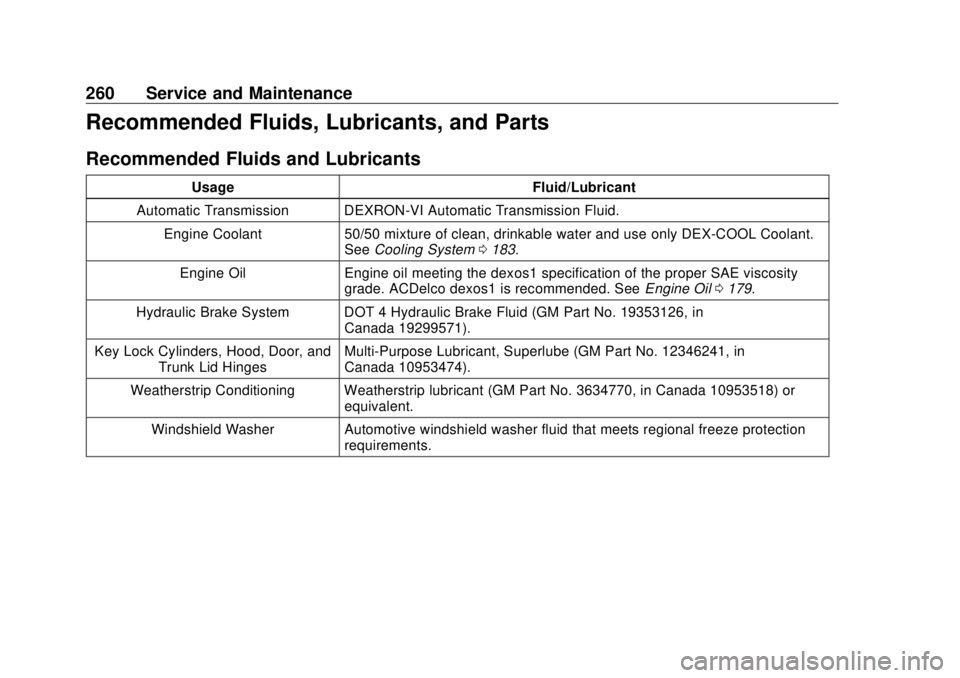
Recommended Fluids, Lubricants, and Parts Recommended Fluids and Lubricants Usage Fluid/Lubricant
Automatic Transmission DEXRON-VI Automatic Transmission Fluid.
Engine Coolant 50/50 mixture of clean, drinkable water and use only DEX-COOL Coolant.
See Cooling System 0 183 .
Engine Oil Engine oil meeting the dexos1 specification of the proper SAE viscosity
grade. ACDelco dexos1 is recommended. See Engine Oil 0 179 .
Hydraulic Brake System DOT 4 Hydraulic Brake Fluid (GM Part No. 19353126, in
Canada 19299571).
Key Lock Cylinders, Hood, Door, and
Trunk Lid Hinges Multi-Purpose Lubricant, Superlube (GM Part No. 12346241, in
Canada 10953474).
Weatherstrip Conditioning Weatherstrip lubricant (GM Part No. 3634770, in Canada 10953518) or
equivalent.
Windshield Washer Automotive windshield washer fluid that meets regional freeze protection
requirements.
Page 272 of 303

Buick Cascada Owner Manual (GMNA-Localizing-U.S-11373983) - 2018 -
CRC - 7/10/17
Customer Information 271.
Lock-Out Service: Service to
unlock the vehicle if you are
locked out. A remote unlock may
be available if you have OnStar.
For security reasons, the driver
must present identification
before this service is given.
.
Emergency Tow from a Public
Road or Highway: Tow to the
nearest Buick dealer for
warranty service, or if the vehicle
was in a crash and cannot be
driven. Assistance is not given
when the vehicle is stuck in
sand, mud, or snow.
.
Flat Tire Change: Service to
change a flat tire with the spare
tire. The spare tire, if equipped,
must be in good condition and
properly inflated. It is the owner's
responsibility for the repair or
replacement of the tire if it is not
covered by the warranty.
.
Battery Jump Start: Service to
jump start a dead battery. .
Trip Interruption Benefits and
Assistance: If your trip is
interrupted due to a warranty
event, incidental expenses may
be reimbursed within the
Powertrain warranty period.
Items considered are reasonable
and customary hotel, meals,
rental car, or a vehicle being
delivered back to the customer,
up to 500 miles.
Services Not Included in
Roadside Assistance .
Impound towing caused by
violation of any laws.
.
Legal fines.
.
Mounting, dismounting,
or changing of snow tires,
chains, or other traction devices.
Service is not provided if a vehicle
is in an area that is not accessible
to the service vehicle or is not a
regularly traveled or maintained
public road, which includes ice and
winter roads. Off-road use is not
covered. Services Specific to
Canadian-Purchased Vehicles .
Fuel Delivery: Reimbursement
is up to 7 liters. Diesel fuel
delivery may be restricted.
Propane and other fuels are not
provided through this service.
.
Lock-Out Service: Vehicle
registration is required.
.
Trip Interruption Benefits and
Assistance: Must be over
150 km from where your trip was
started to qualify.
Pre-authorization, original
detailed receipts, and a copy of
the repair orders are required.
Once authorization has been
received, the Roadside
Assistance advisor will help you
make arrangements and explain
how to receive payment.
.
Alternative Service: If
assistance cannot be provided
right away, the Roadside
Assistance advisor may give
permission to get local
emergency road service. You will
receive payment, up to $100,
Page 279 of 303

Buick Cascada Owner Manual (GMNA-Localizing-U.S-11373983) - 2018 -
CRC - 7/10/17
278 Customer Information
Vehicle Data
Recording and
Privacy The vehicle has a number of
computers that record information
about the vehicle ’ s performance and
how it is driven. For example, the
vehicle uses computer modules to
monitor and control engine and
transmission performance, to
monitor the conditions for airbag
deployment and deploy them in a
crash, and, if equipped, to provide
antilock braking to help the driver
control the vehicle. These modules
may store data to help the dealer
technician service the vehicle.
Some modules may also store data
about how the vehicle is operated,
such as rate of fuel consumption or
average speed. These modules may
retain personal preferences, such as
radio presets, seat positions, and
temperature settings. Event Data Recorders This vehicle is equipped with an
event data recorder (EDR). The
main purpose of an EDR is to
record, in certain crash or near
crash-like situations, such as an air
bag deployment or hitting a road
obstacle, data that will assist in
understanding how a vehicle ’ s
systems performed. The EDR is
designed to record data related to
vehicle dynamics and safety
systems for a short period of time,
typically 30 seconds or less. The
EDR in this vehicle is designed to
record such data as:
.
How various systems in your
vehicle were operating;
.
Whether or not the driver and
passenger safety belts were
buckled/fastened;
.
How far (if at all) the driver was
depressing the accelerator and/
or brake pedal; and,
.
How fast the vehicle was
traveling. These data can help provide a
better understanding of the
circumstances in which crashes and
injuries occur.
Note
EDR data are recorded by your
vehicle only if a non-trivial crash
situation occurs; no data are
recorded by the EDR under normal
driving conditions and no personal
data (e.g., name, gender, age, and
crash location) are recorded.
However, other parties, such as law
enforcement, could combine the
EDR data with the type of
personally identifying data routinely
acquired during a crash
investigation.
To read data recorded by an EDR,
special equipment is required, and
access to the vehicle or the EDR is
needed. In addition to the vehicle
manufacturer, other parties, such as
law enforcement, that have the
special equipment, can read the
information if they have access to
the vehicle or the EDR.
Page 283 of 303

Buick Cascada Owner Manual (GMNA-Localizing-U.S-11373983) - 2018 -
CRC - 7/10/17
282 OnStar
Security If equipped, OnStar provides these
services:
.
With Stolen Vehicle Assistance,
OnStar Advisors can use GPS to
pinpoint the vehicle and help
authorities quickly recover it.
.
With Remote Ignition Block,
if equipped, OnStar can block
the engine from being restarted.
.
With Stolen Vehicle Slowdown,
if equipped, OnStar can work
with law enforcement to
gradually slow the vehicle down.
Theft Alarm Notification If equipped, if the doors are locked
and the vehicle alarm sounds, a
notification by text, e-mail, or phone
call will be sent. If the vehicle is
stolen, an OnStar Advisor can work
with authorities to recover the
vehicle.
Navigation OnStar navigation requires a
specific OnStar service plan. Press
Q to receive Turn-by-Turn
directions or have them sent to the
vehicle ’ s navigation screen,
if equipped.
Turn-by-Turn Navigation 1. Press
Q to connect to an
Advisor.
2. Request directions to be
downloaded to the vehicle.
3. Follow the voice-guided
commands.
Using Voice Commands
During a Planned Route Functionality of the Voice Command
button may vary by vehicle and
region. For some vehicles, press
=to open the OnStar app on the
infotainment display. For other
vehicles press
= as follows.
Cancel Route
1. Press
= . System responds:
“ OnStar ready, ” then a tone. 2. Say “ Cancel route. ” System
responds: “ Do you want to
cancel directions? ”
3. Say “ Yes. ” System responds:
“ OK, request completed, thank
you, goodbye. ”
Route Preview
1. Press
= . System responds:
“ OnStar ready, ” then a tone.
2. Say “ Route preview. ” System
responds with the next three
maneuvers.
Repeat
1. Press
= . System responds:
“ OnStar ready, ” then a tone.
2. Say “ Repeat. ” System
responds with the last direction
given, then responds with
“ OnStar ready, ” then a tone.
Get My Destination
1. Press
= . System responds:
“ OnStar ready, ” then a tone.
Page 285 of 303

Buick Cascada Owner Manual (GMNA-Localizing-U.S-11373983) - 2018 -
CRC - 7/10/17
284 OnStar OnStar Advisor. On some vehicles,
Wi-Fi can also be managed from the
Wi-Fi Hotspot menu.
MyBuick Mobile App (If Available)
Download the myBuick mobile app
to compatible Apple and Android
smartphones. Buick users can
access the following services from a
smartphone:
.
Remotely start/stop the vehicle,
if factory-equipped.
.
Lock/unlock doors, if equipped
with automatic locks.
.
Activate the horn and lamps.
.
Check the vehicle ’ s fuel level, oil
life, or tire pressure,
if factory-equipped with the Tire
Pressure Monitor System.
.
Send destinations to the vehicle.
.
Locate the vehicle on a map
(U.S. market only).
.
Turn the vehicle's Wi-Fi hotspot
on/off, manage settings, and
monitor data consumption,
if equipped. .
Locate a dealer and schedule
service.
.
Request roadside assistance.
.
Set a parking reminder with pin
drop, take a photo, make a note,
and set a timer.
.
Connect with Buick on social
media.
For myBuick mobile app information
and compatibility, see
www.my.buick.com.
An active OnStar service,
compatible device, factory-installed
remote start, and power locks are
required. Data rates apply. See
www.onstar.com for details and
system limitations.
Remote Services Contact an OnStar Advisor to
unlock the doors or sound the horn
and flash the lamps. OnStar AtYourService OnStar Advisors can provide offers
from restaurants and retailers on
your route, help locate hotels,
or book a room. These services
vary by market.
OnStar Hands-Free Calling Make and receive calls with the
built-in wireless calling service,
which requires available minutes.
Functionality of the Voice Command
button may vary by vehicle and
region. For some vehicles, press
=to open the OnStar app on the
infotainment display, then select
Hands-Free calling. For other
vehicles press
= as follows.
Make a Call
1. Press
= . System responds:
“ OnStar ready. ”
2. Say “ Call. ” System responds:
“ Call. Please say the name or
number to call. ”
Page 288 of 303

Buick Cascada Owner Manual (GMNA-Localizing-U.S-11373983) - 2018 -
CRC - 7/10/17
OnStar 287services. Service involving location
information about the vehicle cannot
work unless GPS signals are
available, unobstructed, and
compatible with the OnStar
hardware. OnStar services may not
work if the OnStar equipment is not
properly installed or it has not been
properly maintained. If equipment or
software is added, connected,
or modified, OnStar services may
not work. Other problems beyond
the control of OnStar — such as
hills, tall buildings, tunnels, weather,
electrical system design and
architecture of the vehicle, damage
to the vehicle in a crash, or wireless
phone network congestion or
jamming — may prevent service.
See Radio Frequency Statement
0 276 .
Services for People with
Disabilities
Advisors provide services to help
with physical disabilities and
medical conditions. Press
Q to help:
.
Locate a gas station with an
attendant to pump gas.
.
Find a hotel, restaurant, etc.,
that meets accessibility needs.
.
Provide directions to the closest
hospital or pharmacy in urgent
situations.
TTY Users OnStar has the ability to
communicate to deaf,
hard-of-hearing, or speech-impaired
customers while in the vehicle. The
available dealer-installed TTY
system can provide in-vehicle
access to all OnStar services,
except Virtual Advisor and OnStar
Turn-by-Turn Navigation.
OnStar Personal Identification
Number (PIN)
A PIN is needed to access some
OnStar services. The PIN will need
to be changed the first time when
speaking with an Advisor. To change the OnStar PIN, contact an
OnStar Advisor by pressing
Q or
calling 1-888-4ONSTAR.
Warranty OnStar equipment may be
warranted as part of the vehicle
warranty.
Languages The vehicle can be programmed to
respond in multiple languages.
Press
Q and ask for an Advisor.
Advisors are available in English,
Spanish, and French. Available
languages may vary by country.
Potential Issues OnStar cannot perform Remote
Door Unlock or Stolen Vehicle
Assistance after the vehicle has
been off continuously for 10 days
without an ignition cycle. If the
vehicle has not been started for
10 days, OnStar can contact
Roadside Assistance or a locksmith
to help gain access to the vehicle.
Page 289 of 303

Buick Cascada Owner Manual (GMNA-Localizing-U.S-11373983) - 2018 -
CRC - 7/10/17
288 OnStar Global Positioning
System (GPS) .
Obstruction of the GPS can
occur in a large city with tall
buildings; in parking garages;
around airports; in tunnels and
underpasses; or in an area with
very dense trees. If GPS signals
are not available, the OnStar
system should still operate to
call OnStar. However, OnStar
could have difficulty identifying
the exact location.
.
In emergency situations, OnStar
can use the last stored GPS
location to send to emergency
responders.
A temporary loss of GPS can cause
loss of the ability to send a
Turn-by-Turn Navigation route. The
Advisor may give a verbal route or
may ask for a call back after the
vehicle is driven into an open area.
Cellular and GPS Antennas
Cellular reception is required for
OnStar to send remote signals to
the vehicle. Do not place items over or near the antenna to prevent
blocking cellular and GPS signal
reception.
Unable to Connect to OnStar
Message If there is limited cellular coverage
or the cellular network has reached
maximum capacity, this message
may come on. Press
Q to try the
call again or try again after driving a
few miles into another cellular area.
Vehicle and Power Issues OnStar services require a vehicle
electrical system, wireless service,
and GPS satellite technologies to be
available and operating for features
to function properly. These systems
may not operate if the battery is
discharged or disconnected.
Add-on Electrical Equipment
The OnStar system is integrated
into the electrical architecture of the
vehicle. Do not add any electrical
equipment. See Add-On Electrical
Equipment 0 172 . Added electrical equipment may interfere with the
operation of the OnStar system and
cause it to not operate.
Vehicle Software Updates OnStar or GM may remotely deliver
software updates or changes to the
vehicle without further notice or
consent. These updates or changes
may enhance or maintain safety,
security, or the operation of the
vehicle or the vehicle systems.
Software updates or changes may
affect or erase data or settings that
are stored in the vehicle, such as
OnStar Hands-Free Calling name
tags, saved navigation destinations,
or pre-set radio stations. Neither
OnStar nor GM is responsible for
any affected or erased data or
settings. These updates or changes
may also collect personal
information. Such collection is
described in the OnStar privacy
statement or separately disclosed at
the time of installation. These
updates or changes may also cause
a system to automatically
communicate with GM servers to
collect information about vehicle
Page 293 of 303

Buick Cascada Owner Manual (GMNA-Localizing-U.S-11373983) - 2018 -
CRC - 7/10/17
292 Index
Index A Accessories and
Modifications . . . . . . . . . . . . . . . . . . 175
Accessory Power . . . . . . . . . . . . . . . 148
Adaptive Forward
Lighting (AFL) . . . . . . . . . . . . . . . . . 122
Adaptive Forward Lighting
(AFL) Light . . . . . . . . . . . . . . . . . . . . 109
Adaptive Forward Lighting
Lamps . . . . . . . . . . . . . . . . . . . . . . . . 195
Add-On Electrical Equipment . . . 172
Additional Information
OnStar . . . . . . . . . . . . . . . . . . . . . . . 286
Additional Maintenance
and Care . . . . . . . . . . . . . . . . . . . . . . 257
Adjustments
Lumbar, Front Seats . . . . . . . . . . . . 49
Air Cleaner/Filter, Engine . . . . . . . 183
Air Conditioning . . . . . . . . . . . . . . . . 129
Air Filter, Passenger
Compartment . . . . . . . . . . . . . . . . . 133
Air Vents . . . . . . . . . . . . . . . . . . . . . . . 132
Airbag System
Check . . . . . . . . . . . . . . . . . . . . . . . . . . 70
How Does an Airbag
Restrain? . . . . . . . . . . . . . . . . . . . . . 63
Passenger Sensing System . . . . 65 Airbag System (cont'd)
What Makes an Airbag
Inflate? . . . . . . . . . . . . . . . . . . . . . . . . 63
What Will You See after an
Airbag Inflates? . . . . . . . . . . . . . . . 63
When Should an Airbag
Inflate? . . . . . . . . . . . . . . . . . . . . . . . . 62
Where Are the Airbags? . . . . . . . . 61
Airbags
Adding Equipment to the
Vehicle . . . . . . . . . . . . . . . . . . . . . . . . 69
Passenger Status Indicator . . . 101
Readiness Light . . . . . . . . . . . . . . 101
Servicing Airbag-Equipped
Vehicles . . . . . . . . . . . . . . . . . . . . . . . 69
System Check . . . . . . . . . . . . . . . . . . 59
Alarm
Vehicle Security . . . . . . . . . . . . . . . . 31
All-Season Tires . . . . . . . . . . . . . . . . 209
Antilock Brake System (ABS) . . . 154
Warning Light . . . . . . . . . . . . . . . . . 105
Appearance Care
Exterior . . . . . . . . . . . . . . . . . . . . . . . 241
Interior . . . . . . . . . . . . . . . . . . . . . . . . 246
Assistance Program,
Roadside . . . . . . . . . . . . . . . . . . . . . . 270
Assistance Systems for
Parking and Backing . . . . . . . . . . 162