infotainment BUICK CASCADA 2018 User Guide
[x] Cancel search | Manufacturer: BUICK, Model Year: 2018, Model line: CASCADA, Model: BUICK CASCADA 2018Pages: 303, PDF Size: 5.87 MB
Page 117 of 303
Buick Cascada Owner Manual (GMNA-Localizing-U.S-11373983) - 2018 -
CRC - 7/10/17
116 Instruments and Controls SXM Categories
This allows which available SXM
Categories are used and displayed.
Select to enable or disable available
categories.
Software Versions Menu
Select to display information about
the system and update software if
available.
Phone Settings Select and the following may
display:
.
Bluetooth
Bluetooth
Select and the following may
display:
.
Device List
.
Pair Device
Device List
Select to connect to a different
phone source, disconnect a phone,
or delete a phone. Pair Device
Select to pair a new device. See
“ Bluetooth ” in the Infotainment
Manual.
Navigation Settings See “ Configuration Menu ” in the
Infotainment Manual.
Display Settings Select and the following may
display:
.
Home Page Menu
.
Rear Camera Options
.
Display Off
.
Map Settings
Home Page Menu
Select and the following may
display:
.
Customize
.
Sort
.
Restore Home Page Defaults Customize
This feature allows the selection of
what icons will be on the first
Home Page.
Select and follow the screen
prompts.
Sort
This feature allows the icons on the
Home Page to be moved.
Select and follow the screen
prompts.
Restore Home Page Defaults
This feature will restore the Home
Page to the factory settings.
Select and follow the screen
prompts.
Rear Camera Options
Select and the following may
display:
.
Symbols
.
Guide Lines
Page 118 of 303
Buick Cascada Owner Manual (GMNA-Localizing-U.S-11373983) - 2018 -
CRC - 7/10/17
Instruments and Controls 117Symbols
See Assistance Systems for Parking
or Backing 0 162 .
Select to enable or disable.
Guide Lines
See Assistance Systems for Parking
or Backing 0 162 .
Select to enable or disable.
Display Off
Select to turn the display off. The
display will return when any controls
on the radio center stack are
pressed or the infotainment screen
is touched.
Map Settings
See “ Map Settings ” in the
infotainment manual.
Vehicle Settings
Select and the following may
display:
.
Climate and Air Quality
.
Comfort and Convenience
.
Collision Detection Systems .
Lighting
.
Power Door Locks
.
Remote Lock/Unlock/Start
.
Return to Factory Settings?
Climate and Air Quality Select and the following may
display:
.
Auto Fan Speed
.
Remote Start Auto Heat Seat
.
Auto Rear Defog
Auto Fan Speed
Choose the blower speed setting.
Select High, Medium, or Low.
Remote Start Auto Heat Seat
When on, this feature will turn the
heated seats on when using remote
start on cold days.
Select to enable or disable.
Auto Rear Defog
When on, this feature turns on the
rear window defogger at vehicle
start when the interior temperature
is cold and fog is likely. The auto rear defog function can be disabled
by selecting
1 . When off, the
feature can be turned on by
selecting
1 . See “ Rear Window
Defogger ” under Dual Automatic
Climate Control System 0 129 .
Select to enable or disable.
Comfort and Convenience Select and the following may
display:
.
Chime Volume
.
Button Chime
Chime Volume
This allows the selection of the
chime volume level.
Select Low or High.
Button Chime
This allows the Button Chime
feature to be turned on or off.
Select to enable or disable.
Page 125 of 303
Buick Cascada Owner Manual (GMNA-Localizing-U.S-11373983) - 2018 -
CRC - 7/10/17
124 Lighting burned out bulbs. If a bulb is not
burned out, check the fuse. See
Fuses and Circuit Breakers 0 202 .
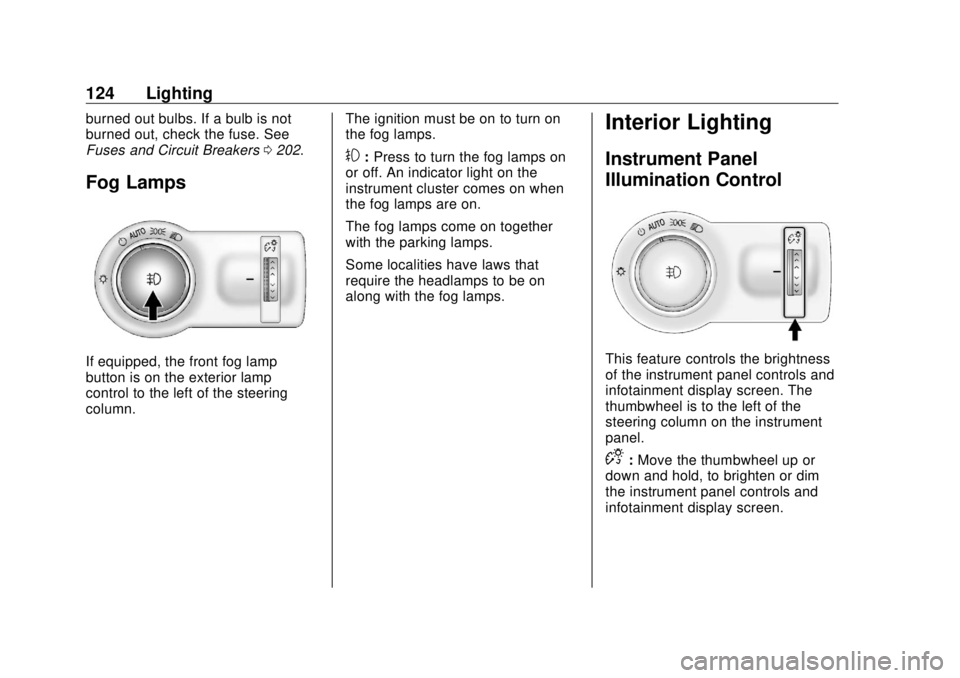
Fog Lamps
If equipped, the front fog lamp
button is on the exterior lamp
control to the left of the steering
column. The ignition must be on to turn on
the fog lamps.
# : Press to turn the fog lamps on
or off. An indicator light on the
instrument cluster comes on when
the fog lamps are on.
The fog lamps come on together
with the parking lamps.
Some localities have laws that
require the headlamps to be on
along with the fog lamps.
Interior Lighting Instrument Panel
Illumination Control
This feature controls the brightness
of the instrument panel controls and
infotainment display screen. The
thumbwheel is to the left of the
steering column on the instrument
panel.
D : Move the thumbwheel up or
down and hold, to brighten or dim
the instrument panel controls and
infotainment display screen.
Page 129 of 303
Buick Cascada Owner Manual (GMNA-Localizing-U.S-11373983) - 2018 -
CRC - 7/10/17
128 Infotainment System
Infotainment
System Introduction Infotainment . . . . . . . . . . . . . . . . . . 128
Introduction Infotainment See the infotainment manual for
information on the radio, audio
players, phone, navigation system,
and voice or speech recognition.
It also includes information on
settings.
Page 136 of 303

Buick Cascada Owner Manual (GMNA-Localizing-U.S-11373983) - 2018 -
CRC - 7/10/17
Driving and Operating 135
Driving Information Distracted Driving Distraction comes in many forms
and can take your focus from the
task of driving. Exercise good
judgment and do not let other
activities divert your attention away
from the road. Many local
governments have enacted laws
regarding driver distraction. Become
familiar with the local laws in
your area.
To avoid distracted driving, keep
your eyes on the road, keep your
hands on the steering wheel, and
focus your attention on driving.
.
Do not use a phone in
demanding driving situations.
Use a hands-free method to
place or receive necessary
phone calls.
.
Watch the road. Do not read,
take notes, or look up
information on phones or other
electronic devices. .
Designate a front seat
passenger to handle potential
distractions.
.
Become familiar with vehicle
features before driving, such as
programming favorite radio
stations and adjusting climate
control and seat settings.
Program all trip information into
any navigation device prior to
driving.
.
Wait until the vehicle is parked
to retrieve items that have fallen
to the floor.
.
Stop or park the vehicle to tend
to children.
.
Keep pets in an appropriate
carrier or restraint.
.
Avoid stressful conversations
while driving, whether with a
passenger or on a cell phone.{ WarningTaking your eyes off the road too
long or too often could cause a
crash resulting in injury or death.
Focus your attention on driving.
Refer to the infotainment section for
more information on using that
system and the navigation system,
if equipped, including pairing and
using a cell phone.
Defensive Driving Defensive driving means “ always
expect the unexpected. ” The first
step in driving defensively is to wear
the seat belt. See Seat Belts 0 53 .
.
Assume that other road users
(pedestrians, bicyclists, and
other drivers) are going to be
careless and make mistakes.
Anticipate what they might do
and be ready.
.
Allow enough following distance
between you and the driver in
front of you.
Page 149 of 303

Buick Cascada Owner Manual (GMNA-Localizing-U.S-11373983) - 2018 -
CRC - 7/10/17
148 Driving and Operating CautionIf the steering wheel is turned
until it reaches the end of its
travel, and is held in that position
while starting the vehicle, damage
may occur to the hydraulic power
steering system and there may be
loss of power steering assist.
Starting Procedure
1. With your foot off the
accelerator pedal, turn the
ignition key to START. When
the engine starts, let go of the
key. The idle speed will go
down as the engine warms. Do
not race the engine
immediately after starting it.
Operate the engine and
transmission gently to allow the
oil to warm up and lubricate all
moving parts. CautionCranking the engine for long
periods of time, by returning the
ignition to the START position
immediately after cranking has
ended, can overheat and damage
the cranking motor, and drain the
battery. Wait at least 15 seconds
between each try, to let the
cranking motor cool down.
2. If the engine does not start
after five to 10 seconds,
especially in very cold weather
(below − 18 °C or 0 °F), it could
be flooded with too much
gasoline. Push the accelerator
pedal all the way to the floor
and hold it there as you hold
the key in START for a
maximum of 15 seconds. Wait
at least 15 seconds between
each try, to allow the cranking
motor to cool. When the engine
starts, let go of the key and accelerator. If the vehicle starts
briefly but then stops again,
repeat the procedure. This
clears the extra gasoline from
the engine. Do not race the
engine immediately after
starting it. Operate the engine
and transmission gently until
the oil warms up and lubricates
all moving parts.
Retained Accessory
Power (RAP) The following vehicle accessories
may be used for up to 10 minutes
after the engine is turned off:
.
Power windows
.
Accessory power outlets
Power to the infotainment system
will continue to operate for
30 minutes or until the key is
removed from the ignition switch,
regardless of whether any door will
be opened.
Page 163 of 303

Buick Cascada Owner Manual (GMNA-Localizing-U.S-11373983) - 2018 -
CRC - 7/10/17
162 Driving and Operating .
Shift the transmission to
N (Neutral).
.
To turn off cruise control,
press
1 .
Erasing Speed Memory
The cruise control set speed is
erased from memory if
1 is pressed
or if the vehicle is turned off.
Driver Assistance
Systems Assistance Systems for
Parking or Backing If equipped, the Rear Vision Camera
(RVC), Rear Parking Assist (RPA),
and Front Parking Assist (FPA) may
help the driver park or avoid objects.
Always check around the vehicle
when parking or backing.
Rear Vision Camera (RVC)
When the vehicle is shifted into
R (Reverse), the RVC displays an
image of the area behind the vehicle
in the infotainment display. 1. View Displayed by the
Camera
1. View Displayed by the
Camera
2. Corners of the Rear Bumper
Page 164 of 303

Buick Cascada Owner Manual (GMNA-Localizing-U.S-11373983) - 2018 -
CRC - 7/10/17
Driving and Operating 163Displayed images may be farther or
closer than they appear. The area
displayed is limited and objects that
are close to either corner of the
bumper or under the bumper do not
display.
Touch MENU on the infotainment
screen to adjust the display
brightness while viewing the rear
camera display.
A warning triangle may show on the
infotainment display to show that
RPA has detected an object. This
triangle changes from amber to red
and increases in size the closer the
object.
{ Warning
The camera(s) do not display
children, pedestrians, bicyclists,
crossing traffic, animals, or any
other object outside of the
cameras ’ field of view, below the
bumper, or under the vehicle.
Shown distances may be different
from actual distances. Do not
(Continued) Warning (Continued) drive or park the vehicle using
only these camera(s). Always
check behind and around the
vehicle before driving. Failure to
use proper care may result in
injury, death, or vehicle damage.
Parking Assist
With RPA, as the vehicle backs up
at speeds of less than 8 km/h
(5 mph), the sensors on the rear
bumper detect objects up to 1.5 m
(5 ft) behind the vehicle that are
within a zone 25 cm (10 in) high off
the ground and below bumper level.
If the vehicle has Front Parking
Assist (FPA), it also detects objects
1.2 m (4 ft) in front of the vehicle.
These detection distances may be
shorter during warmer or humid
weather. Blocked sensors will not
detect objects and can also cause
false detections. Keep the sensors
clean of mud, dirt, snow, ice, and
slush; and clean sensors after a car
wash in freezing temperatures. { WarningThe Parking Assist system does
not detect children, pedestrians,
bicyclists, animals, or objects
located below the bumper or that
are too close or too far from the
vehicle. It is not available at
speeds greater than 8 km/h
(5 mph). To prevent injury, death,
or vehicle damage, even with
Parking Assist, always check the
area around the vehicle and
check all mirrors before moving
forward or backing.
Page 165 of 303

Buick Cascada Owner Manual (GMNA-Localizing-U.S-11373983) - 2018 -
CRC - 7/10/17
164 Driving and Operating
The instrument cluster may have a
parking assist display with bars that
show “ distance to object ” and object
location information for RPA, and on
some vehicles, for the FPA system.
As the object gets closer, more bars
light up, and the bars change color
from yellow to amber to red.
When an object is first detected in
the rear, one beep will be heard
from the rear. When an object is
very close (<0.6 m (2 ft) in the
vehicle rear, or <0.3 m (1 ft) in the
vehicle front), five beeps will sound
from the rear or front depending on
object location. Beeps for FPA are
higher pitched than for RPA. Turning the Features On or Off
Press
X on the center stack to
turn on or off Parking Assist. The
indicator light next to the button
comes on when the features are on
and turns off when the features
have been disabled.
The parking assist symbols and
guidance lines can be turned on or
off through the infotainment system.
See “ Rear Camera Options ” in
Vehicle Personalization 0 114
Forward Collision Alert
(FCA) System If equipped, the FCA system may
help to avoid or reduce the harm
caused by front-end crashes. FCA
provides a visual alert and beeps
when approaching a vehicle directly
ahead too quickly. The forward-looking FCA camera
sensor is on the windshield ahead
of the rearview mirror. FCA detects
vehicles within a distance of
approximately 60 m (197 ft) and
operates at speeds above 40 km/h
(25 mph).
{ WarningFCA is a warning system and
does not apply the brakes. When
approaching a slower-moving or
stopped vehicle ahead too rapidly,
or when following a vehicle too
closely, FCA may not provide a
warning with enough time to help
avoid a crash. It also may not
provide any warning at all. FCA
does not warn of pedestrians,
animals, signs, guardrails,
bridges, construction barrels,
or other objects. Be ready to take
action and apply the brakes. See
Defensive Driving 0 135 .
Page 207 of 303

Buick Cascada Owner Manual (GMNA-Localizing-U.S-11373983) - 2018 -
CRC - 7/10/17
206 Vehicle Care
The vehicle may not be equipped
with all of the fuses, relays, and
features shown.
Fuses Usage
1 Displays
2 Body control module/
Exterior lamps
3 Body control module/
Exterior lamps Fuses Usage
4 Infotainment system
5 Infotainment system/
Instrument cluster
6 Power outlet
7 Power outlet
8 Body control module/
Left low-beam
headlamp Fuses Usage
9 Body control module/
Right low-beam
headlamp
10 Body control module/
Door locks
11 Interior fan
12 Driver power seat
13 Passenger power seat
14 Diagnostic connector
15 Airbag
17 A/C system
18 Service diagnose
19 Body control module/
Brake lamps/Reverse
lamps/Interior lamps
20 –
21 Instrument panel
22 Ignition
23 Body control module
24 Body control module
25 –