instrument cluster BUICK CASCADA 2018 User Guide
[x] Cancel search | Manufacturer: BUICK, Model Year: 2018, Model line: CASCADA, Model: BUICK CASCADA 2018Pages: 303, PDF Size: 5.87 MB
Page 111 of 303
Buick Cascada Owner Manual (GMNA-Localizing-U.S-11373983) - 2018 -
CRC - 7/10/17
110 Instruments and Controls
Door Ajar Light If equipped, this light comes on
when a door is open or not securely
latched. Before driving, check that
all doors are properly closed.
Information Displays Driver Information
Center (DIC) The DIC displays information about
the vehicle. It also displays warning
messages if a system problem is
detected. See Vehicle Messages
0 113 . All messages appear in the
DIC display in the center of the
instrument cluster.
DIC Operation and Displays The DIC has different displays
which can be accessed by using the
DIC buttons on the turn signal lever.
The DIC displays trip, fuel, and
vehicle system information, and
warning messages if a system
problem is detected.
The bottom of the DIC display
shows the position of the shift lever
and the odometer. It may also show
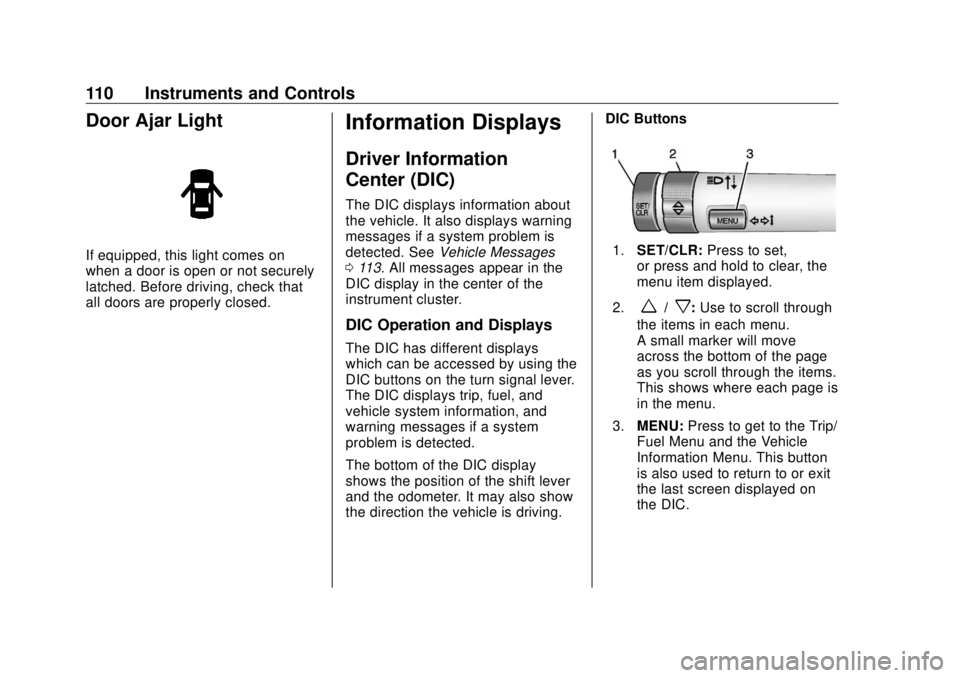
the direction the vehicle is driving. DIC Buttons
1. SET/CLR: Press to set,
or press and hold to clear, the
menu item displayed.
2.
w /
x : Use to scroll through
the items in each menu.
A small marker will move
across the bottom of the page
as you scroll through the items.
This shows where each page is
in the menu.
3. MENU: Press to get to the Trip/
Fuel Menu and the Vehicle
Information Menu. This button
is also used to return to or exit
the last screen displayed on
the DIC.
Page 112 of 303
Buick Cascada Owner Manual (GMNA-Localizing-U.S-11373983) - 2018 -
CRC - 7/10/17
Instruments and Controls 111Trip/Fuel Menu Items Press MENU on the turn signal
lever until the Trip/Fuel Menu is
displayed. Use
w /
x to scroll
through the following menu items:
.
Digital Speedometer
.
Trip 1
.
Trip 2
.
Fuel Range
.
Average Fuel Economy
.
Instantaneous Fuel Economy
.
Average Vehicle Speed
.
Timer
.
Navigation
Digital Speedometer
The speedometer shows how fast
the vehicle is moving in either
kilometers per hour (km/h) or miles
per hour (mph). The speedometer
cannot be reset. Trip 1 and Trip 2
These displays show the current
distance traveled, in either
kilometers (km) or miles (mi), since
the last reset for the trip odometer.
The trip odometer can be reset to
zero by pressing SET/CLR, or the
trip odometer reset stem in the
instrument cluster, while the trip
odometer display is showing.
Fuel Range
This display shows the approximate
distance the vehicle can be driven
without refueling. The fuel range
estimate is based on an average of
the vehicle's fuel economy over
recent driving history and the
amount of fuel remaining in the fuel
tank. Fuel range cannot be reset.
Average Fuel Economy
This display shows the approximate
average liters per 100 kilometers
(L/100 km) or miles per gallon
(mpg). Average fuel economy is
calculated based on the number of
L/100 km (mpg) recorded since the
last time this menu item was reset.
This number reflects only the approximate average fuel economy
that the vehicle has right now, and
will change as driving conditions
change. The average fuel economy
can be reset by pressing SET/CLR
while the Average Fuel Economy
display is showing.
Instantaneous Fuel Economy
The instantaneous fuel economy
display shows the current fuel
economy in liters per 100 kilometers
(L/100 km) or miles per gallon
(mpg). The instantaneous fuel
economy reflects only the current
approximate fuel economy, and
changes frequently as driving
conditions change. Unlike average
economy, this display cannot be
reset.
Average Vehicle Speed
This display shows the average
speed of the vehicle in kilometers
per hour (km/h) or miles per
hour (mph). This average is
calculated based on the various
vehicle speeds recorded since the
last reset of this value. The average
Page 113 of 303
Buick Cascada Owner Manual (GMNA-Localizing-U.S-11373983) - 2018 -
CRC - 7/10/17
112 Instruments and Controls speed can be reset by pressing
SET/CLR while the Average Vehicle
Speed display is showing.
Timer
This display can be used as a timer.
To start the timer, press SET/CLR
while Timer is displayed. The
display will show the amount of time
that has passed since the timer was
last reset, not including time the
ignition is off. Time will continue to
be counted as long as the ignition is
on, even if another display is being
shown on the DIC. The timer will
record up to 99 hours, 59 minutes,
and 59 seconds (99:59:59) after
which the display will return to zero.
To stop the timer, press SET/CLR
briefly while Timer is displayed. To
reset the timer to zero, press and
hold SET/CLR.
Navigation
If equipped, this display is used for
the Navigation System Turn-by-Turn
guidance. Vehicle Information Menu
Items Press MENU on the turn signal
lever until the Vehicle Information
Menu is displayed. Use
w /
x to
scroll through the following menu
items:
.
Unit
.
Tire Pressure
.
Remaining Oil Life
.
Battery Voltage
Unit
Press SET/CLR to set.
Move
w /
x to switch between
metric or US when the set Unit
display is active. Press SET/CLR to
confirm the setting. This will change
the displays on the cluster and DIC
to either metric or English (US)
measurements. Tire Pressure
The display will show a vehicle with
the approximate pressures of all
four tires. Tire pressure is displayed
in either kilopascal (kPa) or
pounds per square inch (psi).
See Tire Pressure Monitor System
0 217 and Tire Pressure Monitor
Operation 0 218 .
Remaining Oil Life
This display shows an estimate of
the oil's remaining useful life.
If REMAINING OIL LIFE 99% is
displayed, that means 99% of the
current oil life remains.
When the remaining oil life is low,
the CHANGE ENGINE OIL SOON
message will appear on the display.
The oil should be changed as soon
as possible. See Engine Oil 0 179 .
In addition to the engine oil life
system monitoring the oil life,
additional maintenance is
recommended. See Maintenance
Schedule 0 252 .
Page 122 of 303

Buick Cascada Owner Manual (GMNA-Localizing-U.S-11373983) - 2018 -
CRC - 7/10/17
Lighting 121taillamps, license plate lamps,
instrument panel lights, and
sidemarker lamps.
; : Turns on the parking lamps
including all lamps, except the
headlamps.
5 : Turns on the headlamps
together with the parking lamps and
instrument panel lights. A warning
chime sounds if the driver door is
opened when the ignition is off and
the headlamps are on.
# : If equipped, press to turn the
fog lamps on or off. See Fog Lamps
0 124 .
When the lights are on,
; will be
lit. See Lamps On Reminder 0 109 .
Headlamp High/
Low-Beam Changer 3 : Push the turn signal lever away
from you and release to turn the
high beams on.
To return to low beams, push the
lever again or pull it toward you and
release.
This indicator light turns on in the
instrument cluster when the
high-beam headlamps are on.
Flash-to-Pass To flash the high beams, pull the
turn signal lever all the way toward
you. Then release it. Daytime Running
Lamps (DRL) DRL can make it easier for others to
see the front of your vehicle during
the day. Fully functional DRL are
required on all vehicles first sold in
Canada.
The dedicated DRL will come on
when all of the following conditions
are met:
.
The ignition is on.
.
The exterior lamp control is
in AUTO.
.
The vehicle is not in P (Park).
The headlamps automatically
change from DRL to the regular
headlamps depending on the
darkness of the surroundings and
information provided by the rain
sensor. The other lamps that come
on with the headlamps will also
come on.
When it is bright enough outside,
the headlamps go off and the DRL
come on.
Page 123 of 303
Buick Cascada Owner Manual (GMNA-Localizing-U.S-11373983) - 2018 -
CRC - 7/10/17
122 Lighting The DRL turn off when the
headlamps are turned to
O or the
ignition is off.
For vehicles first sold in Canada,
the DRL can only be turned off
when the vehicle is parked.
Automatic Headlamp
System When it is dark enough outside and
the exterior lamp control is in the
automatic position and the engine is
running, the headlamps come on
automatically. See Exterior Lamp
Controls 0 120 .
The system may also turn on the
headlamps when driving through a
parking garage or tunnel.
If the vehicle is started in a dark
garage, the automatic headlamp
system comes on immediately. If it
is light outside when the vehicle
leaves the garage, there is a slight
delay before the automatic
headlamp system changes to the
DRL. During that delay, the
instrument cluster may not be as bright as usual. Make sure the
instrument panel brightness control
is in the full bright position. See
Instrument Panel Illumination
Control 0 124 .
Lights On with Wipers If the windshield wipers are
activated in daylight with the engine
on, and the exterior lamp control is
in AUTO, the headlamps, parking
lamps, and other exterior lamps
come on. The transition time for the
lamps coming on varies based on
wiper speed. When the wipers are
not operating, these lamps turn off.
Move the exterior lamp control to
Por
; to disable this feature.
Adaptive Forward
Lighting (AFL) The AFL system adjusts the
headlamps to provide greater road
illumination in various driving
conditions.
To enable AFL, set the exterior lamp
control to the AUTO position.
Moving the control out of the AUTO position will deactivate the system.
AFL will operate when the vehicle
speed is greater than 3 km/h
(2 mph). AFL will not operate when
the transmission is in R (Reverse).
AFL is not immediately operable
after starting the vehicle; driving a
short distance is required to
calibrate the AFL. See Exterior
Lamp Controls 0 120 .
Curve Lighting
The light beam pivots based on the
steering wheel position and vehicle
speed of at least 10 km/h (6 mph).
The headlamps shine at an angle of
up to 15 degrees to the right or left
of the direction of travel.
Corner Lighting
On tight bends or when making a
turn, depending on the steering
angle or the turn signal lamp, an
additional left or right reflector is
turned on to illuminate the road at a
right angle to the direction of travel.
It is activated up to a speed of
40 km/h (25 mph).
Page 124 of 303

Buick Cascada Owner Manual (GMNA-Localizing-U.S-11373983) - 2018 -
CRC - 7/10/17
Lighting 123Reversing Function
If the headlamps are on and the
shift lever is in R (Reverse), both
corner lights are turned on. They
remain on for 20 seconds after
moving the shift lever out of
R (Reverse) or until the vehicle is
driving forward faster than 16 km/h
(10 mph).
Headlamp Leveling
Control The level of the headlamps is
adjusted automatically based on
vehicle load. Hazard Warning Flashers
| : Press to make the front and
rear turn signal lamps flash on and
off. This warns others that you are
having trouble. Press again to turn
the flashers off.
In the event of an accident with
airbag deployment the hazard
warning flashers are activated
automatically. Turn and Lane-Change
Signals
Move the lever all the way up or
down to signal a turn.
An arrow on the instrument cluster
will flash in the direction of the turn
or lane change.
Raise or lower the lever until the
arrow starts to flash to signal a lane
change. The turn signal flashes
three times.
The lever returns to its starting
position when it is released.
If after signaling a turn or lane
change the arrow flashes rapidly or
does not come on, a signal bulb
may be burned out. Replace any
Page 125 of 303
Buick Cascada Owner Manual (GMNA-Localizing-U.S-11373983) - 2018 -
CRC - 7/10/17
124 Lighting burned out bulbs. If a bulb is not
burned out, check the fuse. See
Fuses and Circuit Breakers 0 202 .
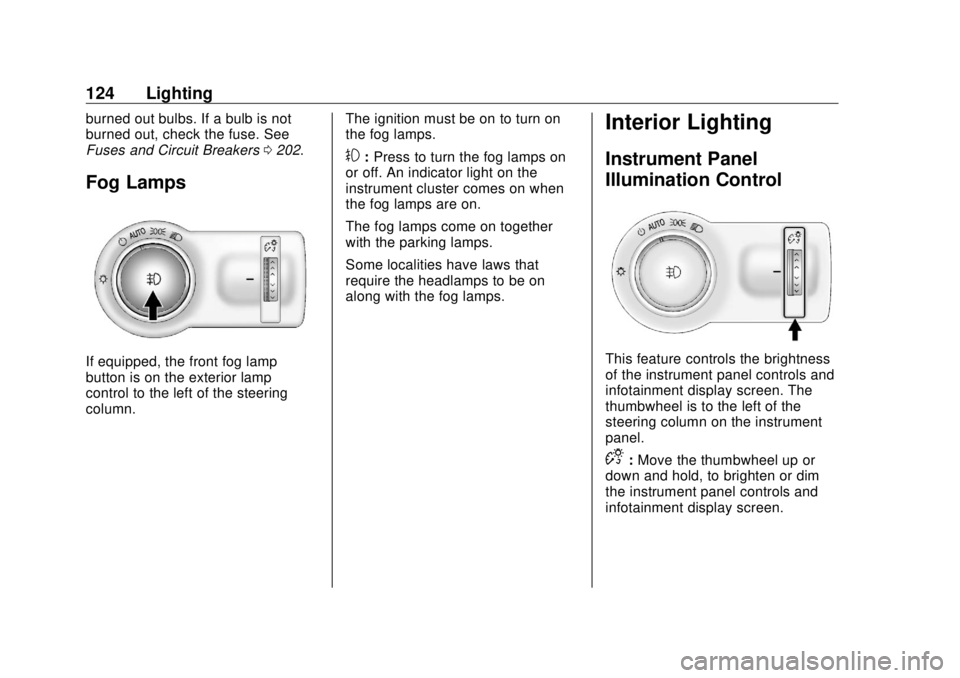
Fog Lamps
If equipped, the front fog lamp
button is on the exterior lamp
control to the left of the steering
column. The ignition must be on to turn on
the fog lamps.
# : Press to turn the fog lamps on
or off. An indicator light on the
instrument cluster comes on when
the fog lamps are on.
The fog lamps come on together
with the parking lamps.
Some localities have laws that
require the headlamps to be on
along with the fog lamps.
Interior Lighting Instrument Panel
Illumination Control
This feature controls the brightness
of the instrument panel controls and
infotainment display screen. The
thumbwheel is to the left of the
steering column on the instrument
panel.
D : Move the thumbwheel up or
down and hold, to brighten or dim
the instrument panel controls and
infotainment display screen.
Page 159 of 303

Buick Cascada Owner Manual (GMNA-Localizing-U.S-11373983) - 2018 -
CRC - 7/10/17
158 Driving and Operating vehicle wheel brakes to assist the
driver in keeping the vehicle on the
intended path.
If cruise control is being used and
TCS or StabiliTrak begins to limit
wheel spin, cruise control will
disengage. Cruise control may be
turned back on when road
conditions allow.
Both systems come on
automatically when the vehicle is
started and begins to move. The
systems may be heard or felt while
they are operating or while
performing diagnostic checks. This
is normal and does not mean there
is a problem with the vehicle.
It is recommended to leave both
systems on for normal driving
conditions, but it may be necessary
to turn TCS off if the vehicle gets
stuck in sand, mud, ice, or snow.
See If the Vehicle Is Stuck 0 141
and “ Turning the Systems Off and
On ” later in this section. The indicator light for both systems
is in the instrument cluster. This
light will:
.
Flash when TCS is limiting
wheel spin
.
Flash when StabiliTrak is
activated
.
Turn on and stay on when either
system is not working
If either system fails to turn on or to
activate, a message displays in the
Driver Information Center (DIC), and
d comes on and stays on to
indicate that the system is inactive
and is not assisting the driver in
maintaining control. The vehicle is
safe to drive, but driving should be
adjusted accordingly.
If
d comes on and stays on:
1. Stop the vehicle. 2. Turn the engine off and wait
15 seconds.
3. Start the engine.
Drive the vehicle. If
d comes on
and stays on, the vehicle may need
more time to diagnose the problem.
If the condition persists, see your
dealer.
Turning the Systems Off
and On
Page 160 of 303

Buick Cascada Owner Manual (GMNA-Localizing-U.S-11373983) - 2018 -
CRC - 7/10/17
Driving and Operating 159CautionDo not repeatedly brake or
accelerate heavily when TCS is
off. The vehicle driveline could be
damaged.
To turn off only TCS, press and
release
g . The appropriate DIC
message is displayed.
To turn TCS on again, press and
release
g . The appropriate DIC
message is displayed.
If TCS is limiting wheel spin when
gis pressed, the system will not turn
off until the wheels stop spinning. To turn off both TCS and StabiliTrak,
press and hold
g until the
StabiliTrak Off light
g comes on and
stays on in the instrument cluster.
The appropriate DIC message is
displayed.
To turn TCS and StabiliTrak on
again, press and release
g . The
StabiliTrak Off light
g in the
instrument cluster turns off. The
appropriate DIC message is
displayed.
Adding accessories can affect
vehicle performance. See
Accessories and Modifications
0 175 .Cruise Control The cruise control lets the vehicle
maintain a speed of about 40 km/h
(25 mph) or more without keeping
your foot on the accelerator. Cruise
control does not work at speeds
below 40 km/h (25 mph).
{ WarningCruise control can be dangerous
where you cannot drive safely at
a steady speed. Do not use
cruise control on winding roads or
in heavy traffic.
Cruise control can be dangerous
on slippery roads. On such roads,
fast changes in tire traction can
cause excessive wheel slip, and
you could lose control. Do not use
cruise control on slippery roads.
Page 161 of 303

Buick Cascada Owner Manual (GMNA-Localizing-U.S-11373983) - 2018 -
CRC - 7/10/17
160 Driving and Operating The vehicle has a Traction Control
System (TCS) or StabiliTrak system
that begins to limit wheel spin while
using cruise control and the cruise
control will automatically disengage.
See Traction Control/Electronic
Stability Control 0 157 . If a collision
alert occurs when cruise control is
activated, cruise control is
disengaged. See Forward Collision
Alert (FCA) System 0 164 . When
road conditions allow you to safely
use it again, cruise control can be
turned back on.
If the brakes are applied, cruise
control disengages. 1 : Press to turn the cruise control
system on or off. A white indicator
comes on in the instrument cluster
when cruise is turned on.
RES/+ : If there is a set speed in
memory, move the thumbwheel up
briefly to resume to that speed or
hold upward to accelerate. If cruise
control is already active, use to
increase vehicle speed.
SET/ − : Move the thumbwheel down
briefly to set the speed and activate
cruise control. If cruise control is
already active, use to decrease
speed.
* : Press to disengage cruise
control without erasing the set
speed from memory.
Setting Cruise Control
If
1 is on when not in use, SET/ − or
RES/+ could get bumped and go
into cruise when not desired. Keep
1 off when cruise control is not
being used. To set a speed:
1. Press
1 to turn cruise
control on.
2. Get up to the speed desired.
3. Move the thumbwheel down
toward SET/ − and release it.
4. Remove your foot from the
accelerator.
The cruise control indicator on the
instrument cluster turns green after
cruise control has been set to the
desired speed. See Instrument
Cluster 0 98 .
Resuming a Set Speed
If the cruise control is set at a
desired speed and then the brakes
are applied or
* is pressed, the
cruise control is disengaged without
erasing the set speed from memory.
Once the vehicle speed is about
40 km/h (25 mph) or greater, move
the thumbwheel up toward RES/+
briefly. The vehicle returns to the
previously set speed.