change time BUICK CENTURY 1997 User Guide
[x] Cancel search | Manufacturer: BUICK, Model Year: 1997, Model line: CENTURY, Model: BUICK CENTURY 1997Pages: 406, PDF Size: 20.64 MB
Page 157 of 406
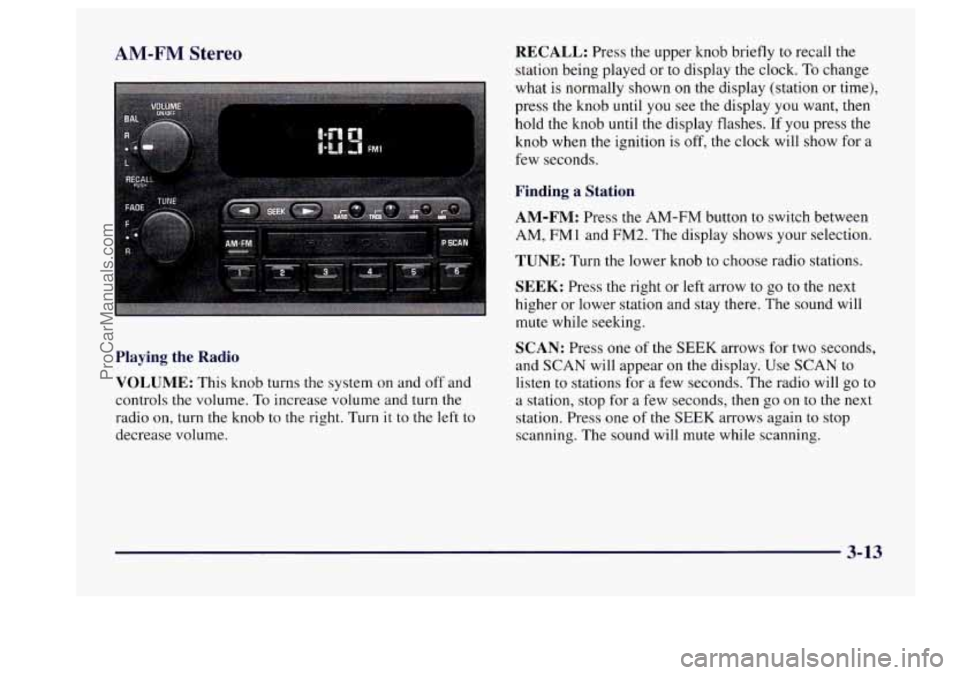
AM-FM Stereo
Playing the Radio
VOLUME:
This knob turns the system on and off and
controls the volume. To increase volume and turn the
radio on, turn the knob to the right. Turn it to
the left to
decrease volume.
RECALL: Press the upper knob briefly to recall the
station being played or to display
the clock. To change
what is normally shown on the display (station or time),
press the knob until
you see the display you want, then
hold the knob until the display flashes. If you press the
knob when the ignition is off, the clock will show for a
few seconds.
Finding a Station
AM-FM:
Press the AM-FM button to switch between
AM, FMl and
FM2. The display shows your selection.
TUNE: Turn the lower knob to choose radio stations.
SEEK: Press the right or left arrow to go to the next
higher or lower station and stay there. The sound will
mute while seeking.
SCAN: Press one of the SEEK arrows for two seconds,
and SCAN will appear on the display. Use SCAN to
listen to stations for a few seconds. The radio will
go to
a station, stop for
a few seconds, then go on to the next
station. Press one
of the SEEK arrows again to stop
scanning. The sound will mute while scanning.
3-13
ProCarManuals.com
Page 159 of 406
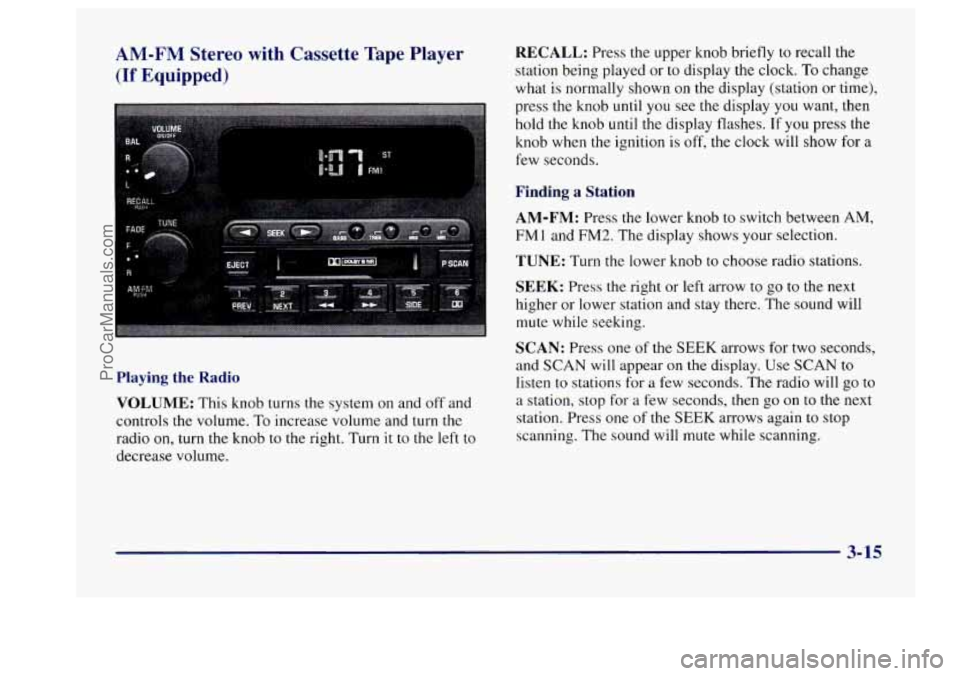
AM-FM Stereo with Cassette Tape Player
(If Equipped)
Playing the Radio
VOLUME:
This knob turns the system on and off and
controls the volume.
To increase volume and turn the
radio on, turn
the knob to the right. Turn it to the left to
decrease volume.
RECALL: Press the upper knob briefly to recall the
station being played or to display the clock. To change
what is normally shown on
the display (station or time),
press
the knob until you see the display you want, then
hold
the knob until the display flashes. If you press the
knob when the ignition
is off, the clock will show for a
few seconds.
Finding a Station
AM-FM:
Press the lower knob to switch between AM,
FMl and
FM2. The display shows your selection.
TUNE: Turn the lower knob to choose radio stations.
SEEK: Press the right or left arrow to go to the next
higher or lower station and stay there. The sound will
mute while seeking.
SCAN: Press one of the SEEK arrows for two seconds,
and SCAN will appear on the display. Use SCAN
to
listen to stations for a few seconds. The radio will go to
a station, stop for a few seconds, then go on to the next
station. Press one of the
SEEK arrows again to stop
scanning. The sound will mute while scanning.
3-15
ProCarManuals.com
Page 163 of 406
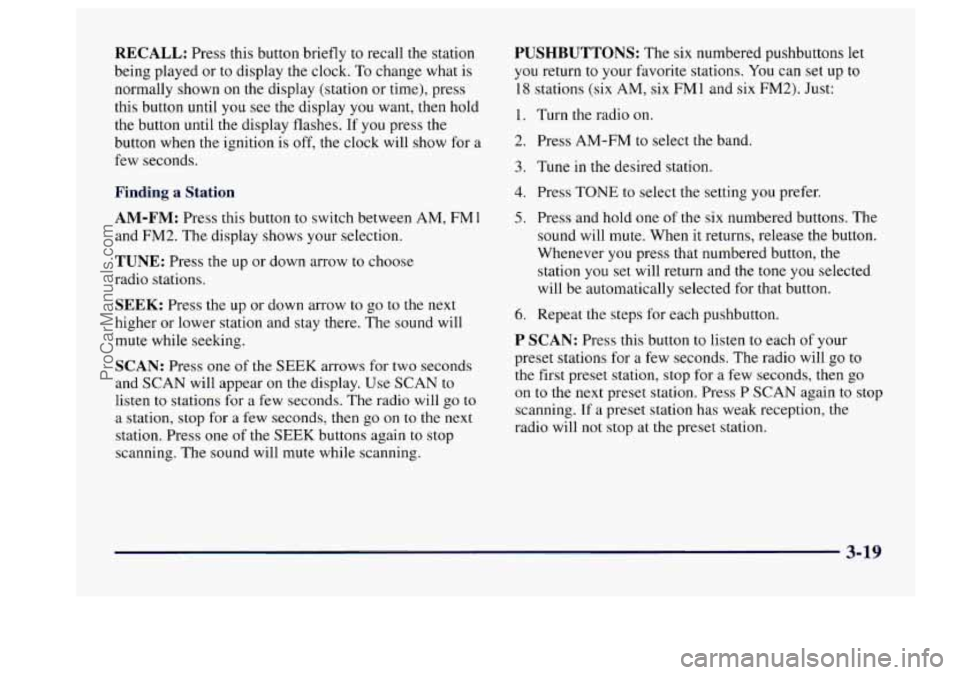
RECALL: Press this button briefly to recall the station
being played or
to display the clock. To change what is
normally shown on the display (station or time), press
this button until you see the display
you want, then hold
the button until the display flashes. If you press the
button when the ignition is off, the clock will show for a
few seconds.
Finding a Station
AM-FM:
Press this button to switch between AM, FMl
and FM2. The display shows your selection.
TUNE: Press the up or down arrow to choose
radio stations.
SEEK: Press the up or down arrow to go to the next
higher or lower station and stay there. The sound will
mute while seeking.
SCAN: Press one of the SEEK arrows for two seconds
and SCAN will appear on the display. Use SCAN to
listen to stations for a few seconds. The radio will go to
a station, stop for a few seconds, then go on to the next
station. Press one of the
SEEK buttons again to stop
scanning. The sound will mute while scanning.
PUSHBUTTONS: The six numbered pushbuttons let
you return to your favorite stations. You can set up to
18 stations (six AM, six FM 1 and six FM2). Just:
1.
2.
3.
4.
5.
6.
Turn the radio on.
Press AM-FM to select the band.
Tune in the desired station.
Press
TONE to select the setting you prefer.
Press and hold one
of the six numbered buttons. The
sound will mute. When it returns, release the button.
Whenever
you press that numbered button, the
station you set will return and the tone you selected
will be automatically selected for that button.
Repeat the steps for each pushbutton.
P SCAN: Press this button to listen to each of your
preset stations for a few seconds. The radio will go
to
the first preset station, stop for a few seconds, then go
on to the next preset station. Press P SCAN again to stop
scanning. If a preset station has weak reception, the
radio will not stop at the preset station.
3-19
ProCarManuals.com
Page 167 of 406
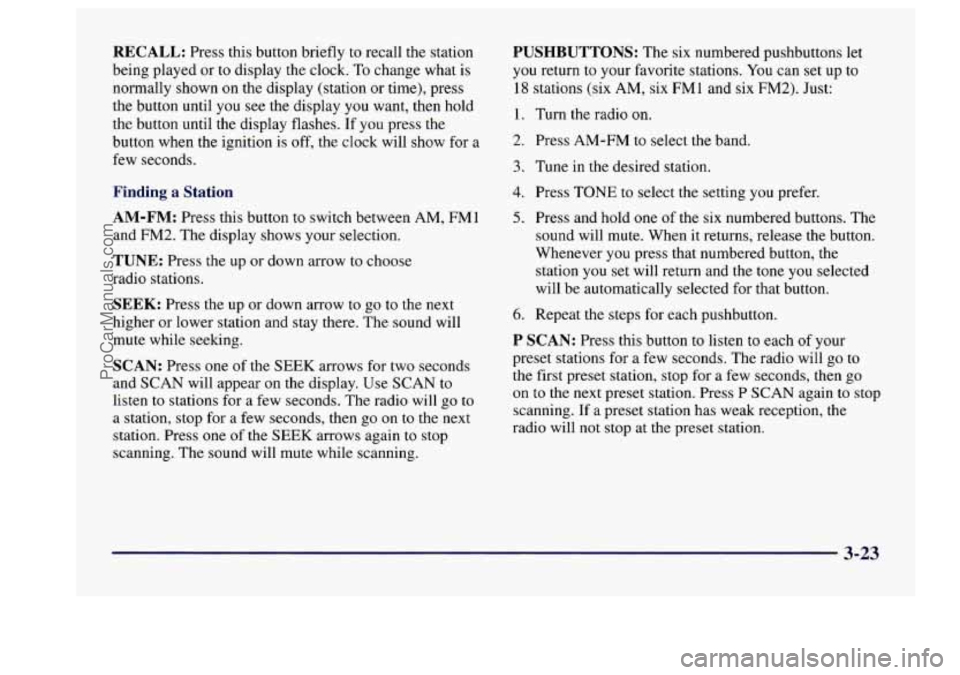
RECALL: Press this button briefly to recall the station
being played or to display the clock. To change what is
normally shown on the display (station or time), press
the button until
you see the display you want, then hold
the button until the display flashes. If you press the
button when the ignition is off, the clock will show for a
few seconds.
Finding a Station
AM-FM: Press this button to switch between AM, FMl
and
FM2. The display shows your selection.
TUNE: Press the up or down arrow to choose
radio stations.
SEEK: Press the up or down arrow to go to the next
higher or lower station and stay there. The sound will
mute while seeking.
SCAN: Press one of the SEEK arrows for two seconds
and SCAN will appear on the display. Use SCAN to
listen to stations for a few seconds. The radio will go to
a station, stop for a few seconds, then go on to the next
station. Press one of the
SEEK arrows again to stop
scanning. The sound will mute while scanning.
PUSHBUTTONS: The six numbered pushbuttons let
you return to your favorite stations. You can set up to
18 stations (six AM, six FM1 and six FM2). Just:
1.
2.
3.
4.
5.
6.
Turn the radio on.
Press AM-FM to select the band.
Tune in the desired station.
Press
TONE to select the setting you prefer.
Press and hold one of the six numbered buttons. The
sound will mute. When it returns, release the button.
Whenever you press that numbered button, the station you set will return and the tone you selected
will be automatically selected for that button.
Repeat the steps for each pushbutton.
P SCAN: Press this button to listen to each of your
preset stations for a few seconds. The radio will go
to
the first preset station, stop for a few seconds, then go
on to the next preset station. Press P SCAN again to stop
scanning. If
a preset station has weak reception, the
radio will not stop at the preset station.
3-23
ProCarManuals.com
Page 169 of 406
0 E20: It is dirty, scratched or wet.
E20: There's too much moisture in the air. (Wait
If any error occurs' fbpeatedly or if an error can't be
corrected, please contact your dealer.
If your radio
displays an error number, write it down and provide it to
your dealer when reporting the problem.
PREV (1): Press this button to go to the start of the
current track if more than eight seconds have played. If
you hold the button or press it more than once, the
player will continue moving back through the disc. The
sound will mute while seeking.
NEXT (2): Press this button to go to the next track. If
you hold the button or press
it more than once, the
player will continue moving forward through the disc.
The sound will mute while seeking.
The
SEEK down and up arrows will also find the
previous and next selections on the disc.
about an hour and
try again.)
44 (3): Press and hold this button to quickly reverse
within a track. You will hear sound.
.. (4): Press and hold this button to quickly advance
within a track.
You will hear sound.
RAND (6): Press this button to hear the tracks in
random, rather than sequential, order. Press
RAND
again to turn off random play.
RECALL: Press this button to see which track is
playing. Press it again within five seconds to see how
long it has been playing.
To change what is normally
shown on the display (track or elapsed time), press the
button until you
see the display you want, then hold the
button until the display flashes.
AM-FM: Press this button to play the radio when a disc
is in the player.
SOURCE: Press this button to change to the disc
function when the radio
is on. When a disc is inserted,
the disc will play until you press
AM-FM. Then the disc
will stop playing and the radio will play. Press
SOURCE
again to play a disc again. CD PLAY will show on
the display.
E JECR Press this button to remove the disc. The raalo
will play.
If you turn off the ignition or radio with a disc in the
player, it will stay in the player. When you turn on the
ignition or system, the disc will start playing where it
stopped,
if it was the last-selected audio source. If you
leave a compact disc
in the player while listening to the
radio, it may become warm.
3-25
ProCarManuals.com
Page 170 of 406
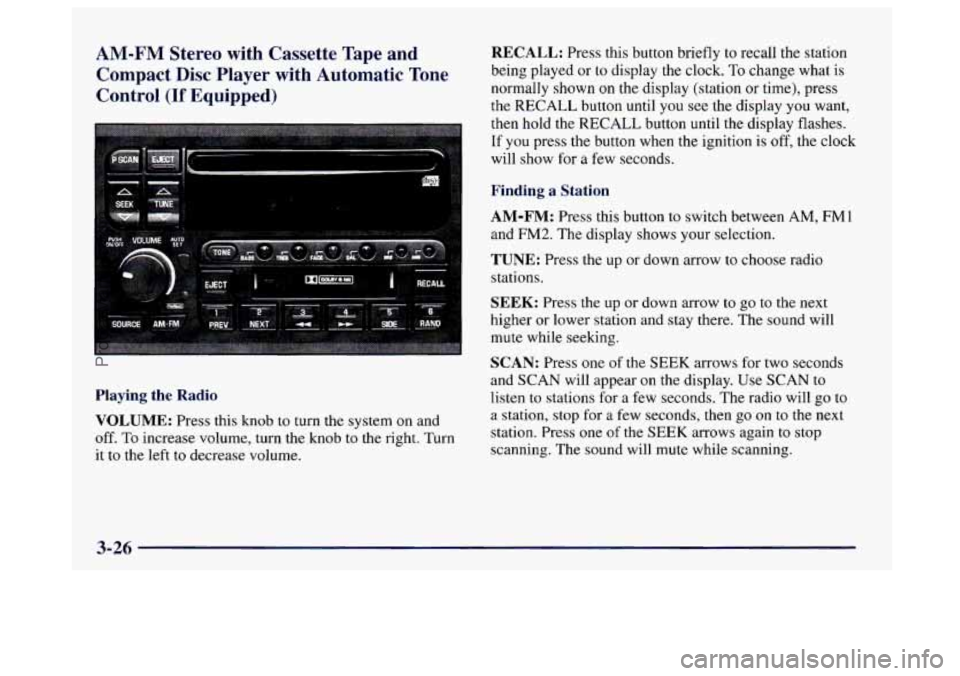
AM-FM Stereo with Cassette Tape and Compact Disc Player with Automatic Tone
Control
(If Equipped)
Playing the Radio
VOLUME:
Press this knob to turn the system on and
off. To increase volume, turn the knob to the right. Turn
it to the left to decrease volume.
RECALL: Press this button briefly to recall the station
being played or
to display the clock. To change what is
normally shown on the display (station or time), press
the RECALL button
until you see the display you want,
then hold the RECALL button until the display flashes.
If you press the button when the ignition is off, the clock
will show for a few seconds.
Finding a Station
AM-FM:
Press this button to switch between AM, FMl
and
FM2. The display shows your selection.
TUNE: Press the up or down arrow to choose radio
stations.
SEEK: Press the up or down arrow to go to the next
higher or lower station and stay there. The sound will
mute while seeking.
SCAN: Press one of the SEEK arrows for two seconds
and
SCAN will appear on the display. Use SCAN to
listen to stations for
a few seconds. The radio will go to
a station, stop for a few seconds, then
go on to the next
station. Press one of the SEEK arrows again to stop
scanning.
The sound will mute while scanning.
3-26
ProCarManuals.com
Page 174 of 406
Playing a Compact Disc
Insert a disc partway into the slot, label side up. The
player will pull it in. The disc should begin playing.
If you want to insert a CD while the ignition or the radio
is off, first press EJECT or RECALL.
If you’re driving on a very rough road or if it’s very hot,
the disc may not play and an error code may appear on
the display. When things get back to normal, the disc
should play.
If the disc comes out, it could be that:
0 E20: The disc is upside down.
0 E20: It is dirty, scratched or wet.
0 E20: There’s too much moisture in the air.
(Wait about an hour and try again.)
If any error occurs repeatedly or if an error can’t be
corrected, please contact your dealer.
If your radio
displays an error number, write it down and provide it to
your dealer when reporting the problem.
PREV (1): Press this button to go to the start of the
current track, if more than eight seconds have played. If
you hold the button or press it more than once,
the
player will continue moving back through the disc. The
sound will mute while seeking.
NEXT (2): Press this button to go to the next track. If
you hold the button or press it more than once, the
player will continue moving forward through the disc.
The sound will mute while seeking.
The SEEK down and up arrows will also find the
previous and next selections on the disc.
44 (3): Press and hold this button to quickly reverse
within
a track. You will hear sound.
.. (4): Press and hold this button to quickly advance
within a track. You will hear sound.
RAND (6): Press this button to hear the tracks in
random, rather than sequential, order. Press RAND
again to turn off random play.
RECALL: Press this button to see which track is
playing. Press it again within five seconds to see how
long it has been playing.
To change what is normally
shown on the display (track or elapsed time), press the
RECALL button until you see the display you want,
then hold the RECALL button until the display flashes.
3-30
ProCarManuals.com
Page 175 of 406
AM-FM: Press this button to play the radio when a d
is in the player.
SOURCE: Press this button to change to the disc
function when the radio is on. When a disc is inserted .i
, sc
9
the disc
will play until you press AM-FM. Then the disc
will stop playing and the radio will play. Press SOURCE
again to play a disc again. CD PLAY will show on
the
display.
EJECT Press this button to remove the disc. The radio
will play.
If you turn off the ignition or radio with a disc in the
player, it will stay in the player. When you turn on the
ignition or system, the disc will start playing where it
stopped, if it was the last-selected audio source.
Also,
as a protection feature, if a CD is ejected and left
in the player,
it will be pulled back in the player with the
ignition on or off. If you leave a compact disc in the
player while listening to the radio, it may become warm.
Theft-Deterrent Feature
THEFTLOCK” is designed to discourage theft of your
radio.
It works by using a secret code to disable all radio
functions whenever battery power is removed.
If THEFTLOCK is active, the THEFTLOCK indicator
will
flash when the ignition is off.
The THEFTLOCK feature for the radio may be used
or
ignored. If ignored, the system plays normally and the
radio is not protected by the feature.
If THEFTLOCK is
activated, your radio will
not operate if stolen.
When THEFTLOCK is activated, the radio will display
LOC
to indicate a locked condition anytime battery
power is removed.
If your battery loses power for any
reason,
you must unlock the radio with the secret code
before
it will operate.
Activating the Theft-Deterrent Feature
The instructions which follow, explain how to enter your
secret code to activate the THEFTLOCK system. It is
recommended that you read through all nine steps
before starting the procedure.
3-31
ProCarManuals.com
Page 195 of 406
Remember: Anti-lock doesn’t change the time you need
to get your foot up
to the brake pedal or always decrease
stopping distance. If you get too close to the vehicle in
front of you, you won’t have time to apply your brakes
if that vehicle suddenly slows or stops. Always leave
enough room up ahead to stop, even though you have
anti-lock brakes.
Using Anti-Lock
Don’t pump the brakes. Just hold the brake pedal down
and let anti-lock work for
you. You may feel the system
working, or
you may notice some noise, but this is normal.
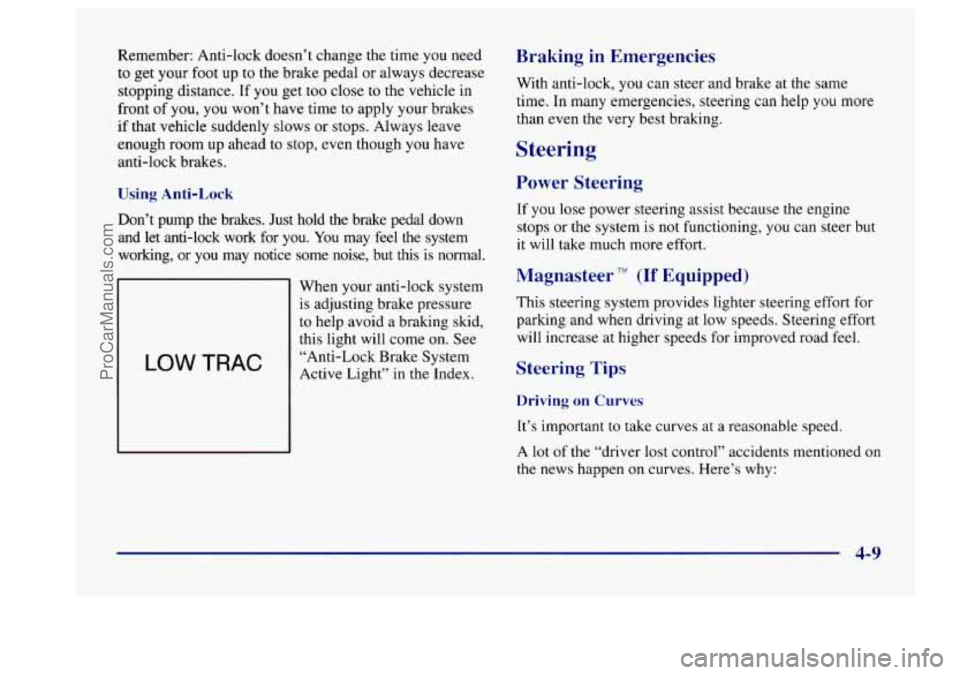
LOW TRAC
When your anti-lock system
is adjusting brake pressure
to help avoid a braking skid,
this light will come on. See
“Anti-Lock Brake System
Active Light” in
the Index.
Braking in Emergencies
With anti-lock, you can steer and brake at the same
time. In many emergencies, steering can help you more
than even the very best braking.
Steering
Power Steering
If you lose power steering assist because the engine
stops or the system is not functioning, you can steer but
it will take much more effort.
Magnasteer TM (If Equipped)
This steering system provides lighter steering effort for
parking and when driving at low speeds. Steering effort
will increase at higher speeds for improved road feel.
Steering Tips
Driving on Curves
It’s important to take curves at a reasonable speed.
A lot of the “driver lost control” accidents mentioned on
the news happen on curves. Here’s why:
4-9
ProCarManuals.com
Page 196 of 406
Experienced driver or beginner, each of us is subject to
the same laws of physics when driving on curves. The
traction
of the tires against the road surface makes it
possible for the vehicle to change its path when you turn
the front wheels. If there’s no traction, inertia will keep
the vehicle going in the same direction. If you’ve ever
tried to steer
a vehicle on wet ice, you’ll understand this.
The traction you can get in a curve depends on the
condition of your tires and the road surface, the angle at
which the curve is banked, and your speed. While you’re
in a curve, speed is the one factor you can control.
Suppose you’re steering through a sharp curve. Then you
suddenly accelerate. Both control systems
-- steering and
acceleration
-- have to do their work where the tires meet
the road. Adding the sudden acceleration can demand too
much of those places. You can lose control.
What should you do if this ever happens? Ease up
on the
accelerator pedal, steer the vehicle the way you want it
to go, and slow down.
Speed limit signs near curves warn that you should
adjust your speed. Of course, the posted speeds are
based on good weather and road conditions. Under less favorable conditions you’ll want to go slower.
If you need to reduce your speed as you approach a
curve, do it before you enter the curve, while your front
wheels are straight ahead.
Try to adjust your speed
so you can “drive” through the
curve. Maintain
a reasonable, steady speed. Wait to
accelerate until you are out of the curve, and then
accelerate gently into the straightaway.
Steering in Emergencies
There are times when steering can be more effective than
braking. For example, you come over a hill and find a
truck stopped in your lane, or a car suddenly pulls out
from nowhere, or a child darts out from between parked
cars and stops right in front
of you. You can avoid these
problems by braking
-- if you can stop in time. But
sometimes you can’t; there isn’t room. That’s the time \
for
evasive action
-- steering around the problem.
Your Buick can perform very well in emergencies like
these. First apply your brakes. (See “Braking in
Emergencies” earlier in this section.) It is better to
remove as much speed as you can from a possible
collision. Then steer around the problem, to the left
or
right depending on the space available.
4-10
ProCarManuals.com