ignition lock BUICK CENTURY 2003 Owner's Guide
[x] Cancel search | Manufacturer: BUICK, Model Year: 2003, Model line: CENTURY, Model: BUICK CENTURY 2003Pages: 344, PDF Size: 2.57 MB
Page 134 of 344
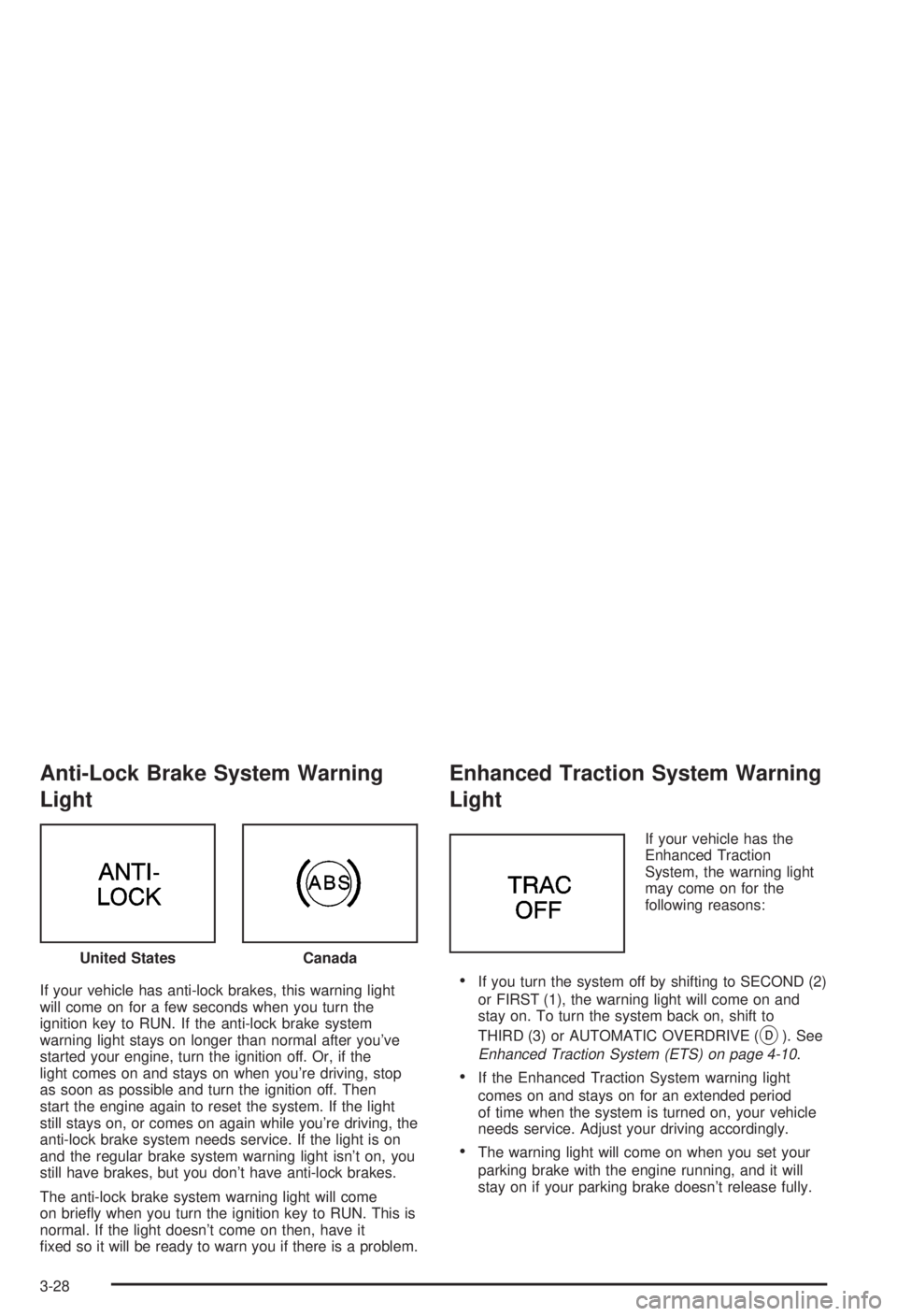
Anti-Lock Brake System Warning
Light
If your vehicle has anti-lock brakes, this warning light
will come on for a few seconds when you turn the
ignition key to RUN. If the anti-lock brake system
warning light stays on longer than normal after you've
started your engine, turn the ignition off. Or, if the
light comes on and stays on when you're driving, stop
as soon as possible and turn the ignition off. Then
start the engine again to reset the system. If the light
still stays on, or comes on again while you're driving, the
anti-lock brake system needs service. If the light is on
and the regular brake system warning light isn't on, you
still have brakes, but you don't have anti-lock brakes.
The anti-lock brake system warning light will come
on brie¯y when you turn the ignition key to RUN. This is
normal. If the light doesn't come on then, have it
®xed so it will be ready to warn you if there is a problem.
Enhanced Traction System Warning
Light
If your vehicle has the
Enhanced Traction
System, the warning light
may come on for the
following reasons:
·If you turn the system off by shifting to SECOND (2)
or FIRST (1), the warning light will come on and
stay on. To turn the system back on, shift to
THIRD (3) or AUTOMATIC OVERDRIVE (
X). See
Enhanced Traction System (ETS) on page 4-10.
·If the Enhanced Traction System warning light
comes on and stays on for an extended period
of time when the system is turned on, your vehicle
needs service. Adjust your driving accordingly.
·The warning light will come on when you set your
parking brake with the engine running, and it will
stay on if your parking brake doesn't release fully. United States
Canada
3-28
Page 146 of 344

AM-FM Radio
Playing the Radio
ON/OFF:Press this knob to turn the system on and off.
VOLUME:Turn the knob to increase or to decrease
volume.RECALL:Push this knob to display the station being
played or to display the clock. To change what is
normally shown on the display (station or time), push
the knob until you see the display you want, then
hold the knob until the display ¯ashes. Push this knob
while the ignition if off to display the clock.
Finding a Station
AM FM:Press this button to switch between AM, FM1
and FM2. The display will show your selection.
TUNE:Turn this knob to choose radio stations.
qSEEKr:Press the right or the left arrow to go to
the next or to the previous station and stay there.
To scan stations, press one of the SEEK arrows for two
seconds, and SCAN will appear on the display. The
radio will go to a station, play for a few seconds, then go
on to the next station. Press one of the SEEK arrows
again to stop scanning.
The radio will seek only to stations that are in the
selected band and only to those with a strong signal.
3-40
Page 154 of 344
Theft-Deterrent Feature
THEFTLOCKžis designed to discourage theft of your
radio. It works by using a secret code to disable all radio
functions whenever battery power is interrupted.
If THEFTLOCK
žis active, the THEFTLOCKžindicator
will ¯ash when the ignition is off.
The THEFTLOCK
žfeature for the radio may be used or
ignored. If ignored, the system plays normally and the
radio is not protected by the feature. If THEFTLOCK
žis
activated, your radio will not operate if stolen.
When THEFTLOCK
žis activated, the radio will display
LOC to indicate a locked condition anytime battery
power is removed. If your battery loses power for any
reason, you must unlock the radio with the secret
code before it will operate.
Activating the Theft-Deterrent Feature
The instructions which follow explain how to enter your
secret code to activate the THEFTLOCKžsystem. Read
through all nine steps before starting the procedure.
If you allow more than 15 seconds to elapse between
any steps, the radio automatically reverts to time
and you must start the procedure over at Step 4.1. Write down any three or four-digit number from 000
to 1999 and keep it in a safe place separate from
the vehicle.
2. Turn the ignition on.
3. Turn the radio off.
4. Press the 1 and 4 pushbuttons at the same time.
Hold them down until --- shows on the display.
Next you will use the secret code number which you
have written down.
5. Press MIN and 000 will appear on the display.
6. Press MIN again to make the last two digits agree
with your code.
7. Press HRS to make the ®rst one or two digits agree
with your code.
8. Press AM-FM after you have con®rmed that the
code matches the secret code you have written
down. The display will show REP to let you know
that you need to repeat Steps 5 through 7 to con®rm
your secret code.
9. Press AM-FM and this time the display will show
SEC to let you know that your radio is secure.
3-48
Page 155 of 344
Unlocking the Theft-Deterrent Feature
After a Power Loss
Enter your secret code as follows; pause no more than
15 seconds between steps:
1. Turn the ignition on. LOC will appear on the
display.
2. Press MIN and 000 will appear on the display.
3. Press MIN again to make the last two digits agree
with your code.
4. Press HRS to make the ®rst one or two digits agree
with your code.
5. Press AM-FM after you have con®rmed that the
code matches the secret code you have written
down. The display will show SEC, indicating
the radio is now operable and secure.
If you enter the wrong code eight times, INOP will
appear on the display. You will have to wait an hour
with the ignition on before you can try again. When you
try again, you will only have three more chances
(eight tries per chance) to enter the correct code before
INOP appears.
If you lose or forget your code, contact your dealership.
Disabling the Theft-Deterrent Feature
Enter your secret code as follows; pause no more than
15 seconds between steps:
1. Turn the ignition on.
2. Turn the radio off.
3. Press the 1 and 4 pushbuttons at the same time.
Hold them down until SEC shows on the display.
4. Press MIN and 000 will appear on the display.
5. Press MIN again to make the last two digits agree
with your code.
6. Press HRS to make the ®rst one or two digits agree
with your code.
7. Press AM-FM after you have con®rmed that the
code matches the secret code you have written
down. The display will show ---, indicating that the
radio is no longer secured.
If the code entered is incorrect, SEC will appear on the
display. The radio will remain secured until the correct
code is entered.
When battery power is removed and later applied to a
secured radio, the radio won't turn on and LOC will
appear on the display.
To unlock a secured radio see ªUnlocking the
Theft-Deterrent Feature After a Power Lossº earlier in
this section.
3-49
Page 259 of 344
The tire in¯ation monitor system detects differences in tire
rotation speeds that are caused by changes in tire
pressure. The system can alert you about a low tire ± but
it doesn't replace normal tire maintenance. See
Tires on
page 5-57.
When the LOW TIRE light comes on, you should stop
as soon as you can and check all your tires for damage.
(If a tire is ¯at, see
If a Tire Goes Flat on page 5-66.)
Also check the tire pressure in all four tires as soon as
you can. See
In¯ation -- Tire Pressure on page 5-57.
The LOW TIRE light will also be displayed (while
the ignition is on) until you reset (calibrate) the system.
Don't reset the tire in¯ation monitor system without
®rst correcting the cause of the problem and checking
and adjusting the pressure in all four tires. If you
reset the system when the tire pressures are incorrect,
the system will not work properly and may not alert
you when a tire is low.
Any time you adjust a tire's pressure, rotate your tires,
or have one or more tires repaired or replaced, you'll
need to reset (calibrate) the tire in¯ation monitor system.
You'll also need to reset the system whenever you
buy new tires and whenever the vehicle's battery has
been disconnected.To reset (calibrate) the system:
1. Turn the ignition to RUN.
2. Locate the red RESET button inside of your
instrument panel fuse block.
The fuse block is located under the cover labeled
FUSES, which is at the end of the instrument panel
on the passenger's side of the vehicle. The
RESET button is the ®rst button in the top row of
the fuse block.
3. Press and hold the RESET button for about ®ve
seconds.
The LOW TIRE light will come on and ¯ash three
times. Then it will go off. If the light doesn't go
off, see your dealer for service.
The system completes the calibration process during
driving.
The system normally takes 15 to 20 minutes of driving
in each of three speed ranges to ªlearnº tire pressures.
The speed ranges are 15 to 40 mph (25 to 65 km/h),
40 to 65 mph (65 to 105 km/h) and above 65 mph
(105 km/h). When learning is complete, the system will
alert you after two to eight minutes if a tire is 12 psi
(83 kPa) different from the other three tires. Detection
thresholds may be higher and detection times may
be longer on rough roads, curves and at high speeds.
The system is not capable of detection at speeds greater
than 70 mph (110 km/h).
5-59
Page 290 of 344
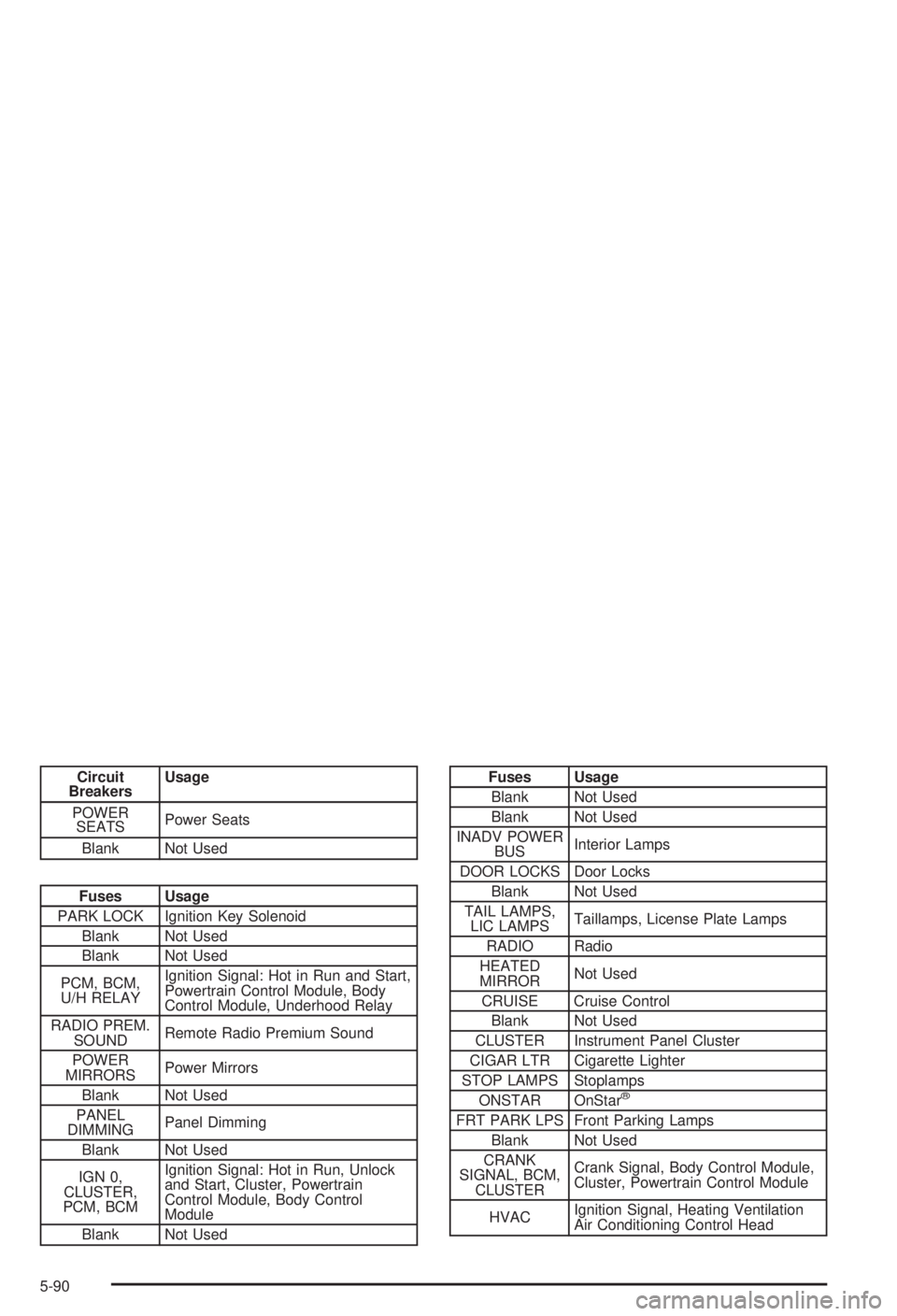
Circuit
BreakersUsage
POWER
SEATSPower Seats
Blank Not Used
Fuses Usage
PARK LOCK Ignition Key Solenoid
Blank Not Used
Blank Not Used
PCM, BCM,
U/H RELAYIgnition Signal: Hot in Run and Start,
Powertrain Control Module, Body
Control Module, Underhood Relay
RADIO PREM.
SOUNDRemote Radio Premium Sound
POWER
MIRRORSPower Mirrors
Blank Not Used
PANEL
DIMMINGPanel Dimming
Blank Not Used
IGN 0,
CLUSTER,
PCM, BCMIgnition Signal: Hot in Run, Unlock
and Start, Cluster, Powertrain
Control Module, Body Control
Module
Blank Not Used
Fuses Usage
Blank Not Used
Blank Not Used
INADV POWER
BUSInterior Lamps
DOOR LOCKS Door Locks
Blank Not Used
TAIL LAMPS,
LIC LAMPSTaillamps, License Plate Lamps
RADIO Radio
HEATED
MIRRORNot Used
CRUISE Cruise Control
Blank Not Used
CLUSTER Instrument Panel Cluster
CIGAR LTR Cigarette Lighter
STOP LAMPS Stoplamps
ONSTAR OnStar
ž
FRT PARK LPS Front Parking Lamps
Blank Not Used
CRANK
SIGNAL, BCM,
CLUSTERCrank Signal, Body Control Module,
Cluster, Powertrain Control Module
HVACIgnition Signal, Heating Ventilation
Air Conditioning Control Head
5-90
Page 291 of 344
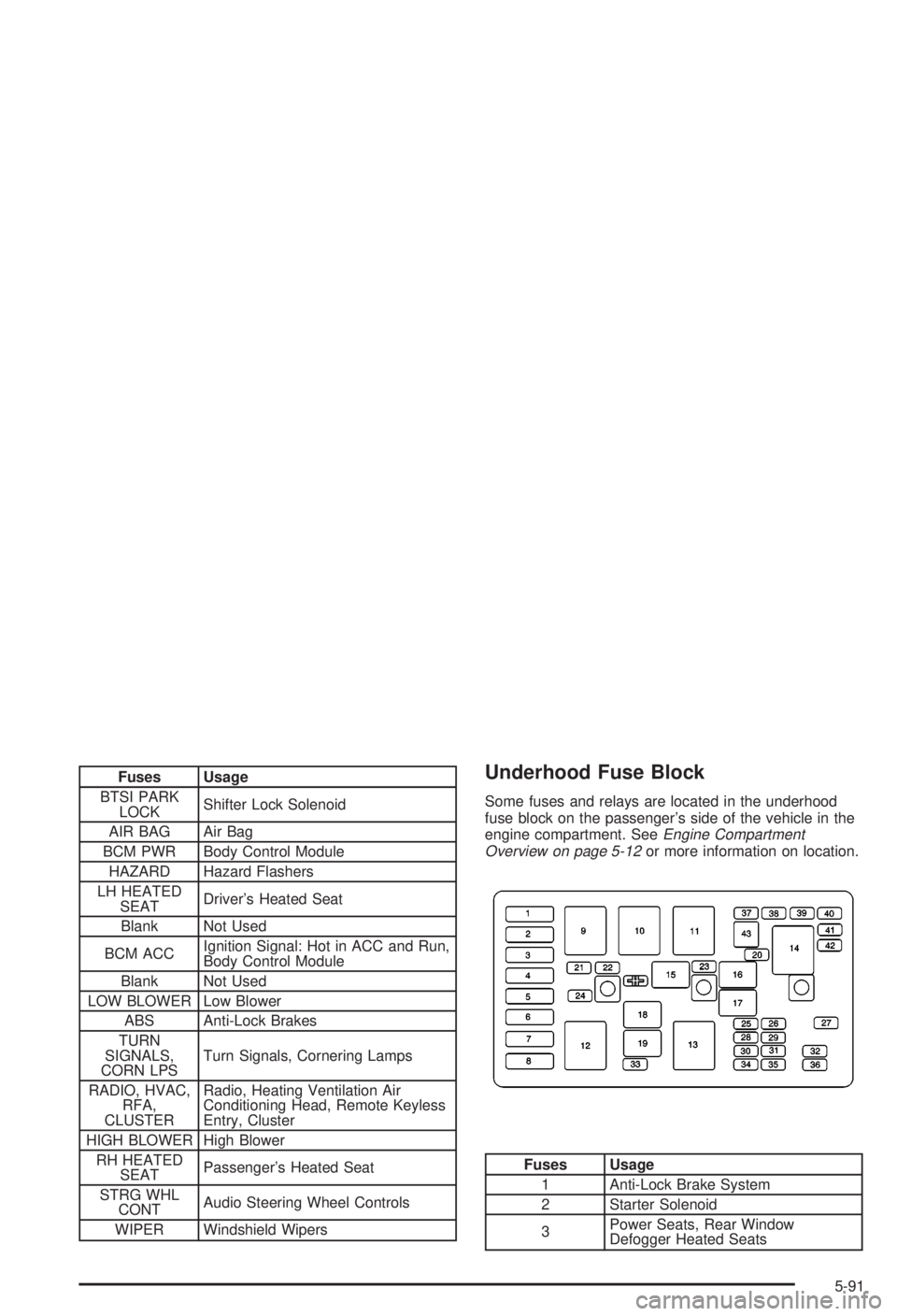
Fuses Usage
BTSI PARK
LOCKShifter Lock Solenoid
AIR BAG Air Bag
BCM PWR Body Control Module
HAZARD Hazard Flashers
LH HEATED
SEATDriver's Heated Seat
Blank Not Used
BCM ACCIgnition Signal: Hot in ACC and Run,
Body Control Module
Blank Not Used
LOW BLOWER Low Blower
ABS Anti-Lock Brakes
TURN
SIGNALS,
CORN LPSTurn Signals, Cornering Lamps
RADIO, HVAC,
RFA,
CLUSTERRadio, Heating Ventilation Air
Conditioning Head, Remote Keyless
Entry, Cluster
HIGH BLOWER High Blower
RH HEATED
SEATPassenger's Heated Seat
STRG WHL
CONTAudio Steering Wheel Controls
WIPER Windshield WipersUnderhood Fuse Block
Some fuses and relays are located in the underhood
fuse block on the passenger's side of the vehicle in the
engine compartment. See
Engine Compartment
Overview on page 5-12or more information on location.
Fuses Usage
1 Anti-Lock Brake System
2 Starter Solenoid
3Power Seats, Rear Window
Defogger Heated Seats
5-91
Page 292 of 344
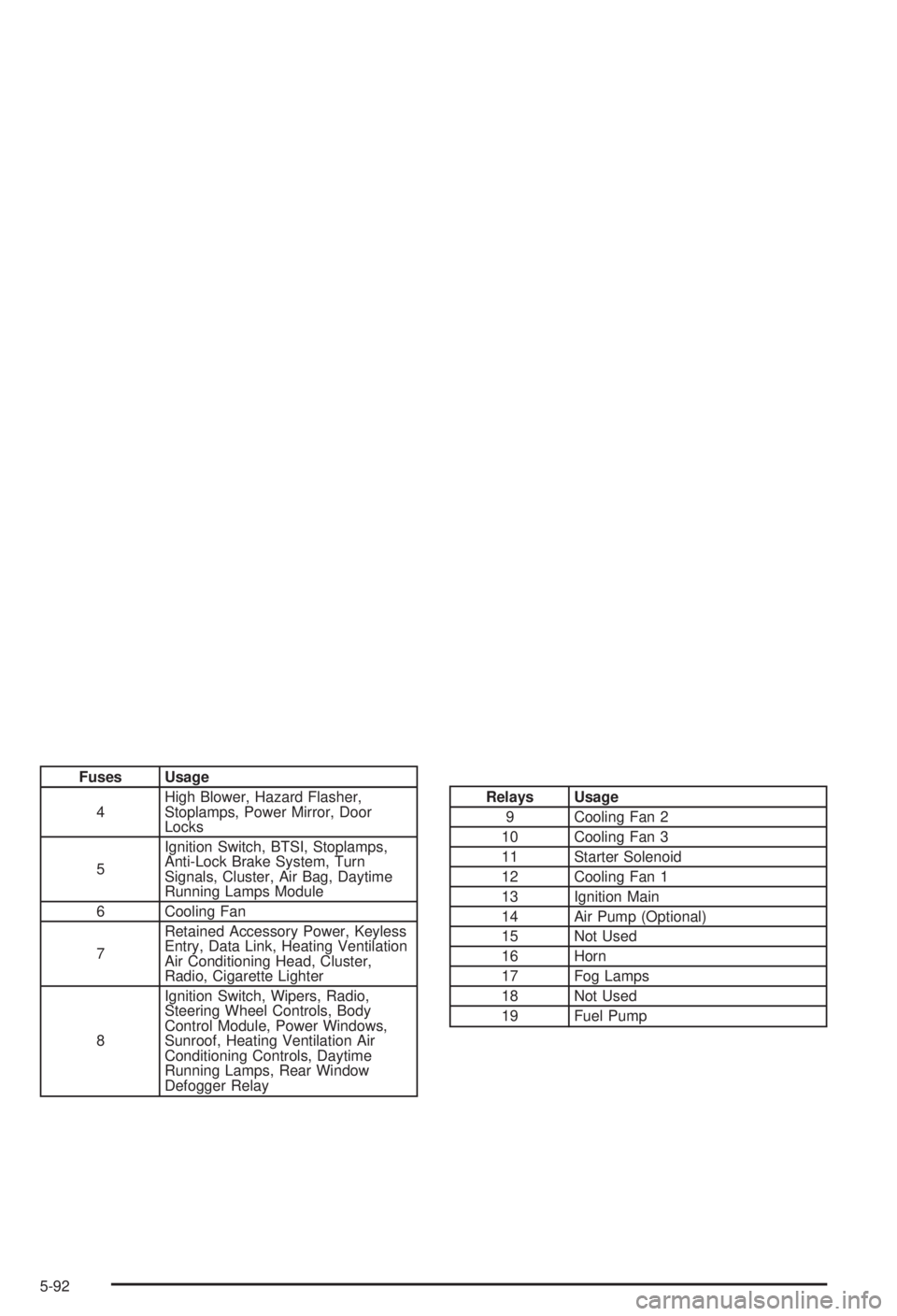
Fuses Usage
4High Blower, Hazard Flasher,
Stoplamps, Power Mirror, Door
Locks
5Ignition Switch, BTSI, Stoplamps,
Anti-Lock Brake System, Turn
Signals, Cluster, Air Bag, Daytime
Running Lamps Module
6 Cooling Fan
7Retained Accessory Power, Keyless
Entry, Data Link, Heating Ventilation
Air Conditioning Head, Cluster,
Radio, Cigarette Lighter
8Ignition Switch, Wipers, Radio,
Steering Wheel Controls, Body
Control Module, Power Windows,
Sunroof, Heating Ventilation Air
Conditioning Controls, Daytime
Running Lamps, Rear Window
Defogger Relay
Relays Usage
9 Cooling Fan 2
10 Cooling Fan 3
11 Starter Solenoid
12 Cooling Fan 1
13 Ignition Main
14 Air Pump (Optional)
15 Not Used
16 Horn
17 Fog Lamps
18 Not Used
19 Fuel Pump
5-92
Page 309 of 344
Ignition Transaxle Lock Check
While parked, and with the parking brake set, try to turn
the ignition key to LOCK in each shift lever position.
·The key should turn to LOCK only when the
shift lever is in PARK (P).
·The key should come out only in LOCK.
Parking Brake and Automatic Transaxle
Park (P) Mechanism Check
{CAUTION:
When you are doing this check, your vehicle
could begin to move. You or others could be
injured and property could be damaged. Make
sure there is room in front of your vehicle in
case it begins to roll. Be ready to apply the
regular brake at once should the vehicle begin
to move.Park on a fairly steep hill, with the vehicle facing
downhill. Keeping your foot on the regular brake, set the
parking brake.
·To check the parking brake's holding ability: With
the engine running and transaxle in NEUTRAL
(N), slowly remove foot pressure from the regular
brake pedal. Do this until the vehicle is held by the
parking brake only.
·To check the PARK (P) mechanism's holding
ability: With the engine running, shift to PARK (P).
Then release the parking brake followed by the
regular brake.
Underbody Flushing Service
At least every spring, use plain water to ¯ush any
corrosive materials from the underbody. Take care to
clean thoroughly any areas where mud and other debris
can collect.
6-13
Page 335 of 344
How to Check Power Steering Fluid..................5-37
How to Check........................................5-20, 5-58
How to Use This Manual...................................... ii
How to Wear Safety Belts Properly...................1-12
Hydroplaning..................................................4-19
I
If No Steam Is Coming From Your Engine..........5-28
If Steam Is Coming From Your Engine...............5-27
If the Light Is Flashing.....................................3-32
If the Light Is On Steady.................................3-32
If You Are Stuck in Sand, Mud, Ice or Snow.......4-31
If You Do Decide To Pull A Trailer.....................4-36
If You're Caught in a Blizzard...........................4-29
Ignition Positions.............................................2-19
Ignition Transaxle Lock Check..........................6-13
Illumination on Remote Activation........................ 2-8
Infants and Young Children, Restraints...............1-32
In¯ation Ð Tire Pressure.................................5-57
Inspection......................................................6-15
Brake System.............................................6-15
Engine Cooling System................................6-14
Exhaust System..........................................6-14
Fuel System...............................................6-14
Part C - Periodic Maintenance.......................6-14
Steering, Suspension and Front Drive Axle
Boot and Seal.........................................6-14
Throttle System...........................................6-15Inspection (cont.)
Instrument Panel Brightness.............................3-14
Instrument Panel Fuse Block............................5-89
Instrument Panel.............................................3-23
Cluster.......................................................3-23
Overview..................................................... 3-2
Interior Lamps................................................3-14J
Jump Starting.................................................5-43
K
Key Lock Cylinders Service..............................6-11
Keyless Entry System....................................... 2-4
Keys............................................................... 2-2
L
Lamps...........................................................3-11
Exterior......................................................3-11
Interior.......................................................3-14
Lap Belt........................................................1-22
Lap-Shoulder Belt...................................1-13, 1-24
LATCH System...............................................1-42
Child Restraints...........................................1-42
7