climate control BUICK ENCLAVE 2008 User Guide
[x] Cancel search | Manufacturer: BUICK, Model Year: 2008, Model line: ENCLAVE, Model: BUICK ENCLAVE 2008Pages: 436
Page 162 of 436
Rear Window Defogger
The rear window defogger uses a warming grid to
remove fog from the rear window.
<(Rear Window Defogger):Press to turn the rear
window defogger on or off. An indicator light below the
button comes on to show that the rear window defogger is
on. Be sure to clear as much snow from the rear window
as possible.
The rear window defogger only works when the ignition is
in ON/RUN. The rear window defogger stays on for about
20 minutes after the button is pressed if traveling at slow
speeds. At higher vehicle speeds, the rear defogger may
stay on continuously. If turned on again, the defogger
only runs for about 10 minutes before turning off. The
defogger can be turned off by pressing the button again,
by turning the ignition to ACC/ACCESSORY or ON/RUN,
or by turning off the engine.
If the vehicle has heated outside rearview mirrors, the
mirrors heat to help clear fog or frost from the surface
of the mirror when the rear window defogger is on.
SeeOutside Heated Mirrors on page 2-37for more
information.Notice:Do not use anything sharp on the inside of
the rear window. If you do, you could cut or damage
the warming grid, and the repairs would not be
covered by the vehicle warranty. Do not attach a
temporary vehicle license, tape, a decal or anything
similar to the defogger grid.
Dual Automatic Climate Control
System
The heating, cooling, and ventilation for the vehicle can
be controlled with this system.
For vehicles with the remote start feature and it is
activated, the climate control system heats or cools the
inside of the vehicle, with the settings used before the
vehicle was turned off. The heated seats, if the vehicle
has them, and the rear window defogger will be turned
on by the climate control system when it is cold outside.
The cooled seat setting is not activated during a remote
start. Normal operation of the system will return after
the key is turned to the ON/RUN position. SeeRemote
Keyless Entry (RKE) System Operation on page 2-5for
more information.
3-24
Page 164 of 436
When the ENG/MET (English/metric) button on the
Driver Information Center (DIC) is pressed, the display
shows readings in Fahrenheit or Celsius. Use the
ENG/MET button to toggle between the readings.
AUTO (Automatic Air Conditioning):If AUTO
is selected on the fan or mode control, the system
automatically controls the air conditioning compressor.
The A/C compressor runs automatically even at cool
outside temperatures in order to dehumidify the air.
The A/C indicator light is lit when the system is operating
automatically. Press the A/C button on the fan control
to turn off the A/C. To clear windows better in defog or
defrost modes, the A/C compressor runs automatically
in damp cool conditions.
h(Auto Recirculation):If AUTO is selected on
either the fan or mode control, the system automatically
controls the supply of fresh outside air or recirculates the
interior air to cool the car faster. The indicator light on
the recirculation button will light whenever the system
switches to recirculation. You may force outside air by
pressing the outside air button. The next time AUTO fan
or mode is selected, it will reset back to AUTO operation.
Manual Operation
9(Off):Turns the climate control system off. Outside
air still enters the vehicle and is directed to the oor.
The airow direction and temperature can be adjusted.
If the temperature is adjusted while the system is
off, the display will light to show the current settings.
wx(Driver Temperature Controls):Press
these buttons next to the fan control to increase
or decrease the temperature inside the vehicle.
wx(Passenger Temperature Controls):Press
these buttons next to the mode control to increase
or decrease the temperature for the front passenger.
If the passenger climate control system is off, pressing
one of these buttons turns it on.
9(Fan Control):Turn clockwise or counterclockwise
to increase or decrease the fan speed. Turning this
control completely counterclockwise turns on the
automatic fan operation.
If the airow seems low when the fan speed is at the
highest setting, the passenger compartment air lter
may need to be replaced. For more information,
seePassenger Compartment Air Filter on page 3-30
andScheduled Maintenance on page 6-4.
3-26
Page 166 of 436

?(Recirculation):Press to turn the recirculation
mode on. An indicator light below the button comes on to
show that this mode is on. This mode recirculates and
helps to quickly cool the air inside the vehicle. It can be
used to prevent outside air and odors from entering the
vehicle. This mode cannot be selected while in the defog
or defrost modes. If you try to select the recirculation
mode, the indicator light ashes three times and turns off.
Operation in this mode during periods of high humidity
and cool outside temperatures may result in increased
window fogging. If window fogging is experienced, select
the defrost mode.
PASS (Passenger Climate Control):Press to turn the
passenger climate control systems on or off.
When the passenger climate control system is on, the
passenger temperature setting is displayed.
If the PASS button is pressed to turn the passenger
temperature setting off, the driver temperature setting
controls the temperature for the entire vehicle.Sensors
The solar sensor, located in the defrost grille, in the
middle of the instrument panel, monitors the solar
radiation. Do not cover the solar sensor or the system
will not work properly.
3-28
Page 167 of 436
There is also an interior temperature sensor located
next to the steering wheel that measures the
temperature of the air inside the vehicle.
There is also an exterior temperature sensor located
behind the front grille. This sensor reads the outside air
temperature and helps maintain the temperature inside
the vehicle. Any cover on the front of the vehicle could
cause a false temperature reading to display.
In order to prevent false temperature readings at
startup, the displayed temperature will not change
until the following occurs:
Vehicle speed is above 10 mph (16 km/h) for
ve minutes.
Vehicle speed is above 32 mph (51 km/h) for
two and a half minutes.
The climate control system uses the information
from these sensors to maintain your comfort setting by
adjusting the outlet temperature, fan speed, and the air
delivery mode. The system may also supply cooler air to
the side of the vehicle facing the sun. The recirculation
mode will also be used as needed to maintain cool outlet
temperatures.
Rear Window Defogger
The rear window defogger uses a warming grid to
remove fog or frost from the rear window.
<(Rear Defogger):Press to turn the rear window
defogger on or off. An indicator light below the button
comes on to show that the rear window defogger is on.
Be sure to clear as much snow from the rear window
as possible.
The rear window defogger only works when the ignition
is in ON/RUN. The rear window defogger stays on
for about 20 minutes after the button is pressed if the
vehicle is traveling at slower vehicle speeds. At higher
vehicle speeds the rear window defogger may stay on
continuously. If turned on again, the defogger only runs
for about 10 minutes before turning off. The defogger can
be turned off by pressing the button again, by turning the
ignition to ACC/ACCESSORY or ON/RUN, or by turning
off the engine.
The heated outside rearview mirrors will heat to help
clear fog or frost from the surface of the mirror when
the rear window defogger is on. SeeOutside Heated
Mirrors on page 2-37for more information.
Notice:Do not use a razor blade or sharp object to
clear the inside rear window. Do not adhere anything
to the defogger grid lines in the rear glass. These
actions may damage the rear defogger. Repairs
would not be covered by your warranty.
3-29
Page 194 of 436

To calibrate the compass, use the following procedure:
Compass Calibration Procedure
1. Before calibrating the compass, check that the
compass zone is set to the variance zone in
which the vehicle is located. See “Compass
Variance (Zone) Procedure” earlier in this section.
Do not operate any switches such as window,
sunroof, climate controls, seats, etc. during
the calibration procedure.
2. Press the vehicle information button until
PRESS
VTO CALIBRATE COMPASS displays.
3. Press the set/reset button to start the compass
calibration.
4. The DIC will display CALIBRATING: DRIVE IN
CIRCLES. Drive the vehicle in tight circles at less
than 5 mph (8 km/h) to complete the calibration.
The DIC will display CALIBRATION COMPLETE
for a few seconds when the calibration is complete.
The DIC display will then return to PRESS
VTO
CALIBRATE COMPASS.
DIC Warnings and Messages
Messages are displayed on the DIC to notify the driver
that the status of the vehicle has changed and that
some action may be needed by the driver to correct the
condition. Multiple messages may appear one after
another. Some messages may not require immediate
action, but you can press the set/reset button to
acknowledge that you received the message and clear
it from the DIC display. Pressing any of the DIC buttons
also acknowledges and clears any messages. Some
messages cannot be cleared from the DIC display
because they are more urgent. These messages require
action before they can be cleared. You should take any
messages that appear on the display seriously and
remember that clearing the messages will only make
the messages disappear, not correct the problem.
The following are the possible messages that can
be displayed and some information about them.
AUTOMATIC LIGHT CONTROL OFF
This message displays when the automatic headlamps
are turned off. SeeExterior Lamps on page 3-15for
more information.
3-56
Page 199 of 436
REMOTE KEY LEARNING ACTIVE
This message displays while you are matching a
Remote Keyless Entry (RKE) transmitter to your vehicle.
See “Matching Transmitter(s) to Your Vehicle” under
Remote Keyless Entry (RKE) System Operation on
page 2-5andDIC Operation and Displays on page 3-49
for more information.
REPLACE BATTERY IN REMOTE KEY
This message displays when the battery in the Remote
Keyless Entry (RKE) transmitter needs to be replaced.
To replace the battery, see “Battery Replacement” under
Remote Keyless Entry (RKE) System Operation on
page 2-5.
RIGHT REAR DOOR OPEN
This message displays when the passenger side rear
door is not closed properly. Make sure that the door
is closed completely.
SERVICE A/C (Air Conditioning)
SYSTEM
This message displays when the electronic sensors that
control the air conditioning and heating systems are
no longer working. Have the climate control system
serviced by your dealer/retailer if you notice a drop
in heating and air conditioning efficiency.
SERVICE AIR BAG
This message displays when there is a problem with
the airbag system. Have your vehicle serviced by your
dealer/retailer immediately. SeeAirbag Readiness Light
on page 3-36for more information.
SERVICE BATTERY CHARGING
SYSTEM
This message displays when there is a problem with the
generator and battery charging systems. Driving with this
problem could drain the battery. Turn off all unnecessary
accessories. Stop and turn off the vehicle as soon as it is
safe to do so. Have the electrical system checked by your
dealer/retailer immediately.
SERVICE BRAKE ASSIST
This message displays if there is a problem with the
brake system. The brake system warning light and
the antilock brake system warning light may also be
displayed on the instrument panel cluster. SeeBrake
System Warning Light on page 3-38andAntilock Brake
System (ABS) Warning Light on page 3-39for more
information. If this happens, stop as soon as possible and
turn off the vehicle. Restart the vehicle and check for the
message on the DIC display. If the message is displayed
or appears again when you begin driving, the brake
system needs service. See your dealer/retailer as
soon as possible. SeeBrakes on page 5-40for more
information.
3-61
Page 260 of 436
Blizzard Conditions
Being stuck in snow can be in a serious situation. Stay
with the vehicle unless there is help nearby. If possible,
use theRoadside Assistance Program on page 7-7.
To get help and keep everyone in the vehicle safe:
Turn on theHazard Warning Flashers on page 3-6.
Tie a red cloth to an outside mirror.
{CAUTION:
Snow can trap engine exhaust under the vehicle.
This may cause exhaust gases to get inside.
Engine exhaust contains carbon monoxide (CO)
which cannot be seen or smelled. It can cause
unconsciousness and even death.
If the vehicle is stuck in the snow:
Clear away snow from around the base of
your vehicle, especially any that is blocking
the exhaust pipe.
Check again from time to time to be sure
snow does not collect there.
CAUTION: (Continued)
CAUTION: (Continued)
Open a window about two inches (5 cm) on
the side of the vehicle that is away from the
wind to bring in fresh air.
Fully open the air outlets on or under the
instrument panel.
Adjust the Climate Control system to a setting
that circulates the air inside the vehicle and
set the fan speed to the highest setting.
See Climate Control System in the Index.
For more information about carbon monoxide, see
Engine Exhaust on page 2-32.
Snow can trap exhaust gases under your vehicle.
This can cause deadly CO (carbon monoxide) gas
to get inside. CO could overcome you and kill you.
You cannot see it or smell it, so you might not
know it is in your vehicle. Clear away snow from
around the base of your vehicle, especially any
that is blocking the exhaust.
Run the engine for short periods only as needed to
keep warm, but be careful.
To save fuel, run the engine for only short periods as
needed to warm the vehicle and then shut the engine off
and close the window most of the way to save heat.
4-16
Page 353 of 436

Treadwear
The treadwear grade is a comparative rating
based on the wear rate of the tire when tested
under controlled conditions on a specied
government test course. For example, a tire
graded 150 would wear one and a half (1.5) times
as well on the government course as a tire
graded 100. The relative performance of tires
depends upon the actual conditions of their use,
however, and may depart signicantly from the
norm due to variations in driving habits, service
practices, and differences in road characteristics
and climate.
Traction – AA, A, B, C
The traction grades, from highest to lowest, are AA,
A, B, and C. Those grades represent the tire’s
ability to stop on wet pavement as measured under
controlled conditions on specied government test
surfaces of asphalt and concrete. A tire marked C
may have poor traction performance.
{WARNING:
The traction grade assigned to this tire is
based on straight-ahead braking traction
tests, and does not include acceleration,
cornering, hydroplaning, or peak traction
characteristics.
5-77
Page 379 of 436
Fuses Usage
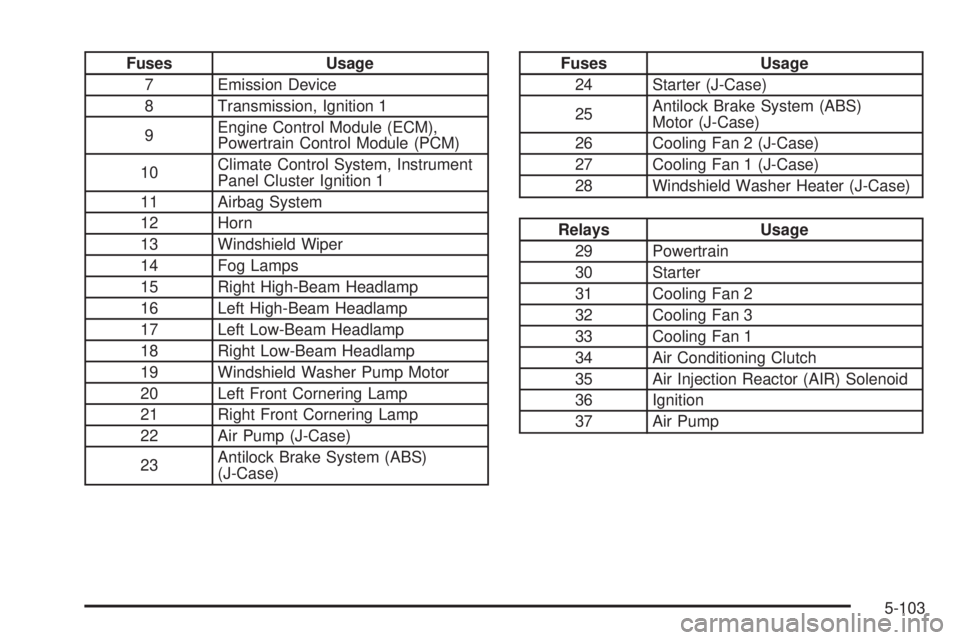
7 Emission Device
8 Transmission, Ignition 1
9Engine Control Module (ECM),
Powertrain Control Module (PCM)
10Climate Control System, Instrument
Panel Cluster Ignition 1
11 Airbag System
12 Horn
13 Windshield Wiper
14 Fog Lamps
15 Right High-Beam Headlamp
16 Left High-Beam Headlamp
17 Left Low-Beam Headlamp
18 Right Low-Beam Headlamp
19 Windshield Washer Pump Motor
20 Left Front Cornering Lamp
21 Right Front Cornering Lamp
22 Air Pump (J-Case)
23Antilock Brake System (ABS)
(J-Case)Fuses Usage
24 Starter (J-Case)
25Antilock Brake System (ABS)
Motor (J-Case)
26 Cooling Fan 2 (J-Case)
27 Cooling Fan 1 (J-Case)
28 Windshield Washer Heater (J-Case)
Relays Usage
29 Powertrain
30 Starter
31 Cooling Fan 2
32 Cooling Fan 3
33 Cooling Fan 1
34 Air Conditioning Clutch
35 Air Injection Reactor (AIR) Solenoid
36 Ignition
37 Air Pump
5-103
Page 425 of 436
Checking Things Under the Hood......................5-12
Chemical Paint Spotting...................................5-99
Child Restraints
Child Restraint Systems...............................1-41
Infants and Young Children...........................1-38
Lower Anchors and Tethers for Children..........1-45
Older Children.............................................1-35
Securing a Child Restraint in a
Rear Seat Position...................................1-51
Securing a Child Restraint in the
Center Front Seat Position........................1-54
Securing a Child Restraint in the
Right Front Seat Position..........................1-54
Where to Put the Restraint...........................1-44
Cleaning
Aluminum or Chrome-Plated Wheels..............5-98
Exterior Lamps/Lenses.................................5-96
Fabric/Carpet..............................................5-93
Finish Care.................................................5-96
Instrument Panel, Vinyl, and Other Plastic
Surfaces.................................................5-95
Interior.......................................................5-92
Leather......................................................5-94
Tires..........................................................5-99
Underbody Maintenance...............................5-99
Washing Your Vehicle...................................5-96
Weatherstrips..............................................5-95
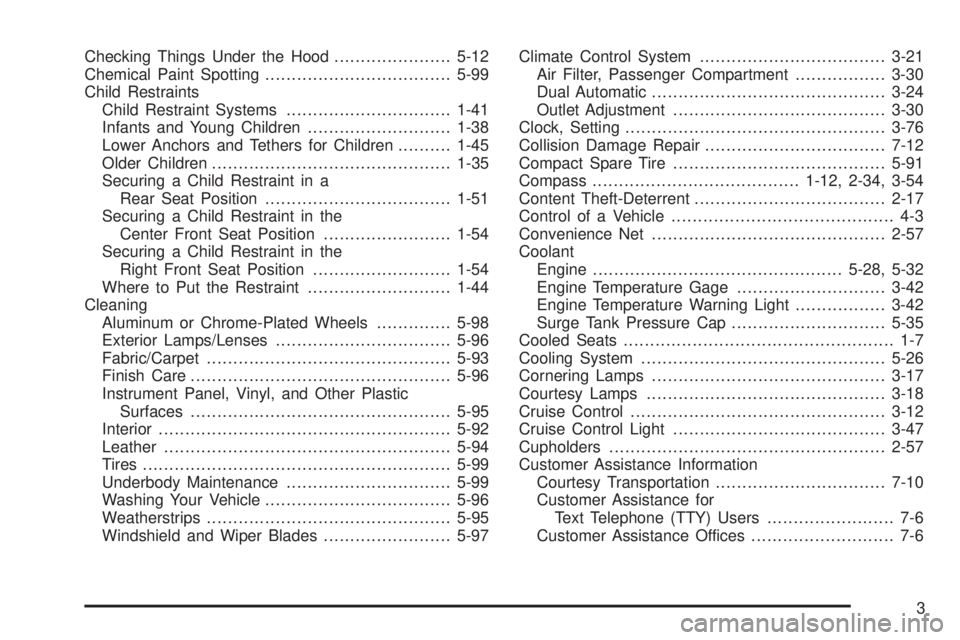
Windshield and Wiper Blades........................5-97Climate Control System...................................3-21
Air Filter, Passenger Compartment.................3-30
Dual Automatic............................................3-24
Outlet Adjustment........................................3-30
Clock, Setting.................................................3-76
Collision Damage Repair..................................7-12
Compact Spare Tire........................................5-91
Compass.......................................1-12, 2-34, 3-54
Content Theft-Deterrent....................................2-17
Control of a Vehicle.......................................... 4-3
Convenience Net............................................2-57
Coolant
Engine...............................................5-28, 5-32
Engine Temperature Gage............................3-42
Engine Temperature Warning Light.................3-42
Surge Tank Pressure Cap.............................5-35
Cooled Seats................................................... 1-7
Cooling System..............................................5-26
Cornering Lamps............................................3-17
Courtesy Lamps.............................................3-18
Cruise Control................................................3-12
Cruise Control Light........................................3-47
Cupholders....................................................2-57
Customer Assistance Information
Courtesy Transportation................................7-10
Customer Assistance for
Text Telephone (TTY) Users........................ 7-6
Customer Assistance Offices........................... 7-6
3