AUX BUICK ENCLAVE 2009 User Guide
[x] Cancel search | Manufacturer: BUICK, Model Year: 2009, Model line: ENCLAVE, Model: BUICK ENCLAVE 2009Pages: 412
Page 225 of 412
r(Enter):Press to select the
choice that is highlighted in
any menu.
z(Display Menu):Press to
adjust the brightness, screen display
mode (normal, full, or zoom), and
display the language menu.
q(Return):Press to exit the
current active menu and return
to the previous menu. This button
operates only when the display
menu or a DVD menu is active.
c(Stop):Press to stop playing,
rewinding, or fast forwarding a DVD.
Press twice to return to the
beginning of the DVD.
s(Play/Pause):Press to start
playing a DVD. Press while a
DVD is playing to pause it. Press
again to continue playing the DVD.
When the DVD is playing,
depending on the radio, play may
be slowed down by pressing
sthen[. The DVD continuesplaying in a slow play mode.
Depending on the radio, perform
reverse slow play by pressing
sthenr. To cancel slow play
mode, press
sagain.
t(Previous Track/Chapter):
Press to return to the start of the
current track or chapter. Press again
to go to the previous track or
chapter. This button might not work
when the DVD is playing the
copyright information or the
previews.
u(Next Track/Chapter):Press to
go to the beginning of the next
chapter or track. This button might
not work when the DVD is
playing the copyright information or
the previews.
r(Fast Reverse):Press to
quickly reverse the DVD or CD. To
stop fast reversing a DVD video,
press
s. To stop fast reversing a
DVD audio or CD, release
r.This button might not work when the
DVD is playing the copyright
information or the previews.
[(Fast Forward):Press to fast
forward the DVD or CD. To stop fast
forwarding a DVD video, press
s. To stop fast forwarding a DVD
audio or CD, release
[. This
button might not work when the DVD
is playing the copyright information
or the previews.
e(Audio):Press to change audio
tracks on DVDs that have this
feature when the DVD is playing.
The format and content of this
function vary for each disc.
{(Subtitles):Press to turn
ON/OFF subtitles and to move
through subtitle options when a DVD
is playing. The format and content
of this function vary for each disc.
AUX (Auxiliary):Press to
switch the system between the DVD
player and an auxiliary source.
Instrument Panel 3-107
Page 227 of 412

ProblemRecommended Action
No power. The ignition might not be turned
ON/RUN or in ACC/ACCESSORY.
The picture does not ll the screen.
There are black borders on the top
and bottom or on both sides or it
looks stretched out. Check the display mode settings in
the setup menu by pressing the
display menu button on the remote
control.
In auxiliary mode, the picture moves
or scrolls. Check the auxiliary input
connections at both devices.
The remote control does not work. Check to make sure there is no obstruction between the remote
control and the transmitter window.
Check the batteries to make sure
they are not dead or installed
incorrectly.
After stopping the player, I push
Play but sometimes the DVD starts
where I left off and sometimes at
the beginning. If the stop button was pressed
one time, the DVD player resumes
playing where the DVD was
stopped. If the stop button was
pressed two times the DVD player
begins to play from the beginning of
the DVD.
The auxiliary source is running but
there is no picture or sound. Check that the RSE video screen is
in the auxiliary source mode.
Check the auxiliary input
connections at both devices.
Instrument Panel 3-109
Page 229 of 412

Rear Seat Audio (RSA)
For vehicles with Rear Seat
Audio (RSA), rear seat passengers
can listen to and control any of
the music sources: radio, CDs,
DVDs, or other auxiliary sources.
The rear seat passengers can only
control the music sources the
front seat passengers are not
listening to (except on some radios
where dual control is allowed).
For example, rear seat passengers
can control a CD and listen to it
through the headphones, while the
driver listens to the radio through
the front speakers. The rear
seat passengers have control of the
volume for each set of headphones.
The RSA functions operate even
when the main radio is off. The front
audio system displays
Xwhen
the RSA is on, and disappears from
the display when it is off.Audio can be heard through wired
headphones (not included) plugged
into the jacks on the RSA. If the
vehicle has this feature, audio can
also be heard on Channel 2 of
the wireless headphones.
The audio system mutes the rear
speakers when the RSA audio
is active through the headphones.
To listen to an iPod or portable
audio device through the RSA,
attach the iPod or portable audio
device to the front auxiliary input
(if available), located on the
front audio system. Turn the iPod
on, then choose the front auxiliary
input with the RSA SRCE button.
Instrument Panel 3-111
Page 230 of 412

P(Power):Press to turn the RSA
on or off.
Volume: Turn to increase or to
decrease the volume of the wired
headphones. The left knob controls
the left headphones and the
right knob controls the right
headphones.
SRCE (Source): Press to switch
between the radio (AM/FM/XM™),
CD, and if the vehicle has these
features, DVD, front auxiliary, and
rear auxiliary.©¨(Seek): Press to go to the
previous or to the next station
and stay there. This function is
inactive, with some radios, if
the front seat passengers are
listening to the radio.
Press and hold
©or¨until the
display ashes to tune to an
individual station. The display stops
ashing after the buttons have
not been pushed for more than
two seconds. This function is inactive, with some radios, if the
front seat passengers are listening
to the radio.
While listening to a disc, press
¨
to go to the next track or chapter on
the disc. Press
©to go back to
the start of the current track or
chapter (if more than ten seconds
have played). This function is
inactive, with some radios, if the
front seat passengers are listening
to the disc.
When a DVD video menu is being
displayed, press
©or¨to
perform a cursor up or down on the
menu. Hold
©or¨to perform
a cursor left or right on the menu.
PROG (Program): Press to go
to the next preset radio station or
channel set on the main radio. This
function is inactive, with some
radios, if the front seat passengers
are listening to the radio.
3-112 Instrument Panel
Page 231 of 412
When a CD or DVD audio disc is
playing, press PROG to go to
the beginning of the CD or DVD
audio. This function is inactive, with
some radios, if the front seat
passengers are listening to the disc.
When a disc is playing in the CD
or DVD changer, press PROG
to select the next disc, if multiple
discs are loaded. This function
is inactive, with some radios, if the
front seat passengers are listening
to the disc.
When a DVD video menu is being
displayed, press PROG to
perform the ENTER menu function.
Theft-Deterrent Feature
THEFTLOCK®is designed to
discourage theft of the vehicle’s
radio by learning a portion of
the Vehicle Identication Number
(VIN). The radio does not operate if
it is stolen or moved to a different
vehicle.
Audio Steering Wheel
Controls
Vehicles with audio steering wheel
controls could differ depending
on the vehicle’s options. Some audio
controls can be adjusted at the
steering wheel.
w(Next):Press to go to the next
radio station stored as a favorite,
or the next track if a CD/DVD
is playing.
cx(Previous/End):Press to
go to the previous radio station
stored as a favorite, the next track if
a CD/DVD is playing, to reject an
incoming call, or end a current call.
bg(Mute/Push to Talk):Press
to silence the vehicle speakers only.
Press again to turn the sound on.
For vehicles with OnStar
®or
Bluetooth systems, press and hold
for longer than two seconds to
interact with those systems. See
OnStar
®System on page 2-41and
Bluetooth®on page 3-92in this
manual for more information.
SRCE (Source):Press to switch
between the radio (AM, FM, XM),
CD, and for vehicles with, DVD, front
auxiliary, and rear auxiliary.
For vehicles with the navigation
system, press and hold this button
for longer than one second to initiate
voice recognition. See “Voice
Recognition” in the Navigation
System manual for more information.
Instrument Panel 3-113
Page 363 of 412
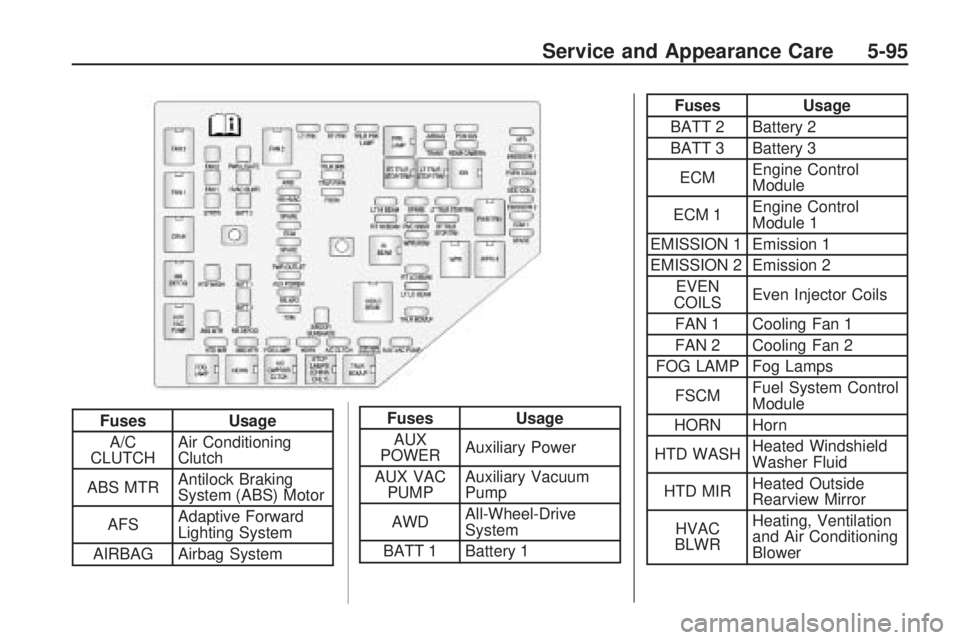
FusesUsage
A/C
CLUTCH Air Conditioning
Clutch
ABS MTR Antilock Braking
System (ABS) Motor
AFS Adaptive Forward
Lighting System
AIRBAG Airbag SystemFuses Usage
AUX
POWER Auxiliary Power
AUX VAC PUMP Auxiliary Vacuum
Pump
AWD All-Wheel-Drive
System
BATT 1 Battery 1
Fuses Usage
BATT 2 Battery 2
BATT 3 Battery 3
ECM Engine Control
Module
ECM 1 Engine Control
Module 1
EMISSION 1 Emission 1
EMISSION 2 Emission 2 EVEN
COILS Even Injector Coils
FAN 1 Cooling Fan 1
FAN 2 Cooling Fan 2
FOG LAMP Fog Lamps
FSCM Fuel System Control
Module
HORN Horn
HTD WASH Heated Windshield
Washer Fluid
HTD MIR Heated Outside
Rearview Mirror
HVAC
BLWR Heating, Ventilation
and Air Conditioning
Blower
Service and Appearance Care 5-95
Page 365 of 412

Relays Usage
A/C
CMPRSR
CLTCHAir Conditioning
Compressor Clutch
AUX VAC
PUMPAuxiliary
Vacuum Pump
CRNK Switched Power
FAN 1 Cooling Fan 1
FAN 2 Cooling Fan 2
FAN 3 Cooling Fan 3
FOG LAMP Fog Lamps
HI BEAMHigh-Beam
Headlamps
HID/LO
BEAMHigh Intensity
Discharge (HID)
Low-Beam
Headlamps
HORN Horn
IGN Ignition MainRelays Usage
LT TRLR
STOP/TRNTrailer Left
Stoplamp and Turn
Signal Lamp
PRK LAMP Park Lamp
PWR/TRN Powertrain
RR DEFOGRear Window
Defogger
RT TRLR
STOP/TRNTrailer Right
Stoplamp and Turn
Signal Lamp
Stop Lamps
(China
Only)Stop Lamps
(China Only)
TRLR
BCK/UPTrailer Back-up
Lamps
WPR Windshield Wiper
WPR HIWindshield Wiper
High Speed
Service and Appearance Care 5-97