change wheel BUICK ENCLAVE 2009 User Guide
[x] Cancel search | Manufacturer: BUICK, Model Year: 2009, Model line: ENCLAVE, Model: BUICK ENCLAVE 2009Pages: 412
Page 211 of 412
in memory for later calls. To prevent
missed calls, a minimum volume
level is used if the volume is turned
down too low.
Bluetooth Controls
Use the buttons located on the
steering wheel to operate the
in-vehicle Bluetooth system. See
Audio Steering Wheel Controls
on page 3-113for more information.
bg(Push To Talk):Press to
answer incoming calls, to conrm
system information, and to start
speech recognition.
cx(Phone On Hook):Press to
end a call, reject a call, or to
cancel an operation.
Pairing
A Bluetooth enabled cell phone
must be paired to the in-vehicle
Bluetooth system rst and then
connected to the vehicle before it
can be used. See the cell phone
manufacturers user guide forBluetooth functions before pairing
the cell phone. If a Bluetooth phone
is not connected, calls will be
made using OnStar
®Hands-Free
Calling, if available. Refer to
the OnStar owner’s guide for more
information.
Pairing Information:
Up to ve cell phones can be
paired to the in-vehicle
Bluetooth system.
The pairing process is disabled
when the vehicle is moving.
The in-vehicle Bluetooth system
automatically links with the rst
available paired cell phone in the
order the phone was paired.
Only one paired cell phone can
be connected to the in-vehicle
Bluetooth system at a time.
Pairing should only need to be
completed once, unless changes
to the pairing information have
been made or the phone is
deleted.To link to a different paired phone,
see Linking to a Different Phone
later in this section.
Pairing a Phone
1. Press and hold
bgfor
two seconds. The system
responds with “Ready” followed
by a tone.
2. Say “Bluetooth”. The system
responds with “Bluetooth
ready” followed by a tone.
3. Say “Pair”. The system responds
with instructions and a four digit
PIN number. The PIN number
will be used in Step 4.
4. Start the Pairing process on the
cell phone that will be paired to
the vehicle. Reference the
cell phone manufacturers user
guide for information on this
process.
Locate the device named
“General Motors” in the list on
the cellular phone and follow the
Instrument Panel 3-93
Page 231 of 412
When a CD or DVD audio disc is
playing, press PROG to go to
the beginning of the CD or DVD
audio. This function is inactive, with
some radios, if the front seat
passengers are listening to the disc.
When a disc is playing in the CD
or DVD changer, press PROG
to select the next disc, if multiple
discs are loaded. This function
is inactive, with some radios, if the
front seat passengers are listening
to the disc.
When a DVD video menu is being
displayed, press PROG to
perform the ENTER menu function.
Theft-Deterrent Feature
THEFTLOCK®is designed to
discourage theft of the vehicle’s
radio by learning a portion of
the Vehicle Identication Number
(VIN). The radio does not operate if
it is stolen or moved to a different
vehicle.
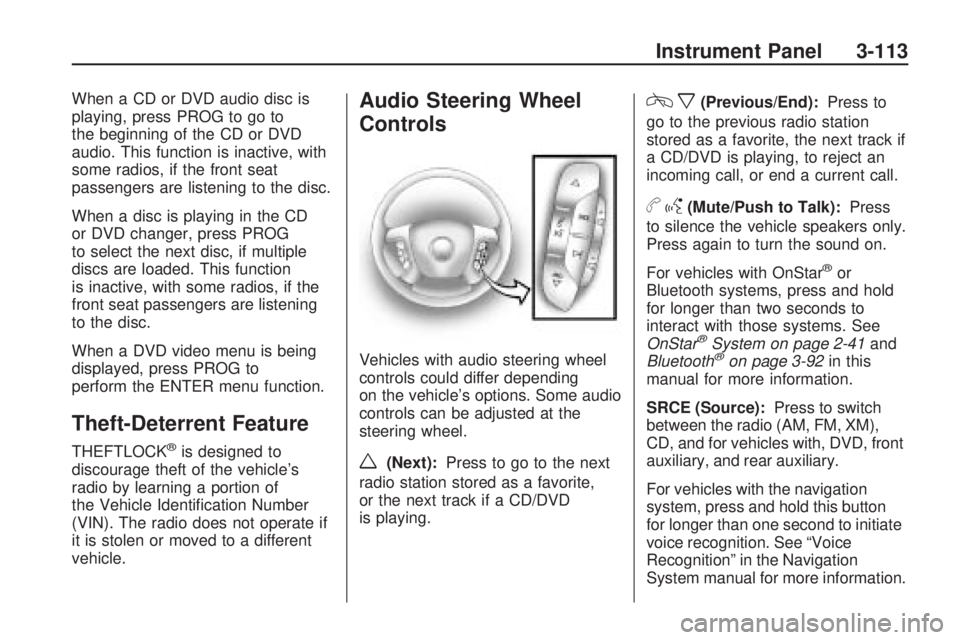
Audio Steering Wheel
Controls
Vehicles with audio steering wheel
controls could differ depending
on the vehicle’s options. Some audio
controls can be adjusted at the
steering wheel.
w(Next):Press to go to the next
radio station stored as a favorite,
or the next track if a CD/DVD
is playing.
cx(Previous/End):Press to
go to the previous radio station
stored as a favorite, the next track if
a CD/DVD is playing, to reject an
incoming call, or end a current call.
bg(Mute/Push to Talk):Press
to silence the vehicle speakers only.
Press again to turn the sound on.
For vehicles with OnStar
®or
Bluetooth systems, press and hold
for longer than two seconds to
interact with those systems. See
OnStar
®System on page 2-41and
Bluetooth®on page 3-92in this
manual for more information.
SRCE (Source):Press to switch
between the radio (AM, FM, XM),
CD, and for vehicles with, DVD, front
auxiliary, and rear auxiliary.
For vehicles with the navigation
system, press and hold this button
for longer than one second to initiate
voice recognition. See “Voice
Recognition” in the Navigation
System manual for more information.
Instrument Panel 3-113
Page 238 of 412

And, of course, actual stopping
distances vary greatly with the
surface of the road, whether it is
pavement or gravel; the condition of
the road, whether it is wet, dry, or
icy; tire tread; the condition of
the brakes; the weight of the vehicle;
and the amount of brake force
applied.
Avoid needless heavy braking.
Some people drive in
spurts — heavy acceleration
followed by heavy braking — rather
than keeping pace with traffic.
This is a mistake. The brakes might
not have time to cool between
hard stops. The brakes will wear out
much faster with a lot of heavy
braking. Keeping pace with
the traffic and allowing realistic
following distances eliminates a lot
of unnecessary braking. That
means better braking and longer
brake life.
If the engine ever stops while the
vehicle is being driven, brake
normally but do not pump the
brakes. If the brakes are pumped,the pedal could get harder to push
down. If the engine stops, there
will still be some power brake assist
but it will be used when the brake
is applied. Once the power assist is
used up, it can take longer to
stop and the brake pedal will be
harder to push.
Adding non-dealer/non-retailer
accessories can affect vehicle’
performance. SeeAccessories and
Modifications on page 5-3.
Antilock Brake
System (ABS)
This vehicle has the Antilock Brake
System (ABS), an advanced
electronic braking system that will
help prevent a braking skid.
When the engine is started and the
vehicle begins to drive away,
ABS checks itself. A momentary
motor or clicking noise might
be heard while this test is going on,
and it might even be noticed that
the brake pedal moves a little. This
is normal.If there is a problem with ABS, this
warning light stays on. See
Antilock Brake System (ABS)
Warning Light on page 3-34.
Let us say the road is wet and you
are driving safely. Suddenly, an
animal jumps out in front of you. You
slam on the brakes and continue
braking. Here is what happens
with ABS:
A computer senses that the wheels
are slowing down. If one of the
wheels is about to stop rolling, the
computer will separately work
the brakes at each wheel.
ABS can change the brake pressure
to each wheel, as required, faster
than any driver could. This can help
the driver steer around the
obstacle while braking hard.
4-4 Driving Your Vehicle
Page 239 of 412

As the brakes are applied, the
computer keeps receiving updates
on wheel speed and controls braking
pressure accordingly.
Remember: ABS does not change
the time needed to get a foot
up to the brake pedal or always
decrease stopping distance. If you
get too close to the vehicle in
front of you, there will not be enough
time to apply the brakes if that
vehicle suddenly slows or stops.
Always leave enough room up
ahead to stop, even with ABS.
Using ABS
Do not pump the brakes. Just hold
the brake pedal down rmly and
let antilock work. The antilock pump
or motor operating might be
heard and the brake pedal might be
felt to pulsate, but this is normal.
Braking in Emergencies
ABS allows the driver to steer and
brake at the same time. In many
emergencies, steering can help more
than even the very best braking.
Brake Assist
This vehicle has a Brake Assist
feature designed to assist the driver
in stopping or decreasing vehicle
speed in emergency driving
conditions. This feature uses the
stability system hydraulic brake
control module to supplement the
power brake system under
conditions where the driver has
quickly and forcefully applied
the brake pedal in an attempt to
quickly stop or slow down the
vehicle. The stability system
hydraulic brake control module
increases brake pressure at each
corner of the vehicle until the
ABS activates. Minor brake pedal
pulsations or pedal movement
during this time is normal and the
driver should continue to apply
the brake pedal as the drivingsituation dictates The Brake Assist
feature will automatically disengage
when the brake pedal is released
or brake pedal pressure is quickly
decreased.
StabiliTrak®System
The vehicle has the StabiliTrak
system which combines antilock
brake, traction and stability control
systems and helps the driver
maintain directional control of the
vehicle in most driving conditions.
When you rst start the vehicle and
begin to drive away, the system
performs several diagnostic checks
to ensure there are no problems.
The system may be heard or
felt while it is working. This is normal
and does not mean there is a
problem with the vehicle. The
system should initialize before the
vehicle reaches 20 mph (32 km/h).
In some cases, it may take
approximately two miles of driving
before the system initializes.
Driving Your Vehicle 4-5
Page 244 of 412

Loss of Control
Let us review what driving experts
say about what happens when
the three control systems — brakes,
steering, and acceleration — do
not have enough friction where the
tires meet the road to do what
the driver has asked.
In any emergency, do not give up.
Keep trying to steer and constantly
seek an escape route or area of
less danger.
Skidding
In a skid, a driver can lose control
of the vehicle. Defensive drivers
avoid most skids by taking
reasonable care suited to existing
conditions, and by not overdriving
those conditions. But skids are
always possible.
The three types of skids correspond
to the vehicle’s three control
systems. In the braking skid, the
wheels are not rolling. In the
steering or cornering skid, too much
speed or steering in a curvecauses tires to slip and lose
cornering force. And in the
acceleration skid, too much throttle
causes the driving wheels
to spin.
If the vehicle starts to slide, ease
your foot off the accelerator pedal
and quickly steer the way you want
the vehicle to go. If you start steering
quickly enough, the vehicle may
straighten out. Always be ready for
a second skid if it occurs.
Of course, traction is reduced when
water, snow, ice, gravel, or other
material is on the road. For safety,
slow down and adjust your
driving to these conditions. It is
important to slow down on slippery
surfaces because stopping
distance is longer and vehicle
control more limited.
While driving on a surface with
reduced traction, try your best to
avoid sudden steering, acceleration,
or braking, including reducing
vehicle speed by shifting to a lower
gear. Any sudden changes couldcause the tires to slide. You might
not realize the surface is slippery
until the vehicle is skidding. Learn to
recognize warning clues — such
as enough water, ice, or packed
snow on the road to make a
mirrored surface — and slow down
when you have any doubt.
Remember: Any Antilock Brake
System (ABS) helps avoid only the
braking skid.
Driving at Night
Night driving is more dangerous than
day driving because some drivers
are likely to be impaired — by alcohol
or drugs, with night vision problems,
or by fatigue.
Night driving tips include:
Drive defensively.
Do not drink and drive.
Reduce headlamp glare by
adjusting the inside rearview
mirror.
4-10 Driving Your Vehicle
Page 250 of 412

Rocking Your Vehicle to
Get It Out
Turn the steering wheel left and
right to clear the area around
the front wheels. Turn off any
traction or stability system. Shift
back and forth between R (Reverse)
and a forward gear, spinning the
wheels as little as possible. To
prevent transmission wear, wait until
the wheels stop spinning before
shifting gears. Release the
accelerator pedal while shifting, and
press lightly on the accelerator
pedal when the transmission is in
gear. Slowly spinning the wheels in
the forward and reverse directions
causes a rocking motion that
could free the vehicle. If that does
not get the vehicle out after a
few tries, it might need to be towed
out. If the vehicle does need to
be towed out, seeTowing Your
Vehicle on page 4-21.
Loading the Vehicle
It is very important to know how
much weight your vehicle can
carry. This weight is called
the vehicle capacity weight and
includes the weight of all
occupants, cargo, and all
nonfactory-installed options.
Two labels on your vehicle show
how much weight it may
properly carry, the Tire and
Loading Information label and
the Certication/Tire label.{CAUTION
Do not load the vehicle any
heavier than the Gross Vehicle
Weight Rating (GVWR), or
either the maximum front or
rear Gross Axle Weight Rating
(GAWR). If you do, parts on
the vehicle can break, and it
can change the way your
vehicle handles. These could
cause you to lose control and
crash. Also, overloading can
shorten the life of the vehicle.
4-16 Driving Your Vehicle
Page 259 of 412

To identify the trailering capacity of
the vehicle, read the information
in “Weight of the Trailer” that
appears later in this section.
Trailering is different than just driving
the vehicle by itself. Trailering means
changes in handling, acceleration,
braking, durability and fuel economy.
Successful, safe trailering takes
correct equipment, and it has to be
used properly.
The following information has many
time-tested, important trailering
tips and safety rules. Many of these
are important for the safety of the
driver and the passengers. So
please read this section carefully
before pulling a trailer.Load-pulling components such
as the engine, transmission, rear
axle, wheel assemblies and tires
are forced to work harder against
the drag of the added weight.
The engine is required to operate
at relatively higher speeds and
under greater loads, generating
extra heat. What’s more, the trailer
adds considerably to wind
resistance, increasing the pulling
requirements.Pulling A Trailer
Here are some important points:
There are many different
laws, including speed limit
restrictions, having to do with
trailering. Make sure the rig will
be legal, not only where you
live but also where you will be
driving. A good source for
this information can be state or
provincial police.
Consider using a sway control.
See “Hitches” later in this
section.
Do not tow a trailer at all during
the rst 500 miles (800 km) the
new vehicle is driven. The engine,
axle or other parts could be
damaged.
Driving Your Vehicle 4-25
Page 313 of 412

Federal Communications
Commission (FCC) and
Industry and Science Canada
The Tire Pressure Monitor System
(TPMS) operates on a radio
frequency and complies with Part 15
of the FCC Rules. Operation is
subject to the following
two conditions:
1. This device may not cause
harmful interference.
2. This device must accept any
interference received, including
interference that may cause
undesired operation.
The TPMS operates on a radio
frequency and complies with
RSS-210 of Industry and Science
Canada. Operation is subject to
the following two conditions:
1. This device may not cause
interference.
2. This device must accept any
interference received, including
interference that may cause
undesired operation of the device.Changes or modications to this
system by other than an authorized
service facility could void
authorization to use this equipment.
Tire Pressure Monitor
Operation
This vehicle may have a Tire
Pressure Monitor System (TPMS).
The TPMS is designed to warn
the driver when a low tire pressure
condition exists. TPMS sensors
are mounted onto each tire
and wheel assembly, excluding the
spare tire and wheel assembly,
if the vehicle has one. The TPMS
sensors monitor the air pressure in
the vehicle’s tires and transmits
the tire pressure readings to
a receiver located in the vehicle.When a low tire pressure condition is
detected, the TPMS illuminates the
low tire pressure warning light
located on the instrument panel
cluster.
At the same time a message to
check the pressure in a specic tire
appears on the Driver Information
Center (DIC) display. The low tire
pressure warning light and the DIC
warning message come on at each
ignition cycle until the tires are
inated to the correct ination
pressure. Using the DIC, tire
pressure levels can be viewed by the
driver. For additional information and
details about the DIC operation and
displays seeDIC Operation and
Displays on page 3-41andDIC
Warnings and Messages on
page 3-48.
Service and Appearance Care 5-45
Page 317 of 412

SeeWhen It Is Time for New
Tires on page 5-50andWheel
Replacement on page 5-55.
When rotating the vehicle’s tires,
always use the correct rotation
pattern shown here.
If the vehicle has a compact
spare tire, do not include it in the
tire rotation.
After the tires have been rotated,
adjust the front and rear ination
pressures as shown on the Tire
and Loading Information label.SeeInflation - Tire Pressure on
page 5-42andLoading the
Vehicle on page 4-16.
Reset the Tire Pressure Monitor
System. SeeTire Pressure
Monitor Operation on page 5-45.
Make certain that all wheel nuts
are properly tightened. See
“Wheel Nut Torque” under
Capacities and Specifications on
page 5-98.
{CAUTION
Rust or dirt on a wheel, or on
the parts to which it is fastened,
can make wheel nuts become
loose after time. The wheel
could come off and cause an
accident. When you change a
wheel, remove any rust or dirt
(Continued)
CAUTION (Continued)
from places where the wheel
attaches to the vehicle. In an
emergency, you can use a
cloth or a paper towel to do
this; but be sure to use a
scraper or wire brush later, if
needed, to get all the rust or
dirt off. SeeChanging a Flat
Tire on page 5-71.
Make sure the spare tire, if the
vehicle has one, is stored
securely. Push, pull, and then
try to rotate or turn the tire.
If it moves, tighten the cable.
SeeStoring a Flat or Spare Tire
and Tools on page 5-80.
Service and Appearance Care 5-49
Page 339 of 412

Changing a Flat Tire
If a tire goes at, avoid further tire
and wheel damage by driving slowly
to a level place. Turn on the hazard
warning ashers. SeeHazard
Warning Flashers on page 3-5.
{CAUTION
Changing a tire can be
dangerous. The vehicle can slip
off the jack and roll over or fall on
you or other people. You and they
could be badly injured or even
killed. Find a level place to
change your tire. To help prevent
the vehicle from moving:
1. Set the parking brake rmly.
2. Put the shift lever in
P (Park).
(Continued)
CAUTION (Continued)
3. Turn off the engine and do
not restart while the vehicle
is raised.
4. Do not allow passengers to
remain in the vehicle.
To be even more certain the
vehicle will not move, you should
put blocks at the front and rear of
the tire farthest away from the
one being changed. That would
be the tire, on the other side, at
the opposite end of the vehicle.When the vehicle has a at tire (B),
use the following example as a
guide to assist you in the placement
of wheel blocks (A).
A. Wheel Block
B. Flat Tire
The following information explains
how to use the jack and change
a tire.
Service and Appearance Care 5-71