brakes BUICK ENCLAVE 2010 User Guide
[x] Cancel search | Manufacturer: BUICK, Model Year: 2010, Model line: ENCLAVE, Model: BUICK ENCLAVE 2010Pages: 438, PDF Size: 2.47 MB
Page 268 of 438
9-26 Driving and Operating
Automatic Engine Grade
Braking
Automatic Engine Grade Braking
assists when driving on a downhill
grade. It maintains vehicle speed by
automatically implementing a shift
schedule that uses the engine and
the transmission to slow the vehicle.
The system will automatically
command downshifts to reduce
vehicle speed, until the brake pedal
is no longer being pressed.
While in the Electronic Range
Select (ERS) mode, grade braking
is deactivated, allowing the driver to
select a range and limiting the
highest gear available. Grade
braking is available for normal
driving and in Tow/Haul mode.
SeeAutomatic Transmission
on
page 9‑23.
Drive Systems
All-Wheel Drive
With this feature, engine power is
always sent to all four wheels. It is
fully automatic, and adjusts itself as
needed for road conditions.
When using a compact spare tire on
an AWD vehicle, the system
automatically detects the compact
spare and disables AWD. To restore
AWD operation and prevent
excessive wear on system, replace
the compact spare with a full-size
tire as soon as possible. See
Compact Spare Tire
on page 10‑80for more information.
Brakes
Antilock Brake
System (ABS)
This vehicle has the Antilock Brake
System (ABS), an advanced
electronic braking system that helps
prevent a braking skid.
When the engine is started and the
vehicle begins to drive away, ABS
checks itself. A momentary motor or
clicking noise might be heard while
this test is going on, and it might
even be noticed that the brake
pedal moves a little. This is normal.
If there is a problem with ABS, this
warning light stays on. See Antilock
Brake System (ABS) Warning Light
on page 5‑22.
Page 269 of 438
Driving and Operating 9-27
If driving safely on a wet road and it
becomes necessary to slam on the
brakes and continue braking to
avoid a sudden obstacle, a
computer senses that the wheels
are slowing down. If one of the
wheels is about to stop rolling, the
computer will separately work the
brakes at each wheel.
ABS can change the brake pressure
to each wheel, as required, faster
than any driver could. This can help
the driver steer around the obstacle
while braking hard.
As the brakes are applied, the
computer keeps receiving updates
on wheel speed and controls
braking pressure accordingly.Remember: ABS does not change
the time needed to get a foot up to
the brake pedal or always decrease
stopping distance. If you get too
close to the vehicle in front of you,
there will not be enough time to
apply the brakes if that vehicle
suddenly slows or stops. Always
leave enough room up ahead to
stop, even with ABS.
Using ABS
Do not pump the brakes. Just hold
the brake pedal down firmly and let
ABS work. The ABS pump or motor
might be heard operating, and the
brake pedal might be felt to pulsate,
but this is normal.
Braking in Emergencies
ABS allows the driver to steer and
brake at the same time. In many
emergencies, steering can help
more than even the very best
braking.
Parking Brake
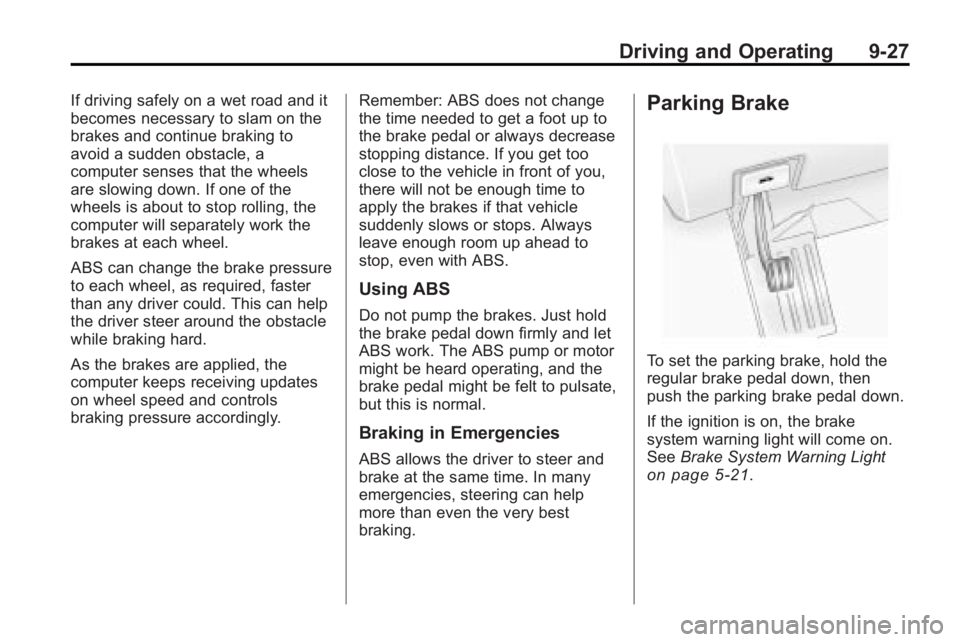
To set the parking brake, hold the
regular brake pedal down, then
push the parking brake pedal down.
If the ignition is on, the brake
system warning light will come on.
See
Brake System Warning Light
on page 5‑21.
Page 272 of 438

9-30 Driving and Operating
and by applying brakes to each
individual wheel (brake-traction
control) as necessary.
The traction control system is
enabled automatically when the
vehicle is started. It will activate and
the StabiliTrak light will flash if it
senses that any of the wheels are
spinning or beginning to lose
traction while driving. If traction
control is turned off, only the
brake-traction control portion of
traction control will work. The
engine speed management will be
disabled. In this mode, engine
power is not reduced automatically
and the driven wheels can spin
more freely. This can cause the
brake-traction control to activate
constantly.
Notice:If the wheel(s) of one axle
is allowed to spin excessively
while the StabiliTrak, ABS and
brake warning lights and any
relevant DIC messages are
displayed, the transfer case could
be damaged. The repairs would not be covered by the vehicle
warranty. Reduce engine power
and do not spin the wheel(s)
excessively while these lights and
messages are displayed.
The traction control system may
activate on dry or rough roads or
under conditions such as heavy
acceleration while turning or abrupt
upshifts/downshifts of the
transmission. When this happens, a
reduction in acceleration may be
noticed, or a noise or vibration may
be heard. This is normal.
If cruise control is being used when
the system activates, the StabiliTrak
light will flash and cruise control will
automatically disengage. Cruise
control may be reengaged when
road conditions allow. See
Cruise
Control on page 9‑30.
StabiliTrak may also turn off
automatically if it determines that a
problem exists with the system.
If the problem does not clear itself
after restarting the vehicle, see your
dealer/retailer for service.Cruise Control
With cruise control, a speed of
about 40 km/h (25 mph) or more can
be maintained without keeping your
foot on the accelerator. Cruise
control does not work at speeds
below about 40 km/h (25 mph).
When the brakes are applied, the
cruise control is disengaged.
{WARNING
Cruise control can be dangerous
where you cannot drive safely at
a steady speed. So, do not use
the cruise control on winding
roads or in heavy traffic.
Cruise control can be dangerous
on slippery roads. On such roads,
fast changes in tire traction can
cause excessive wheel slip, and
you could lose control. Do not use
cruise control on slippery roads.
Page 273 of 438

Driving and Operating 9-31
The cruise control buttons are
located on left side of the steering
wheel.
T(On/Off):Press to turn cruise
control on and off. The indicator
comes on when cruise control is on.
+ RES (Resume/Accelerate):
Press to make the vehicle
accelerate or resume to a previously
set speed.
SET– :Press to set the speed or
make the vehicle decelerate.
[(Cancel): Press to cancel cruise
control. Setting Cruise Control
Cruise control will not work if the
parking brake is set, or if the master
cylinder brake fluid level is low.
The cruise control light on the
instrument panel cluster comes on
after the cruise control has been set
to the desired speed.
{WARNING
If you leave your cruise control on
when you are not using cruise,
you might hit a button and go into
cruise when you do not want to.
You could be startled and even
lose control. Keep the cruise
control switch off until you want to
use cruise control.
1. Press the
Ibutton.
2. Get up to the speed desired. 3. Press and release the
SET– button located on the
steering wheel.
4. Take your foot off the accelerator.
Resuming a Set Speed
If the cruise control is set at a
desired speed and then the brakes
are applied, the cruise control is
disengaged. But it does not need to
be reset.
Once the vehicle speed is 40 km/h
(25 mph) or greater, press the
+RES button on the steering wheel.
The vehicle returns to the previously
set speed and stays there.
Page 274 of 438

9-32 Driving and Operating
Increasing Speed While Using
Cruise Control
There are two ways to increase the
vehicle speed while using cruise
control:
.Press and hold the +RES button
on the steering wheel until the
desired speed is reached, then
release it.
.To increase vehicle speed in
small increments, press the
+RES button briefly. Each time
this is done, the vehicle goes
about 1.6 km/h (1 mph) faster.
Reducing Speed While Using
Cruise Control
There are two ways to reduce the
vehicle speed while using cruise
control:
.Press and hold the SET– button
on the steering wheel until the
lower speed desired is reached,
then release it.
.To slow down in very small
amounts, press the SET– button
briefly. Each time this is done,
the vehicle goes about 1.6 km/h
(1 mph) slower.
Passing Another Vehicle While
Using Cruise Control
Use the accelerator pedal to
increase vehicle speed. When you
take your foot off the pedal, the
vehicle will slow down to the
previously set cruise speed.
Using Cruise Control on Hills
How well the cruise control will work
on hills depends upon the vehicle
speed, load, and the steepness of
the hills. When going up steep hills,
you might have to step on the
accelerator pedal to maintain the
vehicle speed. When going
downhill, you might have to brake or
shift to a lower gear to keep the
vehicle speed down. When the
brakes are applied the cruise control
is disengaged. Ending Cruise Control
There are three ways to end cruise
control:
.Step lightly on the brake pedal.
.Press the[button.
.Press theTbutton.
Erasing Speed Memory
The cruise control set speed
memory is erased when the cruise
control or the ignition is turned off.
Page 276 of 438

9-34 Driving and Operating
When the System Does Not
Seem to Work Properly
If the URPA system does not
activate due to a temporary
condition, the message PARK
ASSIST OFF displays on the DIC
when the shift lever is moved into
R (Reverse). This may occur under
the following conditions:
.The driver disables the system.
.The ultrasonic sensors are not
clean. Keep the vehicle's rear
bumper free of mud, dirt, snow,
ice and slush. For cleaning
instructions, seeExterior Care
on page 10‑88.
.A trailer was attached to the
vehicle, or a bicycle or an object
was hanging out of the liftgate
during the last drive cycle. Once
the attached object is removed,
URPA will return to normal
operation.
.A tow bar is attached to the
vehicle.
.The vehicle's bumper is
damaged. Take the vehicle to
your dealer/retailer to repair the
system.
.Other conditions may affect
system performance, such as
vibrations from a jackhammer or
the compression of air brakes on
a very large truck.
If the system is still disabled, after
driving forward at least 25 km/h
(15 mph), take the vehicle to your
dealer/retailer.
Rear Vision
Camera (RVC)
The vehicle may have a Rear Vision
Camera system. Read this entire
section before using it.
{WARNING
The Rear Vision Camera (RVC)
system does not replace driver
vision. RVC does not:
.Detect objects that are
outside the camera's field of
view, below the bumper,
or underneath the vehicle.
.Detect children, pedestrians,
bicyclists, or pets.
Do not back the vehicle by only
looking at the RVC screen, or use
the screen during longer, higher
speed backing maneuvers or
where there could be cross-traffic. (Continued)
Page 287 of 438
Driving and Operating 9-45
For information on towing a disabled
vehicle, seeTowing the Vehicleon
page 10‑85. For information on
towing the vehicle behind another
vehicle —such as a motorhome,
see Recreational Vehicle Towing
on
page 10‑85.
Driving Characteristics
and Towing Tips
{WARNING
The driver can lose control when
pulling a trailer if the correct
equipment is not used or the
vehicle is not driven properly.
(Continued)
WARNING (Continued)
For example, if the trailer is too
heavy, the brakes may not work
well—or even at all. The driver
and passengers could be
seriously injured. The vehicle may
also be damaged; the resulting
repairs would not be covered by
the vehicle warranty. Pull a trailer
only if all the steps in this section
have been followed. Ask your
dealer/retailer for advice and
information about towing a trailer
with the vehicle. The vehicle can tow a trailer when
equipped with the proper trailer
towing equipment. For trailering
capacity, see
Trailer Towingon
page 9‑50. Trailering changes
handling, acceleration, braking,
durability and fuel economy. With
the added weight, the engine,
transmission, wheel assemblies and
tires are forced to work harder and
under greater loads. The trailer also
adds wind resistance, increasing the
pulling requirements. For safe
trailering, correctly use the proper
trailering equipment.
The following information has
important trailering tips and rules
for your safety and that of your
passengers. Read this section
carefully before pulling a trailer.
Page 288 of 438

9-46 Driving and Operating
Pulling A Trailer
Here are some important points:
.There are many laws, including
speed limit restrictions that apply
to trailering. Check for legal
requirements with state or
provincial police.
.Consider using sway control.
SeeTowing Equipmenton
page 9‑53.
.Do not tow a trailer at all during
the first 800 km (500 miles) the
new vehicle is driven. The
engine, axle or other parts could
be damaged.
.During the first 800 km
(500 miles) that a trailer is
towed, do not drive over 80 km/h
(50 mph) and do not make starts
at full throttle. This reduces wear
on the vehicle.
.The vehicle can tow in D (Drive).
Use a lower gear if the
transmission shifts too often.
See “Tow/Haul Mode” later in
this section.
.Obey speed limit restrictions
when towing a trailer.
.The vehicle is designed primarily
as a passenger and load
carrying vehicle. If a trailer is
towed, the vehicle will require
more frequent maintenance due
to the additional load.
Driving with a Trailer
Towing a trailer requires experience.
Get familiar with handling and
braking with the added trailer
weight. The vehicle is now longer
and not as responsive as the
vehicle is by itself. Check all trailer hitch parts and
attachments, safety chains,
electrical connectors, lamps, tires
and mirror adjustments. If the trailer
has electric brakes, start the vehicle
and trailer moving and then apply
the trailer brake controller by hand
to be sure the brakes are working.
During the trip, check regularly to be
sure that the load is secure, and the
lamps and trailer brakes are working
properly.
Towing with a Stability Control
System
When towing, the sound of the
stability control system might be
heard. The system is reacting to the
vehicle movement caused by the
trailer, which mainly occurs during
cornering. This is normal when
towing heavier trailers.
Page 290 of 438
9-48 Driving and Operating
Following Distance
Stay at least twice as far behind the
vehicle ahead as you would when
driving the vehicle without a trailer.
This can help to avoid situations
that require heavy braking and
sudden turns.
Passing
More passing distance is needed
when towing a trailer. Because the
rig is longer, it is necessary to go
farther beyond the passed vehicle
before returning to the lane.
Backing Up
Hold the bottom of the steering
wheel with one hand. To move the
trailer to the left, move that hand to
the left. To move the trailer to the
right, move your hand to the right.
Always back up slowly and,
if possible, have someone
guide you.
Making Turns
Notice:Making very sharp turns
while trailering could cause the
trailer to come in contact with the
vehicle. The vehicle could be
damaged. Avoid making very
sharp turns while trailering.
When turning with a trailer, make
wider turns than normal so the
trailer will not strike soft shoulders,
curbs, road signs, trees or other
objects. Use the turn signal well in
advance and avoid jerky or sudden
maneuvers.
Turn Signals When Towing a
Trailer
The turn signal indicators on the
instrument panel flash whenever
signaling a turn or lane change.
Properly hooked up, the trailer
lamps also flash, telling other
drivers the vehicle is turning,
changing lanes or stopping. When towing a trailer, the arrows on
the instrument panel flash for turns
even if the bulbs on the trailer are
burned out. Check occasionally to
be sure the trailer bulbs are still
working.
Driving On Grades
Reduce speed and shift to a
lower gear before starting down a
long or steep downgrade. If the
transmission is not shifted down, the
brakes might have to be used so
much that they would get hot and no
longer work well.
The vehicle can tow in D (Drive).
Use a lower gear if the transmission
shifts too often.
Page 296 of 438

9-54 Driving and Operating
Weight-Distributing Hitches and
Weight Carrying Hitches
A. Body-to-Ground Distance
B. Front of Vehicle
When using a weight-distributing
hitch, the hitch must be adjusted so
that the distance (A) remains the
same both before and after coupling
the trailer to the tow vehicle.
Safety Chains
Always attach chains between the
vehicle and the trailer. Cross the
safety chains under the tongue of
the trailer to help prevent the tongue
from contacting the road if it
becomes separated from the hitch.
Always leave just enough slack so
the rig can turn. Never allow safety
chains to drag on the ground.
Trailer Brakes
A loaded trailer that weighs more
than 450 kg (1,000 lbs) needs to
have its own brake system that is
adequate for the weight of the
trailer. Be sure to read and follow
the instructions for the trailer brakes
so they are installed, adjusted and
maintained properly.
Because the vehicle has antilock
brakes, do not try to tap into the
vehicle's hydraulic brake system.
If you do, both brake systems will
not work well, or at all.
Trailer Wiring Harness
Basic Trailer Wiring
The trailer wiring harness, with a
seven-pin connector, is located at
the rear of the vehicle and is tied to
the vehicle's frame. The harness
connector can be plugged into a
seven-pin universal heavy-duty
trailer connector available through
your dealer/retailer.
The seven-wire harness contains
the following trailer circuits:
.Yellow: Left Stop/Turn Signal
.Dark Green: Right Stop/Turn
Signal
.Brown: Taillamps
.Black: Ground
.Light Green: Back-up Lamps
.Red/Black: Battery Feed
.Dark Blue: Trailer Brake*
*The fuse for this circuit is installed
in the underhood electrical center,
but the wires are not connected.