Onstar BUICK ENCLAVE 2012 User Guide
[x] Cancel search | Manufacturer: BUICK, Model Year: 2012, Model line: ENCLAVE, Model: BUICK ENCLAVE 2012Pages: 382, PDF Size: 5.43 MB
Page 169 of 382

Black plate (25,1)Buick Verano Owner Manual - 2013 - crc - 10/17/12
Infotainment System 7-25
5. To add more callers to theconference call, repeat Steps 1
through 4. The number of callers
that can be added is limited by
your wireless service carrier.
Ending a Call
Turn or press the TUNE/MENU
knob and select Hang Up.
Muting a Call
To Mute a Call
Turn or press the TUNE/MENU
knob and select Mute Call.
To Cancel Mute
Turn or press the TUNE/MENU
knob and select Mute Call.
Dual Tone Multi-Frequency
(DTMF) Tones
The in-vehicle Bluetooth system can
send numbers during a call. This is
used when calling a menu-driven
phone system. For Radio with CD:
1. Turn or press the TUNE/MENU
knob and select Enter Number.
2. Enter the character sequence. See “Entering a Character
Sequence” inOperation on
page 7‑4 for more information.
For Radio with CD and
Touchscreen:
1. Touch Enter Number.
2. Use the keypad to enter the number.
Bluetooth (Voice
Recognition)
Using Voice Recognition
For vehicles equipped with radios
with cd and touchscreen, see
“Bluetooth” in the infotainment
manual.
To use voice recognition, press the
b/gbutton located on the steering
wheel. Use the commands below for
the various voice features. For additional information say "Help"
while you are in a voice
recognition menu.
Pairing
A Bluetooth-enabled cell phone
must be paired to the Bluetooth
system and then connected to the
vehicle before it can be used. See
your cell phone manufacturer's user
guide for Bluetooth functions before
pairing the cell phone. If a Bluetooth
phone is not connected, calls will be
made using OnStar Hands-Free
Calling, if available. See
OnStar
Overview on page 14‑1.
Pairing Information
.A Bluetooth phone with MP3
capability cannot be paired to
the vehicle as a phone and an
MP3 player at the same time.
.Up to five cell phones can be
paired to the Bluetooth system.
.The pairing process is disabled
when the vehicle is moving.
Page 171 of 382

Black plate (27,1)Buick Verano Owner Manual - 2013 - crc - 10/17/12
Infotainment System 7-27
Connecting to a Different Phone
To connect to a different cell phone,
the Bluetooth system looks for the
next available cell phone in the
order in which all the available cell
phones were paired. Depending on
which cell phone you want to
connect to, you may have to use
this command several times.
1. Press
b/g. The system
responds “Ready,”followed by
a tone.
2. Say “Bluetooth.”
3. Say “Change phone.”
.If another cell phone is
found, the response will be
“
connected.”
.If another cell phone is not
found, the original phone
remains connected.
Storing and Deleting Phone
Numbers
The system can store up to 30
phone numbers as name tags in the
Hands-Free Directory that is shared
between the Bluetooth and OnStar
systems.
The following commands are used
to delete and store phone numbers.
Store:This command will store a
phone number, or a group of
numbers as a name tag.
Digit Store: This command allows
a phone number to be stored as a
name tag by entering the digits one
at a time.
Delete: This command is used to
delete individual name tags.
Delete All Name Tags: This
command deletes all stored name
tags in the Hands-Free Calling
Directory and the Destinations
Directory. Using the
“Store”Command
1. Pressb/g. The system
responds “Ready,”followed by
a tone.
2. Say “Store.”
3. Say the phone number or group of numbers you want to store all
at once with no pauses, then
follow the directions given by the
system to save a name tag for
this number.
Using the “Digit Store” Command
If an unwanted number is
recognized by the system, say
“Clear” at any time to clear the last
number.
To hear all of the numbers
recognized by the system, say
“Verify” at any time.
1. Press
b/g. The system
responds “Ready,”followed by
a tone.
2. Say “Digit Store.”
Page 341 of 382

Black plate (1,1)Buick Verano Owner Manual - 2013 - crc - 10/17/12
Customer Information 13-1
Customer
Information
Customer Information
Customer SatisfactionProcedure (U.S. and
Canada) . . . . . . . . . . . . . . . . . . . . 13-2
Customer Satisfaction Procedure (Mexico) . . . . . . . . 13-4
Customer Assistance Offices (U.S. and Canada) . . . . . . . . . 13-5
Customer Assistance Offices (Mexico) . . . . . . . . . . . . . . . . . . . . 13-5
Customer Assistance for Text Telephone (TTY) Users (U.S.
and Canada) . . . . . . . . . . . . . . . 13-6
Online Owner Center . . . . . . . . 13-6 GM Mobility Reimbursement
Program (U.S. and
Canada) . . . . . . . . . . . . . . . . . . . . 13-7
Roadside Assistance Program (Mexico) . . . . . . . . . . . . . . . . . . . . 13-7
Roadside Assistance Program (U.S. and
Canada) . . . . . . . . . . . . . . . . . . 13-10
Scheduling Service Appointments (U.S. and
Canada) . . . . . . . . . . . . . . . . . . 13-12
Courtesy Transportation Program (U.S. and
Canada) . . . . . . . . . . . . . . . . . . 13-12
Collision Damage Repair (U.S. and Canada) . . . . . . . . 13-14
Service Publications Ordering Information . . . . . . 13-16
Reporting Safety Defects
Reporting Safety Defects tothe United States
Government . . . . . . . . . . . . . . . 13-17
Reporting Safety Defects to the Canadian
Government . . . . . . . . . . . . . . . 13-18
Reporting Safety Defects to General Motors . . . . . . . . . . . 13-18
Vehicle Data Recording and
Privacy
Vehicle Data Recording andPrivacy . . . . . . . . . . . . . . . . . . . . 13-18
Event Data Recorders . . . . . . 13-19
OnStar
®. . . . . . . . . . . . . . . . . . . . 13-20
Infotainment System . . . . . . . . 13-20
Radio Frequency Identification (RFID) . . . . . . . 13-20
Radio Frequency Statement . . . . . . . . . . . . . . . . . 13-20
Page 346 of 382

Black plate (6,1)Buick Verano Owner Manual - 2013 - crc - 10/17/12
13-6 Customer Information
Customer Assistance for
Text Telephone (TTY)
Users (U.S. and Canada)
To assist customers who are deaf,
hard of hearing, or speech-impaired
and who use Text Telephones
(TTYs), Buick has TTY equipment
available at its Customer Assistance
Center. Any TTY user can
communicate with Buick by dialing:
1-800-832-8425. TTY users in
Canada can dial 1‐800‐263-3830.
Online Owner Center
Online Owner Experience
(U.S.) my.buick.com
The Buick online owner experience
is a one-stop resource that allows
interaction with Buick and keeps
important vehicle-specific
information in one place.
Membership Benefits
E(Vehicle Information):
Download owner manuals and view
vehicle-specific how-to videos.
G(Maintenance Information):
View maintenance schedules,
required alerts, OnStar onboard
vehicle diagnostic information, and
schedule service appointments.
I(Service History): View
printable dealer-recorded service
records and self-recorded service
records.
D(Preferred Dealer
Information): Select a preferred
dealer and view dealer location,
maps, phone numbers, and hours.
J(Warranty Tracking
Information): Track the vehicle’s
warranty information.
J(Recall Information): View
active recalls or search by Vehicle
Identification Number (VIN). See
Vehicle Identification Number (VIN)
on page 12‑1.
H(Other Account Information):
View GM Card, SiriusXM Satellite
radio, and OnStar account
information.
F(Live Chat Support): Chat live
with online help representatives.
Visit my.buick.com to register your
vehicle.
Buick Owner Centre (Canada)
buickowner.ca
Take a trip to the Buick Owner
Centre:
.Chat live with online help
representatives.
.Use the Vehicle Tools section.
.Access third party enthusiast
sites and social media networks.
.Locate owner resources such as
lease-end, financing, and
warranty information.
.Retrieve your favorite articles,
quizzes, tips and multimedia
galleries organized into the
Features and Auto Care
Sections.
.Download the owner manual for
your vehicle, quickly and easily.
Page 351 of 382
Black plate (11,1)Buick Verano Owner Manual - 2013 - crc - 10/17/12
Customer Information 13-11
.Model, year, color, and license
plate number of the vehicle.
.Odometer reading, Vehicle
Identification Number (VIN), and
delivery date of the vehicle.
.Description of the problem.
Coverage
Services are provided up to 6 years/
110 000 km (70,000 mi), whichever
comes first.
In the U.S., anyone driving the
vehicle is covered. In Canada, a
person driving the vehicle without
permission from the owner is not
covered.
Roadside Assistance is not a part of
the New Vehicle Limited Warranty.
Buick and General Motors of
Canada Limited reserve the right to
make any changes or discontinue
the Roadside Assistance program at
any time without notification.
Buick and General Motors of
Canada Limited reserve the right to
limit services or payment to an
owner or driver if they decide theclaims are made too often, or the
same type of claim is made many
times.
Services Provided
.Emergency Fuel Delivery:
Delivery of enough fuel for the
vehicle to get to the nearest
service station.
.Lock-Out Service:
Service to
unlock the vehicle if you are
locked out. A remote unlock may
be available if you have
OnStar
®. For security reasons,
the driver must present
identification before this service
is given.
.Emergency Tow from a Public
Road or Highway: Tow to the
nearest Buick dealer for
warranty service, or if the vehicle
was in a crash and cannot be
driven. Assistance is also given
when the vehicle is stuck in
sand, mud, or snow.
.Flat Tire Change: Service to
change a flat tire with the spare
tire. The spare tire, if equipped,
must be in good condition and
properly inflated. It is the owner's
responsibility for the repair or
replacement of the tire if it is not
covered by the warranty.
.Battery Jump Start: Service to
jump start a dead battery.
Services Not Included in
Roadside Assistance
.Impound towing caused by
violation of any laws.
.Legal fines.
.Mounting, dismounting,
or changing of snow tires,
chains, or other traction devices.
.Towing or services for vehicles
driven on a non-public road or
highway.
Page 360 of 382
Black plate (20,1)Buick Verano Owner Manual - 2013 - crc - 10/17/12
13-20 Customer Information
OnStar®
If the vehicle is equipped with
OnStar®and has an active
subscription, additional data may be
collected through the OnStar
system. This includes information
about the vehicle’s operation; about
collisions involving the vehicle; the
use of the vehicle and its features;
and, in certain situations, the
location and approximate GPS
speed of the vehicle. Refer to the
OnStar Terms and Conditions and
Privacy Statement on the OnStar
website.
Infotainment System
If the vehicle is equipped with a
navigation system as part of the
infotainment system, use of the
system may result in the storage of
destinations, addresses, telephone
numbers, and other trip information.
See the infotainment manual for
information on stored data and for
deletion instructions.
Radio Frequency
Identification (RFID)
RFID technology is used in some
vehicles for functions such as tire
pressure monitoring and ignition
system security, as well as in
connection with conveniences such
as Remote Keyless Entry (RKE)
transmitters for remote door locking/
unlocking and starting, and
in-vehicle transmitters for garage
door openers. RFID technology in
GM vehicles does not use or record
personal information or link with any
other GM system containing
personal information.
Radio Frequency
Statement
This vehicle has systems that
operate on a radio frequency that
comply with Part 15 of the Federal
Communications Commission (FCC)
rules and with Industry Canada
Standards RSS‐GEN/210/220/310.
Operation is subject to the following
two conditions:
1. The device may not cause harmful interference.
2. The device must accept any interference received, including
interference that may cause
undesired operation of the
device.
Changes or modifications to any of
these systems by other than an
authorized service facility could void
authorization to use this equipment.
Page 361 of 382
Black plate (1,1)Buick Verano Owner Manual - 2013 - crc - 10/17/12
OnStar 14-1
OnStar
OnStar Overview
OnStar Overview . . . . . . . . . . . . 14-1
OnStar Services
Emergency . . . . . . . . . . . . . . . . . . 14-2
Security . . . . . . . . . . . . . . . . . . . . . . 14-2
Navigation . . . . . . . . . . . . . . . . . . . 14-2
Connections . . . . . . . . . . . . . . . . . 14-3
Diagnostics . . . . . . . . . . . . . . . . . . 14-5
OnStar Additional Information
OnStar AdditionalInformation . . . . . . . . . . . . . . . . . 14-5
OnStar Overview
If equipped, this vehicle has a
comprehensive, in-vehicle system
that can connect to a live Advisor
for Emergency, Security, Navigation,
Connection, and Diagnostic
Services.
The OnStar system status light is
next to the OnStar buttons. If the
status light is:
.Solid Green: System is ready.
.Flashing Green: On a call.
.Red: Indicates a problem.
Press
Qor call 1-888-4ONSTAR
(1-888-466-7827) to speak to an
Advisor. Press
=to:
.Make a call, end a call,
or answer an incoming call.
.Give OnStar Hands-Free Calling
voice commands.
.Give OnStar Turn-by-Turn
Navigation voice commands.
Requires the available Directions
and Connections service plan.
Press
Qto connect to a live
Advisor to:
.Verify account information or
update contact information.
.Get driving directions. Requires
the available Directions and
Connections service plan.
.Receive On-Demand
Diagnostics for a check of the
vehicle’s key operating systems.
.Receive Roadside Assistance.
Page 362 of 382
Black plate (2,1)Buick Verano Owner Manual - 2013 - crc - 10/17/12
14-2 OnStar
Press the OnStar Emergency
button
>to get a priority
connection to an Emergency
Advisor available 24/7 to:
.Get help for an emergency.
.Be a Good Samaritan or
respond to an AMBER Alert.
.Get crisis assistance and
evacuation routes.
OnStar Services
Emergency
With Automatic Crash Response,
the built-in system can automatically
connect to help in most crashes,
even if help cannot be requested.
Press
>to connect to an
Emergency Advisor. GPS
technology is used to identify the
vehicle location and can provide
critical information to emergency
personnel. The Advisor is also
trained to offer critical assistance in
emergency situations before first
responders arrive.
Security
OnStar provides services like Stolen
Vehicle Assistance, Remote Ignition
Block, and Roadside Assistance,
if the vehicle is equipped. OnStar
can unlock the vehicle doors
remotely, if it is equipped with automatic door locks, and can help
police locate the vehicle if it is
stolen.
Navigation
OnStar navigation requires the
Directions and Connections
service plan.
Press
Qto receive directions or
have them sent to the vehicle
navigation screen, if equipped.
Destinations can also be forwarded
to the vehicle from MapQuest.com.
The OnStar mapping database is
continuously updated. For coverage
maps, see www.onstar.com (U.S.)
www.onstar.ca (Canada).
Turn-by-Turn Navigation
1. PressQto connect to a live
Advisor.
2. Request directions.
3. Directions are downloaded to the vehicle.
4. Follow the voice-guided commands.
Page 363 of 382

Black plate (3,1)Buick Verano Owner Manual - 2013 - crc - 10/17/12
OnStar 14-3
Using Voice Commands
During a Planned Route
Cancel Route
1. Press
=. System responds:
“OnStar ready,” then a tone. Say
“Cancel route.” System
responds: “Do you want to
cancel directions?”
2. Say “Yes.”System responds:
“OK, request completed, thank
you, goodbye.”
Route Preview
1. Press
=. System responds:
“OnStar ready,” then a tone.
2. Say “Route preview.” System
responds with the next three
maneuvers.
3. Say “Goodbye.” Exits voice
commands.
Repeat
1. Press
=. System responds:
“OnStar ready,” then a tone. 2. Say
“Repeat.” System responds
with the last direction given, then
responds with “OnStar ready,”
then a tone.
3. Say “Goodbye.” Exits voice
commands.
Get My Destination
1. Press
=. System responds:
“OnStar ready,” then a tone.
2. Say “Get my destination.”
System responds with address
and the distance to the
destination, then responds with
“OnStar ready,” then a tone.
3. Say “Goodbye.” Exits voice
commands.
Other Navigation Services
Available from OnStar
OnStar eNav: Allows subscribers
to send destinations from
MapQuest.com to their Turn-by-Turn
Navigation or screen-based
navigation system. When ready, the
directions will be downloaded to the
vehicle. Destination Download:
Press
Q,
then request the Advisor to
download directions to the
navigation system in the vehicle.
After the call ends, press the “Go”
button on the navigation screen to
begin driving directions.
Destinations can also be
downloaded on the go. For
information about eNav, Destination
Download, and coverage maps see
www.onstar.com (U.S.),
www.onstar.ca (Canada).
Connections
OnStar Hands-Free Calling allows
calls to be made and received from
the vehicle. The vehicle can also be
controlled from a cell phone through
the OnStar RemoteLink mobile app.
For coverage maps, see
www.onstar.com (U.S.),
www.onstar.ca (Canada).
Page 364 of 382
Black plate (4,1)Buick Verano Owner Manual - 2013 - crc - 10/17/12
14-4 OnStar
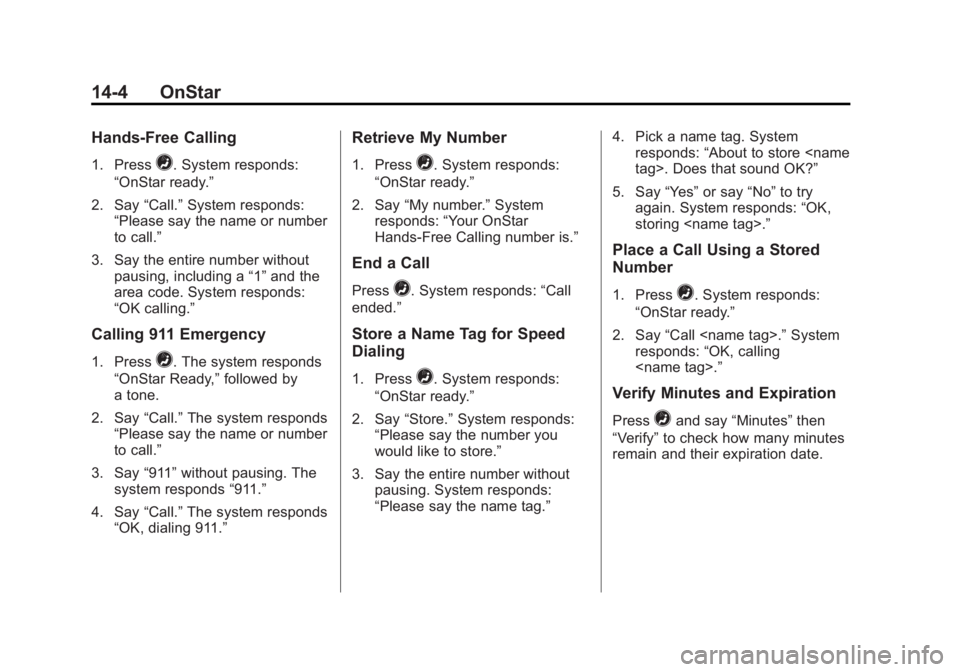
Hands-Free Calling
1. Press=. System responds:
“OnStar ready.”
2. Say “Call.”System responds:
“Please say the name or number
to call.”
3. Say the entire number without pausing, including a “1”and the
area code. System responds:
“OK calling.”
Calling 911 Emergency
1. Press=. The system responds
“OnStar Ready,” followed by
a tone.
2. Say “Call.”The system responds
“Please say the name or number
to call.”
3. Say “911”without pausing. The
system responds “911.”
4. Say “Call.”The system responds
“OK, dialing 911.”
Retrieve My Number
1. Press=. System responds:
“OnStar ready.”
2. Say “My number.” System
responds: “Your OnStar
Hands-Free Calling number is.”
End a Call
Press=. System responds: “Call
ended.”
Store a Name Tag for Speed
Dialing
1. Press=. System responds:
“OnStar ready.”
2. Say “Store.” System responds:
“Please say the number you
would like to store.”
3. Say the entire number without pausing. System responds:
“Please say the name tag.” 4. Pick a name tag. System
responds: “About to store
5. Say “Yes”or say “No”to try
again. System responds: “OK,
storing
Place a Call Using a Stored
Number
1. Press=. System responds:
“OnStar ready.”
2. Say “Call
responds: “OK, calling
Verify Minutes and Expiration
Press=and say “Minutes” then
“Verify” to check how many minutes
remain and their expiration date.