instrument cluster BUICK ENCLAVE 2012 User Guide
[x] Cancel search | Manufacturer: BUICK, Model Year: 2012, Model line: ENCLAVE, Model: BUICK ENCLAVE 2012Pages: 382, PDF Size: 5.43 MB
Page 123 of 382
Black plate (21,1)Buick Verano Owner Manual - 2013 - crc - 10/17/12
Instruments and Controls 5-21
Information Displays
Driver Information
Center (DIC)
The Driver Information Center (DIC)
displays information about the
vehicle. It also displays warning
messages if a system problem is
detected. SeeVehicle Messages on
page 5‑24. All messages appear in
the DIC display in the center of the
instrument cluster.
On some models, the DIC may have
some warning lights or indicators
shown in the top portion of the
display. See Warning Lights,
Gauges, and Indicators on
page 5‑7.
The vehicle may also have features
that can be customized through the
controls on the radio. See Vehicle
Personalization on page 5‑30.
DIC Operation and Displays
The DIC has different displays
which can be accessed by using the
DIC buttons on the turn signal lever.
The DIC displays trip, fuel, and
vehicle system information, and
warning messages if a system
problem is detected.
The bottom of the DIC display
shows the position of the shift lever
and the odometer. It may also show
the direction the vehicle is driving.
In cold weather the DIC display may
change slowly. This is normal and
will move more quickly as the
vehicle's interior temperature rises.
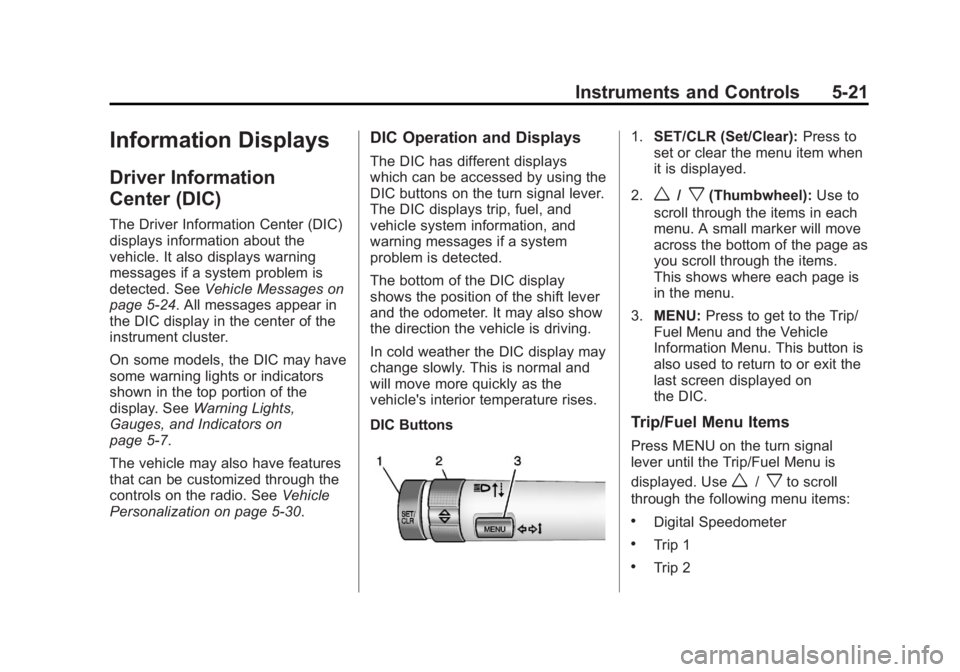
DIC Buttons
1. SET/CLR (Set/Clear): Press to
set or clear the menu item when
it is displayed.
2.
w/x(Thumbwheel): Use to
scroll through the items in each
menu. A small marker will move
across the bottom of the page as
you scroll through the items.
This shows where each page is
in the menu.
3. MENU: Press to get to the Trip/
Fuel Menu and the Vehicle
Information Menu. This button is
also used to return to or exit the
last screen displayed on
the DIC.
Trip/Fuel Menu Items
Press MENU on the turn signal
lever until the Trip/Fuel Menu is
displayed. Use
w/xto scroll
through the following menu items:
.Digital Speedometer
.Trip 1
.Trip 2
Page 124 of 382

Black plate (22,1)Buick Verano Owner Manual - 2013 - crc - 10/17/12
5-22 Instruments and Controls
.Fuel Range
.Average Fuel Economy
.Instantaneous Fuel Economy
.Average Vehicle Speed
.Timer
.Navigation
.Blank Display
Digital Speedometer
The speedometer shows how fast
the vehicle is moving in either
kilometers per hour (km/h) or miles
per hour (mph). The speedometer
cannot be reset.
Trip 1 and Trip 2
These displays show the current
distance traveled, in either
kilometers (km) or miles (mi), since
the last reset for the trip odometer.
The trip odometer can be reset to
zero by pressing SET/CLR, or the
trip odometer reset stem in the
cluster, while the trip odometer
display is showing. Fuel Range
This display shows the approximate
distance the vehicle can be driven
without refueling. The fuel range
estimate is based on an average of
the vehicle's fuel economy over
recent driving history and the
amount of fuel remaining in the fuel
tank. Fuel range cannot be reset.
Average Fuel Economy
This display shows the approximate
average liters per 100 kilometers
(L/100 km) or miles per
gallon (mpg). Average fuel economy
is calculated based on the number
of L/100 km (mpg) recorded since
the last time this menu item was
reset. The average fuel economy
can be reset by pressing SET/CLR
while the Average Fuel Economy
display is showing.
Instantaneous Fuel Economy
The instantaneous fuel economy
display shows the current fuel
economy in liters per 100 kilometers
(L/100 km) or miles per gallon(mpg). The instantaneous fuel
economy reflects only the current
fuel economy and changes
frequently as driving conditions
change. Unlike average economy,
this display cannot be reset.
Average Vehicle Speed
This display shows the average
speed of the vehicle in kilometers
per hour (km/h) or miles per
hour (mph). This average is
calculated based on the various
vehicle speeds recorded since the
last reset of this value. The average
speed can be reset by pressing
SET/CLR while the Average Vehicle
Speed display is showing.
Timer
This display can be used as a timer.
To start the timer, press SET/CLR
while Timer is displayed. The
display will show the amount of time
that has passed since the timer was
last reset, not including time the
ignition is off. Time will continue to
be counted as long as the ignition is
on, even if another display is being
Page 125 of 382
Black plate (23,1)Buick Verano Owner Manual - 2013 - crc - 10/17/12
Instruments and Controls 5-23
shown on the DIC. The timer will
record up to 99 hours, 59 minutes,
and 59 seconds (99:59:59) after
which the display will return to zero.
To stop the timer, press SET/CLR
briefly while Timer is displayed. To
reset the timer to zero, press and
hold SET/CLR.
Navigation
This display is used for the
Navigation System Turn-by-Turn
guidance. See the infotainment
manual, if the vehicle has
navigation, for more information.
Blank Display
This display shows no information.
Vehicle Information Menu
Items
Press MENU on the turn signal
lever until the Vehicle Information
Menu is displayed. Use
w/xto
scroll through the following menu
items:
.Unit
.Tire Pressure
.Remaining Oil Life
.Battery Voltage
Unit
Move
w/xto switch between
metric or US when the Unit display
is active. Press SET/CLR to confirm
the setting. This will change the
displays on the cluster and DIC to
either metric or English (US)
measurements.
Tire Pressure
The display will show a vehicle with
the approximate pressures of all
four tires. Tire pressure is displayed
in either kilopascal (kPa) or pounds
per square inch (psi). See Tire
Pressure Monitor System on
page 10‑46 andTire Pressure
Monitor Operation on page 10‑47 for
more information. Remaining Oil Life
This display shows an estimate of
the oil's remaining useful life.
If REMAINING OIL LIFE 99% is
displayed, that means 99% of the
current oil life remains.
When the remaining oil life is low,
the CHANGE ENGINE OIL SOON
message will appear on the display.
See
Engine Oil Messages on
page 5‑26. The oil should be
changed as soon as possible. See
Engine Oil on page 10‑9. In addition
to the Engine Oil Life System
monitoring the oil life, additional
maintenance is recommended in the
Maintenance Schedule in this
manual. See Maintenance Schedule
on page 11‑3 for more information.
Remember, the Remaining Oil Life
display must be reset after each oil
change. It will not reset itself. Also,
be careful not to reset the
Remaining Oil Life display
accidentally at any time other than
when the oil has just been changed.
It cannot be reset accurately until
Page 138 of 382
Black plate (2,1)Buick Verano Owner Manual - 2013 - crc - 10/17/12
6-2 Lighting
#(Front Fog Lamps):For
vehicles with fog lamps, press to
turn the lamps on or off.
See Front Fog Lamps on page 6‑4.
When the lights are on,
;will be
lit. See Lamps On Reminder on
page 5‑20.
Headlamp High/
Low-Beam Changer
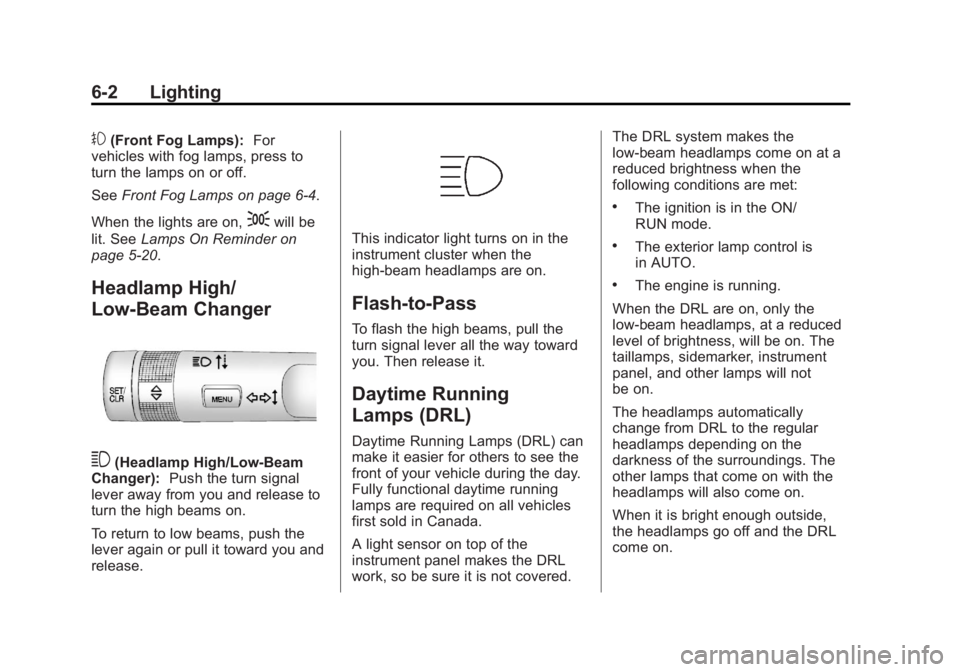
3(Headlamp High/Low-Beam
Changer): Push the turn signal
lever away from you and release to
turn the high beams on.
To return to low beams, push the
lever again or pull it toward you and
release.
This indicator light turns on in the
instrument cluster when the
high-beam headlamps are on.
Flash-to-Pass
To flash the high beams, pull the
turn signal lever all the way toward
you. Then release it.
Daytime Running
Lamps (DRL)
Daytime Running Lamps (DRL) can
make it easier for others to see the
front of your vehicle during the day.
Fully functional daytime running
lamps are required on all vehicles
first sold in Canada.
A light sensor on top of the
instrument panel makes the DRL
work, so be sure it is not covered. The DRL system makes the
low-beam headlamps come on at a
reduced brightness when the
following conditions are met:
.The ignition is in the ON/
RUN mode.
.The exterior lamp control is
in AUTO.
.The engine is running.
When the DRL are on, only the
low-beam headlamps, at a reduced
level of brightness, will be on. The
taillamps, sidemarker, instrument
panel, and other lamps will not
be on.
The headlamps automatically
change from DRL to the regular
headlamps depending on the
darkness of the surroundings. The
other lamps that come on with the
headlamps will also come on.
When it is bright enough outside,
the headlamps go off and the DRL
come on.
Page 140 of 382
Black plate (4,1)Buick Verano Owner Manual - 2013 - crc - 10/17/12
6-4 Lighting
Turn and Lane-Change
Signals
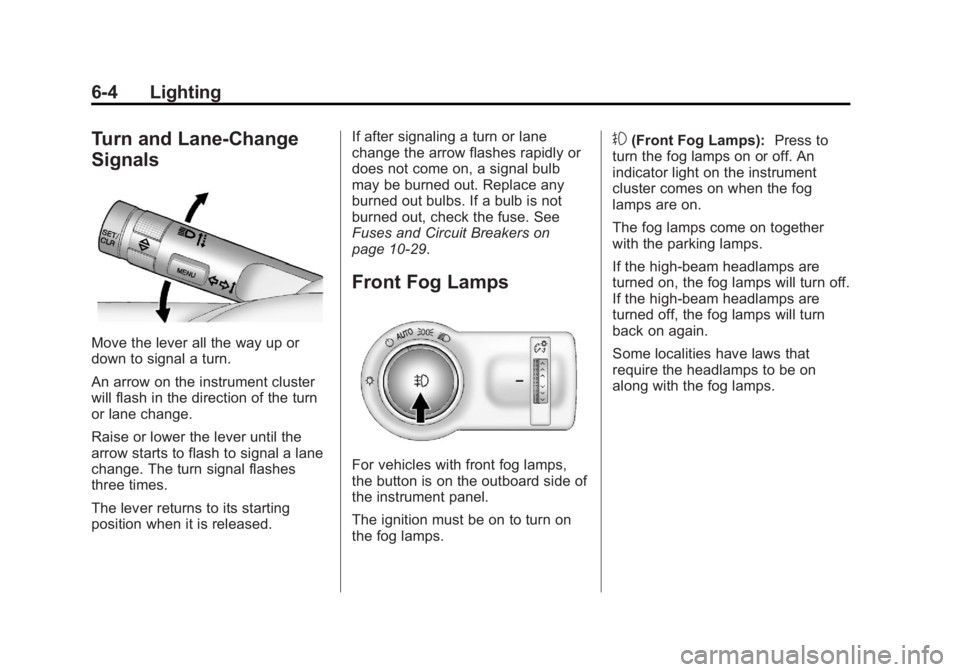
Move the lever all the way up or
down to signal a turn.
An arrow on the instrument cluster
will flash in the direction of the turn
or lane change.
Raise or lower the lever until the
arrow starts to flash to signal a lane
change. The turn signal flashes
three times.
The lever returns to its starting
position when it is released.If after signaling a turn or lane
change the arrow flashes rapidly or
does not come on, a signal bulb
may be burned out. Replace any
burned out bulbs. If a bulb is not
burned out, check the fuse. See
Fuses and Circuit Breakers on
page 10‑29.
Front Fog Lamps
For vehicles with front fog lamps,
the button is on the outboard side of
the instrument panel.
The ignition must be on to turn on
the fog lamps.
#(Front Fog Lamps):
Press to
turn the fog lamps on or off. An
indicator light on the instrument
cluster comes on when the fog
lamps are on.
The fog lamps come on together
with the parking lamps.
If the high-beam headlamps are
turned on, the fog lamps will turn off.
If the high-beam headlamps are
turned off, the fog lamps will turn
back on again.
Some localities have laws that
require the headlamps to be on
along with the fog lamps.
Page 209 of 382
Black plate (25,1)Buick Verano Owner Manual - 2013 - crc - 10/17/12
Driving and Operating 9-25
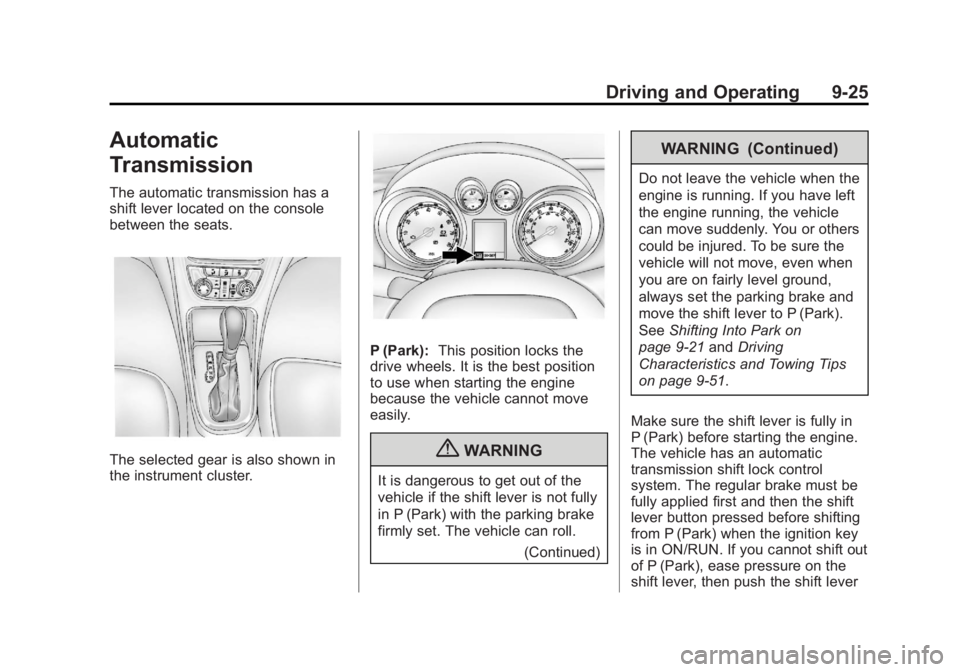
Automatic
Transmission
The automatic transmission has a
shift lever located on the console
between the seats.
The selected gear is also shown in
the instrument cluster.
P (Park):This position locks the
drive wheels. It is the best position
to use when starting the engine
because the vehicle cannot move
easily.
{WARNING
It is dangerous to get out of the
vehicle if the shift lever is not fully
in P (Park) with the parking brake
firmly set. The vehicle can roll.
(Continued)
WARNING (Continued)
Do not leave the vehicle when the
engine is running. If you have left
the engine running, the vehicle
can move suddenly. You or others
could be injured. To be sure the
vehicle will not move, even when
you are on fairly level ground,
always set the parking brake and
move the shift lever to P (Park).
SeeShifting Into Park on
page 9‑21 andDriving
Characteristics and Towing Tips
on page 9‑51.
Make sure the shift lever is fully in
P (Park) before starting the engine.
The vehicle has an automatic
transmission shift lock control
system. The regular brake must be
fully applied first and then the shift
lever button pressed before shifting
from P (Park) when the ignition key
is in ON/RUN. If you cannot shift out
of P (Park), ease pressure on the
shift lever, then push the shift lever
Page 219 of 382

Black plate (35,1)Buick Verano Owner Manual - 2013 - crc - 10/17/12
Driving and Operating 9-35
StabiliTrak is on automatically
whenever the vehicle is started. To
assist with directional control of the
vehicle, the system should always
be left on.
TCS/StabiliTrak Light
When the stability control system
activates,
dflashes on the
instrument cluster. This also occurs
when traction control is activated.
A noise may be heard or vibration
may be felt in the brake pedal. This
is normal. Continue to steer the
vehicle in the intended direction. If there is a problem detected with
StabiliTrak, the appropriate
message will be displayed on the
DIC. See
Ride Control System
Messages on page 5‑28. When a
message is displayed and/or
d
comes on and stays on, the vehicle
is safe to drive but the system is not
operational. Driving should be
adjusted accordingly.
If
dcomes on and stays on, reset
the system:
1. Stop the vehicle.
2. Turn the engine off and wait 15 seconds.
3. Start the engine.
If
dstill comes on and stays on at a
speed above 20 km/h (13 mi/h), see
your dealer for service.
TCS/StabiliTrak Button
This button is on the center stack
below the infotainment system
screen.
StabiliTrak Off LightTCS Off Light
StabiliTrak can be turned off if
needed by pressing and holding
g
untilgandicome on in the
instrument cluster and the
Page 221 of 382

Black plate (37,1)Buick Verano Owner Manual - 2013 - crc - 10/17/12
Driving and Operating 9-37
1(On/Off):Press the upper or
lower portion of the button to turn
the cruise control system on or off.
An white indicator light will turn on
or off in the instrument cluster.
*(Cancel): Press to disengage
cruise control without erasing the
set speed from memory.
RES/+ (Resume/Accel): Move the
thumbwheel up to resume to a
previously set speed or to
accelerate. SET/−
(Set/Coast): Move the
thumbwheel down to set a speed
and activate cruise control or to
make the vehicle decelerate.
Setting Cruise Control
If the cruise button is on when not in
use, it could get bumped and go into
cruise when not desired. Keep the
cruise control button off when cruise
is not being used.
To set a speed:
1. Press
1to turn cruise
control on.
2. Get up to the speed desired.
3. Move the thumbwheel down toward SET/− and release it.
4. Take your foot off the accelerator pedal.
When the cruise control has been
set to the desired speed, a green
cruise control indicator appears on
the instrument cluster.
When the brakes are applied, the
cruise control shuts off. Resuming a Set Speed
If the cruise control is set at a
desired speed and then the brakes
are applied, the cruise control is
disengaged without erasing the set
speed from memory. Once the
vehicle speed is about 40 km/h
(25 mph) or greater, move the
thumbwheel up toward RES/+
briefly and then release it. The
vehicle returns to the previously set
speed and stays there.
Increasing Speed While Using
Cruise Control
If the cruise control system is
already activated:
.Move the thumbwheel up toward
RES/+ and hold it until the
vehicle accelerates to the
desired speed, then release it.
.To increase the speed in small
amounts, move the thumbwheel
up toward RES/+ briefly and
then release it. Each time this is
done, the vehicle goes about
1.6 km/h (1 mph) faster.
Page 272 of 382

Black plate (32,1)Buick Verano Owner Manual - 2013 - crc - 10/17/12
10-32 Vehicle Care
Mini
Fuses Amps Usage
41 –Empty
46 –Empty
47 15A Horn
49 20A Fuel Pump
50 –Empty
51 5A Inside Rear View Mirror
52 –Empty
53 10A Ignition Engine
Control
Module/
Transmission
Control
Module Mini
Fuses Amps Usage
54 7.5A Instrument Cluster/Fuel
System
Control
Module/
Heater,
Ventilation,
and Air
Conditioning
Run/Crank
J-Case Fuses Amps Usage
16 30A Starter Control
18 30A Rear Window Defogger
19 30A Front Power Window
20 30A Rear Power Window J-Case
Fuses Amps Usage
21 40A Rear Electrical
Center
23 –Empty
27 50A Spare
28 –Empty
29 30A Electric Parking
Brake
30 60A Antilock Brake
System
Pump
42 40A Engine Cooling Fan
(RPO LEA)
43 30A Front Wipers
44 –Empty
Page 274 of 382

Black plate (34,1)Buick Verano Owner Manual - 2013 - crc - 10/17/12
10-34 Vehicle Care
Instrument Panel Fuse Block
The vehicle may not be equipped
with all of the fuses, relays, and
features shown. Fuses Amps Usage
1 2A Body Control Module
2 20A Body Control Module
3 20A Body Control Module
4 20A Infotainment System
5 10A Information Display/
Parking
Assist
6 20A Ignition/ Electronic
Key System
7 20A Power Outlet
8 30A Body Control Module
9 30A Body Control Module
10 30A Body Control Module Fuses Amps Usage
11 40A Interior Fan
12 25A Driver Power Seat
13 –Not Used
14 7.5A Diagnostic Connector
15 10A Airbag
16 10A Central Locking
System/
Tailgate
17 10A Air Conditioning
System
18 30A Infotainment System
19 30A Body Control Module
20 5A Passenger Power Seat
21 7.5A Instrument Cluster