wheel BUICK ENCLAVE 2012 Owner's Guide
[x] Cancel search | Manufacturer: BUICK, Model Year: 2012, Model line: ENCLAVE, Model: BUICK ENCLAVE 2012Pages: 382, PDF Size: 5.43 MB
Page 123 of 382
Black plate (21,1)Buick Verano Owner Manual - 2013 - crc - 10/17/12
Instruments and Controls 5-21
Information Displays
Driver Information
Center (DIC)
The Driver Information Center (DIC)
displays information about the
vehicle. It also displays warning
messages if a system problem is
detected. SeeVehicle Messages on
page 5‑24. All messages appear in
the DIC display in the center of the
instrument cluster.
On some models, the DIC may have
some warning lights or indicators
shown in the top portion of the
display. See Warning Lights,
Gauges, and Indicators on
page 5‑7.
The vehicle may also have features
that can be customized through the
controls on the radio. See Vehicle
Personalization on page 5‑30.
DIC Operation and Displays
The DIC has different displays
which can be accessed by using the
DIC buttons on the turn signal lever.
The DIC displays trip, fuel, and
vehicle system information, and
warning messages if a system
problem is detected.
The bottom of the DIC display
shows the position of the shift lever
and the odometer. It may also show
the direction the vehicle is driving.
In cold weather the DIC display may
change slowly. This is normal and
will move more quickly as the
vehicle's interior temperature rises.
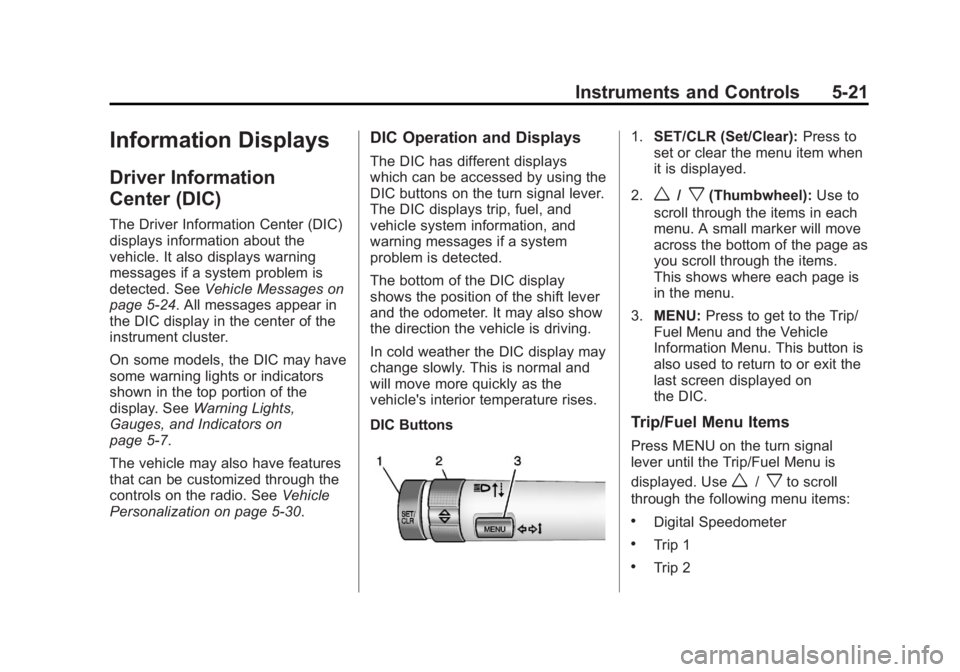
DIC Buttons
1. SET/CLR (Set/Clear): Press to
set or clear the menu item when
it is displayed.
2.
w/x(Thumbwheel): Use to
scroll through the items in each
menu. A small marker will move
across the bottom of the page as
you scroll through the items.
This shows where each page is
in the menu.
3. MENU: Press to get to the Trip/
Fuel Menu and the Vehicle
Information Menu. This button is
also used to return to or exit the
last screen displayed on
the DIC.
Trip/Fuel Menu Items
Press MENU on the turn signal
lever until the Trip/Fuel Menu is
displayed. Use
w/xto scroll
through the following menu items:
.Digital Speedometer
.Trip 1
.Trip 2
Page 130 of 382

Black plate (28,1)Buick Verano Owner Manual - 2013 - crc - 10/17/12
5-28 Instruments and Controls
SERVICE BLIND ZONE ALERT
SYSTEM
If this message appears, both SBZA
displays will remain on indicating
there is a problem with the SBZA
system. If these displays remain on
after continued driving, the system
needs service. Take the vehicle to
your dealer.
SIDE BLIND ZONE ALERT
SYSTEM OFF
This message indicates that the
driver has turned the system off.
SIDE BLIND ZONE SYS.
UNAVAILABLE
This message indicates that the
SBZA system is disabled because
the sensor is blocked and cannot
detect vehicles in the blind zone.
The sensor may be blocked by mud,
dirt, snow, ice, or slush. This
message may also activate during
heavy rain or due to road spray. The
vehicle does not need service. For
cleaning, seeExterior Care on
page 10‑72.
Ride Control System
Messages
SERVICE TRACTION
CONTROL
This message displays when there
is a problem with the Traction
Control System (TCS). When this
message is displayed, the system
will not limit wheel spin. Adjust your
driving accordingly. See your dealer
for service.
SERVICE STABILITRAK
This message displays if there is a
problem with the StabiliTrak system.
If this message appears, try to reset
the system. Stop; turn off the engine
for at least 15 seconds; then start
the engine again. If this message
still comes on, it means there is a
problem. See your dealer for
service. The vehicle is safe to drive;
however, you do not have the
benefit of StabiliTrak, so reduce
your speed and drive accordingly.
TRACTION CONTROL OFF
This message displays when the
Traction Control System (TCS) is
turned off. Adjust your driving
accordingly.
TRACTION CONTROL ON
This message displays when the
Traction Control System (TCS) is
turned on.
Security Messages
THEFT ATTEMPTED
This message displays if the vehicle
detects a tamper condition.
Tire Messages
TIRE PRESSURE LOW ADD
AIR TO TIRE
On vehicles with the Tire Pressure
Monitor System (TPMS), this
message displays when the
pressure in one or more of the
vehicle's tires is low.
Page 141 of 382

Black plate (5,1)Buick Verano Owner Manual - 2013 - crc - 10/17/12
Lighting 6-5
Interior Lighting
Instrument Panel
Illumination Control
This feature controls the brightness
of the instrument panel controls and
infotainment display screen. The
thumbwheel is to the left of the
steering column on the instrument
panel.
D(Instrument Panel
Brightness): Move the
thumbwheel up or down and hold, to
brighten or dim the instrument panel
controls and infotainment display
screen.
Courtesy Lamps
The courtesy lamps come on
automatically when any door is
opened and the dome lamp is in the
door position.
Dome Lamps
The interior lamps control located in
the overhead console controls both
the front and rear interior lamps.
((Dome Lamp Override): Press
to turn the lamps off, even when a
door is open.
H(Door): Press to turn the lamps
on automatically when a door is
opened.
'(On): Press to turn on the
dome lamps.
Reading Lamps
There are front and rear reading
lamps.
The front reading lamps are located
in the overhead console.
Page 148 of 382
Black plate (4,1)Buick Verano Owner Manual - 2013 - crc - 10/17/12
7-4 Infotainment System
Operation
Controls
The infotainment system is operated
by using the pushbuttons,
multifunction knobs, menus shown
on the display, and steering wheel
controls, if equipped.
Turning the System On or Off
O/VOL (Power/Volume):Press to
turn the system on and off.
Automatic Switch-Off
If the infotainment system has been
turned on after the ignition is turned
off, the system will turn off
automatically after 10 minutes.
Volume Control
O/VOL (Power/Volume): Turn to
adjust the volume.
V/8(Phone/Mute): Press to
mute the infotainment system. Press
V/8again, or turn theO/VOL
knob to cancel mute.
Menu System (Radio with CD)
For radios with cd and touchscreen,
see “Using the System” in the
infotainment manual.
Controls
The TUNE/MENU knob and
/
BACK are used to navigate the
menu system.
TUNE/MENU:
Press to:
.Enter the menu system.
.Select or activate the highlighted
menu option.
.Confirm a set value.
.Turn a system setting on or off.
Turn to:
.Highlight a menu option.
.Select a value.
/BACK:
Press to:
.Exit a menu.
.Return from a submenu screen
to the previous menu screen.
.Delete the last character in a
sequence.
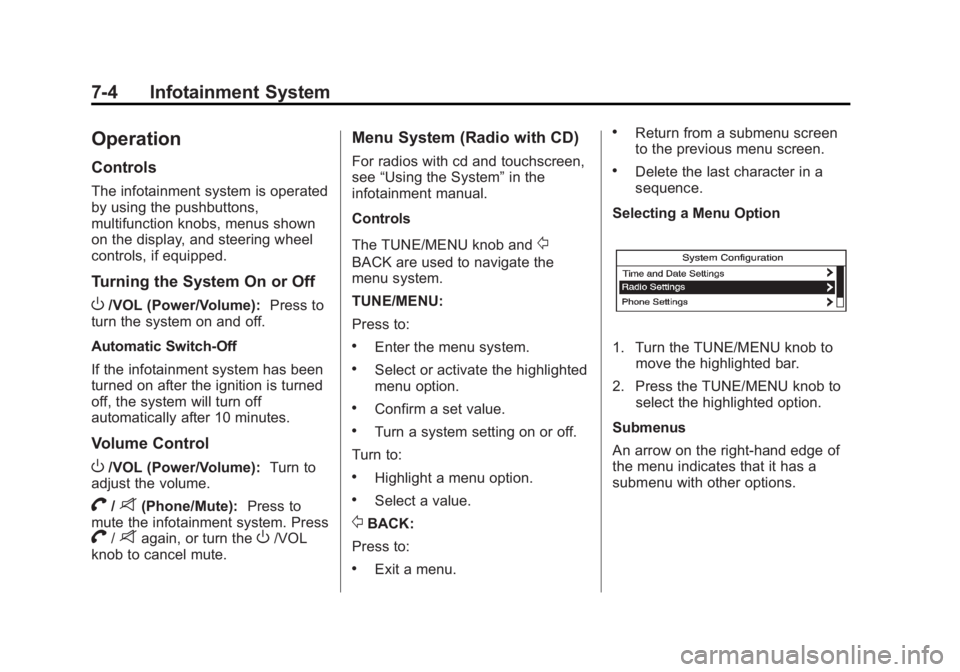
Selecting a Menu Option
1. Turn the TUNE/MENU knob to move the highlighted bar.
2. Press the TUNE/MENU knob to select the highlighted option.
Submenus
An arrow on the right-hand edge of
the menu indicates that it has a
submenu with other options.
Page 165 of 382
Black plate (21,1)Buick Verano Owner Manual - 2013 - crc - 10/17/12
Infotainment System 7-21
Bluetooth Controls
Use the buttons located on the
infotainment system and the
steering wheel to operate the
Bluetooth system.
Steering Wheel Controls
b/g(Push to Talk):Press to
answer incoming calls, confirm
system information, and start voice
recognition.
$/i(Mute/End Call): Press to
end a call, reject a call, or cancel an
operation.
Infotainment System Controls
If equipped, the infotainment system
allows certain controls to be
selected on the infotainment display.
For information about how to
navigate the menu system using the
infotainment controls, see Operation
on page 7‑4.
V/8(Phone/Mute): Press to
enter the Phone main menu. Press
to mute the audio system.
Voice Recognition
The voice recognition system uses
commands to control the system
and dial phone numbers.
Noise: The system may not
recognize voice commands if there
is too much background noise.
When to Speak: A tone sounds to
indicate that the system is ready for
a voice command. Wait for the tone
and then speak.
How to Speak: Speak clearly in a
calm and natural voice.
Audio System
When using the Bluetooth system,
sound comes through the vehicle's
front audio system speakers and
overrides the audio system. Use the
O/VOL knob during a call to
change the volume level. The
adjusted volume level remains in
memory for later calls. The system
maintains a minimum volume level.
Other Information
The Bluetooth®word mark and
logos are owned by the Bluetooth®
SIG, Inc. and any use of such marks
by General Motors is under license.
Other trademarks and trade names
are those of their respective owners.
See Radio Frequency Statement on
page 13‑20 for information
regarding Part 15 of the Federal
Communications Commission (FCC)
rules and Industry Canada
Standards RSS-GEN/210/220/310.
Bluetooth (Infotainment
Controls)
For vehicles equipped with radios
with cd and touchscreen, see
“Bluetooth” in the infotainment
manual.
For information about how to
navigate the menu system using the
infotainment controls, see Operation
on page 7‑4.
Page 169 of 382

Black plate (25,1)Buick Verano Owner Manual - 2013 - crc - 10/17/12
Infotainment System 7-25
5. To add more callers to theconference call, repeat Steps 1
through 4. The number of callers
that can be added is limited by
your wireless service carrier.
Ending a Call
Turn or press the TUNE/MENU
knob and select Hang Up.
Muting a Call
To Mute a Call
Turn or press the TUNE/MENU
knob and select Mute Call.
To Cancel Mute
Turn or press the TUNE/MENU
knob and select Mute Call.
Dual Tone Multi-Frequency
(DTMF) Tones
The in-vehicle Bluetooth system can
send numbers during a call. This is
used when calling a menu-driven
phone system. For Radio with CD:
1. Turn or press the TUNE/MENU
knob and select Enter Number.
2. Enter the character sequence. See “Entering a Character
Sequence” inOperation on
page 7‑4 for more information.
For Radio with CD and
Touchscreen:
1. Touch Enter Number.
2. Use the keypad to enter the number.
Bluetooth (Voice
Recognition)
Using Voice Recognition
For vehicles equipped with radios
with cd and touchscreen, see
“Bluetooth” in the infotainment
manual.
To use voice recognition, press the
b/gbutton located on the steering
wheel. Use the commands below for
the various voice features. For additional information say "Help"
while you are in a voice
recognition menu.
Pairing
A Bluetooth-enabled cell phone
must be paired to the Bluetooth
system and then connected to the
vehicle before it can be used. See
your cell phone manufacturer's user
guide for Bluetooth functions before
pairing the cell phone. If a Bluetooth
phone is not connected, calls will be
made using OnStar Hands-Free
Calling, if available. See
OnStar
Overview on page 14‑1.
Pairing Information
.A Bluetooth phone with MP3
capability cannot be paired to
the vehicle as a phone and an
MP3 player at the same time.
.Up to five cell phones can be
paired to the Bluetooth system.
.The pairing process is disabled
when the vehicle is moving.
Page 181 of 382
Black plate (3,1)Buick Verano Owner Manual - 2013 - crc - 10/17/12
Climate Controls 8-3
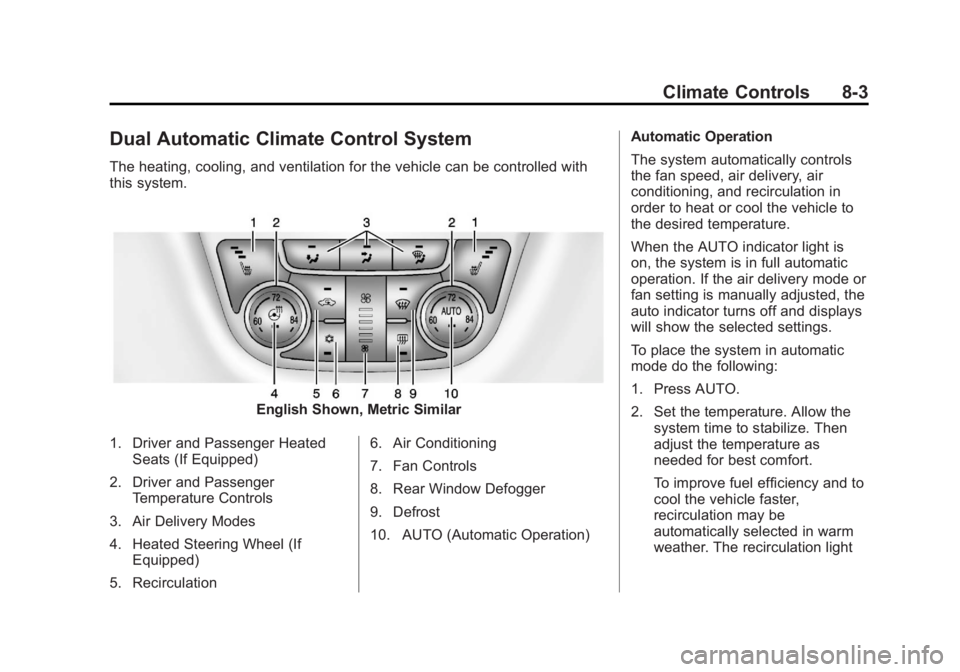
Dual Automatic Climate Control System
The heating, cooling, and ventilation for the vehicle can be controlled with
this system.
English Shown, Metric Similar
1. Driver and Passenger Heated Seats (If Equipped)
2. Driver and Passenger Temperature Controls
3. Air Delivery Modes
4. Heated Steering Wheel (If Equipped)
5. Recirculation 6. Air Conditioning
7. Fan Controls
8. Rear Window Defogger
9. Defrost
10. AUTO (Automatic Operation)Automatic Operation
The system automatically controls
the fan speed, air delivery, air
conditioning, and recirculation in
order to heat or cool the vehicle to
the desired temperature.
When the AUTO indicator light is
on, the system is in full automatic
operation. If the air delivery mode or
fan setting is manually adjusted, the
auto indicator turns off and displays
will show the selected settings.
To place the system in automatic
mode do the following:
1. Press AUTO.
2. Set the temperature. Allow the
system time to stabilize. Then
adjust the temperature as
needed for best comfort.
To improve fuel efficiency and to
cool the vehicle faster,
recirculation may be
automatically selected in warm
weather. The recirculation light
Page 183 of 382
Black plate (5,1)Buick Verano Owner Manual - 2013 - crc - 10/17/12
Climate Controls 8-5
Rear Window Defogger
=(Rear Window Defogger):
Press to turn the rear window
defogger on or off.
The rear window defogger turns off
automatically after about
10 minutes. If turned on again it
runs for about five minutes before
turning off.
The rear window defogger can be
set to automatic operation; see
“Climate and Air Quality” under
Vehicle Personalization on
page 5‑30. When auto rear defog is
selected, the rear window defogger
turns on automatically when the
interior temperature is cold and the
outside temperature is about 4°C
(40°F) and below. The auto rear
defogger turns off automatically
after about 10 minutes. At higher
speeds, the rear window defogger
may stay on continuously.
For vehicles with heated outside
rearview mirrors, they turn on when
the rear window defogger button is on and help to clear fog or frost from
the surface of the mirrors. See
Heated Mirrors on page 2‑15.
Notice:
Do not try to clear frost
or other material from the inside
of the front windshield and rear
window with a razor blade or
anything else that is sharp. This
may damage the rear window
defogger grid and affect the
radio's ability to pick up stations
clearly. The repairs would not be
covered by the vehicle warranty.
MorL(Heated Seats, If
Equipped): Press to turn the
heated seats on or off. See Heated
Front Seats on page 3‑6.
((Heated Steering Wheel, If
Equipped): Press to turn the
heated steering wheel on or off. See
Heated Steering Wheel on
page 5‑3.
Remote Start Climate Control
Operation: For vehicles with the
remote vehicle start feature, the
climate control system may run
when the vehicle is started remotely. The system uses the driver
’s
previous settings to heat or cool the
inside of the vehicle. The rear defog
may come on during remote start
based on cold ambient conditions.
The rear defog indicator light does
not come on during a remote start.
If the vehicle has front heated seats,
they may come on during a remote
start. The heated seat indicator
lights do not come on during a
remote start. See Remote Vehicle
Start on page 2‑8 andHeated Front
Seats on page 3‑6.
Sensors
The solar sensor, located on top of
the instrument panel near the
windshield, monitors the solar heat.
The climate control system uses the
sensor information to adjust the
temperature, fan speed,
recirculation, and air delivery mode
for best comfort.
If the sensor is covered, the
automatic climate control system
may not work properly.
Page 184 of 382
Black plate (6,1)Buick Verano Owner Manual - 2013 - crc - 10/17/12
8-6 Climate Controls
Air Vents
Use the louvers located on the air
vents to change the direction of the
airflow.
Use the thumbwheels near the air
vents to control the amount of
airflow or to shut off the airflow.
Operation Tips
.Keep all outlets open whenever
possible for best system
performance.
.Keep the paths under all seats
clear of objects to help circulate
the air inside the vehicle more
effectively.
.Use of non-GM approved hood
deflectors can adversely affect
the performance of the system.
Maintenance
Passenger Compartment
Air Filter
The filter removes dust, pollen, and
other airborne irritants from outside
air that is pulled into the vehicle.
The filter should be replaced as part
of routine scheduled maintenance.
SeeMaintenance Schedule on
page 11‑3.
See your dealer regarding
replacement of the filter.
Page 186 of 382
Black plate (2,1)Buick Verano Owner Manual - 2013 - crc - 10/17/12
9-2 Driving and Operating
Towing
General TowingInformation . . . . . . . . . . . . . . . . . 9-51
Driving Characteristics and Towing Tips . . . . . . . . . . . . . . . . 9-51
Trailer Towing (2.0L
Engine) . . . . . . . . . . . . . . . . . . . . . 9-54
Trailer Towing (Except 2.0L Engine) . . . . . . . . . . . . . . . . . . . . . 9-54
Towing Equipment . . . . . . . . . . . 9-55
Conversions and Add-Ons
Add-On Electrical Equipment . . . . . . . . . . . . . . . . . 9-56
Driving Information
Distracted Driving
Distraction comes in many forms
and can take your focus from the
task of driving. Exercise good
judgment and do not let other
activities divert your attention away
from the road. Many local
governments have enacted laws
regarding driver distraction. Become
familiar with the local laws in
your area.
To avoid distracted driving, always
keep your eyes on the road, hands
on the wheel, and mind on the drive.
.Do not use a phone in
demanding driving situations.
Use a hands-free method to
place or receive necessary
phone calls.
.Watch the road. Do not read,
take notes, or look up
information on phones or other
electronic devices.
.Designate a front seat
passenger to handle potential
distractions.
.Become familiar with vehicle
features before driving, such as
programming favorite radio
stations and adjusting climate
control and seat settings.
Program all trip information into
any navigation device prior to
driving.
.Wait until the vehicle is parked
to retrieve items that have fallen
to the floor.
.Stop or park the vehicle to tend
to children.
.Keep pets in an appropriate
carrier or restraint.
.Avoid stressful conversations
while driving, whether with a
passenger or on a cell phone.