rear end BUICK ENCLAVE 2014 Owner's Manual
[x] Cancel search | Manufacturer: BUICK, Model Year: 2014, Model line: ENCLAVE, Model: BUICK ENCLAVE 2014Pages: 410, PDF Size: 4.02 MB
Page 11 of 410
Black plate (5,1)Buick Enclave Owner Manual (GMNA-Localizing-U.S./Canada/Mexico-
6014143) - 2014 - CRC - 8/14/13
In Brief 1-5
The engine will continue to run for
10 minutes. Repeat the steps for a
10-minute time extension. Remote
start can be extended only once.
Canceling a Remote Start
To cancel a remote start:
.Aim the RKE transmitter at the
vehicle and press and hold
/
until the parking lamps turn off.
.Turn on the hazard warning
flashers.
.Turn the ignition switch on and
then off.
See Remote Vehicle Start on
page 2-4.
Door Locks
To lock or unlock a door manually:
.From the inside, use the door
lock knob on the window sill.
.From the outside, turn the key
toward the front or rear of the
vehicle, or press
QorKon the
Remote Keyless Entry (RKE)
transmitter.
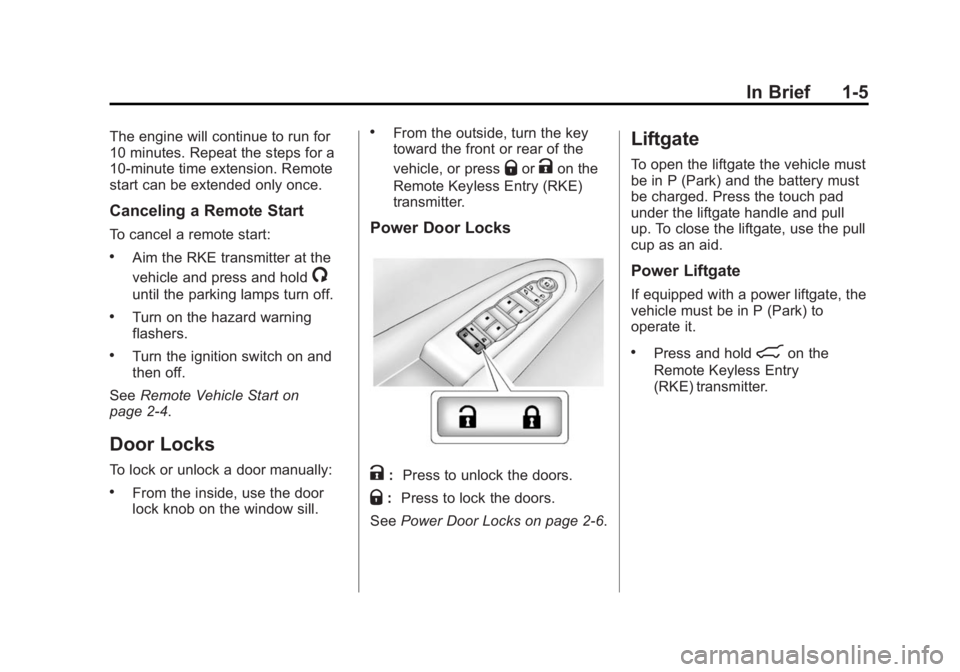
Power Door Locks
K: Press to unlock the doors.
Q:Press to lock the doors.
See Power Door Locks on page 2-6.
Liftgate
To open the liftgate the vehicle must
be in P (Park) and the battery must
be charged. Press the touch pad
under the liftgate handle and pull
up. To close the liftgate, use the pull
cup as an aid.
Power Liftgate
If equipped with a power liftgate, the
vehicle must be in P (Park) to
operate it.
.Press and hold8on the
Remote Keyless Entry
(RKE) transmitter.
Page 19 of 410
Black plate (13,1)Buick Enclave Owner Manual (GMNA-Localizing-U.S./Canada/Mexico-
6014143) - 2014 - CRC - 8/14/13
In Brief 1-13
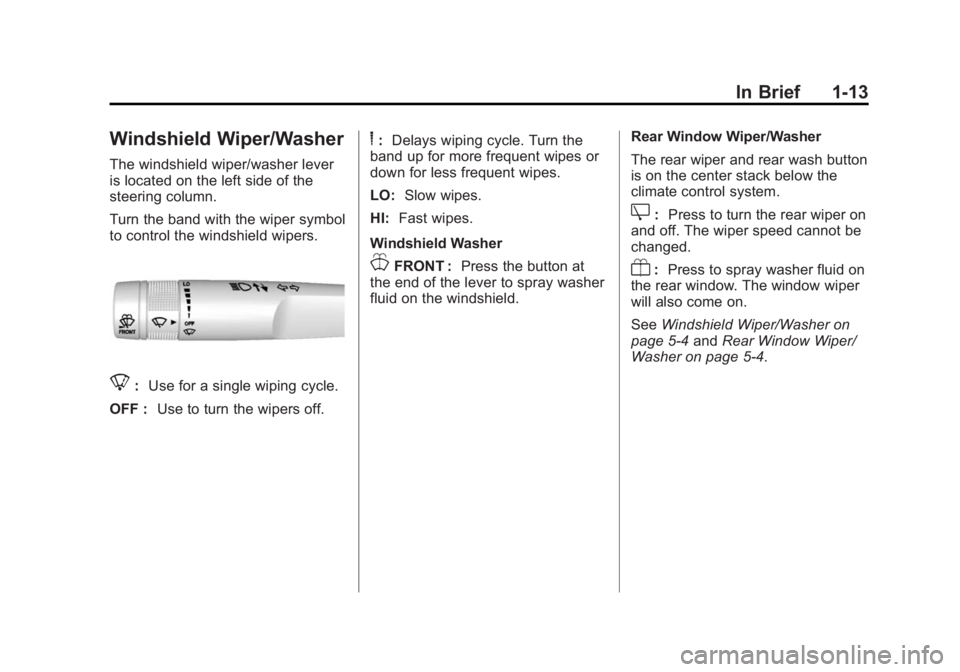
Windshield Wiper/Washer
The windshield wiper/washer lever
is located on the left side of the
steering column.
Turn the band with the wiper symbol
to control the windshield wipers.
8:Use for a single wiping cycle.
OFF : Use to turn the wipers off.
6:Delays wiping cycle. Turn the
band up for more frequent wipes or
down for less frequent wipes.
LO: Slow wipes.
HI: Fast wipes.
Windshield Washer
JFRONT : Press the button at
the end of the lever to spray washer
fluid on the windshield. Rear Window Wiper/Washer
The rear wiper and rear wash button
is on the center stack below the
climate control system.
Z:
Press to turn the rear wiper on
and off. The wiper speed cannot be
changed.
Y: Press to spray washer fluid on
the rear window. The window wiper
will also come on.
See Windshield Wiper/Washer on
page 5-4 andRear Window Wiper/
Washer on page 5-4.
Page 23 of 410
Black plate (17,1)Buick Enclave Owner Manual (GMNA-Localizing-U.S./Canada/Mexico-
6014143) - 2014 - CRC - 8/14/13
In Brief 1-17
SiriusXM Satellite Radio
Service
SiriusXM is a satellite radio service
based in the 48 contiguous United
States and 10 Canadian provinces.
SiriusXM satellite radio has a wide
variety of programming and
commercial-free music, coast to
coast, and in digital-quality sound.
A fee is required to receive the
SiriusXM service.
Refer to:
.www.siriusxm.com or call
1-866-635-2349 (U.S.).
.www.xmradio.ca or call
1-877-209-0079 (Canada).
See Satellite Radio on page 7-9.
Portable Audio Devices
The vehicle has a 3.5 mm (1/8 in)
auxiliary input jack on the faceplate
and a USB port in the instrument
panel storage area. External
devices such as iPods, laptop
computers, MP3 players, CD
changers, USB storage devices, etc. can be connected to the
auxiliary port using a 3.5 mm (1/8 in)
input jack or the USB port
depending on the audio system.
If equipped, there are two USB
ports on the rear of the center
console that can be used for
charging only. They can charge
devices that draw 2.1 amps or less.
See the device’
s owner manual for
the specification.
See Auxiliary Devices on page 7-17.
Bluetooth®
The Bluetooth®system allows users
with a Bluetooth-enabled mobile
phone to make and receive
hands-free calls using the vehicle
audio system and controls.
The Bluetooth-enabled mobile
phone must be paired with the
in-vehicle Bluetooth system before it
can be used in the vehicle. Not all
phones will support all functions.
See Bluetooth on page 7-20.
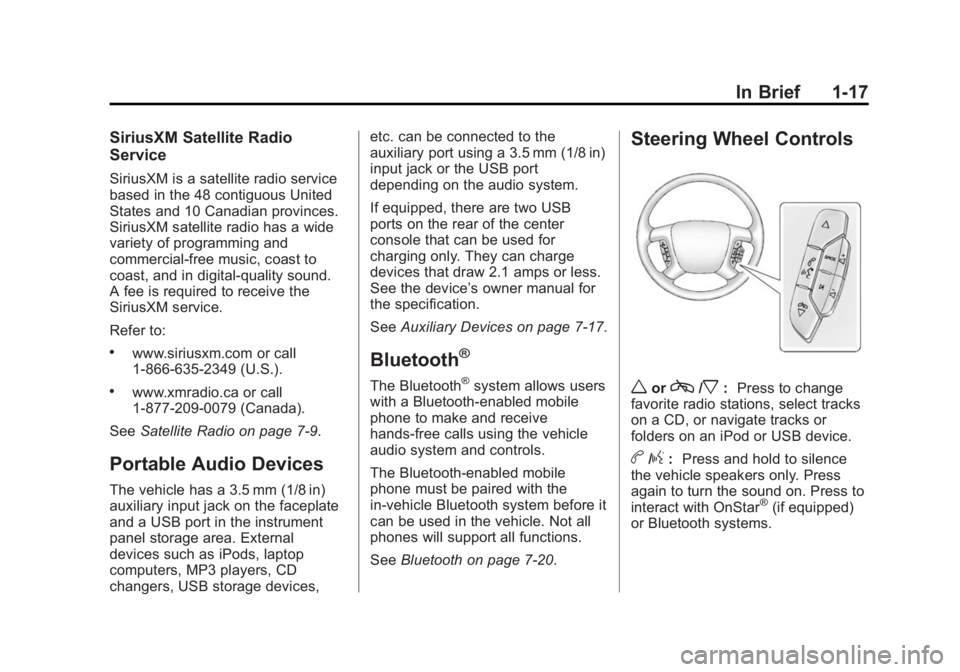
Steering Wheel Controls
worc/x:Press to change
favorite radio stations, select tracks
on a CD, or navigate tracks or
folders on an iPod or USB device.
b/g: Press and hold to silence
the vehicle speakers only. Press
again to turn the sound on. Press to
interact with OnStar
®(if equipped)
or Bluetooth systems.
Page 24 of 410
Black plate (18,1)Buick Enclave Owner Manual (GMNA-Localizing-U.S./Canada/Mexico-
6014143) - 2014 - CRC - 8/14/13
1-18 In Brief
c/x:Press to reject an
incoming call, or end a current call.
SRCE: Press to switch between
the radio, CD, and for equipped
vehicles, front auxiliary, rear
auxiliary, and iPod/USB.
¨: Press to seek the next radio
station, track, or chapter while
sourced to the CD slot, or to select
tracks and folders on an iPod or
USB device.
+
eor −e:Press to increase or to
decrease the volume.
See Steering Wheel Controls on
page 5-3.
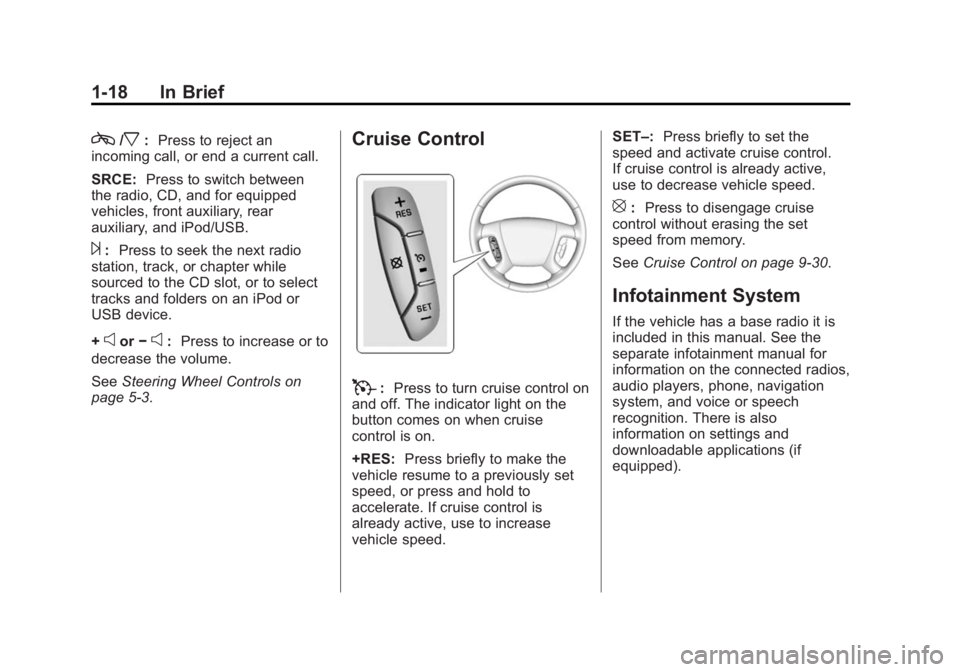
Cruise Control
T: Press to turn cruise control on
and off. The indicator light on the
button comes on when cruise
control is on.
+RES: Press briefly to make the
vehicle resume to a previously set
speed, or press and hold to
accelerate. If cruise control is
already active, use to increase
vehicle speed. SET–:
Press briefly to set the
speed and activate cruise control.
If cruise control is already active,
use to decrease vehicle speed.
[: Press to disengage cruise
control without erasing the set
speed from memory.
See Cruise Control on page 9-30.
Infotainment System
If the vehicle has a base radio it is
included in this manual. See the
separate infotainment manual for
information on the connected radios,
audio players, phone, navigation
system, and voice or speech
recognition. There is also
information on settings and
downloadable applications (if
equipped).
Page 25 of 410
Black plate (19,1)Buick Enclave Owner Manual (GMNA-Localizing-U.S./Canada/Mexico-
6014143) - 2014 - CRC - 8/14/13
In Brief 1-19
Forward Collision Alert
(FCA) System
If equipped, FCA may help avoid or
reduce the harm caused by
front-end crashes. FCA provides a
green indicator when a vehicle is
detected ahead. This indicator
displays amber if you follow a
vehicle much too closely. When
approaching a vehicle ahead too
quickly, FCA provides a red flashing
alert on the windshield and rapidly
beeps.
SeeForward Collision Alert (FCA)
System on page 9-32.
Lane Departure
Warning (LDW)
If equipped, LDW is intended to help
avoid unintentional lane departures
at speeds of 56 km/h (35 mph) or
greater. LDW uses a camera sensor to detect the lane markings. The
LDW indicator,
@, appears green if
a lane marking is detected. If the
vehicle departs the lane, the
indicator will change to amber and
flash. In addition, beeps will sound.
See Lane Departure Warning (LDW)
on page 9-40.
Side Blind Zone
Alert (SBZA)
If equipped, SBZA will detect
vehicles in the next lane over in the
vehicle's side blind zone area.
When this happens, the SBZA
display will light up in the
corresponding outside side mirror
and will flash if the turn signal is on.
See Side Blind Zone Alert (SBZA)
on page 9-35.
Rear Vision
Camera (RVC)
If equipped, RVC displays a view of
the area behind the vehicle, on the
center stack display, when the
vehicle is shifted into R (Reverse).
See Rear Vision Camera (RVC) on
page 9-37.
Ultrasonic Parking Assist
If equipped, this system uses
sensors on the rear bumper to
assist with parking and avoiding
objects while in R (Reverse).
It operates at speeds less than
8 km/h (5 mph). Ultrasonic Rear
Parking Assist (URPA) uses audible
beeps to provide distance and
system information.
Keep the sensors on the vehicle's
rear bumper clean to ensure proper
operation.
See Ultrasonic Parking Assist on
page 9-34.
Page 27 of 410
Black plate (21,1)Buick Enclave Owner Manual (GMNA-Localizing-U.S./Canada/Mexico-
6014143) - 2014 - CRC - 8/14/13
In Brief 1-21
Vent:Press the front or rear of the
switch to vent or close the sunroof.
Express-open/Express-close:
Press and release the rear or front
of the switch to express-open or
express-close the sunroof.
Manual Sunshade
The sunshades must be opened
and closed manually. To open the
sunshade, press the button on the
sunshade handle to release it and
guide it back. To close the
sunshade, pull the sunshade
forward until it latches.
See Sunroof on page 2-19.
Performance and
Maintenance
Traction Control/
Electronic Stability
Control
The vehicle has a traction control
system that limits wheel spin, and
the StabiliTrak system that assists
with directional control of the vehicle
in difficult driving conditions. Both
systems turn on automatically every
time the vehicle is started.
.To turn off traction control and
StabiliTrak, press and release
4
on the center stack, and the
appropriate DIC message
displays. See Ride Control
System Messages on page 5-36.
.Press and release4again to
turn on both systems.
See Traction Control/Electronic
Stability Control on page 9-28.
Tire Pressure Monitor
This vehicle may have a Tire
Pressure Monitor System (TPMS).
The low tire pressure warning light
alerts to a significant loss in
pressure of one of the vehicle's
tires. If the warning light comes on,
stop as soon as possible and inflate
the tires to the recommended
pressure shown on the Tire and
Loading Information label. See
Vehicle Load Limits on page 9-10.
The warning light will remain on until
the tire pressure is corrected.
The low tire pressure warning light
may come on in cool weather when
the vehicle is first started, and then
turn off as the vehicle is driven.
Page 35 of 410
Black plate (5,1)Buick Enclave Owner Manual (GMNA-Localizing-U.S./Canada/Mexico-
6014143) - 2014 - CRC - 8/14/13
Keys, Doors, and Windows 2-5
vehicle's lights cannot be seen,
press and hold
/for at least
four seconds.
When the vehicle starts, the parking
lamps will turn on and remain on as
long as the engine is running. The
doors will be locked and the climate
control system will operate
automatically if the vehicle has the
automatic system, or at the same
setting as when the vehicle was last
turned off.
If the vehicle has an automatic
climate control system and heated
seats, the heated seats turn on
during colder outside temperatures
and shut off when the key is turned
to ON/RUN. See Heated and
Cooled Front Seats on page 3-7.
The rear window defogger and
heated mirrors, if the vehicle has
them, turn on during colder outside
temperatures and turn off when the
key is turned to ON/RUN. After entering the vehicle during a
remote start, insert and turn the key
to the ON/RUN position to drive the
vehicle.
If the vehicle is left running it
automatically shuts off after
10 minutes unless a time extension
has been done.
Extending Engine Run Time
To extend the engine run time by
10 minutes, repeat Steps 1–3 while
the engine is still running. The
engine run time can only be
extended if it is the first remote start
since the vehicle has been driven.
Remote start can be extended
one time.
If the remote start procedure is used
again before the first 10-minute time
frame has ended, the first
10 minutes will immediately expire
and the second 10-minute time
frame will start.
For example, if
Qand then/are
pressed again after the vehicle has
been running for five minutes, 10 minutes are added, allowing the
engine to run for a total of
15 minutes.
A maximum of two remote starts or
remote start attempts are allowed
between ignition cycles.
After the vehicle's engine has been
started two times using the remote
start button, the ignition must be
turned on and then back off before
the remote start procedure can be
used again.
Canceling a Remote Start
To manually shut off a remote start:
.Aim the RKE transmitter at the
vehicle and press
/until the
parking lamps turn off.
.Turn on the hazard warning
flashers.
.Turn the ignition switch on and
then off.
Page 49 of 410
Black plate (19,1)Buick Enclave Owner Manual (GMNA-Localizing-U.S./Canada/Mexico-
6014143) - 2014 - CRC - 8/14/13
Keys, Doors, and Windows 2-19
Sun Visors
Pull the sun visor down to block
glare. If equipped, detach the sun
visor from the center mount to pivot
to the side window or to extend
along the rod.
Roof
Sunroof
The ignition must be in ON/RUN or
ACC/ACCESSORY, or Retained
Accessory Power (RAP) must be
active to operate the sunroof and
power sunshade. SeeRetained
Accessory Power (RAP) on
page 9-18.
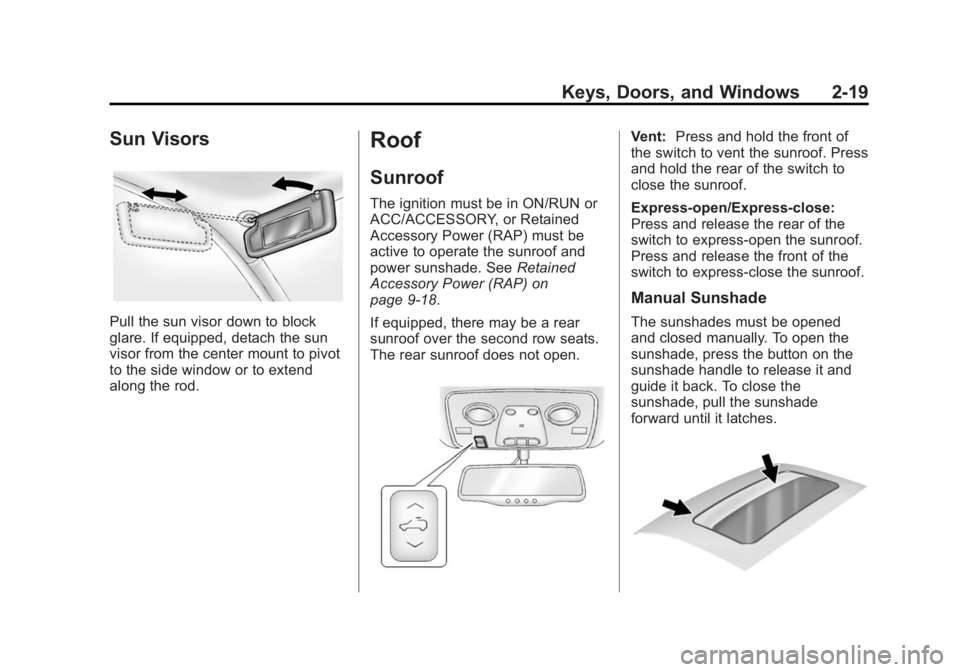
If equipped, there may be a rear
sunroof over the second row seats.
The rear sunroof does not open.
Vent: Press and hold the front of
the switch to vent the sunroof. Press
and hold the rear of the switch to
close the sunroof.
Express-open/Express-close:
Press and release the rear of the
switch to express-open the sunroof.
Press and release the front of the
switch to express-close the sunroof.
Manual Sunshade
The sunshades must be opened
and closed manually. To open the
sunshade, press the button on the
sunshade handle to release it and
guide it back. To close the
sunshade, pull the sunshade
forward until it latches.
Page 51 of 410
Black plate (1,1)Buick Enclave Owner Manual (GMNA-Localizing-U.S./Canada/Mexico-
6014143) - 2014 - CRC - 8/14/13
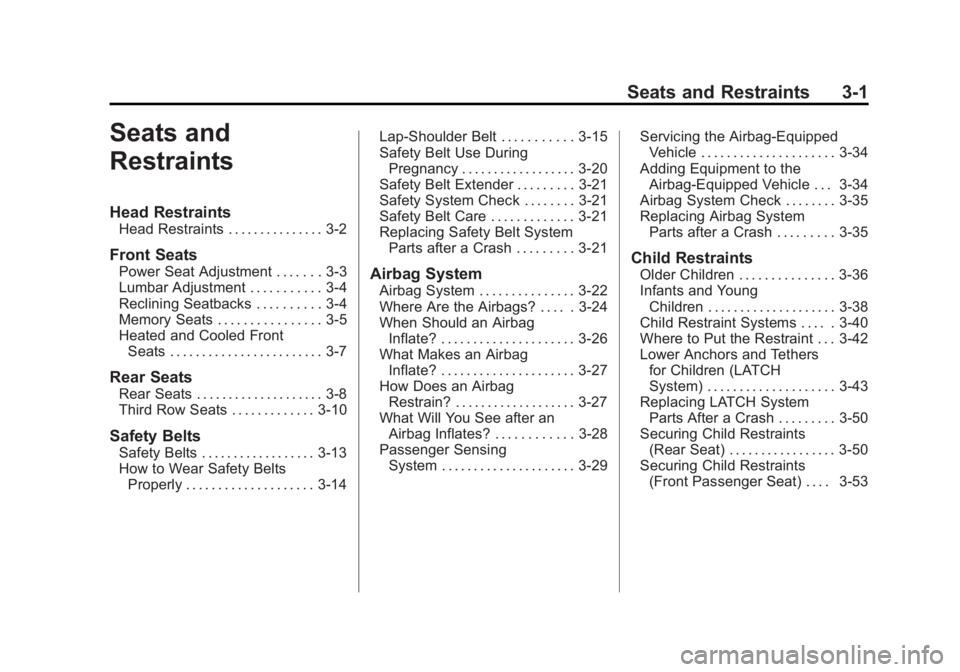
Seats and Restraints 3-1
Seats and
Restraints
Head Restraints
Head Restraints . . . . . . . . . . . . . . . 3-2
Front Seats
Power Seat Adjustment . . . . . . . 3-3
Lumbar Adjustment . . . . . . . . . . . 3-4
Reclining Seatbacks . . . . . . . . . . 3-4
Memory Seats . . . . . . . . . . . . . . . . 3-5
Heated and Cooled FrontSeats . . . . . . . . . . . . . . . . . . . . . . . . 3-7
Rear Seats
Rear Seats . . . . . . . . . . . . . . . . . . . . 3-8
Third Row Seats . . . . . . . . . . . . . 3-10
Safety Belts
Safety Belts . . . . . . . . . . . . . . . . . . 3-13
How to Wear Safety BeltsProperly . . . . . . . . . . . . . . . . . . . . 3-14 Lap-Shoulder Belt . . . . . . . . . . . 3-15
Safety Belt Use During
Pregnancy . . . . . . . . . . . . . . . . . . 3-20
Safety Belt Extender . . . . . . . . . 3-21
Safety System Check . . . . . . . . 3-21
Safety Belt Care . . . . . . . . . . . . . 3-21
Replacing Safety Belt System Parts after a Crash . . . . . . . . . 3-21
Airbag System
Airbag System . . . . . . . . . . . . . . . 3-22
Where Are the Airbags? . . . . . 3-24
When Should an AirbagInflate? . . . . . . . . . . . . . . . . . . . . . 3-26
What Makes an Airbag Inflate? . . . . . . . . . . . . . . . . . . . . . 3-27
How Does an Airbag
Restrain? . . . . . . . . . . . . . . . . . . . 3-27
What Will You See after an Airbag Inflates? . . . . . . . . . . . . 3-28
Passenger Sensing System . . . . . . . . . . . . . . . . . . . . . 3-29 Servicing the Airbag-Equipped
Vehicle . . . . . . . . . . . . . . . . . . . . . 3-34
Adding Equipment to the Airbag-Equipped Vehicle . . . 3-34
Airbag System Check . . . . . . . . 3-35
Replacing Airbag System
Parts after a Crash . . . . . . . . . 3-35
Child Restraints
Older Children . . . . . . . . . . . . . . . 3-36
Infants and YoungChildren . . . . . . . . . . . . . . . . . . . . 3-38
Child Restraint Systems . . . . . 3-40
Where to Put the Restraint . . . 3-42
Lower Anchors and Tethers for Children (LATCH
System) . . . . . . . . . . . . . . . . . . . . 3-43
Replacing LATCH System Parts After a Crash . . . . . . . . . 3-50
Securing Child Restraints (Rear Seat) . . . . . . . . . . . . . . . . . 3-50
Securing Child Restraints (Front Passenger Seat) . . . . 3-53
Page 76 of 410

Black plate (26,1)Buick Enclave Owner Manual (GMNA-Localizing-U.S./Canada/Mexico-
6014143) - 2014 - CRC - 8/14/13
3-26 Seats and Restraints
Warning (Continued)
that person causing severe injury
or even death. The path of an
inflating airbag must be kept
clear. Do not put anything
between an occupant and an
airbag, and do not attach or put
anything on the steering wheel
hub or on or near any other
airbag covering.
Do not use seat or console
accessories that block the
inflation path of a seat-mounted
side impact airbag or the front
center airbag.
Never secure anything to the roof
of a vehicle with roof-rail airbags
by routing a rope or tie-down
through any door or window
opening. If you do, the path of an
inflating roof-rail airbag will be
blocked.
When Should an Airbag
Inflate?
This vehicle is equipped with
airbags. SeeAirbag System on
page 3-22. Airbags are designed to
inflate if the impact exceeds the
specific airbag system's deployment
threshold. Deployment thresholds
are used to predict how severe a
crash is likely to be in time for the
airbags to inflate and help restrain
the occupants. The vehicle has
electronic sensors that help the
airbag system determine the
severity of the impact. Deployment
thresholds can vary with specific
vehicle design.
Frontal airbags are designed to
inflate in moderate to severe frontal
or near frontal crashes to help
reduce the potential for severe
injuries, mainly to the driver's or
front outboard passenger's head
and chest.
Whether the frontal airbags will or
should inflate is not based primarily
on how fast the vehicle is traveling. It depends on what is hit, the
direction of the impact, and how
quickly the vehicle slows down.
Frontal airbags may inflate at
different crash speeds depending on
whether the vehicle hits an object
straight on or at an angle, and
whether the object is fixed or
moving, rigid or deformable, narrow
or wide.
Frontal airbags are not intended to
inflate during vehicle rollovers, rear
impacts, or many side impacts.
In addition, the vehicle has
advanced technology frontal
airbags. Advanced technology
frontal airbags adjust the restraint
according to crash severity.
The front center airbag is designed
to inflate in moderate to severe side
crashes depending upon the
location of the impact, when either
side of the vehicle is struck. In
addition, the front center airbag is
designed to inflate when the
sensing system predicts that the
vehicle is about to roll over on its