133 BUICK ENCLAVE 2016 User Guide
[x] Cancel search | Manufacturer: BUICK, Model Year: 2016, Model line: ENCLAVE, Model: BUICK ENCLAVE 2016Pages: 360, PDF Size: 5.04 MB
Page 121 of 360
Buick Enclave Owner Manual (GMNA-Localizing-U.S./Canada/Mexico-
9159225) - 2016 - crc - 7/31/15
120 Instruments and Controls
Information Displays
Driver Information
Center (DIC)
The DIC displays information about
your vehicle. It also displays
warning messages if a system
problem is detected.
All messages will appear in the DIC
display at the top of the instrument
cluster.
The DIC comes on when the ignition
is on. After a short delay, the DIC
will display the information that was
last displayed before the engine
was turned off.
The DIC also displays a shift lever
position indicator on the bottom line
of the display. SeeAutomatic
Transmission 0203.
The outside air temperature and
compass, if equipped, also display
on the DIC when viewing the trip
and fuel information. The outside air
temperature automatically appears
in the top right corner of the DIC
display. If there is a problem with the system that controls the
temperature display, the numbers
will be replaced with dashes. If this
occurs, have the vehicle serviced.
The compass will be shown in the
bottom right corner of the DIC
display. See
Compass0103.
The DIC has different displays,
which can be accessed by pressing
the DIC buttons on the center stack.
The DIC also allows some features
to be customized. See Vehicle
Personalization 0133.
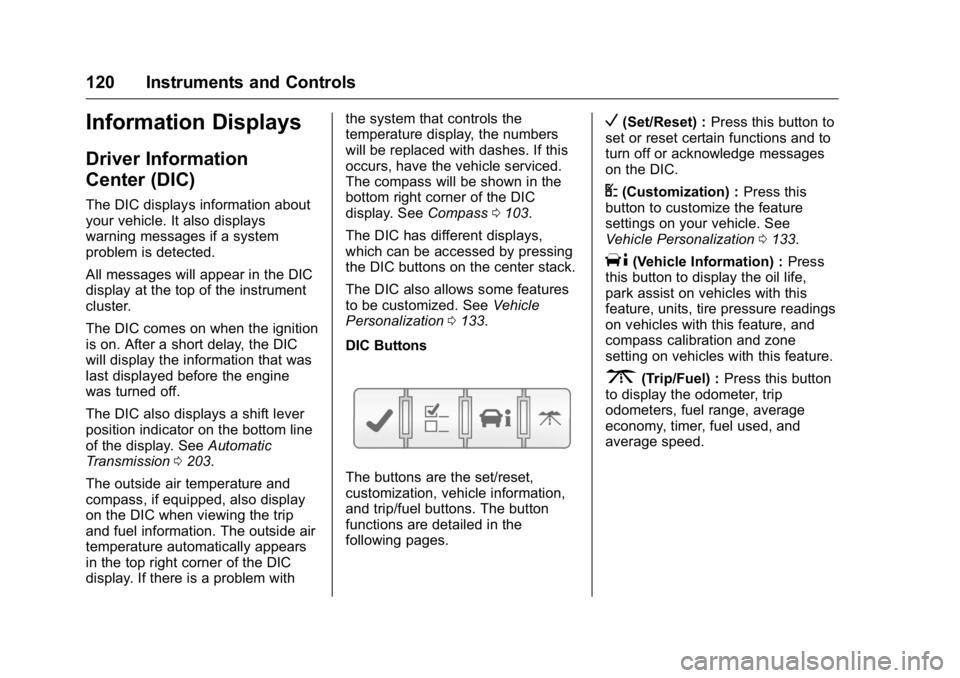
DIC Buttons
The buttons are the set/reset,
customization, vehicle information,
and trip/fuel buttons. The button
functions are detailed in the
following pages.
V(Set/Reset) : Press this button to
set or reset certain functions and to
turn off or acknowledge messages
on the DIC.
U(Customization) : Press this
button to customize the feature
settings on your vehicle. See
Vehicle Personalization 0133.
T(Vehicle Information) : Press
this button to display the oil life,
park assist on vehicles with this
feature, units, tire pressure readings
on vehicles with this feature, and
compass calibration and zone
setting on vehicles with this feature.
3(Trip/Fuel) : Press this button
to display the odometer, trip
odometers, fuel range, average
economy, timer, fuel used, and
average speed.
Page 134 of 360

Buick Enclave Owner Manual (GMNA-Localizing-U.S./Canada/Mexico-
9159225) - 2016 - crc - 7/31/15
Instruments and Controls 133
Vehicle Reminder
Messages
ICE POSSIBLE DRIVE
WITH CARE
This message displays when the
outside air temperature is cold
enough to create icy road
conditions. Adjust your driving
accordingly.
Vehicle Speed Messages
SPEED LIMITED TO XXX KM/
H (MPH)
This message displays when your
vehicle speed is limited to 128 km/h
(80 mph) because the vehicle
detects a problem in the speed
variable assist steering system.
Have your vehicle serviced by your
dealer.
Washer Fluid Messages
WASHER FLUID LOW ADD
FLUID
This message displays when the
windshield washer fluid is low. Fill
the windshield washer fluid reservoir
as soon as possible. SeeEngine
Compartment Overview 0237 for
the location of the windshield
washer fluid reservoir. Also, see
Washer Fluid 0249 for more
information.
Vehicle
Personalization
Your vehicle may have
customization capabilities that allow
you to program certain features to
one preferred setting. Customization
features can only be programmed to
one setting on the vehicle and
cannot be programmed to a
preferred setting for two different
drivers.
All of the customization options may
not be available on your vehicle.
Only the options available will be
displayed on the DIC.
The default settings for the
customization features were set
when your vehicle left the factory,
but may have been changed from
their default state since then.
The customization preferences are
automatically recalled.
To change customization
preferences, use the following
procedure.
Page 147 of 360

Buick Enclave Owner Manual (GMNA-Localizing-U.S./Canada/Mexico-
9159225) - 2016 - crc - 7/31/15
146 Lighting
come on. The transition time for the
lamps coming on varies based on
wiper speed. When the wipers are
not operating, these lamps turn off.
Move the exterior lamp control to
P
or;to disable this feature.
Delayed Headlamps
Delayed headlamps provide a
period of exterior lighting as you
leave the area around the vehicle.
This feature is activated when the
headlamps are on due to the
automatic headlamps control feature
and when the ignition is turned off.
The headlamps remain on until the
exterior lamp control is moved to the
parking lamps position or until the
pre-selected delayed headlamp
lighting period has ended.
If the ignition is turned off with the
exterior lamp control in the
;
or5position, the delayed
headlamps cycle will not occur.
To disable the delayed headlamps
feature or change the time of delay,
see Vehicle Personalization 0133.
Adaptive Forward
Lighting (AFL)
Vehicles with the AFL System have
headlamps that swivel to the left or
right when making a turn to provide
better lighting. To enable AFL, set
the exterior lamp switch to the
AUTO position. Move the switch out
of the AUTO position to turn off the
system. See Exterior Lamp Controls
0 144.
AFL operates when the vehicle
speed is greater than 3 km/h
(2 mph). AFL does not operate
when the transmission is in
R (Reverse). AFL is not immediately
operable after starting the vehicle;
driving a short distance is required
to calibrate the AFL.
Hazard Warning Flashers
|(Hazard Warning Flasher) :
Press this button to make the front
and rear turn signal lamps flash on
and off. This warns others that you
are having trouble. Press again to
turn the flashers off.
The turn signals do not work while
the hazard warning flashers are on.
Page 156 of 360
Buick Enclave Owner Manual (GMNA-Localizing-U.S./Canada/Mexico-
9159225) - 2016 - crc - 7/31/15
Infotainment System 155
Each of these three pages can be
customized to contain your choice
of up to eight per screen. They may
also be re-ordered on each screen
to taste.
FAV (Favorites) :Press to scroll
through the favorites banner on the
bottom of the screen. The favorites
banner stores your favorite radio
and SiriusXM stations (if equipped).
To store a favorite station, press and
hold the desired position on the
banner until a beep is heard.
!(Voice Recognition) : Press to
begin voice recognition. See
Bluetooth 0167.
Menu : Press to enter the Home
Page menu.
qPrevious : Press to go to the
previous Home Page.
Next
r: Press to go to the next
Home Page.
Home Page Features
Some features are disabled when
the vehicle is moving and some
icons may not be active. Now Playing :
Press to display the
active source page. The sources
available are AM, FM, XM (if
equipped), CD, USB, Bluetooth,
or AUX Input.
Settings : Press to display the
Settings menu. See Settings0174.
Tone : Press to display the Tone
Settings menu. The following may
display:
Tone Settings : Press to adjust the
tone settings. The following may
display:
. EQ: Press
oorpto adjust the
equalizer.
. Bass: Press + or −to adjust
the bass.
. Middle: Press + or −to adjust
the middle.
. Treble: Press + or −to adjust the
treble.
. Balance: Press L to hear more
sound from the left speakers or
R for more sound from the right
speakers. The middle position
balances the sound between the
left and right speakers. .
Fade: Press F for more sound
from the front speakers or R for
more sound from the rear
speakers. The middle position
balances the sound between the
front and rear speakers.
DSP Mode : Press
oorpto adjust
the DSP mode, if equipped.
Language
To change the language of the
screens, see Vehicle
Personalization 0133.
English or Metric Units
To change the screens from English
or metric, see Driver Information
Center (DIC) 0120.
Page 251 of 360
Buick Enclave Owner Manual (GMNA-Localizing-U.S./Canada/Mexico-
9159225) - 2016 - crc - 7/31/15
250 Vehicle Care
use. If the vehicle will be operating
in an area where the temperature
may fall below freezing, use a fluid
that has sufficient protection against
freezing.
Adding Washer Fluid
When the windshield washer fluid
reservoir is low, a WASHER FLUID
LOW ADD FLUID message will be
displayed on the Driver Information
Center (DIC). SeeWasher Fluid
Messages 0133.
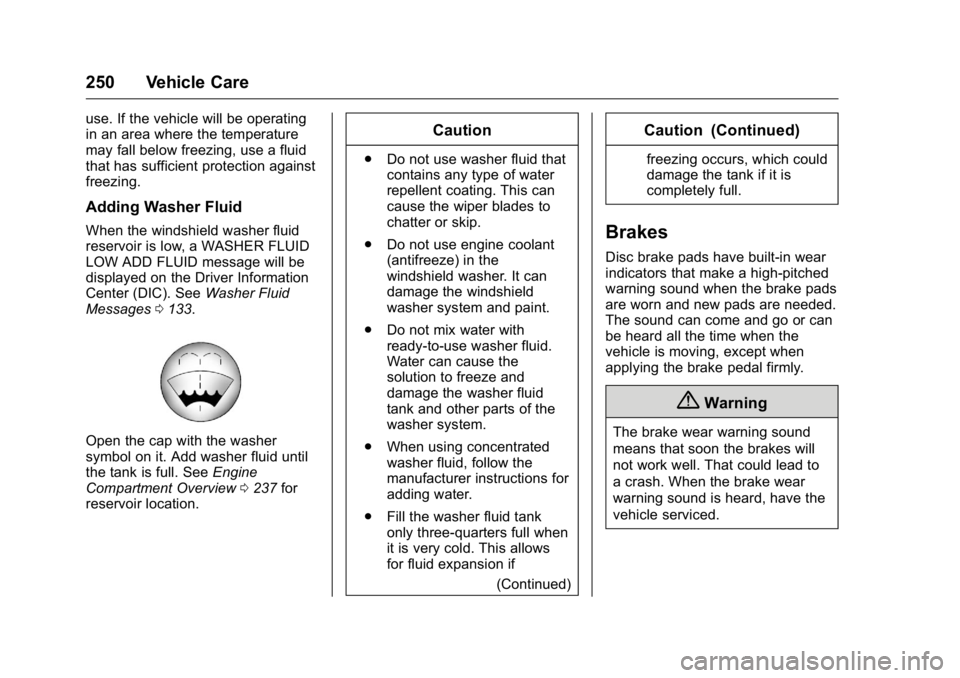
Open the cap with the washer
symbol on it. Add washer fluid until
the tank is full. See Engine
Compartment Overview 0237 for
reservoir location.
Caution
. Do not use washer fluid that
contains any type of water
repellent coating. This can
cause the wiper blades to
chatter or skip.
. Do not use engine coolant
(antifreeze) in the
windshield washer. It can
damage the windshield
washer system and paint.
. Do not mix water with
ready-to-use washer fluid.
Water can cause the
solution to freeze and
damage the washer fluid
tank and other parts of the
washer system.
. When using concentrated
washer fluid, follow the
manufacturer instructions for
adding water.
. Fill the washer fluid tank
only three-quarters full when
it is very cold. This allows
for fluid expansion if
(Continued)
Caution (Continued)
freezing occurs, which could
damage the tank if it is
completely full.
Brakes
Disc brake pads have built-in wear
indicators that make a high-pitched
warning sound when the brake pads
are worn and new pads are needed.
The sound can come and go or can
be heard all the time when the
vehicle is moving, except when
applying the brake pedal firmly.
{Warning
The brake wear warning sound
means that soon the brakes will
not work well. That could lead to
a crash. When the brake wear
warning sound is heard, have the
vehicle serviced.
Page 356 of 360

Buick Enclave Owner Manual (GMNA-Localizing-U.S./Canada/Mexico-
9159225) - 2016 - crc - 7/31/15
Index 355
MessagesAirbag System . . . . . . . . . . . . . . . . 130
Battery Voltage and
Charging . . . . . . . . . . . . . . . . . . . . 125
Brake System . . . . . . . . . . . . . . . . 125
Door Ajar . . . . . . . . . . . . . . . . . . . . . 125
Engine Cooling System . . . . . . . 126
Engine Oil . . . . . . . . . . . . . . . . . . . . 127
Engine Power . . . . . . . . . . . . . . . . 127
Fuel System . . . . . . . . . . . . . . . . . . 127
Key and Lock . . . . . . . . . . . . . . . . . 128
Lamp . . . . . . . . . . . . . . . . . . . . . . . . . 128
Object Detection System . . . . . 128
Ride Control System . . . . . . . . . . 130
Security . . . . . . . . . . . . . . . . . . . . . . 130
Service Vehicle . . . . . . . . . . . . . . . 131
Tire . . . . . . . . . . . . . . . . . . . . . . . . . . . 131
Transmission . . . . . . . . . . . . . . . . . 132
Vehicle . . . . . . . . . . . . . . . . . . . . . . . 124
Vehicle Reminder . . . . . . . . . . . . . 133
Vehicle Speed . . . . . . . . . . . . . . . . 133
Washer Fluid . . . . . . . . . . . . . . . . . 133
Mirrors Automatic Dimming . . . . . . . . . . . . . 40
Automatic DimmingRearview . . . . . . . . . . . . . . . . . . . . . . 41
Convex . . . . . . . . . . . . . . . . . . . . . . . . . 39
Folding . . . . . . . . . . . . . . . . . . . . . . . . . 40 Mirrors (cont'd)
Heated . . . . . . . . . . . . . . . . . . . . . . . . . 40
Park Tilt . . . . . . . . . . . . . . . . . . . . . . . . 40
Power . . . . . . . . . . . . . . . . . . . . . . . . . . 39
Mirrors, Interior Rearview . . . . . . . . 41
Monitor System, Tire Pressure . . . . . . . . . . . . . . . . . . . . . . 272
MP3 . . . . . . . . . . . . . . . . . . . . . . . . . . . . 162
Multi-band Antenna . . . . . . . . . . . . . 160
N
Navigation OnStar®. . . . . . . . . . . . . . . . . . . . . . 340
Net, Convenience . . . . . . . . . . . . . . . 98
New Vehicle Break-In . . . . . . . . . . . 196
O
Object Detection System
Messages . . . . . . . . . . . . . . . . . . . . . 128
Odometer . . . . . . . . . . . . . . . . . . . . . . . 109
Off-Road
Recovery . . . . . . . . . . . . . . . . . . . . . 188
Oil Engine . . . . . . . . . . . . . . . . . . . . . . . . 238
Engine Oil Life System . . . . . . . 241
Messages . . . . . . . . . . . . . . . . . . . . 127
Pressure Light . . . . . . . . . . . . . . . . .118
Older Children, Restraints . . . . . . . 76
Online Owner Center . . . . . . . . . . . 328 OnStar . . . . . . . . . . . . . . . . . . . . . . . . . 337
OnStar System . . . . . . . . . . . . . . . . . 165
OnStar
®Additional
Information . . . . . . . . . . . . . . . . . . . . 343
OnStar
®Connections . . . . . . . . . . . 341
OnStar®Diagnostics . . . . . . . . . . . . 343
OnStar®Emergency . . . . . . . . . . . . 340
OnStar®Navigation . . . . . . . . . . . . . 340
OnStar®Overview . . . . . . . . . . . . . . 339
OnStar®Security . . . . . . . . . . . . . . . 340
Operating Mode
Overheated EngineProtection . . . . . . . . . . . . . . . . . . . 248
Operation Infotainment System . . . . . . . . . . 153
Ordering
Service Publications . . . . . . . . . . 334
Outlets Power . . . . . . . . . . . . . . . . . . . . . . . . 106
Overheated Engine Protection Operating Mode . . . . 248
Overheating, Engine . . . . . . . . . . . . 247
Overview . . . . . . . . . . . . . . . . . . . . . . . 153
P
Parade Dimming . . . . . . . . . . . . . . . . 149
Park Shifting Into . . . . . . . . . . . . . . . . . . . 200
Shifting Out of . . . . . . . . . . . . . . . . 201
Page 357 of 360

Buick Enclave Owner Manual (GMNA-Localizing-U.S./Canada/Mexico-
9159225) - 2016 - crc - 7/31/15
356 Index
Park (cont'd)Tilt Mirrors . . . . . . . . . . . . . . . . . . . . . . 40
Parking Brake . . . . . . . . . . . . . . . . . . . . . . . . . 208
Brake and P (Park)
Mechanism Check . . . . . . . . . . 254
Over Things That Burn . . . . . . . 202
Parking Assist . . . . . . . . . . . . . . . . . . 215
Passenger Airbag Status Indicator . . . . . . . . . . . . . . . . . . . . . . 112
Passenger Compartment Air Filter . . . . . . . . . . . . . . . . . . . . . . . . . . 183
Passenger Sensing System . . . . . 70
Perchlorate Materials Requirements, California . . . . . . 234
Personalization Vehicle . . . . . . . . . . . . . . . . . . . . . . . 133
Phone
Bluetooth . . . . . . . . . . . . . . . . . . . . . 167
Power Door Locks . . . . . . . . . . . . . . . . . . . . . 32
Mirrors . . . . . . . . . . . . . . . . . . . . . . . . . . 39
Outlets . . . . . . . . . . . . . . . . . . . . . . . 106
Protection, Battery . . . . . . . . . . . . 150
Retained Accessory (RAP) . . . 200
Seat Adjustment . . . . . . . . . . . . . . . . 47
Steering Fluid . . . . . . . . . . . . . . . . . 249
Windows . . . . . . . . . . . . . . . . . . . . . . . 41 Pregnancy, Using Safety Belts . . . 62
Privacy
Vehicle Data Recording . . . . . . . 336
Program Courtesy Transportation . . . . . . 331
Proposition 65 Warning,
California . . . . . . . . . . . .234, 252, 293
R
Radio Frequency Statement . . . . 335
Radio Reception . . . . . . . . . . . . . . . . 159
Radios
AM-FM Radio . . . . . . . . . . . . . . . . . 156
Satellite . . . . . . . . . . . . . . . . . . . . . . . 159
Reading Lamps . . . . . . . . . . . . . . . . . 148
Rear Climate Control System . . . . . . . . . . . . . . . . . . . 181, 182
Rear Seat Audio (RSA) System . . . . . . . . . . . . . . . . . . . . . . . . 165
Rear Seats . . . . . . . . . . . . . . . . . . . . . . 52
Rear Vision Camera (RVC) . . . . . 213
Rear Window Washer/Wiper . . . . 103
Rearview Mirrors
Automatic Dimming . . . . . . . . . . . . . 41
Reclining Seatbacks . . . . . . . . . . . . . 48
Recommended Fluids and
Lubricants . . . . . . . . . . . . . . . . . . . . . 319 Records
Maintenance . . . . . . . . . . . . . . . . . . 321
Recreational Vehicle Towing . . . . 296
Reimbursement Program, GM Mobility . . . . . . . . . . . . . . . . . . . 328
Remote Keyless Entry (RKE) System . . . . . . . . . . . . . . . . . . . . . . . . . 28
Remote Vehicle Start . . . . . . . . . . . . 30
Replacement Bulbs . . . . . . . . . . . . . 257
Replacement Parts Airbags . . . . . . . . . . . . . . . . . . . . . . . . . 75
Maintenance . . . . . . . . . . . . . . . . . . 320
Replacing Airbag System . . . . . . . . 75
Replacing LATCH System Parts after a Crash . . . . . . . . . . . . . 89
Replacing Safety Belt System
Parts after a Crash . . . . . . . . . . . . . 63
Reporting Safety Defects Canadian Government . . . . . . . . 336
General Motors . . . . . . . . . . . . . . . 336
U.S. Government . . . . . . . . . . . . . 335
Restraints Where to Put . . . . . . . . . . . . . . . . . . . 81
Retained Accessory Power (RAP) . . . . . . . . . . . . . . . . . . 200
Ride Control Systems Messages . . . . . . . . . . . . . . . . . . . . 130
Page 360 of 360

Buick Enclave Owner Manual (GMNA-Localizing-U.S./Canada/Mexico-
9159225) - 2016 - crc - 7/31/15
Index 359
Turn and Lane-ChangeSignals . . . . . . . . . . . . . . . . . . . . . . . . 147
U
Uniform Tire Quality Grading . . . 280
Universal Remote System . . . . . . 140Operation . . . . . . . . . . . . . . . . . . . . . 142
Programming . . . . . . . . . . . . . . . . . 140
Using This Manual . . . . . . . . . . . . . . . . 2
V
Vehicle Alarm System . . . . . . . . . . . . . . . . . . 36
Canadian Owners . . . . . . . . . . . . . . . 2
Control . . . . . . . . . . . . . . . . . . . . . . . 187
Identification Number (VIN) . . . 322
Load Limits . . . . . . . . . . . . . . . . . . . 192
Messages . . . . . . . . . . . . . . . . . . . . 124
Personalization . . . . . . . . . . . . . . . 133
Reminder Messages . . . . . . . . . . 133
Remote Start . . . . . . . . . . . . . . . . . . . 30
Security . . . . . . . . . . . . . . . . . . . . . . . . 36
Speed Messages . . . . . . . . . . . . . 133
Towing . . . . . . . . . . . . . . . . . . . . . . . . 296
Vehicle Ahead Indicator . . . . . . . . 117
Vehicle Care Tire Pressure . . . . . . . . . . . . . . . . . 271
Vehicle Data Recording and Privacy . . . . . . . . . . . . . . . . . . . . . . . . 336 Ventilation, Air . . . . . . . . . . . . . . . . . . 183
Visors . . . . . . . . . . . . . . . . . . . . . . . . . . . 43
Voltage Devices and Wiring . . . . 257
Voltmeter Gauge . . . . . . . . . . . . . . . 110
W
Warning
Brake System Light . . . . . . . . . . . .115
Caution and Danger . . . . . . . . . . . . . 2
Lane Departure (LDW) . . . . . . . 220
Warning Lights, Gauges, and Indicators . . . . . . . . . . . . . . . . . . . . . 107
Warnings Hazard Flashers . . . . . . . . . . . . . . 146
Washer Fluid . . . . . . . . . . . . . . . . . . . 249 Messages . . . . . . . . . . . . . . . . . . . . 133
Wheels
Alignment and Tire Balance . . 282
Different Size . . . . . . . . . . . . . . . . . 280
Replacement . . . . . . . . . . . . . . . . . 282
When It Is Time for New
Tires . . . . . . . . . . . . . . . . . . . . . . . . . . 278
Where to Put the Restraint . . . . . . 81
Windows . . . . . . . . . . . . . . . . . . . . . . . . 41 Power . . . . . . . . . . . . . . . . . . . . . . . . . . 41
Windshield
Replacement . . . . . . . . . . . . . . . . . 255
Wiper/Washer . . . . . . . . . . . . . . . . 102 Winter
Driving . . . . . . . . . . . . . . . . . . . . . . . . 190
Winter Tires . . . . . . . . . . . . . . . . . . . . 265
Wiper Blade Replacement . . . . . . 254
Wipers Rear Washer . . . . . . . . . . . . . . . . . 103
Wiring, High Voltage Devices . . . 257