cruise control BUICK ENCLAVE 2016 User Guide
[x] Cancel search | Manufacturer: BUICK, Model Year: 2016, Model line: ENCLAVE, Model: BUICK ENCLAVE 2016Pages: 360, PDF Size: 5.04 MB
Page 192 of 360
Buick Enclave Owner Manual (GMNA-Localizing-U.S./Canada/Mexico-
9159225) - 2016 - crc - 7/31/15
Driving and Operating 191
.The Antilock Brake System
(ABS) improves vehicle stability
during hard stops, but the
brakes should be applied sooner
than when on dry pavement.
See Antilock Brake System
(ABS) 0207.
. Allow greater following distance
and watch for slippery spots. Icy
patches can occur on otherwise
clear roads in shaded areas.
The surface of a curve or an
overpass can remain icy when
the surrounding roads are clear.
Avoid sudden steering
maneuvers and braking while
on ice.
. Turn off cruise control.
Blizzard Conditions
Stay with the vehicle unless there is
help nearby. If possible, use
Roadside Assistance. See Roadside
Assistance Program 0329. To get
help and keep everyone in the
vehicle safe:
. Turn on the hazard warning
flashers. .
Tie a red cloth to an outside
mirror.
{Warning
Snow can trap engine exhaust
under the vehicle. This may
cause exhaust gases to get
inside. Engine exhaust contains
carbon monoxide (CO), which
cannot be seen or smelled. It can
cause unconsciousness and even
death.
If the vehicle is stuck in snow:
. Clear snow from the base of
the vehicle, especially any
blocking the exhaust pipe.
. Open a window about 5 cm
(2 in) on the vehicle side
that is away from the wind,
to bring in fresh air.
. Fully open the air outlets on
or under the instrument
panel.
(Continued)
Warning (Continued)
.Adjust the climate control
system to circulate the air
inside the vehicle and set
the fan speed to the highest
setting. See “Climate
Control Systems.”
For more information about CO,
see Engine Exhaust 0202.
To save fuel, run the engine for
short periods to warm the vehicle
and then shut the engine off and
partially close the window. Moving
about to keep warm also helps.
If it takes time for help to arrive,
when running the engine, push the
accelerator pedal slightly so the
engine runs faster than the idle
speed. This keeps the battery
charged to restart the vehicle and to
signal for help with the headlamps.
Do this as little as possible, to
save fuel.
Page 207 of 360

Buick Enclave Owner Manual (GMNA-Localizing-U.S./Canada/Mexico-
9159225) - 2016 - crc - 7/31/15
206 Driving and Operating
number are available. For example,
when 4 (Fourth) is shown next to the
L, 1 (First) through 4 (Fourth) gears
are automatically shifted by the
vehicle. The transmission will not
shift into 5 (Fifth) until the + (Plus)
button is used or you shift back into
D (Drive).
While in L (Low), the transmission
will prevent shifting to a lower gear
range if the engine speed is too
high. You have a brief period of time
to slow the vehicle. If vehicle speed
is not reduced within the time
allowed, the lower gear range shift
will not be completed. You must
further slow the vehicle, then press
the−(Minus) button to the desired
lower gear range.
Automatic Engine Grade Braking is
not available when the ERS is
active. It is available in D (Drive) for
both normal and Tow/Haul mode.
While using the ERS, cruise control
and the Tow/Haul mode can be
used. See “Tow/Haul Mode”
following.Tow/Haul Mode
_
(Tow/Haul) : If equipped with
Tow/Haul mode, the button is on the
center stack under the climate
controls.
Press the button to activate the
system. Press it again to deactivate
the system. This feature can assist
when towing or hauling a
heavy load.
When Tow/Haul is activated, the
Tow/Haul symbol will come on in the
instrument cluster. See Driving
Characteristics and Towing Tips
0 225.
Automatic Engine Grade
Braking
Automatic Engine Grade Braking
assists when driving on a downhill
grade. It maintains vehicle speed by
automatically implementing a shift
schedule that uses the engine and
the transmission to slow the vehicle.
The system will automatically
command downshifts to reduce
vehicle speed, until the brake pedal
is no longer being pressed. While in the Electronic Range
Select (ERS) mode, grade braking
is deactivated, allowing the driver to
select a range and limiting the
highest gear available. Grade
braking is available for normal
driving and in Tow/Haul mode.
See
Automatic Transmission 0203.
Page 210 of 360

Buick Enclave Owner Manual (GMNA-Localizing-U.S./Canada/Mexico-
9159225) - 2016 - crc - 7/31/15
Driving and Operating 209
brake pedal is released or brake
pedal pressure is quickly
decreased.
Hill Start Assist (HSA)
This vehicle has an HSA feature,
which may be useful when the
vehicle is stopped on a grade
sufficient enough to activate HSA.
This feature is designed to prevent
the vehicle from rolling, either
forward or rearward, during vehicle
drive off. After the driver completely
stops and holds the vehicle in a
complete standstill on a grade, HSA
will be automatically activated.
During the transition period between
when the driver releases the brake
pedal and starts to accelerate to
drive off on a grade, HSA holds the
braking pressure for a maximum of
two seconds to ensure that there is
no rolling. The brakes will
automatically release when the
accelerator pedal is applied within
the two-second window. It will not
activate if the vehicle is in a drive
gear and facing downhill, or if the
vehicle is facing uphill and in
R (Reverse).
Ride Control Systems
Traction Control/
Electronic Stability
Control
System Operation
The vehicle has a Traction Control
System (TCS) and StabiliTrak®, an
electronic stability control system.
These systems help limit wheel slip
and assist the driver in maintaining
control, especially on slippery road
conditions.
TCS activates if it senses that any
of the drive wheels are spinning or
beginning to lose traction. When this
happens, TCS applies the brakes to
the spinning wheels and reduces
engine power to limit wheel spin.
StabiliTrak activates when the
vehicle senses a difference between
the intended path and the direction
the vehicle is actually traveling.
StabiliTrak selectively applies
braking pressure to any one of the vehicle wheel brakes to assist the
driver in keeping the vehicle on the
intended path.
If cruise control is being used and
traction control or StabiliTrak begins
to limit wheel spin, cruise control will
disengage. Cruise control may be
turned back on when road
conditions allow.
Both systems come on
automatically when the vehicle is
started and begins to move. The
systems may be heard or felt while
they are operating or while
performing diagnostic checks. This
is normal and does not mean there
is a problem with the vehicle.
It is recommended to leave both
systems on for normal driving
conditions, but it may be necessary
to turn TCS off if the vehicle gets
stuck in sand, mud, ice, or snow.
See
If the Vehicle Is Stuck 0192
and “Turning the Systems Off and
On” later in this section.
Page 212 of 360
Buick Enclave Owner Manual (GMNA-Localizing-U.S./Canada/Mexico-
9159225) - 2016 - crc - 7/31/15
Driving and Operating 211
Cruise Control
With cruise control, a speed of
about 40 km/h (25 mph) or more can
be maintained without keeping your
foot on the accelerator. Cruise
control does not work at speeds
below about 40 km/h (25 mph).
{Warning
Cruise control can be dangerous
where you cannot drive safely at
a steady speed. Do not use
cruise control on winding roads or
in heavy traffic.
Cruise control can be dangerous
on slippery roads. On such roads,
fast changes in tire traction can
cause excessive wheel slip, and
you could lose control. Do not use
cruise control on slippery roads.
If the Traction Control System (TCS)
or StabiliTrak system begins to limit
wheel spin while cruise control is
being used, the cruise control will
disengage. See Traction Control/
Electronic Stability Control 0209. If a collision alert occurs when
cruise control is activated, cruise
control is disengaged. See
Forward
Collision Alert (FCA) System 0216.
When road conditions allow you to
safely use it again, cruise control
can be turned on.
If the brakes are applied, cruise
control is disengaged.
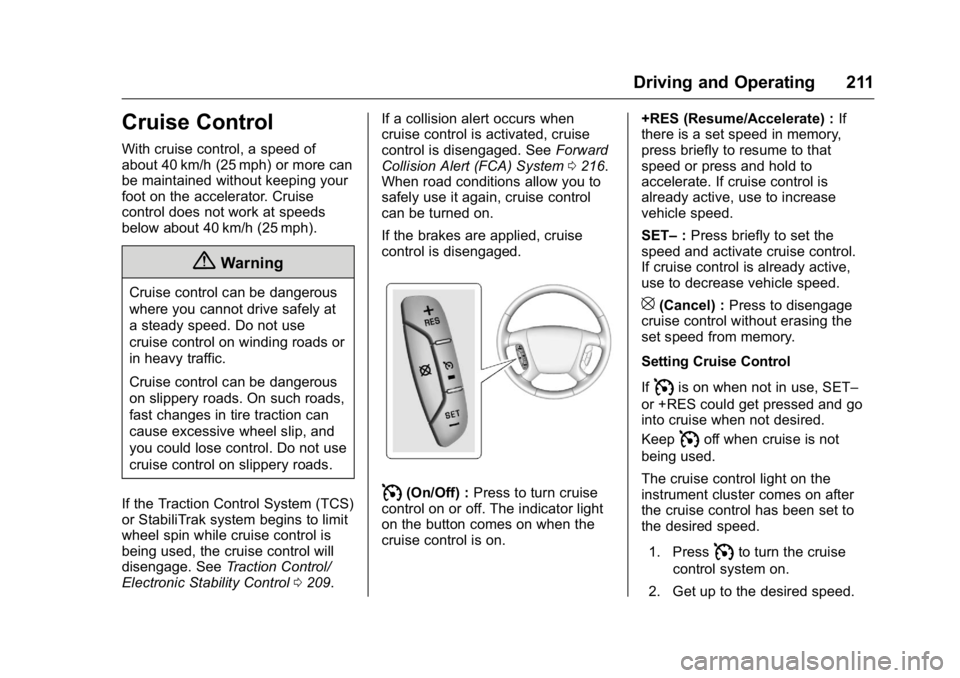
I(On/Off) : Press to turn cruise
control on or off. The indicator light
on the button comes on when the
cruise control is on. +RES (Resume/Accelerate) :
If
there is a set speed in memory,
press briefly to resume to that
speed or press and hold to
accelerate. If cruise control is
already active, use to increase
vehicle speed.
SET– :Press briefly to set the
speed and activate cruise control.
If cruise control is already active,
use to decrease vehicle speed.
[(Cancel) : Press to disengage
cruise control without erasing the
set speed from memory.
Setting Cruise Control
If
Iis on when not in use, SET–
or +RES could get pressed and go
into cruise when not desired.
Keep
Ioff when cruise is not
being used.
The cruise control light on the
instrument cluster comes on after
the cruise control has been set to
the desired speed.
1. Press
Ito turn the cruise
control system on.
2. Get up to the desired speed.
Page 213 of 360

Buick Enclave Owner Manual (GMNA-Localizing-U.S./Canada/Mexico-
9159225) - 2016 - crc - 7/31/15
212 Driving and Operating
3. Press and release SET–.
4. Remove foot from theaccelerator.
Resuming a Set Speed
If the cruise control is set at a
desired speed and then the brakes
are applied or
[is pressed, the
cruise control is disengaged without
erasing the set speed from memory.
Once the vehicle reaches 40 km/h
(25 mph) or more, press +RES. The
vehicle returns to the previously set
speed.
Increasing Speed While Using
Cruise Control
If the cruise control system is
already activated:
. Press and hold +RES until the
desired speed is reached, then
release it.
. To increase vehicle speed in
small increments, press +RES
briefly. For each press, the
vehicle goes about 1.6 km/h
(1 mph) faster. The speedometer reading can be
displayed in either English or metric
units. See
Driver Information Center
(DIC) 0120. The increment value
used depends on the units
displayed.
Reducing Speed While Using
Cruise Control
If the cruise control system is
already activated:
. Press and hold SET– until the
desired lower speed is reached,
then release it.
. To slow down in small
increments, press SET– briefly.
For each press, the vehicle goes
about 1.6 km/h (1 mph) slower.
The speedometer reading can be
displayed in either English or metric
units. See Driver Information Center
(DIC) 0120. The increment value
used depends on the units
displayed. Passing Another Vehicle While
Using Cruise Control
Use the accelerator pedal to
increase the vehicle speed. When
you take your foot off the pedal, the
vehicle will slow down to the
previously set cruise speed. While
pressing the accelerator pedal or
shortly following the release to
override cruise control, briefly
pressing SET–
will result in cruise
control set to the current vehicle
speed.
Using Cruise Control on Hills
How well the cruise control will work
on hills depends upon the vehicle
speed, load, and the steepness of
the hills. When going up steep hills,
you might have to step on the
accelerator pedal to maintain your
speed. When going downhill, you
might have to brake or shift to a
lower gear to keep your speed
down. If the brake pedal is applied
cruise control will disengage.
Page 214 of 360

Buick Enclave Owner Manual (GMNA-Localizing-U.S./Canada/Mexico-
9159225) - 2016 - crc - 7/31/15
Driving and Operating 213
Ending Cruise Control
There are four ways to end cruise
control:
.Step lightly on the brake pedal.
. Press
[.
. Shift the transmission to
N (Neutral).
. To turn off the cruise control,
press
I.
Erasing Speed Memory
The cruise control set speed is
erased from memory if
Iis
pressed or the ignition is turned off.
Driver Assistance
Systems
Rear Vision
Camera (RVC)
The vehicle may have an RVC
system. Read this entire section
before using it.
{Warning
The camera(s) do not display
children, pedestrians, bicyclists,
crossing traffic, animals, or any
other object outside of the
cameras’ field of view, below the
bumper, or under the vehicle.
Shown distances may be different
from actual distances. Do not
drive or park the vehicle using
only these camera(s). Always
check behind and around the
vehicle before driving. Failure to
use proper care may result in
injury, death, or vehicle damage. The RVC system is designed to
help the driver when backing up by
displaying a view of the area behind
the vehicle. When the driver shifts
the vehicle into R (Reverse), the
video image automatically appears
on the infotainment screen. Once
the driver shifts out of R (Reverse),
the screen will go back to the last
screen that had been displayed,
after a delay.
The RVC display remains on after
shifting out of R (Reverse) for
approximately 10 seconds. Return to
the previous screen sooner by
performing one of the following:
.
Press a hard key on the
infotainment system.
. Shift into P (Park).
. Reach a vehicle speed of
8 km/h (5 mph).
Symbols and Guidelines
The RVC system may have a
feature that lets the driver view
caution symbols on the RVC screen
while using the RVC. The Rear
Page 218 of 360
Buick Enclave Owner Manual (GMNA-Localizing-U.S./Canada/Mexico-
9159225) - 2016 - crc - 7/31/15
Driving and Operating 217
Warning (Continued)
guardrails, bridges, construction
barrels, or other objects. Be ready
to take action and apply the
brakes. For more information, see
Defensive Driving0186.
FCA can be disabled with the
[
button on the center stack.
Detecting the Vehicle Ahead
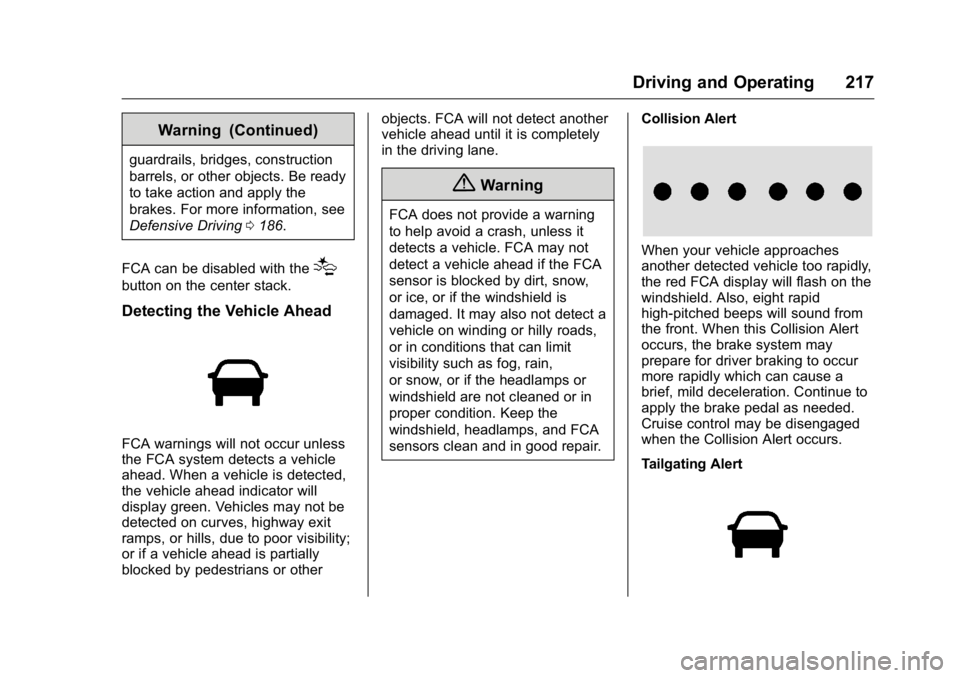
FCA warnings will not occur unless
the FCA system detects a vehicle
ahead. When a vehicle is detected,
the vehicle ahead indicator will
display green. Vehicles may not be
detected on curves, highway exit
ramps, or hills, due to poor visibility;
or if a vehicle ahead is partially
blocked by pedestrians or other objects. FCA will not detect another
vehicle ahead until it is completely
in the driving lane.
{Warning
FCA does not provide a warning
to help avoid a crash, unless it
detects a vehicle. FCA may not
detect a vehicle ahead if the FCA
sensor is blocked by dirt, snow,
or ice, or if the windshield is
damaged. It may also not detect a
vehicle on winding or hilly roads,
or in conditions that can limit
visibility such as fog, rain,
or snow, or if the headlamps or
windshield are not cleaned or in
proper condition. Keep the
windshield, headlamps, and FCA
sensors clean and in good repair.
Collision Alert
When your vehicle approaches
another detected vehicle too rapidly,
the red FCA display will flash on the
windshield. Also, eight rapid
high-pitched beeps will sound from
the front. When this Collision Alert
occurs, the brake system may
prepare for driver braking to occur
more rapidly which can cause a
brief, mild deceleration. Continue to
apply the brake pedal as needed.
Cruise control may be disengaged
when the Collision Alert occurs.
Tailgating Alert
Page 352 of 360

Buick Enclave Owner Manual (GMNA-Localizing-U.S./Canada/Mexico-
9159225) - 2016 - crc - 7/31/15
Index 351
Child Restraints (cont'd)Systems . . . . . . . . . . . . . . . . . . . . . . . . 80
Circuit Breakers . . . . . . . . . . . . . . . . 258
Cleaning Exterior Care . . . . . . . . . . . . . . . . . 300
Interior Care . . . . . . . . . . . . . . . . . . 304
Climate Control Systems Dual Automatic . . . . . . . . . . . . . . . 176
Rear . . . . . . . . . . . . . . . . . . . . . 181, 182
Clock . . . . . . . . . . . . . . . . . . . . . . . . . . . 105
Cluster, Instrument . . . . . . . . . . . . . 108
Collision Damage Repair . . . . . . . 332
Compact Spare Tire . . . . . . . . . . . . 291
Compartments Storage . . . . . . . . . . . . . . . . . . . . . . . . . 95
Compass . . . . . . . . . . . . . . . . . . . . . . . 103
Connections OnStar
®. . . . . . . . . . . . . . . . . . . . . . 341
Control Traction and ElectronicStability . . . . . . . . . . . . . . . . . . . . . 209
Control of a Vehicle . . . . . . . . . . . . . 187
Convenience Net . . . . . . . . . . . . . . . . 98
Convex Mirrors . . . . . . . . . . . . . . . . . . 39
Coolant Engine . . . . . . . . . . . . . . . . . . . . . . . . 244
Engine Temperature Gauge . . .110 Coolant (cont'd)
Engine Temperature
Warning Light . . . . . . . . . . . . . . . .117
Cooling System . . . . . . . . . . . . . . . . . 243
Engine Messages . . . . . . . . . . . . 126
Courtesy Lamps . . . . . . . . . . . . . . . . 148
Courtesy Transportation Program . . . . . . . . . . . . . . . . . . . . . . . 331
Cover
Cargo . . . . . . . . . . . . . . . . . . . . . . . . . . . 97
Engine . . . . . . . . . . . . . . . . . . . . . . . . 238
Cruise Control . . . . . . . . . . . . . . . . . . 211 Light . . . . . . . . . . . . . . . . . . . . . . . . . . .119
Messages . . . . . . . . . . . . . . . . . . . . 125
Cupholders . . . . . . . . . . . . . . . . . . . . . . 95
Customer Assistance . . . . . . . . . . . 327 Offices . . . . . . . . . . . . . . . . . . . . . . . . 327
Text Telephone (TTY)Users . . . . . . . . . . . . . . . . . . . . . . . 327
Customer Information Service PublicationsOrdering Information . . . . . . . . 334
Customer Satisfaction
Procedure . . . . . . . . . . . . . . . . . . . . . 325
D
Damage Repair, Collision . . . . . . . 332
Danger, Warning, and Caution . . . . 2
Data Recorders, Event . . . . . . . . . 337
Daytime Running Lamps/Automatic Headlamp
System . . . . . . . . . . . . . . . . . . . . . . . . 145
Defensive Driving . . . . . . . . . . . . . . . 186
Delayed Entry Lighting . . . . . . . . . 149
Delayed Exit Lighting . . . . . . . . . . . 149
Delayed Headlamps . . . . . . . . . . . . 146
Delayed Locking . . . . . . . . . . . . . . . . . 32
Devices Auxiliary . . . . . . . . . . . . . . . . . . . . . . 164
Diagnostics OnStar
®. . . . . . . . . . . . . . . . . . . . . . 343
Distracted Driving . . . . . . . . . . . . . . . 186
Dome Lamps . . . . . . . . . . . . . . . . . . . 148
Door Ajar Messages . . . . . . . . . . . . . . . 125
Delayed Locking . . . . . . . . . . . . . . . . 32
Locks . . . . . . . . . . . . . . . . . . . . . . . . . . . 31
Power Locks . . . . . . . . . . . . . . . . . . . . 32
Drive Belt Routing, Engine . . . . . . 324
Drive Systems
All-Wheel Drive . . . . . . . . . . 207, 253
Driver Information Center (DIC) . . . . . . . . . . . . . . . . . . 120
Page 355 of 360

Buick Enclave Owner Manual (GMNA-Localizing-U.S./Canada/Mexico-
9159225) - 2016 - crc - 7/31/15
354 Index
J
Jump Starting - NorthAmerica . . . . . . . . . . . . . . . . . . . . . . . 293
K
Key and Lock Messages . . . . . . . . 128
Keyless EntryRemote (RKE) System . . . . . . . . . 28
Keys . . . . . . . . . . . . . . . . . . . . . . . . . . . . . 26
L
Labeling, Tire Sidewall . . . . . . . . . . 266
Lamps Courtesy . . . . . . . . . . . . . . . . . . . . . . 148
Dome . . . . . . . . . . . . . . . . . . . . . . . . . 148
Exterior Controls . . . . . . . . . . . . . . 144
License Plate . . . . . . . . . . . . . . . . . 256
Malfunction Indicator . . . . . . . . . .113
Messages . . . . . . . . . . . . . . . . . . . . 128
Reading . . . . . . . . . . . . . . . . . . . . . . 148
Lane Departure
Warning (LDW) . . . . . . . . . . . . . . . . 220
Lane Departure Warning Light . . . . . . . . . . . . . . . . . . . . . . . . . . 117
Lap-Shoulder Belt . . . . . . . . . . . . . . . 58
LATCH System
Replacing Parts after aCrash . . . . . . . . . . . . . . . . . . . . . . . . . 89 LATCH, Lower Anchors and
Tethers for Children . . . . . . . . . . . . 83
Liftgate . . . . . . . . . . . . . . . . . . . . . . . . . . 33
Lighting Adaptive Forward . . . . . . . . . . . . . 146
Delayed Entry . . . . . . . . . . . . . . . . 149
Delayed Exit . . . . . . . . . . . . . . . . . . 149
Entry . . . . . . . . . . . . . . . . . . . . . . . . . 149
Illumination Control . . . . . . . . . . . 147
Parade Dimming . . . . . . . . . . . . . . 149
Lights . . . . . . . . . . . . . . . . . . . . . . . . . . . 117
Airbag Readiness . . . . . . . . . . . . . .112
Antilock Brake System(ABS) Warning . . . . . . . . . . . . . . .116
Brake System Warning . . . . . . . .115
Charging System . . . . . . . . . . . . . .113
Cruise Control . . . . . . . . . . . . . . . . .119
Engine Coolant Temperature Warning . . . . . . . .117
Engine Oil Pressure . . . . . . . . . . .118
Flash-to-Pass . . . . . . . . . . . . . . . . . 145
High-Beam On . . . . . . . . . . . . . . . . .119
High/Low Beam Changer . . . . . 145
Lane Departure Warning . . . . . . .117
Safety Belt Reminders . . . . . . . . . 111
Security . . . . . . . . . . . . . . . . . . . . . . .119
StabiliTrak
®Indicator . . . . . . . . . .117
Tire Pressure . . . . . . . . . . . . . . . . . .118 Lights (cont'd)
Tow/Haul Mode . . . . . . . . . . . . . . . .116
Locks Automatic Door . . . . . . . . . . . . . . . . . 32
Delayed Locking . . . . . . . . . . . . . . . . 32
Door . . . . . . . . . . . . . . . . . . . . . . . . . . . . 31
Lockout Protection . . . . . . . . . . . . . . 33
Power Door . . . . . . . . . . . . . . . . . . . . . 32
Safety . . . . . . . . . . . . . . . . . . . . . . . . . . 33
Loss of Control . . . . . . . . . . . . . . . . . 188
Lower Anchors and Tethers for Children (LATCH
System) . . . . . . . . . . . . . . . . . . . . . . . . 83
Lumbar Adjustment . . . . . . . . . . . . . . 48
Front Seats . . . . . . . . . . . . . . . . . . . . . 48
M
MaintenanceRecords . . . . . . . . . . . . . . . . . . . . . . 321
Maintenance and Care Additional . . . . . . . . . . . . . . . . . . . . . 316
Maintenance Schedule . . . . . . . . . 310 Recommended Fluids andLubricants . . . . . . . . . . . . . . . . . . . 319
Malfunction Indicator Lamp . . . . . 113
Manual Mode . . . . . . . . . . . . . . . . . . . 205
Memory Features . . . . . . . . . . . . . . . . 11
Memory Seats . . . . . . . . . . . . . . . . . . . 49