power steering BUICK ENCLAVE 2016 User Guide
[x] Cancel search | Manufacturer: BUICK, Model Year: 2016, Model line: ENCLAVE, Model: BUICK ENCLAVE 2016Pages: 360, PDF Size: 5.04 MB
Page 102 of 360
Buick Enclave Owner Manual (GMNA-Localizing-U.S./Canada/Mexico-
9159225) - 2016 - crc - 7/31/15
Instruments and Controls 101
Universal Remote System
Universal Remote System . . . . 140
Universal Remote SystemProgramming . . . . . . . . . . . . . . . 140
Universal Remote System Operation . . . . . . . . . . . . . . . . . . . 142Controls
Steering Wheel
Adjustment
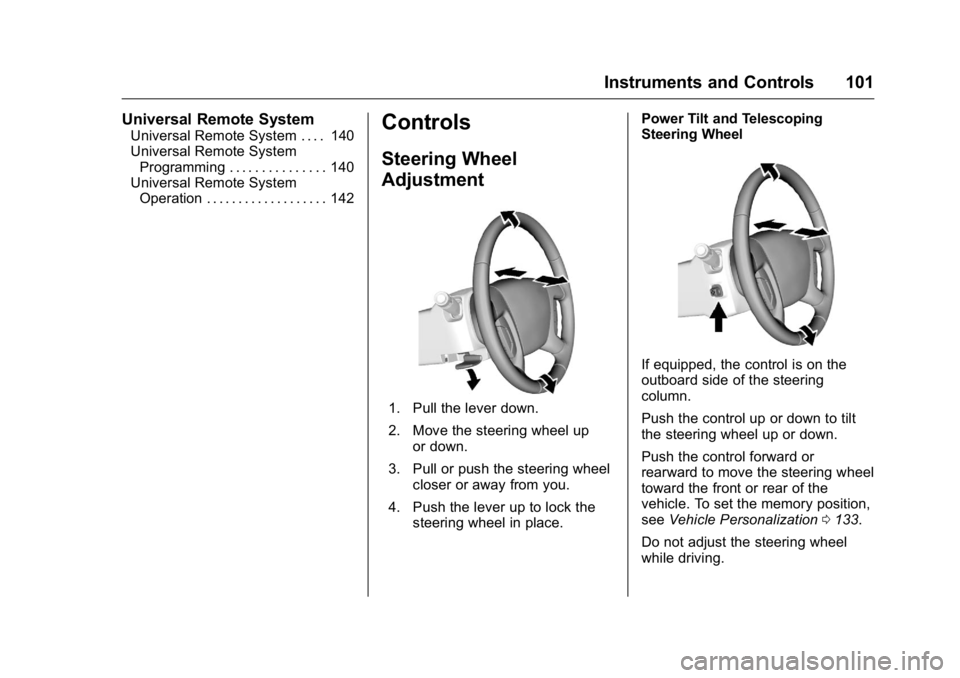
1. Pull the lever down.
2. Move the steering wheel up
or down.
3. Pull or push the steering wheel closer or away from you.
4. Push the lever up to lock the steering wheel in place. Power Tilt and Telescoping
Steering Wheel
If equipped, the control is on the
outboard side of the steering
column.
Push the control up or down to tilt
the steering wheel up or down.
Push the control forward or
rearward to move the steering wheel
toward the front or rear of the
vehicle. To set the memory position,
see
Vehicle Personalization 0133.
Do not adjust the steering wheel
while driving.
Page 132 of 360
Buick Enclave Owner Manual (GMNA-Localizing-U.S./Canada/Mexico-
9159225) - 2016 - crc - 7/31/15
Instruments and Controls 131
Service Vehicle Messages
SERVICE A/C (Air
Conditioning) SYSTEM
This message displays when the
electronic sensors that control the
air conditioning and heating
systems are no longer working.
Have the climate control system
serviced by your dealer if you notice
a drop in heating and air
conditioning efficiency.
SERVICE POWER STEERING
This message displays and a chime
may sound when there may be a
problem with the power steering
system. If this message displays
and a reduction in steering
performance or loss of power
steering assistance is noticed, see
your dealer.
SERVICE VEHICLE SOON
This message displays when a
non-emissions related malfunction
occurs. Have the vehicle serviced
by your dealer as soon as possible.
STARTING DISABLED
SERVICE THROTTLE
This message displays when your
vehicle's throttle system is not
functioning properly. Have your
vehicle serviced by your dealer.
Tire Messages
TIRE LOW ADD AIR TO TIRE
On vehicles with the Tire Pressure
Monitor System (TPMS), this
message displays when the
pressure in one or more of the
vehicle's tires is low.
This message also displays LEFT
FRT (left front), RIGHT FRT (right
front), LEFT RR (left rear),
or RIGHT RR (right rear) to indicate
the location of the low tire.
The low tire pressure warning light
will also come on. SeeTire
Pressure Light 0118.
If a tire pressure message appears
on the DIC, stop as soon as you
can. Inflate the tires by adding air
until the tire pressure is equal to the
values shown on the Tire and Loading Information label. See
Tires
0 264, Vehicle Load Limits 0192,
and Tire Pressure 0271.
The DIC also shows the tire
pressure values. See Driver
Information Center (DIC) 0120.
SERVICE TIRE MONITOR
SYSTEM
On vehicles with the Tire Pressure
Monitor System (TPMS), this
message displays if a part on the
TPMS is not working properly. The
tire pressure light also flashes and
then remains on during the same
ignition cycle. See Tire Pressure
Light 0118. Several conditions may
cause this message to appear. See
Tire Pressure Monitor Operation
0 273 for more information. If the
warning comes on and stays on,
there may be a problem with the
TPMS. See your dealer.
TIRE LEARNING ACTIVE
This message displays when the
Tire Pressure Monitor System
(TPMS) is relearning the tire
positions on your vehicle. The tire
positions must be relearned after
Page 139 of 360
Buick Enclave Owner Manual (GMNA-Localizing-U.S./Canada/Mexico-
9159225) - 2016 - crc - 7/31/15
138 Instruments and Controls
automatically tilt down when the
vehicle is shifted into R (Reverse).
SeePark Tilt Mirrors 040.
Press the customization button until
PARK TILT MIRRORS appears on
the DIC display. Press the set/reset
button once to access the settings
for this feature. Then press the
customization button to scroll
through the following settings:
OFF (default) : Neither outside
mirror will be tilted down when the
vehicle is shifted into R (Reverse).
DRIVER MIRROR : The driver
outside mirror will be tilted down
when the vehicle is shifted into
R (Reverse).
PASSENGER MIRROR : The
passenger outside mirror will be
tilted down when the vehicle is
shifted into R (Reverse).
BOTH MIRRORS : The driver and
passenger outside mirrors will be
tilted down when the vehicle is
shifted into R (Reverse).
NO CHANGE : No change will be
made to this feature. The current
setting will remain. To select a setting, press the set/
reset button while the desired
setting is displayed on the DIC.
EASY EXIT SEAT
If your vehicle has this feature, it
allows you to select your preference
for the automatic easy exit seat
feature. See
Memory Seats 049.
Press the customization button until
EASY EXIT SEAT appears on the
DIC display. Press the set/reset
button once to access the settings
for this feature. Then press the
customization button to scroll
through the following settings:
OFF (default) : No automatic seat
exit recall will occur.
ON : The driver seat will move back
when the key is removed from the
ignition. The steering column will
also move up and forward on
vehicles with the power tilt and
telescopic steering wheel feature.
See Steering Wheel Adjustment
0 101.
The automatic easy exit seat
movement will only occur one time
after the key is removed from the ignition. If the automatic movement
has already occurred, and you put
the key back in the ignition and
remove it again, the seat and
steering column will stay in the
original exit position, unless a
memory recall took place prior to
removing the key again.
NO CHANGE :
No change will be
made to this feature. The current
setting will remain.
To select a setting, press the set/
reset button while the desired
setting is displayed on the DIC.
MEMORY SEAT RECALL
If your vehicle has this feature, it
allows you to select your preference
for the remote memory seat recall
feature. See Memory Seats 049.
Press the customization button until
MEMORY SEAT RECALL appears
on the DIC display. Press the set/
reset button once to access the
settings for this feature. Then press
the customization button to scroll
through the following settings:
OFF (default) : No remote memory
seat recall will occur.
Page 140 of 360
Buick Enclave Owner Manual (GMNA-Localizing-U.S./Canada/Mexico-
9159225) - 2016 - crc - 7/31/15
Instruments and Controls 139
ON :The driver seat and outside
mirrors will automatically move to
the stored driving position when the
unlock button on the Remote
Keyless Entry (RKE) transmitter is
pressed. The steering column will
also move on vehicles with the
power tilt and telescopic steering
wheel feature. See Steering Wheel
Adjustment 0101. See “Memory
Remote Recall” underMemory
Seats 049 for information on
matching transmitters to driver
positions.
NO CHANGE : No change will be
made to this feature. The current
setting will remain.
To select a setting, press the set/
reset button while the desired
setting is displayed on the DIC.
REMOTE START
If your vehicle has this feature, it
allows you to turn the remote start
off or on. The remote start feature
allows you to start the engine from
outside of the vehicle using the
Remote Keyless Entry (RKE)
transmitter. See Remote Vehicle
Start 030. Press the customization button until
REMOTE START appears on the
DIC display. Press the set/reset
button once to access the settings
for this feature. Then press the
customization button to scroll
through the following settings:
OFF :
The remote start feature will
be disabled.
ON (default) : The remote start
feature will be enabled.
NO CHANGE : No change will be
made to this feature. The current
setting will remain.
To select a setting, press the set/
reset button while the desired
setting is displayed on the DIC.
FACTORY SETTINGS
This feature allows you to set all of
the customization features back to
their factory default settings.
Press the customization button until
FACTORY SETTINGS appears on
the DIC display. Press the set/reset
button once to access the settings for this feature. Then press the
customization button to scroll
through the following settings:
RESTORE ALL (default) :
The
customization features will be set to
their factory default settings.
DO NOT RESTORE : The
customization features will not be
set to their factory default settings.
To select a setting, press the set/
reset button while the desired
setting is displayed on the DIC.
EXIT FEATURE SETTINGS
This feature allows you to exit the
feature settings menu.
Press the customization button until
FEATURE SETTINGS PRESS
V
TO EXIT appears in the DIC display.
Press the set/reset button once to
exit the menu.
If you do not exit, pressing the
customization button again will
return you to the beginning of the
feature settings menu.
Page 145 of 360
Buick Enclave Owner Manual (GMNA-Localizing-U.S./Canada/Mexico-
9159225) - 2016 - crc - 7/31/15
144 Lighting
Lighting
Exterior Lighting
Exterior Lamp Controls . . . . . . . 144
Headlamp High/Low-BeamChanger . . . . . . . . . . . . . . . . . . . . 145
Flash-to-Pass . . . . . . . . . . . . . . . . 145
Daytime Running Lamps (DRL)/Automatic Headlamp
System . . . . . . . . . . . . . . . . . . . . . . 145
Delayed Headlamps . . . . . . . . . . 146
Adaptive Forward Lighting (AFL) . . . . . . . . . . . . . . . 146
Hazard Warning Flashers . . . . . 146
Turn and Lane-Change Signals . . . . . . . . . . . . . . . . . . . . . . 147
Interior Lighting
Instrument Panel IlluminationControl . . . . . . . . . . . . . . . . . . . . . . 147
Courtesy Lamps . . . . . . . . . . . . . . 148
Dome Lamps . . . . . . . . . . . . . . . . . 148
Reading Lamps . . . . . . . . . . . . . . 148
Lighting Features
Entry Lighting . . . . . . . . . . . . . . . . 149
Delayed Entry Lighting . . . . . . . 149
Delayed Exit Lighting . . . . . . . . . 149
Parade Dimming . . . . . . . . . . . . . 149
Battery Load Management . . . 150
Battery Power Protection . . . . . 150Exterior Lighting
Exterior Lamp Controls
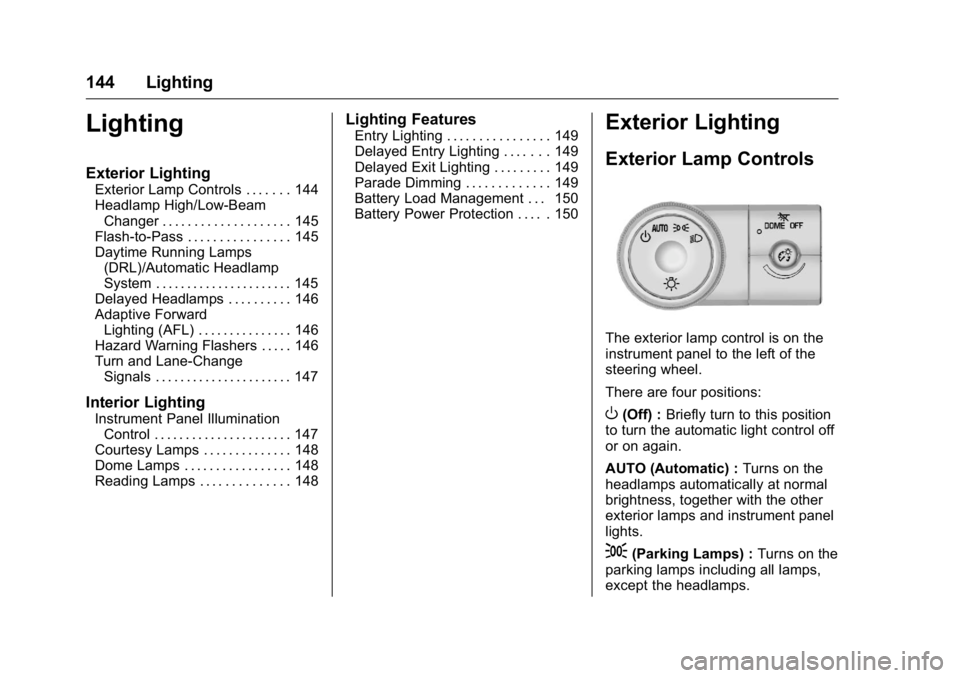
The exterior lamp control is on the
instrument panel to the left of the
steering wheel.
There are four positions:
O(Off) : Briefly turn to this position
to turn the automatic light control off
or on again.
AUTO (Automatic) : Turns on the
headlamps automatically at normal
brightness, together with the other
exterior lamps and instrument panel
lights.
;(Parking Lamps) : Turns on the
parking lamps including all lamps,
except the headlamps.
Page 153 of 360
Buick Enclave Owner Manual (GMNA-Localizing-U.S./Canada/Mexico-
9159225) - 2016 - crc - 7/31/15
152 Infotainment System
functions may gray out when they
are unavailable. Many infotainment
features are also available through
the instrument cluster and steering
wheel controls.
Before driving:
.Become familiar with the
operation, faceplate buttons, and
screen buttons.
. Set up the audio by presetting
favorite stations, setting the
tone, and adjusting the
speakers.
. Set up phone numbers in
advance so they can be called
easily by pressing a single
button or by using a single voice
command if equipped with
Bluetooth phone capability.
See Defensive Driving 0186.
To play the infotainment system with
the ignition off, see Retained
Accessory Power (RAP) 0200.Theft-Deterrent Feature
TheftLock®is designed to
discourage theft of the vehicle's
radio by learning a portion of the
Vehicle Identification Number (VIN).
The radio does not operate if it is
stolen or moved to a different
vehicle.
Page 154 of 360

Buick Enclave Owner Manual (GMNA-Localizing-U.S./Canada/Mexico-
9159225) - 2016 - crc - 7/31/15
Infotainment System 153
Overview
The infotainment system is controlled by using the buttons, touch screen,
steering wheel controls, and voice recognition. SeeOperation0153.
1. PUSH/O(Volume/Power)
2.
Z(Eject)
3. CD Slot
4. AUX Port
5. PUSH/SEL (Select) 6.
/BACK
7. SEEK
¨(Next/Forward)
8.
©SEEK (Previous/Reverse)
9. FAV (Favorites Menu)
10. SRCE (Source) 11.
D(Home Page)
Operation
Infotainment Controls
PUSH/O(Volume/Power):
. Press to turn the system on
and off.
. Turn to adjust the volume.
Z(Eject) : Press to eject a disc
from the CD player. See CD Player
0 160.
AUX Port : 3.5 mm (1/8 in)
connection for external audio
devices.
PUSH/SEL (Select):
. Turn to manually find a station or
highlight a menu selection.
. Press to select a highlighted
selection.
D(Home Page) : Press to go to
the Home Page. See “Home Page”
later in this section.
Page 157 of 360
Buick Enclave Owner Manual (GMNA-Localizing-U.S./Canada/Mexico-
9159225) - 2016 - crc - 7/31/15
156 Infotainment System
Radio
AM-FM Radio
Playing the Radio
PUSH/O(Power/Volume):
. Press to turn the radio on or off.
. Turn to increase or decrease the
volume of the active source.
The steering wheel controls can
also be used to adjust the volume.
See Steering Wheel Controls 0102.
Audio Source
To access AM, FM, or SiriusXM
®if
equipped, do one of the following:
. Press the AM, FM, or XM (if
equipped) screen button on the
Home Page.
. Press the SRCE radio button to
scroll through the options.
A source ribbon will appear at
the bottom of the screen
allowing you to select the one
you want.
Infotainment System Settings
Tone Settings
To access the tone settings, press
the Tone Settings button on the
Home Page.
To adjust the settings:
.Bass: Press + or −to change
the level.
. Middle: Press + or −to change
the level.
. Treble: Press + or −to change
the level.
. EQ: Press
oorpto scroll
through the preset EQ options.
. DSP Mode: Press
oorpto
scroll through the preset DSP
modes.
. Fade: Press the F or R button
for more sound from the front or
rear speakers. The middle
position balances the sound
between the front and rear
speakers. .
Balance: Press the L or R button
for more sound from the left or
right speakers. The middle
position balances the sound
between the left and right
speakers.
Finding a Station
Press SRCE to select AM, FM,
or SiriusXM (if equipped).
Turn the PUSH/SEL knob to find a
radio station. To select a preset
station, press FAV to scroll through
the favorite pages and then press a
preset button on the radio or the
screen button.
Seeking a Station
Press
©SEEK or SEEK¨to search
for a station. You may also use the
¨on the steering wheel controls.
Page 186 of 360
Buick Enclave Owner Manual (GMNA-Localizing-U.S./Canada/Mexico-
9159225) - 2016 - crc - 7/31/15
Driving and Operating 185
Driving and
Operating
Driving Information
Distracted Driving . . . . . . . . . . . . 186
Defensive Driving . . . . . . . . . . . . . 186
Drunk Driving . . . . . . . . . . . . . . . . . 186
Control of a Vehicle . . . . . . . . . . . 187
Braking . . . . . . . . . . . . . . . . . . . . . . . 187
Steering . . . . . . . . . . . . . . . . . . . . . . 187
Off-Road Recovery . . . . . . . . . . . 188
Loss of Control . . . . . . . . . . . . . . . 188
Driving on Wet Roads . . . . . . . . 189
Hill and Mountain Roads . . . . . 190
Winter Driving . . . . . . . . . . . . . . . . 190
If the Vehicle Is Stuck . . . . . . . . 192
Vehicle Load Limits . . . . . . . . . . . 192
Starting and Operating
New Vehicle Break-In . . . . . . . . . 196
Ignition Positions . . . . . . . . . . . . . 196
Starting the Engine . . . . . . . . . . . 198
Engine Heater . . . . . . . . . . . . . . . . 199
Retained AccessoryPower (RAP) . . . . . . . . . . . . . . . . 200
Shifting Into Park . . . . . . . . . . . . . 200
Shifting out of Park . . . . . . . . . . . 201
Parking over Things That Burn . . . . . . . . . . . . . . . . . . . 202
Engine Exhaust
Engine Exhaust . . . . . . . . . . . . . . 202
Running the Vehicle WhileParked . . . . . . . . . . . . . . . . . . . . . . 203
Automatic Transmission
Automatic Transmission . . . . . . 203
Manual Mode . . . . . . . . . . . . . . . . . 205
Tow/Haul Mode . . . . . . . . . . . . . . . 206
Drive Systems
All-Wheel Drive . . . . . . . . . . . . . . . 207
Brakes
Antilock BrakeSystem (ABS) . . . . . . . . . . . . . . . 207
Parking Brake . . . . . . . . . . . . . . . . 208
Brake Assist . . . . . . . . . . . . . . . . . . 208
Hill Start Assist (HSA) . . . . . . . . 209
Ride Control Systems
Traction Control/Electronic Stability Control . . . . . . . . . . . . . 209
Cruise Control
Cruise Control . . . . . . . . . . . . . . . . 211
Driver Assistance Systems
Rear Vision Camera (RVC) . . . 213
Parking Assist . . . . . . . . . . . . . . . . 215
Forward Collision Alert (FCA)System . . . . . . . . . . . . . . . . . . . . . . 216 Side Blind Zone
Alert (SBZA) . . . . . . . . . . . . . . . . 218
Lane Departure Warning (LDW) . . . . . . . . . . . . . 220
Fuel
Fuel . . . . . . . . . . . . . . . . . . . . . . . . . . 221
California FuelRequirements . . . . . . . . . . . . . . . 222
Fuels in Foreign Countries . . . 222
Fuel Additives . . . . . . . . . . . . . . . . 223
Filling the Tank . . . . . . . . . . . . . . . 223
Filling a Portable Fuel Container . . . . . . . . . . . . . . . . . . . 224
Trailer Towing
General TowingInformation . . . . . . . . . . . . . . . . . . 225
Driving Characteristics and Towing Tips . . . . . . . . . . . . . . . . . 225
Trailer Towing . . . . . . . . . . . . . . . . 228
Towing Equipment . . . . . . . . . . . . 230
Conversions and Add-Ons
Add-On Electrical Equipment . . . . . . . . . . . . . . . . . . 232
Page 188 of 360
Buick Enclave Owner Manual (GMNA-Localizing-U.S./Canada/Mexico-
9159225) - 2016 - crc - 7/31/15
Driving and Operating 187
{Warning
Drinking and then driving is very
dangerous. Your reflexes,
perceptions, attentiveness, and
judgment can be affected by even
a small amount of alcohol. You
can have a serious—or even
fatal —collision if you drive after
drinking.
Do not drink and drive or ride with
a driver who has been drinking.
Ride home in a cab; or if you are
with a group, designate a driver
who will not drink.
Control of a Vehicle
Braking, steering, and accelerating
are important factors in helping to
control a vehicle while driving.
Braking
Braking action involves perception
time and reaction time. Deciding to
push the brake pedal is perception
time. Actually doing it is
reaction time. Average driver reaction time is
about three-quarters of a second. In
that time, a vehicle moving at
100 km/h (60 mph) travels 20 m
(66 ft), which could be a lot of
distance in an emergency.
Helpful braking tips to keep in mind
include:
.
Keep enough distance between
you and the vehicle in front
of you.
. Avoid needless heavy braking.
. Keep pace with traffic.
If the engine ever stops while the
vehicle is being driven, brake
normally but do not pump the
brakes. Doing so could make the
pedal harder to push down. If the
engine stops, there will be some
power brake assist but it will be
used when the brake is applied.
Once the power assist is used up, it
can take longer to stop and the
brake pedal will be harder to push.
Steering
Variable Effort Steering
Some vehicles have a steering
system that varies the amount of
effort required to steer the vehicle in
relation to the speed of the vehicle.
The amount of steering effort
required is less at slower speeds to
make the vehicle more
maneuverable and easier to park. At
faster speeds, the steering effort
increases to provide a sport-like feel
to the steering. This provides
maximum control and stability.
Hydraulic Power Steering
This vehicle has hydraulic power
steering. It may require
maintenance. See Power Steering
Fluid 0249.
If power steering assist is lost
because the engine stops, or there
is a system malfunction, the vehicle
can be steered but may require
increased effort. See your dealer if
there is a problem.