lock BUICK ENCLAVE 2016 Owner's Guide
[x] Cancel search | Manufacturer: BUICK, Model Year: 2016, Model line: ENCLAVE, Model: BUICK ENCLAVE 2016Pages: 360, PDF Size: 5.04 MB
Page 39 of 360
Buick Enclave Owner Manual (GMNA-Localizing-U.S./Canada/Mexico-
9159225) - 2016 - crc - 7/31/15
38 Keys, Doors, and Windows
The system is automatically armed
when the key is removed from the
ignition.
The system is automatically
disarmed when the key is turned to
ON/RUN, ACC/ACCESSORY,
or START from the LOCK/OFF
position.
You do not have to manually arm or
disarm the system.
The security light comes on if there
is a problem with arming or
disarming the theft-deterrent
system.
When the PASS-Key III+ system
senses an incorrect key, the vehicle
does not start. Anyone using a
trial-and-error method to start the
vehicle will be discouraged because
of the high number of electrical key
codes.
If the engine does not start and the
security light on the instrument
panel comes on when trying to start
the vehicle, there may be a problem
with the theft-deterrent system. Turn
the ignition off and try again.If the engine still does not start, and
the key appears to be undamaged,
try another ignition key and check
the fuses. See
Fuses and Circuit
Breakers 0258 for additional
information. If the engine still does
not start with the other key, the
vehicle needs service. If the vehicle
does start, the first key may be
faulty. See your dealer who can
service the PASS-Key III+ to have a
new key made. In an emergency,
contact Roadside Assistance. See
Roadside Assistance Program
0 329.
It is possible for the PASS-Key III+
decoder to learn the transponder
value of a new or replacement key.
Up to 10 keys may be programmed
to the vehicle. The following
procedure is for programming
additional keys only. If all currently
programmed keys are lost or do not
operate, you must see your dealer
or a locksmith who can service
PASS-Key III+ to have keys made
and programmed to the system. See your dealer or a locksmith who
can service PASS-Key III+ to get a
new key blank that is cut exactly as
the ignition key that operates the
system.
To program the new additional key:
1. Verify that the new key has a
1stamped on it.
2. Insert the already programmed key in the ignition and start the
engine. If the engine does not
start, see your dealer for
service.
3. After the engine has started, turn the key to LOCK/OFF, and
remove the key.
4. Insert the key to be programmed and turn it to the
ON/RUN position within
five seconds of the original key
being turned to the LOCK/OFF
position.
The security light turns off once
the key has been programmed.
5. Repeat Steps 1–4 if additional keys are to be programmed.
Page 40 of 360
Buick Enclave Owner Manual (GMNA-Localizing-U.S./Canada/Mexico-
9159225) - 2016 - crc - 7/31/15
Keys, Doors, and Windows 39
If the PASS-Key III+ key is lost or
damaged, see your dealer or a
locksmith to have a new key made.
The SERVICE THEFT
DETERRENT SYSTEM message
displays on the Driver Information
Center (DIC) when there is a
problem with the theft-deterrent
system. SeeSecurity Messages
0 130 for additional information.
Do not leave the key or device that
disarms or deactivates the
theft-deterrent system in the vehicle.Exterior Mirrors
Convex Mirrors
{Warning
A convex mirror can make things,
like other vehicles, look farther
away than they really are. If you
cut too sharply into the right lane,
you could hit a vehicle on the
right. Check the inside mirror or
glance over your shoulder before
changing lanes.
The passenger side mirror is convex
shaped. A convex mirror's surface is
curved so more can be seen from
the driver seat.
Power Mirrors
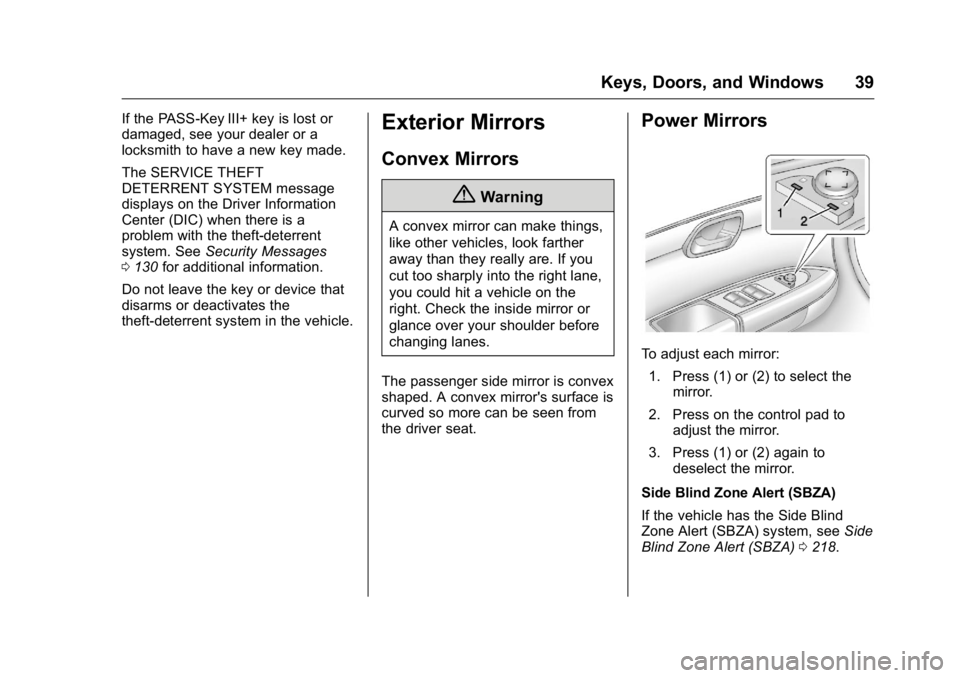
To adjust each mirror: 1. Press (1) or (2) to select the mirror.
2. Press on the control pad to adjust the mirror.
3. Press (1) or (2) again to deselect the mirror.
Side Blind Zone Alert (SBZA)
If the vehicle has the Side Blind
Zone Alert (SBZA) system, see Side
Blind Zone Alert (SBZA) 0218.
Page 42 of 360
Buick Enclave Owner Manual (GMNA-Localizing-U.S./Canada/Mexico-
9159225) - 2016 - crc - 7/31/15
Keys, Doors, and Windows 41
Interior Mirrors
Interior Rearview Mirrors
Adjust the rearview mirror for a clear
view of the area behind your
vehicle.
If equipped with OnStar, the vehicle
may have three control buttons at
the bottom of the mirror. See your
dealer for more information about
OnStar and how to subscribe to it.
See“OnStar,” if equipped.
Do not spray glass cleaner directly
on the mirror. Use a soft towel
dampened with water.
Automatic Dimming
Rearview Mirror
If equipped, automatic dimming
reduces the glare of the headlamps
from behind. This feature comes on
when the vehicle is started.
Windows
{Warning
Never leave a child, a helpless
adult, or a pet alone in a vehicle,
especially with the windows
closed in warm or hot weather.
They can be overcome by the
extreme heat and suffer
permanent injuries or even death
from heat stroke.
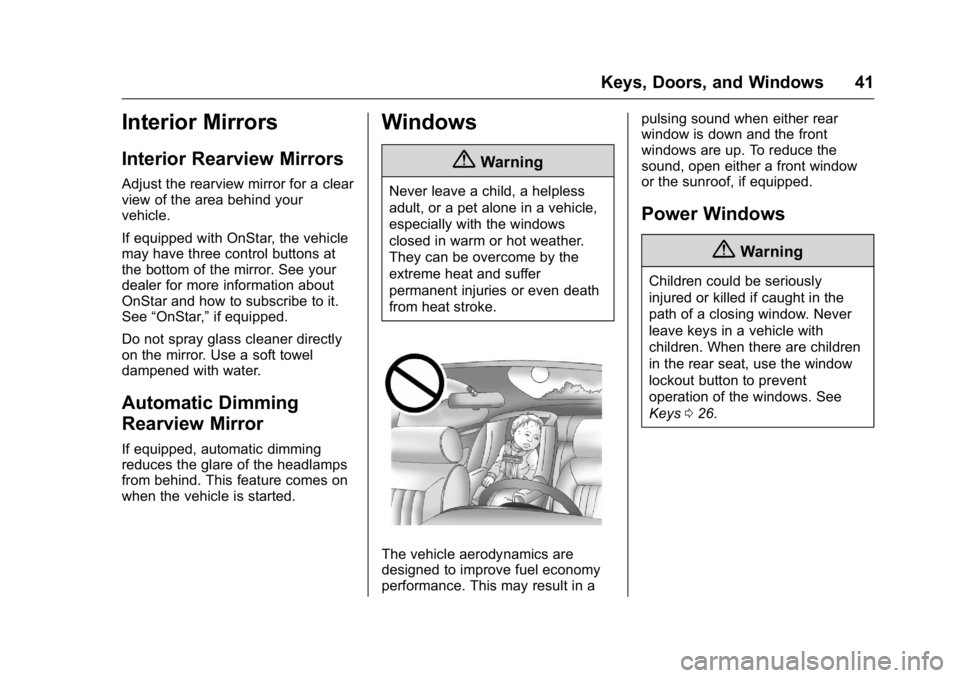
The vehicle aerodynamics are
designed to improve fuel economy
performance. This may result in a pulsing sound when either rear
window is down and the front
windows are up. To reduce the
sound, open either a front window
or the sunroof, if equipped.
Power Windows
{Warning
Children could be seriously
injured or killed if caught in the
path of a closing window. Never
leave keys in a vehicle with
children. When there are children
in the rear seat, use the window
lockout button to prevent
operation of the windows. See
Keys
026.
Page 44 of 360
Buick Enclave Owner Manual (GMNA-Localizing-U.S./Canada/Mexico-
9159225) - 2016 - crc - 7/31/15
Keys, Doors, and Windows 43
Rear Window Lockout
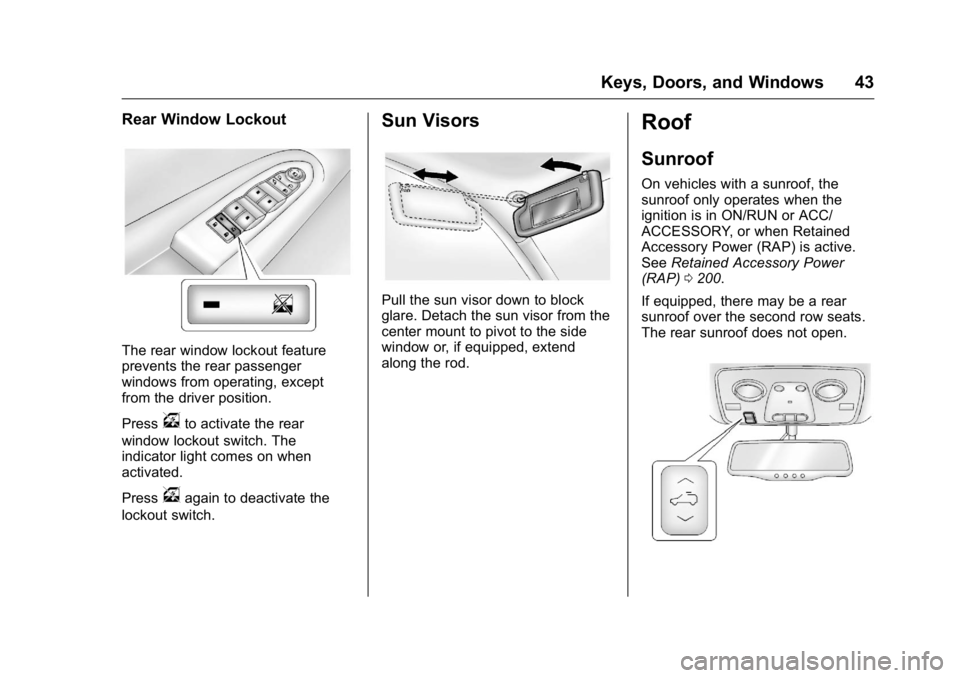
The rear window lockout feature
prevents the rear passenger
windows from operating, except
from the driver position.
Press
vto activate the rear
window lockout switch. The
indicator light comes on when
activated.
Press
vagain to deactivate the
lockout switch.
Sun Visors
Pull the sun visor down to block
glare. Detach the sun visor from the
center mount to pivot to the side
window or, if equipped, extend
along the rod.
Roof
Sunroof
On vehicles with a sunroof, the
sunroof only operates when the
ignition is in ON/RUN or ACC/
ACCESSORY, or when Retained
Accessory Power (RAP) is active.
See Retained Accessory Power
(RAP) 0200.
If equipped, there may be a rear
sunroof over the second row seats.
The rear sunroof does not open.
Page 47 of 360
Buick Enclave Owner Manual (GMNA-Localizing-U.S./Canada/Mexico-
9159225) - 2016 - crc - 7/31/15
46 Seats and Restraints
Head Restraints
Front Seats
{Warning
With head restraints that are not
installed and adjusted properly,
there is a greater chance that
occupants will suffer a neck/
spinal injury in a crash. Do not
drive until the head restraints for
all occupants are installed and
adjusted properly.
The vehicle's front seats have
adjustable head restraints in the
outboard seating positions.
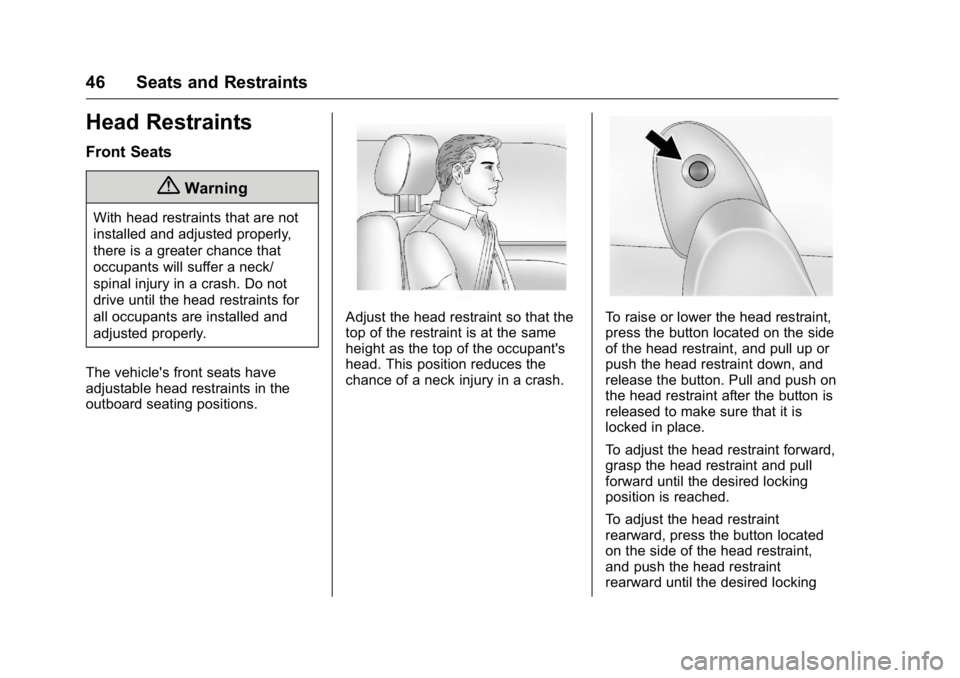
Adjust the head restraint so that the
top of the restraint is at the same
height as the top of the occupant's
head. This position reduces the
chance of a neck injury in a crash.To raise or lower the head restraint,
press the button located on the side
of the head restraint, and pull up or
push the head restraint down, and
release the button. Pull and push on
the head restraint after the button is
released to make sure that it is
locked in place.
To adjust the head restraint forward,
grasp the head restraint and pull
forward until the desired locking
position is reached.
To adjust the head restraint
rearward, press the button located
on the side of the head restraint,
and push the head restraint
rearward until the desired locking
Page 48 of 360
Buick Enclave Owner Manual (GMNA-Localizing-U.S./Canada/Mexico-
9159225) - 2016 - crc - 7/31/15
Seats and Restraints 47
position is reached. Try to move the
head restraint after the button is
released to make sure that it is
locked in place.
The front seat outboard head
restraints are not removable.
Rear Seats
The vehicle's second row seats
have head restraints in the outboard
seating positions that cannot be
adjusted.
The vehicle's third row seats have
headrests in the outboard seating
positions that cannot be adjusted.
The second row head restraints and
third row headrests are not
removable.
Front Seats
Power Seat Adjustment
{Warning
You can lose control of the
vehicle if you try to adjust a driver
seat while the vehicle is moving.
Adjust the driver seat only when
the vehicle is not moving.
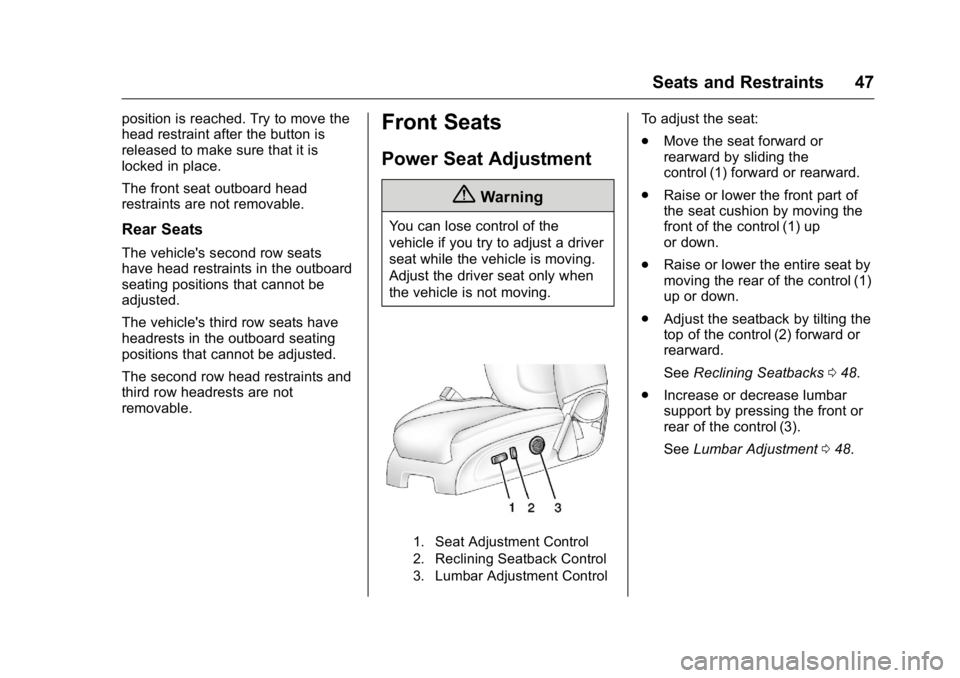
1. Seat Adjustment Control
2. Reclining Seatback Control
3. Lumbar Adjustment Control
To adjust the seat:
.Move the seat forward or
rearward by sliding the
control (1) forward or rearward.
. Raise or lower the front part of
the seat cushion by moving the
front of the control (1) up
or down.
. Raise or lower the entire seat by
moving the rear of the control (1)
up or down.
. Adjust the seatback by tilting the
top of the control (2) forward or
rearward.
See Reclining Seatbacks 048.
. Increase or decrease lumbar
support by pressing the front or
rear of the control (3).
See Lumbar Adjustment 048.
Page 51 of 360
Buick Enclave Owner Manual (GMNA-Localizing-U.S./Canada/Mexico-
9159225) - 2016 - crc - 7/31/15
50 Seats and Restraints
Memory Remote Recall
The memory feature can recall the
driver seat, outside mirrors, and
power steering column (if equipped)
to stored positions when entering
the vehicle.
To activate, unlock the driver door
with the Remote Keyless
Entry (RKE) transmitter. The driver
seat, outside mirrors, and power
steering column will move to the
memory positions associated with
the transmitter used to unlock the
vehicle.
This feature is turned on or off using
the vehicle personalization menu.
SeeVehicle Personalization 0133.
To stop recall movement, press one
of the power seat controls, memory
buttons, power mirror buttons, or the
power steering column control (if
equipped).
If something has blocked the driver
seat and/or steering column while
recalling a memory position, the
recall may stop. Remove the
obstruction; then press and hold the
appropriate manual control for the memory item that is not recalling for
two seconds. Try recalling the
memory position again by pressing
the appropriate memory button.
If the memory position is still not
recalling, see your dealer for
service.
Easy Exit Positions
The easy exit feature can move the
driver seat rearward and the power
steering column (if equipped) up
and forward to allow extra room to
exit the vehicle.
S(Easy Exit Positions) :
Press to
activate the recall. The vehicle must
be in P (Park).
If this feature is programmed on in
the vehicle personalization menu,
automatic driver seat and power
steering column movement occur
when the ignition key is removed.
A single beep sounds. The driver
seat moves back approximately
8 cm (3 in) and the power steering
column (if equipped) moves up and
forward. To move the seat back
farther, press
Sagain until the seat
is all the way back. If something has blocked the driver
seat while recalling the exit position,
the recall may stop. Remove the
obstruction; then press and hold the
power seat control rearward for
two seconds. Try recalling the exit
position again. If the exit position is
still not recalling, see your dealer for
service.
See
Vehicle Personalization 0133.
Heated and Cooled Front
Seats
{Warning
If you cannot feel temperature
change or pain to the skin, the
seat heater may cause burns. To
reduce the risk of burns, people
with such a condition should use
care when using the seat heater,
especially for long periods of
time. Do not place anything on
the seat that insulates against
heat, such as a blanket, cushion,
cover, or similar item. This may
(Continued)
Page 53 of 360
Buick Enclave Owner Manual (GMNA-Localizing-U.S./Canada/Mexico-
9159225) - 2016 - crc - 7/31/15
52 Seats and Restraints
Rear Seats
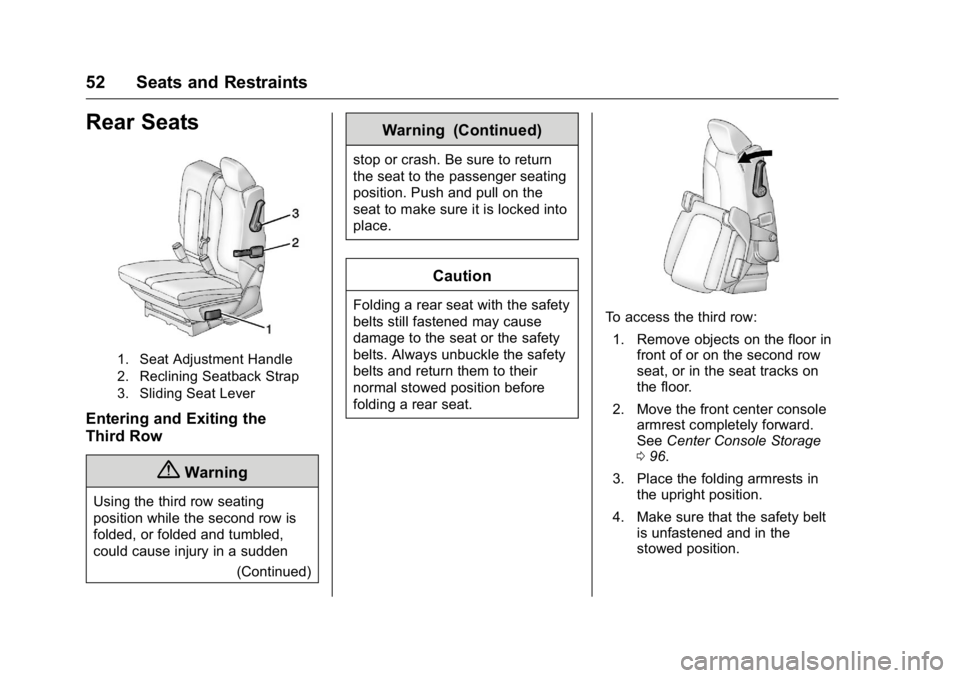
1. Seat Adjustment Handle
2. Reclining Seatback Strap
3. Sliding Seat Lever
Entering and Exiting the
Third Row
{Warning
Using the third row seating
position while the second row is
folded, or folded and tumbled,
could cause injury in a sudden(Continued)
Warning (Continued)
stop or crash. Be sure to return
the seat to the passenger seating
position. Push and pull on the
seat to make sure it is locked into
place.
Caution
Folding a rear seat with the safety
belts still fastened may cause
damage to the seat or the safety
belts. Always unbuckle the safety
belts and return them to their
normal stowed position before
folding a rear seat.To access the third row:
1. Remove objects on the floor in front of or on the second row
seat, or in the seat tracks on
the floor.
2. Move the front center console armrest completely forward.
See Center Console Storage
0 96.
3. Place the folding armrests in the upright position.
4. Make sure that the safety belt is unfastened and in the
stowed position.
Page 54 of 360
Buick Enclave Owner Manual (GMNA-Localizing-U.S./Canada/Mexico-
9159225) - 2016 - crc - 7/31/15
Seats and Restraints 53
5. Pull the sliding seat lever (3)forward. The seatback will tilt
forward, and the seat will begin
sliding forward. Continue to
push forward on the seatback
until the entire seat moves all
the way forward and the seat
cushion is folded.
Returning the Seat to the
Seating Position
To return the second row seat to its
normal seating position:
1. Remove objects on the floor behind the second row seat or
in the seat tracks on the floor.
2. Slide the seat rearward by pushing on the seatback until
the seat is locked into place.
3. Continue pushing the seatback rearward until the seatback is
locked into place.
4. Push down on the rear of the seat cushion until it is locked in
place.
5. Push and pull on the seatback and seat cushion to make sure
they are locked in place. 6. Check that the safety belt is
not under the seat cushion.
Reclining the Seatbacks
To recline the seatback:
1. Leaning rearward in the seat, pull the reclining seatback
strap (2).
2. Move the seatback to the desired position, and then
release the strap (2) to lock the
seatback in place.
3. Push and pull on the seatback to make sure it is locked.
Folding the Seatback
To fold the second row seatbacks:
1. Remove anything on or under the seat.
2. Place the armrest in the upright position, and unfasten the
safety belt.
3. Pull forward on the reclining seatback strap (2).
The head restraint will fold
down automatically. To return the seatback to the
seating position, lift the seatback
and push it rearward until it locks
into place. Push and pull on the
seatback to make sure it is locked.
Pull up on the head restraint to
return it to the upright, locked
position.
Adjusting the Seats
To adjust the second row seats, pull
outward on the seat adjustment
handle (1). Slide the seat forward or
rearward to the desired position.
Release the handle (1), and push
and pull on the seat to make sure it
is locked.
Third Row Seats
{Warning
Using the third row seating
position while the second row is
folded, or pushed forward in the
entry position, could cause injury
in a sudden stop or crash. Be
sure to return the seat to the
(Continued)
Page 55 of 360

Buick Enclave Owner Manual (GMNA-Localizing-U.S./Canada/Mexico-
9159225) - 2016 - crc - 7/31/15
54 Seats and Restraints
Warning (Continued)
passenger seating position. Push
and pull on the seat to make sure
it is locked into place.
Folding the SeatbackCaution
Folding a rear seat with the safety
belts still fastened may cause
damage to the seat or the safety
belts. Always unbuckle the safety
belts and return them to their
normal stowed position before
folding a rear seat.
To fold the third row seatback: 1. If the second row seat is in the full rear position, adjust it
forward to allow the third row
seat to fold fully flat.
2. Remove anything on or under the seat.3. Disconnect the rear safety belt
mini-latch, using a key in the
slot on the mini-buckle, and let
the belt retract into the
headliner.
4. Stow the mini-latch in theholder in the headliner.
5. Pull up on the release lever onthe back of the seat.
6. Push the seatback forward to lay flat.
Returning the Seat to the
Seating Position
To return the seatback to the
seating position:
1. From the rear of the vehicle, raise the seatback to the
upright position using the pull
strap on the back of the third