2018 enclave BUICK ENCLAVE 2018 Infotainment System Guide
[x] Cancel search | Manufacturer: BUICK, Model Year: 2018, Model line: ENCLAVE, Model: BUICK ENCLAVE 2018Pages: 88, PDF Size: 0.99 MB
Page 3 of 88
Buick Infotainment System (GMNA-Localizing-U.S./Canada-10999317) -
2018 - CRC - 7/31/17
2 Introduction
Introduction
Infotainment
The names, logos, emblems,
slogans, vehicle model names, and
vehicle body designs appearing in
this manual including but not limited
to GM, the GM logo, BUICK, the
BUICK Emblem, and the names
ENCLAVE, ENCORE, ENVISION,
LACROSSE, and REGAL, are
trademarks and/or service marks of
General Motors LLC, its
subsidiaries, affiliates, or licensors.For vehicles first sold in Canada,
substitute the name General Motors
of Canada Company for Buick Motor
Division wherever it appears in this
manual.
The information in this manual
supplements the owner
’s manual.
This manual describes features that
may or may not be on the vehicle
because of optional equipment that
was not purchased on the vehicle,
model variants, country
specifications, features/applications
that may not be available in your
region, or changes subsequent to
the printing of this manual.
Keep this manual with the owner ’s
manual in the vehicle, so it will be
there if it is needed. If the vehicle is
sold, leave this manual in the
vehicle.
Overview
Introduction
Read the following pages to
become familiar with the
infotainment system features.
{Warning
Taking your eyes off the road for
too long or too often while using
any infotainment feature can
cause a crash. You or others
could be injured or killed. Do not
give extended attention to
infotainment tasks while driving.
Limit your glances at the vehicle
displays and focus your attention
on driving. Use voice commands
whenever possible.
Litho in U.S.A.
Part No. 84019553 B Second Printing©2017 General Motors LLC. All Rights Reserved.
Page 6 of 88
Buick Infotainment System (GMNA-Localizing-U.S./Canada-10999317) -
2018 - CRC - 7/31/17
Introduction 5
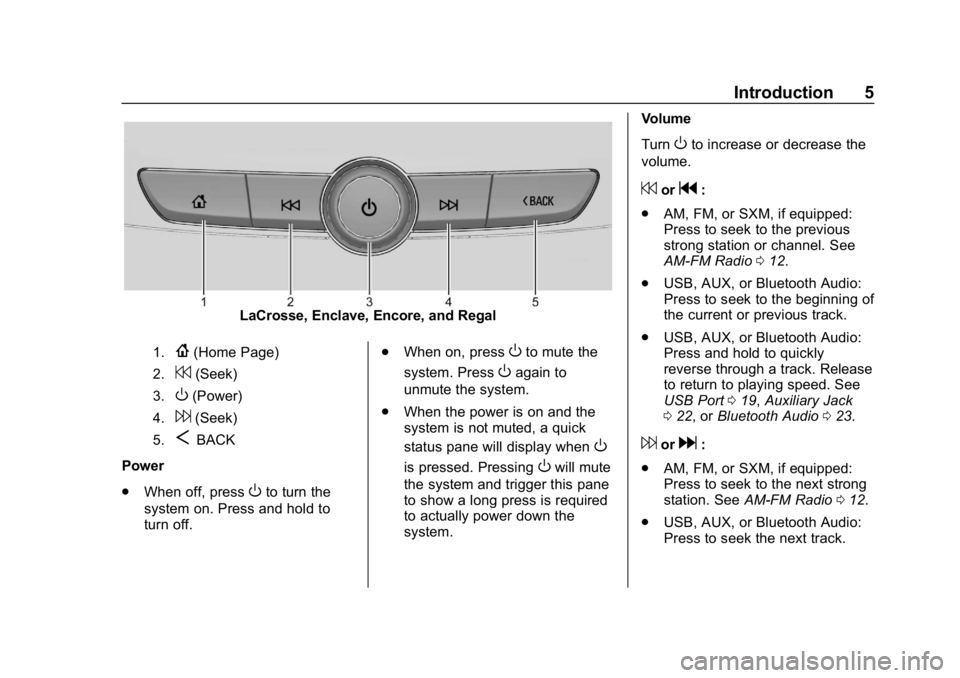
LaCrosse, Enclave, Encore, and Regal
1.{(Home Page)
2.7(Seek)
3.O(Power)
4.6(Seek)
5.SBACK
Power
. When off, press
Oto turn the
system on. Press and hold to
turn off. .
When on, press
Oto mute the
system. Press
Oagain to
unmute the system.
. When the power is on and the
system is not muted, a quick
status pane will display when
O
is pressed. PressingOwill mute
the system and trigger this pane
to show a long press is required
to actually power down the
system. Volume
Turn
Oto increase or decrease the
volume.
7org:
. AM, FM, or SXM, if equipped:
Press to seek to the previous
strong station or channel. See
AM-FM Radio 012.
. USB, AUX, or Bluetooth Audio:
Press to seek to the beginning of
the current or previous track.
. USB, AUX, or Bluetooth Audio:
Press and hold to quickly
reverse through a track. Release
to return to playing speed. See
USB Port 019, Auxiliary Jack
0 22, or Bluetooth Audio 023.
6ord:
. AM, FM, or SXM, if equipped:
Press to seek to the next strong
station. See AM-FM Radio 012.
. USB, AUX, or Bluetooth Audio:
Press to seek the next track.
Page 8 of 88
Buick Infotainment System (GMNA-Localizing-U.S./Canada-10999317) -
2018 - CRC - 7/31/17
Introduction 7
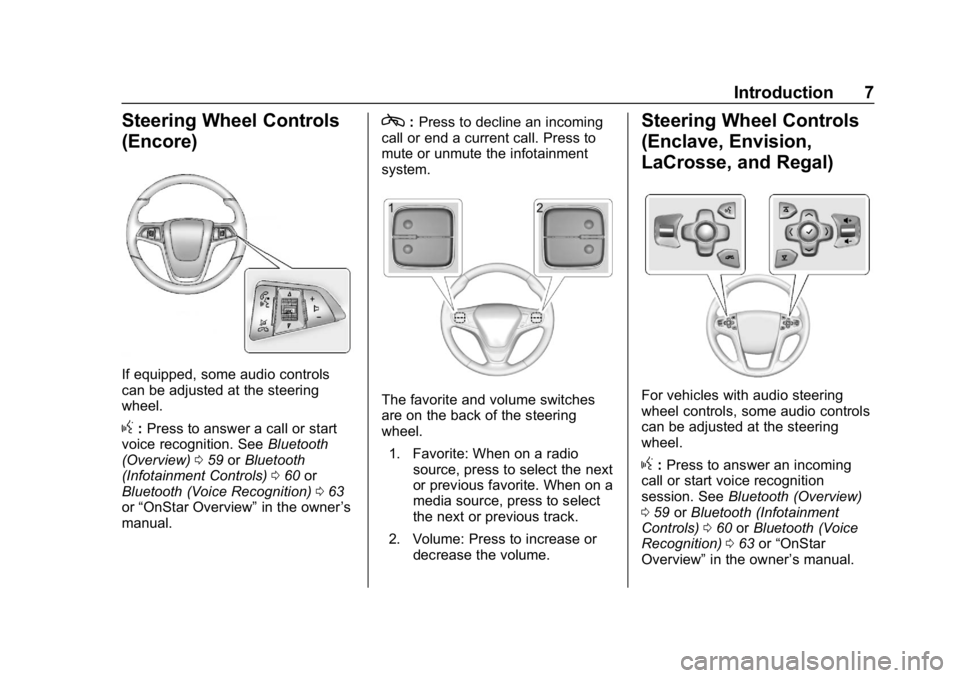
Steering Wheel Controls
(Encore)
If equipped, some audio controls
can be adjusted at the steering
wheel.
g:Press to answer a call or start
voice recognition. See Bluetooth
(Overview) 059 orBluetooth
(Infotainment Controls) 060 or
Bluetooth (Voice Recognition) 063
or “OnStar Overview” in the owner’s
manual.
c: Press to decline an incoming
call or end a current call. Press to
mute or unmute the infotainment
system.
The favorite and volume switches
are on the back of the steering
wheel.
1. Favorite: When on a radio source, press to select the next
or previous favorite. When on a
media source, press to select
the next or previous track.
2. Volume: Press to increase or decrease the volume.
Steering Wheel Controls
(Enclave, Envision,
LaCrosse, and Regal)
For vehicles with audio steering
wheel controls, some audio controls
can be adjusted at the steering
wheel.
g:Press to answer an incoming
call or start voice recognition
session. See Bluetooth (Overview)
0 59 orBluetooth (Infotainment
Controls) 060 orBluetooth (Voice
Recognition) 063 or“OnStar
Overview” in the owner ’s manual.