Park BUICK ENCLAVE 2018 User Guide
[x] Cancel search | Manufacturer: BUICK, Model Year: 2018, Model line: ENCLAVE, Model: BUICK ENCLAVE 2018Pages: 393, PDF Size: 5.68 MB
Page 41 of 393
Buick Enclave Owner Manual (GMNA-Localizing-U.S./Canada/Mexico-
10999311) - 2018 - crc - 11/20/17
40 Keys, Doors, and Windows
To replace the cap:1. Position the bottom edge of the cap under the lower edge of
the metal piece (2). The
tabs (3) attach to the metal
piece (2) at the positions (1).
2. Rotate the cap upward and install into place.
3. Check that the cap is secure.
Free-Turning Locks
The door key lock cylinder turns
freely when either the wrong key is
used, or the correct key is not fully
inserted. The free-turning door lock
feature prevents the lock from being
forced open. To reset the lock, turn
it to the vertical position with the
correct key fully inserted. Remove
the key and insert it again. If this
does not reset the lock, turn the key
halfway around in the cylinder and
repeat the reset procedure.
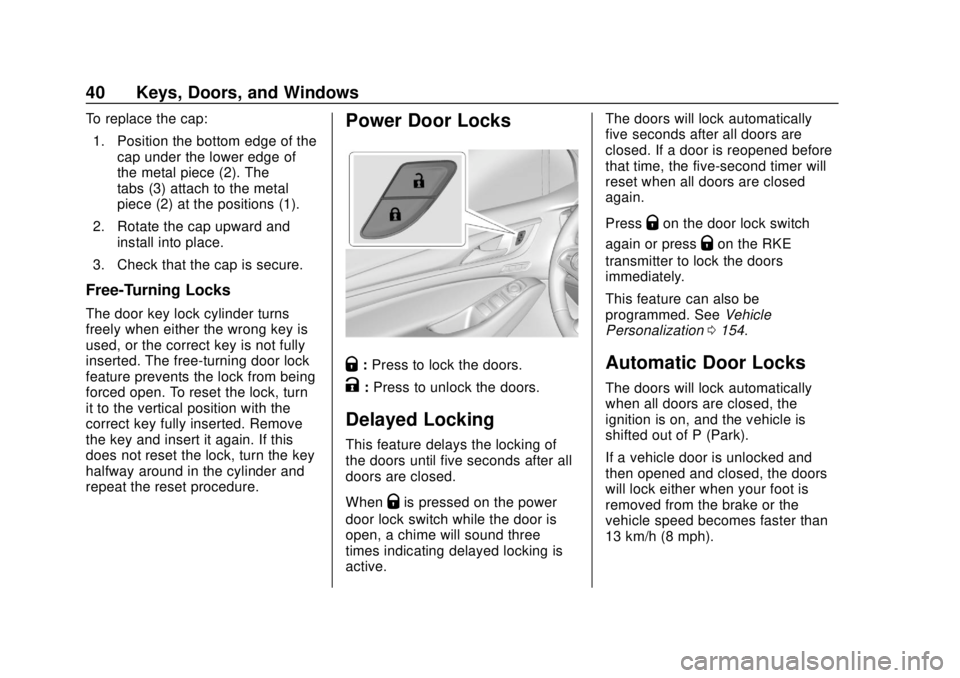
Power Door Locks
Q: Press to lock the doors.
K:Press to unlock the doors.
Delayed Locking
This feature delays the locking of
the doors until five seconds after all
doors are closed.
When
Qis pressed on the power
door lock switch while the door is
open, a chime will sound three
times indicating delayed locking is
active. The doors will lock automatically
five seconds after all doors are
closed. If a door is reopened before
that time, the five-second timer will
reset when all doors are closed
again.
Press
Qon the door lock switch
again or press
Qon the RKE
transmitter to lock the doors
immediately.
This feature can also be
programmed. See Vehicle
Personalization 0154.
Automatic Door Locks
The doors will lock automatically
when all doors are closed, the
ignition is on, and the vehicle is
shifted out of P (Park).
If a vehicle door is unlocked and
then opened and closed, the doors
will lock either when your foot is
removed from the brake or the
vehicle speed becomes faster than
13 km/h (8 mph).
Page 42 of 393

Buick Enclave Owner Manual (GMNA-Localizing-U.S./Canada/Mexico-
10999311) - 2018 - crc - 11/20/17
Keys, Doors, and Windows 41
To unlock the doors:
.Press
Kon the power door lock
switch.
. Shift into P (Park).
Automatic door locking cannot be
disabled. Automatic door unlocking
can be programmed. See Vehicle
Personalization 0154.
Lockout Protection
If the ignition is on or in ACC/
ACCESSORY and the power door
lock switch is pressed with the
driver door open, all the doors will
lock and only the driver door will
unlock.
If the vehicle is off and locking is
requested while a door is open,
when all doors are closed the
vehicle will check for RKE
transmitters inside. If an RKE
transmitter is detected and the
number of RKE transmitters inside
has not reduced, the driver door will
unlock and the horn will chirp three
times. Lockout Protection can be manually
overridden with the driver door open
by pressing and holding
Qon the
power door lock switch.
Unlocked Door Anti-Lockout
If Unlocked Door Anti-Lockout has
been turned on and the vehicle is
off, the driver door is open, and
locking is requested, all the doors
will lock and the driver door will
remain open. Press the button again
to lock the driver door. The
Unlocked Door Anti-Lockout feature
can be turned on or off. See Vehicle
Personalization 0154.
Safety Locks
The rear door safety locks prevent
passengers from opening the rear
doors from inside the vehicle.
Manual Safety Locks
If equipped, the safety lock is on the
inside edge of the rear doors. To
use the safety lock:
1. Move the lever down to the lock position.
2. Close the door.
3. Do the same for the other rear door.
To open a rear door when the safety
lock is on:
1. Unlock the door by activating the inside handle, by pressing
the power door lock switch,
Page 44 of 393

Buick Enclave Owner Manual (GMNA-Localizing-U.S./Canada/Mexico-
10999311) - 2018 - crc - 11/20/17
Keys, Doors, and Windows 43
Power Liftgate Operation
{Warning
You or others could be injured if
caught in the path of the power
liftgate. Make sure there is no one
in the way of the liftgate as it is
opening and closing.
Caution
Driving with an open and
unsecured liftgate may result in
damage to the power liftgate
components.
The switch is on the driver door. The
vehicle must be in P (Park).
The modes are:
.MAX: Opens to maximum
height.
. 3/4: Opens to a reduced height
that can be set from 3/4 to fully
open. Use to prevent the liftgate
from opening into overhead
obstructions such as a garage
door or roof-mounted cargo. The
liftgate can be manually opened
all the way.
. OFF: Opens manually only. To power open or close the liftgate,
select MAX or 3/4 mode.
.
Press
btwice quickly on the
RKE transmitter until the liftgate
moves.
. Press
8on the driver door.
The driver door must either be
unlocked or locked without the
security armed.
. Press the touch pad on the
underside of the liftgate handle
after unlocking all doors. The
RKE transmitter must be within
1 m (3 ft).
Page 45 of 393
Buick Enclave Owner Manual (GMNA-Localizing-U.S./Canada/Mexico-
10999311) - 2018 - crc - 11/20/17
44 Keys, Doors, and Windows
.Presslon the bottom of the
liftgate to the left of the latch to
close.
Press any liftgate button or the
touch pad while the liftgate is
moving to stop it. Pressing again
restarts the operation in the reverse
direction. The touch pad on the
underside of the liftgate handle
cannot be used to close the liftgate.
Caution
Manually forcing the liftgate to
open or close during a power
cycle can damage the vehicle.
Allow the power cycle to
complete.
The power liftgate may be
temporarily disabled under extreme
low temperatures, or after repeated
power cycling over a short period of
time. If this occurs, the liftgate can
still be operated manually.
If the vehicle is shifted out of
P (Park) while the power function is
in progress, the liftgate will continue to completion. If the vehicle is
accelerated before the liftgate has
completed moving, the liftgate may
stop or reverse direction. Check for
DIC messages and make sure the
liftgate is closed and latched before
driving.
Falling Liftgate Detection
If the power liftgate automatically
closes after a power opening cycle,
it indicates that the system is
reacting to excess weight on the
liftgate or a possible support strut
failure. A repetitive chime will sound
while the falling liftgate detection
feature is operating. Remove any
excess weight. If the liftgate
continues to automatically close
after opening, see your dealer for
service before using the power
liftgate.
Interfering with the power liftgate
motion or manually closing the
liftgate too quickly after power
opening may resemble a support
strut failure. This could also activate
the falling liftgate detection feature.
Allow the liftgate to complete its
operation and wait a few seconds
before manually closing the liftgate.
Obstacle Detection Features
If the liftgate encounters an obstacle
during a power open or close cycle,
the liftgate will automatically reverse
direction and move a short distance
away from the obstacle. After
removing the obstruction, the power
liftgate operation can be used again.
If the liftgate encounters multiple
obstacles on the same power cycle,
the power function will deactivate.
After removing the obstructions,
manually close the liftgate which will
allow normal power operation
functions to resume.
If the vehicle is locked while the
liftgate is closing, and an obstacle is
encountered that prevents the
liftgate from completely closing, the
horn will sound as an alert that the
liftgate did not close.
Pinch sensors are on the side
edges of the liftgate. If an object is
caught between the liftgate and the
vehicle and presses against this
Page 48 of 393
Buick Enclave Owner Manual (GMNA-Localizing-U.S./Canada/Mexico-
10999311) - 2018 - crc - 11/20/17
Keys, Doors, and Windows 47
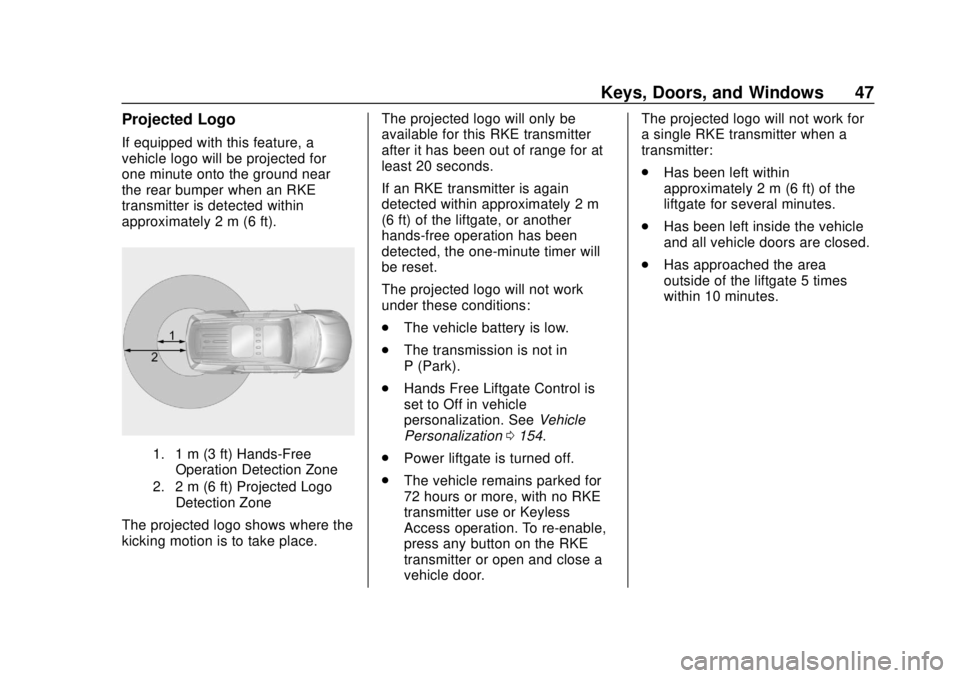
Projected Logo
If equipped with this feature, a
vehicle logo will be projected for
one minute onto the ground near
the rear bumper when an RKE
transmitter is detected within
approximately 2 m (6 ft).
1. 1 m (3 ft) Hands-FreeOperation Detection Zone
2. 2 m (6 ft) Projected Logo Detection Zone
The projected logo shows where the
kicking motion is to take place. The projected logo will only be
available for this RKE transmitter
after it has been out of range for at
least 20 seconds.
If an RKE transmitter is again
detected within approximately 2 m
(6 ft) of the liftgate, or another
hands-free operation has been
detected, the one-minute timer will
be reset.
The projected logo will not work
under these conditions:
.
The vehicle battery is low.
. The transmission is not in
P (Park).
. Hands Free Liftgate Control is
set to Off in vehicle
personalization. See Vehicle
Personalization 0154.
. Power liftgate is turned off.
. The vehicle remains parked for
72 hours or more, with no RKE
transmitter use or Keyless
Access operation. To re-enable,
press any button on the RKE
transmitter or open and close a
vehicle door. The projected logo will not work for
a single RKE transmitter when a
transmitter:
.
Has been left within
approximately 2 m (6 ft) of the
liftgate for several minutes.
. Has been left inside the vehicle
and all vehicle doors are closed.
. Has approached the area
outside of the liftgate 5 times
within 10 minutes.
Page 49 of 393
Buick Enclave Owner Manual (GMNA-Localizing-U.S./Canada/Mexico-
10999311) - 2018 - crc - 11/20/17
48 Keys, Doors, and Windows
Hands Free Liftgate and Projected Logo Availability
ActionHands-Free Liftgate Projected Logo
RKE Transmitter within
detection zone Operative
On for 1 min
RKE Transmitter left inside detection
zone for minimum 10 mins Operative
On for 1 min
Off until RKE button press or a door
is opened and closed
RKE Transmitter brought in and out
of detection zone 5 times within
10 min Operative
On for 1 min
Off for 1 hour or until RKE button
press or door is opened and closed
Vehicle remains parked for more than
72 hours Operative
Off
Vehicle battery is low Non-operative Off
Transmission is not in P (Park) Non-operative Off
Power Liftgate is turned off Non-operative Off
Hands-Free Liftgate is disabled Non-operative Off
Page 53 of 393
Buick Enclave Owner Manual (GMNA-Localizing-U.S./Canada/Mexico-
10999311) - 2018 - crc - 11/20/17
52 Keys, Doors, and Windows
automatic car wash. Push the mirror
outward to return it to the original
position.
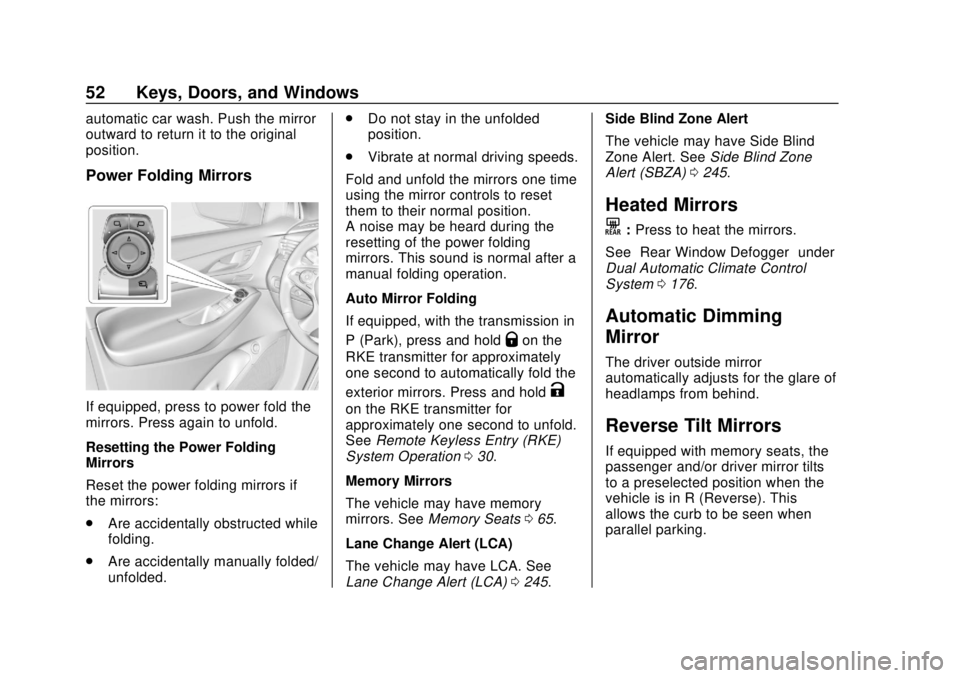
Power Folding Mirrors
If equipped, press to power fold the
mirrors. Press again to unfold.
Resetting the Power Folding
Mirrors
Reset the power folding mirrors if
the mirrors:
.Are accidentally obstructed while
folding.
. Are accidentally manually folded/
unfolded. .
Do not stay in the unfolded
position.
. Vibrate at normal driving speeds.
Fold and unfold the mirrors one time
using the mirror controls to reset
them to their normal position.
A noise may be heard during the
resetting of the power folding
mirrors. This sound is normal after a
manual folding operation.
Auto Mirror Folding
If equipped, with the transmission in
P (Park), press and hold
Qon the
RKE transmitter for approximately
one second to automatically fold the
exterior mirrors. Press and hold
K
on the RKE transmitter for
approximately one second to unfold.
See Remote Keyless Entry (RKE)
System Operation 030.
Memory Mirrors
The vehicle may have memory
mirrors. See Memory Seats 065.
Lane Change Alert (LCA)
The vehicle may have LCA. See
Lane Change Alert (LCA) 0245. Side Blind Zone Alert
The vehicle may have Side Blind
Zone Alert. See
Side Blind Zone
Alert (SBZA) 0245.
Heated Mirrors
K
:Press to heat the mirrors.
See “Rear Window Defogger” under
Dual Automatic Climate Control
System 0176.
Automatic Dimming
Mirror
The driver outside mirror
automatically adjusts for the glare of
headlamps from behind.
Reverse Tilt Mirrors
If equipped with memory seats, the
passenger and/or driver mirror tilts
to a preselected position when the
vehicle is in R (Reverse). This
allows the curb to be seen when
parallel parking.
Page 55 of 393
Buick Enclave Owner Manual (GMNA-Localizing-U.S./Canada/Mexico-
10999311) - 2018 - crc - 11/20/17
54 Keys, Doors, and Windows
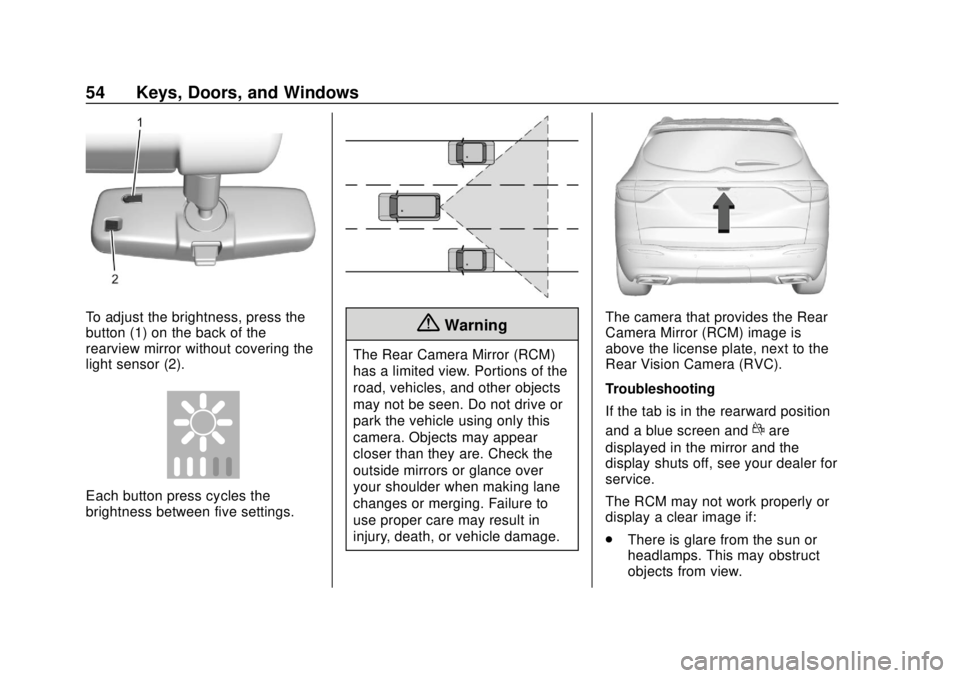
To adjust the brightness, press the
button (1) on the back of the
rearview mirror without covering the
light sensor (2).
Each button press cycles the
brightness between five settings.
{Warning
The Rear Camera Mirror (RCM)
has a limited view. Portions of the
road, vehicles, and other objects
may not be seen. Do not drive or
park the vehicle using only this
camera. Objects may appear
closer than they are. Check the
outside mirrors or glance over
your shoulder when making lane
changes or merging. Failure to
use proper care may result in
injury, death, or vehicle damage.
The camera that provides the Rear
Camera Mirror (RCM) image is
above the license plate, next to the
Rear Vision Camera (RVC).
Troubleshooting
If the tab is in the rearward position
and a blue screen and
dare
displayed in the mirror and the
display shuts off, see your dealer for
service.
The RCM may not work properly or
display a clear image if:
. There is glare from the sun or
headlamps. This may obstruct
objects from view.
Page 68 of 393
Buick Enclave Owner Manual (GMNA-Localizing-U.S./Canada/Mexico-
10999311) - 2018 - crc - 11/20/17
Seats and Restraints 67
Save preferred memory feature
positions to both 1 and 2 if you are
the only driver.
Manually Recalling Memory
Positions
Press and hold 1, 2, or
Bto recall
the previously saved memory
positions.
To stop Manual Memory Recall
movement, release 1, 2, or
Bor
press any of the following controls:
. Power seat
. Memory SET, 1, 2, or
B
.Power mirror, with the driver or
passenger side mirror selected
. Power steering wheel
Auto Memory Recall
The vehicle identifies the number of
the current driver ’s RKE transmitter
(1–8). See Remote Keyless Entry
(RKE) System Operation 030. If the
RKE transmitter is 1 or 2, and Auto
Memory Recall is programmed on in
vehicle personalization, the
positions saved to the same memory button number 1 or 2 are
automatically recalled when the
ignition is turned on, or turned from
off to ACC/ACCESSORY. RKE
transmitters 3–8 will not provide
automatic memory recalls.
To turn Auto Memory Recall on or
off, see "Vehicle Personalization
Settings" previously in this section
and
Vehicle Personalization 0154.
The shift lever must be in P (Park)
to start Auto Memory Recall. Auto
Memory Recall will complete if the
vehicle is shifted out of P (Park)
prior to reaching the saved memory
position.
To stop Auto Memory Recall
movement, turn the ignition off or
press any of the following controls:
. Power seat
. Memory SET, 1, 2, or
B
.Power mirror, with the driver or
passenger side mirror selected
. Power steering wheel,
if equipped If the saved memory seat position
does not automatically recall or
recalls to the wrong positions, the
driver
’s RKE transmitter number (1
or 2) may not match the memory
button number that positions were
saved to. Try saving the position to
the other memory button or try the
other RKE transmitter.
Easy Exit Recall
Easy Exit Recall is not linked to an
RKE transmitter. The position saved
to
Bis used for all drivers. To turn
Easy Exit Recall on or off, see
"Vehicle Personalization Settings"
previously in this section and
Vehicle Personalization 0154.
If turned on, the position saved to
Bis automatically recalled when
one of the following occurs:
. The vehicle is turned off and the
driver door is opened within a
short time.
. The vehicle is turned off with the
driver door open.
Page 123 of 393
Buick Enclave Owner Manual (GMNA-Localizing-U.S./Canada/Mexico-
10999311) - 2018 - crc - 11/20/17
122 Instruments and Controls
Instruments and
Controls
Controls
Steering Wheel Adjustment . . . 123
Steering Wheel Controls . . . . . . 123
Heated Steering Wheel . . . . . . . 123
Horn . . . . . . . . . . . . . . . . . . . . . . . . . . 124
Windshield Wiper/Washer . . . . 124
Rear Window Wiper/Washer . . . . . . . . . . . . . . . . . . . . . 125
Compass . . . . . . . . . . . . . . . . . . . . . 126
Clock . . . . . . . . . . . . . . . . . . . . . . . . . 126
Power Outlets . . . . . . . . . . . . . . . . 127
Wireless Charging . . . . . . . . . . . . 129
Warning Lights, Gauges, and
Indicators
Warning Lights, Gauges, and Indicators . . . . . . . . . . . . . . . . . . . 131
Instrument Cluster . . . . . . . . . . . . 132
Speedometer . . . . . . . . . . . . . . . . . 135
Odometer . . . . . . . . . . . . . . . . . . . . . 135
Trip Odometer . . . . . . . . . . . . . . . . 135
Tachometer . . . . . . . . . . . . . . . . . . . 135
Fuel Gauge . . . . . . . . . . . . . . . . . . . 136
Engine Coolant Temperature
Gauge . . . . . . . . . . . . . . . . . . . . . . 137 Seat Belt Reminders . . . . . . . . . 137
Airbag Readiness Light . . . . . . . 138
Passenger Airbag Status
Indicator . . . . . . . . . . . . . . . . . . . . 139
Charging System Light . . . . . . . 139
Malfunction Indicator Lamp
(Check Engine Light) . . . . . . . . 140
Brake System Warning Light . . . . . . . . . . . . . . . . . . . . . . . . 142
Electric Parking Brake Light . . . . . . . . . . . . . . . . . . . . . . . . 142
Service Electric Parking Brake Light . . . . . . . . . . . . . . . . . . . . . . . . 142
Antilock Brake System (ABS) Warning Light . . . . . . . . . . . . . . . 143
Lane Keep Assist (LKA) Light . . . . . . . . . . . . . . . . . . . . . . . . 143
Vehicle Ahead Indicator . . . . . . 144
Pedestrian Ahead Indicator . . . 144
Traction Off Light . . . . . . . . . . . . . 144
StabiliTrak OFF Light . . . . . . . . . 144
Traction Control System (TCS)/ StabiliTrak Light . . . . . . . . . . . . . 145
Tire Pressure Light . . . . . . . . . . . 145
Engine Oil Pressure Light . . . . 145
Low Fuel Warning Light . . . . . . 146
Security Light . . . . . . . . . . . . . . . . . 146
High-Beam On Light . . . . . . . . . . 146
Lamps On Reminder . . . . . . . . . 147
Cruise Control Light . . . . . . . . . . 147 Door Ajar Light . . . . . . . . . . . . . . . 147
Information Displays
Driver Information Center (DIC)
(Base Level) . . . . . . . . . . . . . . . . 148
Driver Information Center (DIC) (Uplevel) . . . . . . . . . . . . . . . . . . . . 150
Vehicle Messages
Vehicle Messages . . . . . . . . . . . . 153
Engine Power Messages . . . . . 154
Vehicle Speed Messages . . . . . 154
Vehicle Personalization
Vehicle Personalization . . . . . . . 154
Universal Remote System
Universal Remote System . . . . 162
Universal Remote SystemProgramming . . . . . . . . . . . . . . . 162
Universal Remote System Operation . . . . . . . . . . . . . . . . . . . 165